Apache Doris x Fluss: Unified Queries Across Stream and Lake
A campaign's conversion rate has dropped. The team needs to compare it with similar past campaigns before calling it abnormal. In a road test, a rise in human interventions means little without today's test-run count, each vehicle's current state, and records from previous weeks. Both investigations need new events and historical data in the same query.
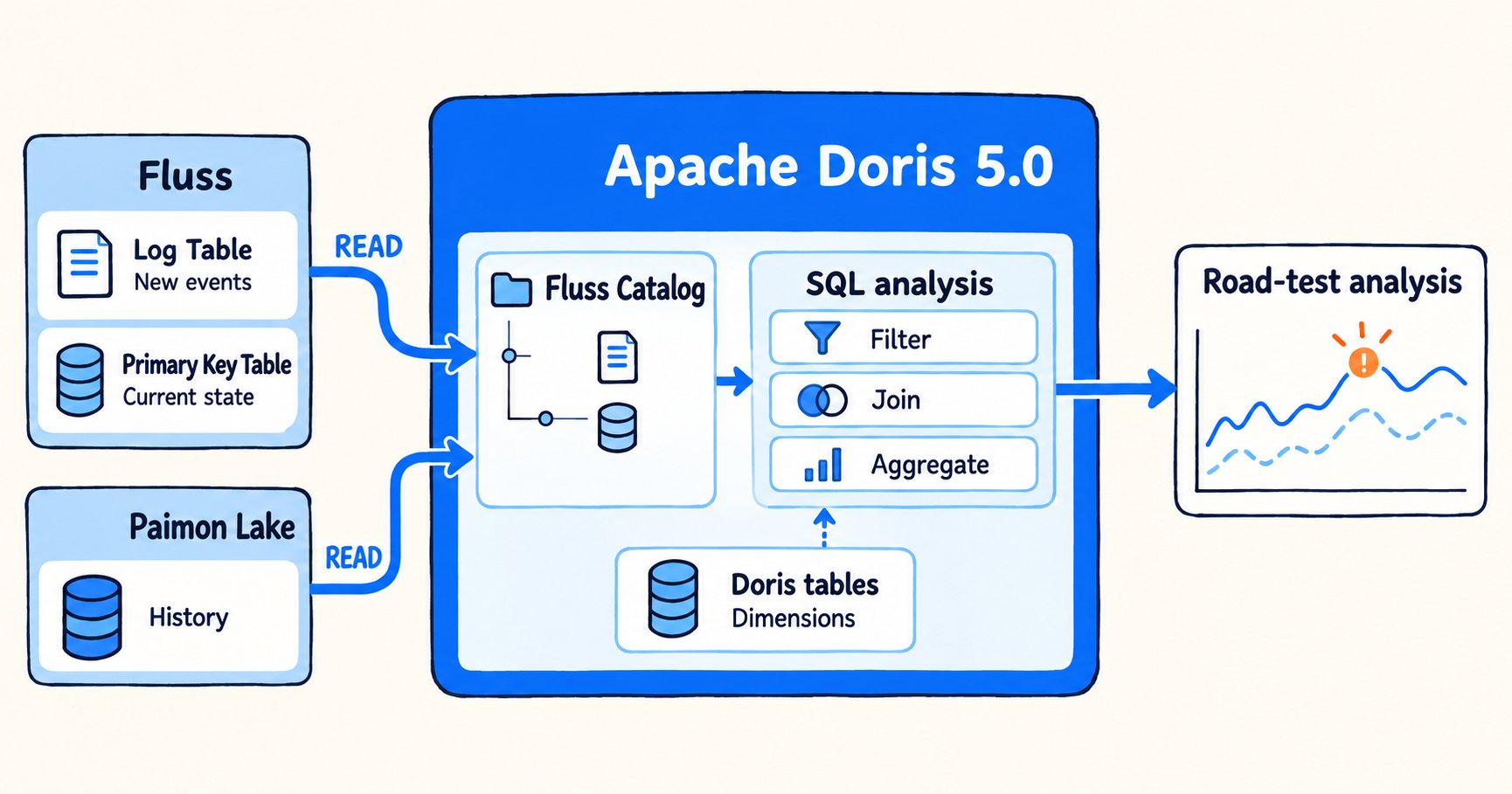
Fluss keeps event logs and current state in tables. With its Fluss Catalog, Apache Doris 5.0 can query those tables alongside history tiered to Paimon. The read path depends on which portion of the data a query needs.
1. How Fluss unifies streams and lakes
Keep event streams and current state in tables
Many real-time pipelines send events through a message queue and then copy them into a state store or analytics engine. Until the copy finishes, analysts cannot query the latest events. For a query that also needs history or current state, they must keep track of what each system holds.
Apache Fluss stores events in tables with schemas and feeds downstream stream consumers. In a suitable pipeline, it can handle the ingestion and distribution previously done by a separate messaging system. Analysts can query recent events without a copy job built solely for analytics. Fluss's columnar layout can also reduce I/O when a query selects only a few fields from a wide table.
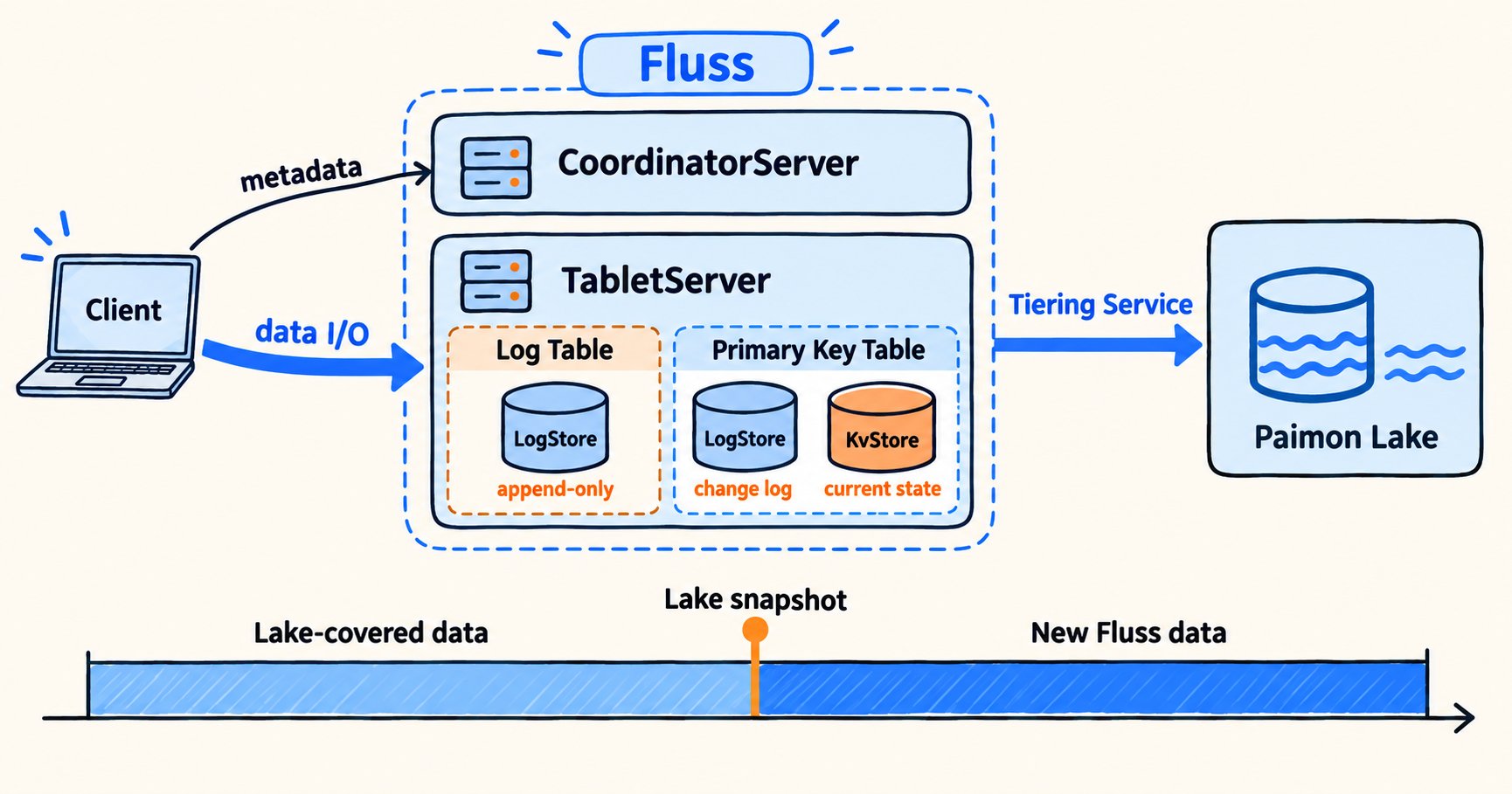
Fluss has two table types:
| Table type | Suitable data | Read behavior |
|---|---|---|
| Log table | Append-only takeover events, trip records, and device alerts | Retains events in write order for continuous consumption and analysis |
| Primary-key table | Changing vehicle states, device configurations, and campaign rules | Maintains the current value by primary key and retains a changelog |
Each table has a Log layer for recent writes and a Lake layer for older data. A tiering service writes the older records to an open lake format. The readable lake snapshot records how far the data has been tiered. Doris uses that position to separate lake history from new log records.
Analyze Fluss data with SQL
Analysts still need to compare events with history, join them to current state, and inspect individual records. How unusual is a new deviation, and which devices or users account for it? Doris queries Fluss tables directly to answer those questions with SQL.
| Scenario | Question | Data needed |
|---|---|---|
| Campaign monitoring | Is a new conversion change outside the range of similar past campaigns? | Latest behavior events, historical trends, and current campaign state |
| Device and fleet analysis | Which devices have new alerts, and have similar anomalies occurred before? | Real-time events, long-term operating records, and current device states |
| Risk review | Does a new anomaly match a historical pattern? | New events, historical details, and continuously updated object states |
Suppose human interventions spike at one intersection during an autonomous driving road test. The team queries the last 30 minutes of events, counts the test runs through that segment, and compares the intervention rate with the same time of day over previous weeks. More interventions may simply mean more vehicles passed through. If the rate rose too, the team needs to investigate.
The team then checks current vehicle states, narrows down the trips and time window, and reviews the driving records.
Doris 5.0 queries Fluss tables through the Fluss Catalog. If a table has been tiered to Paimon, the same query can read lake history and records still in the Fluss log.
2. How Doris reads new events, history, and current state from Fluss
2.1 Query newly written events
To investigate, the road-test team filters recent intervention records by road segment, trigger, and the software version running when each event occurred. Copying the records into Doris first would slow down that initial query.
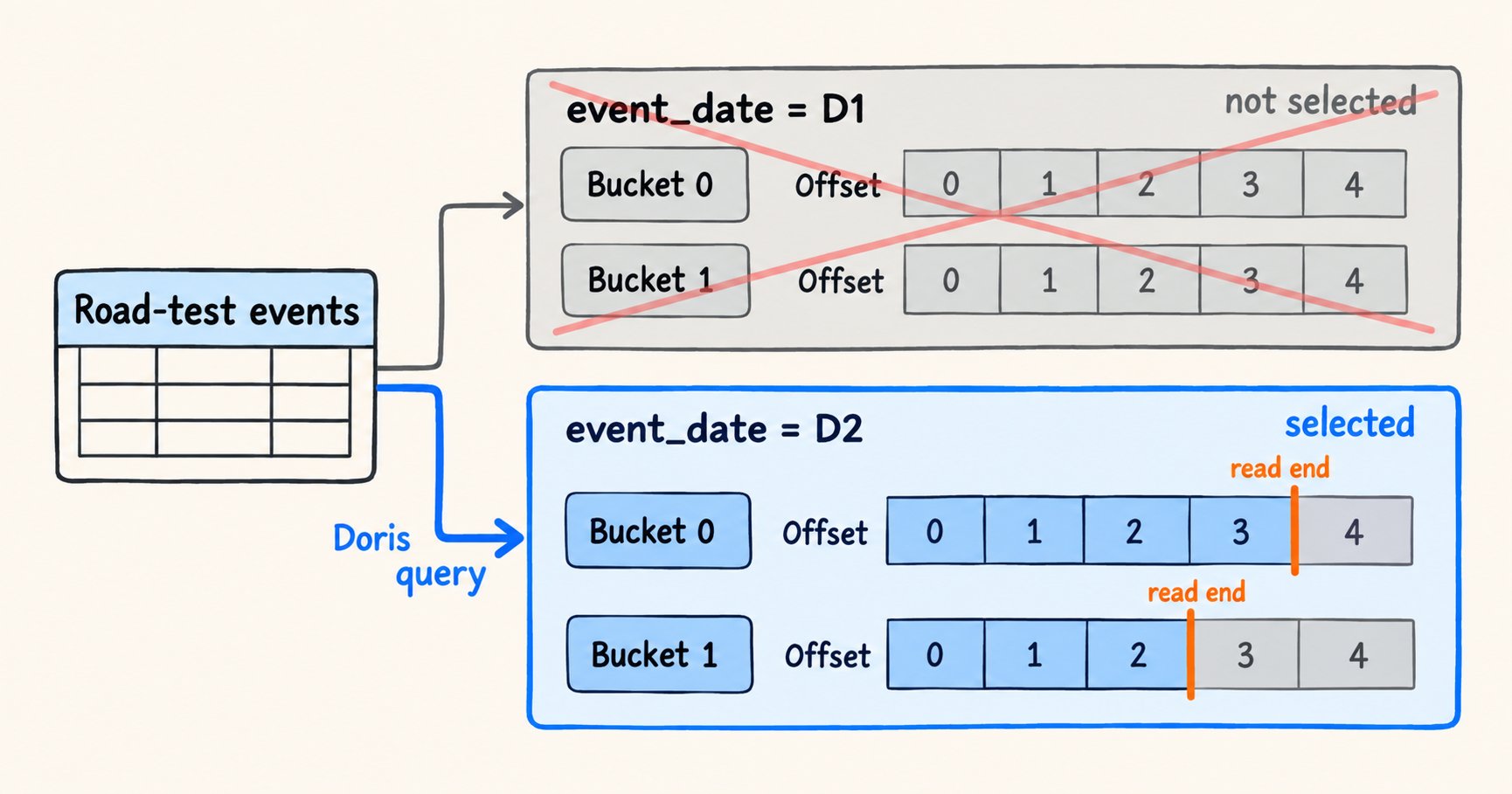
Fluss divides tables into Buckets for parallel reads and writes. In a partitioned table, records go to a partition and then a Bucket. Unpartitioned tables go straight to Buckets. Each Bucket has its own Offset, a position in its log.
Doris reads Fluss log tables through the Fluss Catalog. It can filter and aggregate those records or join them with vehicle models, test plans, and other dimensions in Doris tables. Teams may still store recurring, stable query results in Doris internal tables.
Analysts can inspect Fluss databases, tables, and columns through the Catalog before they query. Fluss still owns the source tables; storing results in Doris is optional.
At planning time, Doris fixes the log end position for each Bucket. It stops there even if more records arrive during execution. Those records appear in a later query, so each execution has a fixed endpoint.
2.2 Combine lake history with new Fluss events
To establish a baseline, the team compares the same road segment across several weeks of morning rush hour. Recent intervention and trip events may still be in the Fluss log, outside the latest readable Paimon snapshot. Separate lake and log queries would force the team to reconcile overlap and gaps itself.
The tiering service writes log records to Paimon, commits a readable snapshot, and records the last tiered Offset for each Bucket. Fluss still holds records written after those positions.
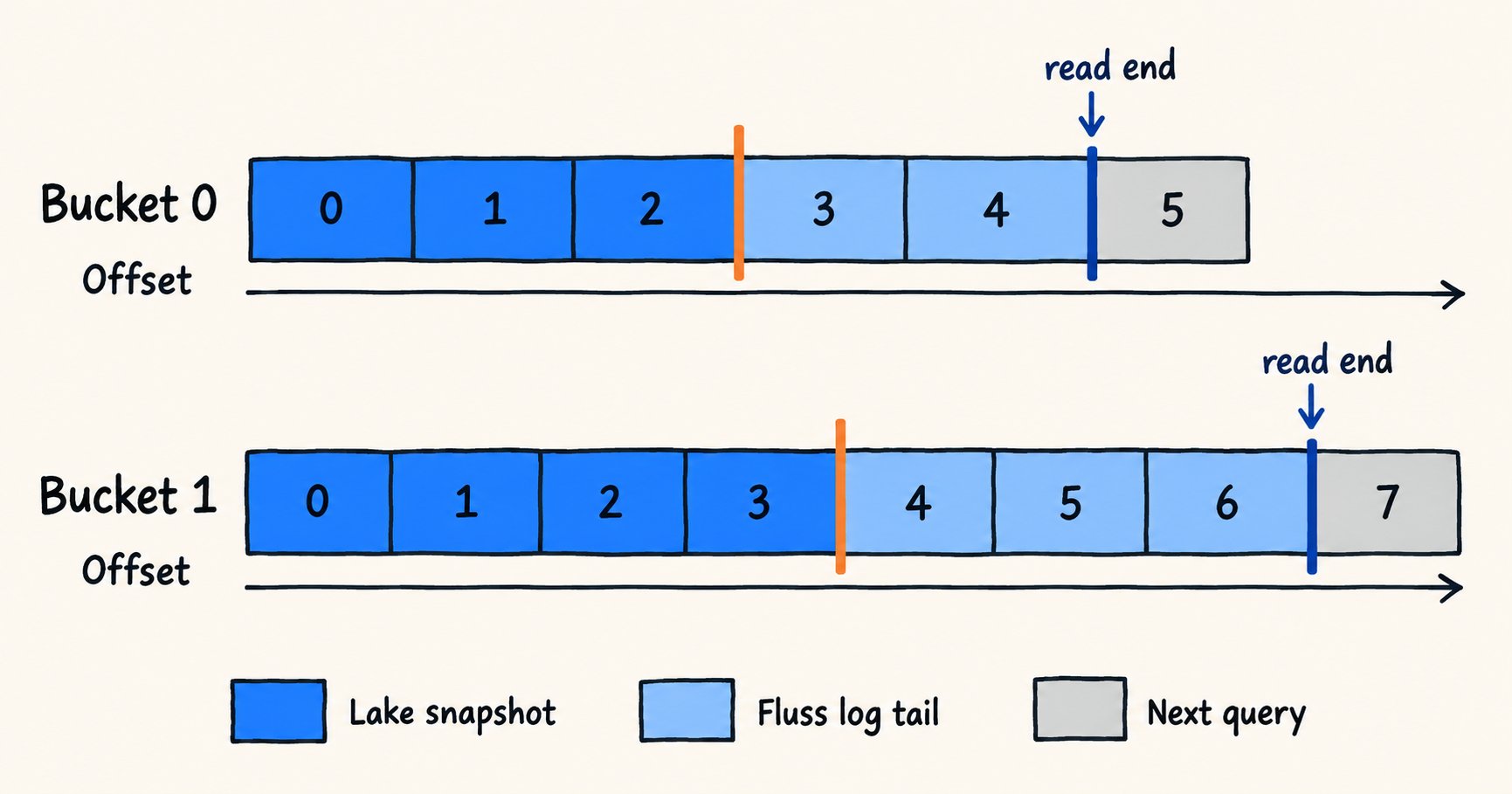
For Fluss tables with lake tiering enabled, Doris can use Union Read. At query planning, Doris fixes a Paimon snapshot and the end Offset for each Bucket. Paimon supplies the history covered by the snapshot; Fluss supplies records from the tiering position to the fixed end. Analysts query one logical table. Records that arrive later appear in the next query.
For append-only events such as interventions, the Offset boundary helps prevent duplicate or missing reads. Analysts can inspect the lake and log separately to check tiering progress. If no readable lake snapshot exists yet, the default query can read only data still retained by Fluss. A task that needs complete history should first confirm that a snapshot is ready and check the log retention range.
2.3 Reconstruct the current value of a primary-key table
Vehicles and device configurations change state too. A vehicle might move from "road testing" to "awaiting maintenance." Counting both changes as current would put two versions of the same vehicle in the report.
A primary-key table has two possible read baselines. For a Fluss-only read, Doris starts with a KV snapshot and applies the later changelog. For a tiered table using Union Read, it starts with a Paimon lake snapshot and applies the Fluss changelog after that snapshot. Union Read does not combine the KV and lake snapshots.
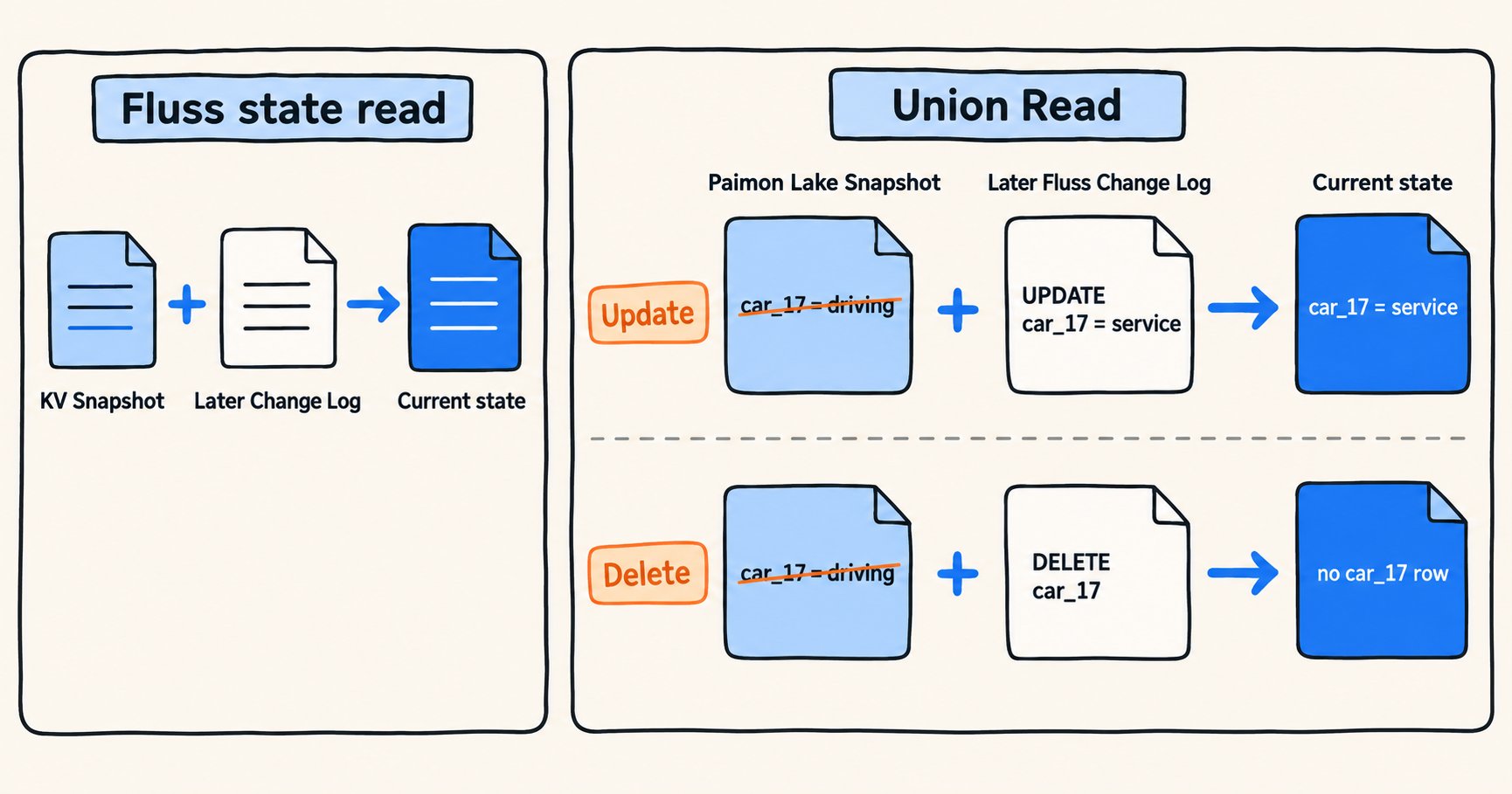
Figure 5. The two paths use a KV snapshot and a lake snapshot as their respective baselines. In Union Read, an update returns the new value and a deletion removes the primary key.
Union Read finds keys changed since the lake snapshot, filters their older lake rows, and emits the latest values from the log tail. An update replaces the old state; a deletion removes the key. Each vehicle appears once in the current-state result.
For road-test analysis, the event table records the software version at the time of the event. The vehicle state table shows the version running now. Those versions answer different questions.
2.4 Choose the read range for the task
Trend analysis needs both history and new events. A baseline report for an archived month may need only lake data. To check tiering progress, analysts need to see what remains in the log. Doris provides three entry points for Fluss tables tiered to Paimon:
| Query entry point | Read range | Use and limitation |
|---|---|---|
| Table name | Normally uses Union Read to cover lake history and untiered changes | Suitable for combined historical and recent analysis; the default mode may change the read path when its conditions are not met |
table$lake | Only data tiered to Paimon | Checks a historical baseline or tiering result; excludes records not yet in the lake |
table$log | Only the Fluss log after the readable lake snapshot | Checks increments in an append-only event table; excludes lake history and does not apply to primary-key tables |
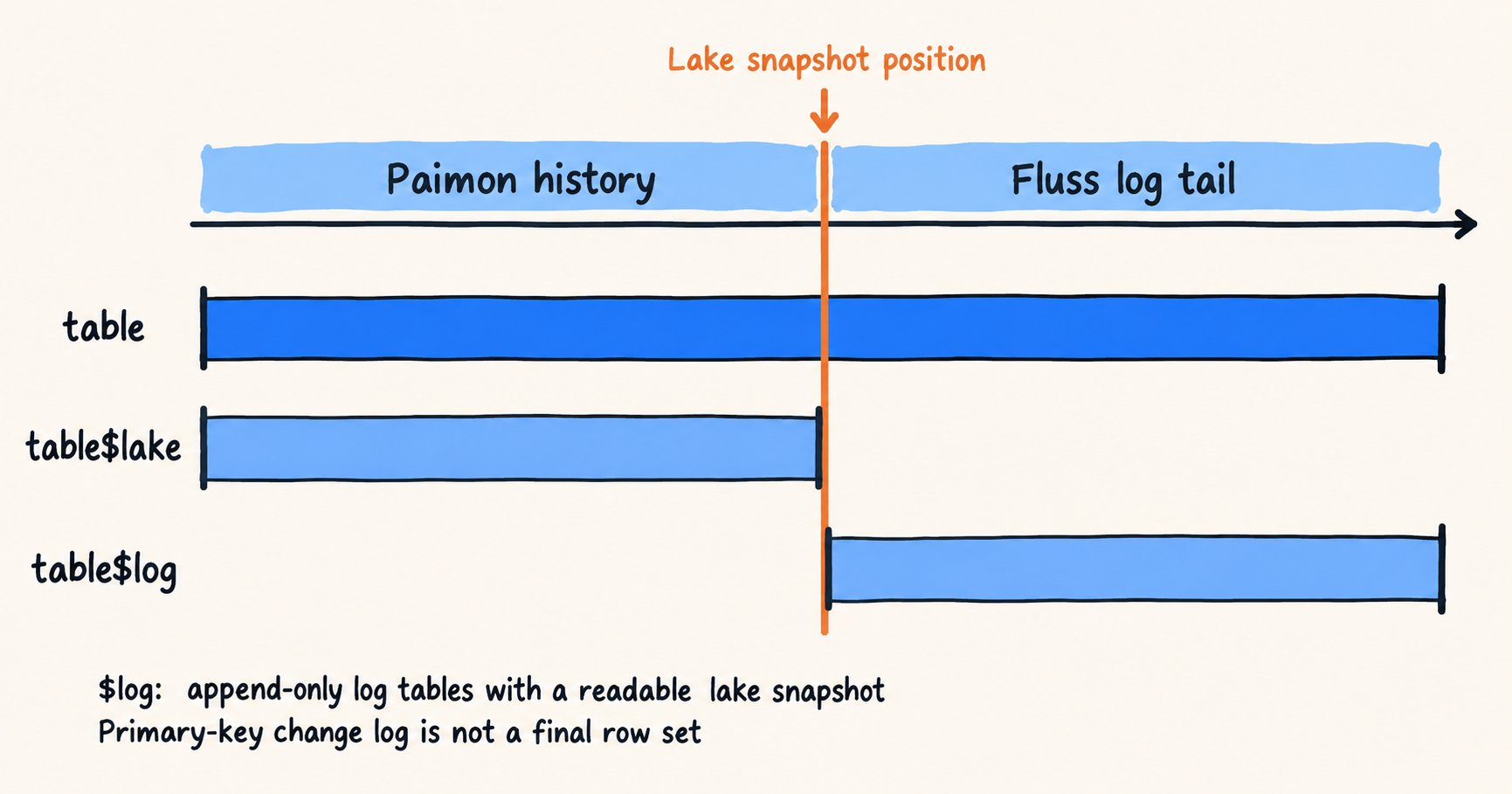
Figure 6. The table name covers both lake and log. $lake reads only the lake; $log reads only the append-only log after the readable lake snapshot.
When querying the table name directly, fluss.union_read.mode controls how Doris chooses the read path. The $lake and $log entry points already identify a specific data segment.
| Mode | Behavior when querying the full table | When to use it |
|---|---|---|
auto (default) | Uses Union Read when a readable lake snapshot exists and the other conditions are met; otherwise adjusts the read path to favor currently readable data | Everyday analysis where query availability takes priority |
required | Must actually use the lake; errors if Union Read cannot run safely | Deployment acceptance checks that require history and increments to join as expected |
disabled | Does not read the lake; reads only data currently available from Fluss | Temporarily isolate a lake-side problem or compare read paths |
$log and disabled start at different positions. $log starts at the tiering position recorded by the lake snapshot. For log tables, disabled reads records still retained by Fluss; for primary-key tables, it reconstructs current state. If Fluss has removed older log segments, a disabled query on a log table cannot see history that exists only in the lake.
Several factors affect scan cost and the choice of read path:
- The lake side uses Doris's Paimon reader and file cache. Partition filters and selecting only the necessary columns can reduce scanning and decoding. A filter on an ordinary data column gives the right result but may not reduce the data read from the source.
- Tiering delays lengthen the primary-key changelog tail that must be merged, increasing memory use. Doris limits the number of tail records for primary-key Union Read. Above that limit,
autochanges the read path andrequiredreturns an error. EXPLAINshows whether Union Read is used and the ranges planned for the lake and log. Query Profile shows row counts and time spent on each side. Together, they reveal whether the cost comes from scanning history, reading the log tail, or tiering progress.
Teams can save the results of stable, frequently run queries in Doris internal tables when needed.
3. Performance measurements
We tested the read paths on an 18-core development machine with 48 GB of memory. Doris 5.0 ran as one FE and one BE, with the BE's default 2 GB JVM heap. Fluss 1.0.0 ran one CoordinatorServer and one TabletServer; Paimon used MinIO on the same machine. The primary-key test table had 30 million keys, 13 columns (about 210 bytes per row), and 16 Buckets. After one warm-up, we ran each query five times and report the median. Docker port forwarding limited bandwidth to both Fluss and the lake, so comparisons on this machine are more useful than the absolute times.
3.1 Primary-key tables: pure JNI reads versus Union Read
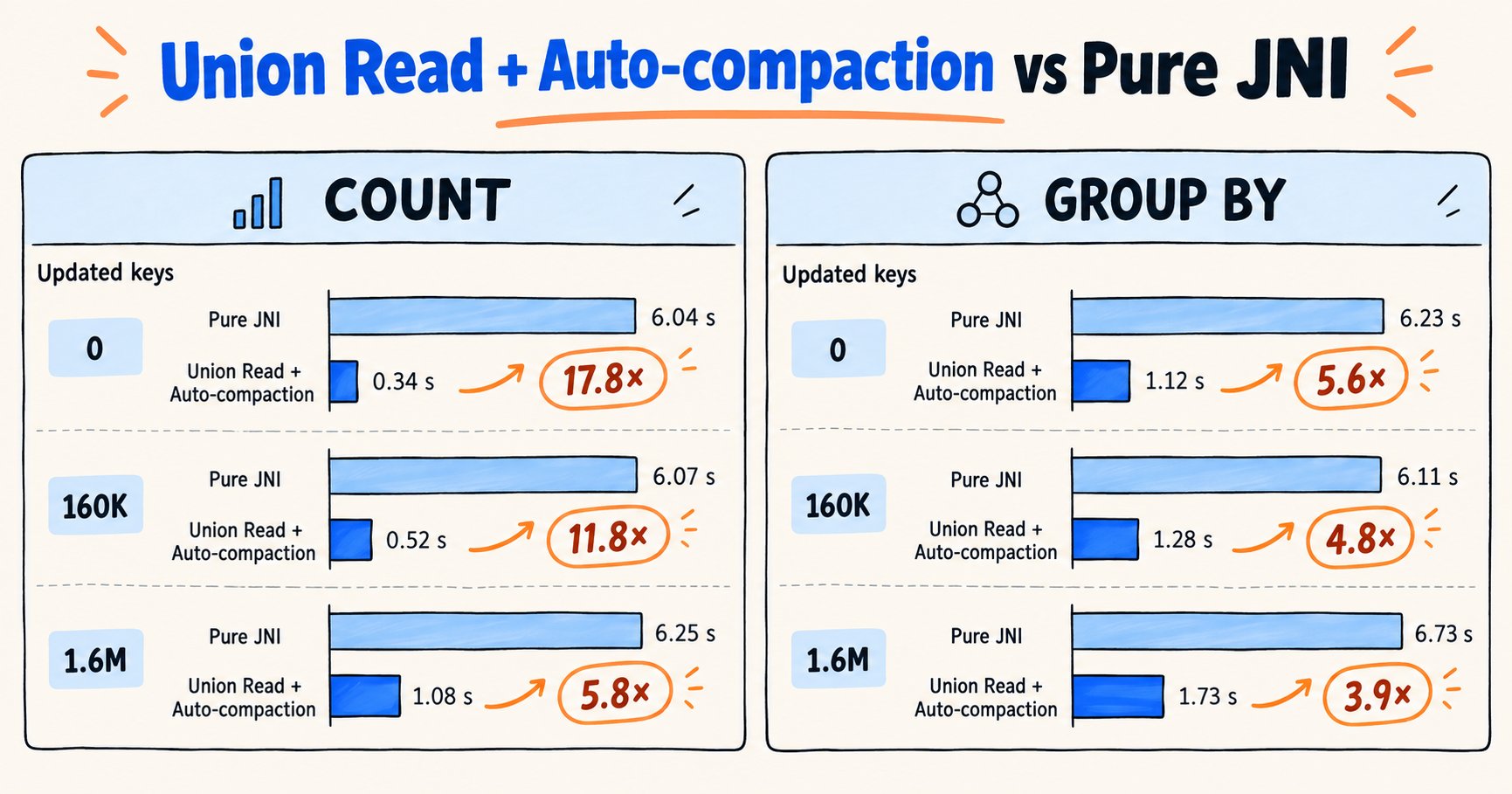
We measured three read paths:
- With a pure JNI read (
fluss.union_read.mode = 'disabled'), the BE does not read the lake. For each Bucket, it copies the full KV snapshot to local disk, scans it with RocksDB, and merges the later changelog to reconstruct current values. The BE calls the Fluss Java SDK through JNI. - With Union Read and lake auto-compaction, Doris uses the Paimon lake snapshot as the baseline and reads lake data with its native Parquet reader. For each Bucket with a log tail, the BE reads that tail once from Fluss through JNI and filters older lake rows by primary key. The lake table has
table.datalake.auto-compactionenabled. - With Union Read but no lake auto-compaction, the logical read is the same. Overlapping lake files, however, require the Paimon Java reader through JNI to merge them. This is the default Fluss configuration.
The first column counts keys updated after the lake snapshot, which determines how much Union Read must fetch from Fluss: 0, 10,000, or 100,000 keys per Bucket. Each cell gives the time in seconds for COUNT(*), a grouped aggregation (count, amount sum, and average discount by category), and SELECT * (excluding transfer of results to the client), in that order.
| Keys updated after the lake snapshot | Pure JNI read | Union Read with auto-compaction | Union Read speedup (count / group by) | Union Read without auto-compaction |
|---|---|---|---|---|
| 0 | 6.04 / 6.23 / 8.07 | 0.34 / 1.12 / 9.27 | 17.8× / 5.6× | 1.06 / 2.08 / OOM |
| 160,000 | 6.07 / 6.11 / 6.98 | 0.52 / 1.28 / 9.65 | 11.8× / 4.8× | 1.06 / 1.97 / OOM |
| 1.6 million | 6.25 / 6.73 / 7.84 | 1.08 / 1.73 / 10.80 | 5.8× / 3.9× | 1.40 / 2.83 / OOM |
- For
SELECT *, pure JNI finishes 1 to 3 seconds sooner than Union Read, but it uses an average of 9 to 10 cores (68 to 75 core-seconds). Union Read uses 1 to 2 cores (9 to 18 core-seconds). Pure JNI consumes 4 to 8 times as much CPU time. The KV snapshot is on local disk, while lake data crosses a forwarded port, which favors pure JNI in this setup. - Pure JNI copies each Bucket's KV snapshot to a BE temporary directory so RocksDB can open it. A query uses a sampled peak of 2.9 to 4.3 GB and releases the space afterward. Union Read does not copy the KV snapshot and does not use that BE disk space.
- Without lake auto-compaction, a merge read can load data from several files into the BE's JVM heap at once. A full-table read uses 16 scanners in parallel by default and fails with
OutOfMemoryErroron the default 2 GB heap.enable_jni_heap_admissionprevents that failure in this test, as shown below. Enablingtable.datalake.auto-compactionfor the primary-key lake table addresses the underlying cause.
3.2 BE JVM Memory Control
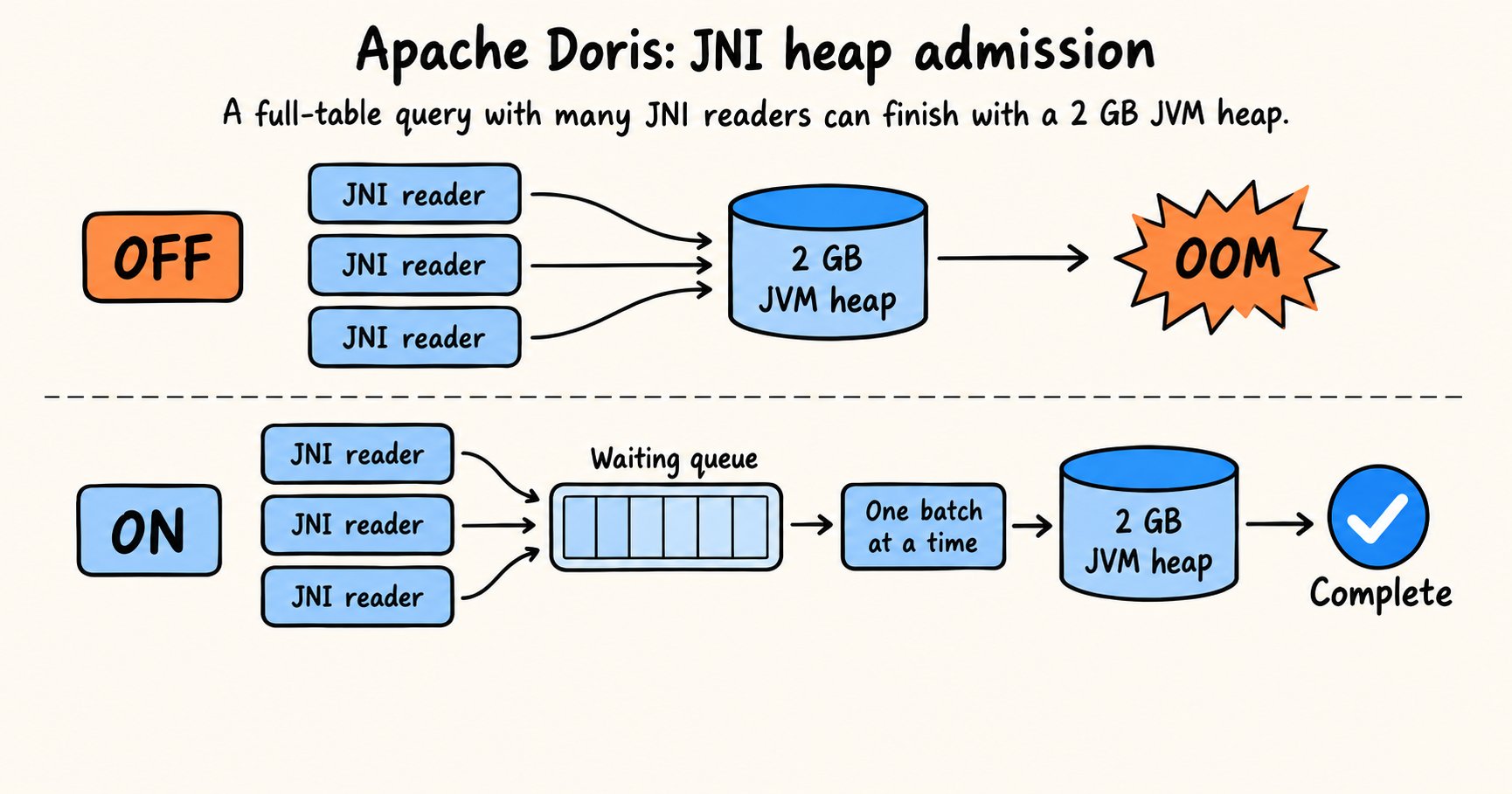
We repeated the full-table read without lake auto-compaction on a BE with a 2 GB JVM heap, then enabled enable_jni_heap_admission and ran it again:
| Keys updated after the lake snapshot | Disabled | enable_jni_heap_admission enabled |
|---|---|---|
| 0 | OOM | 11.8 s |
| 160,000 | OOM | 12.2 s |
| 1.6 million | OOM | 13.5 s |
enable_jni_heap_admission is new in Doris 5.0 and defaults to off. When enabled, readers that expect heavy JVM heap use, including the merge readers in this test, declare an estimate before they start. The BE queues a new reader if admitting it would push declared usage beyond half the maximum JVM heap. Readers proceed as earlier ones finish. This prevented OOM in the test, though queueing increased elapsed time.
4. Planned work
Apache Doris 5.0.0 provides the Fluss Catalog as an experimental feature for reads and analysis. Union Read currently works with Paimon lake tables; Iceberg, Lance, and other lake formats are planned. We plan to benchmark historical scans, log-tail merging, and concurrent queries on reproducible workloads, then use those results to improve performance and resource use.
Today, Doris reads Fluss log and KV data through the Java SDK. Fluss 1.0 has a Rust SDK, and we plan to move these reads to it gradually. Before switching, we need to preserve the semantics of log tables, primary-key tables, and Union Read. Real workloads will show whether Rust improves data conversion, memory use, and resource control.