Pull Request
GitHub provides a convenient Pull Request (PR) collaboration mechanism. This document describes the complete workflow for submitting a PR to the Apache Doris project.
The overall workflow includes:
- Fork the
apache/dorisrepository to your own account. - Configure local git and commit your changes.
- Create a PR on GitHub.
- If there are conflicts, resolve them through rebase.
1. Fork the Repository
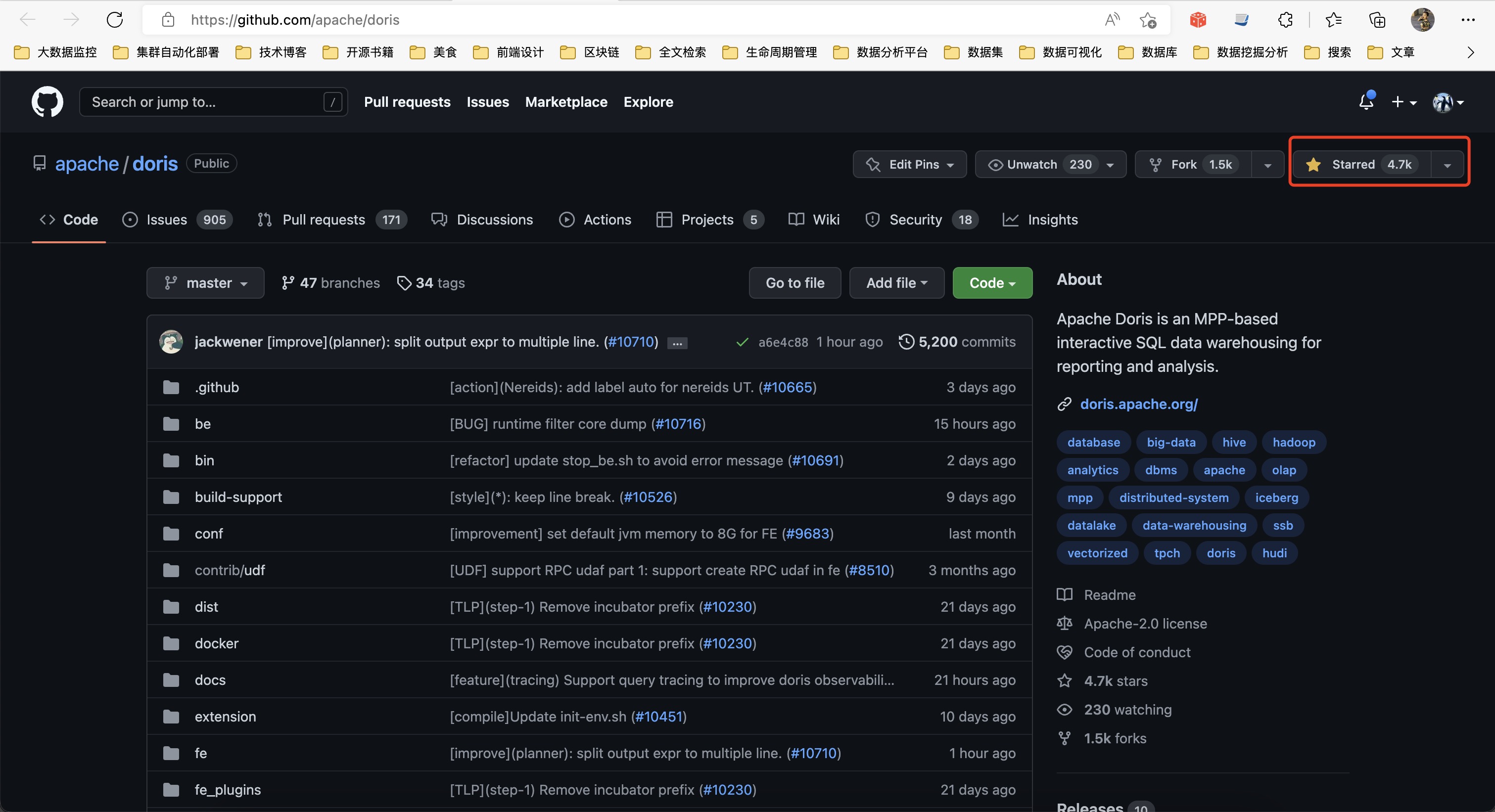
Go to the GitHub page of apache/doris and click the Fork button in the top-right corner to complete the fork.
2. Configure Git and Commit Changes
(1) Clone the code locally
git clone https://github.com/<your_github_name>/doris.git
cd doris
git submodule update --init --recursive
Note: Replace <your_github_name> with your GitHub username.
After the clone completes, origin points by default to your remote fork on GitHub.
(2) Add apache/doris as the upstream remote
cd doris
git remote add upstream https://github.com/apache/doris.git
(3) Check the remote repository settings
git remote -v
origin    https://github.com/<your_github_name>/doris.git (fetch)
origin    https://github.com/<your_github_name>/doris.git (push)
upstream  https://github.com/apache/doris.git (fetch)
upstream  https://github.com/apache/doris.git (push)
(4) Create a new branch for your changes
git checkout -b <your_branch_name>
Note: <your_branch_name> is a branch name you choose.
After creating the branch, you can make code changes on it.
(5) Push the code to the remote branch
git commit -a -m "<your_commit_message>"
git push origin <your_branch_name>
For more information on using git, refer to the official GitHub documentation: Using git.
3. Create a PR
(1) Open a new PR
In your browser, switch to your own GitHub page, switch to the branch you pushed (<your_branch_name>), and click the Compare & pull request button to create the PR.
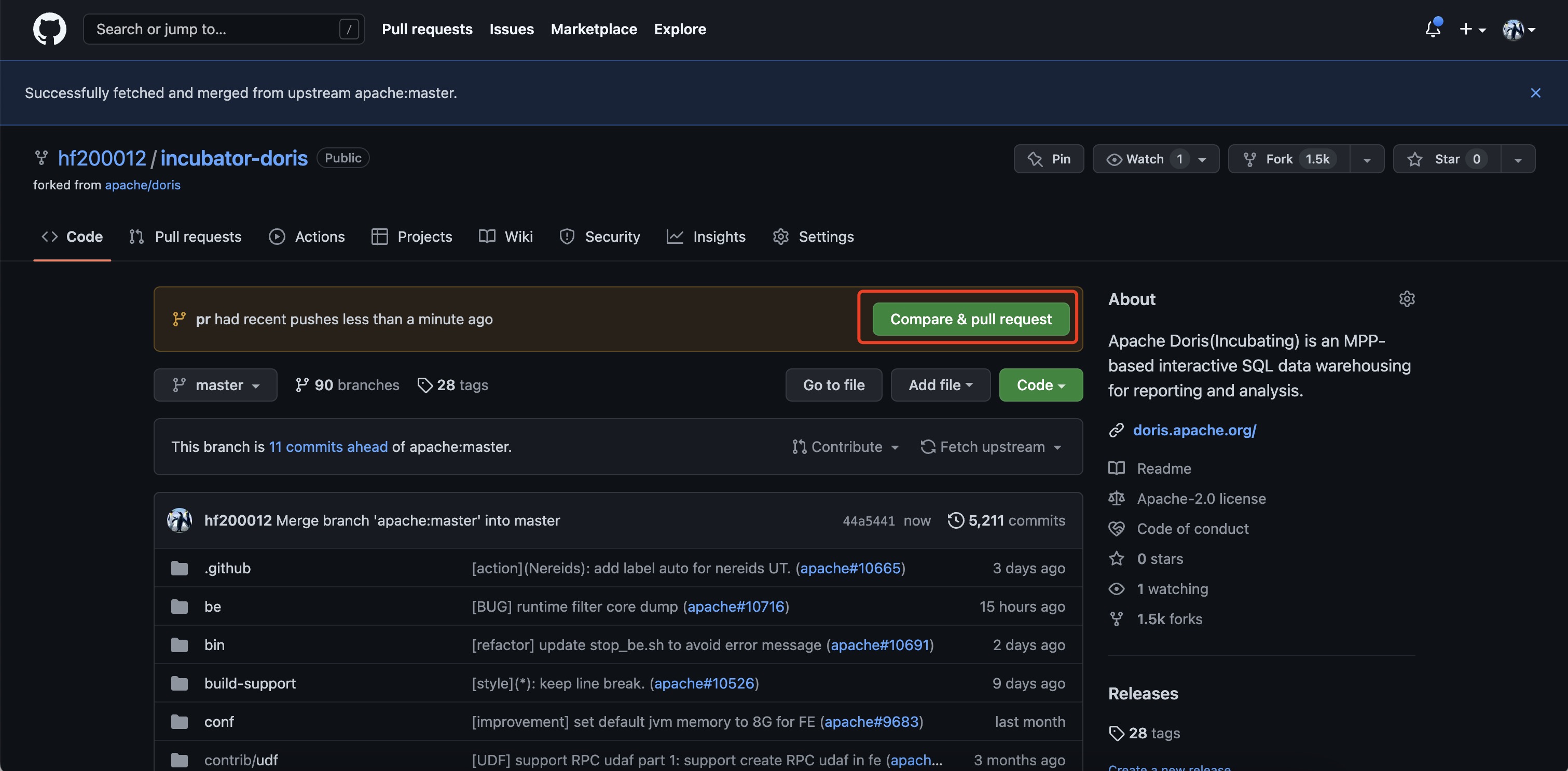
(2) Prepare the branch
The Create pull request button now appears. If it does not appear, check whether the branch is selected correctly. You can also click compare across forks to reselect the repository and branch.
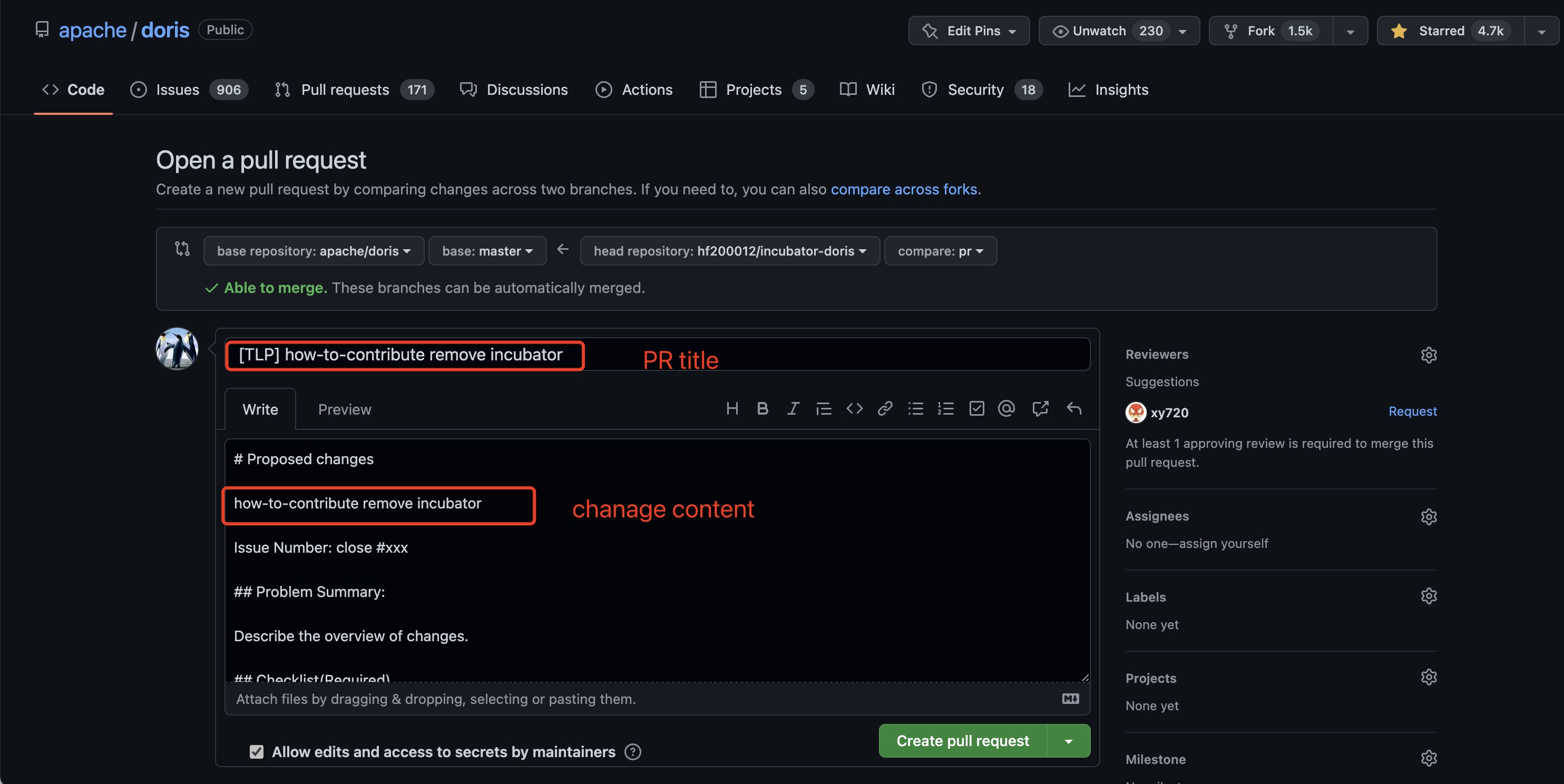
(3) Fill in the Commit Message
Fill in the commit summary and details, then click Create pull request to complete the creation.
Key points for writing a Commit Message:
| Item | Requirement |
|---|---|
| Voice | English "verb + object" form, written as an imperative sentence |
| Tense | Do not use the past tense for verbs |
| Subject and body | Both are required, separated by a blank line (on the GitHub PR page, fill in the two fields separately) |
| Subject length | No more than 50 characters |
| Body line width | No more than 72 characters per line; wrap manually if longer |
| Body content | Explain "what was done, why, and how" |
| Subject first letter | Capitalized |
| End of subject | No period |
| Linked issue | Reference the related issue in the body (for example, #233) |
For more details, refer to https://chris.beams.io/posts/git-commit.
(4) Finish creating the PR
Once the PR is created, you can see it waiting for Doris project maintainers to review. You can wait for the review and merge, or contact the community directly to follow up.
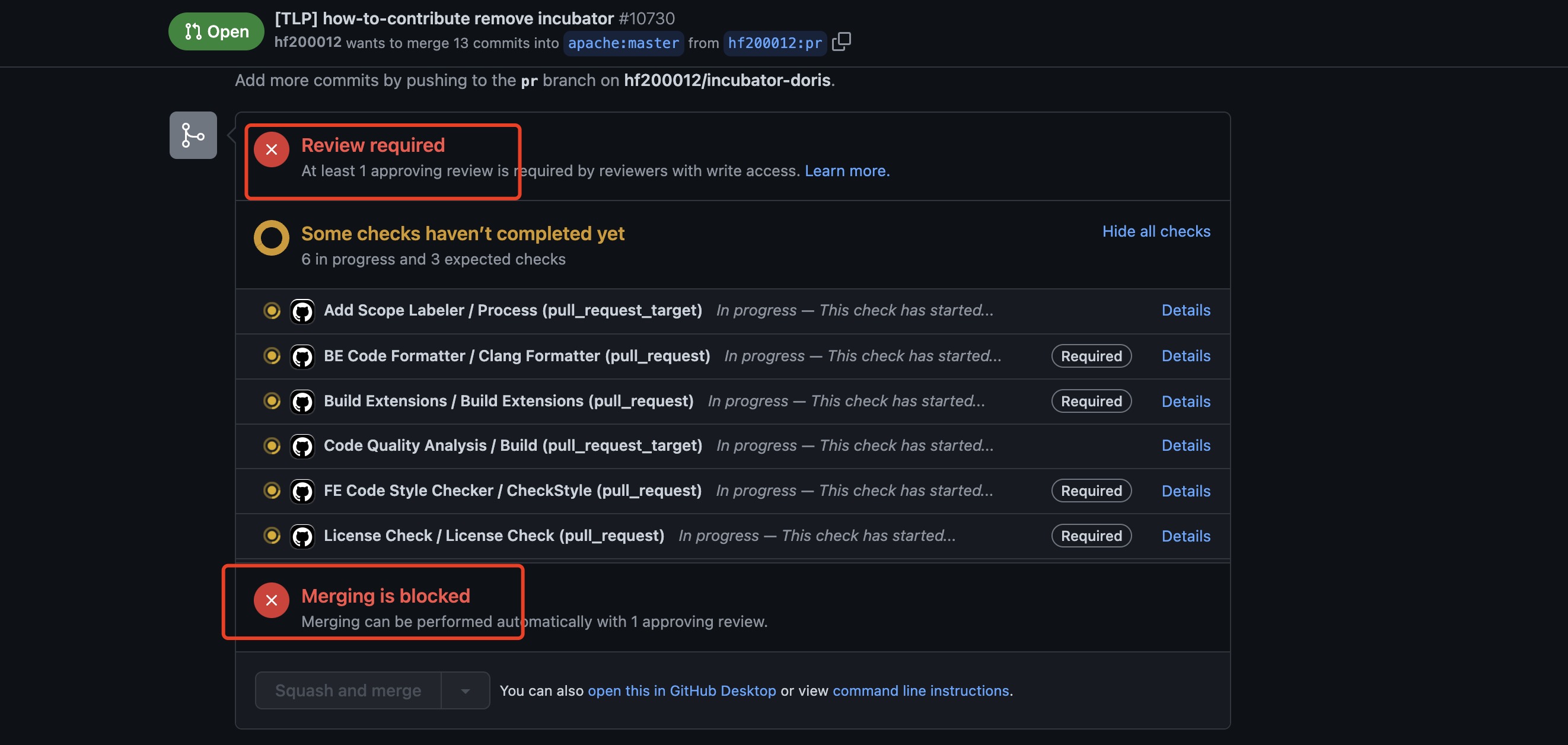
The PR is now created. For more information about PRs, refer to collaborating-with-issues-and-pull-requests.
(5) Wait for CI checks to pass
After the PR is created, the CI pipeline is triggered automatically. In the check list at the bottom of the PR page:
- Checks marked as Required must all pass (turn green) before the PR can be merged.
- Other non-Required checks are for reference and do not block the merge.
Which specific checks are Required is determined by what the PR page shows in real time. If a check fails, click the check to enter the GitHub Actions log and locate the error. After fixing it, run git push to retrigger the checks.
4. Resolving Conflicts
Code conflicts when submitting a PR are usually caused by multiple people editing the same file. Resolve them with the following steps:
(1) Switch to the main branch
git checkout master
(2) Sync the remote main branch to local
git pull upstream master
(3) Switch back to the development branch (assume the branch is named fix)
git checkout fix
(4) Run rebase
git rebase -i master
A file showing the commit history opens. In most cases, save it directly. Git then indicates which files have conflicts. Open each conflicting file and resolve the conflict. After all conflicting files are handled, run:
git add .
git rebase --continue
Repeat until the screen shows something like rebase successful. Then force-push the update to the PR branch:
git push -f origin fix
5. Complete Example
Below is a complete example, from syncing code to pushing the branch.
(1) Fetch the latest code on a local branch with upstream already configured
$ git branch
* master

$ git fetch upstream
remote: Counting objects: 195, done.
remote: Compressing objects: 100% (68/68), done.
remote: Total 141 (delta 75), reused 108 (delta 48)
Receiving objects: 100% (141/141), 58.28 KiB, done.
Resolving deltas: 100% (75/75), completed with 43 local objects.
From https://github.com/apache/doris
   9c36200..0c4edc2  master     -> upstream/master
(2) Run rebase
$ git rebase upstream/master
First, rewinding head to replay your work on top of it...
Fast-forwarded master to upstream/master.
(3) Check whether others' commits have not been synced to your own repo
$ git status
# On branch master
# Your branch is ahead of 'origin/master' by 8 commits.
#
# Untracked files:
#   (use "git add <file>..." to include in what will be committed)
#
#       custom_env.sh
nothing added to commit but untracked files present (use "git add" to track)
(4) Sync others' commits to your own repo
$ git push origin master
Counting objects: 195, done.
Delta compression using up to 32 threads.
Compressing objects: 100% (41/41), done.
Writing objects: 100% (141/141), 56.66 KiB, done.
Total 141 (delta 76), reused 140 (delta 75)
remote: Resolving deltas: 100% (76/76), completed with 44 local objects.
To https://lide-reed:xxxx@github.com/lide-reed/doris.git
   9c36200..0c4edc2  master -> master
(5) Create a new branch and start development
$ git checkout -b my_branch
Switched to a new branch 'my_branch'

$ git branch
  master
* my_branch
(6) Stage the changes after editing the code
$ git add -u
(7) Fill in the message and commit to the local branch
$ git commit -m "Fix a typo"
[my_branch 55e0ba2] Fix a typo
 1 files changed, 2 insertions(+), 2 deletions(-)
(8) Push the branch to your own repo on GitHub
$ git push origin my_branch
Counting objects: 11, done.
Delta compression using up to 32 threads.
Compressing objects: 100% (6/6), done.
Writing objects: 100% (6/6), 534 bytes, done.
Total 6 (delta 4), reused 0 (delta 0)
remote: Resolving deltas: 100% (4/4), completed with 4 local objects.
remote:
remote: Create a pull request for 'my_branch' on GitHub by visiting:
remote:      https://github.com/lide-reed/doris/pull/new/my_branch
remote:
To https://lide-reed:xxxx@github.com/lide-reed/doris.git
 * [new branch]      my_branch -> my_branch
You can now create the PR following the steps described above.