Release Apache Doris Shade
The Doris Shade repository is independent of the main Doris repository and lives at:
This document uses the release of Doris Shade v1.0.0 as an example to describe the complete process for Shade-style components, covering the Maven release plugin, SVN preparation, and the community vote.
Prepare for Release
First, refer to the Release Preparation document to set up the signing, SVN, and Maven environments.
Release to Maven
1. Prepare the Branch
In the repository, create the 1.0.0-release branch and check it out.
2. Release to Maven Staging
Run the Maven release plugin to generate the release tag:
mvn release:clean
mvn release:prepare -DpushChanges=false
-DpushChanges=false means that the newly generated branch and tag are not automatically pushed to the repository during execution.
During execution, release:prepare prompts for three pieces of information:
| Prompt | Recommended value | Example |
|---|---|---|
| Doris Shade version | Use the default, in the format {shade.version} | 1.0.0 |
| Release tag name | Use the default tag name | 1.0.0 |
| Next version | Used for the local branch, no practical meaning | 1.0.1-SNAPSHOT |
You may be prompted for the GPG passphrase during execution. If you see gpg: no valid OpenPGP data found, run export GPG_TTY=$(tty) first and retry.
After mvn release:prepare finishes successfully, a tag and a branch are generated locally, and two new commits are added to the current branch:
- The first commit corresponds to the newly generated tag.
- The second commit corresponds to the branch for the next version.
You can verify this with git log.
After confirming that the local tag is correct, push the tag to the repository:
git push upstream --tags
Here, upstream points to the apache/doris-shade repository.
Finally, run release:perform:
mvn release:perform
After successful execution, you can see the released version at https://repository.apache.org/#stagingRepositories:
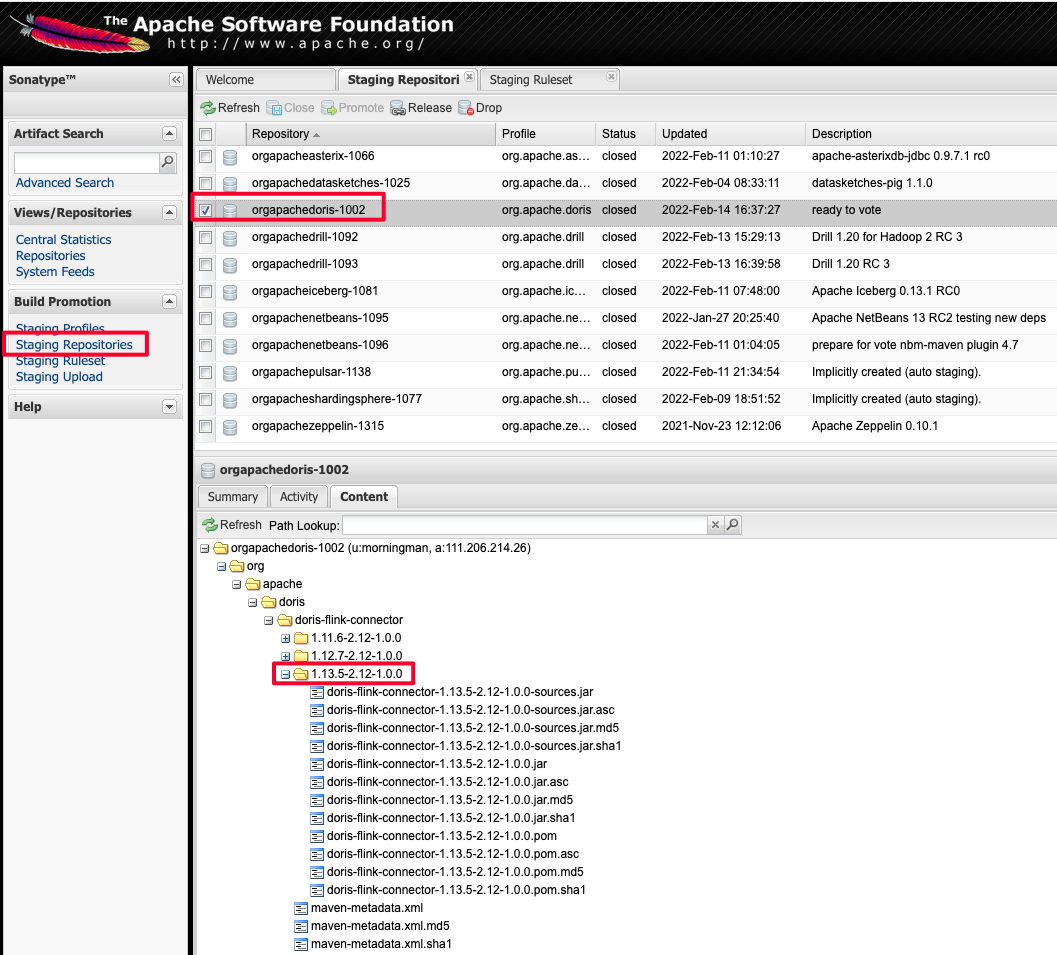
Confirm that the artifacts include the .asc signature file.
If something went wrong, you need to:
- Delete the local tag.
- Delete the tag in the repository.
- Delete the two newly generated local commits.
- Drop the staging repository.
- Repeat the steps above.
After verifying everything is correct, click the close button to complete the Staging release.
3. Prepare SVN
Check out the Dev SVN repository:
svn co https://dist.apache.org/repos/dist/dev/doris/
Package the tag source code and generate the signature file and SHA512 checksum file (the following uses 1.0.0 as an example):
git archive --format=tar 1.14_2.12-1.0.0 --prefix=apache-doris-shade-1.0.0-src/ | gzip > apache-doris-shade-1.0.0-src.tar.gz
gpg -u xxx@apache.org --armor --output apache-doris-shade-1.0.0-src.tar.gz.asc  --detach-sign apache-doris-shade-1.0.0-src.tar.gz
sha512sum apache-doris-shade-1.14_2.12-1.0.0-src.tar.gz > apache-doris-shade-1.0.0-src.tar.gz.sha512
On macOS, use:
shasum -a 512 apache-doris-shade-1.0.0-src.tar.gz > apache-doris-shade-1.0.0-src.tar.gz.sha512
You end up with three files:
| File | Purpose |
|---|---|
apache-doris-shade-1.0.0-src.tar.gz | Source package |
apache-doris-shade-1.0.0-src.tar.gz.asc | GPG signature file |
apache-doris-shade-1.0.0-src.tar.gz.sha512 | SHA512 checksum file |
Move the three files to the SVN directory:
doris/doris-shade/1.0.0/
Example of the full SVN directory structure:
├── 1.2.3-rc01
│   ├── apache-doris-1.2.3-src.tar.gz
│   ├── apache-doris-1.2.3-src.tar.gz.asc
│   ├── apache-doris-1.2.3-src.tar.gz.sha512
...
├── KEYS
├── doris-shade
│   └── 1.0.0
│       ├── apache-doris-shade-1.0.0-src.tar.gz
│       ├── apache-doris-shade-1.0.0-src.tar.gz.asc
│       └── apache-doris-shade-1.0.0-src.tar.gz.sha512
Here, 1.2.3-rc01 is the directory for the main Doris release, and doris-shade/1.0.0 contains the content of this release.
For how to prepare the KEYS file, see the related section in Release Preparation.
4. Vote
Start a vote on the dev@doris.apache.org mailing list. The template is as follows:
Hi all,

This is a call for the vote to release Apache Doris-Shade 1.0.0

The git tag for the release:
https://github.com/apache/doris-shade/releases/tag/doris-shade-1.0.0

Release Notes are here:
https://github.com/apache/doris-shade/blob/doris-shade-1.0.0/CHANGE-LOG.txt

Thanks to everyone who has contributed to this release.

The release candidates:
https://dist.apache.org/repos/dist/dev/doris/doris-shade/

KEYS file is available here:
https://downloads.apache.org/doris/KEYS

To verify and build, you can refer to following link:
https://doris.apache.org/community/release-and-verify/release-verify

The vote will be open for at least 72 hours.

[ ] +1 Approve the release
[ ] +0 No opinion
[ ] -1 Do not release this package because ...
Complete the Release
Refer to the Complete the Release document to finish the entire release process.
Appendix: Release to SNAPSHOT
A Snapshot is not an Apache Release version. It is only used for preview before the release. A Snapshot version can only be released after PMC discussion and approval.
Switch to the doris-shade directory:
mvn deploy
After that, you can view the snapshot version at the following address:
https://repository.apache.org/content/repositories/snapshots/org/apache/doris/doris-shade/
FAQ / Troubleshooting
Q: mvn release:prepare reports gpg: no valid OpenPGP data found?
The terminal cannot receive the GPG passphrase. Run export GPG_TTY=$(tty) and retry.
Q: How do I fully roll back after mvn release:perform fails?
Run the following steps in order: delete the local tag (git tag -d <tag>), delete the remote tag (git push upstream :refs/tags/<tag>), roll back the two local commits (git reset --hard HEAD~2), drop the corresponding repository on Apache Staging, and then run mvn release:clean and mvn release:prepare again.
Q: What is the difference between the Maven release plugin and manually tagging plus mvn deploy?
release:prepare/perform automatically handles version changes, tag creation, and artifact upload, which suits projects with a simple pom such as Shade. The manual approach is more flexible for multi-artifact scenarios, such as Spark Connector across Spark versions.
