AWS Authentication and Authorization
Doris provides several ways to integrate with AWS for authentication and authorization. These methods apply to S3 Load, TVF, External Catalog, Storage Vault, Export, Repository, Resource, and any other feature that needs to access AWS S3 resources. This document explains how to configure AWS security credentials and use them to access AWS service resources from Doris.
Applicable Scenarios
Doris supports the following four AWS authentication and authorization methods. Choose one based on your deployment environment and security compliance requirements:
| Authentication method | Applicable scenario | Advantages | Disadvantages |
|---|---|---|---|
| IAM User (AK/SK) | On-premise deployments with controllable security, or non-AWS S3-compatible object stores (Load/Export/Storage Vault, etc.) | Simple configuration. Works with any object store compatible with the AWS S3 protocol | Risk of key leakage. Keys must be rotated manually |
| Assumed Role (IAM Role) | High-security scenarios where Doris is deployed on AWS EC2 and needs cross-account S3 access | High security. AWS credentials are rotated automatically. Permissions are managed centrally | Trust/permission policy configuration is relatively complex |
| EKS IAM Role (IRSA / Pod Identity) | Doris deployed in an Amazon EKS cluster | Credentials are injected automatically through a Kubernetes ServiceAccount | Requires familiarity with EKS / IAM integration |
| Bucket Policy | Load/Export/Storage Vault scenarios on AWS EC2 with a small number of buckets | Follows the principle of least privilege. Doris detects AWS credentials automatically | Permissions are scattered across individual buckets, with weaker centralized management |
Prerequisites
- Doris FE/BE is deployed and running normally
- You have the target AWS account and the S3 bucket to be accessed
- You have IAM configuration permissions for the account (create User / Role, modify policies)
- For Assumed Role or Bucket Policy, Doris FE/BE must be deployed on AWS EC2 (or in an EKS cluster)
IAM User Authentication and Authorization
Doris supports accessing external data sources using the access_key and secret_key of an AWS IAM User. For more background, see the AWS official document IAM users.
Step 1: Create an IAM User and Configure a Policy
-
Sign in to the AWS console, open the IAM service, and click
Create user.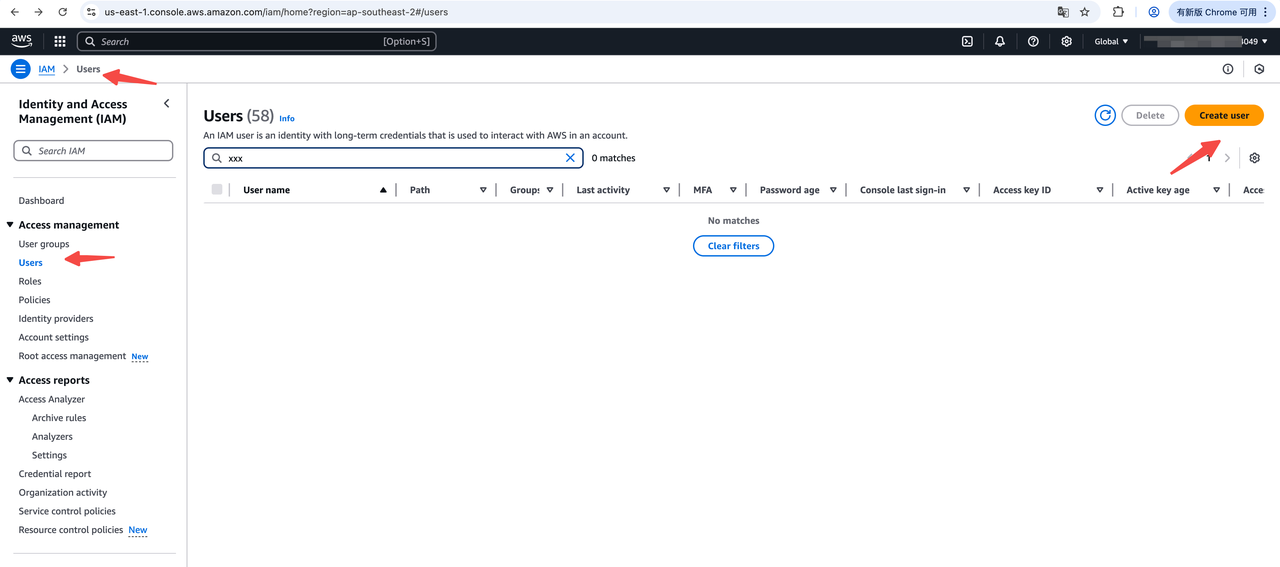
-
Enter the IAM User name. In the
Set permissionssection, choose to attach a policy directly.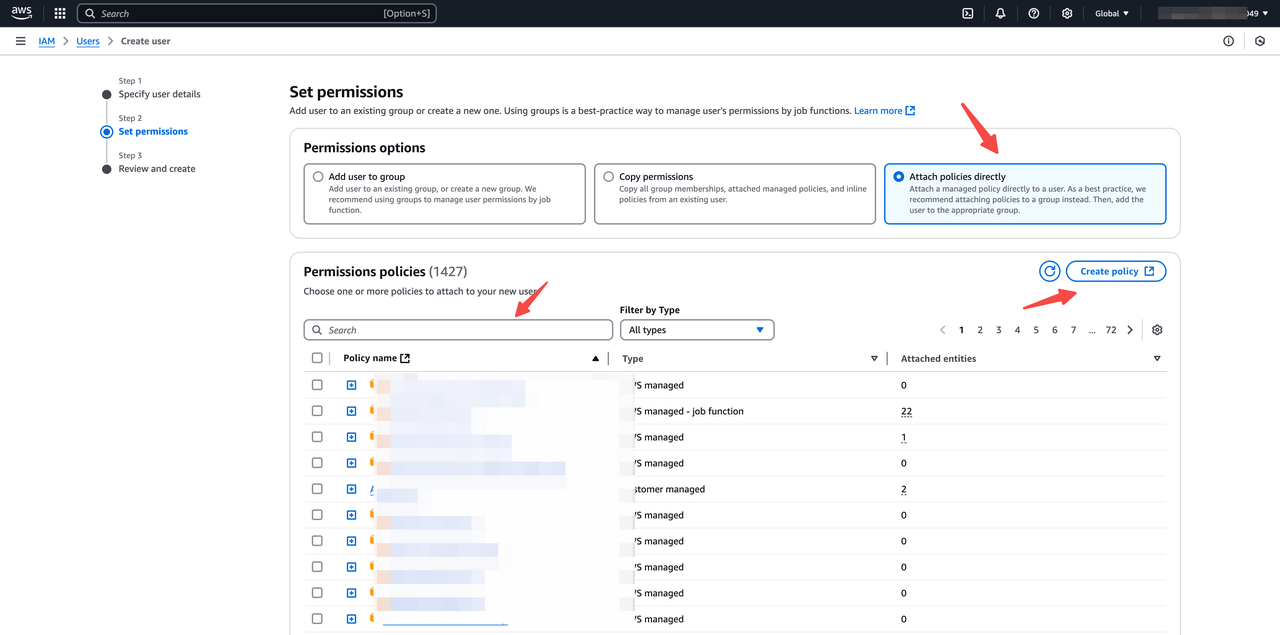
-
In the policy editor, enter the corresponding AWS resource policy. The following examples show common read/write policy templates for accessing an S3 bucket.
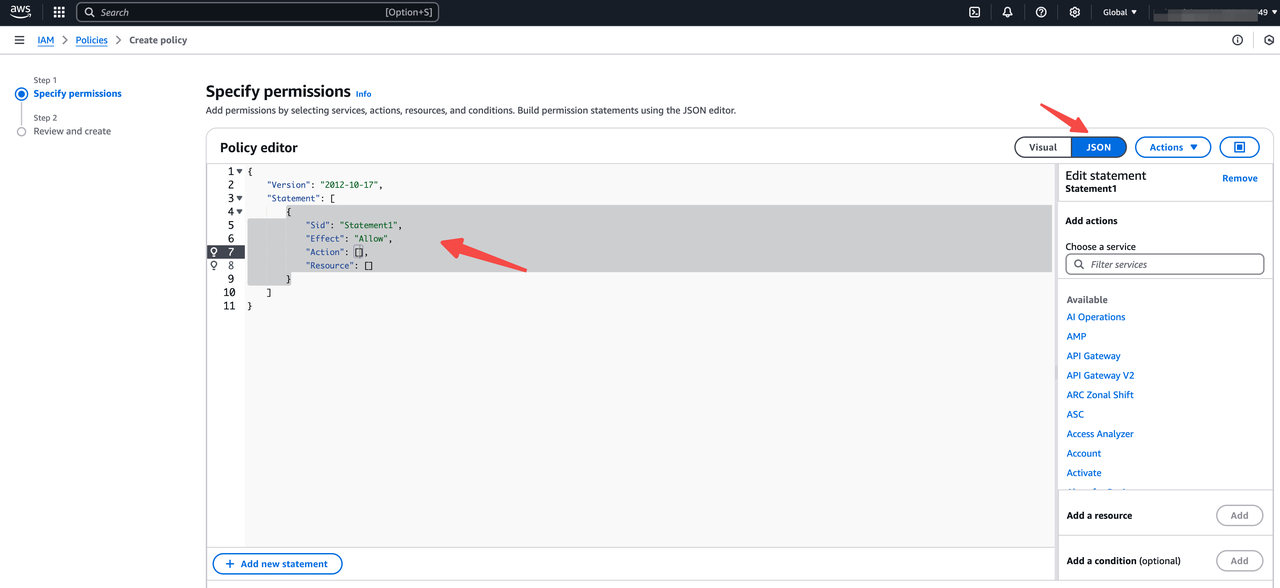
Note:
- Replace the bucket name and prefix path with your own values
- Do not add extra "/" separators
S3 bucket read policy template. Use this for Doris features that only need to read and list objects in the bucket, such as S3 Load, TVF, and External Catalog:
{
    "Version": "2012-10-17",
    "Statement": [
        {
            "Effect": "Allow",
            "Action": [
              "s3:GetObject",
              "s3:GetObjectVersion",
            ],
            "Resource": "arn:aws:s3:::<your-bucket>/your-prefix/*"
        },
        {
            "Effect": "Allow",
            "Action": [
                "s3:ListBucket",
                "s3:GetBucketLocation"
            ],
            "Resource": "arn:aws:s3:::<your-bucket>"
        }
    ]
}
S3 bucket write policy template. Use this for Doris features that need to read, list, and write bucket objects, such as Export, Storage Vault, Resource, and Repository:
{
    "Version": "2012-10-17",
    "Statement": [
        {
            "Effect": "Allow",
            "Action": [
              "s3:PutObject",
              "s3:GetObject",
              "s3:GetObjectVersion",
              "s3:DeleteObject",
              "s3:DeleteObjectVersion",
              "s3:AbortMultipartUpload",
              "s3:ListMultipartUploadParts"
            ],
            "Resource": "arn:aws:s3:::<your-bucket>/<your-prefix>/*"
        },
        {
            "Effect": "Allow",
            "Action": [
                "s3:ListBucket",
                "s3:GetBucketLocation",
                "s3:GetBucketVersioning",
                "s3:GetLifecycleConfiguration"
            ],
            "Resource": "arn:aws:s3:::<your-bucket>"
        }
    ]
} -
After the IAM User is created, create an
access_keyandsecret_keyaccess key pair for this user.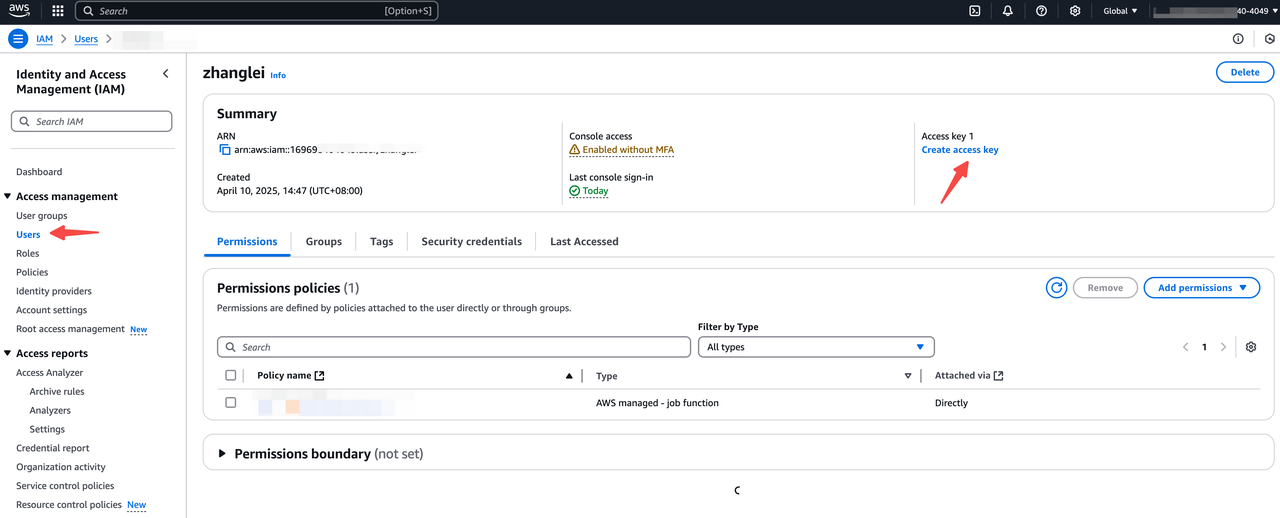
Step 2: Use the Access Key in Doris SQL
After completing Step 1, you have an access_key and a secret_key. With this key pair, you can use all Doris features. The following SQL examples show typical usage. The key fields are:
"s3.access_key" = "<your-access-key>",
"s3.secret_key" = "<your-secret-key>"
S3 Load
  LOAD LABEL s3_load_2022_04_01
  (
      DATA INFILE("s3://your_bucket_name/s3load_example.csv")
      INTO TABLE test_s3load
      COLUMNS TERMINATED BY ","
      FORMAT AS "CSV"
      (user_id, name, age)
  )
  WITH S3
  (
      "provider" = "S3",
      "s3.endpoint" = "https://s3.us-east-1.amazonaws.com",
      "s3.region" = "us-east-1",
      "s3.access_key" = "<your-access-key>",
      "s3.secret_key" = "<your-secrety-key>"
  )
  PROPERTIES
  (
      "timeout" = "3600"
  );
TVF
  SELECT * FROM S3 (
      'uri' = 's3://your_bucket/path/to/tvf_test/test.parquet',
      'format' = 'parquet',
      's3.endpoint' = 'https://s3.us-east-1.amazonaws.com',
      's3.region' = 'us-east-1',
      "s3.access_key" = "<your-access-key>",
      "s3.secret_key"="<your-secret-key>"
  )
External Catalog
  CREATE CATALOG iceberg_catalog PROPERTIES (
      'type' = 'iceberg',
      'iceberg.catalog.type' = 'hadoop',
      'warehouse' = 's3://your_bucket/dir/key',
      's3.endpoint' = 'https://s3.us-east-1.amazonaws.com',
      's3.region' = 'us-east-1',
      "s3.access_key" = "<your-access-key>",
      "s3.secret_key"="<your-secret-key>"
  );
Storage Vault
CREATE STORAGE VAULT IF NOT EXISTS s3_demo_vault
PROPERTIES (
    "type" = "S3",
    "s3.endpoint" = "https://s3.us-east-1.amazonaws.com",
    "s3.region" = "us-east-1",
    "s3.bucket" = "<your-bucket>",
    "s3.access_key" = "<your-access-key>",
    "s3.secret_key"="<your-secret-key>",
    "s3.root.path" = "s3_demo_vault_prefix",
    "provider" = "S3",
    "use_path_style" = "false"
);
Export
EXPORT TABLE s3_test TO "s3://your_bucket/a/b/c"
PROPERTIES (
    "column_separator"="\\x07",
    "line_delimiter" = "\\x07"
) WITH S3 (
    "s3.endpoint" = "https://s3.us-east-1.amazonaws.com",
    "s3.region" = "us-east-1",
    "s3.access_key" = "<your-access-key>",
    "s3.secret_key"="<your-secret-key>",
)
Repository
CREATE REPOSITORY `s3_repo`
WITH S3
ON LOCATION "s3://your_bucket/s3_repo"
PROPERTIES
(
    "s3.endpoint" = "https://s3.us-east-1.amazonaws.com",
    "s3.region" = "us-east-1",
    "s3.access_key" = "<your-access-key>",
    "s3.secret_key"="<your-secret-key>"
);
Resource
CREATE RESOURCE "remote_s3"
PROPERTIES
(
    "s3.endpoint" = "https://s3.us-east-1.amazonaws.com",
    "s3.region" = "us-east-1",
    "s3.bucket" = "<your-bucket>",
    "s3.access_key" = "<your-access-key>",
    "s3.secret_key"="<your-secret-key>"
);
You can specify the access_key and secret_key of different IAM Users in different business logic to achieve fine-grained access control over external data.
Assumed Role Authentication and Authorization
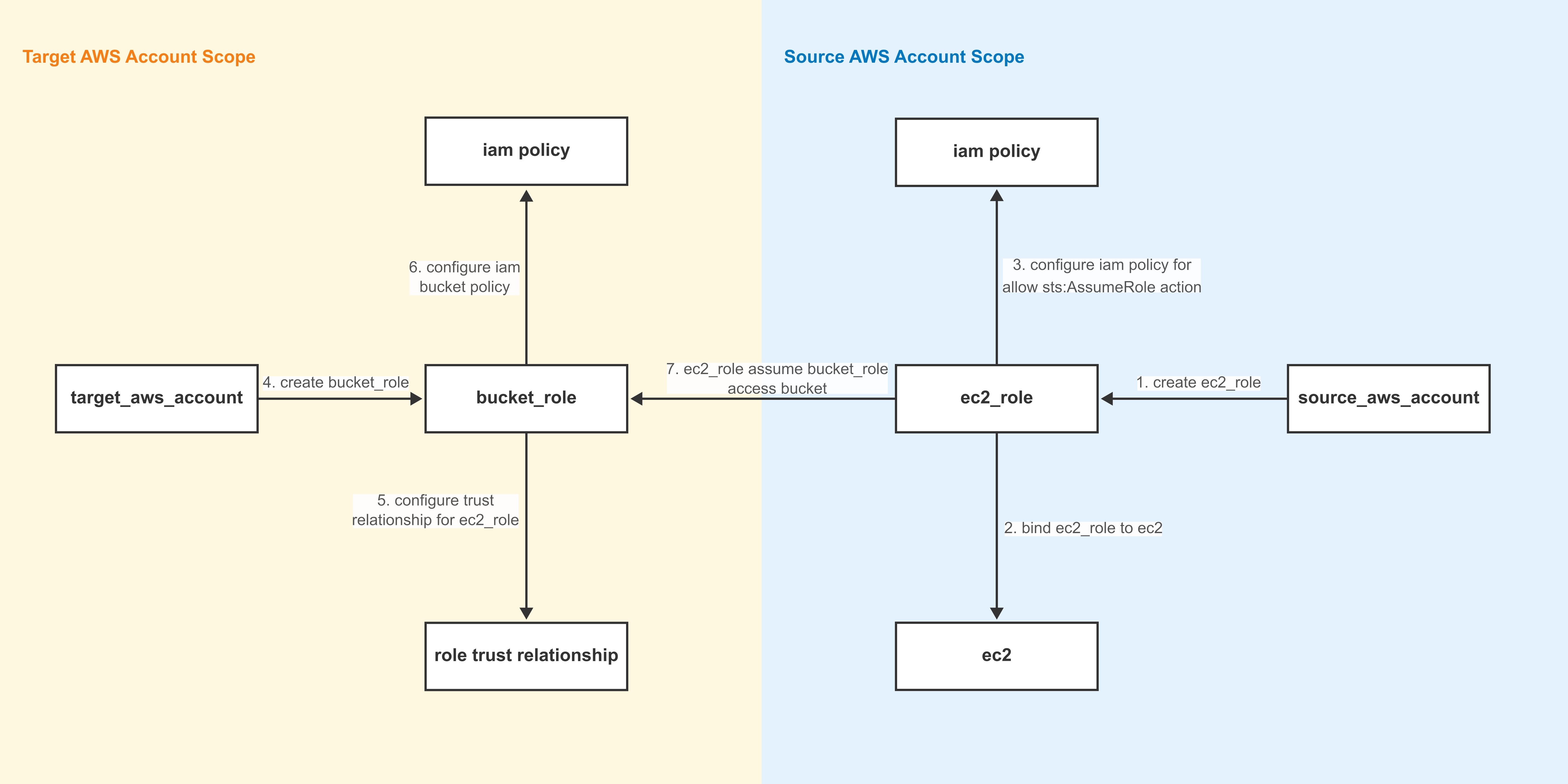
Assumed Role authenticates and authorizes access to external data sources by assuming an AWS IAM Role. For background, see the AWS official document Switching to an IAM role. The following diagram shows the overall configuration flow for Assumed Role:
Term Definitions
| Term | Meaning |
|---|---|
| Source Account | The AWS account that initiates Assume Role (in this example, the account that owns the EC2 machines hosting Doris FE/BE) |
| Target Account | The AWS account that owns the target S3 bucket |
ec2_role | The Role created in the source account, which must be bound to every EC2 machine that hosts Doris FE/BE |
bucket_role | The Role created in the target account, which must be associated with permissions on the target bucket |
Note:
- The source account and the target account can be the same AWS account.
- Make sure every EC2 machine that hosts Doris FE/BE is bound to
ec2_role, especially when scaling out.
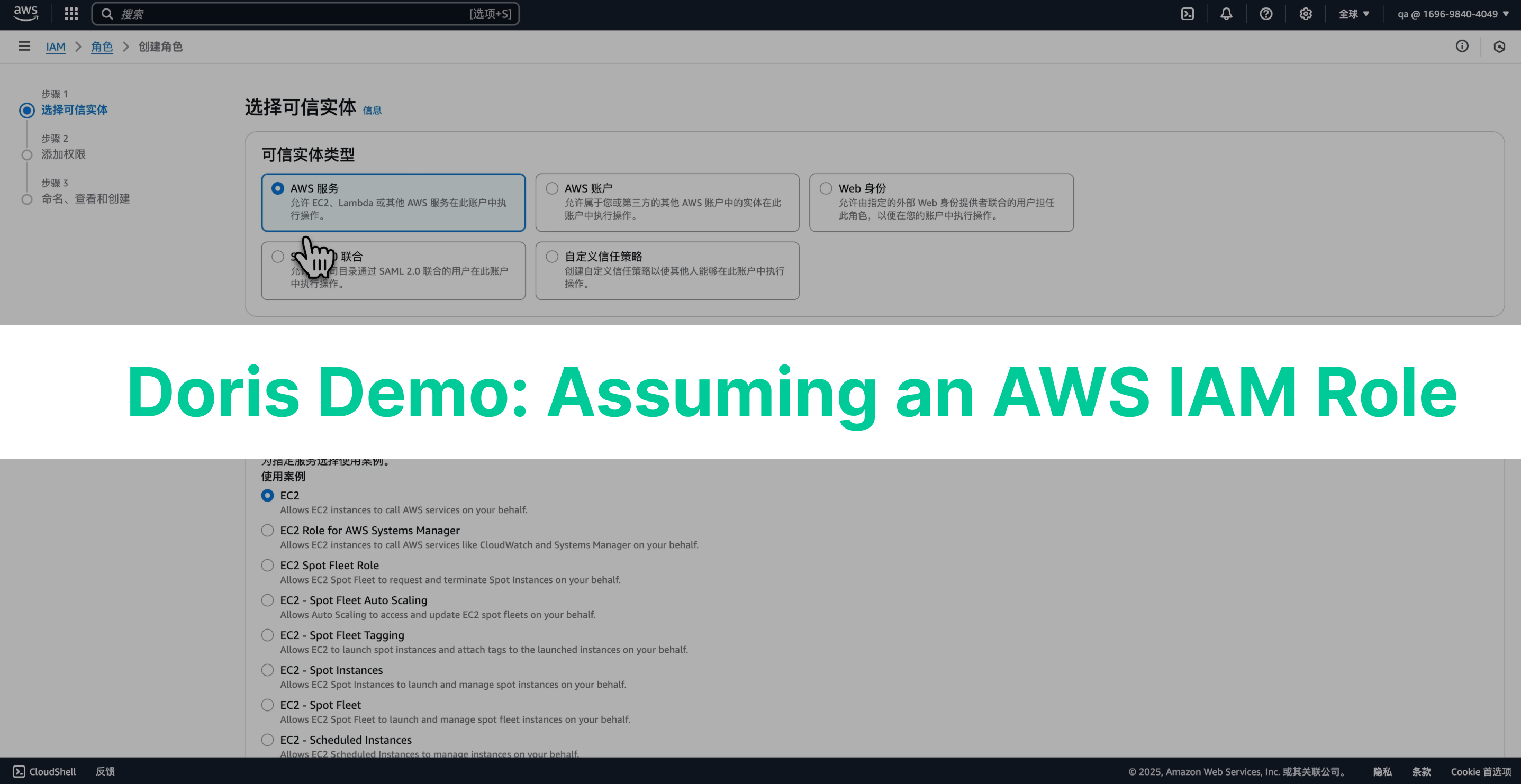
The operational demo is as follows:
Step 1: Preparation
- In the source account, create
ec2_roleand bind it to every EC2 machine that hosts Doris FE/BE. - In the target account, create
bucket_roleand the corresponding S3 bucket.
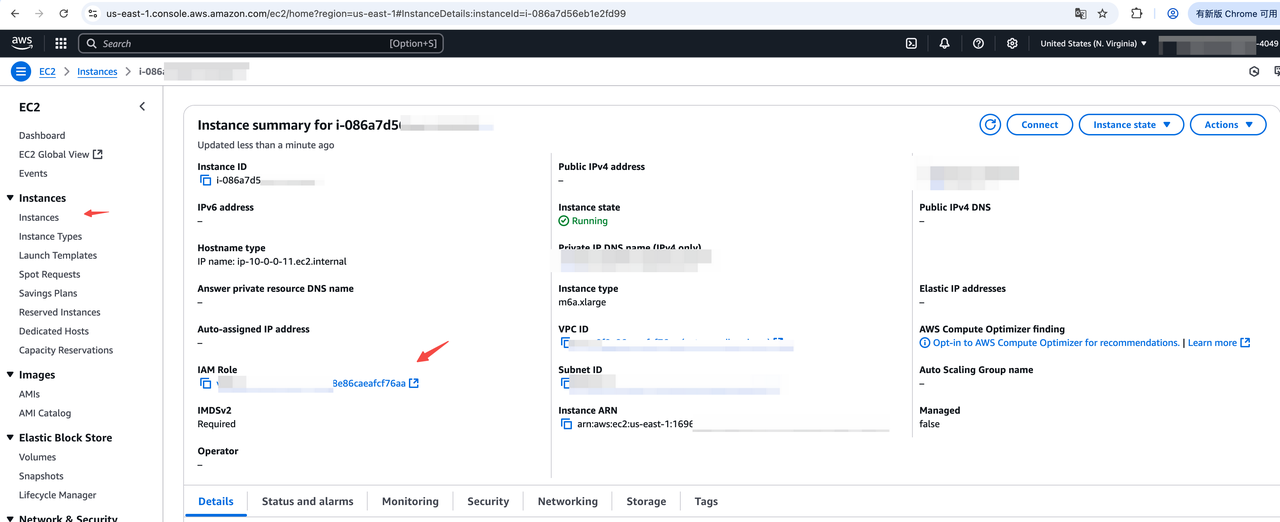
After an EC2 machine is bound to ec2_role, you can view the role_arn in the console, as shown below:
Step 2: Add a Permission Policy to the Source Account IAM Role
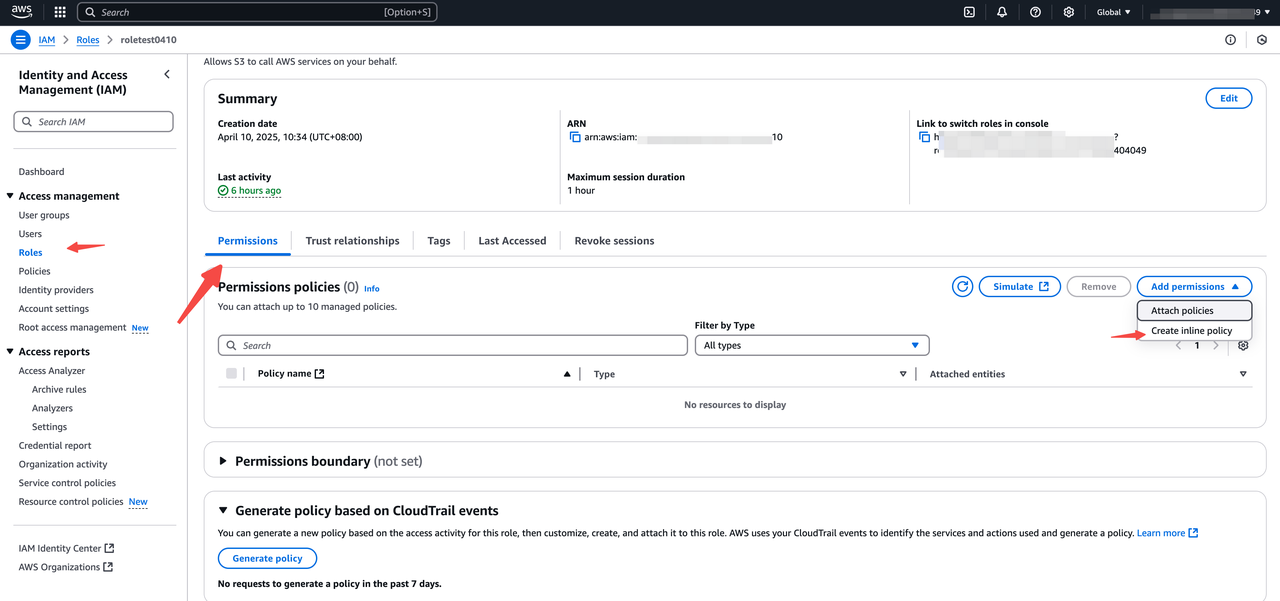
Add an inline policy that allows sts:AssumeRole to the source account role bound to the EC2 instance:
- Sign in to the AWS IAM console, and choose
Access management > Rolesin the left navigation pane. - Find the role associated with the EC2 instance and click the role name.
- On the role details page, in the
Permissionssection, clickAdd permissionsand chooseCreate inline policy. - In the
Specify permissionsstep, switch to the JSON tab, enter the following policy, and then clickReview policyto save.
{
    "Version": "2012-10-17",
    "Statement": [
        {
            "Effect": "Allow",
            "Action": ["sts:AssumeRole"],
            "Resource": "*"
        }
    ]
}
Step 3: Configure the Trust Policy and Permission Policy on the Target Account IAM Role
3.1 Configure the Trust Policy
- Sign in to the AWS IAM console, choose
Access management > Rolesin the left navigation pane, findAssumed Target Role(that is,bucket_role), and click the role name to enter the details page. - Switch to the
Trust relationshipstab and clickEdit trust policy. On the edit page, enter the following JSON, replace<ec2_iam_role_arn>with the ARN of the role associated with the EC2 instance, and then clickUpdate policy.
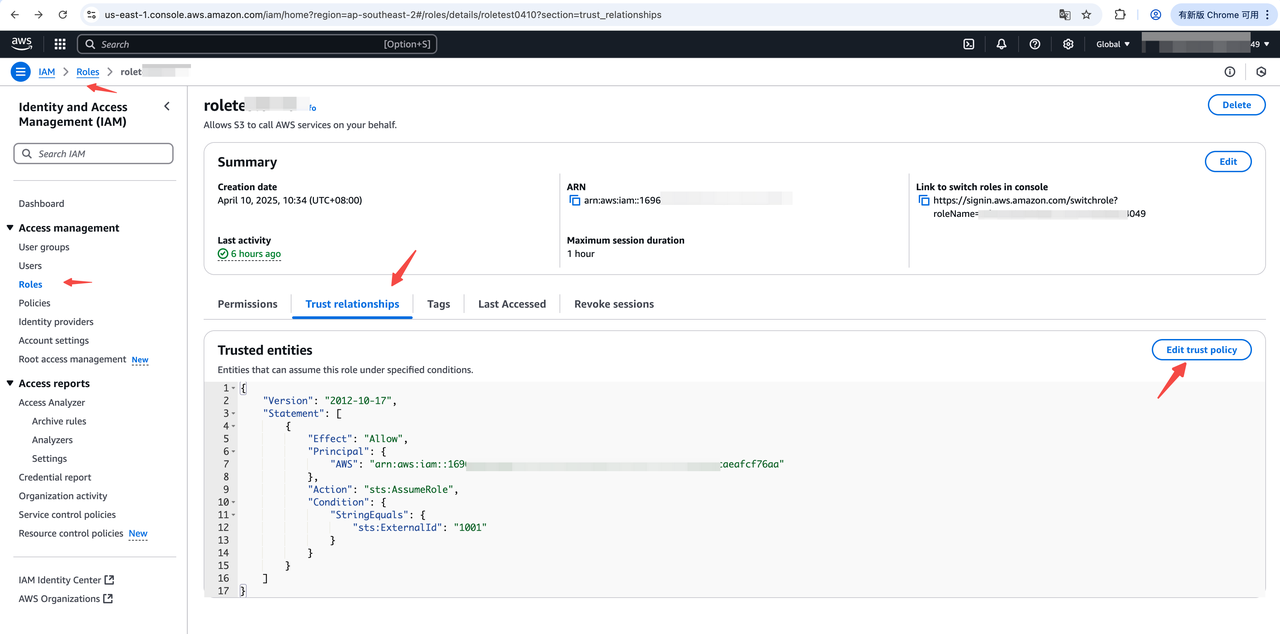
Note: The ExternalId field in Condition is optional. It is used to distinguish scenarios where multiple source users assume the same role. If ExternalId is configured, also pass this value in the corresponding Doris SQL statement. For details about ExternalId, see the AWS official document.
{
    "Version": "2012-10-17",
    "Statement": [
        {
            "Effect": "Allow",
            "Principal": {
                "AWS": "<ec2_iam_role_arn>"
            },
            "Action": "sts:AssumeRole",
            "Condition": {
                "StringEquals": {
                    "sts:ExternalId": "1001"
                }
            }
        }
    ]
}
3.2 Configure the Permission Policy
On the role details page, in the Permissions section, click Add permissions and choose Create inline policy. In the Specify permissions step, switch to the JSON tab, enter the policy below, and click Review policy to save.
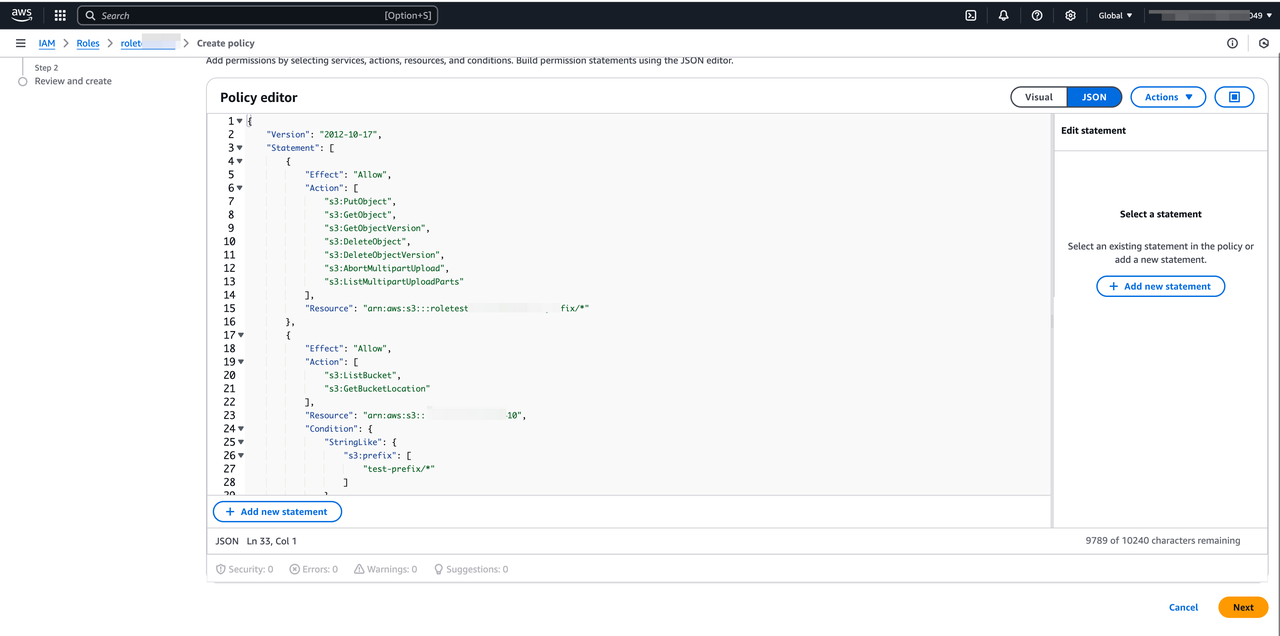
Note:
- Replace the bucket name and prefix path with your own values
- Do not add extra "/" separators
S3 bucket read policy template. Use this for Doris features that only need to read and list objects in the bucket, such as S3 Load, TVF, and External Catalog:
{
    "Version": "2012-10-17",
    "Statement": [
        {
            "Effect": "Allow",
            "Action": [
              "s3:GetObject",
              "s3:GetObjectVersion"
            ],
            "Resource": "arn:aws:s3:::<bucket>/<prefix>/*"
        },
        {
            "Effect": "Allow",
            "Action": [
                "s3:ListBucket",
                "s3:GetBucketLocation"
            ],
            "Resource": "arn:aws:s3:::<bucket>",
        }
    ]
}
S3 bucket write policy template. Use this for Doris features that need to read from and write to the bucket, such as Export, Storage Vault, Resource, and Repository:
{
    "Version": "2012-10-17",
    "Statement": [
        {
            "Effect": "Allow",
            "Action": [
              "s3:PutObject",
              "s3:GetObject",
              "s3:GetObjectVersion",
              "s3:DeleteObject",
              "s3:DeleteObjectVersion",
              "s3:AbortMultipartUpload",
              "s3:ListMultipartUploadParts"
            ],
            "Resource": "arn:aws:s3:::<bucket>/<prefix>/*"
        },
        {
            "Effect": "Allow",
            "Action": [
                "s3:ListBucket",
                "s3:GetBucketLocation"
            ],
            "Resource": "arn:aws:s3:::<bucket>"
        }
    ]
}
Step 4: Use role_arn and external_id in Doris SQL
After completing the previous steps, you have the role_arn of the target account and (optionally) external_id. In Doris SQL, the following two fields are the keys:
"s3.role_arn" = "<your-bucket-role-arn>",
"s3.external_id" = "<your-external-id>"      -- Optional parameter
S3 Load
  LOAD LABEL s3_load_2022_04_01
  (
      DATA INFILE("s3://your_bucket_name/s3load_example.csv")
      INTO TABLE test_s3load
      COLUMNS TERMINATED BY ","
      FORMAT AS "CSV"
      (user_id, name, age)
  )
  WITH S3
  (
      "provider" = "S3",
      "s3.endpoint" = "https://s3.us-east-1.amazonaws.com",
      "s3.region" = "us-east-1",
      "s3.role_arn" = "<your-bucket-role-arn>",
      "s3.external_id" = "<your-external-id>"      -- Optional parameter
  )
  PROPERTIES
  (
      "timeout" = "3600"
  );
TVF
  SELECT * FROM S3 (
      "uri" = "s3://your_bucket/path/to/tvf_test/test.parquet",
      "format" = "parquet",
      "s3.endpoint" = "https://s3.us-east-1.amazonaws.com",
      "s3.region" = "us-east-1",
      "s3.role_arn" = "<your-bucket-role-arn>",
      "s3.external_id" = "<your-external-id>"      -- Optional parameter
  )
External Catalog
  CREATE CATALOG iceberg_catalog PROPERTIES (
      "type" = "iceberg",
      "iceberg.catalog.type" = "hadoop",
      "warehouse" = "s3://your_bucket/dir/key",
      "s3.endpoint" = "https://s3.us-east-1.amazonaws.com",
      "s3.region" = "us-east-1",
      "s3.role_arn" = "<your-bucket-role-arn>",
      "s3.external_id" = "<your-external-id>"      -- Optional parameter
  );
Storage Vault
CREATE STORAGE VAULT IF NOT EXISTS s3_demo_vault
PROPERTIES (
    "type" = "S3",
    "s3.endpoint" = "https://s3.us-east-1.amazonaws.com",
    "s3.region" = "us-east-1",
    "s3.bucket" = "<your-bucket>",
    "s3.role_arn" = "<your-bucket-role-arn>",
    "s3.external_id" = "<your-external-id>",            -- Optional parameter
    "s3.root.path" = "s3_demo_vault_prefix",
    "provider" = "S3",
    "use_path_style" = "false"
);
Export
EXPORT TABLE s3_test TO "s3://your_bucket/a/b/c"
PROPERTIES (
    "column_separator"="\\x07",
    "line_delimiter" = "\\x07"
) WITH S3 (
    "s3.endpoint" = "https://s3.us-east-1.amazonaws.com",
    "s3.region" = "us-east-1",
    "s3.role_arn" = "<your-bucket-role-arn>",
    "s3.external_id" = "<your-external-id>"
)
Repository
CREATE REPOSITORY `s3_repo`
WITH S3
ON LOCATION "s3://your_bucket/s3_repo"
PROPERTIES
(
    "s3.endpoint" = "https://s3.us-east-1.amazonaws.com",
    "s3.region" = "us-east-1",
    "s3.role_arn" = "<your-bucket-role-arn>",
    "s3.external_id" = "<your-external-id>"
);
Resource
CREATE RESOURCE "remote_s3"
PROPERTIES
(
    "s3.endpoint" = "https://s3.us-east-1.amazonaws.com",
    "s3.region" = "us-east-1",
    "s3.bucket" = "<your-bucket>",
    "s3.role_arn" = "<your-bucket-role-arn>",
    "s3.external_id" = "<your-external-id>"
);
IAM Role Authentication and Authorization in EKS Clusters
For Apache Doris running in an Amazon EKS cluster, Amazon EKS provides two main ways to grant it AWS Identity and Access Management (IAM) permissions:
- IAM Roles for Service Accounts (IRSA)
- EKS Pod Identity
Both methods require correctly configuring an IAM Role and its trust policy and IAM policy in the EKS cluster. For detailed configuration steps, see the AWS official document Granting AWS Identity and Access Management permissions to workloads on Amazon Elastic Kubernetes Service clusters.
After the EKS-side configuration is complete, Doris FE/BE automatically obtains credentials through AWSCredentialsProviderChain. You do not need to explicitly specify access_key / secret_key or role_arn in SQL.
Bucket Policy Authentication and Authorization
For Doris machines deployed with an IAM Role, Load, Export, TVF, and similar scenarios also support using an Amazon S3 Bucket Policy to protect access to objects in S3. This method restricts access to the bucket so that only the account that owns the EC2 machine can access it.
Step 1: Set a Bucket Policy on the Target Bucket
Replace arn:aws:iam::111122223333:root in the policy below with the ARN of the account or Role bound to the EC2 machine:
{
    "Version": "2012-10-17",
    "Statement": [
        {
            "Effect": "Allow",
            "Principal": {
                "AWS": [
                    "arn:aws:iam::111122223333:root"
                ]
            },
            "Action": [
                "s3:PutObject",
                "s3:GetObject",
                "s3:GetObjectVersion",
                "s3:DeleteObject",
                "s3:DeleteObjectVersion",
                "s3:AbortMultipartUpload",
                "s3:ListMultipartUploadParts"
            ],
            "Resource": "arn:aws:s3:::<bucket>/<prefix>/*"
        },
        {
            "Effect": "Allow",
            "Principal": {
                "AWS": [
                    "arn:aws:iam::111122223333:root"
                ]
            },
            "Action": [
                "s3:ListBucket",
                "s3:GetBucketLocation"
            ],
            "Resource": "arn:aws:s3:::<bucket>",
        }
    ]
}
Step 2: Access S3 Directly in Doris SQL (No AK/SK or ARN Required)
After the Bucket Policy is set, you do not need to provide access_key, secret_key, or role_arn in SQL. Doris FE/BE automatically obtains credentials through AWSCredentialsProviderChain:
  SELECT * FROM S3 (
      "uri" = "s3://your_bucket/path/to/tvf_test/test.parquet",
      "format" = "parquet",
      "s3.endpoint" = "https://s3.us-east-1.amazonaws.com",
      "s3.region" = "us-east-1"
  )
Reference: Bucket Policy examples
Best Practices for Authorization Methods
| Authorization method | Applicable scenario | Advantages | Disadvantages |
|---|---|---|---|
| AK/SK authorization | On-premise deployments with controllable security, or Load/Export/Storage Vault on non-AWS S3 object stores | Simple configuration. Works with any object store compatible with the AWS S3 protocol | Risk of key leakage. Keys must be rotated manually |
| IAM Role authorization | AWS S3 public cloud Load/Export/Storage Vault scenarios with higher security requirements | High security. AWS credentials are rotated automatically. Permissions are managed centrally | Complex Bucket Policy/Trust configuration process |
| Bucket Policy authorization | AWS S3 public cloud Load/Export/Storage Vault scenarios with a small number of buckets | Moderate configuration complexity. Follows the principle of least privilege. AWS credentials are detected automatically | Permissions are scattered across individual bucket policies |
FAQ
Q: How do I enable AWS SDK DEBUG-level logs for BE and Recycler?
In be.conf and doris_cloud.conf, set aws_log_level=5 and restart the process for the change to take effect.
The aws_log_level parameter is described as follows:
| Item | Description |
|---|---|
| Type | int32 |
| Description | AWS SDK log level |
| Default | 2 (Error) |
Valid values:
Off   = 0
Fatal = 1
Error = 2
Warn  = 3
Info  = 4
Debug = 5
Trace = 6
Q: After enabling AWS SDK DEBUG logs, be.log / recycler.log reports OpenSSL SSL_connect: Connection reset by peer?
Example error:
OpenSSL SSL_connect: Connection reset by peer in connection to sts.me-south-1.amazonaws.com:443
Check the AWS VPC network configuration or firewall port configuration for any issue that prevents access to the STS service in the corresponding region. You can verify with the following command:
telnet sts.<region>.amazonaws.com 443
