Cross-Cluster Replication Overview
CCR (Cross Cluster Replication) is the cross-cluster data replication mechanism provided by Apache Doris. It automatically replicates data changes from a source cluster to a target cluster at the database or table level, and is suitable for disaster recovery backup, read-write separation, data consolidation, isolated upgrade, and cluster migration. This article describes the applicable scenarios, task types, architectural principles, and sync modes of CCR, and provides download links for Syncer in each version.
Applicable Scenarios
CCR is suitable for the following typical business scenarios:
| Scenario | Value | Typical Problems |
|---|---|---|
| Disaster recovery backup | Back up enterprise data to another cluster or data center | Ensures rapid data recovery in the event of business interruption or data loss |
| Read-write separation | Separate query operations from write operations to distribute load | In high-concurrency or write-heavy scenarios, reduces interference between reads and writes and improves database performance and stability |
| Data consolidation | Consolidate data from branch offices in different regions to headquarters | Group headquarters needs unified management and analysis of data from multiple locations, avoiding management chaos caused by data inconsistency |
| Isolated upgrade | Perform version validation and testing in a new cluster | Avoids rollback difficulties caused by version compatibility issues during system cluster upgrades, and allows clusters to be upgraded gradually while maintaining data consistency |
| Cluster migration | Replicate data from an old cluster to a new cluster | Ensures data consistency during data center relocation or hardware replacement of a Doris cluster |
Task Types
CCR supports the following two task types, which can be chosen according to business granularity:
| Task Type | Sync Granularity | Applicable Scenarios | Limitations |
|---|---|---|---|
| Database-level task | Syncs data of an entire database | Whole-database disaster recovery, whole-database migration | None |
| Table-level task | Syncs data of specified tables only | Sync and sharing of specific tables | Does not support renaming or replacing tables; each Doris database can run only one snapshot task at a time, so full sync tasks for table-level sync must be queued |
Principle and Architecture
Glossary
Before reading the following content, clarify these terms:
- Source cluster: The cluster where the data source resides, usually the cluster to which business data is written.
- Target cluster: The target cluster of cross-cluster replication.
- binlog: The change log of the source cluster, which includes schema and data changes.
- Syncer: A lightweight process responsible for replicating data.
- Upstream: Refers to the upstream database in a database-level task, and to the upstream table in a table-level task.
- Downstream: Refers to the downstream database in a database-level task, and to the downstream table in a table-level task.
Architecture Description
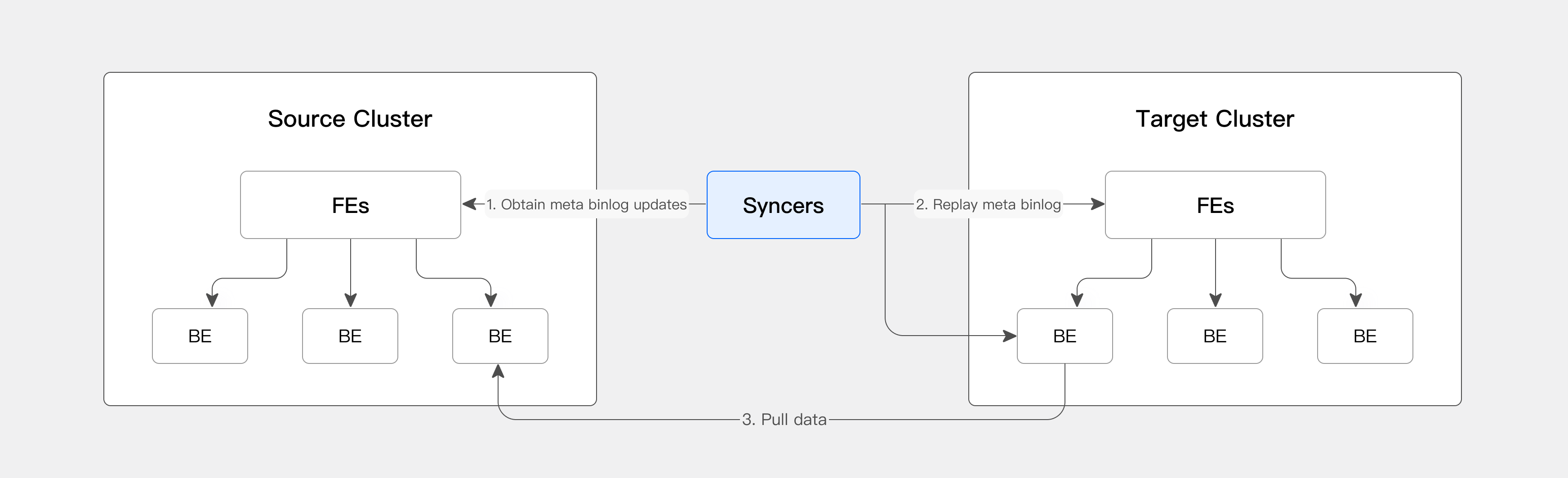
CCR mainly relies on a lightweight process: Syncer. Syncer is responsible for fetching binlog from the source cluster, applying metadata to the target cluster, and notifying the target cluster to pull data from the source cluster, thereby achieving full sync and incremental sync.
Sync Principle
The CCR sync process follows a "full sync + incremental sync" model, and restarts full sync under specific conditions:
-
Full sync
A CCR task first performs full sync, copying upstream data to the downstream completely in one pass.
-
Incremental sync
After full sync completes, the CCR task continues with incremental sync to keep upstream and downstream data consistent.
-
Conditions for restarting full sync
- When a DDL operation that incremental sync currently does not support is encountered, the CCR task restarts full sync. For details on which DDL operations are not supported by incremental sync, see Feature Details.
- If the upstream binlog is interrupted due to expiration or other reasons, incremental sync stops and full sync restarts.
-
Behavior during full sync restart
- While full sync is in progress, incremental sync is paused.
- After full sync completes, the downstream data table is replaced atomically to ensure data consistency.
- After full sync completes, incremental sync resumes.
Sync Modes
CCR supports four sync modes. For trigger conditions, see Feature Details:
| Sync Mode | Principle | Trigger Timing |
|---|---|---|
| Full Sync | The upstream performs a full backup and the downstream performs a restore. A database-level task triggers a database backup, and a table-level task triggers a table backup. | Triggered on first sync or by specific operations. For trigger conditions, see Feature Details. |
| Partial Sync | Backup at the upstream table or partition level, restore at the downstream table or partition level. | Triggered by specific operations. For trigger conditions, see Feature Details. |
| TXN | Incremental data sync. After the upstream commits, the downstream starts syncing. | Triggered by specific operations. For trigger conditions, see Feature Details. |
| SQL | Replays the upstream SQL operations on the downstream. | Triggered by specific operations. For trigger conditions, see Feature Details. |
Download
Select the corresponding Syncer installation package according to the Doris cluster version and server architecture.
System requirement: glibc >= 2.28
| Version | Architecture | Package URL | SHA256 |
|---|---|---|---|
| 2.1 | ARM64 | ccr-syncer-2.1.10-rc08-arm64.tar.xz | 060093e90150ee24f8a784066436a0a4a1116876ebd6f33d5a844e2dc67f10b0 |
| 2.1 | X64 | ccr-syncer-2.1.10-rc08-x64.tar.xz | 656c0a46e3f0e12b9ff2fb76116ad8362e344a8d1ac31f1b26834aaaa1987a7b |
| 3.0 | ARM64 | ccr-syncer-3.0.6-rc07-arm64.tar.xz | bb136f5c9db60f18c174d32304557065e1581e96ce14009f8e8f9aa4d58628f1 |
| 3.0 | X64 | ccr-syncer-3.0.6-rc07-x64.tar.xz | 31e514b4d55fb4f11204cd023369ef5988ffda3cb3728e974899623ea81dc1ad |
| 4.0 | ARM64 | ccr-syncer-4.0.1-rc03-arm64.tar.xz | 5ea016773c0589b437311a40fe5c2397e01ab4dd5d04a62ba9d6c1d4975522ac |
| 4.0 | X64 | ccr-syncer-4.0.1-rc03-x64.tar.xz | bb26d5cc31403e6d6c9d2feccf82347ff7fde81f174b53907ffec067c5a87b54 |
