FE Log Management
This document is for operations and development engineers running a Doris cluster. It describes the logging system of the FE (Frontend) process, including log file categories, log retention and rolling policies, how to enable DEBUG logs at runtime, and how to integrate logs in container environments.
This document applies to Doris 2.1.4 and later versions.
Use Cases
| Scenario | Recommended section |
|---|---|
| Understand which log files FE produces and what each one is for | Log Categories |
| Adjust log retention days, single-file size, or rolling policy | Log Configuration |
| Enable DEBUG logs for a specific class or package while troubleshooting | Enable DEBUG Logs |
| Deploy in Kubernetes or another container environment and send logs to stdout | Container Environment Log Configuration |
| Find where the audit log is and what it records | fe.audit.log in Log Categories and the audit-related parameters in Log Configuration |
Log Categories
After starting the FE process with sh bin/start_fe.sh --daemon, the FE log directory (controlled by the LOG_DIR configuration, default is the log/ directory under the FE deployment path) produces the following log files:
| Log file | Type | Description |
|---|---|---|
fe.log | Runtime log (main) | The main log of the FE process. Contains runtime logs at all levels (DEBUG, INFO, WARN, ERROR, and so on). |
fe.warn.log | Runtime log (warnings) | Records only logs at WARN level and above. A subset of fe.log, useful for quickly checking warnings or errors. |
fe.audit.log | Audit log | Records all database operations (SQL, DDL, DML, and so on) executed through this FE node. |
fe.out | Standard output / error stream | Captures echo output from the start script and log messages not captured by the log4j framework. A supplement to the runtime log. In rare cases, you may need to check it for additional information. |
fe.gc.log | JVM GC log | Garbage collection log of the FE JVM. Its behavior is controlled by JAVA_OPTS in fe.conf. |
Log Configuration
The following configuration items are all in the fe.conf file. They control log storage path, retention time, retention count, single-file size, and related behavior.
General Configuration
| Configuration Item | Default Value | Options | Description |
|---|---|---|---|
LOG_DIR | ENV(DORIS_HOME)/log | Storage path for all logs. Default is the log/ directory under the FE deployment path. Note that this is an environment variable and the configuration name must be in uppercase. | |
sys_log_level | INFO | INFO, WARN, ERROR, FATAL | Log level of fe.log. Default is INFO. Changing this is not recommended, since the INFO level contains many critical log messages. |
sys_log_mode | NORMAL | NORMAL, BRIEF, ASYNC | Output mode of FE logs. NORMAL is the default mode: logs are written synchronously and include location information. ASYNC writes logs asynchronously and includes location information. BRIEF writes logs asynchronously but omits location information. Performance increases from NORMAL to ASYNC to BRIEF. |
Starting from version 3.0.2, the default value of sys_log_mode is changed to ASYNC.
Runtime Logs (fe.log / fe.warn.log)
| Configuration Item | Default Value | Options | Description |
|---|---|---|---|
log_roll_size_mb | 1024 | Maximum size of an individual fe.log, fe.warn.log, or fe.audit.log file. Default is 1024 MB. When a single log file exceeds this threshold, a new file is created automatically. | |
sys_log_roll_interval | DAY | DAY, HOUR | Rolling interval of fe.log and fe.warn.log. Default is 1 day, meaning a new log file is generated each day. |
sys_log_roll_num | 10 | Maximum number of fe.log and fe.warn.log files within a single day. Default is 10. When the file count exceeds this threshold due to rolling or splitting, older log files are deleted. | |
sys_log_enable_compress | false | true, false | Whether to enable compression for historical fe.log and fe.warn.log files. Default is off. When enabled, historical logs are archived using gzip compression. |
sys_log_verbose_modules | Enables DEBUG-level logging for the specified Java packages or classes. See Enable DEBUG Logs. |
sys_log_roll_num controls the number of retained logs per day, not the total count. It must be combined with sys_log_delete_age to determine the total number of retained logs.
Audit Log (fe.audit.log)
| Configuration Item | Default Value | Options | Description |
|---|---|---|---|
audit_log_dir | ENV(DORIS_HOME)/log | Separate storage path for fe.audit.log. Default is the log/ directory under the FE deployment path. | |
audit_log_roll_interval | DAY | DAY, HOUR | Rolling interval of fe.audit.log. Default is 1 day, meaning a new log file is generated each day. |
audit_log_roll_num | 90 | Maximum number of fe.audit.log files. Default is 90. When the file count exceeds this threshold due to rolling or splitting, older log files are deleted. | |
audit_log_enable_compress | false | true, false | Whether to enable compression for historical fe.audit.log files. Default is off. When enabled, historical audit logs are archived using gzip compression. |
audit_log_modules | {"slow_query", "query", "load", "stream_load"} | Module types recorded in fe.audit.log. Defaults are slow query, query, load, and stream load. "Query" includes all DDL, DML, and SQL operations; "slow query" refers to such operations whose execution time exceeds the qe_slow_log_ms threshold; "load" refers to Broker Load; "stream load" refers to stream load operations. | |
qe_slow_log_ms | 5000 | When the execution time of a DDL, DML, or SQL statement exceeds this threshold, it is recorded separately in the slow_query module of fe.audit.log. Default is 5000 ms. | |
sql_digest_generation_threshold_ms | 5000 | Time threshold for sql_digest generation, in milliseconds. If a query's response time exceeds this threshold, a sql_digest is generated for it in fe.audit.log. Default is 5000 ms. |
Retention by Time (log_rollover_strategy = age)
| Configuration Item | Default Value | Options | Description |
|---|---|---|---|
log_rollover_strategy | age | age, size | Log retention strategy. Default is age, which retains historical logs by time; size retains historical logs by total size. |
sys_log_delete_age | 7d | Supports formats like 7d, 10h, 60m, 120s | Effective only when log_rollover_strategy is age. Controls the retention period for fe.log and fe.warn.log files. Default is 7 days. Logs older than 7 days are deleted automatically. |
audit_log_delete_age | 30d | Supports formats like 7d, 10h, 60m, 120s | Effective only when log_rollover_strategy is age. Controls the retention period for fe.audit.log files. Default is 30 days. Logs older than 30 days are deleted automatically. |
Retention by Size (log_rollover_strategy = size)
| Configuration Item | Default Value | Options | Description |
|---|---|---|---|
info_sys_accumulated_file_size | 4 | Effective only when log_rollover_strategy is size. Controls the cumulative size of fe.log files. Default is 4 GB. When the cumulative log size exceeds this threshold, historical log files are deleted. | |
warn_sys_accumulated_file_size | 2 | Effective only when log_rollover_strategy is size. Controls the cumulative size of fe.warn.log files. Default is 2 GB. When the cumulative log size exceeds this threshold, historical log files are deleted. | |
audit_sys_accumulated_file_size | 4 | Effective only when log_rollover_strategy is size. Controls the cumulative size of fe.audit.log files. Default is 4 GB. When the cumulative log size exceeds this threshold, historical log files are deleted. |
Enable DEBUG Logs
DEBUG-level logs on FE can be turned on by modifying the configuration file, or at runtime through the UI or a REST API. The three options compare as follows:
| Method | Restart required | Scope | Use case |
|---|---|---|---|
Modify fe.conf | FE restart required | All nodes apply their own configuration after restart | Keep certain DEBUG logs on long term |
| FE UI | No restart | Only the current FE node | Temporary investigation, visual operation |
| REST API | No restart | Only the target FE node | Temporary investigation, scripted bulk operations |
Option 1: Through the Configuration File
Add sys_log_verbose_modules to fe.conf. For example:
# Enable DEBUG log only for the class org.apache.doris.catalog.Catalog
sys_log_verbose_modules=org.apache.doris.catalog.Catalog

# Enable DEBUG log for all classes under the package org.apache.doris.catalog
sys_log_verbose_modules=org.apache.doris.catalog

# Enable DEBUG log for all classes under the package org
sys_log_verbose_modules=org
Add the configuration item and restart the FE node for it to take effect.
Option 2: Through the FE UI
The UI supports changing log levels at runtime without restarting the FE node. Procedure:
-
Open the FE node's HTTP port (default 8030) in a browser and sign in to the UI.
-
Click the
Logtab in the top navigation bar.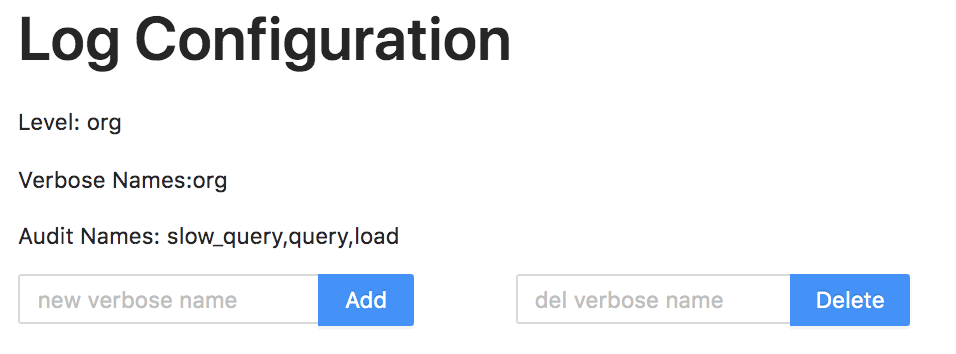
-
In the Add input box, enter a package name or specific class name to turn on the corresponding DEBUG log. For example, entering
org.apache.doris.catalog.Catalogturns on DEBUG logging for the Catalog class: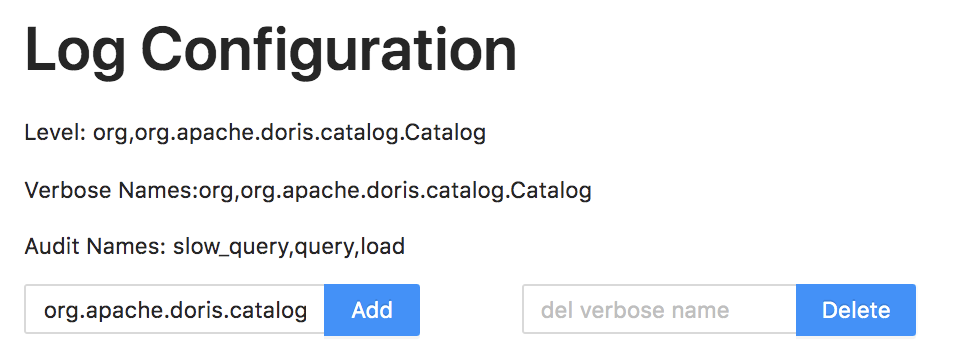
-
In the Delete input box, enter a package name or specific class name to turn off the corresponding DEBUG log.
Changes made here only affect the log level of the corresponding FE node and do not affect other FE nodes.
Option 3: Through the REST API
The REST API also supports changing log levels at runtime without restarting the FE node.
-
Enable DEBUG log
curl -X POST -uuser:passwd fe_host:http_port/rest/v1/log?add_verbose=org.apache.doris.catalog.CatalogThe username and password belong to the root or admin user that signs in to Doris. The
add_verboseparameter specifies the package or class name to enable DEBUG logging for. On success, the response is:{
"msg": "success",
"code": 0,
"data": {
"LogConfiguration": {
"VerboseNames": "org,org.apache.doris.catalog.Catalog",
"AuditNames": "slow_query,query,load",
"Level": "INFO"
}
},
"count": 0
} -
Disable DEBUG log
curl -X POST -uuser:passwd fe_host:http_port/rest/v1/log?del_verbose=org.apache.doris.catalog.CatalogThe
del_verboseparameter specifies the package or class name to disable DEBUG logging for.
Container Environment Log Configuration
In some scenarios (for example, deploying the FE process through Kubernetes), all logs must go to the standard output stream instead of files, so that the container log collector can pick them up uniformly.
Startup Method
Start the FE process in the foreground with the following command. All logs are then sent to the standard output stream:
sh bin/start_fe.sh --console
Log Prefix Identification
To distinguish different log types in the same standard output stream, a different prefix is added to each log line. Example output:
RuntimeLogger 2024-06-24 00:05:21,522 INFO (main|1) [DorisFE.start():158] Doris FE starting...
RuntimeLogger 2024-06-24 00:05:21,530 INFO (main|1) [FrontendOptions.analyzePriorityCidrs():194] configured prior_cidrs value: 172.20.32.136/24
RuntimeLogger 2024-06-24 00:05:21,535 INFO (main|1) [FrontendOptions.initAddrUseIp():101] local address: /172.20.32.136.
RuntimeLogger 2024-06-24 00:05:21,740 INFO (main|1) [ConsistencyChecker.initWorkTime():106] consistency checker will work from 23:00 to 23:00
RuntimeLogger 2024-06-24 00:05:21,889 ERROR (main|1) [Util.report():128] SLF4J: Class path contains multiple SLF4J bindings.
Each prefix corresponds to the following log type:
| Prefix | Corresponding log file | Description |
|---|---|---|
StdoutLogger | fe.out | Logs from the standard output stream. |
StderrLogger | fe.out | Logs from the standard error stream. |
RuntimeLogger | fe.log | Main FE runtime log. |
AuditLogger | fe.audit.log | Audit log. |
| No prefix | fe.gc.log | GC log. |
Additional Configuration for Container Environments
| Configuration Item | Default Value | Options | Description |
|---|---|---|---|
enable_file_logger | true | true, false | Whether to enable file logging. Default is true. When the FE process is started with the --console command, logs are written to both the standard output stream and the regular log files. When set to false, logs are written only to the standard output stream and no log files are produced. |
