Peer Cache Read: Reading File Cache from Other BEs and Compute Groups (Compute-Storage Decoupled)
Peer cache read is how the File Cache handles a miss in compute-storage decoupled mode. When a BE does not have a block in its local File Cache, it first asks the File Cache of another BE, in the same compute group or a different one, and reads from object storage only when no peer has the block either. It only affects the cold-read path; reads that hit the local cache are unchanged.
Cross-group peer cache read is available as an experimental feature starting from Doris 4.2.0 and is disabled by default. To use it, explicitly set enable_cache_read_from_peer = true on the relevant BEs.
Use Cases
| Scenario | What peer read does | Benefit |
|---|---|---|
| Scaling within a compute group | After a scale-out or tablet rebalance, the first reads on the new BE pull cached blocks from the BE that used to serve the tablet instead of going to object storage | Shorter performance dip after rebalancing, less traffic back to object storage |
| Cold reads across compute groups | When this compute group has no cache but another group has already read the same data, the block is read from that group's BE | Lower cold-query latency, fewer reads from object storage |
| Cross-group fill | You designate a "fill compute group". When its BE does not have the block either, it fetches the block from object storage, writes it into its own File Cache, and returns it to the requesting BE | The designated group pays the object storage cost and keeps a copy in its cache |
Performance Reference
In a cold-read test on the TPC-H 1 TB dataset, peer cache read was about twice as fast as reading directly from object storage. The actual gain depends on whether other BEs already hold the data and on how peer network latency compares with object storage latency.
Prerequisites
- A compute-storage decoupled deployment. Peer read does nothing in integrated mode.
- File Cache enabled on every BE (
enable_file_cache = true). - Explicitly set
enable_cache_read_from_peer = true(defaultfalse). - For cross-group fill, the ID of the fill compute group (
compute_group_id). See Designating a Fill Compute Group for how to find it.
Limitations
- Only Doris internal tables are supported. The data cache of external tables (Hive, Iceberg, and others) does not use peer read.
- Peer read is only triggered on a local File Cache miss. Reads issued by warm-up jobs, and the object storage reads a fill server makes on its own behalf, never go through peer read again.
enable_cache_read_from_peercontrols both same-group and cross-group peer read. It is currently not possible to keep same-group peer read while disabling cross-group peer read. Candidates come from FE and naturally include BEs of other compute groups.- The fill server does not yet support files produced by small file merging (Packed File). Those requests fall back to object storage as usual.
- In multi-AZ deployments, cross-group peer read generates cross-AZ network traffic, which may cost extra.
- Peer read is best effort. Whether a read goes to a peer, and to which BE, is decided by the candidate list, timeouts, and the fallback logic.
How It Works
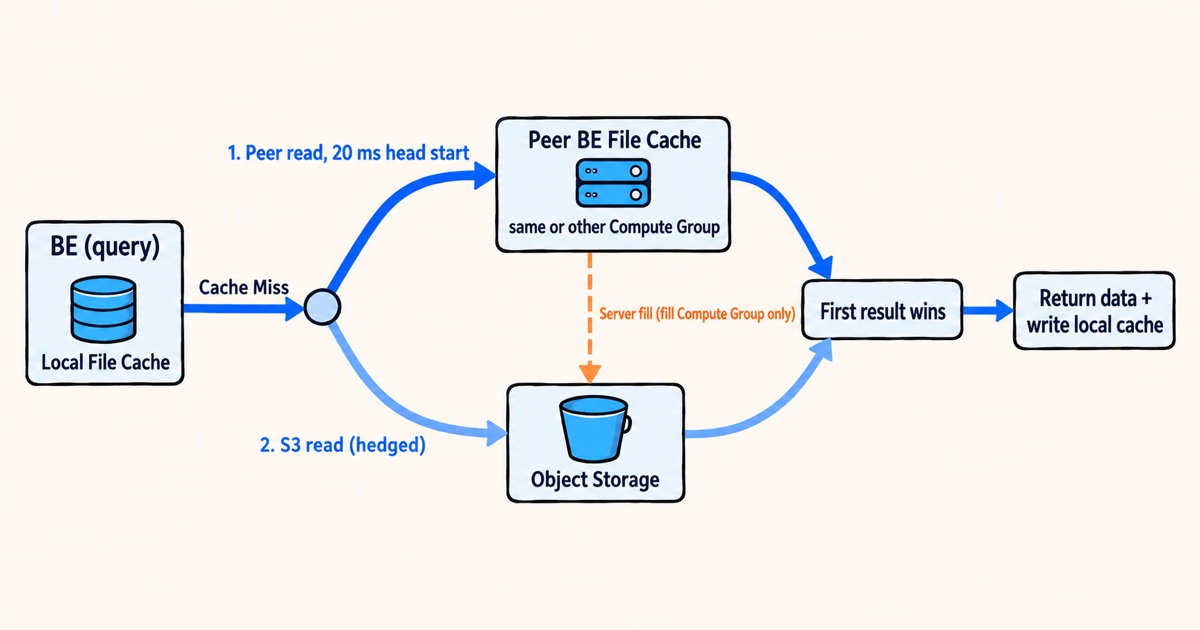
Read Path
- A query that reads a block first checks the local File Cache and returns on a hit.
- On a miss, the BE checks whether it already has peer candidates for the tablet. If there are none, this read goes straight to object storage, and the BE asks FE for candidates in the background. The current request does not wait.
- If there are candidates, the peer read races the object storage read (
enable_peer_s3_race, on by default). The BE sends the peer read first and gives it a head start ofpeer_race_hedge_delay_ms(default 20 ms). If the peer answers within the head start, the object storage read is never sent. - Whichever returns first wins. The data is written into the local File Cache either way, so later reads hit locally.
- If the peer read fails, the read falls back to object storage and the query does not error out. Failures include the candidate not having the block, an RPC error, a full concurrency slot, or a timeout.
With enable_peer_s3_race off, or when the number of concurrent races exceeds max_concurrent_peer_races (default 64), the BE reads sequentially instead: it tries the candidates one by one and reads from object storage only after all of them fail.
A cold query usually issues many concurrent reads. The first read of a segment footer already triggers the candidate fetch, so later reads of the same tablet within the same query can use peer read. Seeing the very first cold read go to object storage is expected.
Where Candidates Come From
| Source | Description | Priority |
|---|---|---|
| Source BE of a rebalance | During a compute group scale-out or tablet rebalance, the warm-up request that FE sends to the target BE records the source BE as a candidate. With balance_type set to without_warmup, no warm-up request is sent and nothing is recorded | Highest |
| Tablet distribution returned by FE | When there are no local candidates, the BE asks FE in the background for the BEs that hold the tablet in every compute group and appends them to the end of the list | Lower |
| Manual setting | Written through the HTTP interface /api/peer_cache?op=set (see Inspecting and Adjusting the Peer Info of a Tablet), normally only for testing and troubleshooting | In the order written |
Candidate Selection and Rotation
- The BE remembers the compute group that last served each tablet successfully and tries that group's candidates first.
- A candidate that does not have the block is moved to the end of the list, so the next read tries a different one. A candidate whose RPCs fail
peer_rpc_failure_eviction_threshold(default 3) times in a row is evicted. - After
peer_all_miss_cooldown_threshold(default 5) consecutive reads in which every candidate missed, the tablet enters a cooldown ofpeer_all_miss_cooldown_duration_s(default 300 seconds). During cooldown, its reads go straight to object storage. - Candidate entries that have not been used for
peer_candidate_expiry_s(default 3600 seconds) are cleared from memory. The next miss fetches them from FE again.
Since version 4.2.0, peer reads share an address-level circuit breaker across tablets. After cache_peer_read_failure_threshold consecutive connection or RPC failures for one address (default 3, effective minimum 1), reads to that address stop for cache_peer_read_circuit_open_seconds seconds (default 30, negative values treated as 0). After that period, only one recovery probe is allowed. This operates independently of tablet candidate eviction and the cooldown after all candidates miss.
Cross-Group Fill
When peer_cache_fill_compute_group_id is set on the requesting BE and the chosen candidate belongs to that compute group, the request carries a fill flag. If the receiving BE does not have the block and enable_peer_server_cache_fill is on (the default), it reads the block from object storage, writes it into its own File Cache, and then returns it.
Fills are bounded by max_concurrent_peer_server_fills (default 32) and peer_server_cache_fill_timeout_ms (default 6000 ms). When the limit is reached or the fill times out, the requesting BE falls back to object storage.
Configuration
All parameters below are BE configs. Except for the thread pool parameters, they can be changed at runtime; see Changing Parameters at Runtime.
Checking or Disabling Peer Read
Peer read is disabled by default. To use it, enable File Cache and set enable_cache_read_from_peer=true in the BE's be.conf, or use the dynamic configuration endpoint below. Same-group and cross-group reads are enabled together, and FE supplies the candidates automatically. Check the current value from a MySQL client:
SHOW BACKEND CONFIG LIKE 'enable_cache_read_from_peer';
To disable it, set the following in be.conf on every BE:
enable_cache_read_from_peer = false
Once disabled, local misses go straight to object storage, and balance strategies that rely on peer read, such as peer_read_async_warmup, lose their effect.
Designating a Fill Compute Group
To have a specific compute group fetch from object storage and fill its own cache during cross-group cold reads, configure the following three steps.
-
Find the ID of the target compute group. The
compute_group_idin theTagcolumn ofSHOW BACKENDSis the compute group ID, notcompute_group_name:SHOW BACKENDS\G*************************** 1. row ***************************
BackendId: 10001
Host: 10.0.0.1
...
Tag: {"cloud_unique_id" : "1:xxx:yyy", "compute_group_id" : "cg_write_01", "compute_group_name" : "write_group", "compute_group_status" : "NORMAL", "location" : "default"} -
On every BE of the compute group that issues the queries, set:
peer_cache_fill_compute_group_id = cg_write_01 -
Confirm that
enable_peer_server_cache_fillistrue(the default) on the BEs of the fill compute group.
Changing Parameters at Runtime
Except for the thread pool parameters, every parameter on this page can be changed at runtime. Add persist=true to persist the change to be_custom.conf:
curl -X POST "http://<be_host>:<be_webserver_port>/api/update_config?enable_cache_read_from_peer=false&persist=true"
curl -X POST "http://<be_host>:<be_webserver_port>/api/update_config?peer_race_hedge_delay_ms=30"
Parameters
Switch and Race
| Parameter | Default | Description |
|---|---|---|
enable_cache_read_from_peer | false | Master switch for peer read. When on, a local File Cache miss first tries other BEs, both in the same compute group and across compute groups |
enable_peer_s3_race | true | Whether the peer read races the object storage read. When off, reads are sequential: candidates are tried one by one, and object storage is read only after all of them fail |
peer_race_hedge_delay_ms | 20 | Head start given to the peer read, in milliseconds. If the peer answers within it, the object storage read is not sent; 0 starts both at the same time |
max_concurrent_peer_races | 64 | Maximum number of concurrent races on one BE. Misses beyond this limit are handled sequentially |
Fill Settings
| Parameter | Default | Description |
|---|---|---|
peer_cache_fill_compute_group_id | "" | Set on the requesting side. ID of the compute group responsible for fills (compute_group_id, not the name). When the chosen candidate belongs to this group, the request carries the fill flag |
enable_peer_server_cache_fill | true | Set on the serving side. Whether to accept requests with the fill flag: if the block is not cached locally, read it from object storage, write it into the local File Cache, and return it |
peer_server_cache_fill_timeout_ms | 6000 | Maximum wait for one fill on the serving side, in milliseconds. On timeout the requesting side falls back to object storage |
max_concurrent_peer_server_fills | 32 | Maximum number of concurrent fills on the serving side. Requests beyond the limit are rejected and the requesting side falls back to object storage |
Candidate Management
| Parameter | Default | Description |
|---|---|---|
peer_rpc_failure_eviction_threshold | 3 | A candidate is evicted after this many consecutive RPC failures |
peer_all_miss_cooldown_threshold | 5 | Number of consecutive reads in which every candidate missed before a tablet enters cooldown |
peer_all_miss_cooldown_duration_s | 300 | Cooldown length in seconds. During cooldown, reads of the tablet go straight to object storage |
peer_candidate_expiry_s | 3600 | Expiry of candidate entries in seconds, measured from the last use. Expired entries are cleared and fetched from FE again on the next miss |
peer_candidate_cleanup_interval_s | 3600 | Interval in seconds of the background job that clears expired candidates |
Thread Pools and Queues
| Parameter | Default | Description |
|---|---|---|
peer_fetch_queue_timeout_ms | 100 | Serving side. A peer read request that waits longer than this (in milliseconds) in the processing queue is rejected, so that the requesting side falls back to object storage quickly |
brpc_peer_fetch_pool_threads | -1 | Serving side. Number of threads that handle peer read requests, isolated from heavy RPCs such as loads. -1 means max(64, 2 × CPU cores). Static; changing it requires a BE restart |
brpc_peer_fetch_pool_max_queue_size | -1 | Queue length of that thread pool. -1 means max(4096, 128 × CPU cores). Static |
min_peer_race_s3_thread_num / max_peer_race_s3_thread_num | 0 / 32 | Requesting side. Size of the thread pool that performs the object storage read during a race. Static |
Side Effects and Caveats
Cross-group peer read weakens the isolation between compute groups. A query in one group uses the network, disk, and File Cache read capacity of another group, and with fill configured it also makes that group spend object storage bandwidth on its behalf. The resources a query consumes are no longer confined to its own compute group.
A fill writes data into the serving BE's local File Cache, which can evict that BE's own hot data.
With the race on, some misses briefly generate both a peer RPC and an object storage read. The 20 ms head start reduces this duplication but does not remove it.
A peer hit is never guaranteed. A full concurrency slot or fill slot on the serving side, a missing block, or a timeout all fall back to object storage. With the race on, a cold query is usually no slower than reading object storage directly, but it is not necessarily faster.
In multi-AZ deployments, cross-group peer read incurs cross-AZ traffic charges.
Observability and Troubleshooting
Query Profile Counters
Peer read counters sit under the SegmentIterator node of the profile, next to the other File Cache counters. See Query Profile for how to obtain and read a profile.
| Counter | Meaning | What it tells you |
|---|---|---|
NumPeerIOTotal | Number of reads served from a peer | Whether the query used peer read at all |
PeerIOUseTimer | Total time spent on the peer read path | Whether the peer path itself is slow |
SameCGPeerIOTotal / SameCGPeerBytesRead / SameCGPeerIOTime | Count, bytes, and time of same-group peer reads | Whether peer reads mostly stay within the compute group |
CrossCGPeerIOTotal / CrossCGPeerBytesRead / CrossCGPeerIOTime | Count, bytes, and time of cross-group peer reads | Whether cross-group reads happened and how much traffic they moved |
PeerRaceWin / S3RaceWin | Number of races won by the peer / by object storage; only meaningful with enable_peer_s3_race = true | A much higher S3RaceWin means the peer is not the faster path in this environment |
PeerLazyFetch / PeerLazyFetchTime | Count and time of background candidate fetches from FE, triggered when the tablet had no candidates | Explains why the first read did not go to a peer |
PeerCacheNodes | Peer nodes the query actually read from | Which BEs the data came from |
InvertedIndexNumPeerIOTotal / InvertedIndexPeerIOUseTimer and SegmentFooterIndexNumPeerIOTotal / SegmentFooterIndexPeerIOUseTimer count peer reads and their time for inverted index files and for segment footers and internal indexes. They tell you whether index reads also hit a peer.
BE bvar Metrics
Read them with curl http://<be_host>:<brpc_port>/vars (brpc_port defaults to 8060). Requesting side (the BE that issues the read):
| Metric | Meaning |
|---|---|
cached_remote_reader_peer_read | Number of peer reads issued |
cached_remote_reader_s3_read | Number of object storage reads issued |
peer_race_peer_win / peer_race_s3_win | Number of races won by the peer / by object storage |
peer_same_compute_group_read / peer_cross_compute_group_read | Number of successful same-group / cross-group peer reads |
peer_lazy_fetch_triggered | Number of background candidate fetches from FE |
peer_cache_reader_peer_latency | Peer RPC latency |
Serving side (the BE that provides the cache):
| Metric | Meaning |
|---|---|
file_cache_get_by_peer_num / file_cache_get_by_peer_success_num / file_cache_get_by_peer_failed_num | Peer read requests received, and how many succeeded or failed |
file_cache_get_by_peer_queue_timeout_num | Requests rejected because they waited longer than peer_fetch_queue_timeout_ms in the queue |
peer_server_fill_requested / peer_server_fill_success | Fills requested and fills completed |
peer_server_fill_timeout / peer_server_fill_rejected | Fills that timed out, and fills rejected because no slot was free |
How to read them:
cached_remote_reader_peer_readhigh andcached_remote_reader_s3_readlow: peer read is working overall.peer_race_s3_winclearly abovepeer_race_peer_win: the peer is not the faster path here. Raisepeer_race_hedge_delay_ms, or disable peer read.peer_cross_compute_group_readhigh: cross-group traffic is happening, so keep an eye on isolation.peer_server_fill_requestedhigh butpeer_server_fill_successlow andpeer_server_fill_timeouthigh: the fill compute group is overloaded or misconfigured.
Inspecting and Adjusting the Peer Info of a Tablet
The BE exposes /api/peer_cache on its webserver_port (default 8040) for viewing and modifying the candidates of a single tablet. It is mainly a troubleshooting tool.
Show the candidates, the last successful compute group, the consecutive miss count, and the cooldown state of one tablet:
curl "http://<be_host>:<be_webserver_port>/api/peer_cache?op=show&tablet_id=<tablet_id>"
{
    "tablet_id": 10086,
    "candidates": [
        {"host": "10.0.0.2", "brpc_port": 8060, "compute_group_id": "cg_write_01", "last_access_time_ms": 1758441600000, "consecutive_rpc_failures": 0}
    ],
    "last_successful_compute_group_id": "cg_write_01",
    "fetching_from_fe": false,
    "consecutive_all_miss": 0,
    "cooldown_until_ms": 0
}
List every tablet on this BE that has candidates. limit defaults to 1000:
curl "http://<be_host>:<be_webserver_port>/api/peer_cache?op=show_all&limit=100"
Force the candidates of a tablet (JSON request body):
curl -X POST "http://<be_host>:<be_webserver_port>/api/peer_cache?op=set&tablet_id=<tablet_id>" \
    -H "Content-Type: application/json" \
    -d '{
        "candidates": [
            {"host": "10.0.0.2", "brpc_port": 8060, "compute_group_id": "cg_write_01"}
        ],
        "last_successful_compute_group_id": "cg_write_01",
        "consecutive_all_miss": 0,
        "cooldown_until_ms": 0
    }'
Remove the candidates of a tablet, or clear its cooldown:
curl -X POST "http://<be_host>:<be_webserver_port>/api/peer_cache?op=remove&tablet_id=<tablet_id>"
curl -X POST "http://<be_host>:<be_webserver_port>/api/peer_cache?op=reset_cooldown&tablet_id=<tablet_id>"
Best Practices
- Use it together with cache warmup. Warm-up pulls data from object storage ahead of time; peer read pulls it from other BEs at query time. Warm-up covers the hot data you know about, and peer read catches the cold reads that warm-up missed.
- Keep peer read on before scaling. After a scale-out or tablet rebalance, peer read lets the new BE reuse the cache of the source BE. Combined with
balance_type = peer_read_async_warmup, the mapping switches immediately and peer read smooths the transition; see Scale Compute Groups. - In a read/write separation setup, make the write compute group the fill group. Cold reads on the read-only group then let the write group fetch from object storage and keep a copy; see File Cache Optimization Best Practices for Read/Write Separation.
- Turn peer read off (
enable_cache_read_from_peer = false) when compute groups must stay strictly isolated, or when the cluster spans AZs and cross-AZ traffic charges matter. - Look at the metrics before tuning. Use
PeerRaceWin/S3RaceWinand the bvars to see whether the peer is winning, then decide whether to adjustpeer_race_hedge_delay_msor disable the race.
FAQ
Q: Why did the first cold read still go to object storage?
When the BE has no candidates for the tablet yet, the current request does not wait for FE. It reads from object storage while the candidates are fetched in the background. Later reads of the same tablet in the same query, and all later queries, use peer read. A PeerLazyFetch value above 0 in the profile marks this case.
Q: How do I confirm that a query used peer read?
Check NumPeerIOTotal, SameCGPeerIOTotal, CrossCGPeerIOTotal, and PeerCacheNodes in the profile. On the BE, cached_remote_reader_peer_read should also be growing.
Q: Can I allow peer read within a compute group but block it across compute groups?
Not currently. enable_cache_read_from_peer controls both kinds of peer read, and the candidates returned by FE include BEs from every compute group.
Q: How do I turn peer read off?
Set enable_cache_read_from_peer = false on every BE. The change can be applied at runtime. After that, local misses read from object storage directly.
Q: S3RaceWin is far higher than PeerRaceWin. What should I do?
Reading from the peer is not faster than reading from object storage in your environment, usually because of peer network latency or a busy peer BE. Try a larger peer_race_hedge_delay_ms and watch the counters, or disable peer read.
Q: A tablet never uses peer read.
Run /api/peer_cache?op=show&tablet_id=<tablet_id>. An empty candidates list means no candidates have been fetched yet. A non-zero cooldown_until_ms means the tablet is in cooldown, which op=reset_cooldown clears.
Q: Cross-group fill is not taking effect.
Check, in order: peer_cache_fill_compute_group_id on the requesting side is the compute group ID, not the name; the chosen candidate really belongs to that group (compute_group_id in the op=show output); enable_peer_server_cache_fill is true on the fill side; and whether peer_server_fill_rejected or peer_server_fill_timeout is growing.