Broker Load
Broker Load is initiated through the MySQL API. Doris actively pulls data from a remote data source according to the information in the LOAD statement. It is an asynchronous import method. After submission, you need to use the SHOW LOAD statement to check the import progress and result.
This method is deprecated and will be removed in version 5.0. Please use "insert into table select xxx from tvf or catalog table" instead.
Broker Load is suitable for the following typical scenarios:
- The source data is stored in a remote system (such as object storage or HDFS).
- The data volume of a single import is large (GB to TB level).
- You want to import data asynchronously in batches, with Doris itself controlling concurrency and retries.
You can also import data through HDFS TVF or S3 TVF in Lakehouse / TVF combined with
INSERT INTO.INSERT INTObased on TVF is currently a synchronous import, while Broker Load is an asynchronous import.
In early versions of Doris, both S3 Load and HDFS Load connected to a specific Broker process through WITH BROKER. As versions evolved, S3 Load and HDFS Load no longer rely on an additional Broker process, but they still use a syntax similar to Broker Load. For historical reasons and syntactic similarity, S3 Load, HDFS Load, and Broker Load are collectively referred to as Broker Load.
Limitations
The following table summarizes the capabilities of Broker Load:
| Dimension | Supported scope |
|---|---|
| Storage backend | S3 protocol, HDFS protocol, other protocols (a corresponding Broker process is required) |
| File path pattern | Wildcards *, ?, [abc], [a-z]; range expansion {1..10}, {a,b,c}. For the full syntax, see File Path Pattern. |
| Data format | CSV, JSON, PARQUET, ORC |
| Compression type | PLAIN, GZ, LZO, BZ2, LZ4FRAME, DEFLATE, LZOP, LZ4BLOCK, SNAPPYBLOCK, ZLIB, ZSTD |
Basic Principles
After you submit an import job:
- The FE generates the corresponding plan and distributes it to multiple BEs for execution based on the current number of BEs and the file size.
- Each BE is responsible for importing part of the data: it pulls data from the Broker, performs data conversion, and writes the data into the Doris system.
- After all BEs complete the import, the FE makes the final decision on whether the import succeeded.
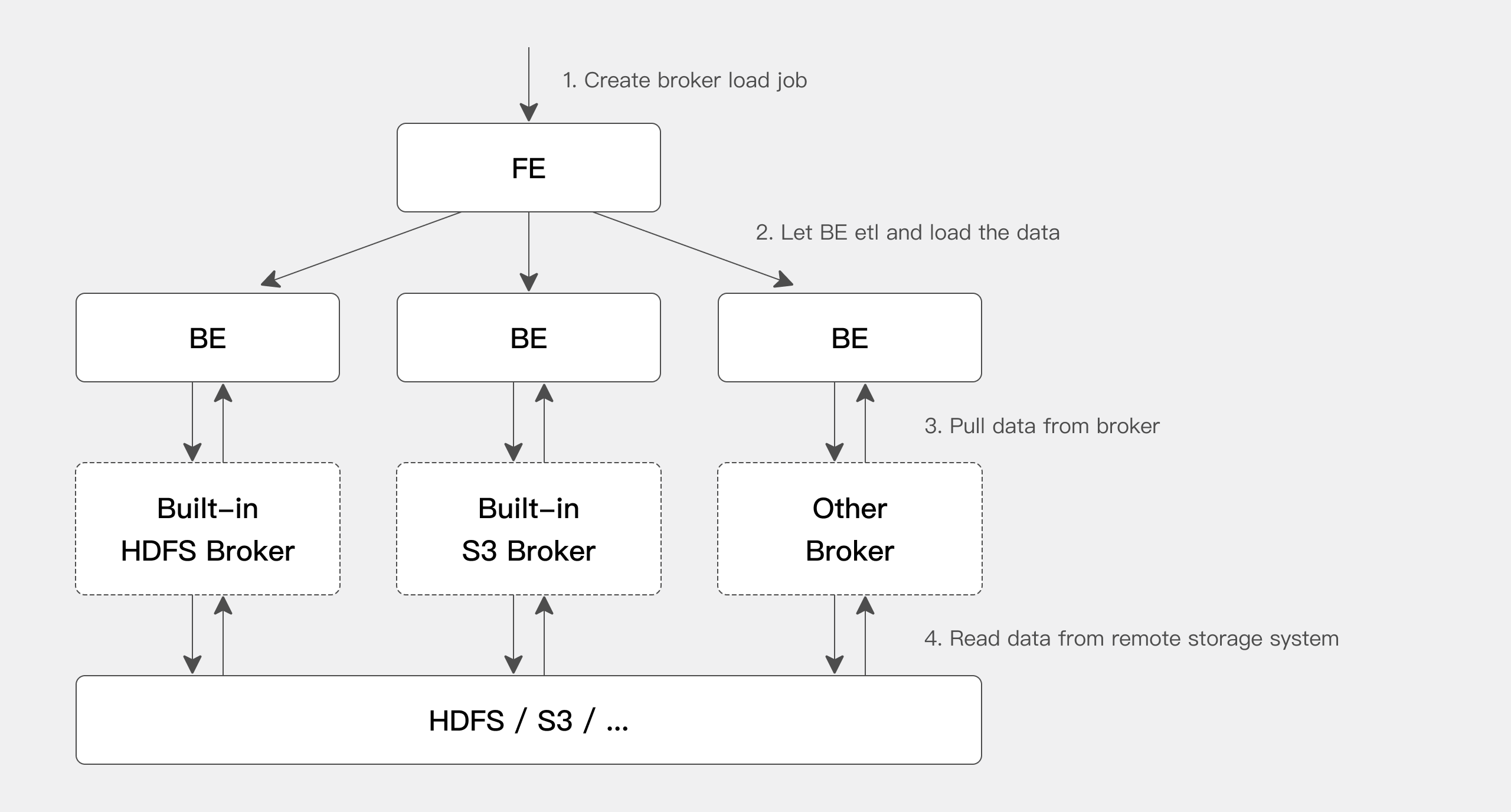
The BE reads data from a remote storage system through the Broker process. The main purposes of introducing the Broker are:
- Ecosystem compatibility: You can develop in Java according to the Broker standard, which makes it easy to support various storage systems in the big data ecosystem.
- Error isolation: The Broker process is separated from the BE process, which improves BE stability.
The BE has built-in support for HDFS and S3, so importing data from HDFS or S3 does not require starting an additional Broker process. If you have a custom Broker implementation, you need to deploy the corresponding Broker process.
Quick Start
This section uses S3 Load as an example to demonstrate the complete process. For the full syntax, see Broker Load in the SQL manual.
Pre-checks
1. Doris table privilege
Broker Load requires the INSERT privilege on the target table. If you do not have this privilege, grant it with the GRANT command.
2. S3 authentication and connection information
Taking AWS S3 as an example (other object storage systems can refer to this):
| Information | How to obtain |
|---|---|
| AK / SK | View or create Access keys in My Security Credentials of the AWS Console. |
| REGION | Selected when creating the bucket, or viewable in the bucket list. |
| ENDPOINT | See AWS documentation: S3 Endpoints. |
Create an Import Job
Step 1: Prepare a CSV file on S3
Create brokerload_example.csv with the following content:
1,Emily,25
2,Benjamin,35
3,Olivia,28
4,Alexander,60
5,Ava,17
6,William,69
7,Sophia,32
8,James,64
9,Emma,37
10,Liam,64
Step 2: Create the target table in Doris
CREATE TABLE testdb.test_brokerload(
    user_id            BIGINT       NOT NULL COMMENT "user id",
    name               VARCHAR(20)           COMMENT "name",
    age                INT                   COMMENT "age"
)
DUPLICATE KEY(user_id)
DISTRIBUTED BY HASH(user_id) BUCKETS 10;
Step 3: Submit the Broker Load job
Replace the bucket name and S3 authentication information with actual values:
LOAD LABEL broker_load_2022_04_01
(
    DATA INFILE("s3://your_bucket_name/brokerload_example.csv")
    INTO TABLE test_brokerload
    COLUMNS TERMINATED BY ","
    FORMAT AS "CSV"
    (user_id, name, age)
)
WITH S3
(
    "provider" = "S3",
    "AWS_ENDPOINT" = "https://s3.us-west-2.amazonaws.com",
    "AWS_ACCESS_KEY" = "<your-ak>",
    "AWS_SECRET_KEY"="<your-sk>",
    "AWS_REGION" = "us-west-2",
    "compress_type" = "PLAIN"
)
PROPERTIES
(
    "timeout" = "3600"
);
The provider field needs to be filled in according to the actual object storage service provider. The list of provider values supported by Doris is as follows:
| provider | Vendor |
|---|---|
S3 | Amazon AWS |
AZURE | Microsoft Azure |
GCP | Google GCP |
OSS | Alibaba Cloud |
COS | Tencent Cloud |
OBS | Huawei Cloud |
BOS | Baidu Cloud |
If a provider is not in the list (for example, MinIO), you can try using S3 (AWS-compatible mode).
View the Import Job
Broker Load is an asynchronous import. You can view the specific result through the SHOW LOAD command:
mysql> show load order by createtime desc limit 1\G;
*************************** 1. row ***************************
         JobId: 41326624
         Label: broker_load_2022_04_01
         State: FINISHED
      Progress: ETL:100%; LOAD:100%
          Type: BROKER
       EtlInfo: unselected.rows=0; dpp.abnorm.ALL=0; dpp.norm.ALL=27
      TaskInfo: cluster:N/A; timeout(s):1200; max_filter_ratio:0.1
      ErrorMsg: NULL
    CreateTime: 2022-04-01 18:59:06
  EtlStartTime: 2022-04-01 18:59:11
 EtlFinishTime: 2022-04-01 18:59:11
 LoadStartTime: 2022-04-01 18:59:11
LoadFinishTime: 2022-04-01 18:59:11
           URL: NULL
    JobDetails: {"Unfinished backends":{"5072bde59b74b65-8d2c0ee5b029adc0":[]},"ScannedRows":27,"TaskNumber":1,"All backends":{"5072bde59b74b65-8d2c0ee5b029adc0":[36728051]},"FileNumber":1,"FileSize":5540}
1 row in set (0.01 sec)
Cancel an Import Job
When the status of a Broker Load job is not CANCELLED or FINISHED, you can manually cancel it. When canceling, you need to specify the label of the job to cancel. For the syntax, see CANCEL LOAD.
For example, to cancel the import job with label broker_load_2022_04_01 in the database demo:
CANCEL LOAD FROM demo WHERE LABEL = "broker_load_2022_04_01";
Bind a Compute Group
In storage-compute decoupled mode, the priority for Broker Load to select a compute group is:
- Select the compute group specified by the
use db@clusterstatement. - Select the compute group specified by the user property
default_compute_group. - Select one from the compute groups that the current user has permission on.
In storage-compute integrated mode: select the compute group specified in the user property resource_tags.location. If it is not specified in the user property, use the compute group named default.
Reference
Import Command Syntax
LOAD LABEL load_label
(
data_desc1[, data_desc2, ...]
[format_properties]
)
WITH [S3|HDFS|BROKER broker_name]
[broker_properties]
[load_properties]
[COMMENT "comments"];
The WITH clause specifies how to access the storage system, and broker_properties provides the configuration parameters for that access method:
| Clause | Description |
|---|---|
S3 | Storage system using the S3 protocol. |
HDFS | Storage system using the HDFS protocol. |
BROKER broker_name | Storage systems using other protocols. You can view the available broker_name list through SHOW BROKER. See "Other Broker imports" below for details. |
Import Configuration Parameters
Load Properties
| Property name | Type | Default | Description |
|---|---|---|---|
timeout | Long | 14400 | Import timeout, in seconds. Range: 1 to 259200 seconds. |
max_filter_ratio | Float | 0.0 | Maximum tolerable ratio of malformed data. The default is zero tolerance. The value range is 0 to 1. If the error rate exceeds this value, the import fails. Malformed data does not include rows filtered out by the WHERE condition. |
strict_mode | Boolean | false | Whether to enable strict mode. |
partial_columns | Boolean | false | Whether to use partial column update. Only effective for Unique Key tables with Merge on Write. |
timezone | String | "Asia/Shanghai" | The time zone used for this import. It affects the result of all time-zone-related functions. |
load_parallelism | Integer | 8 | The upper limit of the number of concurrent instances on each BE. |
send_batch_parallelism | Integer | 1 | The concurrency of the sink node when sending data. Only effective when memtable-on-sink is disabled. |
load_to_single_tablet | Boolean | false | Whether to import only one tablet per partition. Only allowed on OLAP tables that use random bucketing. |
priority | HIGH / NORMAL / LOW | NORMAL | Priority of the import job. |
Format Properties
| Parameter name | Type | Default | Description |
|---|---|---|---|
skip_lines | Integer | 0 | Skip the specified number of lines at the beginning of the CSV file. Not effective when the format is csv_with_names or csv_with_names_and_types. |
trim_double_quotes | Boolean | false | Whether to trim the outer double quotes of fields. |
enclose | String | "" | The enclosing character used when a field contains a newline or delimiter. For example, when the delimiter is , and the enclosing character is ', 'b,c' is parsed as a single field. |
escape | String | "" | The escape character used to escape the enclosing character. For example, when the escape character is \ and the enclosing character is ', the field 'b,\'c' is correctly parsed as 'b,'c'. |
- Format parameters are used to define how the source file is parsed (such as delimiters and quote handling). They should be set in the
PROPERTIESclause inside theLOADstatement. - Load parameters are used to control import behavior (such as timeout and retries). They should be set in the outermost
PROPERTIESblock outside theLOADstatement.
LOAD LABEL s3_load_example (
    DATA INFILE("s3://bucket/path/file.csv")
    INTO TABLE users
    COLUMNS TERMINATED BY ","
    FORMAT AS "CSV"
    (user_id, name, age)
    PROPERTIES (
        "trim_double_quotes" = "true"  -- Format parameter
    )
)
WITH S3 (
    ...
)
PROPERTIES (
    "timeout" = "3600"  -- Load parameter
);
fe.conf System-level Configuration
The following configurations are system-level configurations of Broker Load that apply to all Broker Load import jobs. They are mainly adjusted by modifying fe.conf.
| Configuration item | Type | Default | Description |
|---|---|---|---|
min_bytes_per_broker_scanner | Long | 67108864 (64 MB) | The minimum amount of data processed by a single BE, in bytes. |
max_bytes_per_broker_scanner | Long | 536870912000 (500 GB) | The maximum amount of data processed by a single BE, in bytes. The maximum amount of data supported by a single import job is approximately max_bytes_per_broker_scanner * number of BE nodes. When a larger data volume is needed, increase this value appropriately. |
max_broker_concurrency | Integer | 10 | The maximum import concurrency of a single job. |
default_load_parallelism | Integer | 8 | The maximum number of concurrent instances per BE node. |
broker_load_default_timeout_second | Integer | 14400 | The default timeout for Broker Load imports, in seconds. |
Calculation of import concurrency
The minimum amount of data to process, the maximum concurrency, the source file size, and the current number of BEs in the cluster jointly determine the concurrency of this import:
Concurrency of this import = Math.min(source file size / min_bytes_per_broker_scanner, max_broker_concurrency, number of current BE nodes * load_parallelism)
Amount processed by a single BE for this import = source file size / concurrency of this import
Session Variables
| Session variable | Type | Default | Description |
|---|---|---|---|
time_zone | String | "Asia/Shanghai" | Default time zone, which affects the result of time-zone-related functions during import. |
send_batch_parallelism | Integer | 1 | The concurrency of the sink node when sending data. Only effective when memtable-on-sink is disabled. |
Import Examples
The following typical scenarios show common usage of Broker Load.
Scenario 1: Import a TXT File from HDFS
LOAD LABEL demo.label_20220402
(
    DATA INFILE("hdfs://host:port/tmp/test_hdfs.txt")
    INTO TABLE `load_hdfs_file_test`
    COLUMNS TERMINATED BY "\t"
    (id,age,name)
)
with HDFS
(
    "fs.defaultFS"="hdfs://host:port",
    "hadoop.username" = "user"
)
PROPERTIES
(
    "timeout"="1200",
    "max_filter_ratio"="0.1"
);
Scenario 2: HDFS with NameNode HA Configuration
LOAD LABEL demo.label_20220402
(
    DATA INFILE("hdfs://hafs/tmp/test_hdfs.txt")
    INTO TABLE `load_hdfs_file_test`
    COLUMNS TERMINATED BY "\t"
    (id,age,name)
)
with HDFS
(
    "hadoop.username" = "user",
    "fs.defaultFS"="hdfs://hafs",
    "dfs.nameservices" = "hafs",
    "dfs.ha.namenodes.hafs" = "my_namenode1, my_namenode2",
    "dfs.namenode.rpc-address.hafs.my_namenode1" = "nn1_host:rpc_port",
    "dfs.namenode.rpc-address.hafs.my_namenode2" = "nn2_host:rpc_port",
    "dfs.client.failover.proxy.provider.hafs" = "org.apache.hadoop.hdfs.server.namenode.ha.ConfiguredFailoverProxyProvider"
)
PROPERTIES
(
    "timeout"="1200",
    "max_filter_ratio"="0.1"
);
Scenario 3: Use Wildcards to Match Two Batches of Files and Import Them into Two Tables
Broker Load supports wildcards (*, ?, [...]) and range patterns ({1..10}) in the file path. For the full syntax, see File Path Pattern.
LOAD LABEL example_db.label2
(
    DATA INFILE("hdfs://host:port/input/file-10*")
    INTO TABLE `my_table1`
    PARTITION (p1)
    COLUMNS TERMINATED BY ","
    (k1, tmp_k2, tmp_k3)
    SET (
        k2 = tmp_k2 + 1,
        k3 = tmp_k3 + 1
    ),
    DATA INFILE("hdfs://host:port/input/file-20*")
    INTO TABLE `my_table2`
    COLUMNS TERMINATED BY ","
    (k1, k2, k3)
)
with HDFS
(
    "fs.defaultFS"="hdfs://host:port",
    "hadoop.username" = "user"
);
Use wildcards to match the two batches of files file-10* and file-20* and import them into my_table1 and my_table2 respectively. my_table1 is imported into partition p1, and the values of the second and third columns in the source file are imported after being incremented by 1.
Scenario 4: Use Wildcards to Import a Batch of Data from HDFS
LOAD LABEL example_db.label3
(
    DATA INFILE("hdfs://host:port/user/doris/data/*/*")
    INTO TABLE `my_table`
    COLUMNS TERMINATED BY "\\x01"
)
with HDFS
(
    "fs.defaultFS"="hdfs://host:port",
    "hadoop.username" = "user"
);
Specify the delimiter as \\x01, the default delimiter commonly used in Hive, and use the wildcard * to specify all files in all subdirectories under the data directory.
Scenario 5: Import Parquet-formatted Data
LOAD LABEL example_db.label4
(
    DATA INFILE("hdfs://host:port/input/file")
    INTO TABLE `my_table`
    FORMAT AS "parquet"
    (k1, k2, k3)
)
with HDFS
(
    "fs.defaultFS"="hdfs://host:port",
    "hadoop.username" = "user"
);
If FORMAT AS is not specified, the format is determined by the file suffix by default.
Scenario 6: Extract Partition Fields from the File Path
LOAD LABEL example_db.label5
(
    DATA INFILE("hdfs://host:port/input/city=beijing/*/*")
    INTO TABLE `my_table`
    FORMAT AS "csv"
    (k1, k2, k3)
    COLUMNS FROM PATH AS (city, utc_date)
)
with HDFS
(
    "fs.defaultFS"="hdfs://host:port",
    "hadoop.username" = "user"
);
The columns of my_table are k1, k2, k3, city, utc_date.
The directory hdfs://hdfs_host:hdfs_port/user/doris/data/input/dir/city=beijing contains the following files:
hdfs://hdfs_host:hdfs_port/input/city=beijing/utc_date=2020-10-01/0000.csv
hdfs://hdfs_host:hdfs_port/input/city=beijing/utc_date=2020-10-02/0000.csv
hdfs://hdfs_host:hdfs_port/input/city=tianji/utc_date=2020-10-03/0000.csv
hdfs://hdfs_host:hdfs_port/input/city=tianji/utc_date=2020-10-04/0000.csv
The files only contain the three columns k1, k2, k3. The two columns city and utc_date are extracted from the file path.
Scenario 7: Filter Imported Data
LOAD LABEL example_db.label6
(
    DATA INFILE("hdfs://host:port/input/file")
    INTO TABLE `my_table`
    (k1, k2, k3)
    SET (
        k2 = k2 + 1
    )
    PRECEDING FILTER k1 = 1
    WHERE k1 > k2
)
with HDFS
(
    "fs.defaultFS"="hdfs://host:port",
    "hadoop.username" = "user"
);
Only rows where k1 = 1 in the source data and k1 > k2 after conversion are imported.
Scenario 8: Extract a Time Partition Field from the File Path
LOAD LABEL example_db.label7
(
    DATA INFILE("hdfs://host:port/user/data/*/test.txt")
    INTO TABLE `tbl12`
    COLUMNS TERMINATED BY ","
    (k2,k3)
    COLUMNS FROM PATH AS (data_time)
    SET (
        data_time=str_to_date(data_time, '%Y-%m-%d %H%%3A%i%%3A%s')
    )
)
with HDFS
(
    "fs.defaultFS"="hdfs://host:port",
    "hadoop.username" = "user"
);
The time contains %3A. HDFS paths do not allow :, so all : characters are replaced with %3A.
The path contains the following files:
/user/data/data_time=2020-02-17 00%3A00%3A00/test.txt
/user/data/data_time=2020-02-18 00%3A00%3A00/test.txt
Table schema:
CREATE TABLE IF NOT EXISTS tbl12 (
    data_time DATETIME,
    k2        INT,
    k3        INT
) DISTRIBUTED BY HASH(data_time) BUCKETS 10
PROPERTIES (
    "replication_num" = "3"
);
Scenario 9: Import with Merge
LOAD LABEL example_db.label8
(
    MERGE DATA INFILE("hdfs://host:port/input/file")
    INTO TABLE `my_table`
    (k1, k2, k3, v2, v1)
    DELETE ON v2 > 100
)
with HDFS
(
    "fs.defaultFS"="hdfs://host:port",
    "hadoop.username"="user"
)
PROPERTIES
(
    "timeout" = "3600",
    "max_filter_ratio" = "0.1"
);
my_table must be a Unique Key table. When v2 > 100 in the imported data, the row is treated as a deletion. The import timeout is 3600 seconds, and the allowed error rate is 10%.
Scenario 10: Specify the source_sequence Column to Ensure Replacement Order
LOAD LABEL example_db.label9
(
    DATA INFILE("hdfs://host:port/input/file")
    INTO TABLE `my_table`
    COLUMNS TERMINATED BY ","
    (k1,k2,source_sequence,v1,v2)
    ORDER BY source_sequence
)
with HDFS
(
    "fs.defaultFS"="hdfs://host:port",
    "hadoop.username"="user"
);
my_table must be a Unique Key model table with a Sequence column specified. The data order is guaranteed by the value of the source_sequence column in the source data.
Scenario 11: Import JSON with json_root / jsonpaths
LOAD LABEL example_db.label10
(
    DATA INFILE("hdfs://host:port/input/file.json")
    INTO TABLE `my_table`
    FORMAT AS "json"
    PROPERTIES(
      "json_root" = "$.item",
      "jsonpaths" = "[\"$.id\", \"$.city\", \"$.code\"]"
    )
)
with HDFS
(
    "fs.defaultFS"="hdfs://host:port",
    "hadoop.username"="user"
);
jsonpaths can also be used together with the column list and SET (column_mapping):
LOAD LABEL example_db.label10
(
    DATA INFILE("hdfs://host:port/input/file.json")
    INTO TABLE `my_table`
    FORMAT AS "json"
    (id, code, city)
    SET (id = id * 10)
    PROPERTIES(
      "json_root" = "$.item",
      "jsonpaths" = "[\"$.id\", \"$.city\", \"$.code\"]"
    )
)
with HDFS
(
    "fs.defaultFS"="hdfs://host:port",
    "hadoop.username"="user"
);
To import the JSON object at the root node of a JSON file, set jsonpaths to $., that is, PROPERTIES("jsonpaths"="$.").
Advanced Configuration
S3 Load URL Access Style
The S3 SDK uses virtual-hosted-style access by default. However, some object storage systems do not enable or do not support virtual-hosted-style. You can add the use_path_style parameter to force path-style:
WITH S3
(
    "AWS_ENDPOINT" = "AWS_ENDPOINT",
    "AWS_ACCESS_KEY" = "AWS_ACCESS_KEY",
    "AWS_SECRET_KEY"="AWS_SECRET_KEY",
    "AWS_REGION" = "AWS_REGION",
    "use_path_style" = "true"
)
S3 Load Temporary Credentials
Temporary credentials (TOKEN) are supported for accessing any object storage that supports the S3 protocol:
WITH S3
(
    "AWS_ENDPOINT" = "AWS_ENDPOINT",
    "AWS_ACCESS_KEY" = "AWS_TEMP_ACCESS_KEY",
    "AWS_SECRET_KEY" = "AWS_TEMP_SECRET_KEY",
    "AWS_TOKEN" = "AWS_TEMP_TOKEN",
    "AWS_REGION" = "AWS_REGION"
)
HDFS Authentication
1. Simple Authentication
Simple authentication means setting the Hadoop configuration hadoop.security.authentication to simple:
(
    "username" = "user",
    "password" = ""
);
Set username to the user to access, and leave the password empty.
2. Kerberos Authentication
This authentication method requires the following information:
| Parameter | Description |
|---|---|
hadoop.security.authentication | Specifies the authentication method as kerberos. |
hadoop.kerberos.principal | Specifies the Kerberos principal. |
hadoop.kerberos.keytab | Specifies the path of the Kerberos keytab file. The file must be an absolute path on the server where the Broker process resides, and must be accessible by the Broker process. |
kerberos_keytab_content | Specifies the base64-encoded content of the keytab file. Use either this or hadoop.kerberos.keytab. |
Example:
(
    "hadoop.security.authentication" = "kerberos",
    "hadoop.kerberos.principal" = "doris@YOUR.COM",
    "hadoop.kerberos.keytab" = "/home/doris/my.keytab"
)
(
    "hadoop.security.authentication" = "kerberos",
    "hadoop.kerberos.principal" = "doris@YOUR.COM",
    "kerberos_keytab_content" = "ASDOWHDLAWIDJHWLDKSALDJSDIWALD"
)
When using Kerberos authentication, a krb5.conf file is required. This file contains Kerberos configuration information and is usually installed in the /etc directory. You can also override the default location through the KRB5_CONFIG environment variable. An example of krb5.conf content:
[libdefaults]
    default_realm = DORIS.HADOOP
    default_tkt_enctypes = des3-hmac-sha1 des-cbc-crc
    default_tgs_enctypes = des3-hmac-sha1 des-cbc-crc
    dns_lookup_kdc = true
    dns_lookup_realm = false

[realms]
    DORIS.HADOOP = {
        kdc = kerberos-doris.hadoop.service:7005
    }
HDFS HA Mode
This configuration is used to access an HDFS cluster deployed in HA mode.
| Parameter | Description |
|---|---|
dfs.nameservices | Specifies the name of the HDFS service (user-defined), for example, "dfs.nameservices" = "my_ha". |
dfs.ha.namenodes.xxx | User-defined NameNode names (multiple names are separated by commas). xxx is the user-defined name in dfs.nameservices, for example, "dfs.ha.namenodes.my_ha" = "my_nn". |
dfs.namenode.rpc-address.xxx.nn | Specifies the RPC address of the NameNode. nn is the NameNode name in dfs.ha.namenodes.xxx, for example, "dfs.namenode.rpc-address.my_ha.my_nn" = "host:port". |
dfs.client.failover.proxy.provider.[nameservice ID] | Specifies the provider used by the client to connect to the NameNode. The default is org.apache.hadoop.hdfs.server.namenode.ha.ConfiguredFailoverProxyProvider. |
Example:
(
    "fs.defaultFS" = "hdfs://my_ha",
    "dfs.nameservices" = "my_ha",
    "dfs.ha.namenodes.my_ha" = "my_namenode1, my_namenode2",
    "dfs.namenode.rpc-address.my_ha.my_namenode1" = "nn1_host:rpc_port",
    "dfs.namenode.rpc-address.my_ha.my_namenode2" = "nn2_host:rpc_port",
    "dfs.client.failover.proxy.provider.my_ha" = "org.apache.hadoop.hdfs.server.namenode.ha.ConfiguredFailoverProxyProvider"
)
HA mode can be combined with the two authentication methods above. For example, to access HA HDFS through simple authentication:
(
    "username"="user",
    "password"="passwd",
    "fs.defaultFS" = "hdfs://my_ha",
    "dfs.nameservices" = "my_ha",
    "dfs.ha.namenodes.my_ha" = "my_namenode1, my_namenode2",
    "dfs.namenode.rpc-address.my_ha.my_namenode1" = "nn1_host:rpc_port",
    "dfs.namenode.rpc-address.my_ha.my_namenode2" = "nn2_host:rpc_port",
    "dfs.client.failover.proxy.provider.my_ha" = "org.apache.hadoop.hdfs.server.namenode.ha.ConfiguredFailoverProxyProvider"
)
Other Broker Imports
Brokers for other remote storage systems are optional processes in a Doris cluster. They are mainly used to support reading and writing files and directories in remote storage. Doris currently provides Broker implementations for the following remote storage systems:
- Tencent Cloud CHDFS
- Tencent Cloud GFS
- JuiceFS
In historical versions, Doris also supported Brokers for various object storage systems, but currently WITH S3 is the recommended way to import data from object storage; WITH BROKER is no longer recommended.
The Broker is a stateless Java process that provides services through an RPC service port. It encapsulates POSIX-like file operations (such as open, pread, pwrite) for read/write operations on remote storage. The Broker does not record any other information. All necessary information, including the connection information, file information, and permission information of the remote storage, must be passed in as parameters of the RPC calls.
The Broker only acts as a data path and does not participate in computation, so it has low memory usage. Usually one or more Broker processes are deployed in a Doris system. Brokers of the same type form a group with a name (Broker name).
Broker Information
Broker information consists of two parts: name and authentication information. The common syntax is:
WITH BROKER "broker_name"
(
    "username" = "xxx",
    "password" = "yyy",
    "other_prop" = "prop_value",
    ...
);
Name (Broker Name)
Specify an existing Broker name through the WITH BROKER "broker_name" clause. The Broker name is the name specified by the user when adding a Broker process through the ALTER SYSTEM ADD BROKER command. A name usually corresponds to one or more Broker processes, and Doris selects an available Broker process by name. You can view the existing Brokers in the cluster through SHOW BROKER.
The Broker name is just a user-defined name and does not represent the type of the Broker.
Authentication information
Different Broker types and different access methods require different authentication information. Authentication information is usually provided as key-value pairs in the property map after WITH BROKER "broker_name".
Connection Configurations for Various Brokers
Alibaba Cloud OSS
(
    "fs.oss.accessKeyId" = "",
    "fs.oss.accessKeySecret" = "",
    "fs.oss.endpoint" = ""
)
Baidu Cloud BOS
When using BOS, download the corresponding SDK package. For specific configuration and usage, see the BOS HDFS official documentation. After downloading and extracting, place the JAR package in the lib directory of the Broker.
(
    "fs.bos.access.key" = "xx",
    "fs.bos.secret.access.key" = "xx",
    "fs.bos.endpoint" = "xx"
)
Huawei Cloud OBS
(
    "fs.obs.access.key" = "xx",
    "fs.obs.secret.key" = "xx",
    "fs.obs.endpoint" = "xx"
)
JuiceFS
(
    "fs.defaultFS" = "jfs://xxx/",
    "fs.jfs.impl" = "io.juicefs.JuiceFileSystem",
    "fs.AbstractFileSystem.jfs.impl" = "io.juicefs.JuiceFS",
    "juicefs.meta" = "xxx",
    "juicefs.access-log" = "xxx"
)
GCS
When accessing GCS through the Broker, Project ID is required. Other parameters are optional. For all parameter configurations, see GCS Config:
(
    "fs.gs.project.id" = "Your Project ID",
    "fs.AbstractFileSystem.gs.impl" = "com.google.cloud.hadoop.fs.gcs.GoogleHadoopFS",
    "fs.gs.impl" = "com.google.cloud.hadoop.fs.gcs.GoogleHadoopFileSystem",
)
FAQ and Troubleshooting
Common Errors
1. Import error: Scan bytes per broker scanner exceed limit:xxx
See the "Import timeout" section. Modify the FE configuration items max_bytes_per_broker_scanner and max_broker_concurrency.
2. Import error: failed to send batch or TabletWriter add batch with unknown id
Adjust query_timeout and streaming_load_rpc_max_alive_time_sec appropriately.
3. Import error: LOAD_RUN_FAIL; msg:Invalid Column Name:xxx
For PARQUET or ORC data, the column names in the file header must match the column names in the Doris table. For example:
(tmp_c1,tmp_c2)
SET
(
    id=tmp_c2,
    name=tmp_c1
)
This means: get the columns named (tmp_c1, tmp_c2) from the Parquet or ORC file, and map them to the (id, name) columns of the Doris table. If SET is not specified, the columns in column are used as the mapping.
Note: For ORC files generated directly by some Hive versions, the file header is not the Hive metadata but
(_col0, _col1, _col2, ...), which may cause anInvalid Column Nameerror. In this case, useSETfor mapping.
4. Import error: Failed to get S3 FileSystem for bucket is null/empty
The bucket information is incorrect or does not exist, or the bucket format is not supported. For example, when GCS is used to create a bucket name with _ (such as s3://gs_bucket/load_tbl), the S3 client returns an error when accessing GCS. It is recommended not to use _ when creating bucket paths.
5. Import timeout
The default timeout for an import is 4 hours. If a timeout occurs, directly increasing the maximum timeout is not recommended. When a single import takes more than 4 hours, it is recommended to split the file to be imported and import it in multiple batches, because setting a very large timeout makes the cost of retrying after a single failure very high.
You can use the following formula to estimate the maximum data volume per import that the Doris cluster is expected to handle:
Expected maximum import file data volume = 14400s * 10M/s * number of BEs

For example, if the number of BEs in the cluster is 10:
Expected maximum import file data volume = 14400s * 10M/s * 10 = 1440000M ≈ 1440G

Note: A typical user environment may not reach 10M/s, so it is recommended to split files larger than 500G before importing.
More Help
For more detailed syntax and best practices about Broker Load, see the Broker Load command manual. You can also run HELP BROKER LOAD in the MySQL client command line for more help.
