
Amazon Aurora MySQL
Overview
Before using Doris continuous load to synchronize data from Amazon Aurora MySQL, you need to ensure that the Aurora cluster has Binlog enabled and properly configured. This guide walks you through all prerequisite configuration steps.
Step 1: Check Current Configuration
First, check whether Binlog is enabled and the format is correct by connecting to the Aurora writer instance and running:
-- Check if binlog is enabled
SHOW VARIABLES LIKE 'log_bin';

-- Check binlog format
SHOW VARIABLES LIKE 'binlog_format';

-- Check binlog row image
SHOW VARIABLES LIKE 'binlog_row_image';
If log_bin is ON, binlog_format is ROW, and binlog_row_image is FULL, no additional configuration is needed. You can skip to Step 4: Create Sync User.
Otherwise, continue with the following steps. Aurora MySQL does not enable Binlog by default and requires a cluster parameter group to enable it.
Step 2: Configure Cluster Parameter Group
- Log in to the AWS RDS Console.
- In the left navigation, select Parameter groups, then click Create parameter group.
- Select type DB Cluster Parameter Group and the appropriate Aurora MySQL version family.
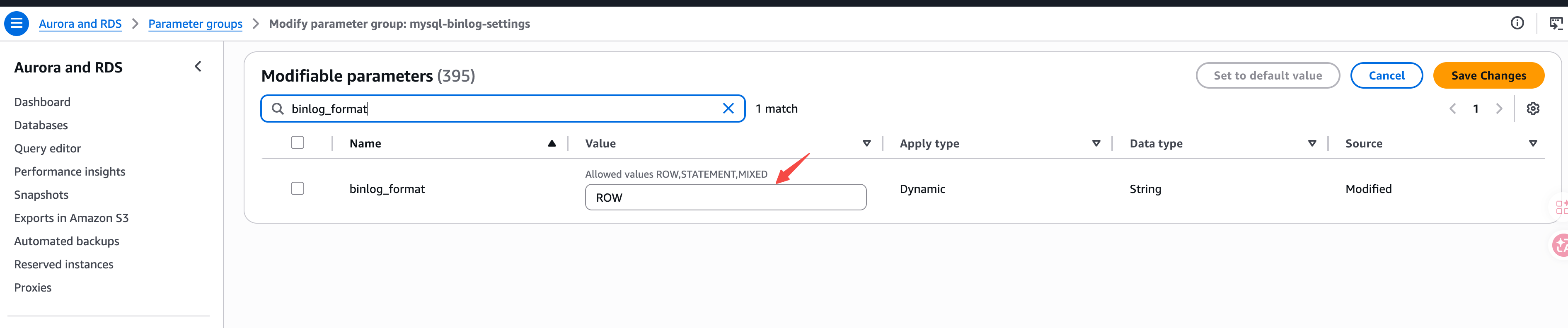
- Edit the cluster parameter group, search for
binlog_format, and set the value toROW:
- Also search for
binlog_row_imageand set the value toFULL. - Click Save Changes.
Step 3: Apply Cluster Parameter Group and Restart
- In the RDS console, select the target Aurora cluster and click Modify.
- Under DB cluster parameter group, select the newly created cluster parameter group.
- Select Apply immediately to apply changes.
- Restart the Aurora writer instance for the changes to take effect.
Modifying the binlog_format parameter requires restarting the Aurora writer instance to take effect. Please perform this during off-peak hours.
Step 4: Create Sync User
Create a dedicated user for Doris continuous load:
CREATE USER 'doris_sync'@'%' IDENTIFIED BY '<password>';
Grant the required permissions:
GRANT SELECT, REPLICATION SLAVE, REPLICATION CLIENT ON *.* TO 'doris_sync'@'%';
Step 5: Configure Binlog Retention
It is recommended to set the Binlog retention time to at least 72 hours to ensure binary log files are still available for replication in failure scenarios.
Use the mysql.rds_set_configuration stored procedure to set the retention time:
CALL mysql.rds_set_configuration('binlog retention hours', 72);
If this configuration is not set, or is set to a too-short interval, it may cause gaps in the binary logs, which could affect Doris's ability to recover replication.
