Doris Operator Status and Troubleshooting
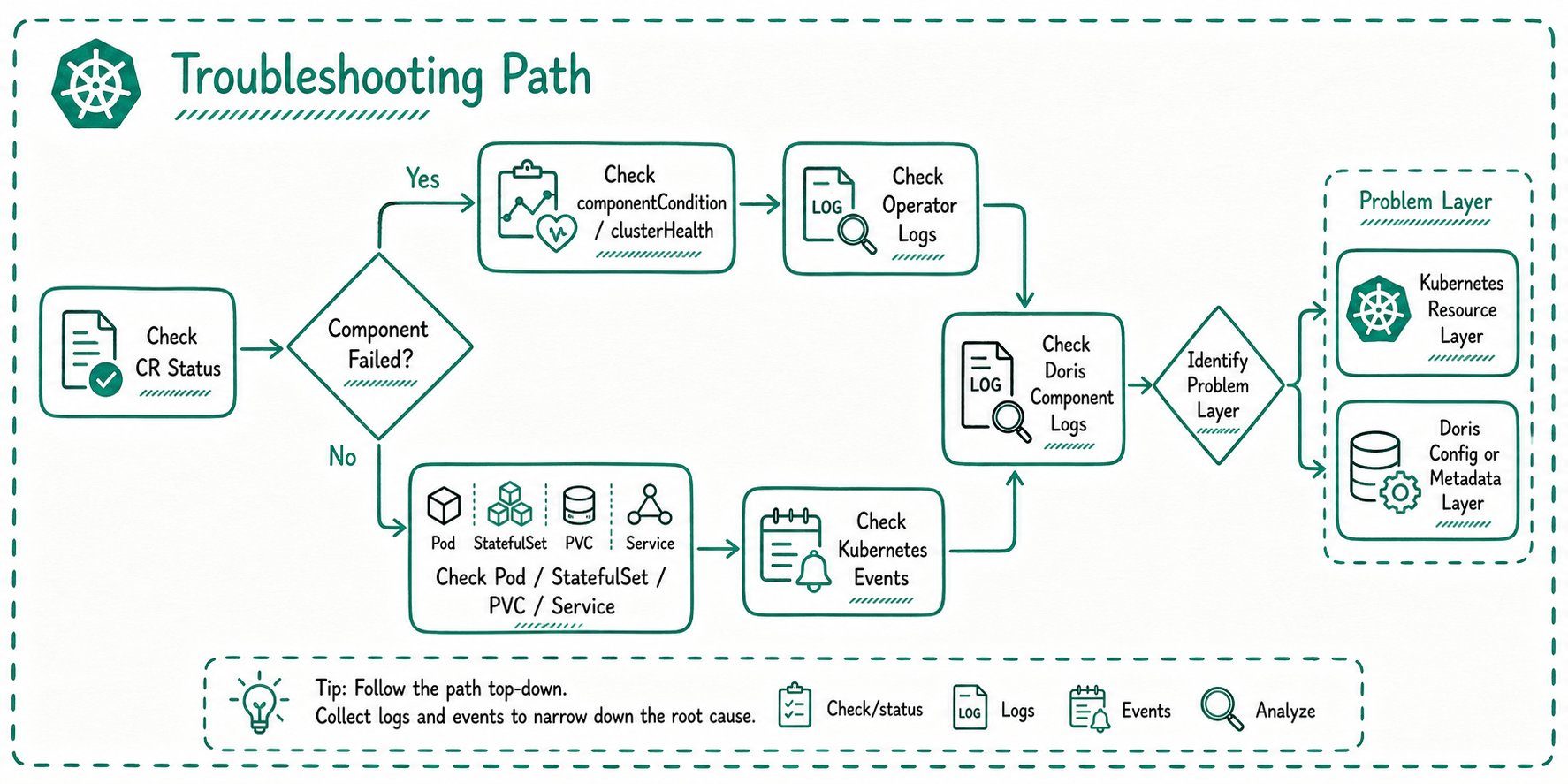
Doris Operator writes component state into the status field of Doris custom resources. When troubleshooting Doris on Kubernetes, start with CR status, then continue with Operator logs, Kubernetes resources, and Doris component logs.
View resource status
Compute-storage integrated clusters use DorisCluster, commonly abbreviated as dcr:
kubectl get dcr -n ${namespace}
kubectl describe dcr ${cluster_name} -n ${namespace}
Compute-storage decoupled clusters use DorisDisaggregatedCluster, commonly abbreviated as ddc:
kubectl get ddc -n ${namespace}
kubectl describe ddc ${cluster_name} -n ${namespace}
If the CR shows components are not ready, continue with underlying resources:
kubectl get pod,sts,svc,pvc -n ${namespace}
kubectl get event -n ${namespace} --sort-by=.lastTimestamp
DorisCluster status
DorisCluster.status is aggregated by component:
| Field | Description |
|---|---|
feStatus | FE status |
beStatus | BE status |
cnStatus | CN status |
brokerStatus | Broker status |
Each component status usually includes:
| Field | Description |
|---|---|
accessService | External access Service for the component |
runningInstances | Running instances |
creatingInstances | Instances being created |
failedInstances | Failed instances |
componentCondition.phase | Current component phase |
componentCondition.reason | Reason for the phase |
componentCondition.message | Human-readable status message |
Common phases include:
| Phase | Meaning |
|---|---|
available | Component is available |
reconciling | Operator is reconciling resources |
waitScheduling | Waiting for scheduling or other resources |
haveMemberFailed | At least one instance has failed |
initializing | Component is initializing |
upgrading | Component is upgrading |
scaling | Component is scaling |
restarting | Component is restarting |
DorisDisaggregatedCluster status
DorisDisaggregatedCluster.status includes component status and overall cluster health.
| Field | Description |
|---|---|
metaServiceStatus | MetaService status |
feStatus | FE status |
computeGroupStatuses | ComputeGroup status list |
clusterHealth | Overall cluster health |
observedGeneration | Generation observed by the Operator |
clusterHealth reflects overall cluster availability:
| Field | Description |
|---|---|
health | Overall health, such as green, yellow, or red |
feAvailable | Whether FE is available |
cgCount | Number of ComputeGroups |
cgAvailableCount | Number of available ComputeGroups |
cgFullAvailableCount | Number of ComputeGroups whose Pods are all available |
| Health | Meaning |
|---|---|
green | Core components are available and ComputeGroup availability is as expected |
yellow | Cluster is partially available but not fully ready |
red | Core components are unavailable or too few ComputeGroups are available |
ComputeGroup phases can include Ready, Reconciling, Scaling, Decommissioning, ScaleDownFailed, and Suspended.
Recommended troubleshooting path
Use the following order:
Common entry points
Pod stays Pending
Common causes:
- Insufficient CPU or memory on nodes.
- Node selector, affinity, or toleration mismatch.
- PVC binding failure.
kubectl describe pod ${pod_name} -n ${namespace}
kubectl get event -n ${namespace} --sort-by=.lastTimestamp
kubectl get pvc -n ${namespace}
PVC cannot be bound
Common causes:
- StorageClass does not exist.
- Insufficient storage capacity.
- Access mode mismatch.
kubectl get storageclass
kubectl describe pvc ${pvc_name} -n ${namespace}
Component keeps restarting
Common causes:
- Invalid Doris startup configuration.
- Port conflict or invalid FQDN configuration.
- Storage permission or mount path problems.
- JVM or system parameters do not satisfy requirements.
kubectl logs ${pod_name} -n ${namespace}
kubectl describe pod ${pod_name} -n ${namespace}
If the Pod is in CrashLoopBackOff and logs are insufficient, use the Debug procedure described in cluster operations.
Service is not accessible
Common causes:
- Using an internal Service as the external entry point.
- Service type does not match the access environment.
- Pods are not Ready, so Endpoints are empty.
- Cloud LoadBalancer creation failed.
kubectl get svc -n ${namespace}
kubectl get endpoints -n ${namespace}
kubectl describe svc ${service_name} -n ${namespace}
Configuration changes do not take effect
Common causes:
- ConfigMap changed, but component did not restart.
- ConfigMap keys do not match component requirements.
- The CR does not reference the ConfigMap correctly.
- Mount path and configured file path do not match.
kubectl get configmap -n ${namespace}
kubectl describe dcr ${cluster_name} -n ${namespace}
kubectl describe ddc ${cluster_name} -n ${namespace}
For compute-storage integrated clusters, check whether enableRestartWhenConfigChange is configured when you expect core ConfigMap changes to trigger a rolling restart.
authSecret problems
Doris Operator may need Doris management credentials for node registration, scale-in, decommissioning, and related operations. Incorrect authSecret configuration can prevent those actions from completing.
Common causes:
- The referenced Secret does not exist or is in the wrong namespace.
- Secret type or keys are incorrect.
- Username or password does not match the Doris management account.
- The management account lacks required privileges.
kubectl get secret ${auth_secret_name} -n ${namespace}
kubectl describe dcr ${cluster_name} -n ${namespace}
kubectl describe ddc ${cluster_name} -n ${namespace}
kubectl logs deployment/${operator_deployment_name} -n ${operator_namespace}
If the cluster uses a non-default management account or has already set a root password, verify that authSecret matches the actual Doris credentials.
ComputeGroup scale-in does not finish
In compute-storage decoupled clusters, ComputeGroup scale-in may stay in Decommissioning or ScaleDownFailed.
Common causes:
- Doris metadata-level decommission is not finished.
- FE is unavailable.
- Management credentials are incorrect.
- Target nodes still have data migration or cleanup tasks.
kubectl describe ddc ${cluster_name} -n ${namespace}
kubectl logs deployment/${operator_deployment_name} -n ${operator_namespace}
You may also need to inspect Doris-side node and ComputeGroup status.
Operator logs
When CR status is not enough to explain the failure, check Doris Operator logs:
kubectl get pod -n ${operator_namespace}
kubectl logs ${operator_pod_name} -n ${operator_namespace}