
VARIANT Workload Guide
Overview
VARIANT stores semi-structured JSON and uses Subcolumnization on frequently used paths.
Use this guide when you are deciding how to model a new VARIANT workload. It helps answer questions such as:
- Should this workload use
VARIANTor static columns? - If the JSON is very wide, should I start with default behavior, sparse columns, or DOC mode?
- Which settings should I leave at defaults, and which ones should I change first?
If you already know you want VARIANT and only need syntax or type rules, go to VARIANT. If you want the smallest runnable import example, go to Import Variant Data.
VARIANT keeps JSON flexible, but Doris can still apply Subcolumnization to frequently used paths. That lets common filters, aggregations, and path-level indexes work well without freezing the whole document schema in advance. On very wide JSON, storage-layer optimizations keep Subcolumnization practical at much larger path counts.
When VARIANT Fits
VARIANT is usually a good fit when most of the following are true:
- The input is JSON or another semi-structured payload whose fields evolve over time.
- Queries usually touch a subset of hot paths instead of every field in every row.
- You want schema flexibility without giving up columnar analytics performance.
- Some paths need indexing, while many other paths can remain dynamic.
Prefer static columns when these conditions dominate:
- The schema is stable and known in advance.
- Core fields are regularly used as join keys, sort keys, or tightly controlled typed columns.
- The main requirement is to archive raw JSON, not to analyze by path.
Four Questions First
Before touching any setting, answer these four questions.
1. Are there clear hot paths?
If queries repeatedly touch the same JSON paths, Doris can keep applying Subcolumnization to those paths. That is where VARIANT helps most.
2. Do a few paths need fixed types or stable indexes?
If yes, use Schema Template for those paths only. It is meant for a small set of business-critical fields, not for describing the whole document.
3. Is this really becoming wide JSON?
You have a wide-JSON problem when path count keeps growing and starts to create metadata pressure, compaction pressure, or noticeable query overhead.
4. For wide JSON, what matters more: hot-path analytics or whole-document return?
- If the main value is still path-based filtering, aggregation, and indexing on hot fields, lean toward sparse columns.
- If the main value is ingest efficiency or returning the whole document, lean toward DOC mode.
Key Concepts
Before reading the storage modes below, make sure these terms are clear. Each is explained in 2-3 lines; for implementation details, see VARIANT.
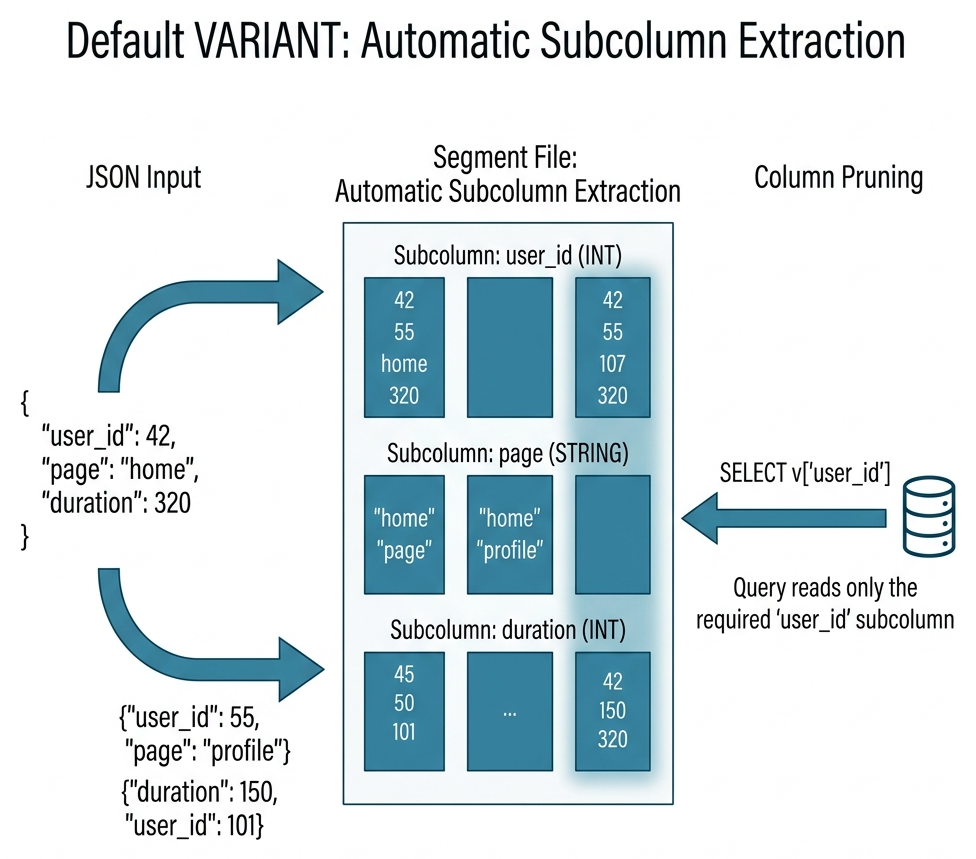
Subcolumnization. When data is written into a VARIANT column, Doris automatically discovers JSON paths and extracts hot paths as independent columnar subcolumns for efficient analytics.
Schema Template. A declaration on a VARIANT column that pins selected paths to stable types. Use it for key business fields that must stay typed, indexable, and predictable. Do not try to enumerate every possible path.
Wide JSON. You have a wide-JSON problem when the number of distinct paths keeps growing and starts to increase metadata size, write cost, compaction cost, or query cost.
Sparse columns. When wide JSON has a clear hot/cold split, sparse columns keep hot paths in Subcolumnization while pushing cold (long-tail) paths into shared sparse storage. Sparse storage supports sharding across multiple physical columns for better read parallelism.
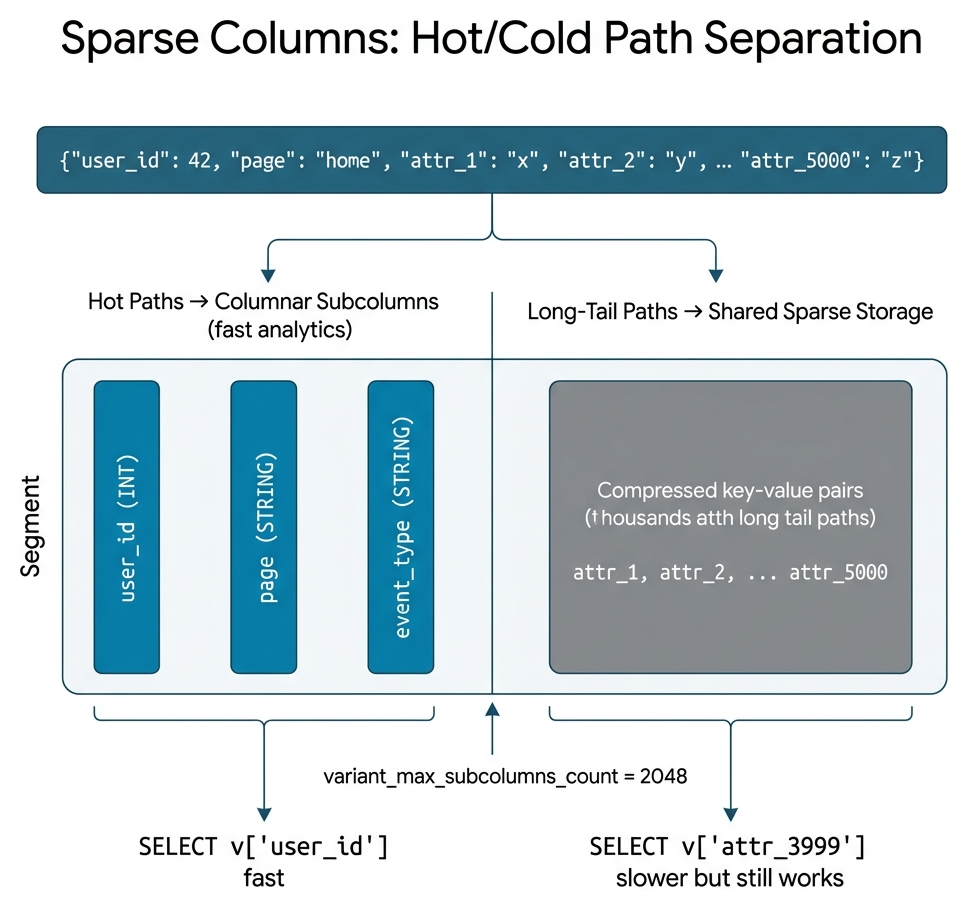
As shown above, hot paths (such as user_id, page) stay as independent columnar subcolumns with full analytics speed, while thousands of long-tail paths converge into shared sparse storage. The threshold is controlled by variant_max_subcolumns_count.
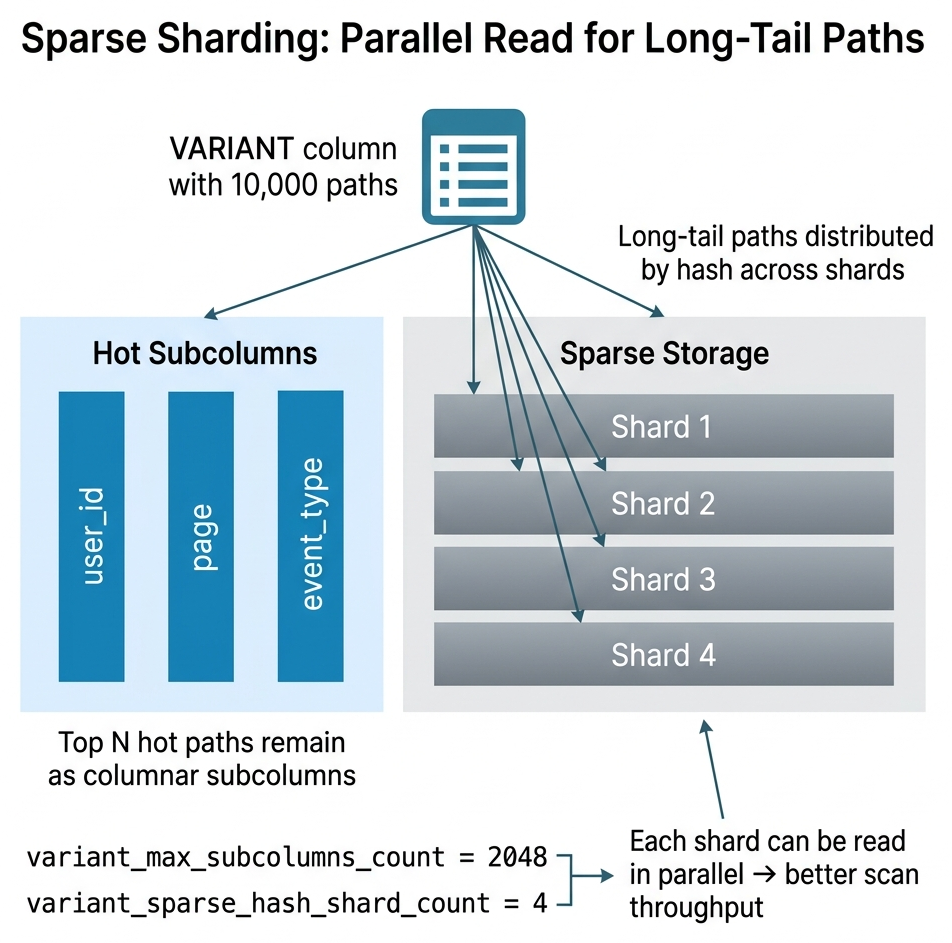
Sparse sharding. When the long-tail path count is very large, a single sparse column can become a read bottleneck. Sparse sharding distributes long-tail paths by hash across multiple physical columns (variant_sparse_hash_shard_count), so they can be scanned in parallel.
DOC mode. Delays Subcolumnization at write time and additionally stores the original JSON as a map-format stored field (the doc map). This gives fast ingest and efficient whole-document return at the cost of extra storage. Subcolumnization still happens later during compaction.
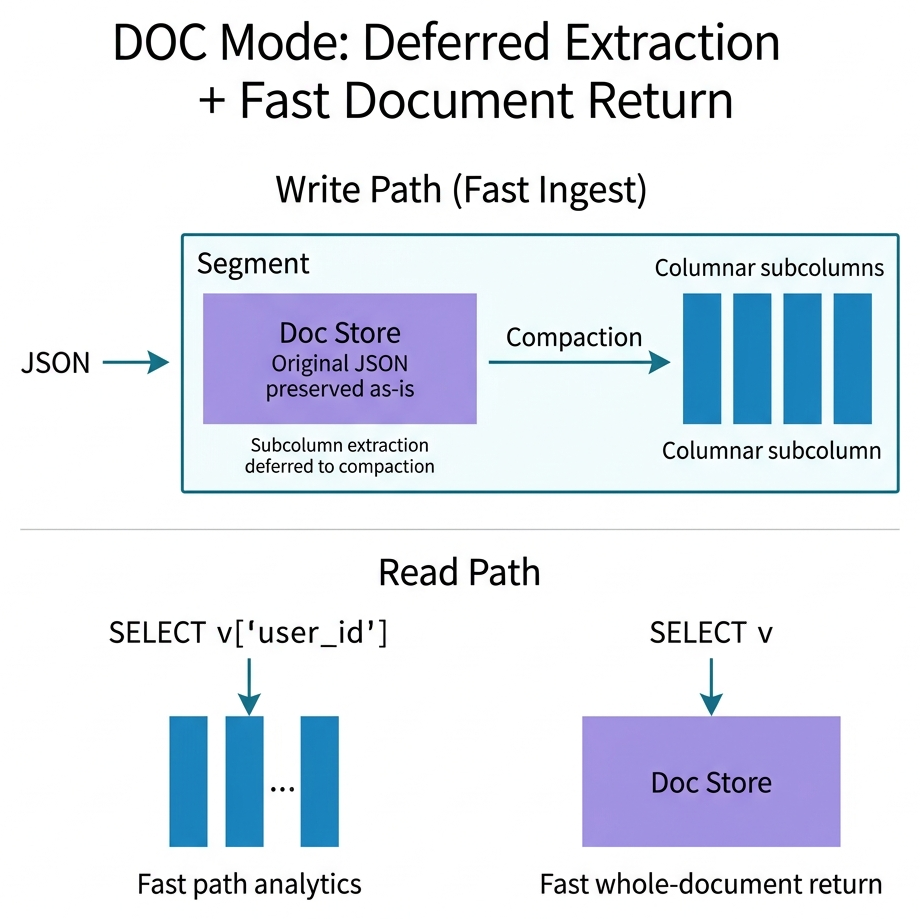
As illustrated above, during write the JSON is preserved as-is into a Doc Store for fast ingest. Subcolumns are extracted later during compaction. At read time, path-based queries (e.g. SELECT v['user_id']) read from materialized subcolumns at full columnar speed, while whole-document queries (SELECT v) read directly from the Doc Store without reconstructing from subcolumns.
DOC mode has three distinct read paths depending on whether the queried path has been materialized:
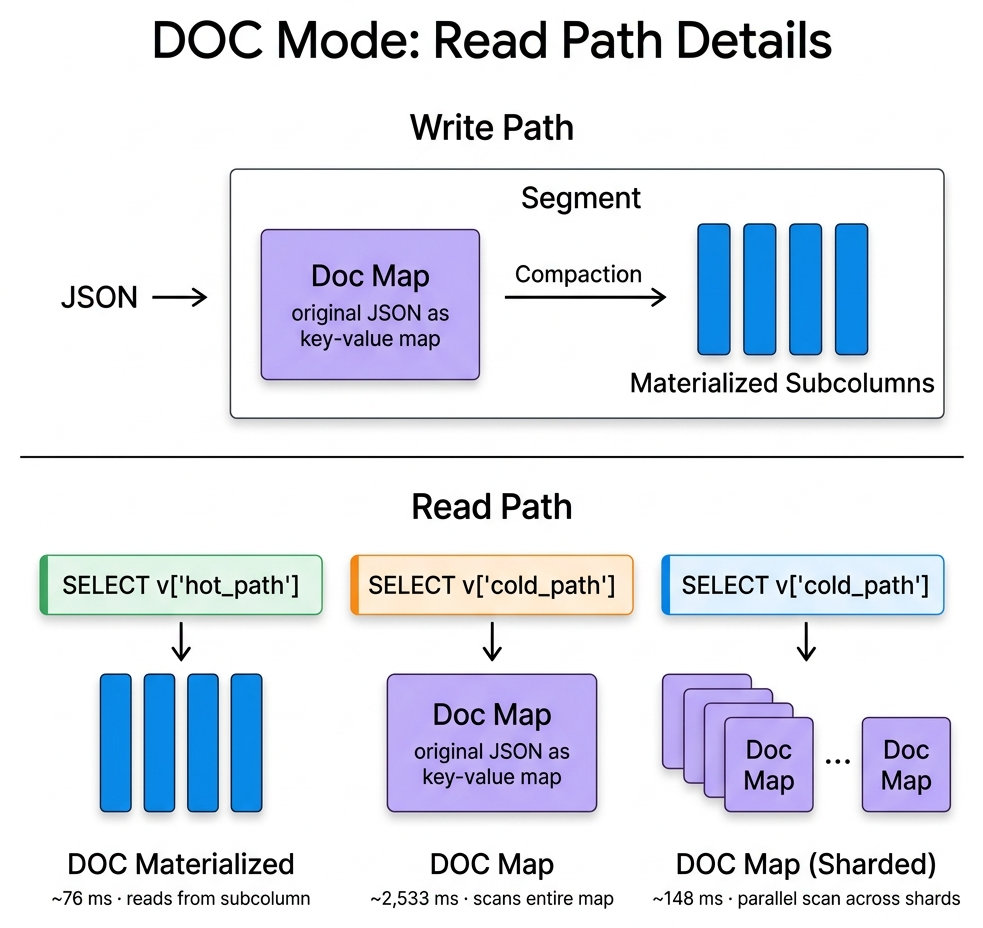
- DOC Materialized: The queried path has already been extracted into a subcolumn (after compaction or when
variant_doc_materialization_min_rowsis met). Reads at full columnar speed, same as default VARIANT. - DOC Map: The queried path has not been materialized yet. The query falls back to scanning the entire doc map to find the value — significantly slower on wide JSON.
- DOC Map (Sharded): Same fallback, but with
variant_doc_hash_shard_countthe doc map is distributed across multiple physical columns, enabling parallel scan and much faster recovery.
Storage Format V3. Decouples column metadata from the segment footer. Recommended for any VARIANT table, especially wide JSON, because it eliminates the metadata bottleneck when thousands of subcolumns exist.
Recommended Decision Path
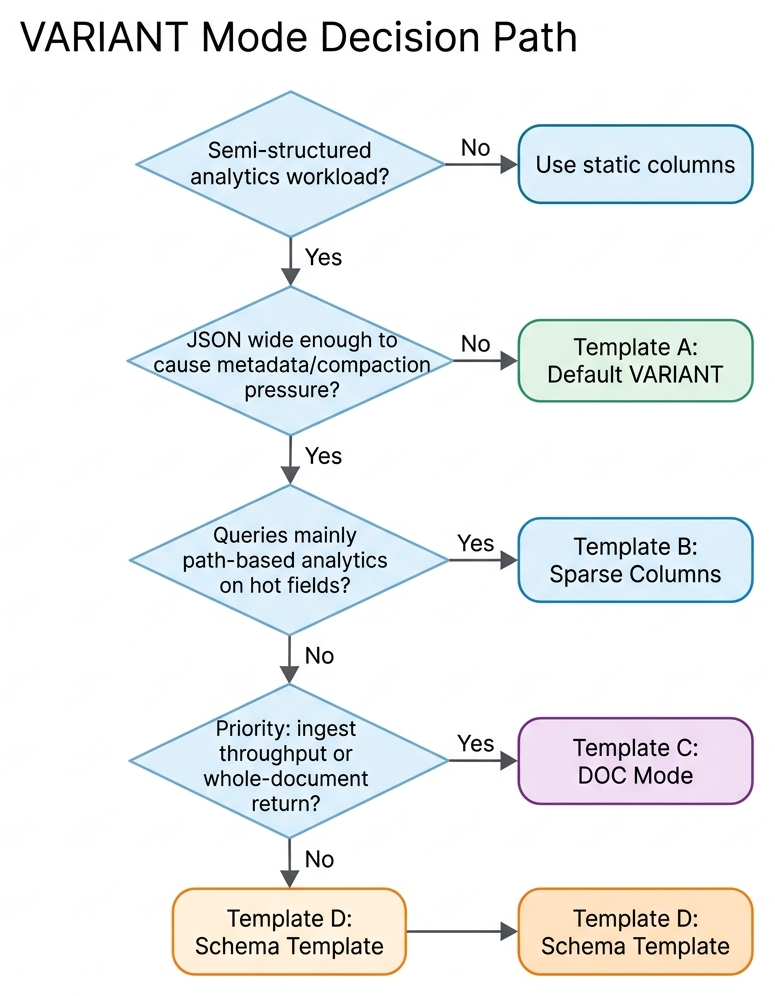
Storage Modes
Use the table below to pick a starting point, then read the matching section.
| Typical scenario | Recommended mode | Key configuration | |
|---|---|---|---|
| A | Event logs, audit logs | Default VARIANT + V3 | Keep defaults |
| B | Advertising / telemetry / user profiles (wide, hot paths few) | Sparse + V3 | variant_max_subcolumns_count, variant_sparse_hash_shard_count |
| C | Model output / trace / archives (ingest-first or whole-doc return) | DOC mode + V3 | variant_enable_doc_mode, variant_doc_materialization_min_rows |
| D | Orders / payments / devices (key paths need stable types) | Schema Template + A or B | Define only key paths |
Default Mode
This is the safest starting point for most new VARIANT workloads.
Typical example: event logs or audit payloads where queries repeatedly touch a few familiar paths.
CREATE TABLE IF NOT EXISTS event_log (
    ts DATETIME NOT NULL,
    event_id BIGINT NOT NULL,
    event_type VARCHAR(64),
    payload VARIANT
)
DUPLICATE KEY(`ts`, `event_id`)
DISTRIBUTED BY HASH(`event_id`) BUCKETS 16
PROPERTIES (
    "replication_num" = "1",
    "storage_format" = "V3"
);
Use it when you are not yet sure whether the workload is wide enough to justify sparse columns or DOC mode, and most value still comes from filtering, aggregating, and grouping on several common paths.
Watch for:
- Do not raise
variant_max_subcolumns_countearly unless path growth is already causing pressure. - If the JSON is not wide, enabling sparse columns or DOC mode adds complexity without benefit.
Sparse Mode
Choose sparse columns when the payload is wide, but most queries still focus on a small set of hot paths.
Typical example: advertising, telemetry, or profile JSON with thousands of optional attributes but only dozens queried regularly.
CREATE TABLE IF NOT EXISTS telemetry_wide (
    ts DATETIME NOT NULL,
    device_id BIGINT NOT NULL,
    attributes VARIANT<
        'device_type' : STRING,
        'region' : STRING,
        properties(
            'variant_max_subcolumns_count' = '2048',
            'variant_sparse_hash_shard_count' = '64'
        )
    >
)
DUPLICATE KEY(`ts`, `device_id`)
DISTRIBUTED BY HASH(`device_id`) BUCKETS 32
PROPERTIES (
    "replication_num" = "1",
    "storage_format" = "V3"
);
Use it when the total key count is very large, but the primary workload is still path-based filtering, aggregation, and indexing.
Watch for:
- If hot-path analytics is the bottleneck, do not jump to DOC mode first.
variant_max_subcolumns_countdefaults to2048, which is already the right starting point for automatic Subcolumnization in most workloads. Do not set it so large that effectively all paths go through Subcolumnization. If the workload truly needs very large extracted-subcolumn scale, prefer DOC Mode.
DOC Mode
Choose DOC mode when returning the whole JSON document or minimizing ingest overhead matters more than optimizing path-based analytics.
Typical example: model responses, trace snapshots, or archived JSON documents that are often returned as complete payloads.
DOC mode helps when:
- When Subcolumnization scale becomes extremely large (approaching 10,000 paths), hardware requirements rise quickly. DOC mode is the more stable choice at this scale.
- Compaction memory can drop by about two-thirds compared with default eager Subcolumnization.
- In sparse wide-column ingestion workloads, throughput can improve by about 5–10×.
- When queries read the whole
VARIANTvalue (SELECT variant_col), DOC mode avoids reconstructing the document from thousands of subcolumns, delivering orders-of-magnitude speedup.
Getting started:
CREATE TABLE IF NOT EXISTS trace_archive (
    ts DATETIME NOT NULL,
    trace_id VARCHAR(64) NOT NULL,
    span VARIANT<
        'service_name' : STRING,
        properties(
            'variant_enable_doc_mode' = 'true',
            'variant_doc_materialization_min_rows' = '10000',
            'variant_doc_hash_shard_count' = '64'
        )
    >
)
DUPLICATE KEY(`ts`, `trace_id`)
DISTRIBUTED BY HASH(`trace_id`) BUCKETS 32
PROPERTIES (
    "replication_num" = "1",
    "storage_format" = "V3"
);
Use it when ingest throughput is the first priority, the workload frequently needs the full JSON document back, or very wide columns are often read with SELECT variant_col.
Watch for:
- DOC mode is not the default answer for every wide-JSON workload. If hot-path analytics dominates, sparse columns usually fit better.
- DOC mode and sparse columns are mutually exclusive. They cannot be enabled at the same time.
Schema Template
Choose Schema Template when a small number of paths need stable types, stable behavior, or path-specific indexes.
Typical example: order, payment, or device payloads where a few business-critical paths must stay typed and searchable.
CREATE TABLE IF NOT EXISTS order_events (
    ts DATETIME NOT NULL,
    order_id BIGINT NOT NULL,
    detail VARIANT<
        'status' : STRING,
        'amount' : DECIMAL(18, 2),
        'currency' : STRING
    >,
    INDEX idx_status(detail) USING INVERTED PROPERTIES("field_pattern" = "status")
)
DUPLICATE KEY(`ts`, `order_id`)
DISTRIBUTED BY HASH(`order_id`) BUCKETS 16
PROPERTIES (
    "replication_num" = "1",
    "storage_format" = "V3"
);
Use it when only a few fields are business-critical and those paths need stricter typing or path-level index strategy. Combine Schema Template with sparse columns or default VARIANT when appropriate.
Watch for:
- Do not turn the whole JSON schema into a static template. That defeats the point of
VARIANT. - Schema Template should cover key paths only; the rest stays dynamic.
Performance
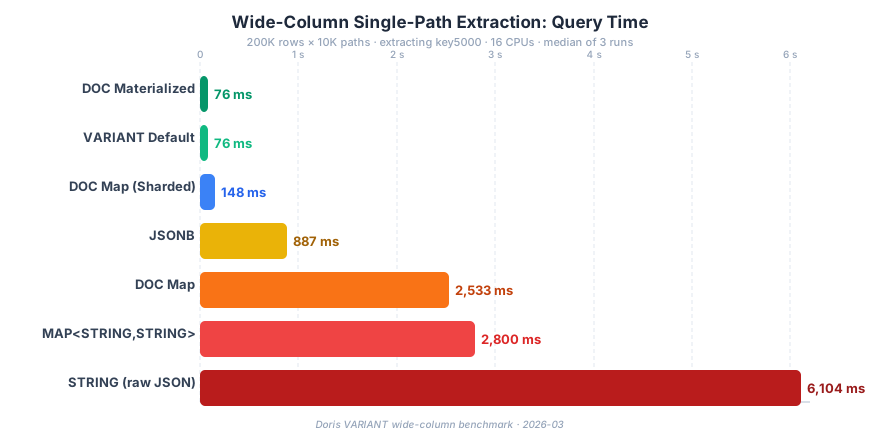
The chart below compares single-path extraction time on a 10K-path wide-column dataset (200K rows, extracting one key, 16 CPUs, median of 3 runs).
| Mode | Query Time | Peak Memory |
|---|---|---|
| DOC Materialized | 76 ms | 1 MiB |
| VARIANT Default | 76 ms | 1 MiB |
| DOC Map (Sharded) | 148 ms | 1 MiB |
| JSONB | 887 ms | 32 GiB |
| DOC Map | 2,533 ms | 1 MiB |
| MAP<STRING,STRING> | 2,800 ms | 1 MiB |
| STRING (raw JSON) | 6,104 ms | 48 GiB |
Key takeaways:
- Materialized subcolumns win. Both Default and DOC Materialized deliver ~76 ms — 80× faster than raw STRING, 12× faster than JSONB.
- DOC Map with sharding helps. Sharding the doc map cuts query time from 2.5 s to 148 ms for un-materialized paths.
- JSONB and STRING are memory-heavy. They consume 32–48 GiB peak memory vs. 1 MiB for VARIANT modes.
Best Practices
Import Phase
- Start with Storage Format V3 for new
VARIANTtables. V3 decouples column metadata from the segment footer. Without it, wide JSON workloads suffer from slow file opening and high memory overhead. - Pin key paths via Schema Template early. Without Schema Template, the system infers types automatically. If the same path changes type across batches (e.g., integer then string), it gets promoted to JSONB, and indexes on that path are lost.
- Start from default settings, then tune from symptoms. For most workloads, defaults are enough. Tune by scenario only when workloads such as AI training, connected vehicles, or user-tag systems need unusually large Subcolumnization scale and many path-level indexes. Over-configuring on day one (very large
variant_max_subcolumns_count, enabling DOC mode when not needed) adds complexity without evidence of benefit.
Query Phase
- Do not use
SELECT *as the main query pattern for very wideVARIANTcolumns. Without DOC mode,SELECT *orSELECT variant_colmust reconstruct large JSON from all subcolumns, which is much slower than specifying paths likeSELECT v['path']. - Always CAST subpaths when the query depends on type. Type inference may not match expectations. If
v['id']is actually stored as STRING but you compare with an integer literal, indexes will not be used and the result may be wrong.
Operations Phase
- Watch compaction pressure. Subcolumn growth increases merge cost. If Compaction Score keeps rising, check whether
variant_max_subcolumns_countis too high or ingestion rate is too fast. - Watch for schema drift. If the JSON structure changes frequently, hot paths may be pushed into sparse storage, causing sudden query slowdowns. Lock critical paths with Schema Template.
- Watch for type conflicts. Frequent type conflicts on the same path indicate the path should be locked via Schema Template to avoid JSONB promotion and index loss.
Quick Verify
After creating a table, use this minimal sequence to verify everything works:
-- Insert sample data
INSERT INTO event_log VALUES
    ('2025-01-01 10:00:00', 1001, 'click', '{"page": "home", "user_id": 42, "duration_ms": 320}'),
    ('2025-01-01 10:00:01', 1002, 'purchase', '{"item": "widget", "price": 9.99, "user_id": 42}'),
    ('2025-01-01 10:00:02', 1003, 'click', '{"page": "search", "user_id": 99, "query": "doris variant"}');

-- Verify data
SELECT payload['user_id'], payload['page'] FROM event_log;

-- Check Subcolumnization results
SET describe_extend_variant_column = true;
DESC event_log;

-- Check per-row types
SELECT variant_type(payload) FROM event_log;
