Duplicate Key Model
The Duplicate Key Model is the default table model in Doris. It stores every original data record without deduplication or aggregation. When creating a table, use the DUPLICATE KEY keyword to specify the sort columns for data storage and to optimize common queries. It is generally recommended to choose three or fewer columns as the sort key. For details on how to choose sort columns, see Sort Key.
Applicable Scenarios
Data in the Duplicate Key Model is typically append-only, and old data is not updated. It is suitable for scenarios that need to store full original data:
- Log storage: Used to store various program operation logs, such as access logs and error logs. Every record needs to be preserved in detail to facilitate subsequent auditing and analysis.
- User behavior data: When analyzing user behavior (such as click data and user access trails), detailed user behavior must be retained to facilitate building user profiles later and performing fine-grained analysis of behavior paths.
- Transaction data: When storing transaction behavior or order data, the data is generally not modified after the transaction ends. The Duplicate Key Model is suitable for retaining this kind of transaction information without missing any record, making it convenient to perform precise transaction reconciliation.
Core Features
The Duplicate Key Model has the following three main features:
| Feature | Description |
|---|---|
| Retain original data | Retains all original data, suitable for storing and querying raw data. For application scenarios that require detailed data analysis, the Duplicate Key Model avoids the risk of data loss. |
| No deduplication or aggregation | Unlike the Aggregate Key Model and the Unique Key Model, the Duplicate Key Model does not deduplicate or aggregate data. Even if two rows are identical, both are fully retained on each insert. |
| Flexible data queries | Because all original data is retained, you can extract details from the complete data and perform aggregation operations on any dimension based on the full dataset, enabling metadata auditing and fine-grained analysis. |
Table Creation Syntax
When creating a table, use the DUPLICATE KEY keyword to specify the Duplicate Key Model and to designate the Key columns. In the Duplicate Key Model, Key columns are used only for sorting and are not required to be unique.
The following example creates a duplicate table for storing log information, sorted by the three columns log_time, log_type, and error_code:
CREATE TABLE IF NOT EXISTS example_tbl_duplicate
(
    log_time        DATETIME       NOT NULL,
    log_type        INT            NOT NULL,
    error_code      INT,
    error_msg       VARCHAR(1024),
    op_id           BIGINT,
    op_time         DATETIME
)
DUPLICATE KEY(log_time, log_type, error_code)
DISTRIBUTED BY HASH(log_type) BUCKETS 10;
Data Writes and Storage
In a duplicate table, data is not deduplicated or aggregated. Inserted data is stored as-is, and Key columns are used only as sort keys.
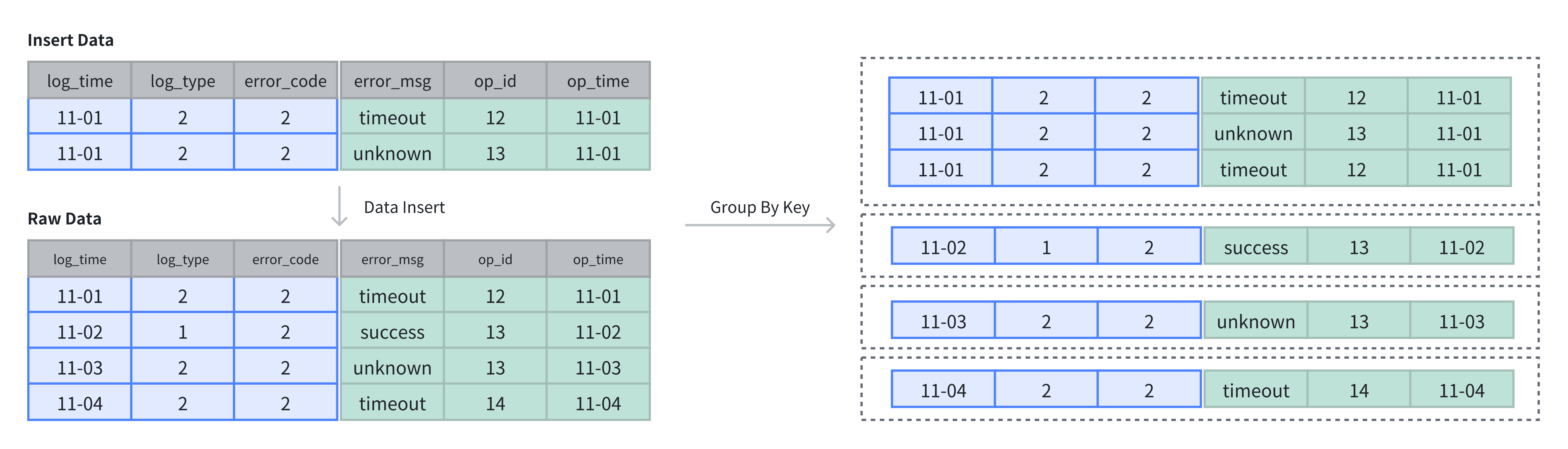
As shown in the figure above, the table originally has 4 rows. After 2 more rows are inserted, all data is stored in APPEND mode, and 6 rows are retained in the end:
-- Write 4 rows of original data
INSERT INTO example_tbl_duplicate VALUES
('2024-11-01 00:00:00', 2, 2, 'timeout', 12, '2024-11-01 01:00:00'),
('2024-11-02 00:00:00', 1, 2, 'success', 13, '2024-11-02 01:00:00'),
('2024-11-03 00:00:00', 2, 2, 'unknown', 13, '2024-11-03 01:00:00'),
('2024-11-04 00:00:00', 2, 2, 'unknown', 12, '2024-11-04 01:00:00');

-- Append 2 more rows
INSERT INTO example_tbl_duplicate VALUES
('2024-11-01 00:00:00', 2, 2, 'timeout', 12, '2024-11-01 01:00:00'),
('2024-11-01 00:00:00', 2, 2, 'unknown', 13, '2024-11-01 01:00:00');

-- The query result shows that all 6 rows are retained
SELECT * FROM example_tbl_duplicate;
+---------------------+----------+------------+-----------+-------+---------------------+
| log_time            | log_type | error_code | error_msg | op_id | op_time             |
+---------------------+----------+------------+-----------+-------+---------------------+
| 2024-11-02 00:00:00 |        1 |          2 | success   |    13 | 2024-11-02 01:00:00 |
| 2024-11-01 00:00:00 |        2 |          2 | timeout   |    12 | 2024-11-01 01:00:00 |
| 2024-11-03 00:00:00 |        2 |          2 | unknown   |    13 | 2024-11-03 01:00:00 |
| 2024-11-04 00:00:00 |        2 |          2 | unknown   |    12 | 2024-11-04 01:00:00 |
| 2024-11-01 00:00:00 |        2 |          2 | unknown   |    13 | 2024-11-01 01:00:00 |
| 2024-11-01 00:00:00 |        2 |          2 | timeout   |    12 | 2024-11-01 01:00:00 |
+---------------------+----------+------------+-----------+-------+---------------------+
