Dynamic Partitioning
Auto Partitioning is the recommended approach for automatic partition management. It is the successor to dynamic partitioning.
Dynamic partitioning rolls partitions forward by adding and dropping them according to configured rules, providing partition lifecycle management (TTL) for tables and reducing data storage pressure. In scenarios such as log management and time-series data management, dynamic partitioning is commonly used to roll-drop expired data.
Applicable Scenarios
| Scenario | Description |
|---|---|
| Log data management | Retain the last N days of logs by day or hour, and automatically drop expired partitions |
| Time-series data management | Automatically maintain partitions along the time dimension for monitoring, IoT, and similar scenarios |
| Data lifecycle management | Use TTL to control the data retention range and reduce storage cost |
| Pre-creating future partitions | Create partitions for the next N days in advance to avoid write failures caused by missing partitions |
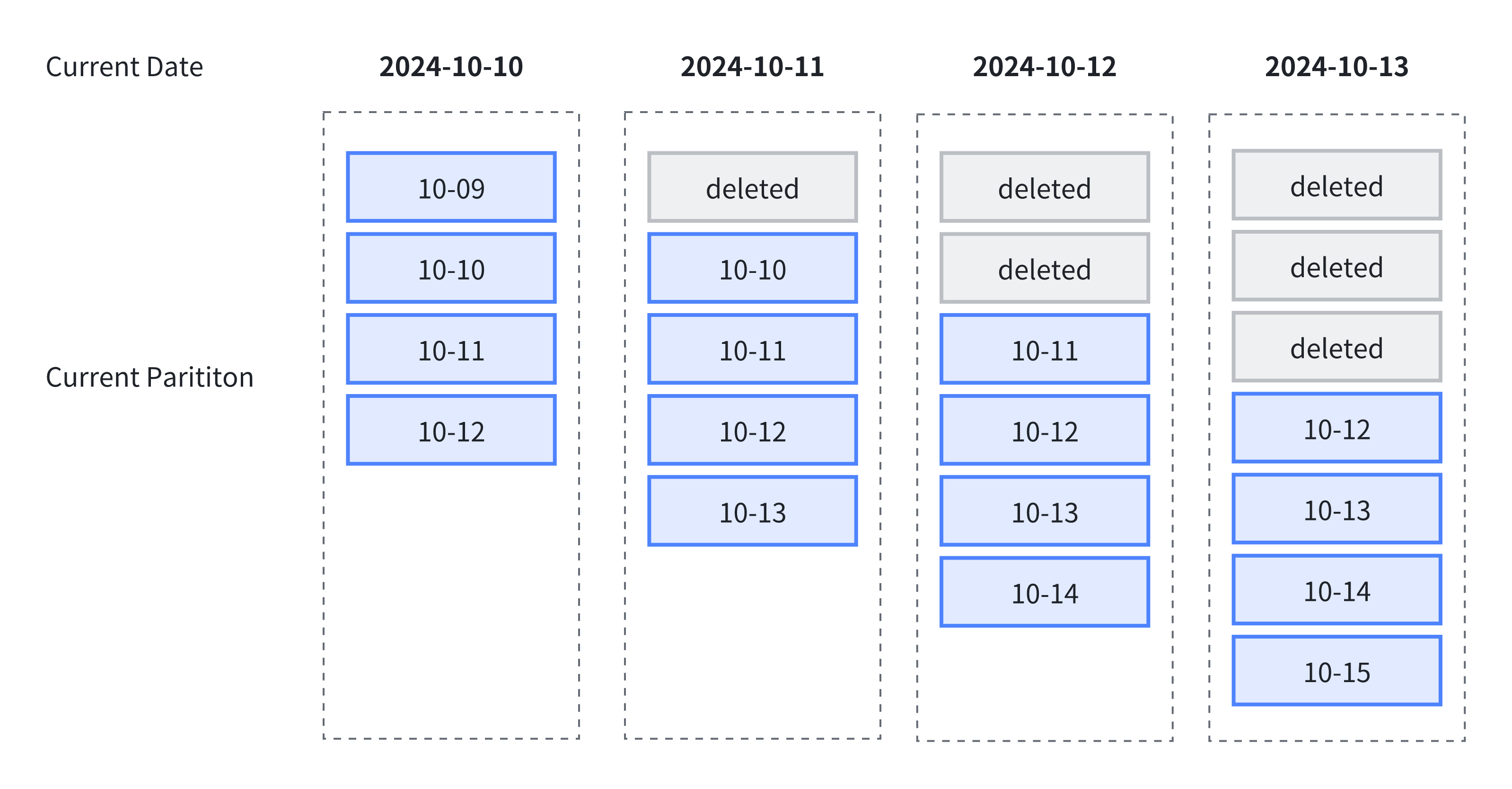
The following diagram shows an example of using dynamic partitioning for lifecycle management. The example specifies the following rules:
- The scheduling unit
dynamic_partition.time_unitisDAY, organizing partitions by day. - The start offset
dynamic_partition.startis set to-1, which retains the partition from one day ago. - The end offset
dynamic_partition.endis set to2, which retains partitions for the next two days.
Based on these rules, four partitions are always retained as time advances: the partition from one day ago, the partition for the current day, and the partitions for the next two days.
Limitations
The following limitations apply when using dynamic partitioning:
- Dynamic partitioning supports only Range partitioning on
DATE/DATETIMEcolumns. - Dynamic partitioning supports only a single partition key.
Creating a Dynamic Partitioned Table
You can create a dynamic partitioned table by specifying the dynamic_partition properties when creating the table:
CREATE TABLE test_dynamic_partition(
    order_id    BIGINT,
    create_dt   DATE,
    username    VARCHAR(20)
)
DUPLICATE KEY(order_id)
PARTITION BY RANGE(create_dt) ()
DISTRIBUTED BY HASH(order_id) BUCKETS 10
PROPERTIES(
    "dynamic_partition.enable" = "true",
    "dynamic_partition.time_unit" = "DAY",
    "dynamic_partition.start" = "-1",
    "dynamic_partition.end" = "2",
    "dynamic_partition.prefix" = "p",
    "dynamic_partition.create_history_partition" = "true"
);
For details on the dynamic_partition parameters, see Dynamic Partition Properties.
Managing Dynamic Partitions
Modifying Dynamic Partition Properties
Modifying dynamic partitions with the ALTER TABLE statement does not take effect immediately. Doris polls dynamic partitions at the interval specified by dynamic_partition_check_interval_seconds and performs the required partition creation and drop operations.
The following example uses an ALTER TABLE statement to convert a non-dynamic partitioned table into a dynamic partitioned table:
CREATE TABLE test_dynamic_partition(
    order_id    BIGINT,
    create_dt   DATE,
    username    VARCHAR(20)
)
DUPLICATE KEY(order_id)
DISTRIBUTED BY HASH(order_id) BUCKETS 10;

ALTER TABLE test_partition SET (
    "dynamic_partition.enable" = "true",
    "dynamic_partition.time_unit" = "DAY",
    "dynamic_partition.start" = "-1",
    "dynamic_partition.end" = "2",
    "dynamic_partition.prefix" = "p",
    "dynamic_partition.create_history_partition" = "true"
);
Viewing Dynamic Partition Scheduling Status
Use SHOW-DYNAMIC-PARTITION to view the scheduling status of all dynamic partitioned tables in the current database:
SHOW DYNAMIC PARTITION TABLES;
+-----------+--------+----------+-------------+------+--------+---------+-----------+----------------+---------------------+--------+------------------------+----------------------+-------------------------+
| TableName | Enable | TimeUnit | Start       | End  | Prefix | Buckets | StartOf   | LastUpdateTime | LastSchedulerTime   | State  | LastCreatePartitionMsg | LastDropPartitionMsg | ReservedHistoryPeriods  |
+-----------+--------+----------+-------------+------+--------+---------+-----------+----------------+---------------------+--------+------------------------+----------------------+-------------------------+
| d3        | true   | WEEK     | -3          | 3    | p      | 1       | MONDAY    | N/A            | 2020-05-25 14:29:24 | NORMAL | N/A                    | N/A                  | [2021-12-01,2021-12-31] |
| d5        | true   | DAY      | -7          | 3    | p      | 32      | N/A       | N/A            | 2020-05-25 14:29:24 | NORMAL | N/A                    | N/A                  | NULL                    |
| d4        | true   | WEEK     | -3          | 3    | p      | 1       | WEDNESDAY | N/A            | 2020-05-25 14:29:24 | NORMAL | N/A                    | N/A                  | NULL                    |
| d6        | true   | MONTH    | -2147483648 | 2    | p      | 8       | 3rd       | N/A            | 2020-05-25 14:29:24 | NORMAL | N/A                    | N/A                  | NULL                    |
| d2        | true   | DAY      | -3          | 3    | p      | 32      | N/A       | N/A            | 2020-05-25 14:29:24 | NORMAL | N/A                    | N/A                  | NULL                    |
| d7        | true   | MONTH    | -2147483648 | 5    | p      | 8       | 24th      | N/A            | 2020-05-25 14:29:24 | NORMAL | N/A                    | N/A                  | NULL                    |
+-----------+--------+----------+-------------+------+--------+---------+-----------+----------------+---------------------+--------+------------------------+----------------------+-------------------------+
7 rows in set (0.02 sec)
Managing Historical Partitions
When you specify the number of dynamic partitions with the start and end properties, historical partitions are not created by default to avoid the long waiting time caused by creating all partitions at once. Only partitions after the current time are created. To create all partitions at once, enable the create_history_partition parameter.
For example, if the current date is 2024-10-11 and you specify start = -2, end = 2:
- When
create_history_partition = true, 5 partitions are created immediately for the range[10-09, 10-13]. - When
create_history_partition = false, only 3 partitions are created for the range[10-11, 10-13].
Dynamic Partition Parameters
Dynamic Partition Properties
Dynamic partition rule parameters use the dynamic_partition prefix. The following rule parameters are available:
| Parameter | Required | Description |
|---|---|---|
dynamic_partition.enable | No | Whether to enable the dynamic partitioning feature. Can be set to TRUE or FALSE. If other required dynamic partition parameters are specified, it defaults to TRUE. |
dynamic_partition.time_unit | Yes | The scheduling unit for dynamic partitioning. Can be set to HOUR, DAY, WEEK, MONTH, or YEAR, indicating that partitions are created or dropped by hour, day, week, month, or year, respectively. |
dynamic_partition.start | No | The start offset for dynamic partitioning, expressed as a negative number. The default value is -2147483648, which means historical partitions are not dropped. Based on the time_unit property, partitions whose range is before this offset relative to the current day (week / month) are dropped. Whether historical partitions between this offset and the current time are created if they do not exist is controlled by dynamic_partition.create_history_partition. |
dynamic_partition.end | Yes | The end offset for dynamic partitioning, expressed as a positive number. Based on the time_unit property, partitions for the corresponding range are pre-created relative to the current day (week / month). |
dynamic_partition.prefix | Yes | The prefix for the names of dynamically created partitions. |
dynamic_partition.buckets | No | The number of buckets for dynamically created partitions. Setting this parameter overrides the bucket number specified in DISTRIBUTED. |
dynamic_partition.replication_num | No | The number of replicas for dynamically created partitions. If not specified, it defaults to the number of replicas specified when the table was created. |
dynamic_partition.create_history_partition | No | Defaults to false. When set to true, Doris automatically creates all partitions according to the rules described below. At the same time, the FE parameter max_dynamic_partition_num limits the total number of partitions to avoid creating too many at once. If the number of partitions to be created exceeds max_dynamic_partition_num, the operation is rejected. This parameter has no effect when the start property is not specified. |
dynamic_partition.history_partition_num | No | When create_history_partition is true, this parameter specifies the number of historical partitions to create. The default value is -1, meaning unset. This variable has the same effect as dynamic_partition.start; it is recommended to set only one of them at a time. |
dynamic_partition.start_day_of_week | No | When time_unit is WEEK, this parameter specifies the start of the week. The valid range is 1 to 7, where 1 means Monday and 7 means Sunday. The default is 1, meaning Monday is the start of the week. |
dynamic_partition.start_day_of_month | No | When time_unit is MONTH, this parameter specifies the start of the month. The valid range is 1 to 28, where 1 means the 1st of the month and 28 means the 28th of the month. The default is 1, meaning the 1st of the month is the start. The 29th, 30th, and 31st are not supported as start dates to avoid ambiguity caused by leap years or months of varying length. |
dynamic_partition.reserved_history_periods | No | The historical partition time ranges to retain. When dynamic_partition.time_unit is DAY / WEEK / MONTH / YEAR, set the value in the format [yyyy-MM-dd,yyyy-MM-dd],[...,...]. When dynamic_partition.time_unit is HOUR, set the value in the format [yyyy-MM-dd HH:mm:ss,yyyy-MM-dd HH:mm:ss],[...,...]. If not set, the default is "NULL". |
dynamic_partition.time_zone | No | The time zone for dynamic partitioning. Defaults to the system time zone of the current server, for example, Asia/Shanghai. For more time zone settings, see Time Zone Management. |
FE Configuration Parameters
You can modify the dynamic partition parameters in FE through the FE configuration file or the ADMIN SET FRONTEND CONFIG command:
| Parameter | Default | Description |
|---|---|---|
dynamic_partition_enable | false | Whether to enable the dynamic partitioning feature in Doris. This parameter affects only partition operations on dynamic partitioned tables, not on regular tables. |
dynamic_partition_check_interval_seconds | 600 | The execution frequency of the dynamic partition thread, in seconds. |
max_dynamic_partition_num | 500 | Limits the maximum number of partitions that can be created when creating a dynamic partitioned table, to avoid creating too many partitions at once. |
Dynamic Partitioning Best Practices
Example 1: Rolling Retention of Log Data
Partition by day, retain only the last 7 days plus the current day, and pre-create partitions for the next 3 days:
CREATE TABLE tbl1 (
    order_id    BIGINT,
    create_dt   DATE,
    username    VARCHAR(20)
)
PARTITION BY RANGE(create_dt) ()
DISTRIBUTED BY HASH(create_dt)
PROPERTIES (
    "dynamic_partition.enable" = "true",
    "dynamic_partition.time_unit" = "DAY",
    "dynamic_partition.start" = "-7",
    "dynamic_partition.end" = "3",
    "dynamic_partition.prefix" = "p",
    "dynamic_partition.buckets" = "32"
);
Example 2: Partitioning by Month and Retaining All History
Partition by month, do not drop historical partitions, pre-create partitions for the next 2 months, and set the 3rd of each month as the start day:
CREATE TABLE tbl1 (
    order_id    BIGINT,
    create_dt   DATE,
    username    VARCHAR(20)
)
PARTITION BY RANGE(create_dt) ()
DISTRIBUTED BY HASH(create_dt)
PROPERTIES (
    "dynamic_partition.enable" = "true",
    "dynamic_partition.time_unit" = "MONTH",
    "dynamic_partition.end" = "2",
    "dynamic_partition.prefix" = "p",
    "dynamic_partition.buckets" = "8",
    "dynamic_partition.start_day_of_month" = "3"
);
Example 3: Retaining Specified Historical Time Ranges
Partition by day, retain partitions for the last 10 days and the next 10 days, and additionally retain historical data for the periods [2020-06-01, 2020-06-20] and [2020-10-31, 2020-11-15]:
CREATE TABLE tbl1 (
    order_id    BIGINT,
    create_dt   DATE,
    username    VARCHAR(20)
)
PARTITION BY RANGE(create_dt) ()
DISTRIBUTED BY HASH(create_dt)
PROPERTIES (
    "dynamic_partition.enable" = "true",
    "dynamic_partition.time_unit" = "DAY",
    "dynamic_partition.start" = "-10",
    "dynamic_partition.end" = "10",
    "dynamic_partition.prefix" = "p",
    "dynamic_partition.buckets" = "8",
    "dynamic_partition.reserved_history_periods" = "[2020-06-01,2020-06-20],[2020-10-31,2020-11-15]"
);
