NGram BloomFilter Index
The NGram BloomFilter index is a Skip Index specifically designed to accelerate LIKE '%pattern%' fuzzy queries on string columns. Built on top of the BloomFilter index, it introduces N-Gram tokenization to split text into multiple word groups composed of adjacent characters before writing them into the BloomFilter, thereby supporting fast filtering for fuzzy matching.
Key benefit: In suitable scenarios, compared with a full scan without an index, the NGram BloomFilter index can deliver several to ten times the query speedup (see the 8x speedup case in Usage Example).
Index Principle
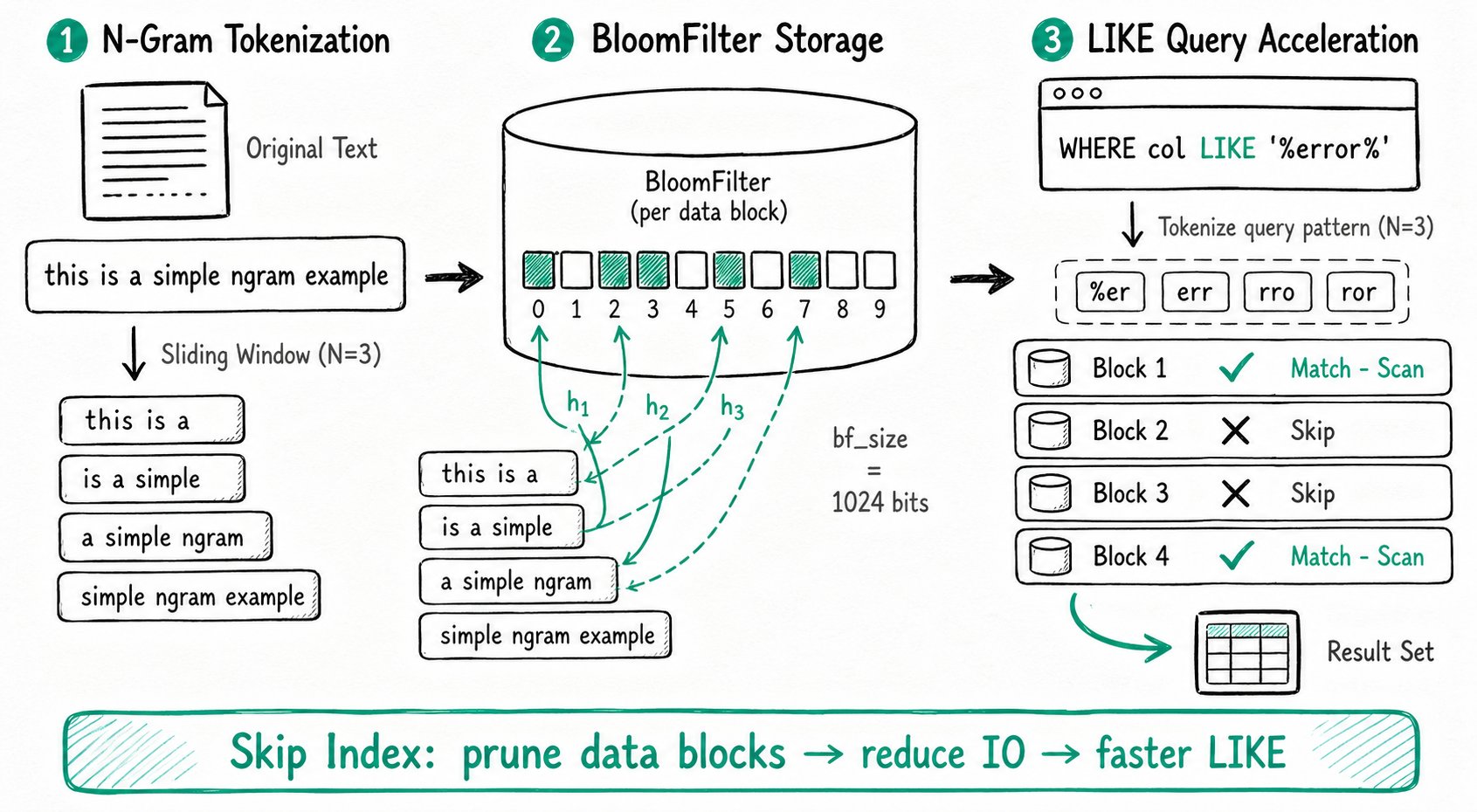
N-Gram tokenization splits a sentence or a piece of text into multiple word groups composed of adjacent characters. For example, tokenizing the string 'This is a simple ngram example' with N = 3 produces the following 4 words:
'This is a''is a simple''a simple ngram''simple ngram example'
Key differences between the NGram BloomFilter index and the regular BloomFilter index:
| Comparison | BloomFilter Index | NGram BloomFilter Index |
|---|---|---|
| Written content | The original column values | Each word group obtained by N-Gram tokenization of the original text |
| Accelerated query type | Equality queries (=, IN) | LIKE '%pattern%' fuzzy queries |
| Applicable column type | Multiple data types | String columns only |
Query acceleration process:
- Apply N-Gram tokenization to the
patterninLIKE '%pattern%'. - Check one by one whether each tokenized word group exists in the BloomFilter.
- If a word group does not exist in the BloomFilter, the corresponding data block cannot satisfy the LIKE condition and can be skipped.
- Skipping data blocks that do not match reduces IO and accelerates the query.
Use Cases
The NGram BloomFilter index is suitable for the following scenarios:
- Acceleration of
LIKE '%pattern%'fuzzy queries on string columns. - The number of consecutive characters in the
LIKEpattern is greater than or equal to thegram_sizedefined for the index.
- Only string columns are supported, and only
LIKEqueries can be accelerated. - The NGram BloomFilter index and the regular BloomFilter index are mutually exclusive. Only one of them can be chosen for the same column.
- The method for analyzing index effectiveness is the same as for the BloomFilter index.
Manage Indexes
Create an Index
Create at Table Creation
Add the index definition after the COLUMN definition in the table creation statement:
INDEX `idx_column_name` (`column_name`) USING NGRAM_BF
PROPERTIES("gram_size"="3", "bf_size"="1024")
COMMENT 'username ngram_bf index'
Syntax Description
| Parameter | Required | Description |
|---|---|---|
idx_column_name (column_name) | Required | column_name is the name of the column on which the index is built and must be defined earlier; idx_column_name is the index name and must be unique within the table |
USING NGRAM_BF | Required | Specifies the index type as NGram BloomFilter index |
PROPERTIES | Optional | Specifies additional properties for the NGram BloomFilter index. See the table below for details |
COMMENT | Optional | Specifies a comment for the index |
It is recommended to prefix index names with idx_, for example idx_review_body.
PROPERTIES Parameters
| Property | Description |
|---|---|
gram_size | The N in N-Gram, specifying that every N consecutive characters form a word group. For example, 'This is a simple ngram example' is split into 4 word groups when N = 3. It is recommended to set this to the minimum length of the LIKE query string, but not below 2. |
bf_size | The size of the BloomFilter, in Bits. It determines the index size for each data block. A larger value consumes more storage space but reduces the probability of hash collisions. |
Recommended configuration: It is generally recommended to start with "gram_size"="3" and "bf_size"="1024", then tune based on the Query Profile.
View Indexes
-- Method 1: In the INDEX section of the table schema, USING NGRAM_BF marks an NGram BloomFilter index
SHOW CREATE TABLE table_name;

-- Method 2: An IndexType of NGRAM_BF marks an NGram BloomFilter index
SHOW INDEX FROM table_name;
Drop an Index
ALTER TABLE table_ngrambf DROP INDEX idx_ngrambf;
Modify an Index
The NGram BloomFilter index can be added to an existing table in the following two ways:
-- Method 1: Use CREATE INDEX
CREATE INDEX idx_column_name2(column_name2) ON table_ngrambf
USING NGRAM_BF
PROPERTIES("gram_size"="3", "bf_size"="1024")
COMMENT 'username ngram_bf index';

-- Method 2: Use ALTER TABLE ADD INDEX
ALTER TABLE table_ngrambf
ADD INDEX idx_column_name2(column_name2) USING NGRAM_BF
PROPERTIES("gram_size"="3", "bf_size"="1024")
COMMENT 'username ngram_bf index';
Use the Index
Enable Function Pushdown
Before using the NGram BloomFilter index, enable function pushdown (enable_function_pushdown defaults to false):
SET enable_function_pushdown = true;
Trigger Index Acceleration
The NGram BloomFilter index is automatically used to accelerate LIKE queries, for example:
SELECT count() FROM table1 WHERE message LIKE '%error%';
Index Effectiveness Analysis
The acceleration effect of the BloomFilter index (including NGram BloomFilter) can be analyzed using the following metrics in the Query Profile:
| Metric | Meaning |
|---|---|
RowsBloomFilterFiltered | Number of rows filtered out by the BloomFilter index, which can be compared with other Rows metrics to analyze the filtering effect |
BlockConditionsFilteredBloomFilterTime | Time consumed by the BloomFilter index |
Usage Example
The following uses the Amazon product user review dataset amazon_reviews as an example to demonstrate how to use the NGram BloomFilter index and its acceleration effect.
Step 1: Create the Table
CREATE TABLE `amazon_reviews` (
    `review_date` int(11) NULL,
    `marketplace` varchar(20) NULL,
    `customer_id` bigint(20) NULL,
    `review_id` varchar(40) NULL,
    `product_id` varchar(10) NULL,
    `product_parent` bigint(20) NULL,
    `product_title` varchar(500) NULL,
    `product_category` varchar(50) NULL,
    `star_rating` smallint(6) NULL,
    `helpful_votes` int(11) NULL,
    `total_votes` int(11) NULL,
    `vine` boolean NULL,
    `verified_purchase` boolean NULL,
    `review_headline` varchar(500) NULL,
    `review_body` string NULL
) ENGINE=OLAP
DUPLICATE KEY(`review_date`)
COMMENT 'OLAP'
DISTRIBUTED BY HASH(`review_date`) BUCKETS 16
PROPERTIES (
    "replication_allocation" = "tag.location.default: 1",
    "compression" = "ZSTD"
);
Step 2: Load Data
1. Download the dataset
Use wget or another tool to download the dataset from the following URLs:
https://datasets-documentation.s3.eu-west-3.amazonaws.com/amazon_reviews/amazon_reviews_2010.snappy.parquet
https://datasets-documentation.s3.eu-west-3.amazonaws.com/amazon_reviews/amazon_reviews_2011.snappy.parquet
https://datasets-documentation.s3.eu-west-3.amazonaws.com/amazon_reviews/amazon_reviews_2012.snappy.parquet
https://datasets-documentation.s3.eu-west-3.amazonaws.com/amazon_reviews/amazon_reviews_2013.snappy.parquet
https://datasets-documentation.s3.eu-west-3.amazonaws.com/amazon_reviews/amazon_reviews_2014.snappy.parquet
https://datasets-documentation.s3.eu-west-3.amazonaws.com/amazon_reviews/amazon_reviews_2015.snappy.parquet
2. Load via Stream Load
curl --location-trusted -u root: -T amazon_reviews_2010.snappy.parquet -H "format:parquet" http://127.0.0.1:8030/api/${DB}/amazon_reviews/_stream_load
curl --location-trusted -u root: -T amazon_reviews_2011.snappy.parquet -H "format:parquet" http://127.0.0.1:8030/api/${DB}/amazon_reviews/_stream_load
curl --location-trusted -u root: -T amazon_reviews_2012.snappy.parquet -H "format:parquet" http://127.0.0.1:8030/api/${DB}/amazon_reviews/_stream_load
curl --location-trusted -u root: -T amazon_reviews_2013.snappy.parquet -H "format:parquet" http://127.0.0.1:8030/api/${DB}/amazon_reviews/_stream_load
curl --location-trusted -u root: -T amazon_reviews_2014.snappy.parquet -H "format:parquet" http://127.0.0.1:8030/api/${DB}/amazon_reviews/_stream_load
curl --location-trusted -u root: -T amazon_reviews_2015.snappy.parquet -H "format:parquet" http://127.0.0.1:8030/api/${DB}/amazon_reviews/_stream_load
The files above may exceed 10 GB. Adjust streaming_load_max_mb in be.conf to avoid exceeding the Stream Load file upload size limit. The following command applies the change dynamically (run it on every BE):
curl -X POST http://{be_ip}:{be_http_port}/api/update_config?streaming_load_max_mb=32768
3. Verify the data load
Run count() via SQL to confirm that the data was loaded successfully:
mysql> SELECT COUNT() FROM amazon_reviews;
+-----------+
| count(*)  |
+-----------+
| 135589433 |
+-----------+
Step 3: Performance Comparison
Scenario 1: Query without an index (takes 7.60s)
SELECT
    product_id,
    any_value(product_title),
    AVG(star_rating) AS rating,
    COUNT() AS count
FROM
    amazon_reviews
WHERE
    review_body LIKE '%is super awesome%'
GROUP BY
    product_id
ORDER BY
    count DESC,
    rating DESC,
    product_id
LIMIT 5;
Query result:
+------------+------------------------------------------+--------------------+-------+
| product_id | any_value(product_title)                 | rating             | count |
+------------+------------------------------------------+--------------------+-------+
| B00992CF6W | Minecraft                                | 4.8235294117647056 |    17 |
| B009UX2YAC | Subway Surfers                           | 4.7777777777777777 |     9 |
| B00DJFIMW6 | Minion Rush: Despicable Me Official Game |              4.875 |     8 |
| B0086700CM | Temple Run                               |                  5 |     6 |
| B00KWVZ750 | Angry Birds Epic RPG                     |                  5 |     6 |
+------------+------------------------------------------+--------------------+-------+
5 rows in set (7.60 sec)
Scenario 2: After adding the NGram BloomFilter index (takes 0.93s)
Add the index:
ALTER TABLE amazon_reviews
ADD INDEX review_body_ngram_idx(review_body) USING NGRAM_BF
PROPERTIES("gram_size"="10", "bf_size"="10240");
Run the same query again:
+------------+------------------------------------------+--------------------+-------+
| product_id | any_value(product_title)                 | rating             | count |
+------------+------------------------------------------+--------------------+-------+
| B00992CF6W | Minecraft                                | 4.8235294117647056 |    17 |
| B009UX2YAC | Subway Surfers                           | 4.7777777777777777 |     9 |
| B00DJFIMW6 | Minion Rush: Despicable Me Official Game |              4.875 |     8 |
| B0086700CM | Temple Run                               |                  5 |     6 |
| B00KWVZ750 | Angry Birds Epic RPG                     |                  5 |     6 |
+------------+------------------------------------------+--------------------+-------+
5 rows in set (0.93 sec)
Performance comparison:
| Scenario | Time | Performance Gain |
|---|---|---|
| Without index | 7.60 s | Baseline |
| With NGram BloomFilter index added | 0.93 s | About 8x |
Index limitations for escaped LIKE patterns
Since 4.1.5, LIKE queries with a custom ESCAPE or a backslash in the pattern do not use the NGRAM Bloom Filter for pruning, to avoid incorrect filtering. These queries remain supported through normal scanning. LIKE patterns without escapes can still use the index when the existing conditions are met.