Prefix Index and Sort Key
The Prefix Index is a sparse index that Apache Doris builds in and maintains automatically. It locates data blocks quickly based on the first 36 bytes of the sort key, with no manual creation required. Choosing an appropriate sort key during table schema design significantly accelerates equality and range queries in WHERE conditions.
How It Works
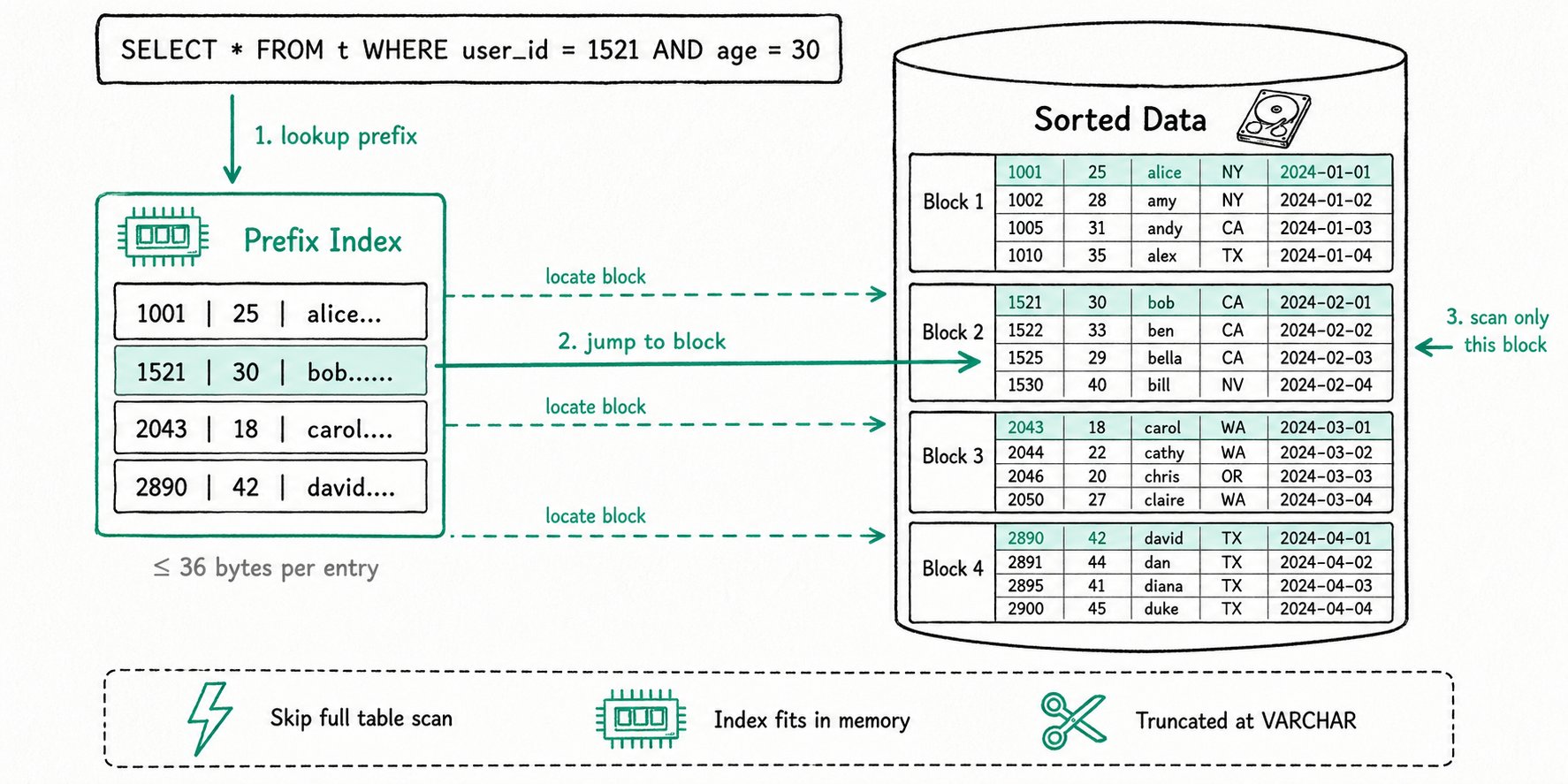
Sort Key
Apache Doris stores data in an ordered structure similar to an SSTable (Sorted String Table), and data can be stored sorted by one or more specified columns. These sorting columns are called the Sort Key.
Different data models derive the sort key from different sources:
| Data model | Sort key source |
|---|---|
| Aggregate | Aggregate Key in the CREATE TABLE statement |
| Unique | Unique Key in the CREATE TABLE statement |
| Duplicate | Duplicate Key in the CREATE TABLE statement |
With the sort key, when a query's WHERE condition hits the sort columns, Doris can quickly jump to the matching data range and avoid a full table scan, reducing search complexity and accelerating the query.
Prefix Index
Building on the sort key, Apache Doris also introduces the Prefix Index:
- Every several rows in a table form one logical Data Block.
- Each data block keeps only one entry in the prefix index table. The entry is the prefix produced by concatenating the sort columns of the first row in the block, and it is no longer than 36 bytes.
- Because the prefix index is small, it can be fully cached in memory. It locates the starting row number of the target data block quickly and substantially improves query efficiency.
36-Byte Truncation Rule
The Prefix Index takes the first 36 bytes of a row's sort columns as its index content, but truncates immediately when it encounters a VARCHAR column:
- When the concatenation of sort columns reaches a
VARCHARcolumn, truncation occurs at the end of that column, regardless of whether 36 bytes have been filled. - If the first column itself is a
VARCHAR, truncation occurs at the end of that column even if its length is less than 36 bytes, and subsequent columns are not added to the prefix index.
Applicable Scenarios
The Prefix Index mainly serves the following query scenarios:
- Equality queries:
col = value,col IN (...) - Range queries:
col > value,BETWEEN ... AND ..., and similar
As long as the WHERE condition hits a prefix of the sort key (that is, several leftmost columns starting from the first one), the prefix index can accelerate the query.
Table Schema Design Recommendations
A table has only one sort key definition, so a table can have only one set of prefix indexes. The choice of sort key at table creation time directly determines how much acceleration the prefix index provides. Consider the following guidelines:
- Prefer columns that appear most frequently in
WHEREfilter conditions as Key columns. - Place columns queried more frequently first, because the prefix index only takes effect on conditions that hit consecutively from the leftmost column.
- Be careful when placing
VARCHARcolumns at the front of the sort key, to avoid triggering truncation that prevents subsequent columns from entering the prefix index.
If a high-frequency query condition cannot hit the prefix index by adjusting the sort key, see the section Alternatives When the Prefix Index Cannot Be Hit below.
Usage Examples
Example 1: Prefix Index Without Truncation
For the following sort key, the prefix index is user_id (8 Bytes) + age (4 Bytes) + message (first 20 Bytes), totaling 32 bytes:
| ColumnName | Type |
|---|---|
| user_id | BIGINT |
| age | INT |
| message | VARCHAR(100) |
| max_dwell_time | DATETIME |
| min_dwell_time | DATETIME |
Example 2: First Column Is VARCHAR and Triggers Truncation
For the following sort key, the prefix index is only user_name (20 Bytes). Even though the total has not reached 36 bytes, truncation occurs immediately because the first column is VARCHAR, and subsequent columns are not added to the prefix index:
| ColumnName | Type |
|---|---|
| user_name | VARCHAR(20) |
| age | INT |
| message | VARCHAR(100) |
| max_dwell_time | DATETIME |
| min_dwell_time | DATETIME |
Example 3: Query Hitting vs. Missing the Prefix Index
Based on the table schema in Example 1:
-
Hits the prefix index (the condition covers the two leftmost sort columns, with high efficiency):
SELECT * FROM table WHERE user_id = 1829239 AND age = 20; -
Misses the prefix index (the condition skips
user_id, so the prefix cannot be used for location):SELECT * FROM table WHERE age = 20;
Therefore, choosing the correct column order at table creation time greatly improves query efficiency.
Verifying Index Effectiveness
The Prefix Index takes effect automatically when it can accelerate a query, with no special syntax required. You can verify the acceleration with the following metric in Query Profile:
| Metric | Meaning |
|---|---|
RowsKeyRangeFiltered | The number of rows filtered out by the prefix index. Compare it with other Rows* metrics to evaluate the filtering effect of the index. |
Alternatives When the Prefix Index Cannot Be Hit
When a high-frequency query condition cannot hit the prefix index (for example, when commonly used filter columns are not a prefix of the sort key), consider the following two options:
- Create an inverted index: A table can have multiple inverted indexes, flexibly covering columns used in different query conditions.
- Use a single-table materialized view (Duplicate model): By creating a strongly consistent single-table synchronous materialized view with a different column order, you can indirectly achieve multiple sets of prefix indexes.
FAQ
Q1: Does the Prefix Index need to be created manually?
No. When a table is created, Doris automatically takes the first 36 bytes of the sort key as the prefix index. There is no dedicated DDL syntax for it.
Q2: Can a single table have multiple sets of prefix indexes?
No. Because the sort key is unique, a table can have only one set of prefix indexes. If multiple sets are required, use inverted indexes or materialized views.
Q3: Why is my prefix index much shorter than expected?
The most common reason is that a VARCHAR column appears early in the sort key and triggers the truncation rule. Place fixed-length types (such as BIGINT, INT, and DATETIME) at the front of the sort key.
Q4: Can the Prefix Index accelerate LIKE queries or text retrieval?
No. For LIKE fuzzy matching and full-text retrieval, use the NGram BloomFilter Index and the inverted index, respectively.
