How Apache Doris IAM Assume Role Works
This document describes how Apache Doris accesses S3 resources through the AWS IAM Assume Role mechanism, including its advantages over the traditional AK/SK approach, the STS temporary credential authentication flow, and how Doris integrates with this mechanism when deployed on EC2.
Applicable Scenarios
| Scenario | Description |
|---|---|
| Replace long-term AK/SK credentials | Use STS dynamic temporary credentials to eliminate the risk of hardcoded key leaks |
| Cross-account S3 access | A source-account entity assumes a role in the target account, with External ID providing secure isolation |
| Least-privilege compliance audit | Role-based authorization, with AWS providing audit trails of specific operators and actions |
| Doris clusters deployed on EC2 | FE/BE nodes automatically perform Assume Role through the EC2 Instance Profile |
Prerequisites
- Apache Doris version 3.0.6 or later (S3 Load, TVF, Export, Resource, Repository, Storage Vault, and other features all support Assume Role)
- FE and BE processes are deployed on AWS EC2 instances with an IAM Role bound
- IAM roles and trust relationships have been planned for both the source account and the target account
- Access to the STS service is available
1. Problems with the Traditional AK/SK Approach for Accessing AWS Resources
The static AK/SK access pattern has significant weaknesses in key management, audit traceability, and permission control:
| Risk Category | Specific Manifestation |
|---|---|
| Long-term exposure risk | Static AK/SK must be hardcoded in configuration files. Once leaked through code disclosure, accidental commits, or malicious theft, attackers permanently gain full privileges equivalent to the key owner, leading to ongoing risks of data leaks, resource tampering, and financial loss |
| Audit blind spot | When multiple users or services share the same set of keys, cloud operation logs only record the key identity and cannot associate actions with a specific user, making it impossible to trace the actual responsible party or business module |
| High operational cost | Key rotation is a disaster: keys for business modules must be rotated manually, which is error-prone and easily triggers service outages |
| Loss of permission control | Coarse-grained account-level authorization cannot meet the least-privilege requirements at the service or instance level |
2. Introduction to the AWS IAM Assume Role Mechanism
2.1 What is AWS IAM Assume Role
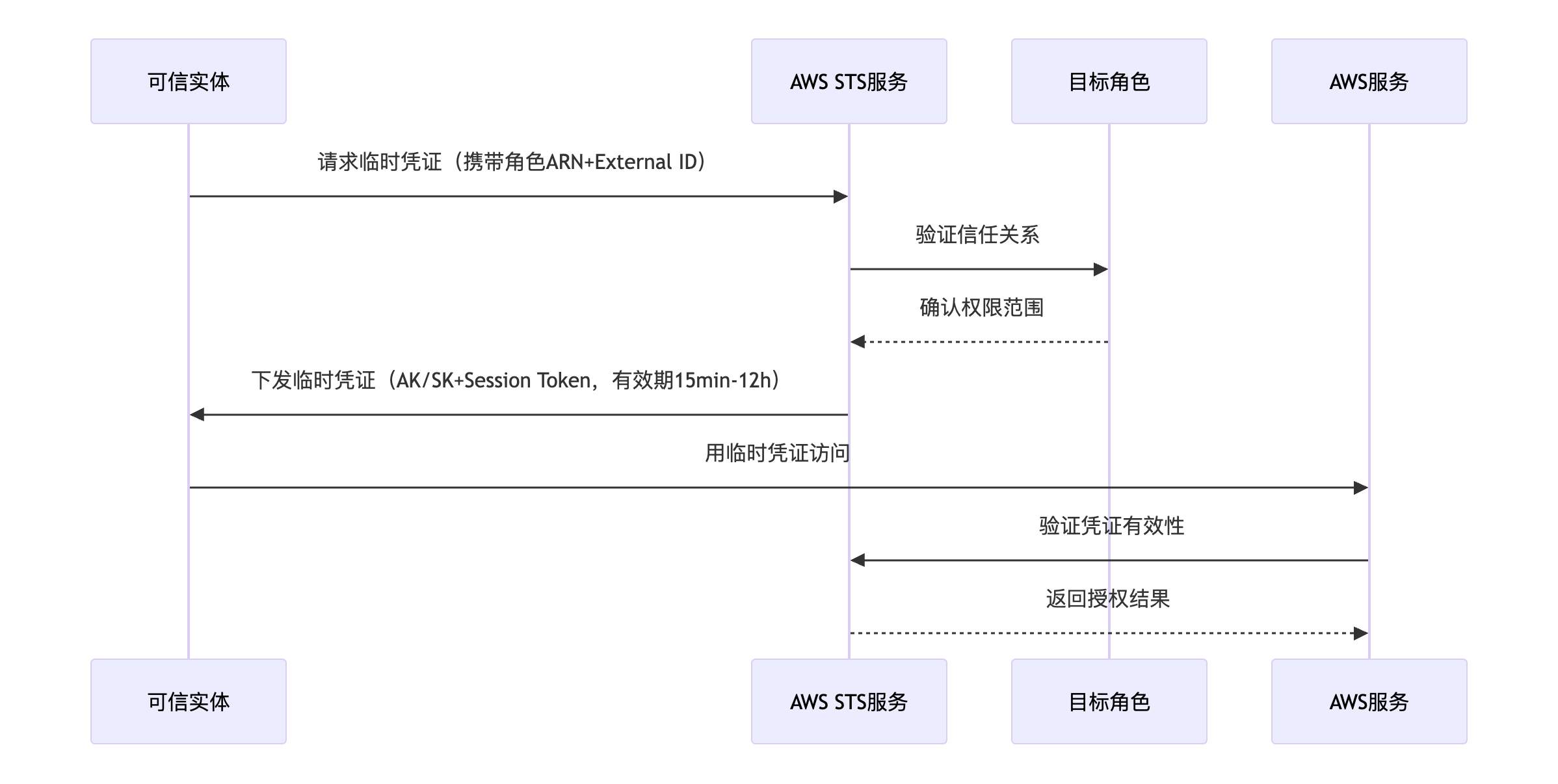
AWS Assume Role is a secure identity-switching mechanism that allows a trusted entity (such as an IAM user, an EC2 instance, or an external account) to temporarily obtain the permissions of a target role through STS (Security Token Service). The workflow is as follows:
2.2 Advantages of Using AWS IAM Assume Role
- Dynamic token mechanism: Replace permanent credentials with temporary credentials valid for 15 minutes to 12 hours
- Cross-account secure isolation: Use External ID for secure cross-account isolation, with auditability through the AWS console
- Principle of least privilege: Role-based access following the Principle of Least Privilege
2.3 Authentication Flow for Accessing an S3 Bucket via AWS IAM Assume Role
The full authentication flow consists of three stages: source-user identity verification, target-role permission activation, and resource operation execution.

Stage 1: Source-User Identity Verification
-
Permission policy check
- When the source user initiates an AssumeRole request, the IAM policy engine of the source account first verifies whether the user is authorized to call the
sts:AssumeRoleaction. - Check basis: the IAM Permissions Policies attached to the source user's identity
- When the source user initiates an AssumeRole request, the IAM policy engine of the source account first verifies whether the user is authorized to call the
-
Trust relationship validation
- A request is made to the target account through STS to check whether the source user is on the trust policy allowlist of the target role.
- Check basis: the IAM Trust Relationships Policies bound to the target role (which explicitly specify which accounts or users may assume that role)
Stage 2: Target-Role Permission Activation
-
Temporary credential generation
If trust-relationship validation passes, STS generates a three-element temporary credential:
{
    "AccessKeyId": "***",
    "SecretAccessKey": "***",
    "SessionToken": "***"
}
The credential is valid for 15 minutes to 12 hours.
-
Target-role permission verification
- Before the target role uses the temporary credential to access S3, the IAM policy engine of the target account verifies whether the role is authorized to perform the requested S3 action (such as
s3:GetObjectors3:PutObject). - Check basis: the IAM Permissions Policies attached to the target role (which define what the role is allowed to do)
- Before the target role uses the temporary credential to access S3, the IAM policy engine of the target account verifies whether the role is authorized to perform the requested S3 action (such as
Stage 3: Resource Operation Execution
- Access the bucket: After all verifications pass, the target role can execute S3 API operations.
3. How Doris Applies the AWS IAM Assume Role Mechanism
3.1 Integration Principle
Doris uses the AWS IAM Assume Role feature by binding the AWS EC2 instances on which the FE and BE processes are deployed to the source account. The main flow is shown in the following diagram:
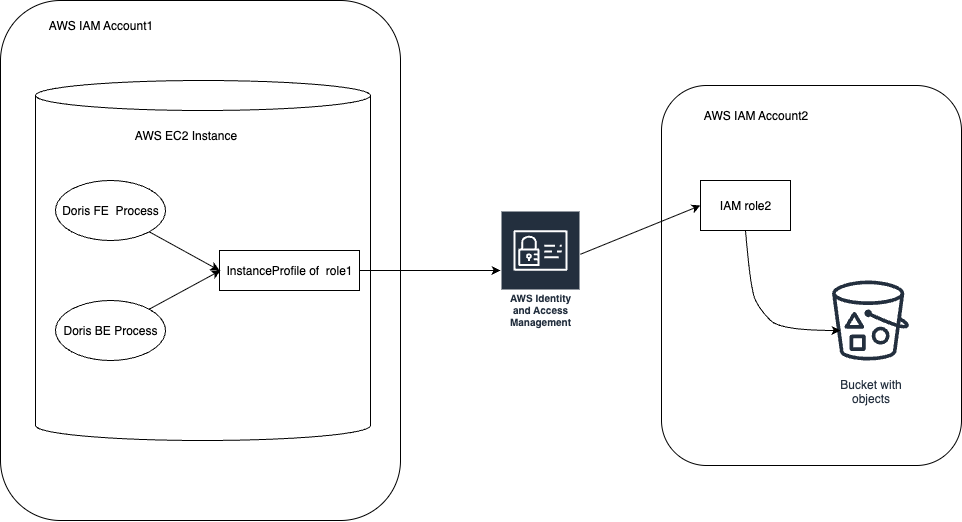
After configuration, the Doris FE and BE processes automatically obtain the profile of the EC2 instance and perform Assume Role to access the bucket. When the cluster scales out, BE nodes automatically check whether each new EC2 instance has been bound to the IAM Role to prevent missing configuration.
3.2 Supported Feature Scope
Doris features such as S3 Load, TVF, Export, Resource, Repository, and Storage Vault all support the AWS Assume Role approach in version 3.0.6 and later. Connectivity is checked when SQL statements for these features are executed.
3.3 SQL Configuration Example
The following example creates an S3 Repository:
CREATE REPOSITORY `s3_repo`
WITH S3 ON LOCATION "s3://bucket/path/"
PROPERTIES (
  "s3.role_arn" = "arn:aws:iam::1234567890:role/doris-s3-role",
  "s3.external_id" = "doris-external-id",
  "timeout" = "3600"
);
Key parameters:
| Parameter | Required | Description |
|---|---|---|
s3.role_arn | Yes | The ARN of IAM Role2 under AWS IAM Account2 |
s3.external_id | No | The externalId value configured in the Trust Relationships Policies |
timeout | No | Operation timeout, in seconds |
For detailed usage of SQL statements for more features, see AWS Authentication and Authorization.
