Compute Group Management: Creation, Authorization, and Scaling
Compute Group (called "Compute Cluster" in versions before 3.0.2) is the mechanism for physically isolating different workloads in the storage-compute separation architecture. One or more BE nodes form a Compute Group, and multiple Compute Groups access the same data through a shared storage layer.
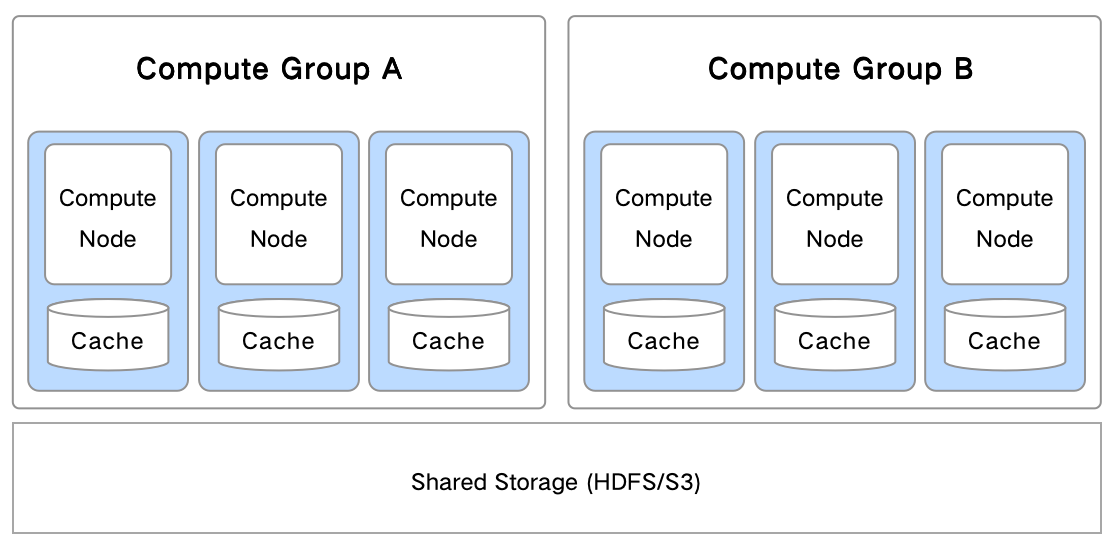
Key characteristics:
- BE nodes are locally stateless, and data is stored on shared storage.
- Multiple Compute Groups share the same data without additional replicas.
- Adding or removing a Compute Group requires no data migration, only cache warm-up at query time.
Compared with Resource Group, Compute Group has the following advantages:
| Dimension | Compute Group | Resource Group |
|---|---|---|
| Storage cost | Data resides in shared storage. The number of Compute Groups is not limited by replica count, and cost does not increase with the number of groups. | Adding replicas means storage cost grows linearly. |
| Scaling flexibility | Adding a new Compute Group requires only cache warm-up, no data migration. | Adding a replica requires migrating a large amount of data. |
| Isolation completeness | The shared storage layer guarantees multiple replicas. A BE outage within a single Compute Group does not affect data loading. | A BE outage may cause data loading to fail. |
In versions before 3.0.2, Compute Group is called Compute Cluster.
View Compute Groups
View all Compute Groups under the current warehouse:
SHOW COMPUTE GROUPS;
Add a Compute Group
Use the ADD BACKEND command to add a BE node and specify the Compute Group it belongs to.
Specify a Compute Group:
ALTER SYSTEM ADD BACKEND 'host:9050' PROPERTIES ("tag.compute_group_name" = "new_group");
Without specifying a Compute Group (joins default_compute_group by default):
ALTER SYSTEM ADD BACKEND 'host:9050';
Manage Compute Group Access Permissions
Grant access permission
Grant the usage permission of a specified Compute Group to a user:
GRANT USAGE_PRIV ON COMPUTE GROUP {compute_group_name} TO {user};
Revoke access permission
Revoke a user's usage permission on a specified Compute Group:
REVOKE USAGE_PRIV ON COMPUTE GROUP {compute_group_name} FROM {user};
Set the Default Compute Group
Set and view the default Compute Group
| Operation | Command | Permission requirement |
|---|---|---|
| Set the default Compute Group for the current user | SET PROPERTY 'default_compute_group' = '{clusterName}'; | No additional permission required |
| Set the default Compute Group for another user | SET PROPERTY FOR {user} 'default_compute_group' = '{clusterName}'; | Requires Admin permission |
| View the default Compute Group of the current user | SHOW PROPERTY; | No additional permission required |
| View the default Compute Group of another user | SHOW PROPERTY FOR {user}; | Requires the relevant view permission |
The value of the default_compute_group field in the returned result is the current default Compute Group.
Permission description
Admin user (for example, CREATE USER jack IDENTIFIED BY '123456' DEFAULT ROLE "admin"):
- Can set the default Compute Group for themselves and for other users.
- Can view the
PROPERTYof themselves and of other users.
Regular user (for example, CREATE USER jack1 IDENTIFIED BY '123456'):
- Can only set the default Compute Group for themselves.
- Can only view their own
PROPERTY. - Cannot execute
SHOW COMPUTE GROUPS(the operation requires theGRANT ADMINpermission).
FAQ
Q: An error occurs when performing data reads or writes
The current user has not configured a default Compute Group. Execute use @cluster to specify the Compute Group for the current session, or use SET PROPERTY to set a default value.
Q: A default Compute Group has been set, but reads and writes still report errors
The previously specified Compute Group has been deleted. Execute use @cluster to specify it again, or use SET PROPERTY to update the default setting.
Automatic Selection of the Default Compute Group
When a user has not explicitly set a default Compute Group, the system automatically selects one that meets the following conditions:
- Has Active BE nodes.
- The current user has usage permission on it.
Within the same session, the default Compute Group remains unchanged. Across sessions, the following situations cause the system to re-select automatically:
| Trigger condition | Always changes |
|---|---|
| The user loses usage permission on the previously selected Compute Group | Always changes |
| A Compute Group is added or removed | Always changes |
| The previously selected Compute Group no longer has Active BE nodes | May change |
Switch Compute Groups
In the storage-compute separation architecture, you can specify the database and the Compute Group in the same statement:
USE { [catalog_name.]database_name[@compute_group_name] | @compute_group_name }
If a database name or Compute Group name contains a reserved keyword, enclose the corresponding name with backticks (`).
Compute Group Scaling
Use the addition or removal of BE nodes to elastically scale a Compute Group:
- Scale out:
ALTER SYSTEM ADD BACKENDadds a new BE to the specified Compute Group. - Scale in:
ALTER SYSTEM DECOMMISSION BACKENDdecommissions a BE from the Compute Group.
For detailed operations, see Storage-compute separation operations.