Bind Workload Group to Compute Group: Resource Isolation Across Workloads
Why Bind Workload Group to Compute Group
Doris supports logically grouping BE nodes within a cluster through Compute Group, forming independent sub-clusters that isolate compute resources across different workloads.
In earlier versions, a Workload Group took effect globally across all Compute Groups, forcing different workloads to share the same set of resource quota configurations. For example:
- Workload A and Workload B each created their own Workload Group, and the sum of their resource quotas already reached 100%.
- Workload A could not create any additional Workload Group.
- The two workloads had significantly different Workload Group configuration needs, but the old architecture could not manage them independently per workload.
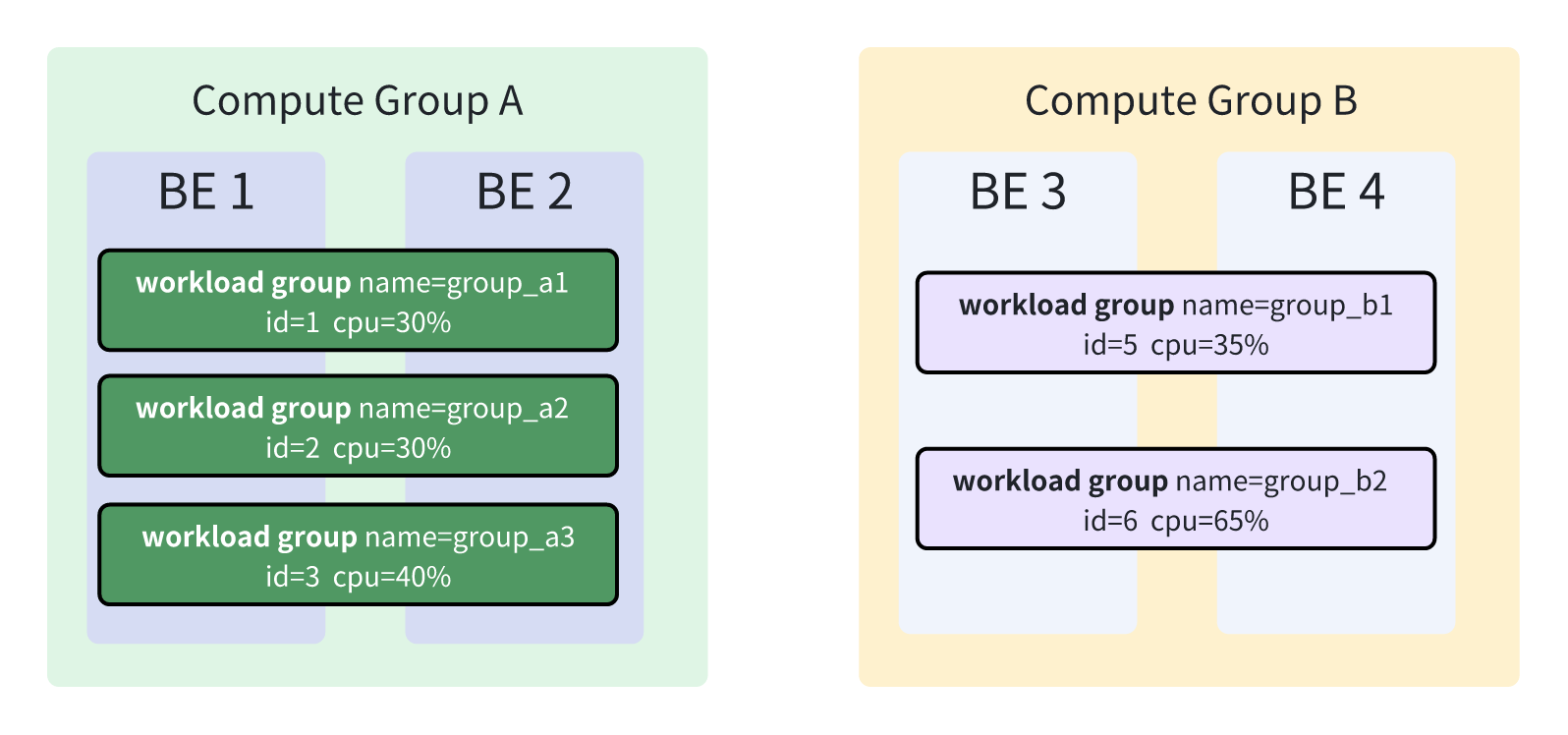
To address this, the current version introduces the Bind Workload Group to Compute Group mechanism, which lets each Compute Group maintain its own independent set of Workload Group configurations.
Relationship Between Compute Group and Resource Group
| Architecture type | Corresponding concept | Description |
|---|---|---|
| Storage-compute separation | Compute Group | Logical partitioning unit for independent sub-clusters |
| Storage-compute integrated | Resource Group | Functionally equivalent to Compute Group |
When discussing resource management, you can treat the two as logically equivalent concepts. All descriptions in this document about binding a Workload Group to a Compute Group apply to both storage-compute separation and storage-compute integrated architectures.
How It Works
Design in Earlier Versions
Assume the cluster has Compute Group A (serving Workload A) and Compute Group B (serving Workload B), along with two Workload Groups, group_a and group_b, whose resource quotas sum to 100%.
In earlier versions, group_a and group_b took effect on all BE nodes and were not restricted by Compute Group boundaries, as shown below:
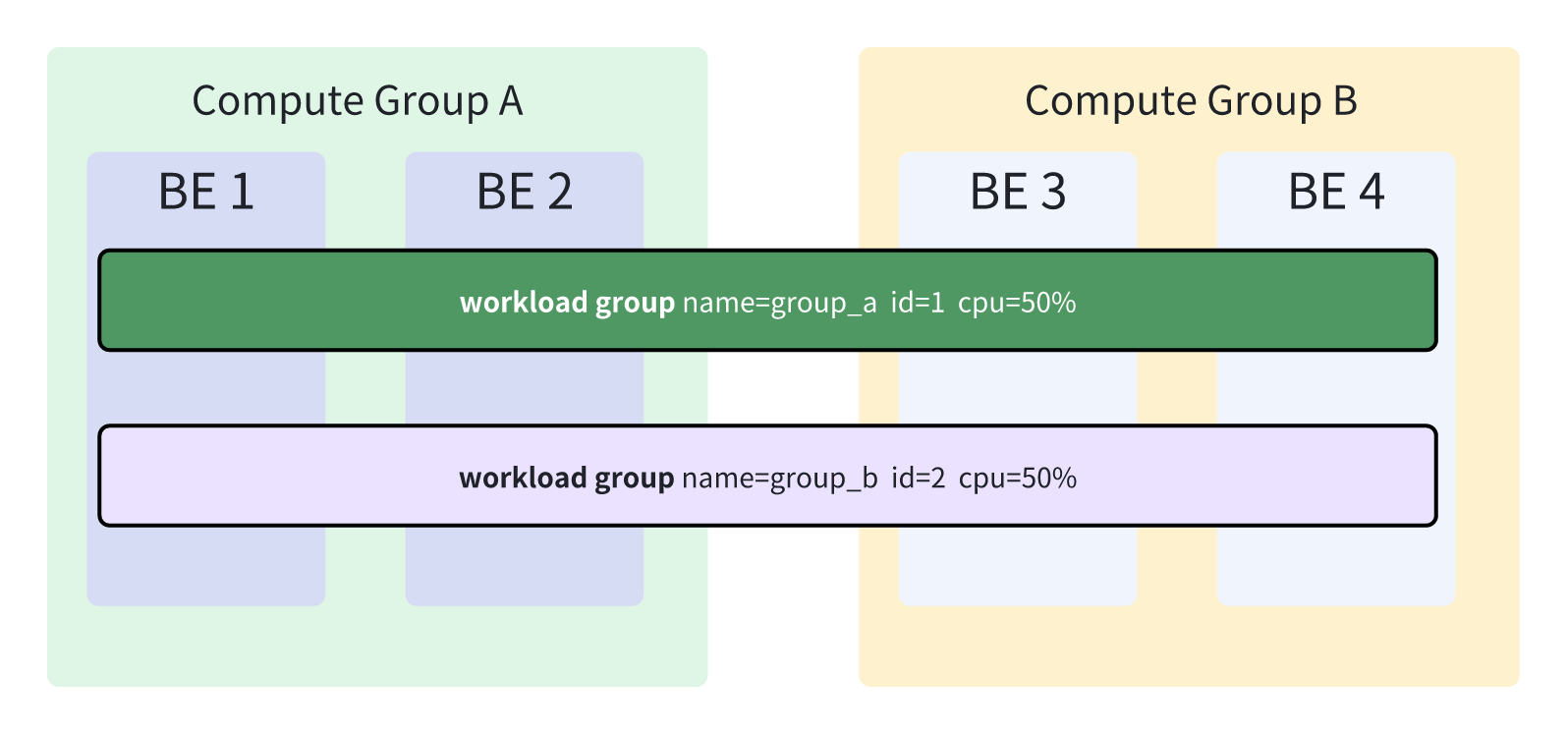
This led to:
- After Workload A created
group_a, the resource quota was full, and no additional Workload Group could be created. - The Workload Group configurations of the two workloads affected each other, making differentiated management difficult.
Design in the Current Version
In the current version, a Workload Group can be bound to a specific Compute Group. Different Compute Groups have their own independent Workload Group configurations, as shown below:
Usage
Doris has a default Compute Group mechanism: when a new BE node is added without specifying its affiliation, the node is automatically placed into the default Compute Group.
| Architecture type | Default Compute Group name |
|---|---|
| Storage-compute separation | default_compute_group |
| Storage-compute integrated | default |
FOR clause differs between architectures- Cloud (storage-compute decoupled) mode: CREATE / ALTER / DROP WORKLOAD GROUP must explicitly include the
FOR <compute_group>clause. Omitting it raises:Must specify compute group via 'FOR <compute_group>' in cloud mode. - Non-cloud (storage-compute coupled) mode: The
FOR <compute_group>clause is optional. The value here actually refers to a resource group (Tag) rather than a real compute group — the grammar is shared with cloud mode purely for consistency. When omitted, it defaults to the default resource group (default).
Create a Workload Group
Bind to a specific Compute Group:
CREATE WORKLOAD GROUP group_a FOR compute_group_a PROPERTIES ('cpu_share'='1024');
Without specifying a Compute Group (non-cloud mode only, binds to the default resource group):
CREATE WORKLOAD GROUP group_a PROPERTIES ('cpu_share'='1024');
Drop a Workload Group
Drop from a specific Compute Group:
DROP WORKLOAD GROUP group_a FOR compute_group_a;
Without specifying a Compute Group (non-cloud mode only, drops from the default resource group):
DROP WORKLOAD GROUP group_a;
Alter Workload Group Properties
Alter the properties of a Workload Group in a specific Compute Group:
ALTER WORKLOAD GROUP group_a FOR compute_group_a PROPERTIES ('cpu_share'='2048');
Without specifying a Compute Group (non-cloud mode only, alters the Workload Group in the default resource group):
ALTER WORKLOAD GROUP group_a PROPERTIES ('cpu_share'='2048');
The ALTER statement is used only to modify the properties of a Workload Group. It cannot modify the binding relationship between a Workload Group and a Compute Group.
Referencing a Workload Group from a Workload Policy
In the workload_group property of CREATE WORKLOAD POLICY / ALTER WORKLOAD POLICY, because a workload group belongs to a compute group, the value must follow these rules:
-
Cloud (storage-compute decoupled) mode: The fully qualified form
<compute_group>.<workload_group>is required, for example:CREATE WORKLOAD POLICY p1 CONDITIONS(query_time > 3000) ACTIONS(cancel_query)
PROPERTIES('workload_group'='compute_group_a.wg1'); -
Non-cloud (storage-compute coupled) mode: Both
<workload_group>(default resource group) and<resource_group>.<workload_group>are accepted.
Notes
-
The binding relationship cannot be modified: A Workload Group is assigned to a fixed Compute Group at creation time and cannot be migrated between Compute Groups.
-
Upgrade behavior: When upgrading from an earlier version to the current version, the system automatically creates a new Workload Group with the same name but a different ID for each Compute Group, based on existing Workload Groups. For example, if the earlier version had two Compute Groups and a
group_a, after the upgrade each Compute Group gets its own new Workload Group namedgroup_a, and the originalgroup_athat did not belong to any Compute Group is automatically deleted. -
Privilege management is unchanged: Privilege checks for Workload Groups are still performed by associating with the Workload Group name, and the management approach is the same as in earlier versions.
-
Lifecycle of the
normalWorkload Group: Doris has a default Workload Group namednormal. Whenever a new Compute Group is created, the system automatically creates a correspondingnormalWorkload Group for it; when a Compute Group is dropped, the associatednormalWorkload Group is automatically dropped as well. The lifecycle of thenormalWorkload Group is fully managed by the system and requires no manual operation.
