High-Speed Data Transmission Link Based on Arrow Flight SQL
The Arrow Flight SQL high-speed data transmission capability described in this document is currently an experimental feature. It is not recommended for production use. If you encounter any issues during use, please report them through the mailing list or GitHub Issue.
Starting from Doris 2.1, a high-speed data transmission link based on the Arrow Flight SQL protocol has been implemented, allowing multiple languages to read large batches of data from Doris at high speed using SQL. Compared with the MySQL Client or JDBC/ODBC driver solutions, performance improves by tens to hundreds of times in some scenarios. Arrow Flight SQL also provides a generic JDBC driver that can interact seamlessly with databases that follow the same protocol.
Applicable scenarios
- Bulk export of large-scale data from Doris for analysis (with performance improvements of tens to hundreds of times over the MySQL/JDBC protocol).
- Downstream data analysis uses columnar formats such as Apache Arrow or Pandas, where row-to-column conversion overhead should be avoided.
- Accessing Doris through BI tools such as DBeaver using the Arrow Flight SQL protocol.
- Reading Doris data at high speed in Arrow format from big data components such as Spark and Flink.
Implementation principle
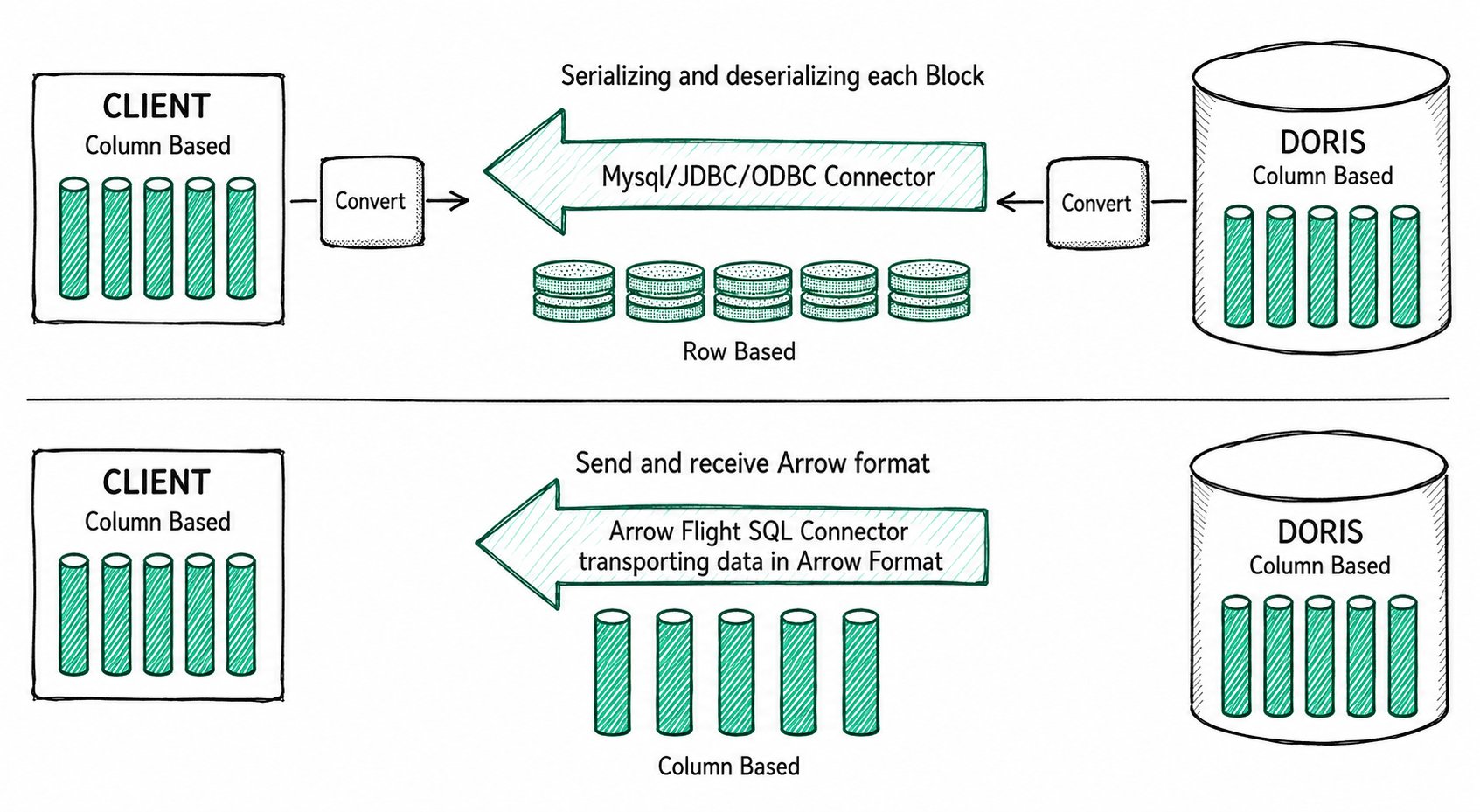
In Doris, query results are organized as Blocks in columnar format. In versions before 2.1, when query results are transmitted to the client through the MySQL Client or JDBC/ODBC driver, the columnar Blocks must be serialized into row-based Bytes, and then deserialized back into columnar format on the client side.
With the high-speed data transmission link built on Arrow Flight SQL, if the client also supports the Arrow columnar format, the entire transmission process completely avoids serialization and deserialization, eliminating the time and performance overhead they cause.
Further reading:
- Apache Arrow official installation tutorial: Apache Arrow
- How Doris implements the Arrow Flight protocol: Doris support Arrow Flight SQL protocol
Server-side configuration
Before using Arrow Flight SQL, you need to enable the Arrow Flight SQL service on Doris FE and BE:
- Modify
arrow_flight_sql_portinfe/conf/fe.confto an available port, such as8070. - Modify
arrow_flight_sql_portinbe/conf/be.confto an available port, such as8050. - Restart the cluster.
The arrow_flight_sql_port configured in fe.conf and be.conf must not be the same.
How to verify successful startup:
| Role | Log file | Keyword |
|---|---|---|
| FE | fe/log/fe.log | Arrow Flight SQL service is started |
| BE | be/log/be.INFO | Arrow Flight Service bind to host |
Type Mapping and Resource Release Since 4.1.5
Since version 4.1.5, Arrow schemas preserve child-field logical type metadata and nullability in nested ARRAY / MAP / STRUCT values. DATETIME uses a timestamp without a time zone; TIMESTAMPTZ uses a timestamp annotated with the session time zone (Z is normalized to UTC). Parse the two types according to their different time zone semantics. Timestamps outside the supported range cause an error rather than being truncated or wrapped.
Closing a result stream before reading finishes cancels the corresponding query and releases resources. Clients should close Readers / Statements correctly. For external table batch scans that must retain the Coordinator, the FE configuration arrow_flight_deferred_query_idle_timeout_second defaults to 3600 seconds. The deadline is never shorter than the query execution timeout, and releasing the Coordinator does not close the session.
Since version 4.1.5, Arrow Flight queries explicitly bypass the MySQL protocol SQL result cache and the MySQL point-query short-circuit path. Queries still execute normally.
Python usage
Using the Python ADBC Driver to connect to Doris enables extremely fast data reads. The required Python version is >= 3.9. The following demonstrates common database operations with the ADBC Driver, including DDL, DML, setting Session variables, and Show statements.
1. Install dependencies
The ADBC Driver is published on PyPI and can be installed via pip:
pip install adbc_driver_manager
pip install adbc_driver_flightsql
Import the following modules in your code to use it:
import adbc_driver_manager
import adbc_driver_flightsql.dbapi as flight_sql

>>> print(adbc_driver_manager.__version__)
1.1.0
>>> print(adbc_driver_flightsql.__version__)
1.1.0
2. Establish a connection
When creating a client that interacts with the Doris Arrow Flight SQL service, you need to provide the FE Host, Arrow Flight Port, username, and password.
Assume that the Arrow Flight SQL service of FE and BE runs on ports 8070 and 8050 respectively, and the username/password is user/pass. The connection process is as follows:
conn = flight_sql.connect(uri="grpc://{FE_HOST}:{fe.conf:arrow_flight_sql_port}", db_kwargs={
            adbc_driver_manager.DatabaseOptions.USERNAME.value: "user",
            adbc_driver_manager.DatabaseOptions.PASSWORD.value: "pass",
        })
cursor = conn.cursor()
After the connection is established, you can use the returned Cursor to interact with Doris through SQL, performing operations such as table creation, metadata retrieval, data ingestion, and queries.
3. Execute DDL and query metadata
Pass SQL to the cursor.execute() function to perform table creation and metadata retrieval:
cursor.execute("DROP DATABASE IF EXISTS arrow_flight_sql FORCE;")
print(cursor.fetchallarrow().to_pandas())

cursor.execute("create database arrow_flight_sql;")
print(cursor.fetchallarrow().to_pandas())

cursor.execute("show databases;")
print(cursor.fetchallarrow().to_pandas())

cursor.execute("use arrow_flight_sql;")
print(cursor.fetchallarrow().to_pandas())

cursor.execute("""CREATE TABLE arrow_flight_sql_test
    (
         k0 INT,
         k1 DOUBLE,
         K2 varchar(32) NULL DEFAULT "" COMMENT "",
         k3 DECIMAL(27,9) DEFAULT "0",
         k4 BIGINT NULL DEFAULT '10',
         k5 DATE,
    )
    DISTRIBUTED BY HASH(k5) BUCKETS 5
    PROPERTIES("replication_num" = "1");""")
print(cursor.fetchallarrow().to_pandas())

cursor.execute("show create table arrow_flight_sql_test;")
print(cursor.fetchallarrow().to_pandas())
If StatusResult returns 0, the query has executed successfully (this design exists for compatibility with JDBC):
  StatusResult
0            0

  StatusResult
0            0

                   Database
0         __internal_schema
1          arrow_flight_sql
..                      ...
507             udf_auth_db

[508 rows x 1 columns]

  StatusResult
0            0

  StatusResult
0            0
                   Table                                       Create Table
0  arrow_flight_sql_test  CREATE TABLE `arrow_flight_sql_test` (\n  `k0`...
4. Ingest data
Run INSERT INTO to ingest a small amount of test data into the table you created:
cursor.execute("""INSERT INTO arrow_flight_sql_test VALUES
        ('0', 0.1, "ID", 0.0001, 9999999999, '2023-10-21'),
        ('1', 0.20, "ID_1", 1.00000001, 0, '2023-10-21'),
        ('2', 3.4, "ID_1", 3.1, 123456, '2023-10-22'),
        ('3', 4, "ID", 4, 4, '2023-10-22'),
        ('4', 122345.54321, "ID", 122345.54321, 5, '2023-10-22');""")
print(cursor.fetchallarrow().to_pandas())
The following output indicates a successful ingestion:
  StatusResult
0            0
To ingest large batches of data into Doris, it is recommended to use pydoris to execute Stream Load.
5. Execute queries
Query the table you just loaded, including aggregation, sorting, and Set Session Variable operations:
cursor.execute("select * from arrow_flight_sql_test order by k0;")
print(cursor.fetchallarrow().to_pandas())

cursor.execute("set exec_mem_limit=2000;")
print(cursor.fetchallarrow().to_pandas())

cursor.execute("show variables like \"%exec_mem_limit%\";")
print(cursor.fetchallarrow().to_pandas())

cursor.execute("select k5, sum(k1), count(1), avg(k3) from arrow_flight_sql_test group by k5;")
print(cursor.fetch_df())
Output:
   k0            k1    K2                k3          k4          k5
0   0       0.10000    ID       0.000100000  9999999999  2023-10-21
1   1       0.20000  ID_1       1.000000010           0  2023-10-21
2   2       3.40000  ID_1       3.100000000      123456  2023-10-22
3   3       4.00000    ID       4.000000000           4  2023-10-22
4   4  122345.54321    ID  122345.543210000           5  2023-10-22

[5 rows x 6 columns]

  StatusResult
0            0

    Variable_name Value Default_Value Changed
0  exec_mem_limit  2000    2147483648       1

           k5  Nullable(Float64)_1  Int64_2 Nullable(Decimal(38, 9))_3
0  2023-10-22         122352.94321        3            40784.214403333
1  2023-10-21              0.30000        2                0.500050005

[2 rows x 5 columns]
Use one of the following two methods to fetch query results so the data stays in columnar format:
cursor.fetchallarrow(): returns Arrow formatcursor.fetch_df(): returns a Pandas DataFrame directly
Do not use cursor.fetchall(). It converts columnar data back to row-based format, which is essentially the same as using mysql-client. Performance may even be slower than mysql-client because of the extra column-to-row conversion on the client side.
6. Complete example
# Doris Arrow Flight SQL Test

# step 1, library is released on PyPI and can be easily installed.
# pip install adbc_driver_manager
# pip install adbc_driver_flightsql
import adbc_driver_manager
import adbc_driver_flightsql.dbapi as flight_sql

# step 2, create a client that interacts with the Doris Arrow Flight SQL service.
# Modify arrow_flight_sql_port in fe/conf/fe.conf to an available port, such as 8070.
# Modify arrow_flight_sql_port in be/conf/be.conf to an available port, such as 8050.
conn = flight_sql.connect(uri="grpc://{FE_HOST}:{fe.conf:arrow_flight_sql_port}", db_kwargs={
            adbc_driver_manager.DatabaseOptions.USERNAME.value: "root",
            adbc_driver_manager.DatabaseOptions.PASSWORD.value: "",
        })
cursor = conn.cursor()

# interacting with Doris via SQL using Cursor
def execute(sql):
    print("\n### execute query: ###\n " + sql)
    cursor.execute(sql)
    print("### result: ###")
    print(cursor.fetchallarrow().to_pandas())

# step3, execute DDL statements, create database/table, show stmt.
execute("DROP DATABASE IF EXISTS arrow_flight_sql FORCE;")
execute("show databases;")
execute("create database arrow_flight_sql;")
execute("show databases;")
execute("use arrow_flight_sql;")
execute("""CREATE TABLE arrow_flight_sql_test
    (
         k0 INT,
         k1 DOUBLE,
         K2 varchar(32) NULL DEFAULT "" COMMENT "",
         k3 DECIMAL(27,9) DEFAULT "0",
         k4 BIGINT NULL DEFAULT '10',
         k5 DATE,
    )
    DISTRIBUTED BY HASH(k5) BUCKETS 5
    PROPERTIES("replication_num" = "1");""")
execute("show create table arrow_flight_sql_test;")


# step4, insert into
execute("""INSERT INTO arrow_flight_sql_test VALUES
        ('0', 0.1, "ID", 0.0001, 9999999999, '2023-10-21'),
        ('1', 0.20, "ID_1", 1.00000001, 0, '2023-10-21'),
        ('2', 3.4, "ID_1", 3.1, 123456, '2023-10-22'),
        ('3', 4, "ID", 4, 4, '2023-10-22'),
        ('4', 122345.54321, "ID", 122345.54321, 5, '2023-10-22');""")


# step5, execute queries, aggregation, sort, set session variable
execute("select * from arrow_flight_sql_test order by k0;")
execute("set exec_mem_limit=2000;")
execute("show variables like \"%exec_mem_limit%\";")
execute("select k5, sum(k1), count(1), avg(k3) from arrow_flight_sql_test group by k5;")

# step6, close cursor
cursor.close()
Java usage
There are three connection options on the Java side. Their characteristics and selection guidance are as follows:
| Connection method | URL form | Return format | Recommended scenario |
|---|---|---|---|
JDBC (jdbc:arrow-flight-sql) | jdbc:arrow-flight-sql://... | JDBC ResultSet (rows) | Downstream analysis uses row-based format, or you need compatibility with BI tools or existing JDBC code |
| Flight ADBC Driver | grpc://... | Arrow (columnar) | Downstream analysis uses Arrow / columnar format, with a focus on optimal performance |
| Flight JDBC Driver (ADBC wrapper) | jdbc:arrow-flight-sql://... | Arrow (columnar) | Same as Flight ADBC Driver, but the project needs to keep using the jdbc:arrow-flight-sql URL form |
You can refer to the demo in JDBC/Java Arrow Flight SQL Sample to test the performance of different connection methods. Expected results are described in Add Arrow Flight Sql demo for Java. For performance comparison between Java Arrow Flight SQL connection methods and the traditional jdbc:mysql, see GitHub Issue 25514 (Section 6.2).
Additional recommendations:
- Whether parsing a JDBC
ResultSetor Arrow data, parsing time is greater than the time spent reading the data itself. If Arrow Flight SQL shows only limited improvement overjdbc:mysql://, check whether the data parsing step takes too long first. - For all connection methods, JDK 17 reads data faster than JDK 1.8.
- When the data volume is very large, Arrow Flight SQL uses less memory than
jdbc:mysql://. Try Arrow Flight SQL first when memory is constrained. - In addition to the three methods above, you can also use the native
FlightClientto connect directly to the Arrow Flight Server, which is more flexible and supports parallel reads from multiple Endpoints. The Flight ADBC Driver itself creates connections based onFlightClient, and is simpler to use thanFlightClientdirectly.
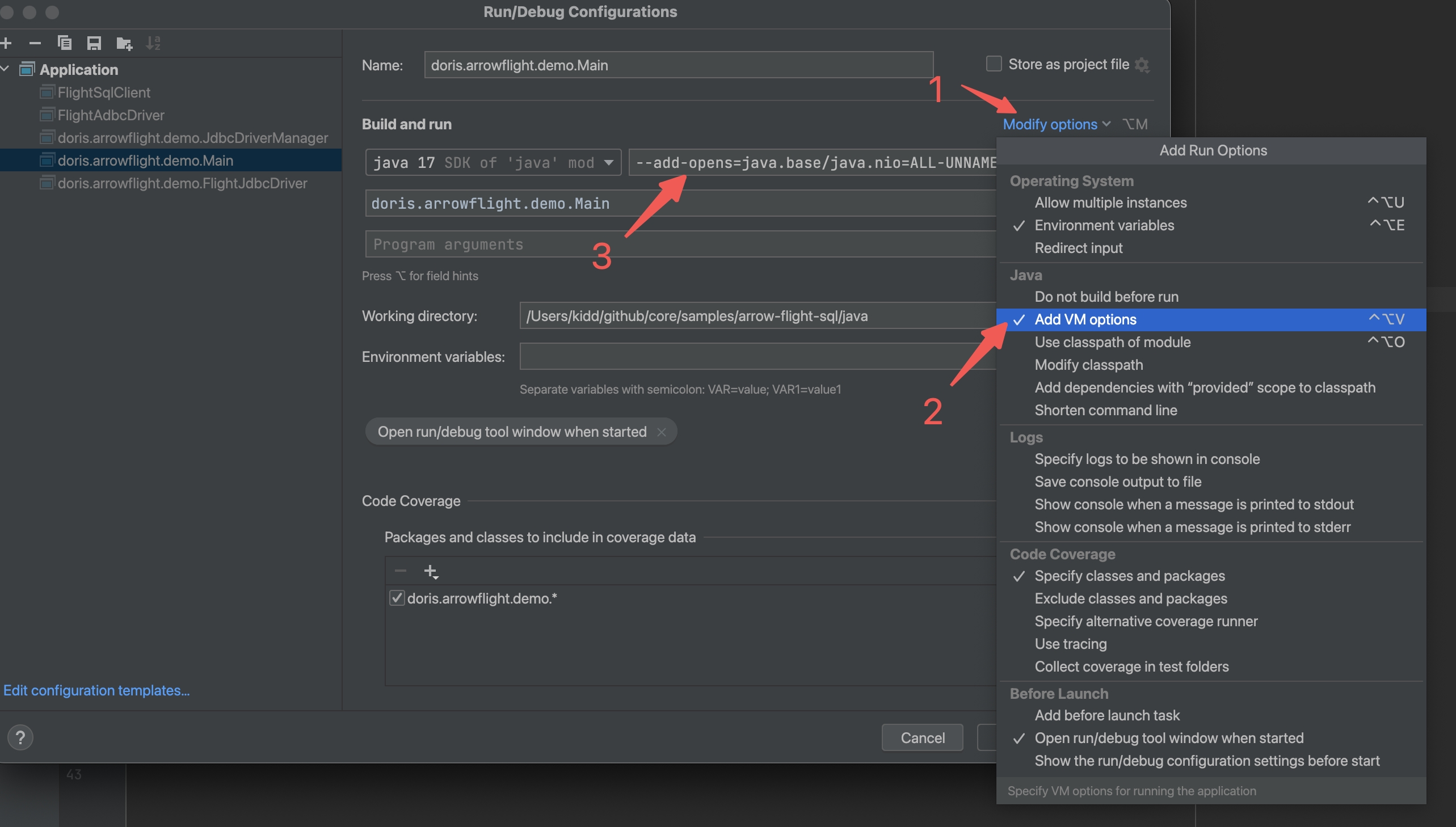
When using Java 9 or above, you must add --add-opens=java.base/java.nio=ALL-UNNAMED to the Java command to expose some JDK internals. Otherwise, one of the following errors occurs:
module java.base does not "opens java.nio" to unnamed modulemodule java.base does not "opens java.nio" to org.apache.arrow.memory.corejava.lang.NoClassDefFoundError: Could not initialize class org.apache.arrow.memory.util.MemoryUtil (Internal; Prepare)
There are two ways to add it:
# Option 1: Add via command-line argument directly
$ java --add-opens=java.base/java.nio=ALL-UNNAMED -jar ...

# Option 2: Add via environment variable
$ env _JAVA_OPTIONS="--add-opens=java.base/java.nio=ALL-UNNAMED" java -jar ...
When debugging in IntelliJ IDEA, add this argument under Build and run in Run/Debug Configurations. See the figure below:
Option 1: jdbc:arrow-flight-sql
The open-source JDBC driver for the Arrow Flight SQL protocol is compatible with the standard JDBC API. It allows most BI tools to access Doris through JDBC and supports high-speed transmission of Apache Arrow data. Usage is similar to the MySQL JDBC driver: simply replace the jdbc:mysql protocol in the connection URL with the jdbc:arrow-flight-sql protocol. Query results are still returned as the JDBC ResultSet data structure.
POM dependencies:
<properties>
    <arrow.version>17.0.0</arrow.version>
</properties>
<dependencies>
    <dependency>
        <groupId>org.apache.arrow</groupId>
        <artifactId>flight-sql-jdbc-core</artifactId>
        <version>${arrow.version}</version>
    </dependency>
</dependencies>
Connection code example:
import java.sql.Connection;
import java.sql.DriverManager;
import java.sql.ResultSet;
import java.sql.Statement;

Class.forName("org.apache.arrow.driver.jdbc.ArrowFlightJdbcDriver");
String DB_URL = "jdbc:arrow-flight-sql://{FE_HOST}:{fe.conf:arrow_flight_sql_port}?useServerPrepStmts=false"
        + "&cachePrepStmts=true&useSSL=false&useEncryption=false";
String USER = "root";
String PASS = "";

Connection conn = DriverManager.getConnection(DB_URL, USER, PASS);
Statement stmt = conn.createStatement();
ResultSet resultSet = stmt.executeQuery("select * from information_schema.tables;");
while (resultSet.next()) {
    System.out.println(resultSet.toString());
}

resultSet.close();
stmt.close();
conn.close();
Option 2: Flight ADBC Driver / Flight JDBC Driver
In addition to using JDBC, Java can also create a Driver to read Doris directly and return data in Arrow format. The following examples show how to use the ADBC Driver and the JDBC Driver (ADBC wrapper) to connect to the Doris Arrow Flight Server.
POM dependencies:
<properties>
    <adbc.version>0.15.0</adbc.version>
</properties>

<dependencies>
    <dependency>
        <groupId>org.apache.arrow.adbc</groupId>
        <artifactId>adbc-driver-jdbc</artifactId>
        <version>${adbc.version}</version>
    </dependency>
    <dependency>
        <groupId>org.apache.arrow.adbc</groupId>
        <artifactId>adbc-core</artifactId>
        <version>${adbc.version}</version>
    </dependency>
    <dependency>
        <groupId>org.apache.arrow.adbc</groupId>
        <artifactId>adbc-driver-manager</artifactId>
        <version>${adbc.version}</version>
    </dependency>
    <dependency>
        <groupId>org.apache.arrow.adbc</groupId>
        <artifactId>adbc-sql</artifactId>
        <version>${adbc.version}</version>
    </dependency>
    <dependency>
        <groupId>org.apache.arrow.adbc</groupId>
        <artifactId>adbc-driver-flight-sql</artifactId>
        <version>${adbc.version}</version>
    </dependency>
</dependencies>
Flight ADBC Driver
Connection code example:
// 1. new driver
final BufferAllocator allocator = new RootAllocator();
FlightSqlDriver driver = new FlightSqlDriver(allocator);
Map<String, Object> parameters = new HashMap<>();
AdbcDriver.PARAM_URI.set(parameters, Location.forGrpcInsecure("{FE_HOST}", {fe.conf:arrow_flight_sql_port}).getUri().toString());
AdbcDriver.PARAM_USERNAME.set(parameters, "root");
AdbcDriver.PARAM_PASSWORD.set(parameters, "");
AdbcDatabase adbcDatabase = driver.open(parameters);

// 2. new connection
AdbcConnection connection = adbcDatabase.connect();
AdbcStatement stmt = connection.createStatement();

// 3. execute query
stmt.setSqlQuery("select * from information_schema.tables;");
QueryResult queryResult = stmt.executeQuery();
ArrowReader reader = queryResult.getReader();

// 4. load result
List<String> result = new ArrayList<>();
while (reader.loadNextBatch()) {
    VectorSchemaRoot root = reader.getVectorSchemaRoot();
    String tsvString = root.contentToTSVString();
    result.add(tsvString);
}
System.out.printf("batchs %d\n", result.size());

// 5. close
reader.close();
queryResult.close();
stmt.close();
connection.close();
Flight JDBC Driver (ADBC wrapper)
Connection code example:
final Map<String, Object> parameters = new HashMap<>();
AdbcDriver.PARAM_URI.set(
        parameters,"jdbc:arrow-flight-sql://{FE_HOST}:{fe.conf:arrow_flight_sql_port}?useServerPrepStmts=false&cachePrepStmts=true&useSSL=false&useEncryption=false");
AdbcDriver.PARAM_USERNAME.set(parameters, "root");
AdbcDriver.PARAM_PASSWORD.set(parameters, "");
try (
        BufferAllocator allocator = new RootAllocator();
        AdbcDatabase db = new JdbcDriver(allocator).open(parameters);
        AdbcConnection connection = db.connect();
        AdbcStatement stmt = connection.createStatement()
) {
    stmt.setSqlQuery("select * from information_schema.tables;");
    AdbcStatement.QueryResult queryResult = stmt.executeQuery();
    ArrowReader reader = queryResult.getReader();
    List<String> result = new ArrayList<>();
    while (reader.loadNextBatch()) {
        VectorSchemaRoot root = reader.getVectorSchemaRoot();
        String tsvString = root.contentToTSVString();
        result.add(tsvString);
    }
    long etime = System.currentTimeMillis();
    System.out.printf("batchs %d\n", result.size());

    reader.close();
    queryResult.close();
    stmt.close();
}  catch (Exception e) {
    e.printStackTrace();
}
Type mapping
Starting from version 4.1.4, DATETIME / DATETIMEV2 values returned by Arrow Flight SQL are timezone-naive Arrow timestamps, while TIMESTAMPTZ is still returned as a timezone-aware timestamp.
Before 4.1.4, DATETIME was tagged as timezone-aware, so a client parsing it in its local timezone applied an extra timezone offset. After upgrading, parse DATETIME columns as local wall-clock values without a timezone.
The same version also corrects the following type metadata:
- In the
GetTablesmetadata endpoint, the Arrow type ofDATEV2is corrected fromDate(MILLISECOND)toDate(DAY). ARRAY/MAP/STRUCTmetadata now reports the real child field types instead of placeholder types.
Integration with third-party components
BI tools (DBeaver and others)
Starting from Doris v2.1.8, BI tools such as DBeaver can connect to Doris using the arrow-flight-sql protocol. For configuration, refer to:
Spark and Flink
Arrow Flight officially has no plans to support Spark and Flink (see GitHub Issue). However, starting from version 24.0.0, the following connectors support accessing Doris through Arrow Flight SQL, and read performance is expected to improve several times:
The community previously referenced Spark-Flight-Connector to test connecting to Doris through FlightClient in Spark. The conclusions are:
- Conversion between Arrow and Doris Block is 10 times faster than conversion between CSV and Doris Block.
- Arrow has better support for complex types such as Map and Array.
- Arrow data is highly compressible, resulting in smaller network overhead during transmission.
However, Doris Arrow Flight has not yet implemented multi-node parallel reads. Query results are still aggregated to a single BE node before being returned. For simple bulk data export, performance may not be as good as the Doris Spark Connector, which supports parallel reads at the Tablet level.
If you want to use Arrow Flight SQL to connect Doris in Spark, you can refer to the following open-source projects to implement it yourself:
Advanced configuration
Multi-BE parallel result return
By default, Doris aggregates the results of a query from all BE nodes onto a single BE node. The behavior under different protocols is as follows:
- MySQL/JDBC query: FE requests the query result from the aggregating BE node.
- Arrow Flight SQL query: FE wraps the IP/Port of that BE node into an Endpoint and returns it to the ADBC Client. The ADBC Client then requests the data from this Endpoint.
Scenario 1: Pure SELECT pull (no Join/Sort/window functions)
If the query is a simple SELECT that pulls data from Doris without operators that cause data shuffling such as Join, Sort, or window functions, the query can be split at Tablet granularity. The Doris Spark/Flink Connector implements parallel reads using this approach in two steps:
-
Run
EXPLAIN SQL. The query plan returned by FE contains the full Tablet ID list in the ScanOperator. -
Based on this Tablet ID list, split the original SQL into multiple SQL statements, each reading only part of the Tablets, for example:
SELECT * FROM t1 TABLET(10001,10002) limit 1000;The split SQL statements can be executed in parallel. For details, see Support select table sample.
Scenario 2: Queries with aggregation at the outermost layer
For a query of the form select k1, sum(k2) from xxx group by k1, starting from Doris v3.0.4, you can use the following setting to allow each BE node to return its result independently:
set enable_parallel_result_sink=true;
After receiving the Endpoint list returned by FE, the ADBC Client pulls results from multiple BE nodes in parallel. For implementation details, see support parallel result sink.
When the aggregation result is small, returning from multiple BEs increases RPC pressure.
In theory, every query except those whose outermost layer is sorting could support parallel result return per BE node. This is not yet implemented.
Multiple BEs sharing the same external access IP
There is a deployment topology where the FE node is reachable from outside the cluster, but all BE nodes are reachable only from inside the cluster.
- Connecting to Doris with the MySQL Client or JDBC and running queries works, because results are returned by FE.
- Connecting to Doris with Arrow Flight SQL fails to run queries, because the ADBC Client needs to connect directly to the BE nodes to pull query results.
In production, exposing BE nodes outside the cluster is usually inconvenient. You can add a reverse proxy (such as Nginx) in front of all BE nodes, so that external clients connecting to Nginx are randomly routed to a BE node. However, by default, Arrow Flight SQL query results are stored randomly on a particular BE node. If this differs from the BE node Nginx routes to, an internal data forwarding step happens inside BE.
Starting from Doris v2.1.8, you can configure public_host and arrow_flight_sql_proxy_port in be.conf of all BE nodes to the external access IP and port shared by multiple BE nodes. Query results are forwarded correctly and returned to the ADBC Client:
public_host={nginx ip}
arrow_flight_sql_proxy_port={nginx port}
FAQ
1. Error i/o timeout
Q: The full error message is connection error: desc = "transport: Error while dialing: dial tcp <ip:arrow_flight_port>: i/o timeout".
A: Troubleshoot in two cases based on the role corresponding to <ip:arrow_flight_port> in the error message.
Case 1: <ip:arrow_flight_port> is the IP and arrow_flight_port of an FE node
- Check whether the Arrow Flight Server on the FE node started successfully. Searching for
Arrow Flight SQL service is startedinfe/log/fe.logindicates a successful start. - If the FE Arrow Flight Server has started normally, check whether the client machine can
pingthis IP. If not, an externally accessible IP needs to be enabled for the FE node, and the cluster needs to be redeployed.
Case 2: <ip:arrow_flight_port> is the IP and arrow_flight_port of a BE node
- Check whether the Arrow Flight Server on the BE node started successfully. Searching for
Arrow Flight Service bind to hostinbe/log/be.INFOindicates a successful start. - If the BE Arrow Flight Server has started normally, check whether the client machine can
pingthis IP.
If the BE node is known to be on the cluster's internal network, use one of the following two methods:
- Enable an externally accessible IP for each BE node. Starting from Doris v2.1.8, configure
public_hostin that BE node'sbe.confto this IP, and similarly configurepublic_hostof all BE nodes to the corresponding client-accessible IP. - Refer to the Multiple BEs sharing the same external access IP section to add a reverse proxy in front of all BE nodes.
If you are not sure whether BE is fully on the internal network, follow these steps to check:
- On the BE node machine, run
ifconfigto return all IPs. One of them should match the IP in<ip:arrow_flight_port>and match the IP printed byshow backends. pingeach of the other IPs returned byifconfigin turn.- If any IP can be reached by the client, configure that IP as
public_host. If none can be reached by the client, the BE node is fully on the internal network.
2. Error module java.base does not "opens java.nio"... when connecting to Arrow Flight SQL with JDBC or Java
Q: The full error may be one of the following:
module java.base does not "opens java.nio" to unnamed modulemodule java.base does not "opens java.nio" to org.apache.arrow.memory.corejava.lang.NoClassDefFoundError: Could not initialize class org.apache.arrow.memory.util.MemoryUtil (Internal; Prepare)
A: Resolve as follows:
- Check whether
JAVA_OPTS_FOR_JDK_17infe/conf/fe.confcontains--add-opens=java.base/java.nio=ALL-UNNAMED. If not, add it. - Refer to the notes in Java usage and add
--add-opens=java.base/java.nio=ALL-UNNAMEDto the Java command. - When debugging in IntelliJ IDEA, add
--add-opens=java.base/java.nio=ALL-UNNAMEDunderBuild and runinRun/Debug Configurations.
3. Error arrow flight schema timeout in ARM environments
Q: The full error is get flight info statement failed, arrow flight schema timeout, TimeoutException: Waited 5000 milliseconds for io.grpc.stub.Client.
A: If the Linux kernel version is <= 4.19.90, you need to upgrade to 4.19.279 or later, or recompile Doris BE in the lower-version Linux kernel environment. For the specific compilation method, refer to the document docs/dev/install/source-install/compilation-arm.
Cause: Older Linux kernels have compatibility issues with Arrow. cpp: arrow::RecordBatch::MakeEmpty() hangs while constructing an Arrow Record Batch, so BE's Arrow Flight Server does not respond to FE's RPC request within 5000ms, and FE then returns an RPC timeout failed error to the client. Spark and Flink also convert query results into Arrow Record Batches before returning them when reading Doris, so the same issue applies.
The Linux kernel version on KylinV10 SP2 and SP3 only goes up to 4.19.90-24.4.v2101.ky10.aarch64 and cannot be upgraded further. The only option is to recompile Doris BE on KylinV10. If the issue persists after compiling with the new ldb_toolchain, try compiling with the older ldb_toolchain v0.17. If your ARM environment cannot reach the internet, Huawei Cloud provides ARM + KylinV10 and Alibaba Cloud provides x86 + KylinV10.
4. How to change the per-batch read size for jdbc:arrow-flight-sql
Q: In some scenarios, the batch size needs to be changed to improve performance.
A: Modify setTargetBatchSize in the makeJdbcConfig method in org.apache.arrow.adbc.driver.jdbc.JdbcArrowReader (default 1024), then save the modified file to a local directory under the same path to override the original file and take effect.
5. ADBC v0.10 does not support parallel reads
Q: Do JDBC and the Java ADBC/JDBC Driver in ADBC v0.10 support parallel reads?
A: No, because the stmt.executePartitioned() method is not implemented. The only option is to use the native FlightClient to implement parallel reads from multiple Endpoints. The call flow looks like:
sqlClient = new FlightSqlClient
execute   = sqlClient.execute(sql)
endpoints = execute.getEndpoints()
for (FlightEndpoint endpoint : endpoints) { ... }
In addition, the default AdbcStatement in ADBC v0.10 is actually JdbcStatement. After executeQuery, the row-based JDBC ResultSet is converted back to Arrow columnar format. Java ADBC functionality is expected to be more complete in ADBC 1.0.0. See GitHub Issue for details.
6. Specifying database name in the URL
Q: Can a database name be specified in the URL?
A: As of Arrow v15.0, the Arrow JDBC Connector does not support specifying a database name in the URL. For example, specifying the test database in jdbc:arrow-flight-sql://{FE_HOST}:{fe.conf:arrow_flight_sql_port}/test?useServerPrepStmts=false has no effect. You must run the SQL use database manually. Arrow v18.0 supports specifying the database name in the URL, but bugs still exist in practice.
7. Python ADBC prints a Cannot disable autocommit warning
Q: The full warning is Warning: Cannot disable autocommit; conn will not be DB-API 2.0 compliant.
A: When using Python, you can ignore this warning. It is an issue with the Python ADBC Client and does not affect queries.
8. Python error grpc: received message larger than max
Q: The full error is grpc: received message larger than max (20748753 vs. 16777216).
A: Refer to Python: grpc: received message larger than max #2078 and add adbc_driver_flightsql.DatabaseOptions.WITH_MAX_MSG_SIZE.value in the Database Option.
9. Error invalid bearer token
Q: The client reports the error invalid bearer token.
A: You can take the following actions:
-
Modify the maximum number of connections for the current user:
SET PROPERTY FOR 'root' 'max_user_connections' = '10000'; -
Add the following two items in
fe.confand restart FE:qe_max_connection=30000
arrow_flight_token_cache_size=8000
Cause: Long-lived connection retention mechanism
The connection between the ADBC Client and the Arrow Flight Server is essentially a long-lived connection. Auth Token, Connection, and Session need to be cached on the Server. Once the connection is created, it is not closed immediately when a single query finishes. It needs the client to send a close() request before being cleaned up. In practice, the client often does not send close(), so Auth Token, Connection, and Session remain on the Server for a long time. They time out by default after 3 days, or are evicted by LRU when the number of connections exceeds the arrow_flight_token_cache_size limit.
Cause: Default connection limit is too small
As of Doris v2.1.8, Arrow Flight connections and MySQL/JDBC connections share the same connection limits, including:
- The total connection count for all users on FE:
qe_max_connection, default1024. - The connection count per user:
max_user_connectionsinUserProperty, default100.
Arrow Flight SQL is often used to replace JDBC scenarios, but JDBC connections are released immediately after the query finishes. Therefore, when using Arrow Flight SQL, the default connection limits in Doris are too small, often causing the number of connections to exceed arrow_flight_token_cache_size and evict connections that are still in use.
10. Reading Datetime type via JDBC or Java returns a timestamp
Q: When reading the Datetime type via JDBC or Java connecting to Arrow Flight SQL, a timestamp (such as 1740993808) is returned instead of a formatted time (such as 2025-03-03 17:23:28Z).
A: When reading the Datetime type via JDBC or Java connecting to Arrow Flight SQL, you must convert the timestamp yourself. Refer to Add java parsing datetime type in arrow flight sql sample #48578. Python Arrow Flight SQL returns 2025-03-03 17:23:28Z for the Datetime type, while JDBC or Java returns 1740993808.
11. JDBC or Java JDBC Client error when reading Array nested types
Q: The full error is Configuration does not provide a mapping for array column 2.
A: It is recommended to switch to the Java ADBC Client, referring to sample/arrow-flight-sql.
The Python ADBC Client, Java ADBC Client, and Java JDBC DriverManager all read Array nested types without issues. The problem only occurs when using JDBC or the Java JDBC Client to connect to Arrow Flight SQL. Arrow Flight JDBC is not developed by Arrow officially. It is developed by the third-party database company Dremio and has weaker compatibility. Other compatibility issues have been found previously, so the Java ADBC Client is the preferred recommendation.