Kettle
The Kettle Doris Plugin is a Kettle plugin for Doris that writes data from other data sources to Doris in Kettle through Stream Load.
This plugin uses the Stream Load feature of Doris for data ingestion and must be used together with the Kettle service. When you already use Kettle for ETL job orchestration and want to write data sources supported by Kettle to Doris, you can use this plugin to complete data synchronization.
About Kettle
Kettle is an open-source ETL (Extract, Transform, Load) tool originally developed by Pentaho. As one of the core components of the Pentaho product suite, Kettle is mainly used for data integration and data processing. It can extract data from various sources, clean and transform the data, and load the data into target systems.
For more information, see the Pentaho official website.
Workflow
The workflow for writing data to Doris with the Kettle Doris Plugin is as follows:
| Step | User goal | Operation |
|---|---|---|
| 1 | Prepare the Kettle environment | Download and unpack Kettle, or build Kettle yourself. |
| 2 | Prepare the Doris plugin | Build the Kettle Doris Plugin in the Doris source code. |
| 3 | Install the plugin | Copy the built doris-stream-loader plugin to the plugins directory of Kettle. |
| 4 | Build a job | Select Doris Stream Loader in Kettle, and configure the Doris connection and import parameters. |
| 5 | Run synchronization | Start the job to write data to Doris through Stream Load. |
Prepare the Kettle environment
Download and start Kettle
- Visit the Kettle download page to download Kettle.
- Unpack the downloaded package.
- Run
spoon.shto start Kettle.
Build Kettle yourself
To build Kettle yourself, see Pentaho Kettle build instructions.
Build and install the Kettle Doris Plugin
Build the plugin
In the Doris source code directory, go to extension/kettle and then build the plugin:
cd doris/extension/kettle
mvn clean package -DskipTests
Install the plugin
After the build completes, unpack the plugin package and copy doris-stream-loader to the plugins directory of Kettle:
cd assemblies/plugin/target
unzip doris-stream-loader-plugins-9.4.0.0-343.zip
cp -r doris-stream-loader ${KETTLE_HOME}/plugins/
Build and run a job
Build a Doris Stream Loader job
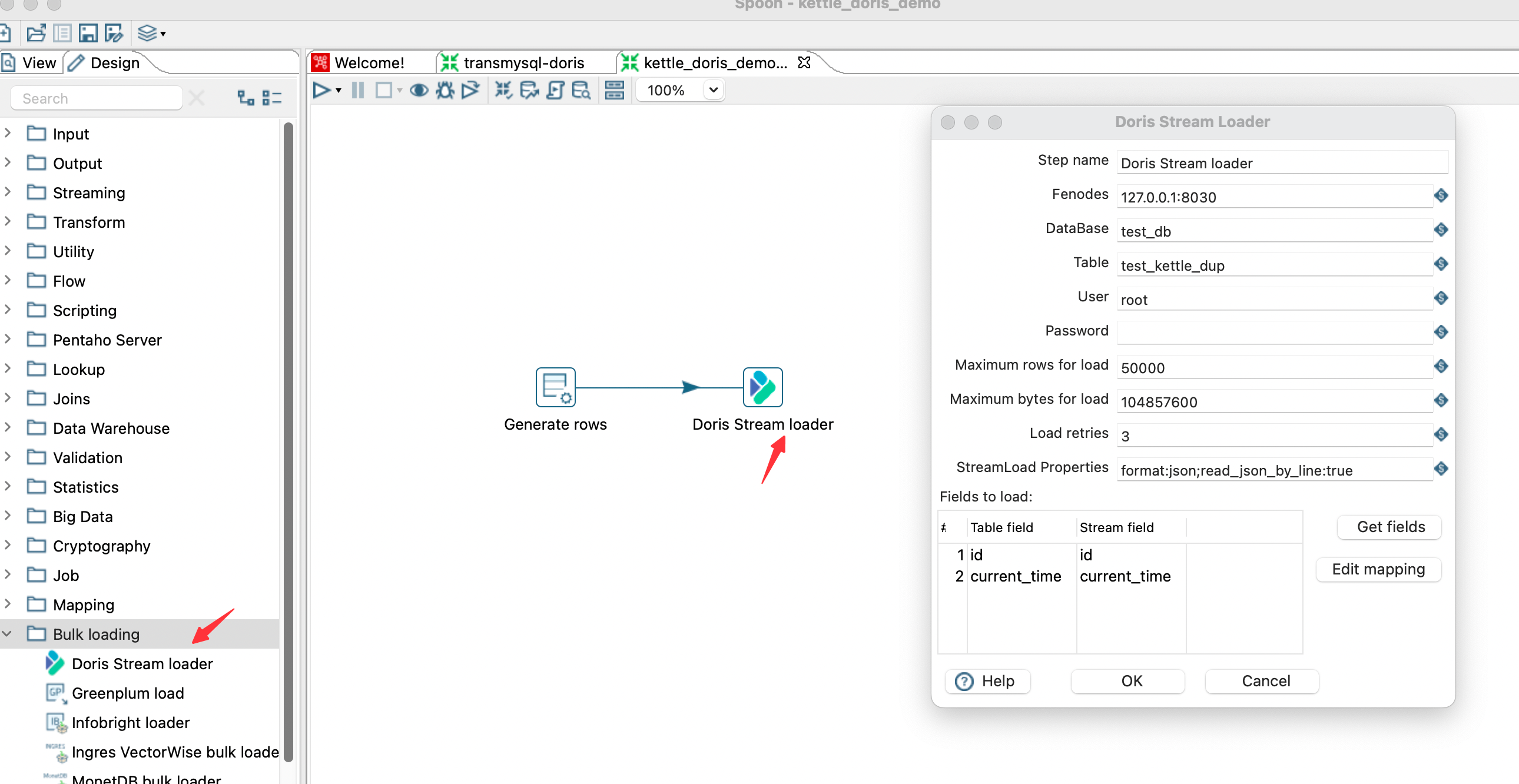
In Kettle, find Doris Stream Loader under Bulk loading, and build a job.
Run the job
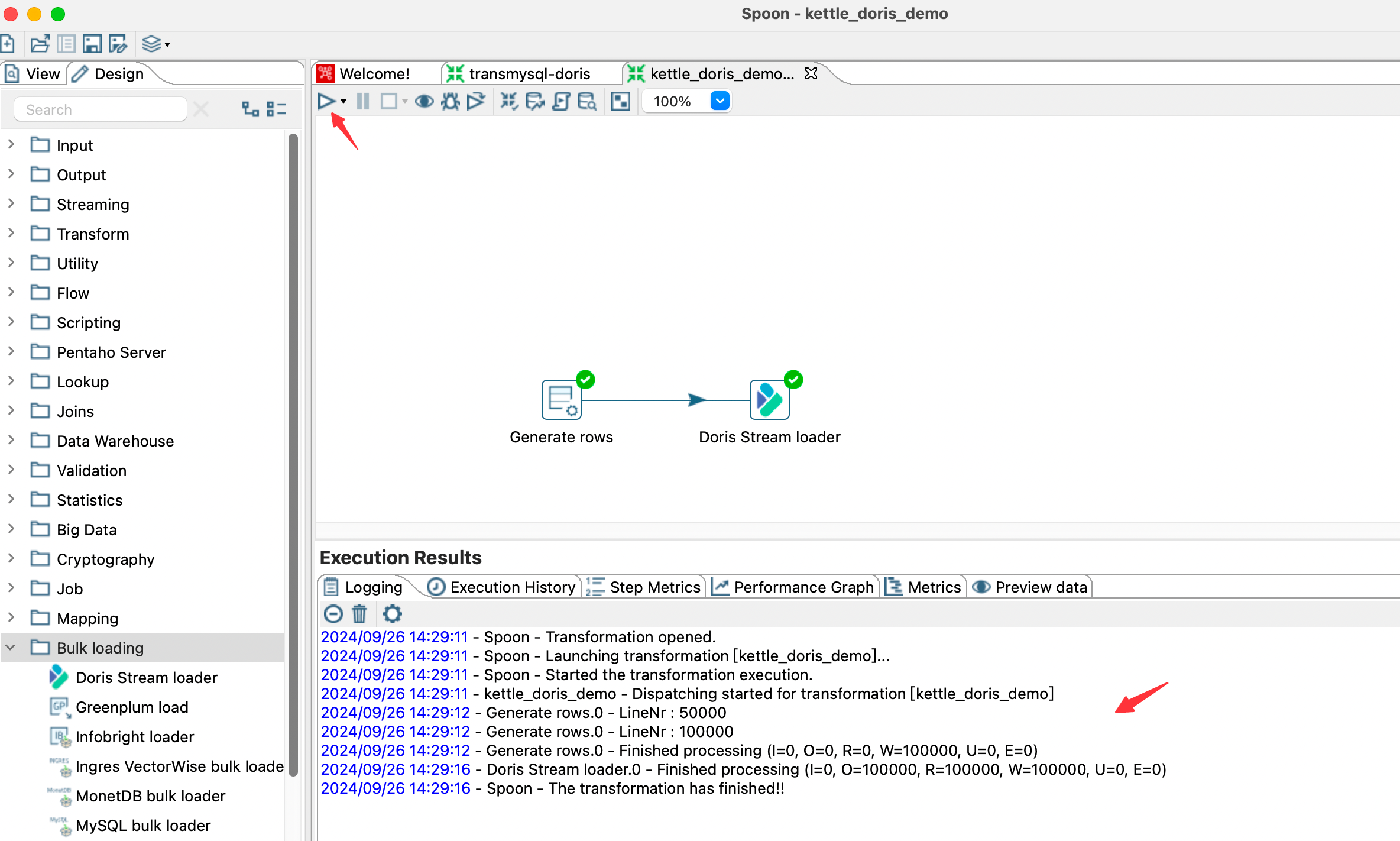
Click Start to run the job and complete the data synchronization.
Parameters
The following table describes the main configuration items in a Doris Stream Loader job:
| Parameter | Default value | Required | Description |
|---|---|---|---|
Step name | -- | Y | The name of the step. |
fenodes | -- | Y | The HTTP address of Doris FE. Multiple addresses are supported, separated by commas. |
| Database | -- | Y | The target database in Doris to write to. |
| Target table | -- | Y | The target table in Doris to write to. |
| Username | -- | Y | The username for accessing Doris. |
| Password | -- | N | The password for accessing Doris. |
| Maximum rows per import | 10000 | N | The maximum number of rows in a single import. |
| Maximum bytes per import | 10485760 (10 MB) | N | The maximum size in bytes of a single import. |
| Import retry count | 3 | N | The number of retries after an import failure. |
| Stream Load properties | -- | N | Request headers for Stream Load. |
| Delete mode | N | N | Whether to enable delete mode. By default, Stream Load performs insert operations. After delete mode is enabled, all Stream Load writes are delete operations. |
For more Stream Load parameters, see the Stream Load documentation.
FAQ
Can the Kettle Doris Plugin be used on its own?
No. The Kettle Doris Plugin must be used together with the Kettle service.
How should fenodes be filled in?
Set fenodes to the HTTP address of Doris FE. If there are multiple FE addresses, separate them with commas.
How does delete mode affect writes?
By default, Stream Load performs insert operations. After delete mode is enabled, all Stream Load writes are delete operations.