Routine Load
Routine Load is a streaming import job provided by Apache Doris that continuously consumes data from a Kafka topic and writes it to a Doris table. After you submit a Routine Load job, Doris keeps the import job running continuously, generates import tasks in real time to consume messages from the specified topic in the Kafka cluster, and provides Exactly-Once semantics to ensure that data is neither lost nor duplicated.
Quick Navigation
For different needs, jump directly to the corresponding section:
| My need | Section |
|---|---|
| Run a minimal example right away | Quick Start |
| Understand the principles, state machine, and auto-recovery mechanism | Basic Principles |
| Look up all configurable parameters (FE/BE/job/Kafka) | Reference Manual |
| Find examples by scenario (fault tolerance, filtering, JSON, Kerberos, etc.) | Import Examples |
Job enters PAUSED, reports out of range, or has SSL errors | Frequently Asked Questions (FAQ) |
Use Cases
Routine Load is suitable for the following scenarios:
- Continuously synchronize real-time data from a Kafka topic into Doris.
- Need Exactly-Once semantics to avoid data loss or duplication.
- Need to perform column mapping, filtering, derived column computation, and other transformations on the imported data.
- Need to dynamically distribute data from a single Kafka topic into multiple Doris tables (single stream, multiple tables).
Supported Data Sources and Formats
Routine Load only supports consuming data from a Kafka cluster, and supports the following two message formats:
| Format | Description |
|---|---|
| CSV | Each message is a single line, and the line ending does not include a newline character. |
| JSON | A single JSON object, or a JSON array containing multiple objects. |
When importing CSV format, distinguish clearly between null values and empty strings:
- A null value is represented by
\n. For example,a,\n,bindicates that the middle column is a null value. - An empty string sets the data to empty directly. For example,
a,,bindicates that the middle column is an empty string ('').
Limitations
When using Routine Load to consume data from Kafka, the following limitations apply:
| Limitation | Description |
|---|---|
| Message format | Only CSV and JSON text formats are supported. Each CSV message is a single line, and the line ending does not include a newline character. |
| Kafka version | Kafka 0.10.0.0 and above is supported by default. To use a Kafka version below 0.10.0.0 (0.9.0, 0.8.2, 0.8.1, 0.8.0), modify the BE configuration kafka_broker_version_fallback to the older version you want to be compatible with, or directly set property.broker.version.fallback when creating the job. The cost of using an older version is that some new features of Routine Load may be unavailable, such as setting Kafka partition offsets by time. |
Basic Principles
Routine Load continuously consumes data from a Kafka topic and writes it to Doris. In Doris, after you create a Routine Load job, a long-running import job is generated, which contains several import tasks:
- Load Job: A Routine Load Job is a long-running import job that continuously consumes data from the data source.
- Load Task: A load job is split into several load tasks for actual consumption. Each task is an independent transaction.
The detailed flow of Routine Load is shown in the following figure:
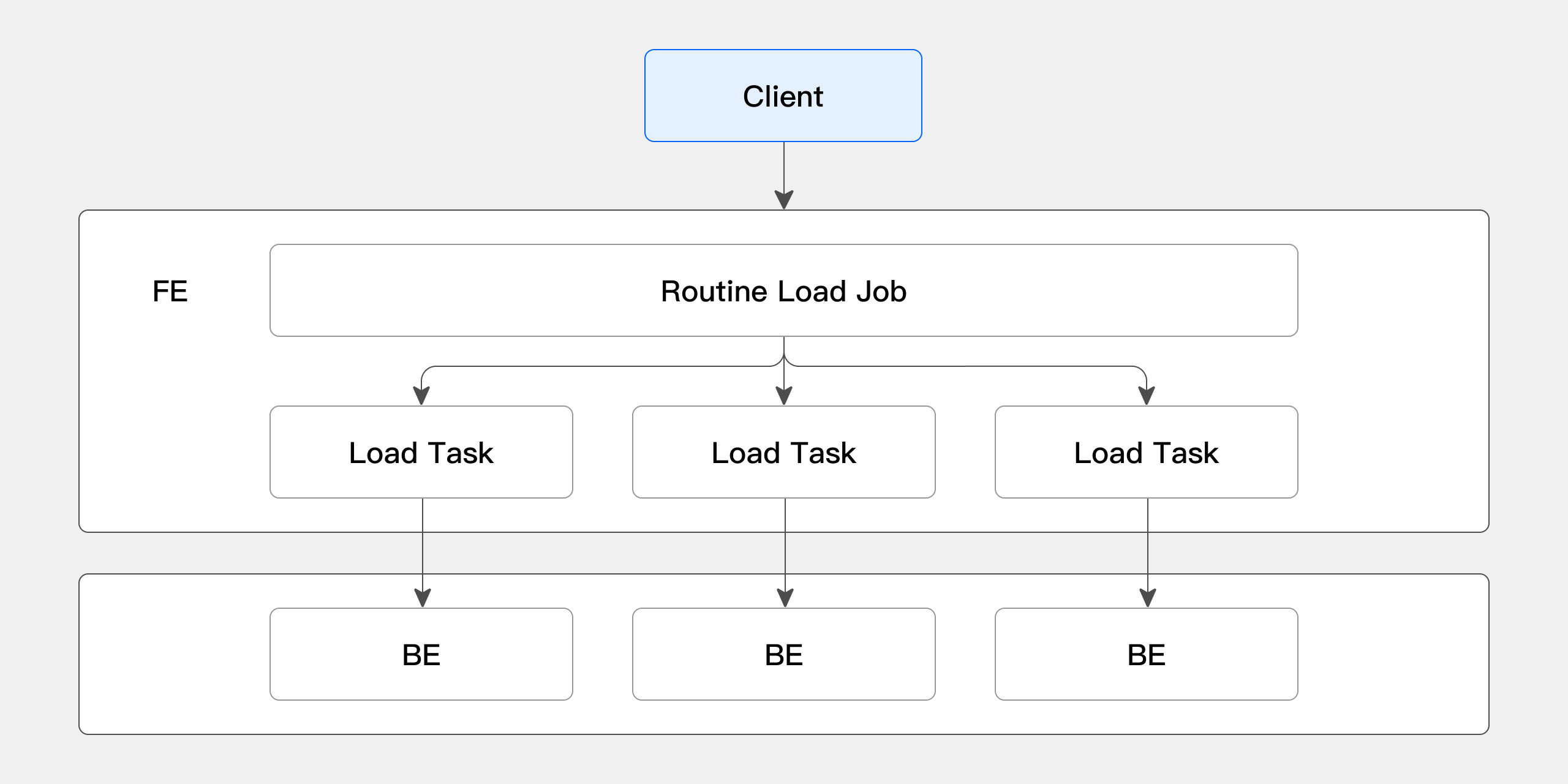
The overall flow is as follows:
- The client submits a request to the FE to create a Routine Load job. The FE generates a long-running import job (Routine Load Job) through the Routine Load Manager.
- The FE splits the Routine Load Job into several Routine Load Tasks through the Job Scheduler. The Task Scheduler then dispatches them to BE nodes.
- On the BE, after a Routine Load Task finishes importing, it commits the transaction to the FE and updates the metadata of the job.
- After a Routine Load Task is committed, new tasks are generated, or timed-out tasks are retried.
- The newly generated Routine Load Tasks are scheduled by the Task Scheduler in a continuous loop.
Auto-Recovery Mechanism
To ensure high availability of jobs, Routine Load introduces an auto-recovery mechanism. When a job is paused unexpectedly, the Routine Load Scheduler thread tries to recover the job automatically. For unexpected Kafka-side outages or other unworkable situations, the auto-recovery mechanism ensures that, once Kafka recovers, the import job can continue running normally without manual intervention.
The following table lists which cases are recovered automatically and which require manual intervention:
| Cause of pause | Auto-recovery | Recommended action |
|---|---|---|
| Kafka broker temporarily unreachable, network jitter | Yes | The Scheduler retries automatically at the period_of_auto_resume_min interval. |
User manually runs PAUSE ROUTINE LOAD | No | Manually run RESUME ROUTINE LOAD. |
Data quality issue (exceeds max_filter_ratio or max_error_number) | No | Investigate ErrorLogUrls, adjust the data or parameters, then RESUME. |
| Unrecoverable metadata exceptions, such as the database or table being dropped | No | Recreate the table or rebuild the job. |
Quick Start
This section walks through a minimal runnable example, demonstrating how to create a Routine Load job from Kafka, and the basic operations to view, pause, resume, modify, and stop the job.
Create an Import Job
You can create a long-running Routine Load import task with the CREATE ROUTINE LOAD command. Routine Load can consume CSV and JSON data.
Import CSV Data
-
Prepare a Kafka data sample:
kafka-console-consumer.sh --bootstrap-server localhost:9092 --topic test-routine-load-csv --from-beginning
1,Emily,25
2,Benjamin,35
3,Olivia,28
4,Alexander,60
5,Ava,17
6,William,69
7,Sophia,32
8,James,64
9,Emma,37
10,Liam,64 -
Create the target table for import:
CREATE TABLE testdb.test_routineload_tbl(
    user_id            BIGINT       NOT NULL COMMENT "user id",
    name               VARCHAR(20)           COMMENT "name",
    age                INT                   COMMENT "age"
)
DUPLICATE KEY(user_id)
DISTRIBUTED BY HASH(user_id) BUCKETS 10; -
Create the Routine Load import job:
CREATE ROUTINE LOAD testdb.example_routine_load_csv ON test_routineload_tbl
COLUMNS TERMINATED BY ",",
COLUMNS(user_id, name, age)
FROM KAFKA(
    "kafka_broker_list" = "192.168.88.62:9092",
    "kafka_topic" = "test-routine-load-csv",
    "property.kafka_default_offsets" = "OFFSET_BEGINNING"
);
Import JSON Data
-
Prepare a Kafka data sample:
kafka-console-consumer.sh --bootstrap-server localhost:9092 --topic test-routine-load-json --from-beginning
{"user_id":1,"name":"Emily","age":25}
{"user_id":2,"name":"Benjamin","age":35}
{"user_id":3,"name":"Olivia","age":28}
{"user_id":4,"name":"Alexander","age":60}
{"user_id":5,"name":"Ava","age":17}
{"user_id":6,"name":"William","age":69}
{"user_id":7,"name":"Sophia","age":32}
{"user_id":8,"name":"James","age":64}
{"user_id":9,"name":"Emma","age":37}
{"user_id":10,"name":"Liam","age":64} -
Create the target table for import:
CREATE TABLE testdb.test_routineload_tbl(
    user_id            BIGINT       NOT NULL COMMENT "user id",
    name               VARCHAR(20)           COMMENT "name",
    age                INT                   COMMENT "age"
)
DUPLICATE KEY(user_id)
DISTRIBUTED BY HASH(user_id) BUCKETS 10; -
Create the Routine Load import job:
CREATE ROUTINE LOAD testdb.example_routine_load_json ON test_routineload_tbl
COLUMNS(user_id,name,age)
PROPERTIES(
    "format"="json",
    "jsonpaths"="[\"$.user_id\",\"$.name\",\"$.age\"]"
)
FROM KAFKA(
    "kafka_broker_list" = "192.168.88.62:9092",
    "kafka_topic" = "test-routine-load-json",
    "property.kafka_default_offsets" = "OFFSET_BEGINNING"
);
To import the JSON object at the root of the JSON file, set jsonpaths to $., for example: PROPERTIES("jsonpaths"="$.").
View Import Status
The status of Routine Load has two dimensions:
- Load job: View information about the load job target table, the number of subtasks, the import latency status, the import configuration, and the import results.
- Load task: View the status of import subtasks, the consumption progress, and the BE node to which the task is dispatched.
View the Load Job
Use the SHOW ROUTINE LOAD command to view the load job. This command describes the basic state of the current job, such as the import target table, the import latency status, the import configuration, and any error information.
The following command shows the job status of testdb.example_routine_load_csv:
mysql> SHOW ROUTINE LOAD FOR testdb.example_routine_load\G
*************************** 1. row ***************************
                  Id: 12025
                Name: example_routine_load
          CreateTime: 2024-01-15 08:12:42
           PauseTime: NULL
             EndTime: NULL
              DbName: default_cluster:testdb
           TableName: test_routineload_tbl
        IsMultiTable: false
               State: RUNNING
      DataSourceType: KAFKA
      CurrentTaskNum: 1
       JobProperties: {"max_batch_rows":"200000","timezone":"America/New_York","send_batch_parallelism":"1","load_to_single_tablet":"false","column_separator":"','","line_delimiter":"\n","current_concurrent_number":"1","delete":"*","partial_columns":"false","merge_type":"APPEND","exec_mem_limit":"2147483648","strict_mode":"false","jsonpaths":"","max_batch_interval":"10","max_batch_size":"104857600","fuzzy_parse":"false","partitions":"*","columnToColumnExpr":"user_id,name,age","whereExpr":"*","desired_concurrent_number":"5","precedingFilter":"*","format":"csv","max_error_number":"0","max_filter_ratio":"1.0","json_root":"","strip_outer_array":"false","num_as_string":"false"}
DataSourceProperties: {"topic":"test-topic","currentKafkaPartitions":"0","brokerList":"192.168.88.62:9092"}
    CustomProperties: {"kafka_default_offsets":"OFFSET_BEGINNING","group.id":"example_routine_load_73daf600-884e-46c0-a02b-4e49fdf3b4dc"}
           Statistic: {"receivedBytes":28,"runningTxns":[],"errorRows":0,"committedTaskNum":3,"loadedRows":3,"loadRowsRate":0,"abortedTaskNum":0,"errorRowsAfterResumed":0,"totalRows":3,"unselectedRows":0,"receivedBytesRate":0,"taskExecuteTimeMs":30069}
            Progress: {"0":"2"}
                 Lag: {"0":0}
ReasonOfStateChanged:
        ErrorLogUrls:
            OtherMsg:
                User: root
             Comment:
1 row in set (0.00 sec)
View the Load Subtasks
Use the SHOW ROUTINE LOAD TASK command to view the import subtasks. You can specify the routine load job by WHERE JobName = <job_name> or FOR [<db>.]<job_name> (if <db> is omitted, the current database is used). This command describes the subtask information under the current job, such as the subtask status and the BE id to which the task is dispatched.
The following command shows the subtask information of testdb.example_routine_load_csv:
mysql> SHOW ROUTINE LOAD TASK WHERE jobname = 'example_routine_load_csv';
+-----------------------------------+-------+-----------+-------+---------------------+---------------------+---------+-------+----------------------+
| TaskId                            | TxnId | TxnStatus | JobId | CreateTime          | ExecuteStartTime    | Timeout | BeId  | DataSourceProperties |
+-----------------------------------+-------+-----------+-------+---------------------+---------------------+---------+-------+----------------------+
| 8cf47e6a68ed4da3-8f45b431db50e466 | 195   | PREPARE   | 12177 | 2024-01-15 12:20:41 | 2024-01-15 12:21:01 | 20      | 10429 | {"4":1231,"9":2603}  |
| f2d4525c54074aa2-b6478cf8daaeb393 | 196   | PREPARE   | 12177 | 2024-01-15 12:20:41 | 2024-01-15 12:21:01 | 20      | 12109 | {"1":1225,"6":1216}  |
| cb870f1553864250-975279875a25fab6 | -1    | NULL      | 12177 | 2024-01-15 12:20:52 | NULL                | 20      | -1    | {"2":7234,"7":4865}  |
| 68771fd8a1824637-90a9dac2a7a0075e | -1    | NULL      | 12177 | 2024-01-15 12:20:52 | NULL                | 20      | -1    | {"3":1769,"8":2982}  |
| 77112dfea5e54b0a-a10eab3d5b19e565 | 197   | PREPARE   | 12177 | 2024-01-15 12:21:02 | 2024-01-15 12:21:02 | 20      | 12098 | {"0":3000,"5":2622}  |
+-----------------------------------+-------+-----------+-------+---------------------+---------------------+---------+-------+----------------------+
You can also use the following syntax:
mysql> SHOW ROUTINE LOAD TASK FOR testdb.example_routine_load_csv;
Pause an Import Job
You can pause an import job with the PAUSE ROUTINE LOAD command. After being paused, the job enters the PAUSED state, but the job is not terminated. You can restart it with the RESUME ROUTINE LOAD command.
PAUSE ROUTINE LOAD FOR testdb.example_routine_load_csv;
Resume an Import Job
You can resume an import job in the PAUSED state with the RESUME ROUTINE LOAD command.
RESUME ROUTINE LOAD FOR testdb.example_routine_load_csv;
Modify an Import Job
You can modify a created import job with the ALTER ROUTINE LOAD command. Before modifying, first pause the job with PAUSE ROUTINE LOAD. After the modification is complete, resume it with RESUME ROUTINE LOAD.
For example, to modify the desired concurrency parameter desired_concurrent_number and the Kafka topic information:
ALTER ROUTINE LOAD FOR testdb.example_routine_load_csv
PROPERTIES(
    "desired_concurrent_number" = "3"
)
FROM KAFKA(
    "kafka_broker_list" = "192.168.88.60:9092",
    "kafka_topic" = "test-topic"
);
Cancel an Import Job
You can stop and delete a Routine Load import job with the STOP ROUTINE LOAD command. A deleted import job cannot be recovered, and cannot be viewed via the SHOW ROUTINE LOAD command.
STOP ROUTINE LOAD FOR testdb.example_routine_load_csv;
Bind a Compute Group
In storage-compute separation mode, the Compute Group selection logic for Routine Load follows this priority order:
- Select the Compute Group specified by the
use db@clusterstatement. - Select the Compute Group specified by the user property
default_compute_group. - Select one Compute Group from those the current user has permission to access.
In storage-compute integrated mode, the Compute Group specified by the user property resource_tags.location is selected. If no Compute Group is specified in user properties, the Compute Group named default is used.
The Compute Group of a Routine Load job can only be specified at creation time. After the job is created, the bound Compute Group cannot be changed.
Reference Manual
Import Command Syntax
The syntax for creating a long-running Routine Load import job is as follows:
CREATE ROUTINE LOAD [<db_name>.]<job_name> [ON <tbl_name>]
[merge_type]
[load_properties]
[job_properties]
FROM KAFKA [data_source_properties]
[COMMENT "<comment>"]
The modules are described as follows:
| Module | Description |
|---|---|
| db_name | Specifies the database in which to create the import task. |
| job_name | Specifies the name of the import task to be created. Tasks with the same name cannot exist within the same database. |
| tbl_name | Specifies the name of the table to import data into. This is optional. If not specified, the dynamic table approach is used, which requires the data in Kafka to include the table name. |
| merge_type | The data merge type. The default value is APPEND. There are three options: - APPEND: append import. - MERGE: merge import. - DELETE: all the imported data is to be deleted. |
| load_properties | The import description module, which includes the following components: - column_separator clause - columns_mapping clause - preceding_filter clause - where_predicates clause - partitions clause - delete_on clause - order_by clause |
| job_properties | Specifies the common import parameters of Routine Load. |
| data_source_properties | Describes the properties of the Kafka data source. |
| comment | Describes the comment for the import job. |
Import Parameter Description
FE Configuration Parameters
| Parameter | Default | Dynamic | FE Master only | Description |
|---|---|---|---|---|
| max_routine_load_task_concurrent_num | 256 | Yes | Yes | Limits the maximum subtask concurrency of a Routine Load import job. Keeping the default is recommended. Setting it too large may cause too many concurrent tasks and consume cluster resources. |
| max_routine_load_task_num_per_be | 1024 | Yes | Yes | The maximum number of concurrent Routine Load tasks per BE. max_routine_load_task_num_per_be should be smaller than routine_load_thread_pool_size. |
| max_routine_load_job_num | 100 | Yes | Yes | Limits the maximum number of Routine Load jobs, including those in the NEED_SCHEDULED, RUNNING, and PAUSE states. |
| max_tolerable_backend_down_num | 0 | Yes | Yes | If even one BE is down, Routine Load cannot recover automatically. When certain conditions are met, Doris can re-schedule a PAUSED task and switch it to the RUNNING state. A value of 0 means re-scheduling is allowed only when all BE nodes are alive. |
| period_of_auto_resume_min | 5 (minutes) | Yes | Yes | The interval at which Routine Load auto-recovery occurs. |
BE Configuration Parameters
| Parameter | Default | Dynamic | Description |
|---|---|---|---|
| max_consumer_num_per_group | 3 | Yes | The maximum number of consumers a single subtask can spawn for consumption. |
Import Configuration Parameters
When creating a Routine Load job, you can specify import configuration parameters for different modules with the CREATE ROUTINE LOAD command.
tbl_name Clause
Specifies the name of the table to import. This is optional.
If not specified, the dynamic table approach is used, which requires the data in Kafka to include the table name. Currently, the dynamic table name is only supported by extracting it from the Kafka Value, and the data must follow this format. For JSON: table_name|{"col1": "val1", "col2": "val2"}, where tbl_name is the table name and | is the separator between the table name and the table data. CSV-formatted data is similar, for example: table_name|val1,val2,val3.
The table_name here must match the table name in Doris exactly, otherwise the import will fail. Dynamic tables do not support column_mapping.
merge_type Clause
You can specify the data merge type with the merge_type module. There are three options:
- APPEND: append import.
- MERGE: merge import. Only applicable to the Unique Key model. Must be used with the
[DELETE ON]module to mark the Delete Flag column. - DELETE: all the imported data is to be deleted.
load_properties Clause
You can describe the properties of the imported data with the load_properties module. The syntax is as follows:
[COLUMNS TERMINATED BY <column_separator>,]
[COLUMNS (<column1_name>[, <column2_name>, <column_mapping>, ...]),]
[WHERE <where_expr>,]
[PARTITION(<partition1_name>, [<partition2_name>, <partition3_name>, ...]),]
[DELETE ON <delete_expr>,]
[ORDER BY <order_by_column1>[, <order_by_column2>, <order_by_column3>, ...]]
The corresponding parameters of each module are as follows:
| Sub-module | Parameter | Description |
|---|---|---|
| COLUMNS TERMINATED BY | <column_separator> | Specifies the column separator. The default is \t. For example, to specify a comma as the separator: COLUMN TERMINATED BY ",". Notes on null handling:- A null value is represented by - An empty string sets the data to empty directly. |
| COLUMNS | <column_name> | Specifies the corresponding column name. For example, to specify the import columns (k1, k2, k3): COLUMNS(k1, k2, k3). The COLUMNS clause can be omitted in the following cases:- The columns in the CSV correspond to the columns in the table one to one. - The keys in the JSON have the same names as the columns in the table. |
<column_mapping> | During import, you can filter and transform columns through column mapping. For example, the target column k4 is computed from the k3 column with the formula k3+1: COLUMNS(k1, k2, k3, k4 = k3 + 1). For details, see Data Transformation. | |
| WHERE | <where_expr> | Filters the imported data source by condition. For example, to import only data with age > 30: WHERE age > 30. |
| PARTITION | <partition_name> | Specifies which partitions in the target table to import into. If not specified, the data is automatically imported into the corresponding partitions. For example, to import into partitions p1 and p2: PARTITION(p1, p2). |
| DELETE ON | <delete_expr> | In MERGE import mode, use delete_expr to mark which columns need to be deleted. For example, to delete columns where age > 30 during MERGE: DELETE ON age > 30. |
| ORDER BY | <order_by_column> | Only effective for the Unique Key model. Specifies the Sequence Column in the imported data to ensure data ordering. For example, to specify create_time as the Sequence Column: ORDER BY create_time. For details, see Data Update / Sequence Column. |
job_properties Clause
When creating a Routine Load import job, you can specify the properties of the import job with the job_properties clause. The syntax is as follows:
PROPERTIES ("<key1>" = "<value1>"[, "<key2>" = "<value2>" ...])
The specific parameter options of the job_properties clause are as follows:
| Parameter | Description |
|---|---|
| desired_concurrent_number | Default value: 256 The desired concurrency for a single load task. During import, the desired subtask concurrency may not equal the actual concurrency. The actual concurrency is calculated as:
- - - |
| max_batch_interval | The maximum running time of each subtask, in seconds. Must be greater than 0. The default value is 60. max_batch_interval, max_batch_rows, and max_batch_size together form the subtask execution threshold. When any one of them is reached, the import subtask ends and a new subtask is generated. |
| max_batch_rows | The maximum number of rows each subtask can read. Must be greater than or equal to 200000. The default is 20000000. max_batch_interval, max_batch_rows, and max_batch_size together form the subtask execution threshold. When any one of them is reached, the import subtask ends and a new subtask is generated. |
| max_batch_size | The maximum number of bytes each subtask can read. The unit is bytes, the range is 100 MB to 1 GB, and the default is 1 GB. max_batch_interval, max_batch_rows, and max_batch_size together form the subtask execution threshold. When any one of them is reached, the import subtask ends and a new subtask is generated. |
| max_error_number | The maximum number of error rows allowed within the sampling window. Must be greater than or equal to 0. The default is 0 (no error rows are allowed). The sampling window is max_batch_rows * 10. If the number of error rows in the sampling window exceeds max_error_number, the routine load job is paused. Manual intervention is required to check data quality issues. The data quality issues can be checked through the ErrorLogUrls field in the SHOW ROUTINE LOAD command. Rows filtered out by the where condition are not counted as error rows. |
| strict_mode | Whether to enable strict mode. Disabled by default. Strict mode means strict filtering of column type conversions during import. When enabled, if a non-null original data value becomes NULL after a column type conversion, it is filtered out. Filtering policy: - Strict Mode does not affect derived columns (those generated by function transformation). - When a column type needs conversion, data of the wrong type is filtered out. You can view it in - For an imported column type that has range restrictions, if the original data passes type conversion but cannot pass the range restriction, strict mode does not affect it. For example, if the type is |
| timezone | Specifies the timezone used by the import job. The default is the session's timezone parameter. This parameter affects the results of all timezone-related functions involved in the import. |
| format | Specifies the format of the import data. The default is CSV. JSON format is supported. |
| jsonpaths | When the import data format is JSON, you can use jsonpaths to specify the fields to extract from the JSON data. For example: "jsonpaths" = "[\"$.userid\",\"$.username\",\"$.age\",\"$.city\"]" |
| json_root | When the import data format is JSON, you can use json_root to specify the root node of the JSON data. Doris extracts and parses elements from the root node specified by json_root. The default is empty. For example: "json_root" = "$.RECORDS" |
| strip_outer_array | When the import data format is JSON, strip_outer_array set to true means the JSON data is presented as an array, and each element in the data is treated as a row. The default is false. JSON data in Kafka is often presented as an array, that is, the outermost layer is wrapped with brackets []. In this case, you can specify "strip_outer_array" = "true". For example, the following data is parsed into two rows: [{"user_id":1,"name":"Emily","age":25},{"user_id":2,"name":"Benjamin","age":35}] |
| send_batch_parallelism | Sets the parallelism for sending batch data. If the parallelism value exceeds the BE configuration max_send_batch_parallelism_per_job, the BE acting as the coordinator uses the value of max_send_batch_parallelism_per_job. |
| load_to_single_tablet | Supports importing data from a task into only one tablet of the corresponding partition. The default is false. This parameter can only be set when importing data into an OLAP table with random bucketing. |
| partial_columns | Specifies whether to enable partial column update. The default is false. This parameter can only be set when the table model is Unique and uses Merge on Write. Single-stream multi-table imports do not support this parameter. For details, see Partial Column Update. |
| unique_key_update_mode | Specifies the update mode of a Unique Key table. Options:
|
| partial_update_new_key_behavior | The handling of newly inserted rows when performing partial column updates on a Unique Merge on Write table. Two types: APPEND and ERROR.- APPEND: allow inserting new rows.- ERROR: when inserting a new row, the import fails and an error is reported. |
| max_filter_ratio | The maximum filter ratio allowed within the sampling window. Must be greater than or equal to 0 and less than or equal to 1. The default value is 1.0, which means any error rows are tolerated. The sampling window is max_batch_rows * 10. If the number of error rows / total rows in the sampling window exceeds max_filter_ratio, the routine load job is paused. Manual intervention is required to check data quality issues. Rows filtered out by the where condition are not counted as error rows. |
| enclose | Specifies the enclosing character. When CSV data fields contain row separators or column separators, you can specify a single-byte character as the enclosing character to prevent unintended truncation. For example, if the column separator is , and the enclosing character is ', then for the data a,'b,c', b,c is parsed as a single field. |
| escape | Specifies the escape character. Used to escape characters in a field that are the same as the enclosing character. For example, for the data a,'b,'c' with the enclosing character ', to parse b,'c as a single field, you must specify a single-byte escape character (such as \) and modify the data to a,'b,\'c'. |
data_source_properties Clause
When creating a Routine Load import job, you can specify the properties of the Kafka data source with the data_source_properties clause. The syntax is as follows:
FROM KAFKA ("<key1>" = "<value1>"[, "<key2>" = "<value2>" ...])
The specific parameter options of the data_source_properties clause are as follows:
| Parameter | Description |
|---|---|
| kafka_broker_list | Specifies the Kafka broker connection information. The format is <kafka_broker_ip>:<kafka port>. Multiple brokers are separated by commas. For example: "kafka_broker_list" = "<broker1_ip>:9092,<broker2_ip>:9092" |
| kafka_topic | Specifies the Kafka topic to subscribe to. A single import job can only consume one Kafka topic. |
| kafka_partitions | Specifies the Kafka partitions to subscribe to. If not specified, all partitions are consumed by default. |
| kafka_offsets | The starting consumption offset of the Kafka partition to consume. If a time is specified, consumption starts from the most recent offset whose time is greater than or equal to the specified time. The offset can be a specific offset value greater than or equal to 0, or one of the following formats: - - - A time format, for example: If not specified, all partitions of the topic are subscribed to from Note: the time format cannot be mixed with the OFFSET format. |
| property | Specifies custom Kafka parameters, equivalent to the --property parameter of the kafka shell. When the value of a parameter is a file, prefix the value with the keyword FILE:. To create a file, see the CREATE FILE command. For more supported custom parameters, see the client-side configurations in the official librdkafka CONFIGURATION document. For example: "property.client.id" = "12345", "property.group.id" = "group_id_0", "property.ssl.ca.location" = "FILE:ca.pem". |
By configuring the kafka property parameters in data_source_properties, you can configure secure access options. Doris currently supports several Kafka security protocols, such as plaintext (default), SSL, PLAIN, and Kerberos.
Import Status
You can view the status of the import job with the SHOW ROUTINE LOAD command:
SHOW [ALL] ROUTINE LOAD [FOR jobName];
Example result:
mysql> SHOW ROUTINE LOAD FOR testdb.example_routine_load\G
*************************** 1. row ***************************
                  Id: 12025
                Name: example_routine_load
          CreateTime: 2024-01-15 08:12:42
           PauseTime: NULL
             EndTime: NULL
              DbName: default_cluster:testdb
           TableName: test_routineload_tbl
        IsMultiTable: false
               State: RUNNING
      DataSourceType: KAFKA
      CurrentTaskNum: 1
       JobProperties: {"max_batch_rows":"200000","timezone":"America/New_York","send_batch_parallelism":"1","load_to_single_tablet":"false","column_separator":"','","line_delimiter":"\n","current_concurrent_number":"1","delete":"*","partial_columns":"false","merge_type":"APPEND","exec_mem_limit":"2147483648","strict_mode":"false","jsonpaths":"","max_batch_interval":"10","max_batch_size":"104857600","fuzzy_parse":"false","partitions":"*","columnToColumnExpr":"user_id,name,age","whereExpr":"*","desired_concurrent_number":"5","precedingFilter":"*","format":"csv","max_error_number":"0","max_filter_ratio":"1.0","json_root":"","strip_outer_array":"false","num_as_string":"false"}
DataSourceProperties: {"topic":"test-topic","currentKafkaPartitions":"0","brokerList":"192.168.88.62:9092"}
    CustomProperties: {"kafka_default_offsets":"OFFSET_BEGINNING","group.id":"example_routine_load_73daf600-884e-46c0-a02b-4e49fdf3b4dc"}
           Statistic: {"receivedBytes":28,"runningTxns":[],"errorRows":0,"committedTaskNum":3,"loadedRows":3,"loadRowsRate":0,"abortedTaskNum":0,"errorRowsAfterResumed":0,"totalRows":3,"unselectedRows":0,"receivedBytesRate":0,"taskExecuteTimeMs":30069}
            Progress: {"0":"2"}
                 Lag: {"0":0}
ReasonOfStateChanged:
        ErrorLogUrls:
            OtherMsg:
                User: root
             Comment:
1 row in set (0.00 sec)
The result columns are described as follows:
| Result column | Description |
|---|---|
| Id | The job ID, automatically generated by Doris. |
| Name | The job name. |
| CreateTime | The job creation time. |
| PauseTime | The most recent job pause time. |
| EndTime | The job end time. |
| DbName | The corresponding database name. |
| TableName | The corresponding table name. For multi-table jobs (dynamic tables), the specific table name is not displayed; multi-table is displayed instead. |
| IsMultiTable | Whether the job is multi-table (single stream, multiple tables). |
| State | The job running state. There are 5 states. See Job State Machine below. |
| DataSourceType | The data source type: KAFKA. |
| CurrentTaskNum | The current number of subtasks. |
| JobProperties | Job configuration details. |
| DataSourceProperties | Data source configuration details. |
| CustomProperties | Custom configuration. |
| Statistic | Statistics on the job running state. |
| Progress | The job running progress. For Kafka data sources, displays the currently consumed offset for each partition. For example, {"0":"2"} means the consumption progress of Kafka partition 0 is 2. |
| Lag | The job latency status. For Kafka data sources, displays the consumption lag for each partition. For example, {"0":10} means the consumption lag of Kafka partition 0 is 10. |
| ReasonOfStateChanged | The reason for the job state change. |
| ErrorLogUrls | The URL where you can view the filtered low-quality data. |
| OtherMsg | Other error information. |
Job State Machine
A Routine Load job has 5 states. The transitions between states are as follows:
| State | Meaning | Trigger | Possible next state |
|---|---|---|---|
NEED_SCHEDULE | The job is waiting to be scheduled. | Initial state after CREATE ROUTINE LOAD or RESUME ROUTINE LOAD. | RUNNING |
RUNNING | The job is running and continuously consuming Kafka. | Entered after successful scheduling. | PAUSED / STOPPED |
PAUSED | The job is paused but not terminated. | Manual PAUSE ROUTINE LOAD, or automatically paused on exception. | NEED_SCHEDULE (manual RESUME or auto-recovery) / CANCELLED |
STOPPED | The job has been stopped and cannot be restarted. | STOP ROUTINE LOAD. | Terminal state. |
CANCELLED | The job has been canceled. | Database or table dropped, or other exceptions. | Terminal state. |
Import Examples
The following table lists, by use case, all the typical examples in this section for quick navigation:
| Category | Scenario | Applicable problem |
|---|---|---|
| Data quality and filtering | Set Maximum Import Fault Tolerance | Unstable data quality with dirty data that needs to be tolerated. |
| Data quality and filtering | Set Import Filter Conditions | Import only data that meets the conditions. |
| Data quality and filtering | Strict Mode Import | Strictly filter type conversion errors. |
| Consumption control | Consume Data from a Specified Offset | Need precise control of the Kafka offset. |
| Consumption control | Specify the group.id and client.id of the Consumer Group | Need a custom Kafka consumer identity. |
| Data write control | Import Data into a Specified Partition | Write only into specified partitions of the target table. |
| Data write control | Set the Import Timezone | Handle time fields across timezones. |
| Data write control | Set merge_type | Delete or merge writes on a Unique Key table. |
| Data transformation | Column Mapping and Derived Column Computation in Import | Compute fields during import. |
| Data transformation | Import Data with Enclosing Characters | CSV fields contain separators. |
| Complex format | JSON Format Import | Kafka data is in JSON format. |
| Complex format | Import Complex Types | Handle types such as Array, Map, Bitmap, and HLL. |
| Security and multi-table | Kafka Security Authentication | SSL/Kerberos/PLAIN and other authentication scenarios. |
| Security and multi-table | Single-Stream Multi-Table Import | Write data from one topic into multiple Doris tables. |
Set Maximum Import Fault Tolerance
-
Sample import data:
1,Benjamin,18
2,Emily,20
3,Alexander,dirty_data -
Table schema:
CREATE TABLE demo.routine_test01 (
    id       INT             NOT NULL   COMMENT "User ID",
    name     VARCHAR(30)     NOT NULL   COMMENT "Name",
    age      INT                        COMMENT "Age"
)
DUPLICATE KEY(`id`)
DISTRIBUTED BY HASH(`id`) BUCKETS 1; -
Import command:
CREATE ROUTINE LOAD demo.kafka_job01 ON routine_test01
        COLUMNS TERMINATED BY ","
        PROPERTIES
        (
            "max_filter_ratio"="0.5",
            "max_error_number" = "100",
            "strict_mode" = "true"
        )
        FROM KAFKA
        (
            "kafka_broker_list" = "10.16.10.6:9092",
            "kafka_topic" = "routineLoad01",
            "property.kafka_default_offsets" = "OFFSET_BEGINNING"
); -
Import result:
mysql> select * from routine_test01;
+------+------------+------+
| id   | name       | age  |
+------+------------+------+
|    1 | Benjamin   |   18 |
|    2 | Emily      |   20 |
+------+------------+------+
2 rows in set (0.01 sec)
Consume Data from a Specified Offset
-
Sample import data:
1,Benjamin,18
2,Emily,20
3,Alexander,22
4,Sophia,24
5,William,26
6,Charlotte,28 -
Table schema:
CREATE TABLE demo.routine_test02 (
    id       INT             NOT NULL   COMMENT "User ID",
    name     VARCHAR(30)     NOT NULL   COMMENT "Name",
    age      INT                        COMMENT "Age"
)
DUPLICATE KEY(`id`)
DISTRIBUTED BY HASH(`id`) BUCKETS 1; -
Import command:
CREATE ROUTINE LOAD demo.kafka_job02 ON routine_test02
        COLUMNS TERMINATED BY ","
        FROM KAFKA
        (
            "kafka_broker_list" = "10.16.10.6:9092",
            "kafka_topic" = "routineLoad02",
            "kafka_partitions" = "0",
            "kafka_offsets" = "3"
); -
Import result:
mysql> select * from routine_test02;
+------+--------------+------+
| id   | name         | age  |
+------+--------------+------+
|    4 | Sophia       |   24 |
|    5 | William      |   26 |
|    6 | Charlotte    |   28 |
+------+--------------+------+
3 rows in set (0.01 sec)
Specify the group.id and client.id of the Consumer Group
-
Sample import data:
1,Benjamin,18
2,Emily,20
3,Alexander,22 -
Table schema:
CREATE TABLE demo.routine_test03 (
    id       INT             NOT NULL   COMMENT "User ID",
    name     VARCHAR(30)     NOT NULL   COMMENT "Name",
    age      INT                        COMMENT "Age"
)
DUPLICATE KEY(`id`)
DISTRIBUTED BY HASH(`id`) BUCKETS 1; -
Import command:
CREATE ROUTINE LOAD demo.kafka_job03 ON routine_test03
        COLUMNS TERMINATED BY ","
        FROM KAFKA
        (
            "kafka_broker_list" = "10.16.10.6:9092",
            "kafka_topic" = "routineLoad01",
            "property.group.id" = "kafka_job03",
            "property.client.id" = "kafka_client_03",
            "property.kafka_default_offsets" = "OFFSET_BEGINNING"
); -
Import result:
mysql> select * from routine_test03;
+------+------------+------+
| id   | name       | age  |
+------+------------+------+
|    1 | Benjamin   |   18 |
|    2 | Emily      |   20 |
|    3 | Alexander  |   22 |
+------+------------+------+
3 rows in set (0.01 sec)
Set Import Filter Conditions
-
Sample import data:
1,Benjamin,18
2,Emily,20
3,Alexander,22
4,Sophia,24
5,William,26
6,Charlotte,28 -
Table schema:
CREATE TABLE demo.routine_test04 (
    id       INT             NOT NULL   COMMENT "User ID",
    name     VARCHAR(30)     NOT NULL   COMMENT "Name",
    age      INT                        COMMENT "Age"
)
DUPLICATE KEY(`id`)
DISTRIBUTED BY HASH(`id`) BUCKETS 1; -
Import command:
CREATE ROUTINE LOAD demo.kafka_job04 ON routine_test04
        COLUMNS TERMINATED BY ",",
        WHERE id >= 3
        FROM KAFKA
        (
            "kafka_broker_list" = "10.16.10.6:9092",
            "kafka_topic" = "routineLoad04",
            "property.kafka_default_offsets" = "OFFSET_BEGINNING"
); -
Import result:
mysql> select * from routine_test04;
+------+--------------+------+
| id   | name         | age  |
+------+--------------+------+
|    4 | Sophia       |   24 |
|    5 | William      |   26 |
|    6 | Charlotte    |   28 |
+------+--------------+------+
3 rows in set (0.01 sec)
Import Data into a Specified Partition
-
Sample import data:
1,Benjamin,18,2024-02-04 10:00:00
2,Emily,20,2024-02-05 11:00:00
3,Alexander,22,2024-02-06 12:00:00 -
Table schema:
CREATE TABLE demo.routine_test05 (
    id      INT            NOT NULL  COMMENT "ID",
    name    VARCHAR(30)    NOT NULL  COMMENT "Name",
    age     INT                      COMMENT "Age",
    date    DATETIME                 COMMENT "Date"
)
DUPLICATE KEY(`id`)
PARTITION BY RANGE(`id`)
(PARTITION partition_a VALUES [("0"), ("1")),
PARTITION partition_b VALUES [("1"), ("2")),
PARTITION partition_c VALUES [("2"), ("3")))
DISTRIBUTED BY HASH(`id`) BUCKETS 1; -
Import command:
CREATE ROUTINE LOAD demo.kafka_job05 ON routine_test05
        COLUMNS TERMINATED BY ",",
        PARTITION(partition_b)
        FROM KAFKA
        (
            "kafka_broker_list" = "10.16.10.6:9092",
            "kafka_topic" = "routineLoad05",
            "property.kafka_default_offsets" = "OFFSET_BEGINNING"
); -
Import result:
mysql> select * from routine_test05;
+------+----------+------+---------------------+
| id   | name     | age  | date                |
+------+----------+------+---------------------+
|    1 | Benjamin |   18 | 2024-02-04 10:00:00 |
+------+----------+------+---------------------+
1 rows in set (0.01 sec)
Set the Import Timezone
-
Sample import data:
1,Benjamin,18,2024-02-04 10:00:00
2,Emily,20,2024-02-05 11:00:00
3,Alexander,22,2024-02-06 12:00:00 -
Table schema:
CREATE TABLE demo.routine_test06 (
    id      INT            NOT NULL  COMMENT "id",
    name    VARCHAR(30)    NOT NULL  COMMENT "name",
    age     INT                      COMMENT "age",
    date    DATETIME                 COMMENT "date"
)
DUPLICATE KEY(id)
DISTRIBUTED BY HASH(id) BUCKETS 1; -
Import command:
CREATE ROUTINE LOAD demo.kafka_job06 ON routine_test06
        COLUMNS TERMINATED BY ","
        PROPERTIES
        (
            "timezone" = "Asia/Shanghai"
        )
        FROM KAFKA
        (
            "kafka_broker_list" = "10.16.10.6:9092",
            "kafka_topic" = "routineLoad06",
            "property.kafka_default_offsets" = "OFFSET_BEGINNING"
); -
Import result:
mysql> select * from routine_test06;
+------+-------------+------+---------------------+
| id   | name        | age  | date                |
+------+-------------+------+---------------------+
|    1 | Benjamin    |   18 | 2024-02-04 10:00:00 |
|    2 | Emily       |   20 | 2024-02-05 11:00:00 |
|    3 | Alexander   |   22 | 2024-02-06 12:00:00 |
+------+-------------+------+---------------------+
3 rows in set (0.00 sec)
Set merge_type
Specify merge_type to Perform Delete
-
Sample import data:
3,Alexander,22
5,William,26
The data in the table before the import:
mysql> SELECT * FROM routine_test07;
+------+----------------+------+
| id   | name           | age  |
+------+----------------+------+
|    1 | Benjamin       |   18 |
|    2 | Emily          |   20 |
|    3 | Alexander      |   22 |
|    4 | Sophia         |   24 |
|    5 | William        |   26 |
|    6 | Charlotte      |   28 |
+------+----------------+------+ -
Table schema:
CREATE TABLE demo.routine_test07 (
    id      INT            NOT NULL  COMMENT "id",
    name    VARCHAR(30)    NOT NULL  COMMENT "name",
    age     INT                      COMMENT "age"
)
UNIQUE KEY(id)
DISTRIBUTED BY HASH(id) BUCKETS 1; -
Import command:
CREATE ROUTINE LOAD demo.kafka_job07 ON routine_test07
        WITH DELETE
        COLUMNS TERMINATED BY ","
        FROM KAFKA
        (
            "kafka_broker_list" = "10.16.10.6:9092",
            "kafka_topic" = "routineLoad07",
            "property.kafka_default_offsets" = "OFFSET_BEGINNING"
); -
Import result:
mysql> SELECT * FROM routine_test07;
+------+----------------+------+
| id   | name           | age  |
+------+----------------+------+
|    1 | Benjamin       |   18 |
|    2 | Emily          |   20 |
|    4 | Sophia         |   24 |
|    6 | Charlotte      |   28 |
+------+----------------+------+
Specify merge_type to Perform Merge
-
Sample import data:
1,xiaoxiaoli,28
2,xiaoxiaowang,30
3,xiaoxiaoliu,32
4,dadali,34
5,dadawang,36
6,dadaliu,38
The data in the table before the import:
mysql> SELECT * FROM routine_test08;
+------+----------------+------+
| id   | name           | age  |
+------+----------------+------+
|    1 | Benjamin       |   18 |
|    2 | Emily          |   20 |
|    3 | Alexander      |   22 |
|    4 | Sophia         |   24 |
|    5 | William        |   26 |
|    6 | Charlotte      |   28 |
+------+----------------+------+
6 rows in set (0.01 sec) -
Table schema:
CREATE TABLE demo.routine_test08 (
    id      INT            NOT NULL  COMMENT "id",
    name    VARCHAR(30)    NOT NULL  COMMENT "name",
    age     INT                      COMMENT "age"
)
UNIQUE KEY(id)
DISTRIBUTED BY HASH(id) BUCKETS 1; -
Import command:
CREATE ROUTINE LOAD demo.kafka_job08 ON routine_test08
        WITH MERGE
        COLUMNS TERMINATED BY ",",
        DELETE ON id = 2
        FROM KAFKA
        (
            "kafka_broker_list" = "10.16.10.6:9092",
            "kafka_topic" = "routineLoad08",
            "property.kafka_default_offsets" = "OFFSET_BEGINNING"
); -
Import result:
mysql> SELECT * FROM routine_test08;
+------+-------------+------+
| id   | name        | age  |
+------+-------------+------+
|    1 | xiaoxiaoli  |   28 |
|    3 | xiaoxiaoliu |   32 |
|    4 | dadali      |   34 |
|    5 | dadawang    |   36 |
|    6 | dadaliu     |   38 |
+------+-------------+------+
5 rows in set (0.00 sec)
Specify the Sequence Column for Merge Imports
-
Sample import data:
1,xiaoxiaoli,28
2,xiaoxiaowang,30
3,xiaoxiaoliu,32
4,dadali,34
5,dadawang,36
6,dadaliu,38
The data in the table before the import:
mysql> SELECT * FROM routine_test09;
+------+----------------+------+
| id   | name           | age  |
+------+----------------+------+
|    1 | Benjamin       |   18 |
|    2 | Emily          |   20 |
|    3 | Alexander      |   22 |
|    4 | Sophia         |   24 |
|    5 | William        |   26 |
|    6 | Charlotte      |   28 |
+------+----------------+------+
6 rows in set (0.01 sec) -
Table schema:
CREATE TABLE demo.routine_test08 (
    id      INT            NOT NULL  COMMENT "id",
    name    VARCHAR(30)    NOT NULL  COMMENT "name",
    age     INT                      COMMENT "age"
)
UNIQUE KEY(id)
DISTRIBUTED BY HASH(id) BUCKETS 1
PROPERTIES (
    "function_column.sequence_col" = "age"
); -
Import command:
CREATE ROUTINE LOAD demo.kafka_job09 ON routine_test09
        WITH MERGE
        COLUMNS TERMINATED BY ",",
        COLUMNS(id, name, age),
        DELETE ON id = 2,
        ORDER BY age
        PROPERTIES
        (
            "desired_concurrent_number"="1",
            "strict_mode" = "false"
        )
        FROM KAFKA
        (
            "kafka_broker_list" = "10.16.10.6:9092",
            "kafka_topic" = "routineLoad09",
            "property.kafka_default_offsets" = "OFFSET_BEGINNING"
); -
Import result:
mysql> SELECT * FROM routine_test09;
+------+-------------+------+
| id   | name        | age  |
+------+-------------+------+
|    1 | xiaoxiaoli  |   28 |
|    3 | xiaoxiaoliu |   32 |
|    4 | dadali      |   34 |
|    5 | dadawang    |   36 |
|    6 | dadaliu     |   38 |
+------+-------------+------+
5 rows in set (0.00 sec)
Column Mapping and Derived Column Computation in Import
-
Sample import data:
1,Benjamin,18
2,Emily,20
3,Alexander,22 -
Table schema:
CREATE TABLE demo.routine_test10 (
    id      INT            NOT NULL  COMMENT "id",
    name    VARCHAR(30)    NOT NULL  COMMENT "name",
    age     INT                      COMMENT "age",
    num     INT                      COMMENT "number"
)
DUPLICATE KEY(`id`)
DISTRIBUTED BY HASH(`id`) BUCKETS 1; -
Import command:
CREATE ROUTINE LOAD demo.kafka_job10 ON routine_test10
        COLUMNS TERMINATED BY ",",
        COLUMNS(id, name, age, num=age*10)
        FROM KAFKA
        (
            "kafka_broker_list" = "10.16.10.6:9092",
            "kafka_topic" = "routineLoad10",
            "property.kafka_default_offsets" = "OFFSET_BEGINNING"
); -
Import result:
mysql> SELECT * FROM routine_test10;
+------+----------------+------+------+
| id   | name           | age  | num  |
+------+----------------+------+------+
|    1 | Benjamin       |   18 |  180 |
|    2 | Emily          |   20 |  200 |
|    3 | Alexander      |   22 |  220 |
+------+----------------+------+------+
3 rows in set (0.01 sec)
Import Data with Enclosing Characters
-
Sample import data:
1,"Benjamin",18
2,"Emily",20
3,"Alexander",22 -
Table schema:
CREATE TABLE demo.routine_test11 (
    id      INT            NOT NULL  COMMENT "id",
    name    VARCHAR(30)    NOT NULL  COMMENT "name",
    age     INT                      COMMENT "age",
    num     INT                      COMMENT "number"
)
DUPLICATE KEY(`id`)
DISTRIBUTED BY HASH(`id`) BUCKETS 1; -
Import command:
CREATE ROUTINE LOAD demo.kafka_job11 ON routine_test11
        COLUMNS TERMINATED BY ","
        PROPERTIES
        (
            "desired_concurrent_number"="1",
            "enclose" = "\""
        )
        FROM KAFKA
        (
            "kafka_broker_list" = "10.16.10.6:9092",
            "kafka_topic" = "routineLoad12",
            "property.kafka_default_offsets" = "OFFSET_BEGINNING"
); -
Import result:
mysql> SELECT * FROM routine_test11;
+------+----------------+------+------+
| id   | name           | age  | num  |
+------+----------------+------+------+
|    1 | Benjamin       |   18 |  180 |
|    2 | Emily          |   20 |  200 |
|    3 | Alexander      |   22 |  220 |
+------+----------------+------+------+
3 rows in set (0.02 sec)
JSON Format Import
Import JSON Data in Simple Mode
-
Sample import data:
{ "id" : 1, "name" : "Benjamin", "age":18 }
{ "id" : 2, "name" : "Emily", "age":20 }
{ "id" : 3, "name" : "Alexander", "age":22 } -
Table schema:
CREATE TABLE demo.routine_test12 (
    id      INT            NOT NULL  COMMENT "id",
    name    VARCHAR(30)    NOT NULL  COMMENT "name",
    age     INT                      COMMENT "age"
)
DUPLICATE KEY(`id`)
DISTRIBUTED BY HASH(`id`) BUCKETS 1; -
Import command:
CREATE ROUTINE LOAD demo.kafka_job12 ON routine_test12
        PROPERTIES
        (
            "format" = "json"
        )
        FROM KAFKA
        (
            "kafka_broker_list" = "10.16.10.6:9092",
            "kafka_topic" = "routineLoad12",
            "property.kafka_default_offsets" = "OFFSET_BEGINNING"
); -
Import result:
mysql> select * from routine_test12;
+------+----------------+------+
| id   | name           | age  |
+------+----------------+------+
|    1 | Benjamin       |   18 |
|    2 | Emily          |   20 |
|    3 | Alexander      |   22 |
+------+----------------+------+
3 rows in set (0.02 sec)
Import Complex JSON Data in Match Mode
-
Sample import data:
{ "name" : "Benjamin", "id" : 1, "num":180 , "age":18 }
{ "name" : "Emily", "id" : 2, "num":200 , "age":20 }
{ "name" : "Alexander", "id" : 3, "num":220 , "age":22 } -
Table schema:
CREATE TABLE demo.routine_test13 (
    id      INT            NOT NULL  COMMENT "id",
    name    VARCHAR(30)    NOT NULL  COMMENT "name",
    age     INT                      COMMENT "age",
    num     INT                      COMMENT "num"
)
DUPLICATE KEY(`id`)
DISTRIBUTED BY HASH(`id`) BUCKETS 1; -
Import command:
CREATE ROUTINE LOAD demo.kafka_job13 ON routine_test13
        COLUMNS(name, id, num, age)
        PROPERTIES
        (
            "format" = "json",
            "jsonpaths" = "[\"$.name\",\"$.id\",\"$.num\",\"$.age\"]"
        )
        FROM KAFKA
        (
            "kafka_broker_list" = "10.16.10.6:9092",
            "kafka_topic" = "routineLoad13",
            "property.kafka_default_offsets" = "OFFSET_BEGINNING"
); -
Import result:
mysql> select * from routine_test13;
+------+----------------+------+------+
| id   | name           | age  | num  |
+------+----------------+------+------+
|    1 | Benjamin       |   18 |  180 |
|    2 | Emily          |   20 |  200 |
|    3 | Alexander      |   22 |  220 |
+------+----------------+------+------+
3 rows in set (0.01 sec)
Import Data with a Specified JSON Root Node
-
Sample import data:
{"id": 1231, "source" :{ "id" : 1, "name" : "Benjamin", "age":18 }}
{"id": 1232, "source" :{ "id" : 2, "name" : "Emily", "age":20 }}
{"id": 1233, "source" :{ "id" : 3, "name" : "Alexander", "age":22 }} -
Table schema:
CREATE TABLE demo.routine_test14 (
    id      INT            NOT NULL  COMMENT "id",
    name    VARCHAR(30)    NOT NULL  COMMENT "name",
    age     INT                      COMMENT "age"
)
DUPLICATE KEY(`id`)
DISTRIBUTED BY HASH(`id`) BUCKETS 1; -
Import command:
CREATE ROUTINE LOAD demo.kafka_job14 ON routine_test14
        PROPERTIES
        (
            "format" = "json",
            "json_root" = "$.source"
        )
        FROM KAFKA
        (
            "kafka_broker_list" = "10.16.10.6:9092",
            "kafka_topic" = "routineLoad14",
            "property.kafka_default_offsets" = "OFFSET_BEGINNING"
); -
Import result:
mysql> select * from routine_test14;
+------+----------------+------+
| id   | name           | age  |
+------+----------------+------+
|    1 | Benjamin       |   18 |
|    2 | Emily          |   20 |
|    3 | Alexander      |   22 |
+------+----------------+------+
3 rows in set (0.01 sec)
Column Mapping and Derived Column Computation in Import (JSON)
-
Sample import data:
{ "id" : 1, "name" : "Benjamin", "age":18 }
{ "id" : 2, "name" : "Emily", "age":20 }
{ "id" : 3, "name" : "Alexander", "age":22 } -
Table schema:
CREATE TABLE demo.routine_test15 (
    id      INT            NOT NULL  COMMENT "id",
    name    VARCHAR(30)    NOT NULL  COMMENT "name",
    age     INT                      COMMENT "age",
    num     INT                      COMMENT "num"
)
DUPLICATE KEY(`id`)
DISTRIBUTED BY HASH(`id`) BUCKETS 1; -
Import command:
CREATE ROUTINE LOAD demo.kafka_job15 ON routine_test15
        COLUMNS(id, name, age, num=age*10)
        PROPERTIES
        (
            "format" = "json"
        )
        FROM KAFKA
        (
            "kafka_broker_list" = "10.16.10.6:9092",
            "kafka_topic" = "routineLoad15",
            "property.kafka_default_offsets" = "OFFSET_BEGINNING"
); -
Import result:
mysql> select * from routine_test15;
+------+----------------+------+------+
| id   | name           | age  | num  |
+------+----------------+------+------+
|    1 | Benjamin       |   18 |  180 |
|    2 | Emily          |   20 |  200 |
|    3 | Alexander      |   22 |  220 |
+------+----------------+------+------+
3 rows in set (0.01 sec)
Flexible Partial Column Update
This example demonstrates how to use flexible partial column update, where each row can update different columns. This is very useful in CDC scenarios, because change records may contain different fields.
-
Sample import data (each JSON record updates different columns):
{"id": 1, "balance": 150.00, "last_active": "2024-01-15 10:30:00"}
{"id": 2, "city": "Shanghai", "age": 28}
{"id": 3, "name": "Alice", "balance": 500.00, "city": "Beijing"}
{"id": 1, "age": 30}
{"id": 4, "__DORIS_DELETE_SIGN__": 1} -
Create the table (Merge-on-Write and the skip bitmap column must be enabled):
CREATE TABLE demo.routine_test_flexible (
    id           INT            NOT NULL  COMMENT "id",
    name         VARCHAR(30)              COMMENT "name",
    age          INT                      COMMENT "age",
    city         VARCHAR(50)              COMMENT "city",
    balance      DECIMAL(10,2)            COMMENT "balance",
    last_active  DATETIME                 COMMENT "last active time"
)
UNIQUE KEY(`id`)
DISTRIBUTED BY HASH(`id`) BUCKETS 1
PROPERTIES (
    "replication_num" = "1",
    "enable_unique_key_merge_on_write" = "true",
    "enable_unique_key_skip_bitmap_column" = "true"
); -
Insert initial data:
INSERT INTO demo.routine_test_flexible VALUES
(1, 'John', 25, 'Shenzhen', 100.00, '2024-01-01 08:00:00'),
(2, 'Jane', 30, 'Guangzhou', 200.00, '2024-01-02 09:00:00'),
(3, 'Bob', 35, 'Hangzhou', 300.00, '2024-01-03 10:00:00'),
(4, 'Tom', 40, 'Nanjing', 400.00, '2024-01-04 11:00:00'); -
Import command:
CREATE ROUTINE LOAD demo.kafka_job_flexible ON routine_test_flexible
        PROPERTIES
        (
            "format" = "json",
            "unique_key_update_mode" = "UPDATE_FLEXIBLE_COLUMNS"
        )
        FROM KAFKA
        (
            "kafka_broker_list" = "10.16.10.6:9092",
            "kafka_topic" = "routineLoadFlexible",
            "property.kafka_default_offsets" = "OFFSET_BEGINNING"
); -
Import result:
mysql> SELECT * FROM demo.routine_test_flexible ORDER BY id;
+------+-------+------+-----------+---------+---------------------+
| id   | name  | age  | city      | balance | last_active         |
+------+-------+------+-----------+---------+---------------------+
|    1 | John  |   30 | Shenzhen  |  150.00 | 2024-01-15 10:30:00 |
|    2 | Jane  |   28 | Shanghai  |  200.00 | 2024-01-02 09:00:00 |
|    3 | Alice |   35 | Beijing   |  500.00 | 2024-01-03 10:00:00 |
+------+-------+------+-----------+---------+---------------------+
3 rows in set (0.01 sec)NoteThe row with
id=4is deleted because of__DORIS_DELETE_SIGN__. Each row only updates the columns included in its corresponding JSON record.
Import Complex Types
Import Array Data Type
-
Sample import data:
{ "id" : 1, "name" : "Benjamin", "age":18, "array":[1,2,3,4,5]}
{ "id" : 2, "name" : "Emily", "age":20, "array":[6,7,8,9,10]}
{ "id" : 3, "name" : "Alexander", "age":22, "array":[11,12,13,14,15]} -
Table schema:
CREATE TABLE demo.routine_test16
(
    id      INT             NOT NULL  COMMENT "id",
    name    VARCHAR(30)     NOT NULL  COMMENT "name",
    age     INT                       COMMENT "age",
    array   ARRAY<int(11)>  NULL      COMMENT "test array column"
)
DUPLICATE KEY(`id`)
DISTRIBUTED BY HASH(`id`) BUCKETS 1; -
Import command:
CREATE ROUTINE LOAD demo.kafka_job16 ON routine_test16
        PROPERTIES
        (
            "format" = "json"
        )
        FROM KAFKA
        (
            "kafka_broker_list" = "10.16.10.6:9092",
            "kafka_topic" = "routineLoad16",
            "property.kafka_default_offsets" = "OFFSET_BEGINNING"
); -
Import result:
mysql> select * from routine_test16;
+------+----------------+------+----------------------+
| id   | name           | age  | array                |
+------+----------------+------+----------------------+
|    1 | Benjamin       |   18 | [1, 2, 3, 4, 5]      |
|    2 | Emily          |   20 | [6, 7, 8, 9, 10]     |
|    3 | Alexander      |   22 | [11, 12, 13, 14, 15] |
+------+----------------+------+----------------------+
3 rows in set (0.00 sec)
Import Map Data Type
-
Sample import data:
{ "id" : 1, "name" : "Benjamin", "age":18, "map":{"a": 100, "b": 200}}
{ "id" : 2, "name" : "Emily", "age":20, "map":{"c": 300, "d": 400}}
{ "id" : 3, "name" : "Alexander", "age":22, "map":{"e": 500, "f": 600}} -
Table schema:
CREATE TABLE demo.routine_test17 (
    id      INT                 NOT NULL  COMMENT "id",
    name    VARCHAR(30)         NOT NULL  COMMENT "name",
    age     INT                           COMMENT "age",
    map     Map<STRING, INT>    NULL      COMMENT "test column"
)
DUPLICATE KEY(`id`)
DISTRIBUTED BY HASH(`id`) BUCKETS 1; -
Import command:
CREATE ROUTINE LOAD demo.kafka_job17 ON routine_test17
    PROPERTIES
        (
            "format" = "json"
        )
        FROM KAFKA
        (
            "kafka_broker_list" = "10.16.10.6:9092",
            "kafka_topic" = "routineLoad17",
            "property.kafka_default_offsets" = "OFFSET_BEGINNING"
); -
Import result:
mysql> select * from routine_test17;
+------+----------------+------+--------------------+
| id   | name           | age  | map                |
+------+----------------+------+--------------------+
|    1 | Benjamin       |   18 | {"a":100, "b":200} |
|    2 | Emily          |   20 | {"c":300, "d":400} |
|    3 | Alexander      |   22 | {"e":500, "f":600} |
+------+----------------+------+--------------------+
3 rows in set (0.01 sec)
Import Bitmap Data Type
-
Sample import data:
{ "id" : 1, "name" : "Benjamin", "age":18, "bitmap_id":243}
{ "id" : 2, "name" : "Emily", "age":20, "bitmap_id":28574}
{ "id" : 3, "name" : "Alexander", "age":22, "bitmap_id":8573} -
Table schema:
CREATE TABLE demo.routine_test18 (
    id        INT            NOT NULL      COMMENT "id",
    name      VARCHAR(30)    NOT NULL      COMMENT "name",
    age       INT                          COMMENT "age",
    bitmap_id INT                          COMMENT "test",
    device_id BITMAP         BITMAP_UNION  COMMENT "test column"
)
AGGREGATE KEY (`id`,`name`,`age`,`bitmap_id`)
DISTRIBUTED BY HASH(`id`) BUCKETS 1; -
Import command:
CREATE ROUTINE LOAD demo.kafka_job18 ON routine_test18
        COLUMNS(id, name, age, bitmap_id, device_id=to_bitmap(bitmap_id))
        PROPERTIES
        (
            "format" = "json"
        )
        FROM KAFKA
        (
            "kafka_broker_list" = "10.16.10.6:9092",
            "kafka_topic" = "routineLoad18",
            "property.kafka_default_offsets" = "OFFSET_BEGINNING"
); -
Import result:
mysql> select id, BITMAP_UNION_COUNT(pv) over(order by id) uv from(
    ->    select id, BITMAP_UNION(device_id) as pv
    ->    from routine_test18
    -> group by id
    -> ) final;
+------+------+
| id   | uv   |
+------+------+
|    1 |    1 |
|    2 |    2 |
|    3 |    3 |
+------+------+
3 rows in set (0.00 sec)
Import HLL Data Type
-
Sample import data:
2022-05-05,10001,Test01,Beijing,windows
2022-05-05,10002,Test01,Beijing,linux
2022-05-05,10003,Test01,Beijing,macos
2022-05-05,10004,Test01,Hebei,windows
2022-05-06,10001,Test01,Shanghai,windows
2022-05-06,10002,Test01,Shanghai,linux
2022-05-06,10003,Test01,Jiangsu,macos
2022-05-06,10004,Test01,Shaanxi,windows -
Table schema:
create table demo.routine_test19 (
    dt        DATE,
    id        INT,
    name      VARCHAR(10),
    province  VARCHAR(10),
    os        VARCHAR(10),
    pv        hll hll_union
)
Aggregate KEY (dt,id,name,province,os)
distributed by hash(id) buckets 10; -
Import command:
CREATE ROUTINE LOAD demo.kafka_job19 ON routine_test19
        COLUMNS TERMINATED BY ",",
        COLUMNS(dt, id, name, province, os, pv=hll_hash(id))
        FROM KAFKA
        (
            "kafka_broker_list" = "10.16.10.6:9092",
            "kafka_topic" = "routineLoad19",
            "property.kafka_default_offsets" = "OFFSET_BEGINNING"
); -
Import result:
mysql> select * from routine_test19;
+------------+-------+----------+----------+---------+------+
| dt         | id    | name     | province | os      | pv   |
+------------+-------+----------+----------+---------+------+
| 2022-05-05 | 10001 | Test01   | Beijing     | windows | NULL |
| 2022-05-06 | 10001 | Test01   | Shanghai    | windows | NULL |
| 2022-05-05 | 10002 | Test01   | Beijing     | linux   | NULL |
| 2022-05-06 | 10002 | Test01   | Shanghai    | linux   | NULL |
| 2022-05-05 | 10004 | Test01   | Heibei      | windows | NULL |
| 2022-05-06 | 10004 | Test01   | Shanxi      | windows | NULL |
| 2022-05-05 | 10003 | Test01   | Beijing     | macos   | NULL |
| 2022-05-06 | 10003 | Test01   | Jiangsu     | macos   | NULL |
+------------+-------+----------+----------+---------+------+
8 rows in set (0.01 sec)

mysql> SELECT HLL_UNION_AGG(pv) FROM routine_test19;
+-------------------+
| hll_union_agg(pv) |
+-------------------+
|                 4 |
+-------------------+
1 row in set (0.01 sec)
Kafka Security Authentication
Doris supports the following Kafka security protocol access methods. Import examples and parameter descriptions are given below.
Import Kafka Data with SSL Authentication
Example import command:
CREATE ROUTINE LOAD demo.kafka_job20 ON routine_test20
        PROPERTIES
        (
            "format" = "json"
        )
        FROM KAFKA
        (
            "kafka_broker_list" = "192.168.100.129:9092",
            "kafka_topic" = "routineLoad21",
            "property.security.protocol" = "ssl",
            "property.ssl.ca.location" = "FILE:ca.pem",
            "property.ssl.certificate.location" = "FILE:client.pem",
            "property.ssl.key.location" = "FILE:client.key",
            "property.ssl.key.password" = "ssl_passwd"
        );
Parameter descriptions:
| Parameter | Description |
|---|---|
| property.security.protocol | The security protocol used. SSL is used in the example above. |
| property.ssl.ca.location | The location of the CA (Certificate Authority) certificate. |
| property.ssl.certificate.location | (Required only when client authentication is enabled on the Kafka server) The location of the client's public key. |
| property.ssl.key.location | (Required only when client authentication is enabled on the Kafka server) The location of the client's private key. |
| property.ssl.key.password | (Required only when client authentication is enabled on the Kafka server) The password of the client's private key. |
Import Kafka Data with Kerberos Authentication
Example import command:
CREATE ROUTINE LOAD demo.kafka_job21 ON routine_test21
        PROPERTIES
        (
            "format" = "json"
        )
        FROM KAFKA
        (
            "kafka_broker_list" = "192.168.100.129:9092",
            "kafka_topic" = "routineLoad21",
            "property.security.protocol" = "SASL_PLAINTEXT",
            "property.sasl.kerberos.service.name" = "kafka",
            "property.sasl.kerberos.keytab"="/opt/third/kafka/kerberos/kafka_client.keytab",
            "property.sasl.kerberos.principal" = "clients/stream.dt.local@EXAMPLE.COM"
        );
Parameter descriptions:
| Parameter | Description |
|---|---|
| property.security.protocol | The security protocol used. SASL_PLAINTEXT is used in the example above. |
| property.sasl.kerberos.service.name | Specifies the broker service name. The default is Kafka. |
| property.sasl.kerberos.keytab | The location of the keytab file. |
| property.sasl.kerberos.principal | Specifies the kerberos principal. |
It is recommended to set rdnbs=true in krb5.conf. Otherwise, the following error may occur: Server kafka/15.5.4.68@EXAMPLE.COM not found in Kerberos database
Import a Kafka Cluster with PLAIN Authentication
Example import command:
CREATE ROUTINE LOAD demo.kafka_job22 ON routine_test22
        PROPERTIES
        (
            "format" = "json"
        )
        FROM KAFKA
        (
            "kafka_broker_list" = "192.168.100.129:9092",
            "kafka_topic" = "routineLoad22",
            "property.security.protocol"="SASL_PLAINTEXT",
            "property.sasl.mechanism"="PLAIN",
            "property.sasl.username"="admin",
            "property.sasl.password"="admin"
        );
Parameter descriptions:
| Parameter | Description |
|---|---|
| property.security.protocol | The security protocol used. SASL_PLAINTEXT is used in the example above. |
| property.sasl.mechanism | Specifies the SASL authentication mechanism as PLAIN. |
| property.sasl.username | The SASL username. |
| property.sasl.password | The SASL password. |
Connect to a Kafka Service with Encrypted Authentication (StreamNative Example)
Taking access to the StreamNative messaging service as an example:
CREATE ROUTINE LOAD example_db.test1 ON example_tbl
COLUMNS(user_id, name, age)
FROM KAFKA (
    "kafka_broker_list" = "pc-xxxx.aws-mec1-test-xwiqv.aws.snio.cloud:9093",
    "kafka_topic" = "my_topic",
    "property.security.protocol" = "SASL_SSL",
    "property.sasl.mechanism" = "PLAIN",
    "property.sasl.username" = "user",
    "property.sasl.password" = "token:eyJhbxxx",
    "property.group.id" = "my_group_id_1",
    "property.client.id" = "my_client_id_1",
    "property.enable.ssl.certificate.verification" = "false"
);
- If a trusted CA certificate path is not configured on the BE side, set
"property.enable.ssl.certificate.verification" = "false"to skip server certificate verification. - Otherwise, configure the trusted CA certificate path:
"property.ssl.ca.location" = "/path/to/ca-cert.pem".
Single-Stream Multi-Table Import
Create a Kafka routine dynamic multi-table import task named test1 for example_db. Specify group.id and client.id, automatically consume all partitions by default, and subscribe from the position where data is available (OFFSET_BEGINNING).
Suppose you need to import data from Kafka into the tbl1 and tbl2 tables in example_db. You can create a routine load task named test1 to import the data of the Kafka topic my_topic into both tbl1 and tbl2:
CREATE ROUTINE LOAD example_db.test1
FROM KAFKA
(
    "kafka_broker_list" = "broker1:9092,broker2:9092,broker3:9092",
    "kafka_topic" = "my_topic",
    "property.kafka_default_offsets" = "OFFSET_BEGINNING"
);
In this case, the data in Kafka must include the table name. Currently, the dynamic table name is only supported by extracting it from the Kafka Value, and the data must follow this format. For JSON: table_name|{"col1": "val1", "col2": "val2"}, where tbl_name is the table name and | is the separator between the table name and the table data. CSV-formatted data is similar, for example: table_name|val1,val2,val3.
The table_name here must match the table name in Doris exactly, otherwise the import will fail. Dynamic tables do not support column_mapping.
Strict Mode Import
Create a Kafka routine load task named test1 for example_tbl in example_db, with strict mode enabled:
CREATE ROUTINE LOAD example_db.test1 ON example_tbl
COLUMNS(k1, k2, k3, v1, v2, v3 = k1 * 100),
PRECEDING FILTER k1 = 1,
WHERE k1 < 100 and k2 like "%doris%"
PROPERTIES
(
    "strict_mode" = "true"
)
FROM KAFKA
(
    "kafka_broker_list" = "broker1:9092,broker2:9092,broker3:9092",
    "kafka_topic" = "my_topic"
);
Frequently Asked Questions (FAQ)
What should I do if a Routine Load job automatically enters the PAUSED state?
This is usually caused by data quality issues or Kafka-side exceptions:
- Run
SHOW ROUTINE LOAD FOR <job_name>to viewReasonOfStateChangedandErrorLogUrls. - For dirty data, increase
max_filter_ratioandmax_error_numberas appropriate. - For Kafka exceptions, after confirming that the broker and topic are reachable, run
RESUME ROUTINE LOADto recover.
How to handle the Offset out of range or out of range error?
This usually means the recorded offset has already been cleared from Kafka (purged due to retention):
- Pause the job:
PAUSE ROUTINE LOAD FOR <job_name>. - Use
ALTER ROUTINE LOADto resetkafka_offsetsto a valid position (such asOFFSET_BEGINNINGor a specific offset). - Run
RESUME ROUTINE LOADto recover the job.
Server kafka/xxx@EXAMPLE.COM not found in Kerberos database?
In Kerberos authentication scenarios, set rdnbs=true in krb5.conf.
Server certificate verification failed or other SSL errors?
If a trusted CA certificate is not configured on the BE side, set "property.enable.ssl.certificate.verification" = "false", or explicitly specify "property.ssl.ca.location" = "/path/to/ca-cert.pem".
The desired concurrency (desired_concurrent_number) does not take effect?
The actual concurrency is determined by the minimum of the following three:
min(topic_partition_num, desired_concurrent_number, max_routine_load_task_concurrent_num)
Check the number of partitions of the Kafka topic and the FE configuration max_routine_load_task_concurrent_num.
How to use an older Kafka version (< 0.10.0.0)?
Set kafka_broker_version_fallback in the BE configuration, or specify the compatible version with property.broker.version.fallback when creating the job.
How to specify the target table for single-stream multi-table import?
The Kafka message Value must contain the table name in the form table_name|<data>, and the table name must strictly match the table name in Doris. Dynamic tables do not support column_mapping.
How to view the dirty data that failed to import?
Run SHOW ROUTINE LOAD FOR <job_name> and check the ErrorLogUrls field in the result. Visit that URL through a browser or wget to obtain a sample of the filtered error data and the cause of the error.
Must I pause a Routine Load job before modifying it?
Yes. The ALTER ROUTINE LOAD command requires the job to be in the PAUSED state. The modification flow is: PAUSE ROUTINE LOAD -> ALTER ROUTINE LOAD -> RESUME ROUTINE LOAD.
More Help
- SQL manual reference: CREATE ROUTINE LOAD
- At the client command line, run
HELP ROUTINE LOADfor more help information.