Amazon Aurora PostgreSQL
Doris streaming ingestion supports synchronizing data from Amazon Aurora PostgreSQL-Compatible Edition 14 or later. Before synchronization, you must enable Logical Replication on the Aurora cluster side and complete the related authorization. This document is intended for DBAs and data engineers, and provides the complete prerequisite configuration steps.
Prerequisite Checklist
Before you start the configuration, confirm the following information:
| Check item | Requirement |
|---|---|
| Aurora PostgreSQL version | 14 or later |
| Operation permissions | Permissions to modify cluster parameter groups in the AWS RDS console |
| Database permissions | Permissions to create users, grant privileges, and create Publications |
| Maintenance window | Acceptable to restart the Aurora writer instance (a restart is required after modifying logical replication parameters) |
Configuration Workflow
The full configuration workflow consists of 5 steps:
- Check the current logical replication configuration status
- Configure the cluster parameter group
- Apply the cluster parameter group and restart the instance
- Create a Doris sync user and grant privileges
- Configure the Publication based on the Doris version
If Step 1 shows that logical replication is already enabled, you can skip directly to Step 4 to create the sync user.
Step 1: Check the Current Configuration
Purpose: Determine whether the Aurora cluster has logical replication enabled, and decide whether the parameter group needs to be modified.
Connect to the Aurora writer instance and execute the following SQL:
SHOW rds.logical_replication;
Choose the next action based on the returned value:
| Returned value | Meaning | Next action |
|---|---|---|
on | Logical replication is enabled | Skip to Step 4: Create the Sync User |
off | Logical replication is not enabled | Continue with Step 2: Configure the Cluster Parameter Group |
Step 2: Configure the Cluster Parameter Group
Purpose: Create a DB Cluster Parameter Group with logical replication enabled, for use by the Aurora cluster.
Steps:
-
Sign in to the AWS RDS console.
-
In the left navigation pane, choose Parameter groups, and click Create parameter group.
-
Set the type to DB Cluster Parameter Group, and select the corresponding Aurora PostgreSQL version family.
-
Edit the cluster parameter group you just created, search for
rds.logical_replication, and set its value to1: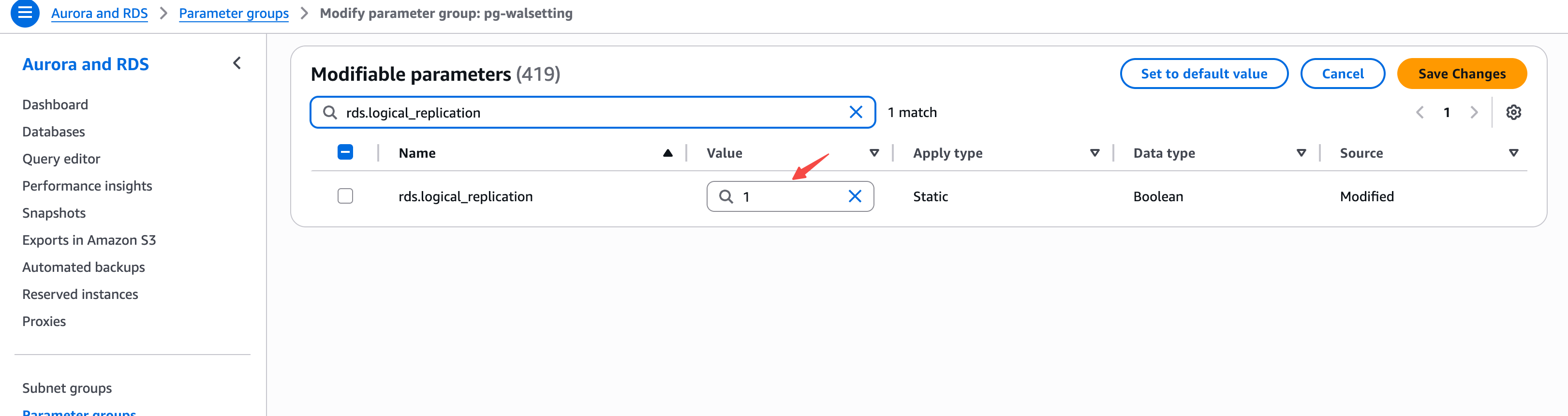
-
Click Save Changes to save.
Key parameter description:
| Parameter | Recommended value | Description |
|---|---|---|
rds.logical_replication | 1 | Enable logical replication; 0 means disabled |
Step 3: Apply the Cluster Parameter Group and Restart
Purpose: Bind the newly created parameter group to the target Aurora cluster, and make the configuration take effect by restarting the writer instance.
Steps:
- In the RDS console, select the target Aurora cluster and click Modify.
- In DB cluster parameter group, select the cluster parameter group created in Step 2.
- Choose Apply immediately.
- Restart the Aurora writer instance to make the configuration take effect.
Modifying the rds.logical_replication parameter requires restarting the Aurora writer instance to take effect. Perform this operation during off-peak business hours.
Step 4: Create the Sync User
Purpose: Create a dedicated account for Doris streaming ingestion, and grant the minimum privileges required for reading data and performing replication.
-
Create a dedicated user:
CREATE USER doris_sync PASSWORD '<password>'; -
Grant read privileges on the schema and tables (using the
publicschema as an example; replace it as needed):GRANT USAGE ON SCHEMA "public" TO doris_sync;
GRANT SELECT ON ALL TABLES IN SCHEMA "public" TO doris_sync;
ALTER DEFAULT PRIVILEGES IN SCHEMA "public" GRANT SELECT ON TABLES TO doris_sync; -
Grant the replication privilege:
GRANT rds_replication TO doris_sync;
Privilege description:
| Privilege | Purpose |
|---|---|
USAGE ON SCHEMA | Allows access to the specified schema |
SELECT ON ALL TABLES | Allows reading data from all existing tables in the schema |
ALTER DEFAULT PRIVILEGES ... GRANT SELECT | Automatically grants read privileges on tables created later in this schema |
rds_replication | The role required to perform logical replication in Aurora PostgreSQL |
Step 5: Configure the Publication
Doris 4.0
A Publication named dbz_publication must be created in advance with FOR ALL TABLES:
CREATE PUBLICATION dbz_publication FOR ALL TABLES;
If the sync user has superuser privileges, such as the rds_superuser role, Doris can automatically create dbz_publication when the task starts, and you do not need to execute this statement manually. Doris 4.0 does not support custom Publication names or Publications that contain only a subset of tables.
Doris 4.1.0 and later
By default, you do not need to create a Publication manually. When publication_name is not set, Doris uses the sync account to create a Publication named doris_pub_<job_id> and cleans it up when the job is deleted. The sync account therefore needs permission to create Publications.
If publication_name is explicitly set when creating the Streaming Job, create a Publication with the same name in advance. A custom Publication must include all source tables synchronized by the job and must be maintained and cleaned up by the user. For example:
CREATE PUBLICATION doris_pub_custom
FOR TABLE public.orders, public.customers;
Set "publication_name" = "doris_pub_custom" when creating the job. The name can contain only lowercase letters, digits, and underscores, cannot start with a digit, and is limited to 63 characters.
FAQ
Q1: SHOW rds.logical_replication; returns on. What else needs to be done?
You do not need to modify the cluster parameter group or restart the instance. Start directly from Step 4: Create the Sync User.
Q2: Are Aurora PostgreSQL 13 or earlier versions supported?
No. Doris streaming ingestion requires Aurora PostgreSQL 14 or later.
Q3: Can I use a Publication with a custom name?
Doris 4.0 does not support custom names and only supports dbz_publication FOR ALL TABLES. Since version 4.1.0, you can specify a custom name through publication_name, but you must create the Publication before creating the job and ensure that it includes all synchronized tables.
Q4: Must I use a superuser account for synchronization?
No. In Doris 4.0, a regular sync user requires dbz_publication to be created manually, while Doris can create it automatically when the user has superuser privileges. Since version 4.1.0, when publication_name is omitted, Doris automatically creates and manages the default Publication. A Publication must be created in advance only when a custom Publication is used.
Troubleshooting
| Symptom | Possible cause | Solution |
|---|---|---|
SHOW rds.logical_replication; still returns off | The new parameter group is not bound to the cluster, or the writer instance has not been restarted | Verify that DB cluster parameter group has been switched to the new parameter group, and restart the writer instance |
| User creation or privilege grant fails | The current login account has insufficient privileges | Sign in with an account that has rds_superuser or equivalent privileges, then perform the operation |
GRANT rds_replication returns an error | The current Aurora version is too low, or the cluster is not Aurora PostgreSQL | Upgrade to Aurora PostgreSQL 14 or later |
Doris 4.0 reports that dbz_publication does not exist | dbz_publication has not been created, and the sync account lacks superuser privileges | Execute CREATE PUBLICATION dbz_publication FOR ALL TABLES;, or use an account with the required privileges |
| Doris 4.1.0 or later fails to create the default Publication | The sync account lacks permission to create Publications | Grant the required privileges to the sync account, or have an administrator create a custom Publication in advance and configure publication_name |
| Doris 4.1.0 or later reports that a custom Publication does not exist | publication_name is configured, but a Publication with the same name has not been created | Create the Publication as described in Step 5, or remove the publication_name configuration |