Amazon RDS MySQL
Doris streaming ingestion supports synchronizing data from Amazon RDS MySQL. Compatible versions include MySQL 5.6, 5.7, and 8.0.x. Before starting a sync task, you must ensure that the RDS instance has Binlog enabled and that change logs are recorded in the correct format.
This document is intended for users who need to synchronize data from Amazon RDS MySQL into Doris through streaming ingestion (CDC). It guides you through all prerequisite configurations in scenario order.
Prerequisite Checklist
Before you begin, confirm the following conditions:
| Check item | Expected value | Description |
|---|---|---|
log_bin | ON | Binlog is enabled |
binlog_format | ROW | Changes are recorded in row mode |
binlog_row_image | FULL | The full row image is recorded |
| Sync user | Created | Has SELECT, REPLICATION SLAVE, and REPLICATION CLIENT privileges |
| Binlog retention | At least 72 hours | Prevents premature log cleanup that could interrupt sync |
If any of the above is not satisfied, follow the steps below to configure them one by one.
Step 1: Check the Current Binlog Configuration
Purpose: Confirm the current Binlog status of the RDS instance and decide whether the parameter group needs to be modified.
After connecting to the RDS instance, run the following SQL:
-- Check if binlog is enabled
SHOW VARIABLES LIKE 'log_bin';

-- Check binlog format
SHOW VARIABLES LIKE 'binlog_format';

-- Check binlog row image
SHOW VARIABLES LIKE 'binlog_row_image';
How to interpret the results:
- If
log_bin = ON,binlog_format = ROW, andbinlog_row_image = FULL, no additional configuration is needed. You can skip directly to Step 4: Create a Sync User. - If any of these is not satisfied, continue with Step 2 and Step 3.
Step 2: Create and Configure a Parameter Group
Purpose: Create a custom parameter group in the AWS console and adjust the Binlog-related parameters to the values required by Doris streaming ingestion.
The steps are as follows:
-
Log in to the AWS RDS console.
-
In the left navigation pane, select Parameter groups, and click Create parameter group.
-
Choose the matching MySQL version family and create a new parameter group.
-
Edit the parameter group, search for
binlog_format, and set the value toROW: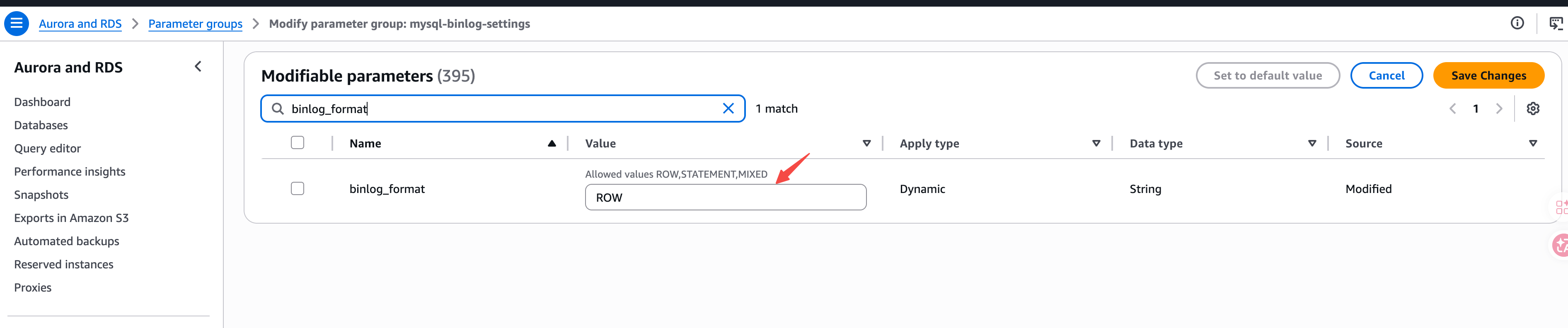
-
Likewise, search for
binlog_row_imageand set the value toFULL. -
Click Save Changes to save.
The parameters that need to be modified are summarized below:
| Parameter | Target value | Purpose |
|---|---|---|
binlog_format | ROW | Records data changes at row level, required for CDC sync |
binlog_row_image | FULL | Records the complete row data before and after each change |
Step 3: Apply the Parameter Group and Restart the Instance
Purpose: Bind the new parameter group to the target RDS instance and make the configuration take effect by restarting.
The steps are as follows:
- In the RDS console, select the target instance and click Modify.
- In DB parameter group, choose the newly created parameter group.
- Select Apply immediately to apply the change immediately.
- Restart the RDS instance to make the configuration take effect.
Modifying the binlog_format parameter requires restarting the RDS instance to take effect. Perform this operation during off-peak hours.
Step 4: Create a Sync User
Purpose: Create a dedicated account for Doris streaming ingestion to use, following the principle of least privilege.
-
Create a dedicated user:
CREATE USER 'doris_sync'@'%' IDENTIFIED BY '<password>'; -
Grant the privileges required for sync:
GRANT SELECT, REPLICATION SLAVE, REPLICATION CLIENT ON *.* TO 'doris_sync'@'%';
Description of the required privileges:
| Privilege | Purpose |
|---|---|
SELECT | Reads existing data (full-load phase) |
REPLICATION SLAVE | Pulls Binlog as a replica |
REPLICATION CLIENT | Queries Binlog status on the primary |
Step 5: Configure Binlog Retention
Purpose: By default, Amazon RDS MySQL purges binary logs as soon as possible. It is recommended to set the Binlog retention to at least 72 hours so that the Binlog files used for replication remain available in failure scenarios.
Use the mysql.rds_set_configuration stored procedure to set the retention time:
CALL mysql.rds_set_configuration('binlog retention hours', 72);
If this configuration item is not set, or is set to an interval that is too short, gaps may appear in the binary log, which can affect Doris's ability to resume replication.
Frequently Asked Questions (FAQ)
Q1: Is it mandatory to restart the instance after modifying binlog_format?
Yes. binlog_format is a static parameter and requires a restart of the RDS instance to take effect. Perform the operation during off-peak hours.
Q2: Why must binlog_row_image be set to FULL?
Doris streaming ingestion needs the complete row data before and after each change in order to correctly reconstruct UPDATE and DELETE operations. Setting it to MINIMAL or NOBLOB will cause sync errors or incomplete data.
Q3: Can the same parameter group be reused across multiple RDS instances?
Yes. Multiple RDS instances under the same version family can share a single parameter group, as long as they all require the same Binlog configuration.
Q4: Can the Binlog retention time be set longer?
Yes. binlog retention hours supports values from 1 to 168 hours (up to 7 days). A longer retention provides a larger recovery window but consumes more storage space.
Troubleshooting
| Symptom | Possible cause | Solution |
|---|---|---|
SHOW VARIABLES LIKE 'log_bin' returns OFF | The instance does not have automated backups enabled, so Binlog is not enabled | Enable automated backups for the instance in the RDS console; Binlog will then be enabled automatically |
binlog_format remains MIXED or STATEMENT after modification | The instance has not been restarted, or the bound parameter group is not the correct one | Confirm that the new parameter group is bound, then restart the instance |
Doris sync reports binary log not found | The Binlog has been purged | Increase binlog retention hours and restart the Doris sync task |
| The sync user cannot connect | Host whitelist or password is incorrect | Check whether the host qualifier in 'doris_sync'@'%' matches the egress IP of the Doris node |
| Insufficient privilege errors | Missing privileges such as REPLICATION SLAVE | Re-run the GRANT statement from Step 4 |