Change Data and Incremental Consumption Overview
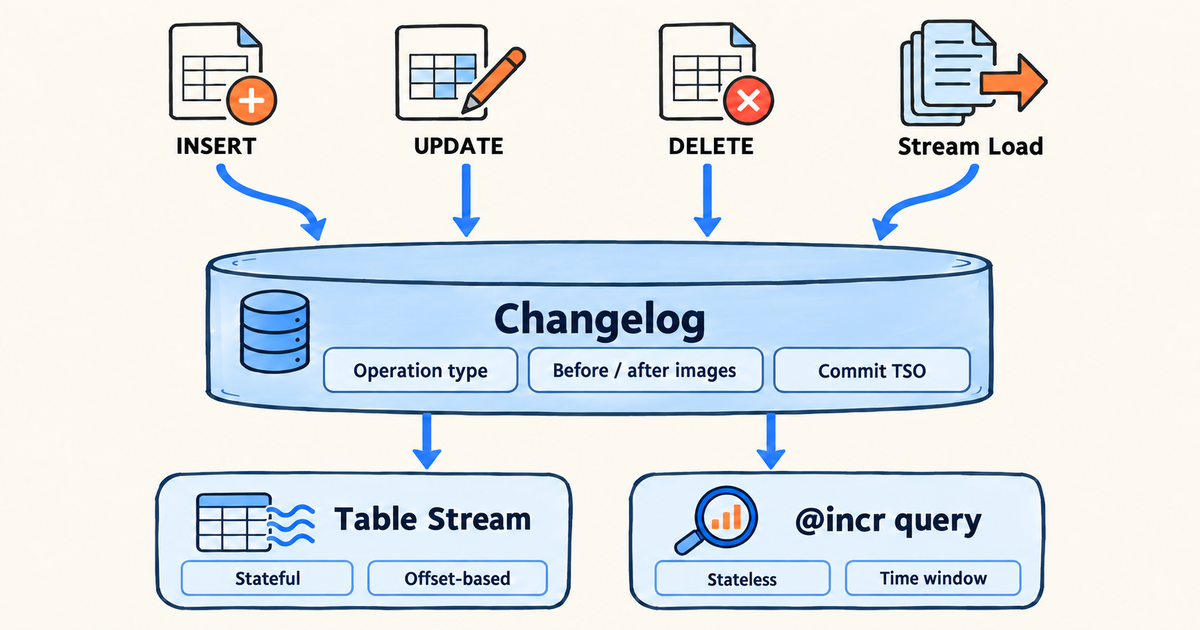
Starting from version 5.0, Doris can record the row-level changes of internal tables in a changelog and offers two ways to read those changes:
- Table Stream: a named consumption object that remembers how far you have consumed. Each read returns only the changes since the last consumption, and reading plus writing into the target table happen in one transaction.
- Incremental query (
@incr): no object to create. Read the changes of a table within a time window you specify.
Async materialized views can also use the higher-level capability Incremental View Maintenance (IVM). IVM lets Doris manage internal Table Streams automatically and maintains the materialized view from row-level changes. When you need to maintain a materialized view, use IVM directly instead of creating and consuming Streams yourself.
This feature is available since version 5.0.0. It is experimental and disabled by default. See Prerequisites for how to enable it.
What problems it solves
Incremental processing inside Doris usually runs into these problems:
| Problem | Without change records | With changelog |
|---|---|---|
| Downstream wants increments but cannot get them | The upstream table receives many updates and deletes every day, so downstream reports, wide tables, and aggregate tables can only be recomputed in full, or rely on an update_time column maintained by the application | A Table Stream returns only the changes between two consumptions, so downstream processes the increment |
| Updates and deletes are invisible | An update on a Unique Key table overwrites the old value and a deleted row simply disappears, so there is no way to know afterwards what was changed or deleted | Every insert, update (with the values before and after), and delete of each row is recorded |
| Increments of multiple tables do not line up | When joining incremental data with a dimension table, the dimension table is in its "current" state while the increment covers "a period in the past" | <stream>@snapshot() reads the dimension table image aligned with the consumption offset |
The changelog records every insert, update (with values before and after the update), and delete of each row, together with a globally monotonic commit timestamp. Table Stream and incremental query read those records in different ways.
Two layers
| Capability | Object needed | Who tracks the position | Best for |
|---|---|---|---|
| Table Stream | CREATE STREAM required | Doris keeps a consumption offset per partition | Continuous incremental ETL, downstream sync, exactly-once consumption |
Incremental query @incr | Nothing to create | You choose the time window | Ad-hoc analysis, external schedulers that manage their own positions |
IVM sits on top of these two layers. It uses the changes recorded in the changelog and the internal Table Streams that Doris creates automatically, but the user entry points remain CREATE MATERIALIZED VIEW and REFRESH MATERIALIZED VIEW.
Typical scenarios
| Scenario | Recommended approach | How it works | See |
|---|---|---|---|
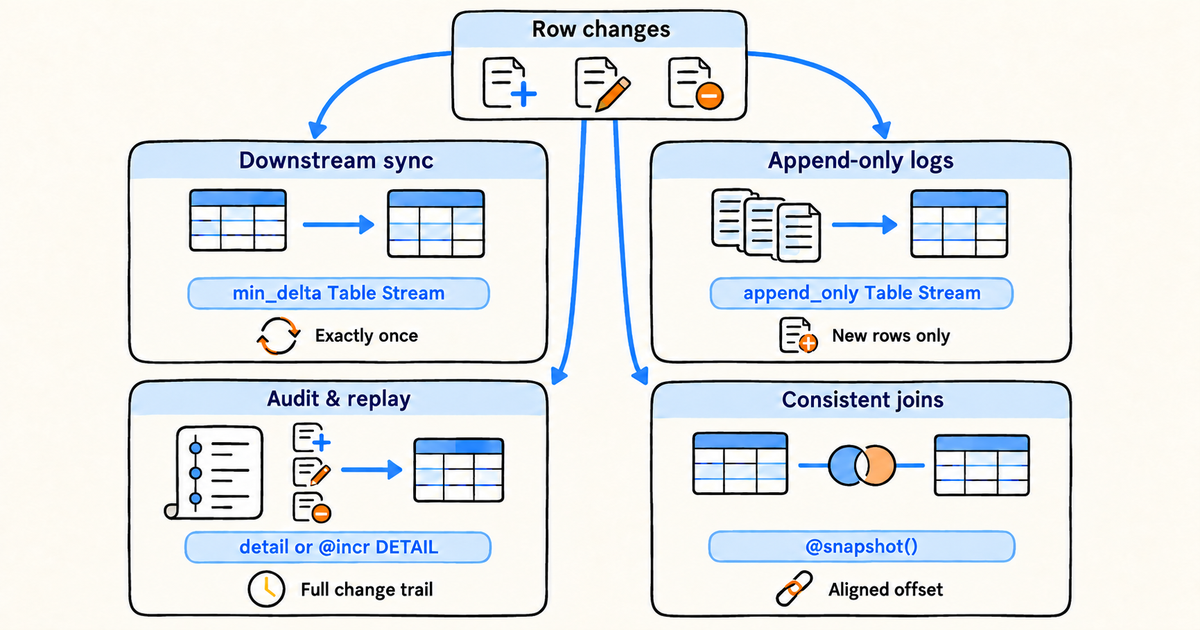
| Incremental sync to a downstream table | Table Stream, min_delta type | An orders table receives many status updates every day. Create a min_delta Table Stream and periodically run INSERT INTO downstream SELECT ... FROM the orders stream. Each run processes only the net changes between two executions: new orders, orders whose status changed (with the values before and after), and deleted orders. Reading the changes and writing the downstream table happen in one transaction; a failure rolls back automatically, so nothing is skipped or consumed twice | Table Stream Basics |
| Append-only logs and event tables | Table Stream, append_only type | For detail tables that only receive inserts, fetch only the newly written rows at minimal cost | Consumption types |
| Change auditing and replay | Table Stream detail type, or the DETAIL mode of @incr | When you need the full trail of every modification, export row-by-row changes by consumption offset or by time window and land them in an audit table | Incremental Query |
| Consistent joins between incremental data and dimension tables | <stream>@snapshot() | Consuming order changes requires joining the users table. users_stream@snapshot() reads the image of the users table aligned with the consumption offset, so a new order is never joined with stale user information or vice versa | Snapshot reads |
Capability matrix
Table models
| Table model | Changelog | Before image | Available change types |
|---|---|---|---|
| Duplicate Key | Supported | Not supported | APPEND only |
| Unique Key (Merge-on-Write, without cluster key) | Supported | Supported (changelog.need_historical_value = true) | APPEND / UPDATE_BEFORE / UPDATE_AFTER / DELETE |
| Unique Key (Merge-on-Read) | Not supported | - | - |
| Aggregate Key | Not supported | - | - |
Other restrictions (auto-increment columns, VARIANT columns, schema change scope, and so on) are listed in Changelog.
Choosing a consumption type
| You need | Choose | Notes |
|---|---|---|
| Only newly inserted rows | append_only | Updates and deletes are not emitted; lowest overhead |
| The net change of each key between two consumptions | min_delta (default) | Multiple modifications of the same key fold into one UPDATE_BEFORE + UPDATE_AFTER pair; a key inserted and then deleted is not emitted |
| The complete record of every modification | detail | Emitted row by row, never folded |
UPDATE_BEFORE and DELETE rows in min_delta and detail need before images, so the base table must be a MoW table with changelog.need_historical_value enabled.
Prerequisites
-
Version: Doris 5.0.0 or later.
-
FE configuration: enable the following two items in
fe.confand restart the FE (neither is a dynamic configuration):enable_feature_changelog = true
enable_table_stream = trueenable_feature_changelogcontrols changelog and the allocation of commit timestamps (TSO);enable_feature_binlogonly controls CCR binlog and is not needed here.enable_table_streamcontrols the Table Stream DDL. When it is off, creating a Stream fails withTable Stream is experimental. Please set enable_table_stream=true to enable it.. -
Enable changelog at table creation: Changelog can only be enabled when the table is created. An existing table cannot be switched on through
ALTER TABLE; recreate the table and reload the data. -
Deployment mode: Changelog and Table Stream work in both the integrated storage-compute mode and the compute-storage decoupled mode. Use
@incrincremental queries in the integrated mode for now; support in the decoupled mode is still being completed.
With changelog enabled, every write additionally generates and persists change records, and MoW tables also need to read the old values. Load throughput drops noticeably. Enable it only on tables that really need incremental consumption, and evaluate with a realistic workload before going to production.
FAQ
| Question | Answer |
|---|---|
| Can changelog be enabled on an existing table? | No. Changelog can only be enabled at table creation; create a new table with changelog enabled and reload the data, see Changelog |
Table Stream or @incr? | Continuous incremental ETL that must be exactly-once: Table Stream. Ad-hoc analysis, looking back at changes in a period, or an external system that already manages its own positions: @incr, see Differences from Table Stream |
Creating a Stream fails with Table Stream is experimental. Please set enable_table_stream=true to enable it. | enable_table_stream is not enabled on the FE; update fe.conf and restart the FE |
| Does it work in the compute-storage decoupled mode? | Changelog and Table Stream do; use @incr in the integrated storage-compute mode for now |
| How does changelog affect writes? | Every write additionally generates and persists change records, and MoW tables also read the old values, so load throughput drops noticeably. Enable it only on tables that need incremental consumption and evaluate with a realistic workload |
| Are change records cleaned up automatically? | Yes. changelog.ttl_seconds controls retention (one day by default); incremental reads filter expired records, and background compaction reclaims their storage. Consume changes within the retention window; see Retention and cleanup |
Reading guide
| Page | Content |
|---|---|
| Quick Start | A 10-minute walkthrough: create the table, create the Stream, write data, view changes, consume |
| Changelog | How to enable it, properties, supported scope, the change record model, DDL restrictions, overhead and troubleshooting |
| Incremental Query | @incr time-window queries and the three incremental modes |
| Table Stream Basics | Creating and managing Streams, the three consumption types, initial rows, reading versus consuming, virtual columns |
| Table Stream Advanced | Partition-level offsets, snapshot and reset, consistent joins, concurrent consumption, the effect of base table changes, monitoring and recovery |
| Incremental View Maintenance (IVM) | Maintains async materialized views by row using the changelog and internal Table Streams |