Data Update Overview
This article introduces the data update and deletion capabilities of Apache Doris, helping you answer the following questions:
- Which table model should you choose for your business scenario?
- When should you use ingest-based updates (UPSERT, partial column updates), and when should you use DML updates (
UPDATE,INSERT INTO SELECT)? - What is the implementation mechanism behind the Unique Key model? (Merge-on-Write, Sequence column, delete marker, partial column update)
- How are typical scenarios such as CDC synchronization and real-time wide tables implemented?
Reading suggestions:
- For a quick selection, go directly to 1. Choosing the Right Update Method.
- To understand the principles or troubleshoot performance issues, see 2. Unique Key Model Implementation Mechanism.
- To reference typical business practices, see 3. Typical Business Scenarios.
- To learn about best practices and limitations, see 4. Usage Recommendations.
1. Choosing the Right Update Method
1.1 Comparison of Table Models and Update Capabilities
Doris provides three table models, with significant differences in support for updates and deletions. When making a selection, first confirm whether your business requires row-level updates or partial column updates.
| Table Model | Data Organization | Supported Update/Delete Methods | Typical Use Cases |
|---|---|---|---|
| Unique Key Model | Each row is identified by a unique primary key, deduplicated on write | UPSERT, partial column update, UPDATE, marked deletion, DELETE | Order status changes, user tag updates, CDC synchronization |
| Aggregate Key Model | Value columns with the same Key are merged by aggregation function (SUM/MAX/MIN/REPLACE) | Updated through ingestion based on aggregation semantics; DELETE only supports Key column conditions | Real-time reports, click counts, and other aggregation scenarios |
| Duplicate Key Model | Append-only writes, no deduplication or aggregation | Only supports DELETE | Logs, behavior tracking, and other append-only scenarios |
Selection conclusion: Choose the Unique Key model when row-level updates or partial column updates are required.
1.2 Update Path Selection
The Unique Key model supports two update paths, which can be chosen based on data scale and business frequency:
| Path | Applicable Scenarios | Recommended Write Method |
|---|---|---|
| Ingest-based update (UPSERT) | High-frequency, large-batch updates; CDC synchronization; multi-source wide table assembly | Stream Load, Routine Load, Broker Load, INSERT INTO |
DML update (UPDATE) | Low-frequency, batch updates; conditional data refresh; cross-table associated updates | UPDATE, INSERT INTO ... SELECT ... |
1.2.1 Update via Ingestion (UPSERT)
All ingestion methods (Stream Load, Broker Load, Routine Load, INSERT INTO) process data in the Unique Key model with UPSERT semantics by default:
- If the primary key already exists: the old row is overwritten by the new row.
- If the primary key does not exist: a new row is inserted.
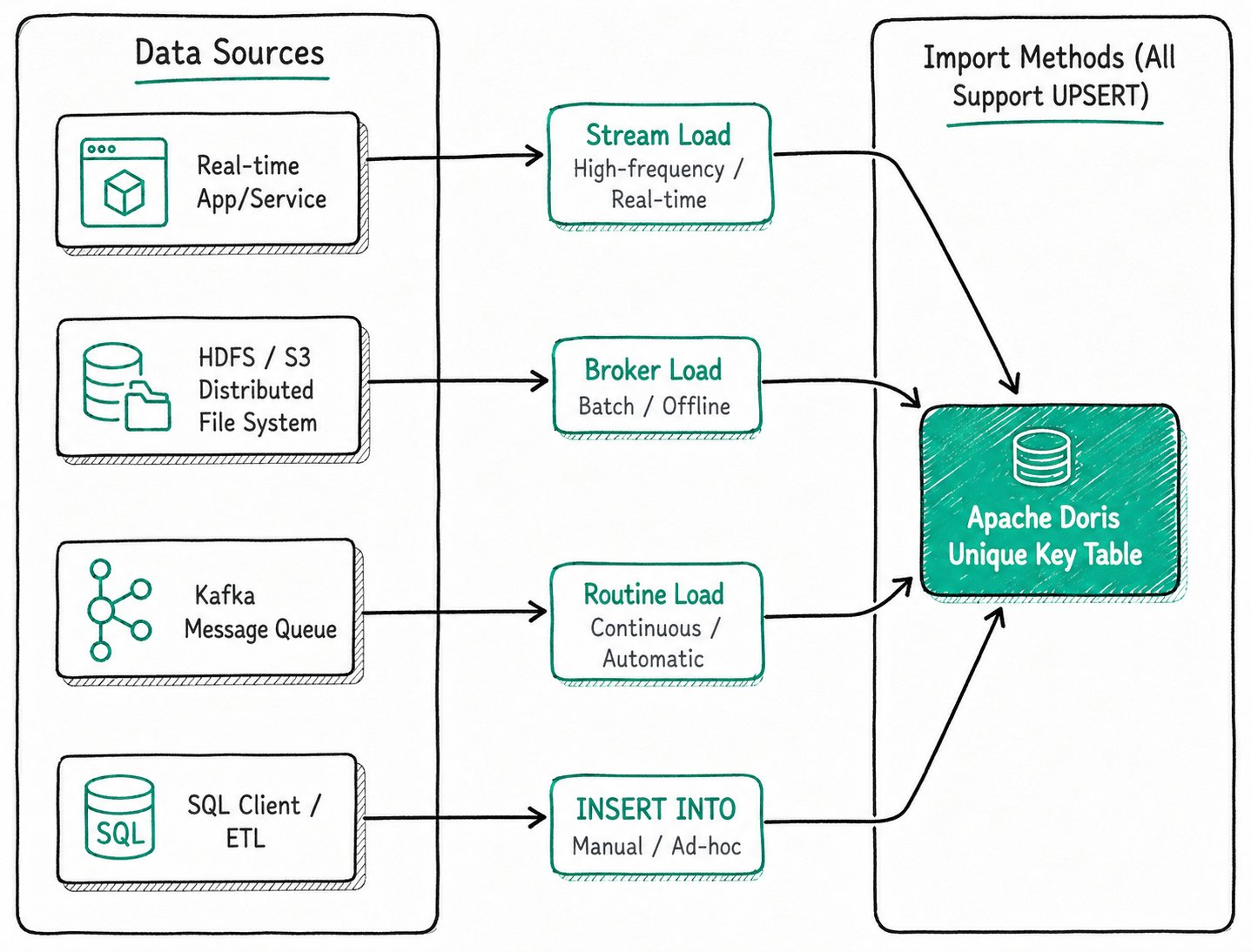
The behavior of ingest-based updates differs across table models. For details, see:
- Update via Ingestion in the Unique Key Model: Implement full-row Upsert and partial column updates through Stream Load, Routine Load, and other methods.
- Update via Ingestion in the Aggregate Model: The write semantics and available update methods for the Aggregate model.
1.2.2 Update via the UPDATE Statement
Doris supports the standard SQL UPDATE, which can update data in Unique Key model tables based on WHERE conditions and supports cross-table associated updates.
-- Simple update
UPDATE user_profiles SET age = age + 1 WHERE user_id = 1;

-- Cross-table associated update
UPDATE sales_records t1
SET t1.user_name = t2.name
FROM user_profiles t2
WHERE t1.user_id = t2.user_id;
The execution process of UPDATE is: first scan the data that meets the conditions, then write the updated rows back. This is suitable for low-frequency, batch update scenarios.
High-concurrency UPDATE operations on data with the same primary key are not recommended. Concurrent UPDATE operations cannot guarantee data isolation when they involve the same primary key.
For the syntax, typical usage, and limitations of the UPDATE statement, see: Updating Data Using the UPDATE Command.
1.2.3 Update via INSERT INTO SELECT
Since the Unique Key model uses UPSERT semantics by default, using INSERT INTO ... SELECT ... can also achieve the effect of UPDATE, which is suitable for batch write-back from other tables.
1.3 Data Deletion Paths
Doris provides two data deletion paths, with different implementation mechanisms across table models:
| Deletion Path | Supported Table Models | Description |
|---|---|---|
| Marked deletion via ingestion | Unique Key Model | Writes a __DORIS_DELETE_SIGN__ = 1 marker, with background Compaction performing physical cleanup |
DML deletion (DELETE / TRUNCATE) | All models | Delete data by condition or empty a table/partition |
For complete information, see Data Deletion.
2. Unique Key Model Implementation Mechanism
2.1 Merge-on-Write and Merge-on-Read
The Unique Key model has two data merging strategies. Since Doris 2.1, Merge-on-Write is the default implementation.
| Dimension | Merge-on-Write (MoW) | Merge-on-Read (MoR, legacy) |
|---|---|---|
| Behavior on write | Deduplicates and merges on write, keeping only one latest record per primary key in storage | Retains multiple versions on write |
| Query performance | Close to that of a Duplicate Key table without updates | Real-time merge during queries, taking approximately 3-10 times longer than MoW |
| Write performance | Has merging overhead, slightly lower than MoR (about 10-20% for small batches, about 30-50% for large batches) | Close to a Duplicate Key table |
| Resource consumption | Writes and background Compaction consume more CPU/memory | Queries consume more CPU/memory |
| Applicable scenarios | Read-heavy with infrequent writes (recommended) | Write-heavy with infrequent reads (no longer recommended) |
Newly created tables use MoW by default, with no additional configuration required.
2.2 Sequence Column and Out-of-Order Data
In a distributed system, data may arrive out of order. For example, an order status changes successively to "Paid" and "Shipped", but due to network latency, the "Shipped" message may arrive at Doris before the "Paid" message.
The Sequence column mechanism solves this problem: when creating the table, specify a column (typically a timestamp or version number) as the Sequence column. When writing data with the same primary key, Doris always retains the row with the largest Sequence value.
CREATE TABLE order_status (
    order_id BIGINT,
    status_name STRING,
    update_time DATETIME
)
UNIQUE KEY(order_id)
DISTRIBUTED BY HASH(order_id)
PROPERTIES (
    "function_column.sequence_col" = "update_time" -- Specify update_time as the Sequence column
);

-- 1. Write the "Shipped" record (larger update_time)
-- {"order_id": 1001, "status_name": "Shipped", "update_time": "2023-10-26 12:00:00"}

-- 2. Write the "Paid" record (smaller update_time, arrives later)
-- {"order_id": 1001, "status_name": "Paid", "update_time": "2023-10-26 11:00:00"}

-- Final result: the record with the largest update_time is retained
-- order_id: 1001, status_name: "Shipped", update_time: "2023-10-26 12:00:00"
For more information:
- For concurrency control capabilities such as the Sequence column, MVCC version management, and
UPDATEconcurrency parameters, see: Concurrency Control of Updates in the Unique Key Model. - When multiple data streams update different columns of the same wide table simultaneously, you can use Sequence Mapping to control the version order of each column independently. For details, see: Multi-Stream Updates in the Unique Key Model.
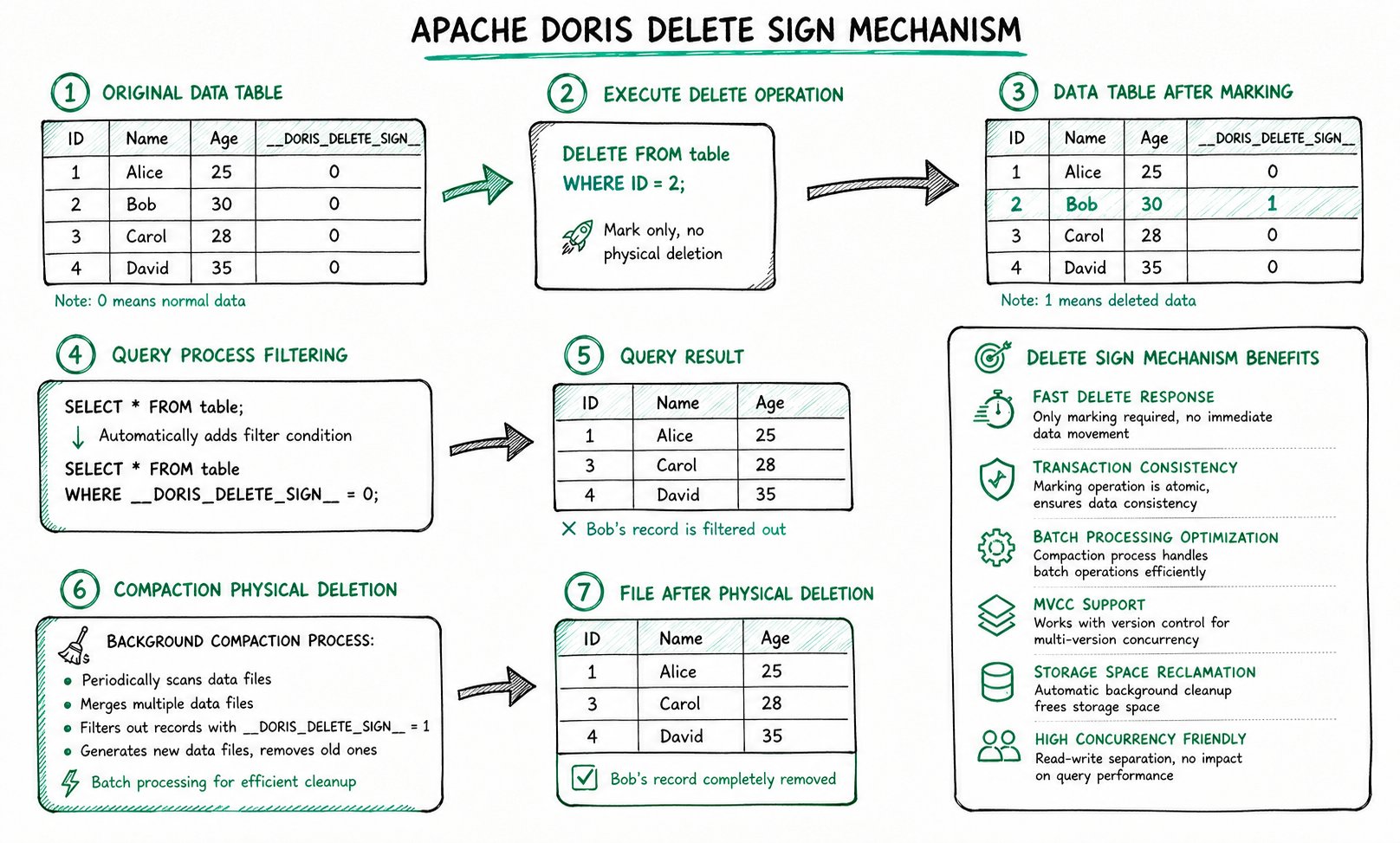
2.3 Workflow of the Delete Marker
__DORIS_DELETE_SIGN__ uses a "logical marker, background cleanup" approach, divided into three stages:
- Execute deletion: When data is deleted via ingestion or the
DELETEstatement, Doris does not immediately remove the data from physical files. Instead, it writes a new record with__DORIS_DELETE_SIGN__marked as1. - Query filtering: During queries, Doris automatically appends the filter condition
WHERE __DORIS_DELETE_SIGN__ = 0to hide rows marked for deletion from the results. - Background Compaction: When the Compaction process detects that a primary key has both a normal record and a delete marker record, it physically removes both records during the merge process, freeing storage space.
2.4 Partial Column Update
Starting from version 2.0, the Unique Key model (MoW) supports partial column updates: during ingestion, you only need to provide the primary key and the columns to be updated. Columns that are not provided retain their original values.
How to enable:
| Ingestion Method | Configuration to Enable |
|---|---|
INSERT INTO | Set the session variable enable_unique_key_partial_update = true |
| Stream Load and other ingestion methods | Set the partial_columns parameter to true |
Merge-on-Write must be enabled when creating the table:
CREATE TABLE user_profiles (
    user_id BIGINT,
    name STRING,
    age INT,
    last_login DATETIME
)
UNIQUE KEY(user_id)
DISTRIBUTED BY HASH(user_id)
PROPERTIES (
    "enable_unique_key_merge_on_write" = "true"
);

-- Initial data
-- user_id: 1, name: 'Alice', age: 30, last_login: '2023-10-01 10:00:00'

-- Partial update via Stream Load, writing only age and last_login
-- {"user_id": 1, "age": 31, "last_login": "2023-10-26 18:00:00"}

-- Data after update
-- user_id: 1, name: 'Alice', age: 31, last_login: '2023-10-26 18:00:00'
In terms of implementation, partial column updates in the Unique Key model are not in-place updates. Instead, during ingestion, existing columns are read, missing fields are filled in, and the entire row is rewritten. This results in read amplification and write amplification: for example, when updating 10 fields of a 100-column wide table with similar field sizes, a 1 MB effective update triggers approximately 9 MB of data reads and 10 MB of data writes.
Performance recommendations:
| Recommendation | Description |
|---|---|
| Use SSD | Partial column updates generate a large amount of random IO. The bottleneck on mechanical disks is significant, so SSDs (NVMe preferred) are recommended |
| Enable row store for wide tables | For very wide tables, enabling row store is recommended, so a single IO can read the entire row. In column store mode, each missing field requires a separate IO |
For complete usage instructions (Stream Load, INSERT INTO, Flink Connector, etc.), see: Column Update.
3. Typical Business Scenarios
3.1 Real-Time CDC Synchronization
Tools such as Flink CDC capture the Binlog of upstream databases (MySQL, PostgreSQL, Oracle, etc.) and write it to Doris Unique Key model tables.
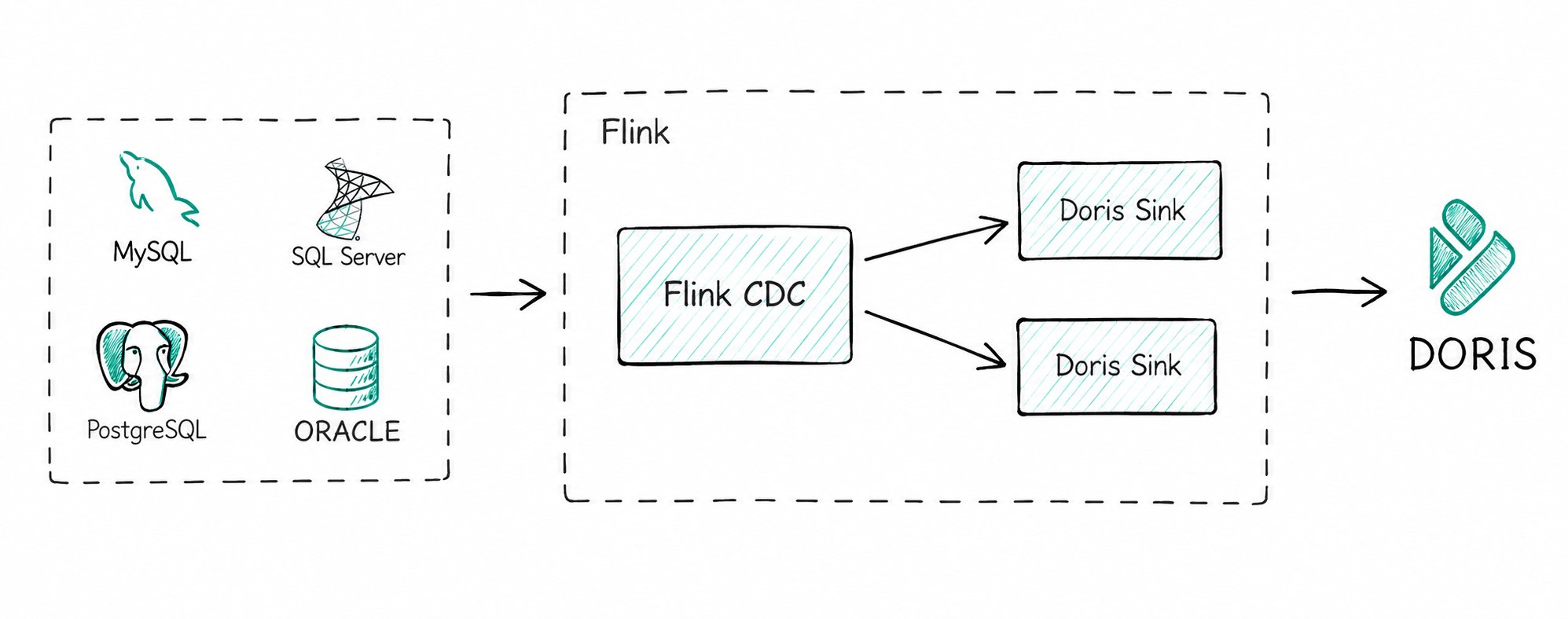
Key capabilities:
- Whole-database synchronization: Flink Doris Connector internally integrates Flink CDC, enabling end-to-end whole-database synchronization without manual table creation or field mapping.
- Consistency guarantee: The following capabilities are used in combination to align with the upstream database state:
- The Unique Key model UPSERT handles
INSERT/UPDATE. __DORIS_DELETE_SIGN__handlesDELETE.- The Sequence column (such as the Binlog timestamp) handles out-of-order data.
- The Unique Key model UPSERT handles
3.2 Real-Time Wide Table Assembly
Using partial column updates, you can complete multi-source wide table assembly directly within Doris without performing real-time joins in Flink:
- Create a Unique Key model wide table.
- Different data sources (basic information, behavior logs, transaction data, etc.) write to it in real time via Stream Load / Routine Load.
- Each data stream writes only the columns it is responsible for, for example:
- The user behavior stream updates
page_view_countandlast_login_time. - The transaction stream updates
total_ordersandtotal_amount.
- The user behavior stream updates
Each stream writes only the changed columns, which reduces IO overhead and avoids the resource consumption of real-time joins. For version control in multi-stream concurrent scenarios, see: Multi-Stream Updates in the Unique Key Model.
4. Usage Recommendations
4.1 General Recommendations
| No. | Recommendation | Description |
|---|---|---|
| 1 | Prefer ingest-based updates | For high-frequency, large-volume updates, prefer Stream Load and Routine Load over UPDATE DML |
| 2 | Batch writes | Avoid high-frequency single-row INSERT (> 100 TPS), as each INSERT has transaction overhead. You can enable Group Commit to merge small batch commits |
| 3 | Use high-frequency DELETE on Duplicate/Aggregate models with caution | Predicate accumulation affects subsequent query performance |
| 4 | Use TRUNCATE PARTITION to delete an entire partition | When deleting an entire partition, TRUNCATE PARTITION is much more efficient than DELETE |
| 5 | Execute UPDATE serially | Avoid concurrent execution of UPDATE tasks that may operate on the same primary key |
4.2 Unique Key Model in the Compute-Storage Decoupled Architecture
Doris 3.0 introduces the compute-storage decoupled architecture. In this architecture, BE is stateless, and Merge-on-Write must maintain global state through the Meta Service to resolve write-write conflicts among ingestion, Compaction, and Schema Change. The Unique Key model MoW relies on a distributed table lock based on the Meta Service to ensure write consistency.
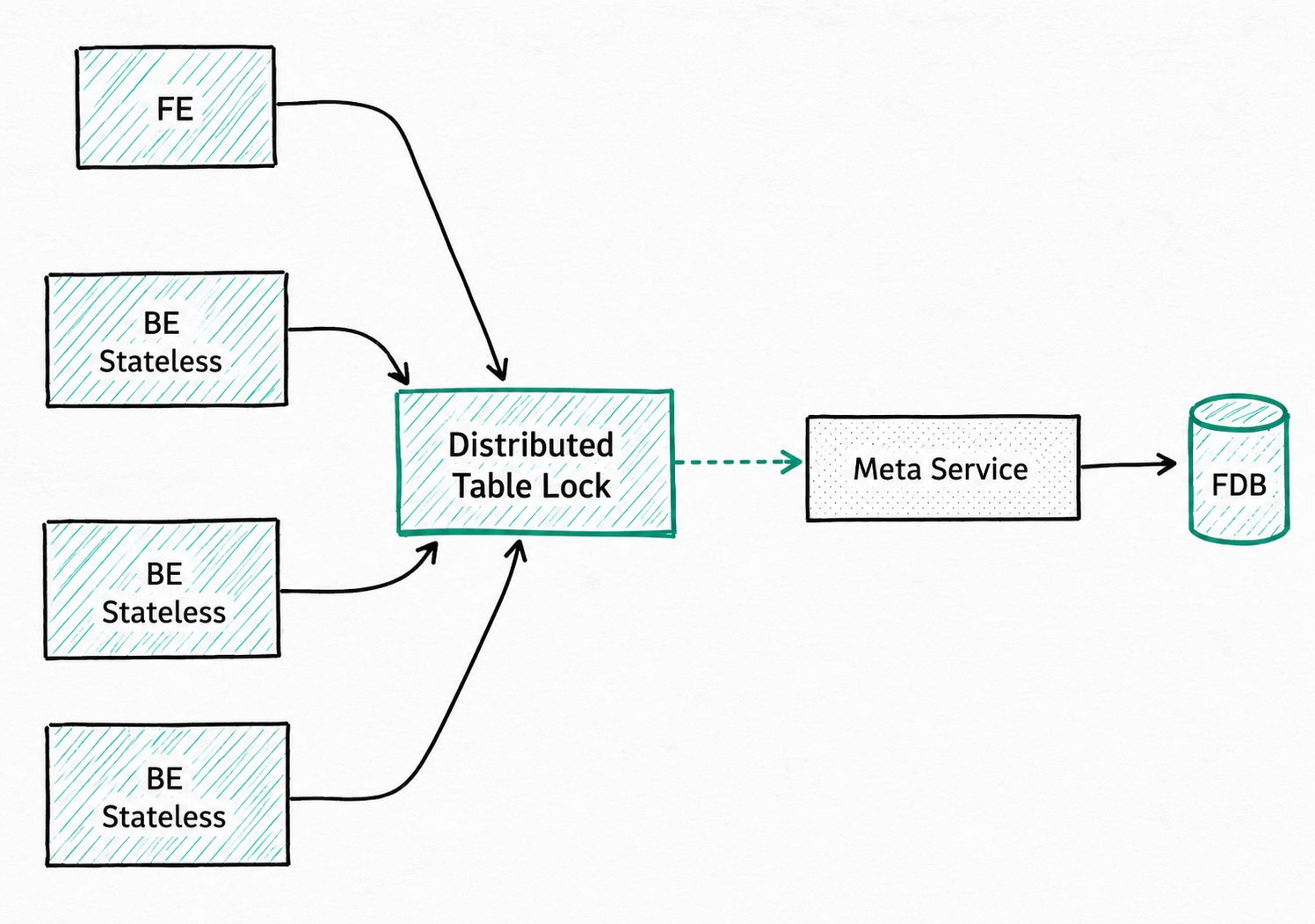
High-frequency ingestion and Compaction can cause table lock contention. When using this architecture, the following are recommended:
- Control single-table ingestion frequency: It is recommended that the ingestion frequency of a single Unique Key table does not exceed 60 times per second. This can be reduced by batching or adjusting concurrency.
- Design partitions and buckets reasonably:
- Partitions: Use time partitions (by day or by hour) so that each ingestion only updates a small number of partitions.
- Buckets: The number of buckets (number of Tablets) should match the data volume, typically between 8 and 64. Too many Tablets aggravate lock contention.
- Adjust Compaction strategy: When the write pressure is high, reduce the Compaction frequency to lessen lock conflicts with ingestion tasks.
- Use a recent version: Version 3.1 has made significant optimizations to the distributed table lock implementation. Using the latest stable version is recommended.
