Doris Operator Lifecycle Management
Doris Operator manages Doris clusters through the Reconcile loop. After a Doris custom resource is changed, the Operator updates underlying Kubernetes resources according to the new desired state and, when needed, performs Doris metadata-level actions.
This document explains the operational semantics behind those changes.
Cluster creation
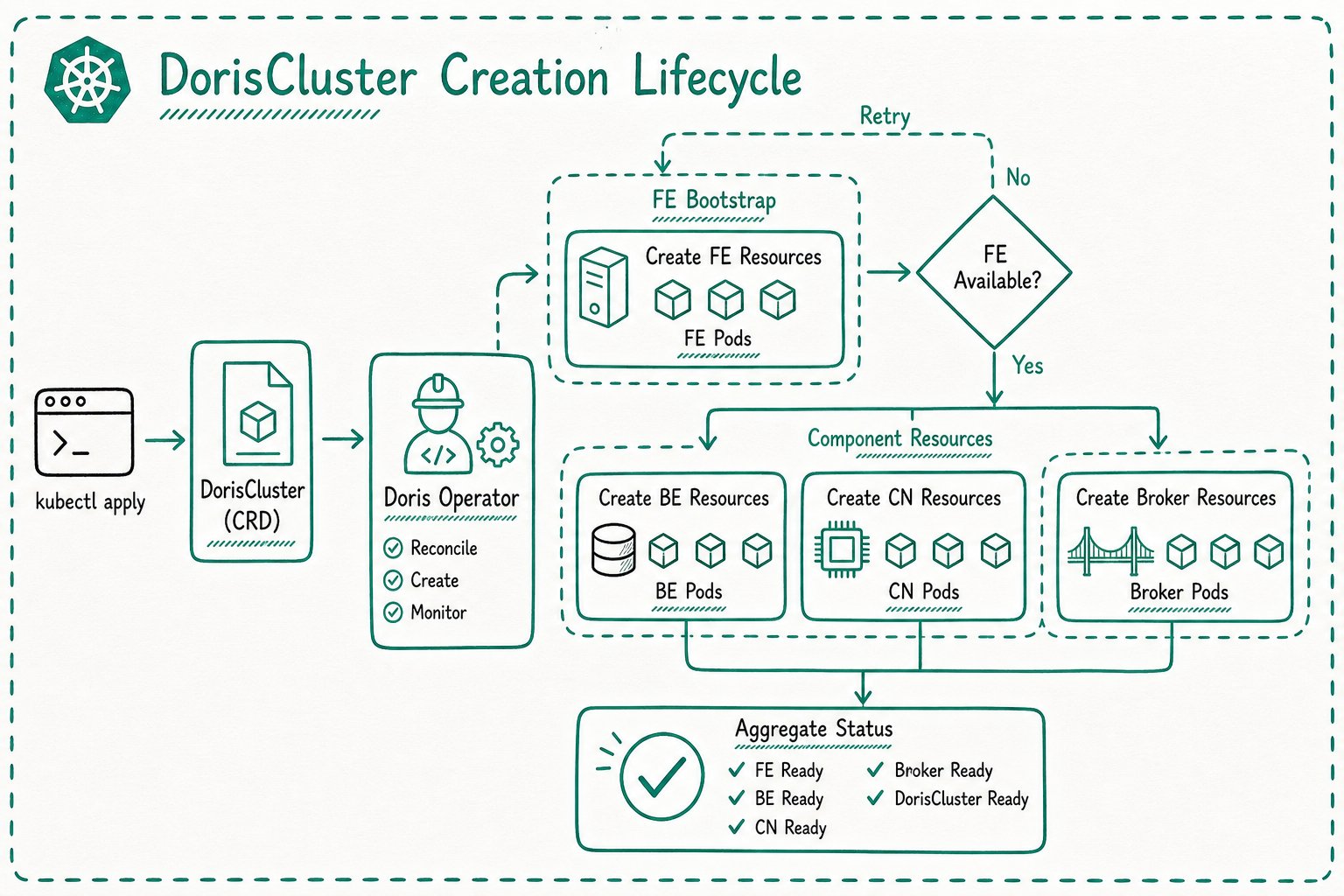
When you create a DorisCluster or DorisDisaggregatedCluster, the Operator creates the underlying Kubernetes resources according to the component configuration in the resource.
For compute-storage integrated clusters, FE is usually created first:
For compute-storage decoupled clusters, MetaService is created first:
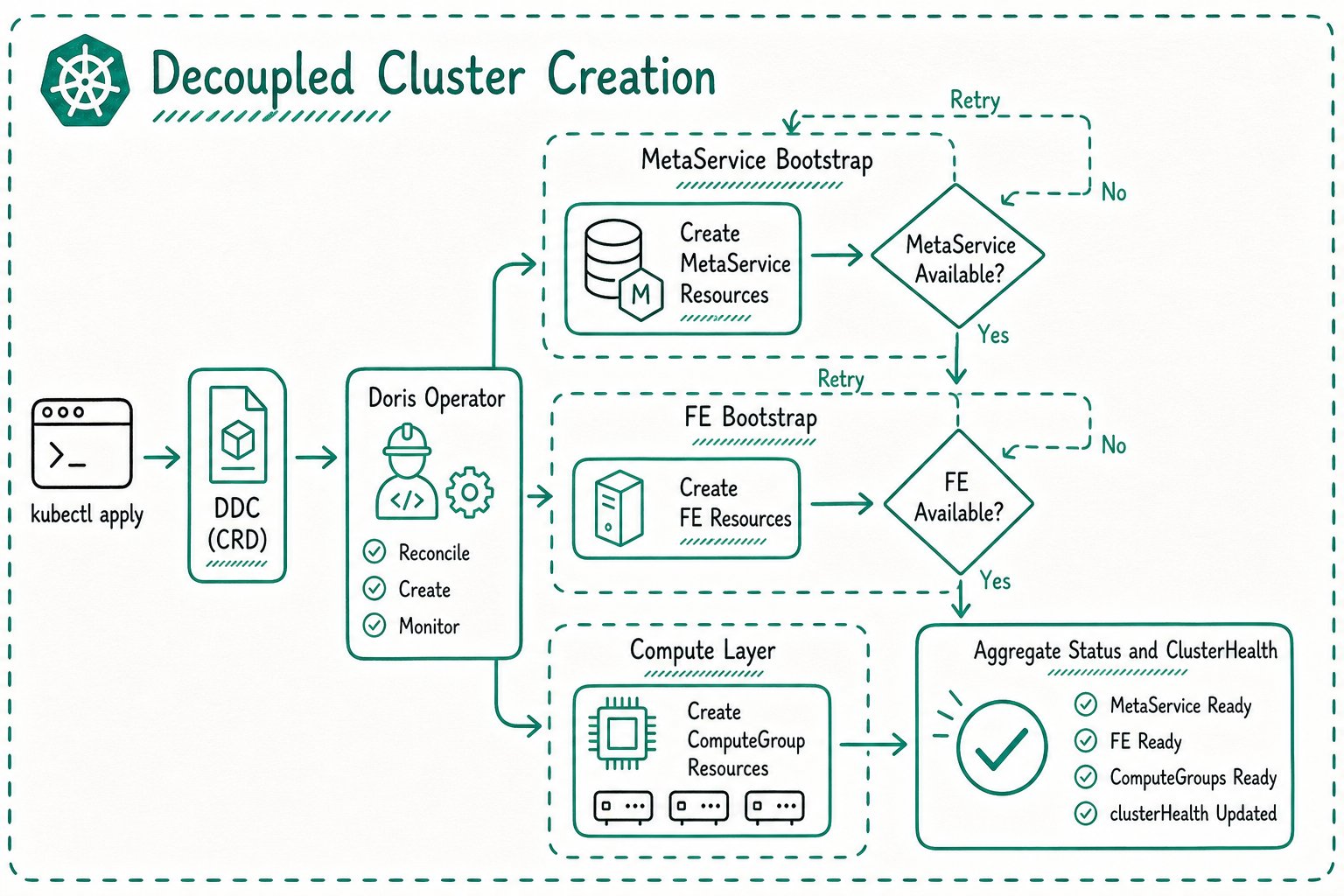
If dependencies are not ready, the Operator keeps waiting and retries in later Reconcile loops.
Scale out
Scaling out is usually done by increasing a component's replicas field. For example:
spec:
  beSpec:
    replicas: 5
After the Operator detects the change, it updates the corresponding StatefulSet. Kubernetes creates the new Pods, and the Operator continues checking readiness and updating CR status.
For compute-storage decoupled clusters, scaling out a ComputeGroup is done in the same way:
spec:
  computeGroups:
    - uniqueId: adhoc-query
      replicas: 5
Pay attention to:
- Whether the cluster has enough CPU, memory, and storage.
- Whether new Pods can be scheduled.
- Whether PVCs can be bound.
- Whether new nodes can register with the Doris cluster.
Scale in
Scale-in is riskier than scale-out because it may affect data replicas, metadata quorum, node roles, or service capacity.
Before scaling in a production cluster, confirm Doris replica status, business traffic, and rollback options.
Compute-storage integrated clusters
Scale-in risks differ by component:
| Component | Main concern |
|---|---|
| FE | Follower and Observer roles can affect metadata quorum |
| BE | Replica migration and data availability must be considered |
| CN | No data replicas, but scale-in affects compute capacity and cache |
| Broker | Check whether external access tasks still depend on it |
For FE, the replica count cannot be lower than the number of election nodes. For scale-in in this mode, evaluate cluster topology and Doris-level risk separately.
Compute-storage decoupled clusters
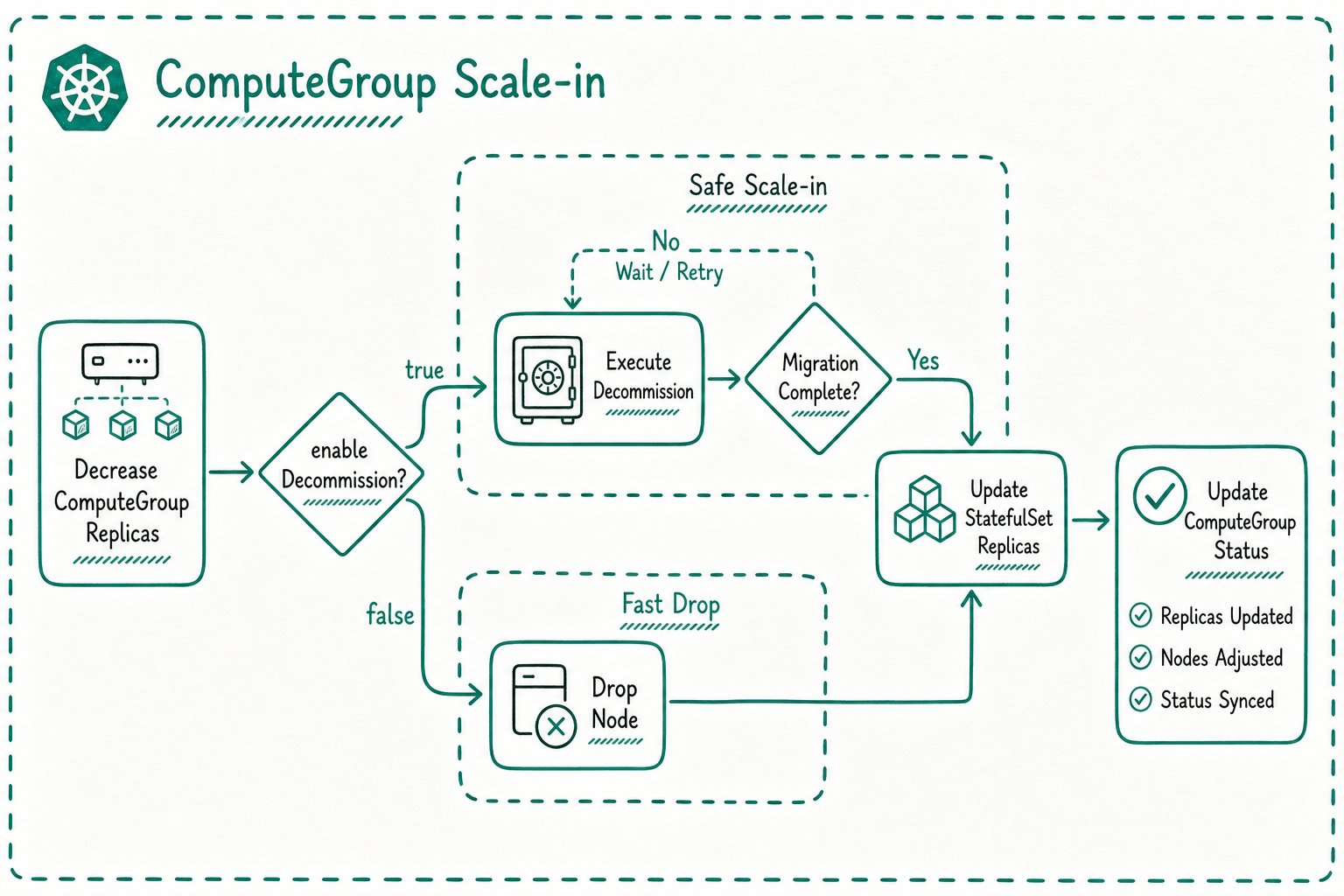
When scaling in a ComputeGroup, Doris metadata-level actions may be required. The behavior depends on enableDecommission:
| Configuration | Behavior |
|---|---|
enableDecommission: true | Run decommission before scale-in and wait for safe removal |
enableDecommission: false | Directly drop the corresponding node |
Before scaling in, confirm current data distribution and business traffic.
Configuration changes
Doris startup configuration is usually mounted through ConfigMap. Whether a change requires a restart depends on the configuration type and Operator settings.
For compute-storage integrated clusters:
spec:
  enableRestartWhenConfigChange: true
When this is enabled, core ConfigMap changes can trigger a rolling restart.
Check the following when changing configuration:
- Whether ConfigMap keys match component requirements, such as
fe.conf. - Whether configured directories match PVC mount paths.
- Whether ports, FQDN, and authentication settings match the Kubernetes network model.
- Whether the change takes effect only after component restart.
Rolling updates
Changing component images, some Pod template fields, or configuration hashes can trigger a StatefulSet rolling update.
Recommended practice:
- Perform the update during off-peak hours.
- Make sure the cluster has no unresolved failures first.
- Confirm client retry behavior.
- Follow Doris version upgrade documentation for upgrade order.
Cluster deletion
After the Doris custom resource is deleted, the Operator enters cleanup flow and removes Kubernetes resources that it manages.
Before deletion, confirm:
- Whether PVCs should be retained.
- Whether object storage, FoundationDB, or other external dependencies are shared.
- Whether data and metadata backups are needed.
- Whether clients are still connected.
Deleting the CR can remove the corresponding Kubernetes resources. Confirm cleanup scope and backup strategy before proceeding.
Observing lifecycle operations
Lifecycle completion should be judged using CR status, Kubernetes resource state, and Doris component state together.
kubectl get dcr -n ${namespace}
kubectl describe dcr ${cluster_name} -n ${namespace}
kubectl get ddc -n ${namespace}
kubectl describe ddc ${cluster_name} -n ${namespace}
kubectl get pod,sts,svc,pvc -n ${namespace}
If status does not converge for a long time, continue with Operator logs and Kubernetes Events to determine whether the problem is in scheduling, storage binding, configuration mounting, node registration, or Doris metadata operations.