Analytic Functions
TL;DR Apache Doris analytic functions (window functions) compute a value for every row of a result set without collapsing rows the way
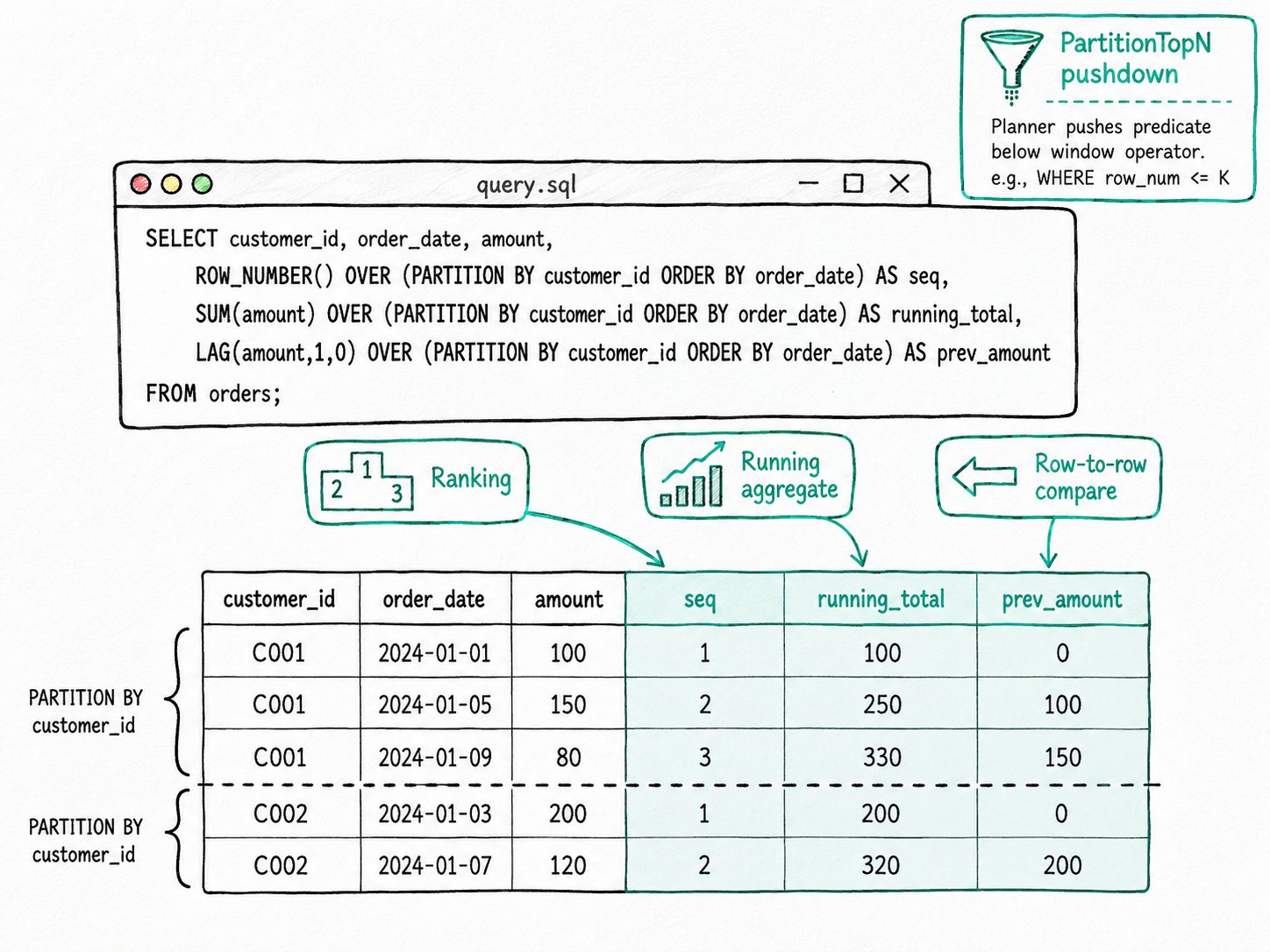
GROUP BYdoes. Apache Doris supports the standard set,ROW_NUMBER,RANK,DENSE_RANK,NTILE,LAG,LEAD,FIRST_VALUE,LAST_VALUE,NTH_VALUE,PERCENT_RANK,CUME_DIST, plus every aggregate (SUM,AVG,COUNT,MIN,MAX) used withOVER. The Nereids optimizer also rewritesWHERE row_num <= Kinto a partition-aware Top-N below the window, so a "top 10 per category" query never sorts the whole partition.
Why use analytic functions in Apache Doris?
Apache Doris analytic functions answer three questions that show up in almost every analytics workload and that GROUP BY cannot answer on its own.
- "Number every order per customer in time order, then keep the first 10." A self-join on
(customer_id, order_date)works but reads the table twice. - "What was the running total of sales by day, and the 7-day moving average?"
GROUP BYcollapses the rows you still want to see. - "How does each row compare to the previous row?" Year-over-year, period-over-period, gap-between-events, this is the lag/lead pattern, and writing it without window functions means a self-join with an offset predicate that the planner cannot optimize.
Apache Doris analytic functions answer all three in one pass over the data, with no self-join and the original rows preserved.
What are Apache Doris analytic functions?
An Apache Doris analytic function is a SQL function that, for each input row, computes a value over a window of related rows defined by an OVER clause. The window can be the whole partition, a fixed range around the current row, or anything in between. The output has the same number of rows as the input.
function(args) OVER ( [PARTITION BY ...] [ORDER BY ...] [<frame>] )
Key terms
OVERclause: tells Apache Doris this call is a window function rather than a regular aggregate. Required.PARTITION BY: splits the input into independent groups. Each partition is computed on its own. Different from table partitions, this is a runtime concept.ORDER BY(insideOVER): orders rows within each partition.LAG,LEAD,ROW_NUMBER,RANK, and any frame withPRECEDING/FOLLOWINGneed it.- Window frame: the slice of the partition the function reads for the current row. Apache Doris supports
ROWS BETWEEN ... PRECEDING/FOLLOWING/CURRENT ROW/UNBOUNDED ...and a restricted form ofRANGE. - PartitionTopN: an internal operator the planner inserts when it can prove a
WHERE rank <= Kfilter only needs the top K rows per partition. Source:CreatePartitionTopNFromWindow.java.
How do Apache Doris analytic functions work?
Apache Doris analytic functions run through a five-step pipeline: plan, shuffle, sort, evaluate, and push down.
- Plan. The optimizer parses the
OVERclause into aWindowExpression, normalizes the frame (CheckAndStandardizeWindowFunctionAndFrame), and groups window calls that share the samePARTITION BYplusORDER BYinto a single physical window operator. Calls that share a partition and order do not pay for an extra sort. - Shuffle by partition. If
PARTITION BYis present, the engine shuffles rows so all rows for the same partition land on the same backend. With noPARTITION BY, the whole window runs in a single pipeline (the parallelism upper bound). - Sort within partition. Each backend sorts its partitions by the
ORDER BYcolumns. Ties produce a non-deterministic row order unless theORDER BYis unique, which is why the docs warn thatSUM() OVER (ORDER BY date_col)can return different results on tied dates. - Evaluate per row. Apache Doris walks each partition once, maintaining the window frame as it goes. Ranking functions emit one integer per row; aggregate functions over
ROWS UNBOUNDED PRECEDINGkeep a running total; sliding-window aggregates add the new row and drop the row that fell off the back. - Push down filters and Top-N.
CreatePartitionTopNFromWindowturnsWHERE row_number() OVER (PARTITION BY a ORDER BY b) <= Kinto aPartitionTopN(K)operator below the window, so each partition only carries the top K rows into the window operator.PushDownFilterThroughWindowlifts filters onPARTITION BYcolumns past the window, so Apache Doris filters before sorting instead of after.
Quick start
CREATE TABLE orders (
  customer_id INT, order_date DATE, amount DECIMAL(10,2)
) DISTRIBUTED BY HASH(customer_id) BUCKETS 4
PROPERTIES ("replication_num" = "1");

INSERT INTO orders VALUES
  (1,'2026-04-30',50),(1,'2026-05-01',80),(1,'2026-05-02',30),
  (2,'2026-04-30',20),(2,'2026-05-01',90);

SELECT customer_id, order_date, amount,
       ROW_NUMBER() OVER (PARTITION BY customer_id ORDER BY order_date) AS seq,
       SUM(amount)  OVER (PARTITION BY customer_id ORDER BY order_date) AS running_total,
       LAG(amount,1,0) OVER (PARTITION BY customer_id ORDER BY order_date) AS prev_amount
FROM orders;
Expected result
+-------------+------------+--------+-----+---------------+-------------+
| customer_id | order_date | amount | seq | running_total | prev_amount |
+-------------+------------+--------+-----+---------------+-------------+
|           1 | 2026-04-30 |     50 |   1 |            50 |           0 |
|           1 | 2026-05-01 |     80 |   2 |           130 |          50 |
|           1 | 2026-05-02 |     30 |   3 |           160 |          80 |
|           2 | 2026-04-30 |     20 |   1 |            20 |           0 |
|           2 | 2026-05-01 |     90 |   2 |           110 |          20 |
+-------------+------------+--------+-----+---------------+-------------+
One pass, three windowed columns, no self-joins. The original five rows are preserved. LAG(..., 1, 0) returns 0 instead of NULL for the first row of each partition.
When should you use Apache Doris analytic functions?
Apache Doris analytic functions fit any row-preserving computation that depends on neighboring rows, including Top-N per group, running totals, lag/lead comparisons, percentile bucketing, and share-of-total ratios.
Good fit
- Top-N per group: "top 10 orders per customer," "best-selling product per region." Add a
WHERE rn <= 10filter and Apache Doris pushes a partition Top-N below the window. - Running totals, moving averages, and centered moving averages with
ROWS BETWEEN n PRECEDING AND m FOLLOWING. - Year-over-year, day-over-day, and gap-between-events analysis with
LAGandLEAD. One pass over the table replaces a self-join. - Bucketing for percentile or quartile reports with
NTILE. - Reporting queries that mix per-row values with whole-partition totals, for example
amount / SUM(amount) OVER (PARTITION BY region) AS share_of_region.
Not a good fit
- A pure aggregation that collapses rows.
SELECT category, SUM(amount) FROM t GROUP BY categorydoes the same work without sorting and without keeping every row in memory. Reach forGROUP BYfirst, and only switch toOVERwhen you also need the unaggregated columns. RANGEframes with numeric offsets, likeRANGE BETWEEN 5 PRECEDING AND CURRENT ROW. The Apache DorisRANGEframe is restricted toUNBOUNDEDboundaries orCURRENT ROW; arbitraryRANGE n PRECEDING/FOLLOWINGis not supported. UseROWSif you need a numeric offset.- A window with no
PARTITION BY. The whole result set lands on one pipeline, and that pipeline becomes the bottleneck on large inputs. Add a partition key whenever the workload allows it. ORDER BYon a non-unique column when you care about deterministic output.SUM(x) OVER (ORDER BY day)can return different cumulative totals across runs when several rows share the same day. Add a tie-breaker; see Window Functions Overview.- Recomputing the same window result on every refresh. If the same
ROW_NUMBER()query runs every minute against a slow-moving table, an async materialized view with a partial refresh is cheaper than re-windowing each time.
Further reading
- Analytic Functions (Window Functions): full guide with worked examples
- Window Functions Overview: syntax, frame clauses, and the unique-ordering caveat
LAG,LEAD,ROW_NUMBER,RANK,NTILE: per-function reference pages- Pipeline Execution Engine: how partitioned windows get parallelized across BEs
- Vectorized Execution: the engine that runs each window's batch through SIMD-accelerated operators.
- Async Materialized View: precompute window results that re-run every minute
- MPP Architecture: how window/analytic operators are shuffled and partitioned across BEs.