Batch Load
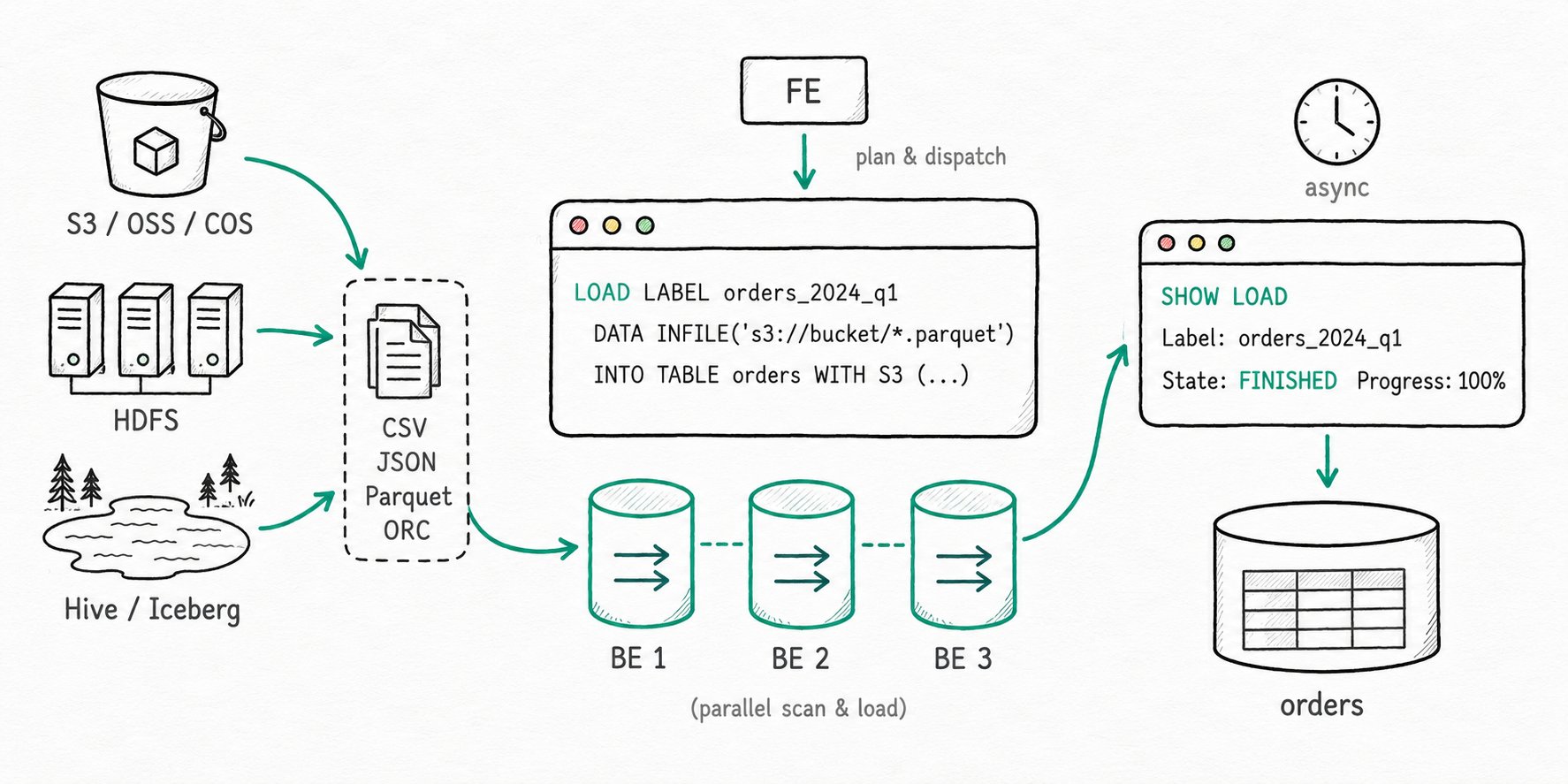
TL;DR Apache Doris Batch Load moves large files from S3, HDFS, or another warehouse into Doris in one shot. You submit a
LOAD LABELstatement, the FE plans the work and fans it out to BEs, and you check progress withSHOW LOAD. The job is asynchronous, so the client can disconnect; the label is what lets you find the result and what dedupes a retry. For external catalogs and TVF reads, the synchronousINSERT INTO ... SELECTform covers the same ground with simpler ETL.
Why use batch load in Apache Doris?
Apache Doris Batch Load is the right tool when a single ingestion job runs for hours and the warehouse, not the client, has to own its lifecycle. Real-time loaders are the right tool for events trickling in, but they fall apart when you need to move a TB of historical data, or rebuild a fact table from a Hive snapshot, or backfill last quarter from Parquet on S3. A Stream Load over HTTP times out. A per-row INSERT would take days. The job has to run server-side, retry on its own, and survive the client losing its connection.
- A nightly ETL has to land a few hundred GB of Parquet from S3 before the morning dashboards refresh.
- A migration from Snowflake or Hive needs to copy whole partitions, with column-level filters and type casts.
- A backfill of one missing day cannot block the connection that submitted it.
Batch Load handles all three by treating large bulk ingestion as a long-running, label-tracked job that the warehouse owns end to end.
What is Apache Doris batch load?
Apache Doris Batch Load is the family of asynchronous bulk-load methods in Doris. The main entry point is the LOAD LABEL ... WITH S3|HDFS|BROKER statement, historically called Broker Load, which today covers S3, HDFS, and any storage system reachable through a Broker process. The synchronous INSERT INTO ... SELECT variant covers the same ingestion needs when the source is an external catalog (Hive, Iceberg, JDBC) or a file behind a TVF such as S3() or HDFS(). Both share the same transaction model as the rest of Doris loading: one label per job, atomic commit, replica-level publish.
Key terms
LOAD LABEL: the SQL entry point for an asynchronous Broker Load. The label is per-database and dedupes retries.WITH S3/WITH HDFS/WITH BROKER: the access clause that picks the storage backend.S3andHDFSare built into the BE;BROKER broker_nameroutes through an external Broker process for everything else.SHOW LOAD: the FE-side view that reports state, progress, error URL, and the parsedEtlInfo.- TVF (Table-Valued Function):
S3(...),HDFS(...),LOCAL(...),iceberg_meta(...), and the like. They expose files or external metadata as a table you canSELECTfrom, then pipe intoINSERT INTO ... SELECTfor synchronous ingestion. max_filter_ratio: the per-job tolerance for malformed rows. Default is zero, so a single bad row cancels the load.
How does Apache Doris batch load work?
Apache Doris Batch Load registers a labeled job on the FE, parallelizes file scans across BEs, and atomically commits the result once every replica publishes the new version.
- Submit and label. A
LOAD LABEL my_db.daily_orders ...request lands on the FE. The FE registers the label, opens a transaction, and the load entersPENDING. Resubmitting the same label inside the retention window short-circuits to the original job. - Plan and fan out. The FE estimates file sizes (one BE handles between
min_bytes_per_broker_scannerandmax_bytes_per_broker_scanner, default 64 MB to 500 GB), splits the work, and dispatches scanner tasks to BEs. Job state moves throughLOADING. - Read and write in parallel. Each BE pulls its slice of the source data (S3, HDFS, or through a Broker), parses CSV/JSON/Parquet/ORC, applies any
SETexpressions,WHEREfilter, orCOLUMNS FROM PATHextraction, and writes segments into the target tablets. Malformed rows count againstmax_filter_ratio; the bad-row sample is exposed via the URL field. - Commit and publish. When every BE acknowledges, the FE commits the transaction. A
PublishVersiontask ships to every replica. When all replicas confirm, the job becomesFINISHEDand the rows are queryable. A failure anywhere along the way moves the job toCANCELLEDand discards the data. - Inspect with SHOW LOAD.
SHOW LOAD WHERE LABEL = ...reportsState,Progress,EtlInfo(rows scanned, rows filtered, rows in error), and the error URL when something went wrong.
The INSERT INTO target SELECT * FROM s3(...) form takes the same plan shape but runs synchronously. The connection has to stay open until the load finishes; in exchange you get an immediate result and SQL-level composition (joins, type casts, predicate pushdown into the source).
Quick start
LOAD LABEL testdb.orders_2024_q1
(
  DATA INFILE("s3://my-bucket/orders/2024-q1/*.parquet")
  INTO TABLE orders
  FORMAT AS "parquet"
  (order_id, customer_id, amount, order_date)
)
WITH S3 (
  "provider"      = "S3",
  "AWS_ENDPOINT"  = "https://s3.us-west-2.amazonaws.com",
  "AWS_REGION"    = "us-west-2",
  "AWS_ACCESS_KEY" = "<ak>",
  "AWS_SECRET_KEY" = "<sk>"
)
PROPERTIES ("timeout" = "3600", "max_filter_ratio" = "0.01");
Expected result
+----------+--------------------+----------+------------------+--------+
| JobId    | Label              | State    | Progress         | Type   |
+----------+--------------------+----------+------------------+--------+
| 41326624 | orders_2024_q1     | FINISHED | ETL:100%;LOAD:100% | BROKER |
+----------+--------------------+----------+------------------+--------+
SHOW LOAD ORDER BY CreateTime DESC LIMIT 1 returns when the job is FINISHED. Up to 1% of malformed rows are tolerated; anything more cancels the job and the URL field points at a sample of the offending rows.
When should you use Apache Doris batch load?
Use Apache Doris Batch Load when a single ingestion run handles tens of GB or more from object storage, an external warehouse, or a Hive-partitioned directory.
Good fit
- Periodic ingestion of large CSV, JSON, Parquet, or ORC files from S3, HDFS, OSS, COS, OBS, or any S3-compatible storage.
- One-off migrations from Hive, Iceberg, Snowflake, or BigQuery: combine Catalog with
INSERT INTO ... SELECTfor source-side projection and pushdown. - Backfills measured in tens of GB to hundreds of GB per job, where the client cannot stay connected for hours.
- Loads that need server-side
WHEREfiltering, column transformations viaSET, or partition fields extracted from the file path withCOLUMNS FROM PATH AS. - Hive-partitioned directories matched with wildcards (
*,?,{1..10}) inside one statement.
Not a good fit
- Continuous Kafka ingestion. Use Routine Load so the FE owns the consumer and offsets.
- Per-event JDBC writes from a microservice. The commit overhead per job is wasted on tiny payloads. Reach for Group Commit instead.
- Loads from local files on the client machine. Broker Load reads from remote storage only;
Stream Loador Doris Streamloader is the right tool. - Single jobs over a few TB. The default 4-hour timeout becomes a footgun, retries are expensive, and a partial failure replays the whole batch. Split the input by date or directory and submit several jobs.
- Continuous incremental file pickup from S3. A nightly Broker Load works; per-minute polling does not. Use Streaming Job continuous load so the FE tracks which files have been ingested.
Further reading
- Stream Load: the synchronous HTTP load path for smaller, real-time batches.
- Group Commit: server-side merging for the high-frequency small-batch end of the spectrum.
- Broker Load reference: full SQL surface, Kerberos and HDFS HA configuration, scenario-by-scenario examples.
- INSERT INTO Select: the synchronous variant, including TVF and Catalog flows.
- Load overview decision table: which method fits which scenario across real-time, streaming, and batch.
- Catalog and TVF entry point: how
S3(),HDFS(), and friends expose files as queryable tables. - Load Transactions: the label, lifecycle states, and atomic commit model that batch loads share with the rest of Doris.
- BROKER LOAD SQL reference: the canonical statement grammar and every option.