LLM SQL Functions
TL;DR Apache Doris ships a family of
AI_*SQL functions that send a row's column value to an external LLM and return the result inline. You configure the provider once as an AIRESOURCE, then writeAI_CLASSIFY(...),AI_EXTRACT(...), orAI_GENERATE(...)anywhere a value is allowed. Snowflake's Cortex AISQL and Databricks' AI Functions cover the same ground; the Apache DorisAI_*family is the open-source equivalent.
Why use AI_* SQL functions in Apache Doris?
Apache Doris AI_* SQL functions remove the need for an external Python service when text columns require classification, extraction, summarization, or PII redaction. Plenty of analytics work on text columns is not analytics at all. Someone has to classify support tickets by topic, score reviews for sentiment, pull product names out of free-form complaints, summarize long call notes, or redact PII before exporting. The work is repetitive, the columns are already in the warehouse, and the only piece missing is a model. Apache Doris already serves embeddings through EMBED() and an MCP server for AI clients, so this card rounds out the SQL-callable side.
The usual workaround is a Python service. It pulls rows from Doris, calls OpenAI or Anthropic, parses the response, and writes the result back. That service drifts out of sync with the source table, owns its own retries, and lives outside the warehouse's permissions and observability.
AI_* functions move that loop into SQL. The model is a registered resource. The call is a function. The result is a column you can persist with INSERT, filter on with WHERE, or compute on the fly. One language, one transaction boundary, one place to read the audit log.
What are the Apache Doris AI_* SQL functions?
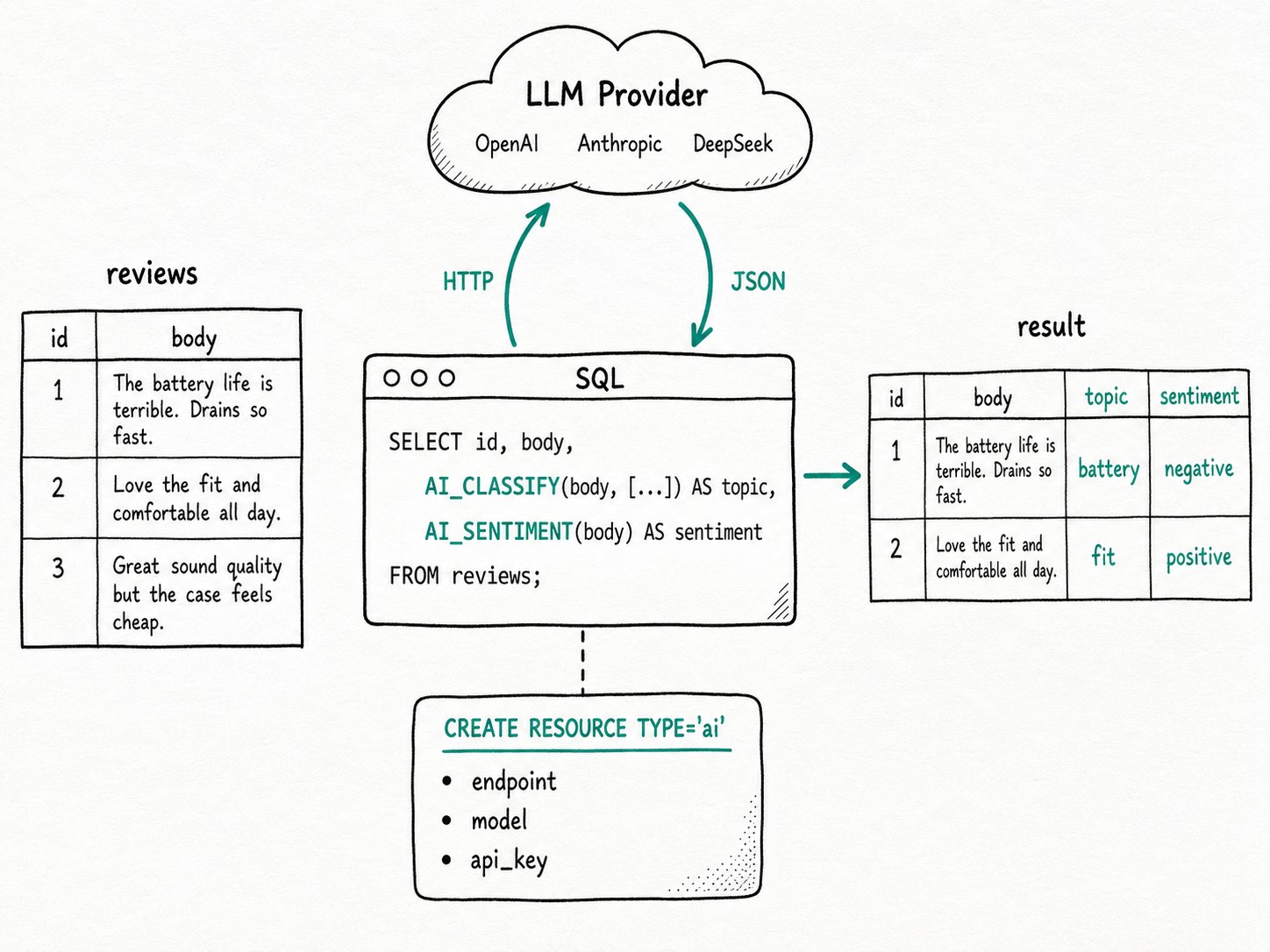
The Apache Doris AI_* family is a set of SQL-callable functions that wrap an HTTP call to an LLM provider. Each function passes the input columns through a fixed prompt template and returns a typed result, so the planner treats them like any other scalar function. Apache Doris reaches the provider through an AI resource you create once with CREATE RESOURCE ... TYPE='ai'. Ten scalar functions cover the most common tasks, and one aggregate, AI_AGG, rolls multiple rows into a single LLM-generated answer.
Key terms
- AI resource: a named connection to an LLM provider. Stores
provider_type, endpoint, model name, API key, and tuning knobs (temperature,max_token,max_retries,retry_delay_second). Twelve providers are supported: OpenAI, Anthropic, Gemini, DeepSeek, MoonShot, QWen, MiniMax, Zhipu, Baichuan, VoyageAI, Jina, andlocalfor self-hosted endpoints. AI_*scalar functions:AI_GENERATE,AI_TRANSLATE,AI_SUMMARIZE,AI_SENTIMENT,AI_CLASSIFY,AI_EXTRACT,AI_FIXGRAMMAR,AI_MASK,AI_FILTER,AI_SIMILARITY. Each takes a resource name as the first argument and the column as the second, plus a small set of task-specific arguments such as the label set or target language.AI_AGG: an aggregate function that joins all rows in a group, sends them to the LLM with a custom prompt, and returns one summary per group. The group equivalent ofAI_SUMMARIZE.default_ai_resource: a session variable that selects a resource for the rest of the session, so you can drop the explicit first argument.
How do the Apache Doris AI_* SQL functions work?
The Apache Doris AI_* SQL functions run as scalar UDFs on the BE: the planner routes each call, the BE batches rows, and one HTTP request per batch reaches the provider before returning a typed value to SQL.
- Register the model.
CREATE RESOURCEvalidates the endpoint with a probe call (skipped forprovider_type = 'local'or whenai.validity_check = 'false'), masks the API key inSHOW RESOURCESoutput, and persists the configuration in the FE's metadata. - Plan the call. When the planner sees an
AI_*function, it routes the work to the BE the same way it would for any scalar UDF. The function's first argument must be a literal resource name; the planner rejects an expression there at analysis time. - Batch on the BE. The BE accumulates input rows into a batch capped by
embed_max_batch_size(default 5) andai_context_window_size(default 128 KB of accumulated text), then issues one HTTP request per batch. An oversized row gets its own batch, so a single long document does not stall the rest of the query. - Retry and time out. The HTTP call honors
ai.max_retriesandai.retry_delay_secondfrom the resource. Each request inherits the time remaining in the session'squery_timeout, so a slow provider does not extend the query past its budget. - Return a typed value. Scalar functions return
STRING(orBOOLEANforAI_FILTER,DOUBLEforAI_SIMILARITY). You can store it, filter on it, or feed it to the next operator without leaving SQL.
Quick start
CREATE RESOURCE "deepseek_chat" PROPERTIES (
  "type" = "ai",                     "ai.provider_type" = "deepseek",
  "ai.endpoint"   = "https://api.deepseek.com/chat/completions",
  "ai.model_name" = "deepseek-chat", "ai.api_key" = "sk-xxx"
);
SET default_ai_resource = "deepseek_chat";

CREATE TABLE reviews (id INT, body STRING)
  DUPLICATE KEY(id) DISTRIBUTED BY HASH(id) BUCKETS 1;
INSERT INTO reviews VALUES
  (1, 'Battery dies in 4 hours. Returning it.'),
  (2, 'Fits perfectly, color is exactly as pictured. Love it.');

SELECT id, body, AI_SENTIMENT(body) AS sentiment,
       AI_CLASSIFY(body, ['battery', 'fit', 'price', 'shipping']) AS topic
FROM reviews;
Expected result
+----+--------------------------------+-----------+---------+
| id | body                           | sentiment | topic   |
+----+--------------------------------+-----------+---------+
|  1 | Battery dies in 4 hours...     | negative  | battery |
|  2 | Fits perfectly, color is...    | positive  | fit     |
+----+--------------------------------+-----------+---------+
The query runs two LLM round trips, one per function, with both rows batched into each. The output columns are typed strings, so a downstream GROUP BY topic or a join works without parsing.
When should you use the Apache Doris AI_* SQL functions?
The Apache Doris AI_* functions fit batch enrichment, ETL backfills, and cross-row roll-ups, but not interactive sub-second queries or workloads that demand strict reproducibility.
Good fit
- Batch enrichment of text columns: classify support tickets nightly, score new reviews for sentiment, or extract structured fields from invoices once at ingest.
- Backfills inside the database:
UPDATE t SET topic = AI_CLASSIFY(body, [...]) WHERE topic IS NULLkeeps the work in one place and benefits from Doris transactions. - Cross-row roll-ups via
AI_AGG: weekly summaries of complaints per product, executive recaps of meeting notes, themed digests of news articles. - Semantic filtering in
WHERE:AI_FILTER('Is this a security incident?', body)for one-off triage where building a fine-tuned classifier is overkill.
Not a good fit
- Calling
AI_*per row on every dashboard refresh. Each row is one provider call, and the bill scales with row count and refresh rate. Materialize the result into a column, index it, and query the column. See Incremental Materialized View for the precompute path. - Interactive sub-second queries. LLM inference latency is hundreds of milliseconds at best, and rate limits make tail latency worse. Use
AI_*for batch and ETL, not for queries that block a user clicking a button. - Retrieval problems where you need to find similar items. An embedding column plus a vector index and
cosine_distanceis faster, cheaper, and reproducible. See Embedding for the SQL-native path. - Anything that needs strict reproducibility. Provider responses are non-deterministic unless you pin
temperature = 0, and even then minor model-side updates change outputs. Snapshot the result instead of recomputing it on each query. - Workloads that need a provider outside the supported list. Anything beyond the twelve
provider_typevalues has to expose an OpenAI-, Anthropic-, or Gemini-compatible API, or run as alocalendpoint.
Further reading
- AI on Doris: the full AI feature surface, including how
AI_*functions, embeddings, vector search, and the MCP server fit together. - AI Functions overview: every supported provider, the full property list for
CREATE RESOURCE, and one-off examples per function. - Embedding:
EMBED()shares the same AI resource mechanism and is the right tool when the next step is vector search. - Hybrid Search: how to pair LLM-generated columns with full-text and ANN predicates in the same query.
- Snowflake Cortex AISQL reference: the closest analog for cross-warehouse comparison.
- MCP Server: the other end of the AI surface, letting AI clients query Doris through Model Context Protocol tools.
- VARIANT Data Type: the natural home for JSON output produced by
AI_EXTRACTand friends. - Databricks AI Functions: another vendor's take on the same idea.