Resource Group
TL;DR Apache Doris Resource Group tags BE nodes into named pools, places table replicas across those pools, and binds each user to one or more pools. A query runs only on BEs in the user's pools and only reads replicas placed there. Because the pools are different BE processes, a crash or OOM in one group cannot take down another. The cost is storage: every pool that needs to read a table needs its own replica.
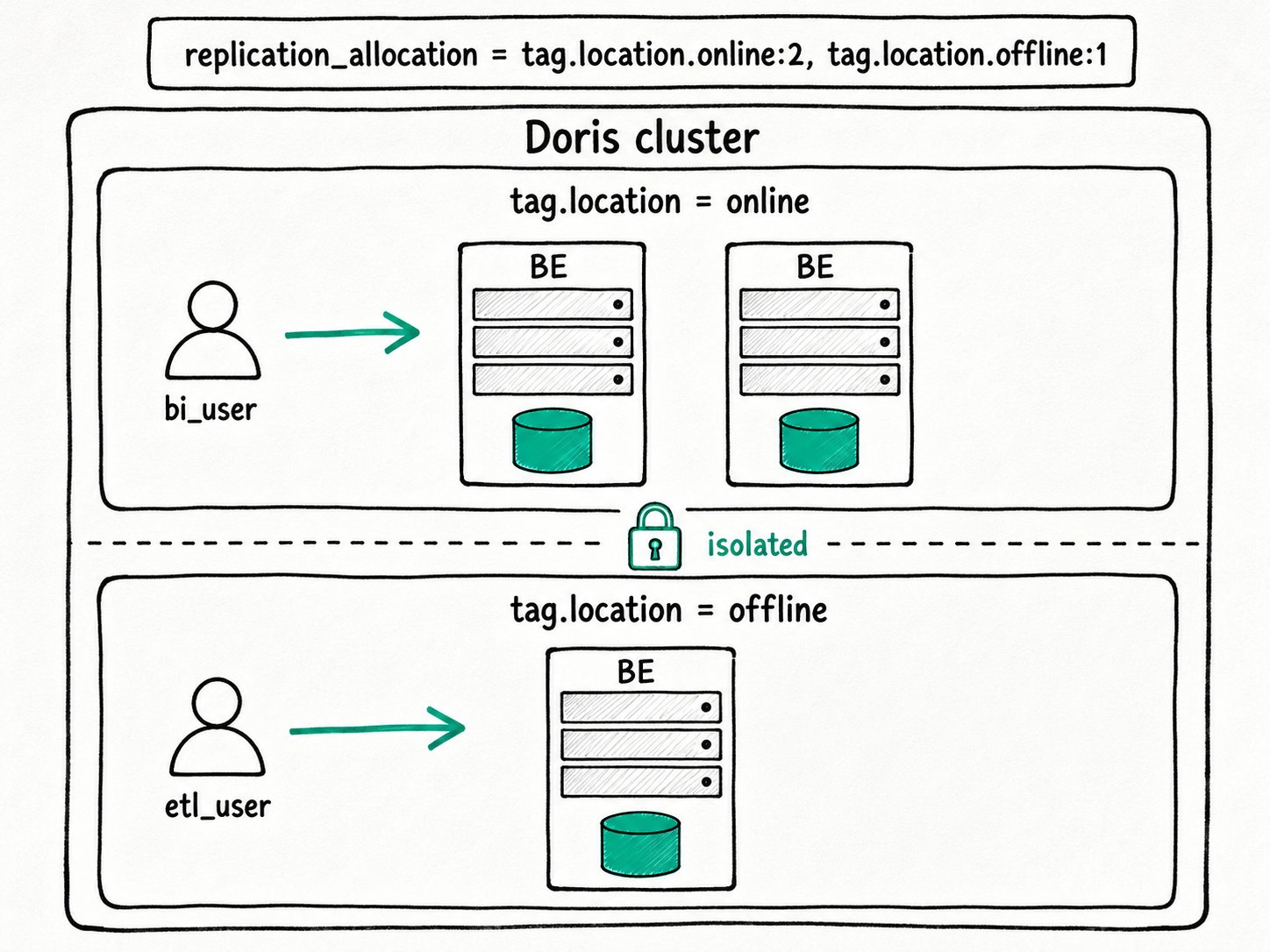
Why use Resource Group in Apache Doris?
Apache Doris Resource Group exists because a single cluster typically serves more than one workload, and the workloads do not trust each other. The 2 a.m. ETL job rewrites yesterday's partitions on the same BEs that an executive dashboard polls every fifteen seconds during the day. A finance batch reruns a heavy report at 9 a.m. while an analyst kicks off an unbounded SELECT *.
Workload Group handles a lot of this in-process: cgroups for CPU, a per-group memory tracker, a per-group queue. It is cheap and flexible. What it cannot do is survive a BE crash. If the kernel OOM-kills a BE, every group on that BE goes with it. If the BE segfaults inside a query, the dashboard and the ETL job both reconnect. For workloads that need to be insulated from each other at the process layer, in-process tools are not enough.
Apache Doris Resource Group fixes that without standing up a second cluster. Each BE gets a label, each table declares how many replicas belong to each tag, and each user is bound to the tags they are allowed to use. The cluster keeps one FE quorum, one schema catalog, one set of credentials, but the BEs are now divided into pools that share nothing at runtime.
What is the Apache Doris Resource Group?
The Apache Doris Resource Group is a placement-and-routing feature built on resource tags. Every BE belongs to exactly one location tag. Every replica of every table belongs to exactly one tag, decided at create time by replication_allocation. Every user has a set of tags they are allowed to use, decided by the resource_tags.location property. The query planner intersects them: it picks BEs in the user's tag set and reads only the replicas placed on those BEs.
Key terms
tag.location: the BE-side label. Set withALTER SYSTEM MODIFY BACKEND ... SET ("tag.location" = "<name>"). A BE can carry only one location tag, and the default isdefault.replication_allocation: a table or database property mapping tags to replica counts, written astag.location.<name>:<n>. Comma-separate entries to spread replicas across pools (e.g.,tag.location.online:2, tag.location.offline:1).resource_tags.location: a user property listing the tags the user is allowed to access. Comma-separate to grant several. Empty means the default behavior described below.- Default tag: the built-in
defaulttag. Every BE starts there, and it cannot be dropped. From 2.0.3 onward, ordinary users with noresource_tags.locationset can only seedefault;rootandadmincan see everything.
How does the Apache Doris Resource Group work?
The Apache Doris Resource Group works in five steps: tag the BEs, allocate replicas across tags, bind users to tags, route the query, and split the load path.
- Tag the BEs.
ALTER SYSTEM MODIFY BACKEND "host:9050" SET ("tag.location" = "online"). The FE writes the change to its edit log so the assignment survives restarts.SHOW BACKENDSreports the tag in itsTagcolumn. - Allocate replicas across tags. When a table is created with
replication_allocation = "tag.location.online:2, tag.location.offline:1", the FE checks that enough BEs carry each tag, then asks the tablet scheduler to place one replica per slot. A failed check reports "Failed to find enough host with tag(...)" and the DDL aborts. You can also set the property at the database level so new tables inherit it. - Bind users to tags.
SET PROPERTY FOR 'bi_user' 'resource_tags.location' = 'online'. The change is global, but a user has to reconnect for it to take effect on their session. - Route the query. When the user submits a query, the FE resolves their allowed tags into a working set of BEs and plans the query against only the replicas placed on those BEs. If the table has no replica on any of the user's allowed tags, the plan fails with "no queryable replicas".
- Split loads in half. A load job has a compute part (read the source, transform, distribute) and a write part (encode, compress, persist). The compute part respects the user's tag. The write part has to land on whichever BEs own the table's replicas, regardless of tag. So if a Stream Load is submitted by a user bound to
offline, the compute side runs on offline BEs but the writes still touch every replica owner.
Quick start
-- Tag two BEs into 'online', one into 'offline'
ALTER SYSTEM MODIFY BACKEND "be1:9050" SET ("tag.location" = "online");
ALTER SYSTEM MODIFY BACKEND "be2:9050" SET ("tag.location" = "online");
ALTER SYSTEM MODIFY BACKEND "be3:9050" SET ("tag.location" = "offline");

-- Place 2 replicas in 'online', 1 in 'offline'
CREATE TABLE orders (id BIGINT, region STRING, amount DECIMAL(18,2))
DISTRIBUTED BY HASH(id) BUCKETS 8
PROPERTIES ("replication_allocation" = "tag.location.online:2, tag.location.offline:1");

-- Bind users to their pools
SET PROPERTY FOR 'bi_user'  'resource_tags.location' = 'online';
SET PROPERTY FOR 'etl_user' 'resource_tags.location' = 'offline';
Expected result
+----------+-------+---------+
| Host     | Alive | Tag     |
+----------+-------+---------+
| be1:9050 | true  | online  |
| be2:9050 | true  | online  |
| be3:9050 | true  | offline |
+----------+-------+---------+
SHOW BACKENDS confirms the assignment. After bi_user reconnects, their queries plan against the two online replicas and never touch be3. etl_user runs on be3 and reads the single offline replica. A BE crash on be3 is invisible to bi_user.
When should you use the Apache Doris Resource Group?
The Apache Doris Resource Group fits any deployment that needs BE-process-level isolation between workloads on a single cluster, and accepts the extra storage cost of one replica per pool.
Good fit
- Read/write separation on one cluster: an offline pool for ETL, an online pool for dashboards, a single shared dataset with one replica per pool.
- Multi-tenant clusters where one tenant's BE crash or OOM must not page the others.
- Cases where you want to consolidate several physical clusters into one without giving up workload-level fault isolation.
- Pair Workload Group inside each pool to subdivide CPU and memory at the per-query level. See Workload Group.
Not a good fit
- You only need soft CPU and memory limits and you can accept that a BE crash takes everything down. Use Workload Group on its own. It also supports cross-group queries, which Resource Group cannot.
- Storage cost is your tightest budget. Every pool that reads a table needs its own replica. Five pools means five replicas of every shared table; the storage bill scales linearly with the number of groups.
- You run the storage-compute decoupled (cloud) deployment. There the equivalent is Compute Group, which gives you the same node-level isolation without multiplying replicas, because storage is shared.
- Heavy cross-pool ad-hoc analytics. The planner cannot stitch BEs from different tags into one query; missing replicas surface as "no queryable replicas" rather than a fallback.
- Loads where you expect the writes to be isolated too. The write side always lands on the replica owners; only the compute side respects the tag.
Further reading
- Resource Group reference: the full SQL surface, the validation rules, and the loading split in detail.
- Workload management overview: the side-by-side comparison of Resource Group, Workload Group, and Compute Group.
- Workload Group: the in-process isolation feature you usually pair with this one.
- Compute Group: the storage-compute decoupled equivalent that does not multiply storage.
- Multi-tenant workload isolation in Apache Doris: the design post covering the whole isolation landscape, including how Resource Group complements Workload Group.