Spill to Disk
TL;DR Apache Doris Spill to Disk lets HashJoin, Aggregation, Sort, and CTE operators write intermediate state to local disk when a query is about to exceed its memory budget. The query slows down but finishes instead of OOM-ing. Enable it with
set enable_spill = trueper session or at the Workload Group level, point BE at a spill directory, and read spill counters back from the query profile.
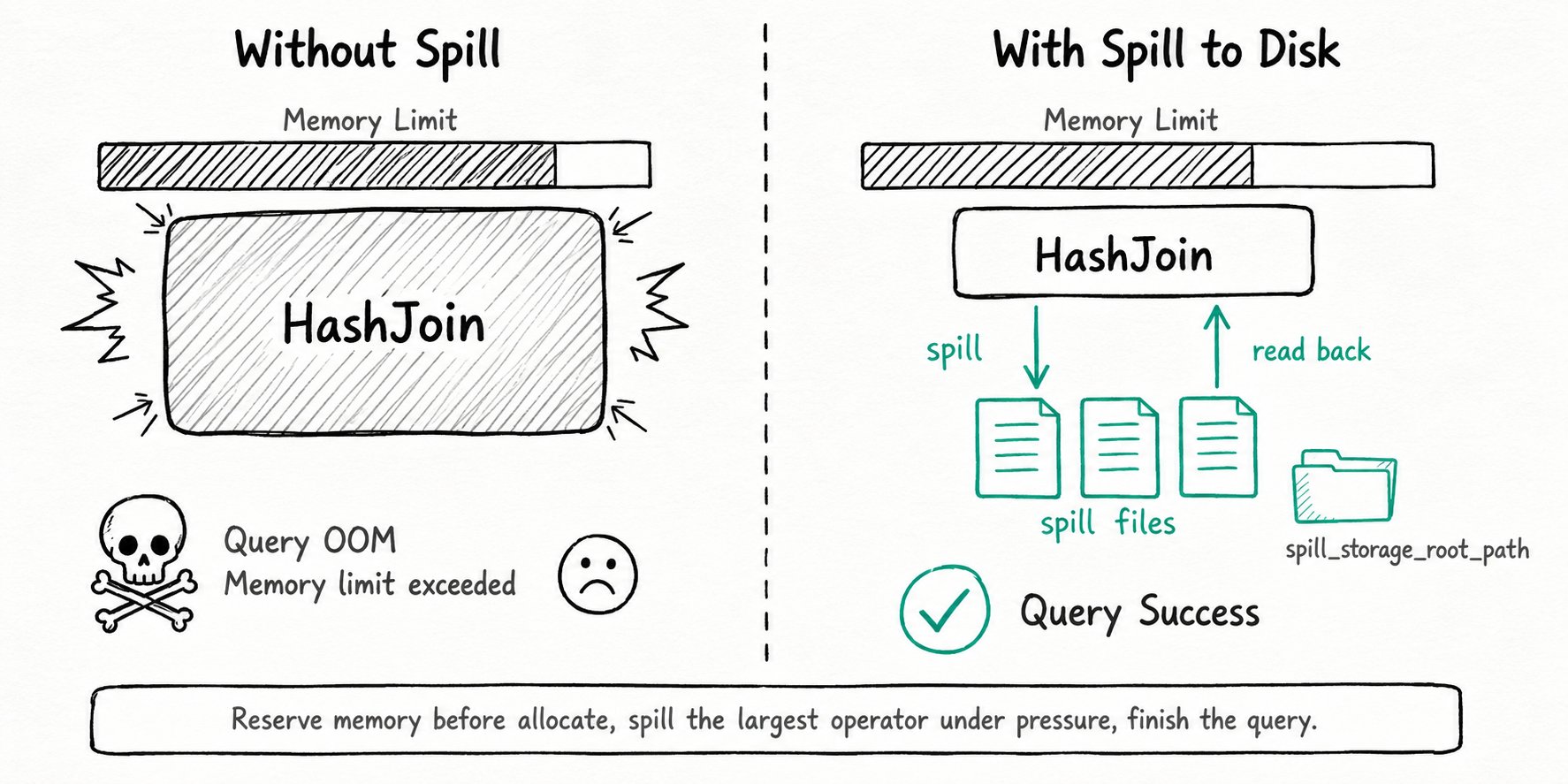
Why use spill to disk in Apache Doris?
Spill to Disk turns out-of-memory failures in Apache Doris into slower but successful queries. Apache Doris is an MPP engine: by default the join hash tables, the aggregation state, and the sort buffer all live in BE memory. That is great for latency and bad the moment a query asks for more memory than the node, the query, or the workload group is allowed to use. The classic failure mode is a nightly ETL or an ad-hoc TPC-DS style query that touches a wide fact table, builds a multi-gigabyte hash table, then dies with Memory limit exceeded. The user retries, hits the same wall, and either tunes exec_mem_limit upward or gives up.
- A single oversized HashJoin or Aggregation kills the whole query.
- ETL on tables much larger than RAM is fragile or simply impossible.
- Bumping
exec_mem_limitper query starves everyone else. - Concurrent heavy queries push the BE close to the global memory ceiling and trigger emergency cancellations.
Apache Doris Spill to Disk turns those hard failures into slower, but successful, queries. The same node that used to OOM at 10x dataset size now finishes at 50x, paying disk IO instead of crashing.
What is Apache Doris Spill to Disk?
Apache Doris Spill to Disk is a runtime mechanism in the Pipeline Execution Engine that lets memory-intensive operators evict their intermediate state to local disk under memory pressure, then read it back to finish the query. The mechanism is operator-level, not query-level: only the operators that are actually large get spilled, and a query can keep running on a mix of in-memory and on-disk state.
Key terms
Spillable operator: an operator that can hand back memory on demand. Today this covers HashJoin (partitioned hash join), Aggregation (partitioned agg), Sort (external merge sort), and CTE.Reserve memory: before processing a block, the operator estimates how much it needs and reserves it from the memory tracker. A failed reservation is what triggers spilling, before the allocation actually happens.Revocable memory: the portion of an operator's memory that can be written to disk and reclaimed. The scheduler picks the operator with the largest revocable footprint to spill first.Force spill: a debug mode (enable_force_spill) that spills even when there is plenty of memory. Use it to validate query correctness on the spill path before you trust it in production.- Spill storage path: the local directories the BE uses for spill files, configured separately from the table storage path.
How does Apache Doris Spill to Disk work?
Apache Doris Spill to Disk works by reserving memory before allocation, detecting pressure, picking the operator with the most revocable memory, partitioning its state to disk, then resuming the query once memory frees up. The six-step flow below covers the full lifecycle.
- Reserve before allocate. Each pipeline task estimates the memory it needs for the next block and asks the per-query and per-process memory tracker for a reservation. Cheap and accurate beats panic-cancelling later.
- Detect pressure. A reservation fails when the query, the workload group, or the BE process would cross its limit. The task gets paused instead of cancelled.
- Pick a victim. The query scheduler scans the paused query's operators and picks the one with the most revocable memory: typically the build-side hash table or the open aggregation map.
- Spill in partitions. Partitioned HashJoin and Partitioned Aggregation hash their state into N partitions (
spill_hash_join_partition_count,spill_aggregation_partition_count) and write whole partitions to disk through the spill IO thread pool. Sort writes sorted runs that are merged later. - Resume and finish. Once enough memory is free, the task is unpaused. Probe-side rows are routed by the same partition function, so each partition joins or aggregates against its on-disk peers. The result is correct; the query just spent extra time on disk IO.
- Account and clean up. The profile records every spill counter (bytes written, files, IO wait, partition skew). Spill files live under
spill_storage_root_pathand are GC'd by a background task.
Quick start
-- Enable spill for this session (or set it on a workload group).
SET enable_spill = true;
-- Spill paths do real disk IO, so give the query a longer budget.
SET query_timeout = 3600;
-- Run a query that would normally OOM.
SELECT l_orderkey, SUM(l_quantity)
FROM lineitem JOIN orders ON l_orderkey = o_orderkey
WHERE o_orderdate >= '1995-01-01'
GROUP BY l_orderkey
ORDER BY 2 DESC LIMIT 100;
-- Check that spill actually happened.
SELECT query_id, spill_write_bytes_to_local_storage
FROM information_schema.backend_active_tasks;
Expected result
The query returns its top-100 rows. In the query profile, look for Spilled: true on the PARTITIONED_HASH_JOIN_SINK_OPERATOR or AGGREGATION_SINK_OPERATOR, plus SpillWriteBlockBytes, SpillWriteFileBytes, and SpillWriteTime. Audit logs add SpillWriteBytesToLocalStorage and SpillReadBytesFromLocalStorage for the same query. If those counters are zero, the query fit in memory and never spilled, which is the desired outcome.
When should you use Apache Doris Spill to Disk?
Use Apache Doris Spill to Disk for heavy ETL, batch analytics, and multi-tenant workloads where finishing the query matters more than latency. Skip it for sub-second serving paths and runaway queries.
Good fit
- Heavy ETL on tables much larger than per-node memory: aggregations and joins that have to finish overnight no matter how skewed the data is.
- TPC-DS, multi-table materialized view refresh, and other batch jobs that stack several large hash joins in one plan.
- Queries that occasionally see a memory spike on a wide partition. You trade latency for surviving the spike.
- Multi-tenant clusters where you cap each Workload Group tightly and want overshoots to spill instead of being killed.
Not a good fit
- Latency-sensitive serving paths (point lookups, dashboards under one second). Disk IO will tank the SLA, and these queries should never exceed memory in the first place. Size
exec_mem_limitproperly and leave spill off. - Workloads where a memory bump is cheaper than the disk IO. If your query is 10% over budget, raising
exec_mem_limitormax_memory_percentfinishes it faster than spilling does. - Streaming aggregation. The streaming agg path does not spill, by design. Switch to non-streaming agg or accept the memory cost.
- Clusters with no spare local disk and no SSD. Spinning disks combined with heavy spill will dominate query time and starve normal scans of IO bandwidth.
- A workaround for runaway queries. Spill makes a 100GB hash table possible. It does not make a
SELECT *from a billion rows free. Pair it with Workload Group caps and queueing.
Further reading
- Spill to Disk admin guide: full BE config, FE session variables, slot-based memory allocation, and the TPC-DS 10TB validation run.
- Workload Group: per-group memory ceilings and how the high watermark triggers spill before kill.
- Pipeline Execution Engine: the runtime that owns the reserve-before-allocate accounting and the revocable-memory bookkeeping.
- Query profile: how to read the per-operator
Spill*counters that confirm spill happened. backend_active_taskssystem table: live per-query spill bytes for monitoring and alerting.- MPP Architecture: the distributed execution layer that allocates
exec_mem_limitper BE, the budget spill-to-disk respects.