Integration with Snowflake Catalog
Apache Doris can connect to Snowflake Catalog services through the Iceberg REST Catalog API. This integration allows Doris to query Iceberg tables managed by Snowflake, and to create and write Iceberg tables when using Snowflake Open Catalog internal catalogs.
This document covers two Snowflake catalog services:
- Snowflake Horizon Catalog: used to access Snowflake-managed Iceberg tables in an existing Snowflake account.
- Snowflake Open Catalog: Snowflake's managed Apache Polaris / Iceberg REST Catalog service, used to manage Iceberg catalogs, namespaces, and tables.
Choosing a Snowflake Catalog
| Item | Snowflake Horizon Catalog | Snowflake Open Catalog |
|---|---|---|
| Main use case | Query Snowflake-managed Iceberg tables | Manage Iceberg tables in Snowflake Open Catalog |
Doris warehouse | Snowflake database name | Open Catalog catalog name |
| Credential | Snowflake Programmatic Access Token (PAT) | Service connection <client_id>:<client_secret> |
| OAuth scope | session:role:<ROLE_NAME> | PRINCIPAL_ROLE:<ROLE_NAME> |
| Create tables from Doris | Not recommended | Supported on internal catalogs |
| Write from Doris | Insert into existing Snowflake-managed Iceberg tables | Insert into tables in internal catalogs |
Use Horizon Catalog when your tables are managed by Snowflake. Use Open Catalog internal catalogs when you want Doris to create and manage Iceberg tables through Snowflake Open Catalog.
Note: When connecting to Horizon Catalog, set
iceberg.rest.view-enabledtofalse. (Since Doris 4.0.6/4.1.1)
Storage Access Model
Horizon Catalog is used for Snowflake-managed Iceberg tables, whose storage access is managed by Snowflake. Doris obtains table metadata through the REST Catalog API, and Snowflake returns temporary object storage credentials when iceberg.rest.vended-credentials-enabled is set to true. Therefore, you do not need to configure an AWS IAM role or S3 credentials in the Doris catalog for Horizon Catalog.
Open Catalog internal catalogs use the object storage location configured for the catalog. When the location is on AWS S3, Open Catalog needs an IAM role that it can assume to read and write Iceberg metadata and data files. In the IAM role trust policy, the trust principal is the AWS principal allowed to call sts:AssumeRole. For Snowflake Open Catalog, use the IAM user ARN shown in the catalog storage details as the trust principal, and configure the External ID from the same page. The External ID limits role assumption to this Open Catalog integration and helps prevent confused-deputy access.
Connect to Snowflake Horizon Catalog
Snowflake Environment Setup
Snowflake Horizon Catalog exposes Snowflake-managed Iceberg tables through the Iceberg REST Catalog API.
The REST endpoints are:
REST endpoint:
https://<snowflake_account_identifier>.snowflakecomputing.com/polaris/api/catalog

Token endpoint:
https://<snowflake_account_identifier>.snowflakecomputing.com/polaris/api/catalog/v1/oauth/tokens
Create a Snowflake-managed Iceberg table:
CREATE OR REPLACE ICEBERG TABLE <database_name>.<schema_name>.<table_name> (
  ID BIGINT,
  NAME STRING
)
CATALOG = 'SNOWFLAKE'
EXTERNAL_VOLUME = 'SNOWFLAKE_MANAGED';
SNOWFLAKE_MANAGED is a Snowflake reserved value. It is not a user-created external volume, and you do not need to grant Doris access to an external volume for this value.
Grant privileges to the Snowflake role used by Doris:
GRANT USAGE ON DATABASE <database_name> TO ROLE <role_name>;
GRANT USAGE ON SCHEMA <database_name>.<schema_name> TO ROLE <role_name>;
GRANT SELECT ON TABLE <database_name>.<schema_name>.<table_name> TO ROLE <role_name>;
If Doris needs to write to the table, grant write privileges:
GRANT SELECT, INSERT, UPDATE, DELETE, TRUNCATE
ON TABLE <database_name>.<schema_name>.<table_name>
TO ROLE <role_name>;
Create a Programmatic Access Token (PAT) for the service user:
ALTER USER IF EXISTS <service_user>
ADD PAT <pat_name>
  DAYS_TO_EXPIRY = 7
  ROLE_RESTRICTION = '<role_name>'
  COMMENT = 'Horizon Iceberg REST access for Doris';
You can verify the PAT with the token endpoint:
curl -i --fail -X POST \
  "https://<snowflake_account_identifier>.snowflakecomputing.com/polaris/api/catalog/v1/oauth/tokens" \
  --header "Content-Type: application/x-www-form-urlencoded" \
  --data-urlencode "grant_type=client_credentials" \
  --data-urlencode "scope=session:role:<role_name>" \
  --data-urlencode "client_secret=<PAT_token>"
Create a Doris Catalog
Create an Iceberg REST Catalog in Doris:
CREATE CATALOG snowflake_horizon PROPERTIES (
    'type' = 'iceberg',
    'iceberg.catalog.type' = 'rest',
    'iceberg.rest.uri' = 'https://<snowflake_account_identifier>.snowflakecomputing.com/polaris/api/catalog',
    'warehouse' = '<snowflake_database_name>',
    'iceberg.rest.security.type' = 'oauth2',
    'iceberg.rest.oauth2.credential' = '<PAT_token>',
    'iceberg.rest.oauth2.server-uri' = 'https://<snowflake_account_identifier>.snowflakecomputing.com/polaris/api/catalog/v1/oauth/tokens',
    'iceberg.rest.oauth2.scope' = 'session:role:<role_name>',
    'iceberg.rest.vended-credentials-enabled' = 'true',
    'client.region' = '<storage_region>',
    'iceberg.rest.nested-namespace-enabled' = 'true',
    'iceberg.rest.view-enabled' = 'false',
    'iceberg.rest.connection-timeout-ms' = '30000',
    'iceberg.rest.socket-timeout-ms' = '120000'
);
Parameter notes:
warehouse: Snowflake database name, not a Snowflake compute warehouse.iceberg.rest.oauth2.credential: the Snowflake PAT.iceberg.rest.oauth2.scope:session:role:<role_name>.iceberg.rest.vended-credentials-enabled: enables Snowflake to return temporary object storage credentials.client.region: the region of the underlying object storage.iceberg.rest.view-enabled: set tofalsewhen connecting to Horizon Catalog.
Access Horizon Tables
After the catalog is created, query Snowflake-managed Iceberg tables from Doris:
SHOW DATABASES FROM snowflake_horizon;
SHOW TABLES FROM snowflake_horizon.<schema_name>;

SELECT COUNT(*)
FROM snowflake_horizon.<schema_name>.<table_name>;
Example output:
mysql> SHOW DATABASES FROM snowflake_horizon;
+--------------------+
| Database           |
+--------------------+
| PUBLIC             |
| information_schema |
| mysql              |
+--------------------+

mysql> SHOW TABLES FROM snowflake_horizon.PUBLIC;
+------------------+
| Tables_in_PUBLIC |
+------------------+
| DORIS_HORIZON_T  |
+------------------+

mysql> SELECT * FROM snowflake_horizon.PUBLIC.DORIS_HORIZON_T;
+------+-------+
| id   | name  |
+------+-------+
|    1 | alice |
|    2 | bob   |
+------+-------+
To write to an existing Snowflake-managed Iceberg table:
INSERT INTO snowflake_horizon.<schema_name>.<table_name>
VALUES (1, 'doris_insert');
Connect to Snowflake Open Catalog
Snowflake Open Catalog is Snowflake's managed Apache Polaris / Iceberg REST Catalog service. To use Open Catalog with Doris, prepare object storage access first, then create an Open Catalog catalog, namespace, catalog role, and service connection.
The REST endpoints are:
REST endpoint:
https://<open_catalog_account_identifier>.snowflakecomputing.com/polaris/api/catalog

Token endpoint:
https://<open_catalog_account_identifier>.snowflakecomputing.com/polaris/api/catalog/v1/oauth/tokens
AWS Environment Preparation
Open Catalog stores Iceberg metadata and data files in the object storage location specified by the catalog. If you use AWS S3, prepare an S3 bucket and an IAM role before creating the Open Catalog catalog.
Create an S3 Bucket
Create a bucket for Iceberg table data:
aws s3 mb s3://<bucket_name> --region <region>
aws s3 ls | grep <bucket_name>
The Open Catalog catalog will use a path in this bucket as its default base location, for example:
s3://<bucket_name>/<catalog_prefix>/
Create an IAM Policy for S3 Access
Create an IAM policy that allows Open Catalog to access the catalog location. Save the following content as snowflake-open-catalog-s3-policy.json:
cat > snowflake-open-catalog-s3-policy.json <<'EOF'
{
  "Version": "2012-10-17",
  "Statement": [
    {
      "Effect": "Allow",
      "Action": [
        "s3:ListBucket",
        "s3:GetBucketLocation",
        "s3:ListBucketMultipartUploads"
      ],
      "Resource": "arn:aws:s3:::<bucket_name>",
      "Condition": {
        "StringLike": {
          "s3:prefix": [
            "<catalog_prefix>",
            "<catalog_prefix>/*"
          ]
        }
      }
    },
    {
      "Effect": "Allow",
      "Action": [
        "s3:GetObject",
        "s3:PutObject",
        "s3:DeleteObject",
        "s3:AbortMultipartUpload",
        "s3:ListMultipartUploadParts"
      ],
      "Resource": "arn:aws:s3:::<bucket_name>/<catalog_prefix>/*"
    }
  ]
}
EOF
Create an IAM Role
Create a temporary trust policy first. After the Open Catalog catalog is created, update the trust policy with the IAM user ARN and External ID provided by Snowflake Open Catalog.
Create snowflake-open-catalog-trust-policy.json:
cat > snowflake-open-catalog-trust-policy.json <<'EOF'
{
  "Version": "2012-10-17",
  "Statement": [
    {
      "Effect": "Allow",
      "Principal": {
        "AWS": "arn:aws:iam::<aws_account_id>:root"
      },
      "Action": "sts:AssumeRole"
    }
  ]
}
EOF
Create the IAM role and attach the S3 policy:
aws iam create-role \
    --role-name <open_catalog_role_name> \
    --assume-role-policy-document file://snowflake-open-catalog-trust-policy.json \
    --description "IAM role for Snowflake Open Catalog to access S3"

aws iam put-role-policy \
    --role-name <open_catalog_role_name> \
    --policy-name snowflake-open-catalog-s3-access \
    --policy-document file://snowflake-open-catalog-s3-policy.json
Verify that the IAM role and inline policy are created:
aws iam get-role --role-name <open_catalog_role_name>
aws iam list-role-policies --role-name <open_catalog_role_name>
Record the role ARN. You will use it when creating the Open Catalog catalog:
arn:aws:iam::<aws_account_id>:role/<open_catalog_role_name>
Open Catalog Environment Setup
Create an Open Catalog catalog. Use an internal catalog if Doris needs to create and write Iceberg tables.
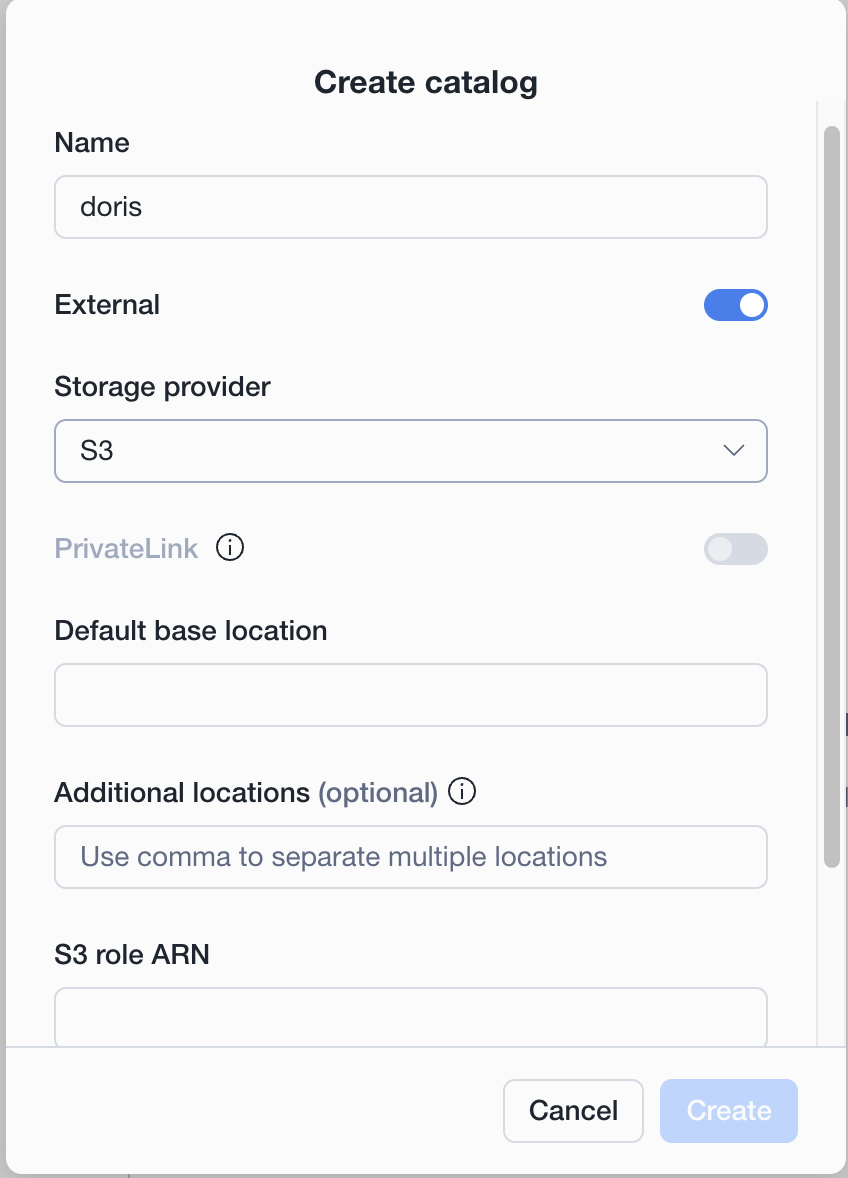
Typical catalog settings:
name: <catalog_name>
type: INTERNAL
storage provider: S3
default base location: s3://<bucket_name>/<catalog_prefix>/
S3 role ARN: arn:aws:iam::<aws_account_id>:role/<open_catalog_role_name>
After creating the Open Catalog catalog, open the catalog details page and copy the following values from storage details:
- IAM user ARN
- External ID
Then update the IAM role trust relationship to use the exact values from Snowflake Open Catalog:
cat > snowflake-open-catalog-trust-policy.json <<'EOF'
{
  "Version": "2012-10-17",
  "Statement": [
    {
      "Effect": "Allow",
      "Principal": {
        "AWS": "<open_catalog_iam_user_arn>"
      },
      "Action": "sts:AssumeRole",
      "Condition": {
        "StringEquals": {
          "sts:ExternalId": "<external_id>"
        }
      }
    }
  ]
}
EOF

aws iam update-assume-role-policy \
    --role-name <open_catalog_role_name> \
    --policy-document file://snowflake-open-catalog-trust-policy.json
Do not publish the IAM user ARN, External ID, or real role ARN in public documents or screenshots.
Create a namespace, for example public.
Image placeholder: Create a namespace in Snowflake Open Catalog.
Create a catalog role and grant the required privileges.
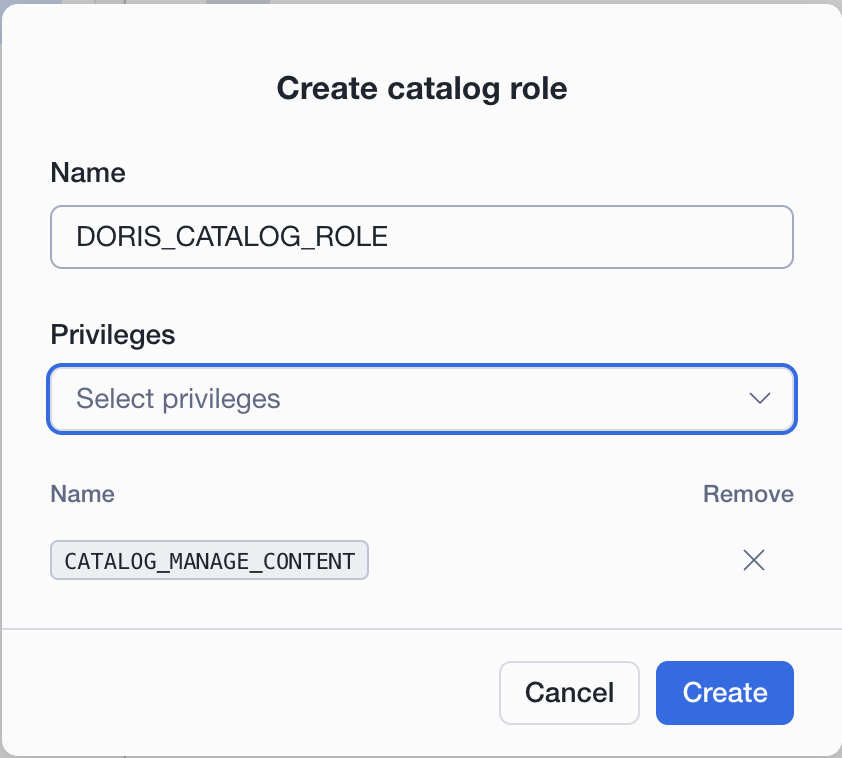
For a quick start, you can grant CATALOG_MANAGE_CONTENT. In production, use the minimum privileges required by your workload.
Create a service connection for Doris.
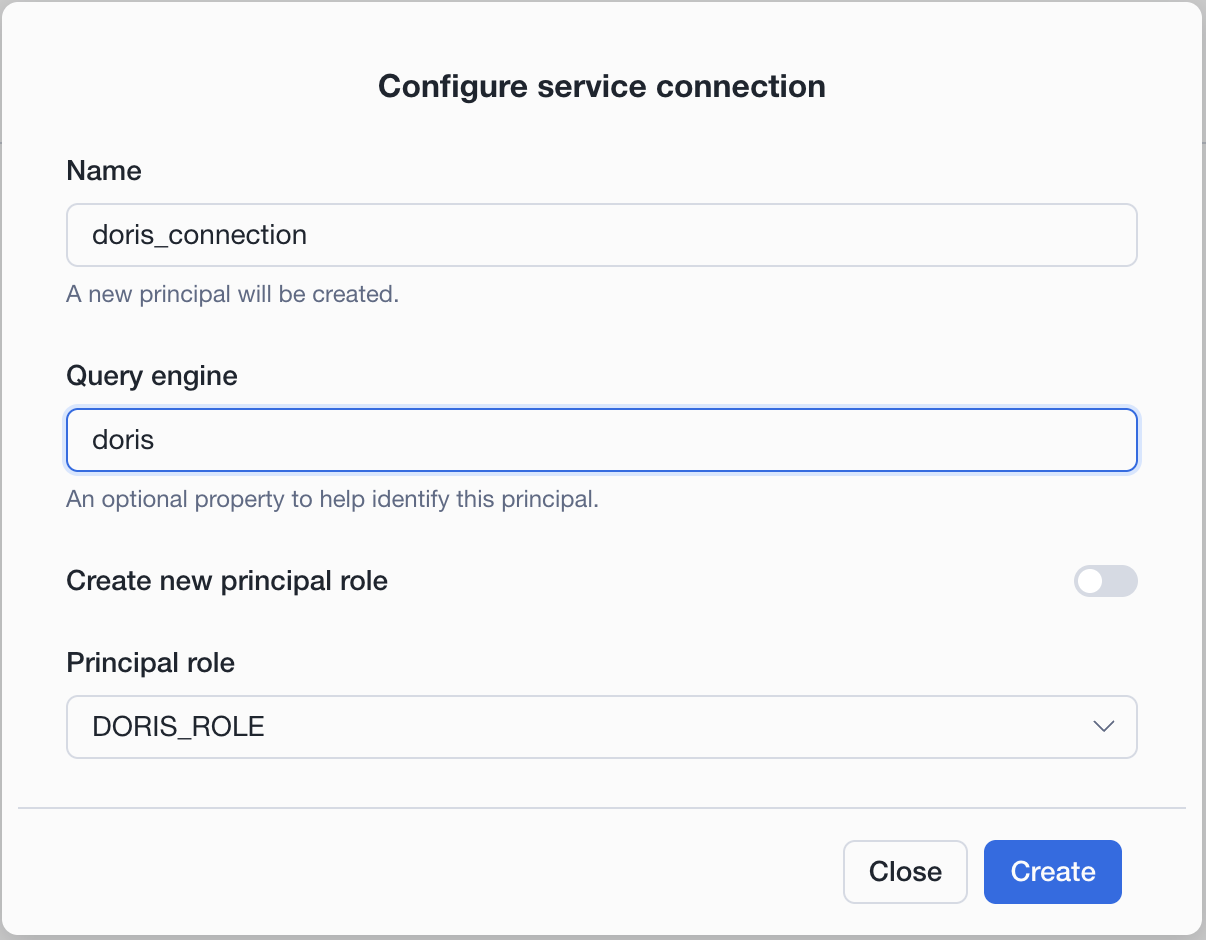
Typical service connection settings:
name: doris_connection
query engine: doris
principal role: <principal_role_name>
After the service connection is created, copy the client credentials. The value used by Doris is in the format <client_id>:<client_secret>.
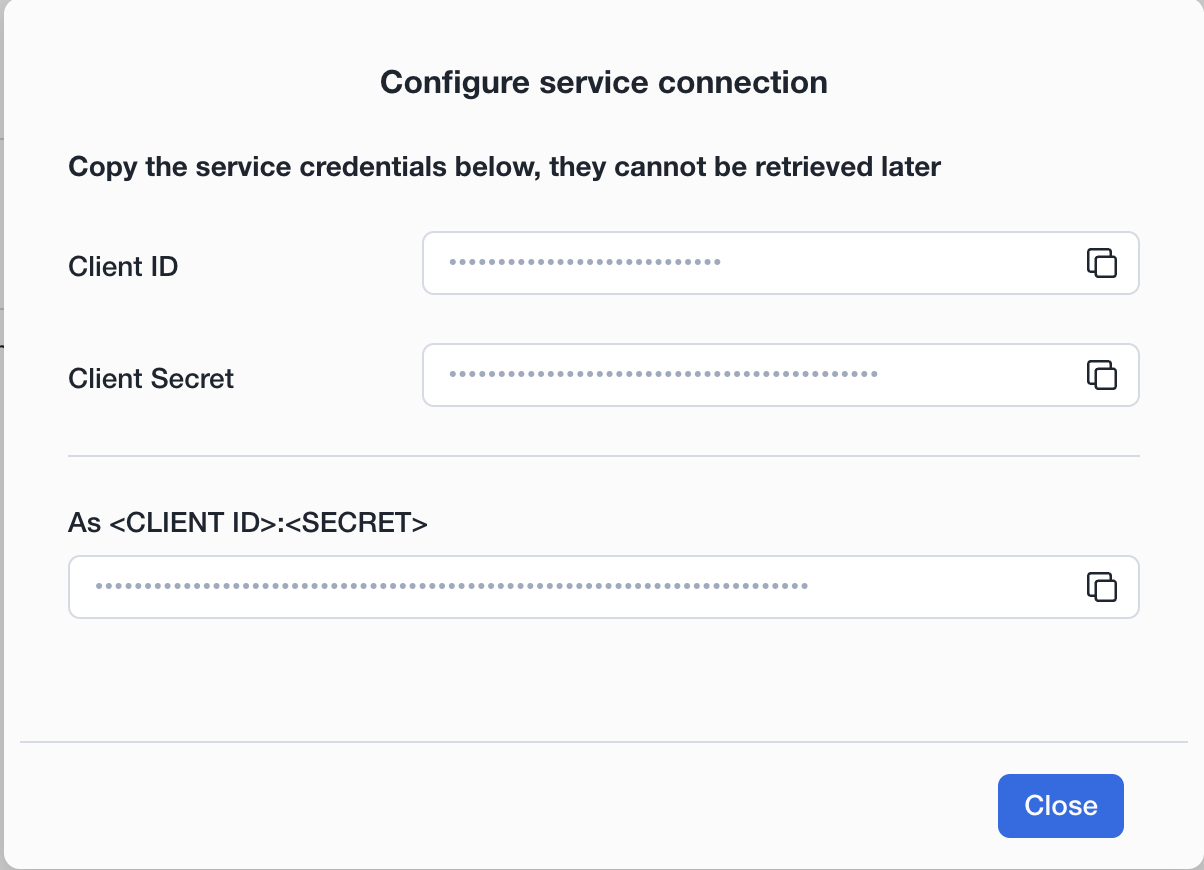
Do not store real client secrets in public files or screenshots.
Create a Doris Catalog
Create an Iceberg REST Catalog in Doris:
CREATE CATALOG snowflake_open_catalog PROPERTIES (
    'type' = 'iceberg',
    'iceberg.catalog.type' = 'rest',
    'iceberg.rest.uri' = 'https://<open_catalog_account_identifier>.snowflakecomputing.com/polaris/api/catalog',
    'warehouse' = '<open_catalog_catalog_name>',
    'iceberg.rest.security.type' = 'oauth2',
    'iceberg.rest.oauth2.credential' = '<client_id>:<client_secret>',
    'iceberg.rest.oauth2.server-uri' = 'https://<open_catalog_account_identifier>.snowflakecomputing.com/polaris/api/catalog/v1/oauth/tokens',
    'iceberg.rest.oauth2.scope' = 'PRINCIPAL_ROLE:<principal_role_name>',
    'iceberg.rest.vended-credentials-enabled' = 'true',
    'client.region' = '<storage_region>',
    'iceberg.rest.nested-namespace-enabled' = 'true'
);
Parameter notes:
warehouse: the Open Catalog catalog name.iceberg.rest.oauth2.credential: service connection credentials in<client_id>:<client_secret>format.iceberg.rest.oauth2.scope:PRINCIPAL_ROLE:<principal_role_name>.iceberg.rest.vended-credentials-enabled: set totrueso Doris can use credentials vended by Open Catalog.client.region: the region of the object storage.
Access and Manage Open Catalog Tables
Access the Open Catalog namespace:
SHOW DATABASES FROM snowflake_open_catalog;
SHOW TABLES FROM snowflake_open_catalog.public;
Create an Iceberg table through Doris:
CREATE TABLE snowflake_open_catalog.public.doris_open_catalog_t (
  id INT,
  name STRING
)
PROPERTIES (
  'write-format' = 'parquet'
);
Insert and query data:
INSERT INTO snowflake_open_catalog.public.doris_open_catalog_t
VALUES (1, 'open_catalog_insert');

SELECT *
FROM snowflake_open_catalog.public.doris_open_catalog_t
ORDER BY id;
Summary
Through the Iceberg REST Catalog API, Apache Doris can connect to Snowflake Catalog services and analyze Iceberg data managed by Snowflake.
- Use Snowflake Horizon Catalog to query Snowflake-managed Iceberg tables. Configure
iceberg.rest.view-enabled = falsewhen creating the Doris catalog. - Use Snowflake Open Catalog internal catalogs when you want Doris to create, write, and query Iceberg tables managed by Snowflake Open Catalog.