Colocation Join
Colocation Join is a Join optimization capability provided by Doris. By colocating multiple tables on the same BE nodes according to identical rules, Join operations on bucket columns can be completed locally, avoiding cross-node data transfer and accelerating queries.
This document describes the principles, implementation, usage, and considerations of Colocation Join.
Applicability Checklist
Before using Colocation Join, confirm the following:
- Two or more tables participating in the Join have been added to the same Colocation Group.
- The Join Key is consistent with the bucket column (Distribution Key).
- The replica count and bucket count of the tables are the same, and data distribution is stable (
IsStable = true). - The query has an obvious Shuffle performance bottleneck caused by Join between large tables.
Terminology
| Term | Abbreviation | Description |
|---|---|---|
| Colocation Group | CG | A CG contains one or more tables. Tables within the same Group share the same Colocation Group Schema and the same data shard distribution. |
| Colocation Group Schema | CGS | Describes the common Schema information related to Colocation for tables in a CG, including bucket column types, bucket count, and replica count. |
Principles
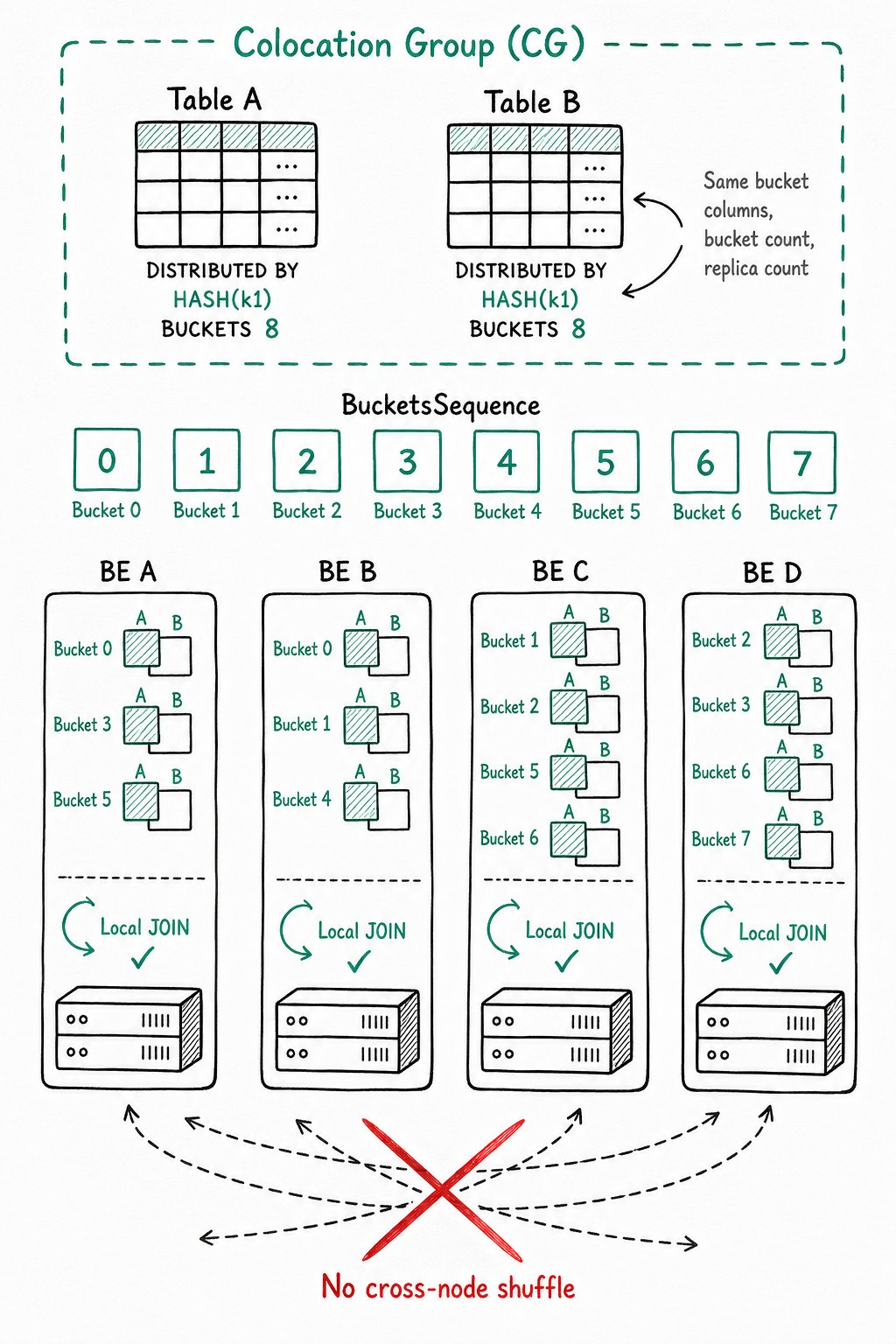
The Colocation Join feature groups a set of tables sharing the same CGS into a CG and ensures that the corresponding data shards of these tables are placed on the same BE nodes. As a result, when tables in the CG perform Join operations on bucket columns, local data Join can be performed directly, reducing data transfer time between nodes.
Buckets and BucketsSequence
The data of a table is ultimately placed into a bucket by hashing the bucket column values and taking the modulo with the number of buckets. Suppose a table has 8 buckets, then there are 8 buckets in total: [0, 1, 2, 3, 4, 5, 6, 7]. This sequence is called a BucketsSequence. Each bucket contains one or more data shards (Tablets):
- For a single-partition table, a bucket contains only one Tablet.
- For a multi-partition table, a bucket contains multiple Tablets.
Constraints for Tables in the Same CG
To ensure that tables share the same data distribution, tables in the same CG must have the following properties identical:
-
Bucket columns and bucket count
The bucket columns are the columns specified in
DISTRIBUTED BY HASH(col1, col2, ...)in the create-table statement. Bucket columns determine which column values are used to hash and divide a table's data into different Tablets. Tables in the same CG must have exactly the same bucket column types and counts, and the same number of buckets, so that the data shards of multiple tables can be distributed in a one-to-one correspondence. -
Replica count
The replica counts of all partitions of all tables in the same CG must be consistent. If they are inconsistent, a replica of some Tablet may not have a corresponding shard replica of another table on the same BE.
Tables in the same CG do not require the same partition count, partition ranges, or partition column types.
Data Distribution Illustration
After the bucket columns and bucket count are fixed, tables in the same CG share the same BucketsSequence. The replica count determines on which BEs the multiple replicas of the Tablet within each bucket are stored.
Assume the BucketsSequence is [0, 1, 2, 3, 4, 5, 6, 7] and there are 4 BE nodes [A, B, C, D]. A possible data distribution is as follows:
+---+ +---+ +---+ +---+ +---+ +---+ +---+ +---+
| 0 | | 1 | | 2 | | 3 | | 4 | | 5 | | 6 | | 7 |
+---+ +---+ +---+ +---+ +---+ +---+ +---+ +---+
| A | | B | | C | | D | | A | | B | | C | | D |
|   | |   | |   | |   | |   | |   | |   | |   |
| B | | C | | D | | A | | B | | C | | D | | A |
|   | |   | |   | |   | |   | |   | |   | |   |
| C | | D | | A | | B | | C | | D | | A | | B |
+---+ +---+ +---+ +---+ +---+ +---+ +---+ +---+
The data of all tables in the CG is uniformly distributed according to the rule above. This ensures that data with the same bucket column values resides on the same BE node, allowing local data Join.
Usage
Specify Colocation Group at Table Creation
Purpose: Add a newly created table to a specified Colocation Group.
Command: Specify "colocate_with" = "group_name" in PROPERTIES.
Example:
CREATE TABLE tbl (k1 int, v1 int sum)
DISTRIBUTED BY HASH(k1)
BUCKETS 8
PROPERTIES(
    "colocate_with" = "group1"
);
Description:
- If the specified Group does not exist, Doris automatically creates a Group containing only the current table.
- If the Group already exists, Doris checks whether the current table satisfies the Colocation Group Schema. If it does, the table is created and added to the Group. The table also creates shards and replicas according to the data distribution rules of the existing Group.
- A Group belongs to a Database, and the Group name is unique within a Database. In internal storage, the full name of a Group is
dbId_groupName, but users only seegroupName.
Create a Cross-Database Global Group
In version 2.0, Doris supports cross-Database Groups.
Purpose: Implement cross-Database Colocate Join.
Command: Use the keyword __global__ as the prefix of the Group name when creating the table.
Example:
CREATE TABLE tbl (k1 int, v1 int sum)
DISTRIBUTED BY HASH(k1)
BUCKETS 8
PROPERTIES(
    "colocate_with" = "__global__group1"
);
Description: A Group with the __global__ prefix no longer belongs to a Database, and its name is globally unique. By creating a Global Group, you can implement cross-Database Colocate Join.
Drop Table
When the last table in a Group is completely deleted, the Group is also automatically deleted.
Complete deletion means deletion from the recycle bin. Typically, after a table is dropped using the DROP TABLE command, it remains in the recycle bin for one day by default before being deleted.
View Groups
Purpose: View information about existing Colocation Groups in the cluster and their data distribution.
1. View all Groups in the cluster
SHOW PROC '/colocation_group';

+-------------+--------------+--------------+------------+----------------+----------+----------+
| GroupId     | GroupName    | TableIds     | BucketsNum | ReplicationNum | DistCols | IsStable |
+-------------+--------------+--------------+------------+----------------+----------+----------+
| 10005.10008 | 10005_group1 | 10007, 10040 | 10         | 3              | int(11)  | true     |
+-------------+--------------+--------------+------------+----------------+----------+----------+
Field descriptions:
| Field | Description |
|---|---|
| GroupId | The cluster-wide unique identifier of the Group. The first half is the db id, and the second half is the group id. |
| GroupName | The full name of the Group. |
| TableIds | The list of table ids contained in the Group. |
| BucketsNum | Bucket count. |
| ReplicationNum | Replica count. |
| DistCols | Distribution columns, that is, the bucket column types. |
| IsStable | Whether the Group is stable (for the definition of stable, see the Colocation Replica Balancing and Repair section). |
2. View the data distribution of a specific Group
SHOW PROC '/colocation_group/10005.10008';

+-------------+---------------------+
| BucketIndex | BackendIds          |
+-------------+---------------------+
| 0           | 10004, 10002, 10001 |
| 1           | 10003, 10002, 10004 |
| 2           | 10002, 10004, 10001 |
| 3           | 10003, 10002, 10004 |
| 4           | 10002, 10004, 10003 |
| 5           | 10003, 10002, 10001 |
| 6           | 10003, 10004, 10001 |
| 7           | 10003, 10004, 10002 |
+-------------+---------------------+
Field descriptions:
| Field | Description |
|---|---|
| BucketIndex | The index of the bucket sequence. |
| BackendIds | The list of BE node ids where the data shards of the bucket reside. |
The commands above require ADMIN privilege and are not available to regular users.
Modify the Colocate Group Property of a Table
Purpose: Add an existing table to, migrate it within, or remove it from a Colocation Group.
1. Set or migrate Group
ALTER TABLE tbl SET ("colocate_with" = "group2");
Behavior:
- If the table did not previously belong to any Group, this command checks the Schema and adds the table to the Group (the Group is created if it does not exist).
- If the table previously belonged to another Group, this command first removes the table from the original Group and then adds it to the new Group (the Group is created if it does not exist).
2. Remove the Colocation property
ALTER TABLE tbl SET ("colocate_with" = "");
Other Related Operations
When adding partitions (ADD PARTITION) or modifying the replica count of a table with the Colocation property, Doris checks whether the modification violates the Colocation Group Schema. If so, the modification is rejected.
Colocation Replica Balancing and Repair
The replica distribution of a Colocation table must follow the distribution specified in the Group, so replica repair and balancing differ from those of regular shards.
Stable State of a Group
A Group itself has a Stable property:
| State | Meaning | Impact on Queries |
|---|---|---|
| Stable (true) | All shards of the tables in the Group are not currently changing. | The Colocation feature works normally. |
| Unstable (false) | Some shards of tables in the Group are being repaired or migrated. | Colocation Join for the relevant tables degrades to regular Join. |
Replica Repair
Replicas can only be stored on the specified BE nodes. So when a BE becomes unavailable (such as crash or Decommission), a new BE must be found as a replacement. Doris prefers the BE with the lowest load as the replacement. After replacement, all data shards in the bucket on the old BE need to be repaired. During the migration, the Group is marked as Unstable.
Replica Balancing
Doris attempts to evenly distribute the shards of Colocation tables across all BE nodes. The differences between the two types of balancing are as follows:
| Type | Balancing Granularity | Description |
|---|---|---|
| Regular table | Single replica | A BE with lower load is found individually for each replica. |
| Colocation table | Bucket | All replicas in a bucket are migrated together. |
A simple balancing algorithm is used: without considering the actual size of replicas, only the replica count is used to evenly distribute the BucketsSequence across all BEs. For the specific algorithm, see the code comments in ColocateTableBalancer.java.
- Note 1: The current Colocation replica balancing and repair algorithm may not work well for heterogeneously deployed Doris clusters. Heterogeneous deployment means that the BE nodes have inconsistent disk capacities, counts, or disk types (SSD and HDD). In heterogeneous deployments, small-capacity BE nodes and large-capacity BE nodes may end up storing the same number of replicas.
- Note 2: When a Group is in the Unstable state, Joins involving its tables degrade to regular Joins. This may significantly reduce the cluster's query performance. If you do not want the system to balance automatically, you can set the FE configuration
disable_colocate_balanceto disable automatic balancing, and turn it back on at an appropriate time (for details, see the Advanced Operations section).
Querying
Querying Colocation tables is the same as querying regular tables, and users do not need to be aware of the Colocation property. If the Group of a Colocation table is in the Unstable state, the query automatically degrades to a regular Join.
The following example shows how to confirm whether Colocation Join takes effect.
Example Tables
Table 1:
CREATE TABLE `tbl1` (
    `k1` date NOT NULL COMMENT "",
    `k2` int(11) NOT NULL COMMENT "",
    `v1` int(11) SUM NOT NULL COMMENT ""
) ENGINE=OLAP
AGGREGATE KEY(`k1`, `k2`)
PARTITION BY RANGE(`k1`)
(
    PARTITION p1 VALUES LESS THAN ('2019-05-31'),
    PARTITION p2 VALUES LESS THAN ('2019-06-30')
)
DISTRIBUTED BY HASH(`k2`) BUCKETS 8
PROPERTIES (
    "colocate_with" = "group1"
);
Table 2:
CREATE TABLE `tbl2` (
    `k1` datetime NOT NULL COMMENT "",
    `k2` int(11) NOT NULL COMMENT "",
    `v1` double SUM NOT NULL COMMENT ""
) ENGINE=OLAP
AGGREGATE KEY(`k1`, `k2`)
DISTRIBUTED BY HASH(`k2`) BUCKETS 8
PROPERTIES (
    "colocate_with" = "group1"
);
View the Query Plan
DESC SELECT * FROM tbl1 INNER JOIN tbl2 ON (tbl1.k2 = tbl2.k2);

+----------------------------------------------------+
| Explain String                                     |
+----------------------------------------------------+
| PLAN FRAGMENT 0                                    |
|  OUTPUT EXPRS:`tbl1`.`k1` |                        |
|   PARTITION: RANDOM                                |
|                                                    |
|   RESULT SINK                                      |
|                                                    |
|   2:HASH JOIN                                      |
|   |  join op: INNER JOIN                           |
|   |  hash predicates:                              |
|   |  colocate: true                                |
|   |    `tbl1`.`k2` = `tbl2`.`k2`                   |
|   |  tuple ids: 0 1                                |
|   |                                                |
|   |----1:OlapScanNode                              |
|   |       TABLE: tbl2                              |
|   |       PREAGGREGATION: OFF. Reason: null        |
|   |       partitions=0/1                           |
|   |       rollup: null                             |
|   |       buckets=0/0                              |
|   |       cardinality=-1                           |
|   |       avgRowSize=0.0                           |
|   |       numNodes=0                               |
|   |       tuple ids: 1                             |
|   |                                                |
|   0:OlapScanNode                                   |
|      TABLE: tbl1                                   |
|      PREAGGREGATION: OFF. Reason: No AggregateInfo |
|      partitions=0/2                                |
|      rollup: null                                  |
|      buckets=0/0                                   |
|      cardinality=-1                                |
|      avgRowSize=0.0                                |
|      numNodes=0                                    |
|      tuple ids: 0                                  |
+----------------------------------------------------+
If Colocation Join takes effect, the Hash Join node displays colocate: true.
If it does not take effect, the query plan is as follows:
+----------------------------------------------------+
| Explain String                                     |
+----------------------------------------------------+
| PLAN FRAGMENT 0                                    |
|  OUTPUT EXPRS:`tbl1`.`k1` |                        |
|   PARTITION: RANDOM                                |
|                                                    |
|   RESULT SINK                                      |
|                                                    |
|   2:HASH JOIN                                      |
|   |  join op: INNER JOIN (BROADCAST)               |
|   |  hash predicates:                              |
|   |  colocate: false, reason: group is not stable  |
|   |    `tbl1`.`k2` = `tbl2`.`k2`                   |
|   |  tuple ids: 0 1                                |
|   |                                                |
|   |----3:EXCHANGE                                  |
|   |       tuple ids: 1                             |
|   |                                                |
|   0:OlapScanNode                                   |
|      TABLE: tbl1                                   |
|      PREAGGREGATION: OFF. Reason: No AggregateInfo |
|      partitions=0/2                                |
|      rollup: null                                  |
|      buckets=0/0                                   |
|      cardinality=-1                                |
|      avgRowSize=0.0                                |
|      numNodes=0                                    |
|                                                    |
| PLAN FRAGMENT 1                                    |
|  OUTPUT EXPRS:                                     |
|   PARTITION: RANDOM                                |
|                                                    |
|   STREAM DATA SINK                                 |
|     EXCHANGE ID: 03                                |
|     UNPARTITIONED                                  |
|                                                    |
|   1:OlapScanNode                                   |
|      TABLE: tbl2                                   |
|      PREAGGREGATION: OFF. Reason: null             |
|      partitions=0/1                                |
|      rollup: null                                  |
|      buckets=0/0                                   |
|      cardinality=-1                                |
|      avgRowSize=0.0                                |
|      numNodes=0                                    |
|      tuple ids: 1                                  |
+----------------------------------------------------+
The HASH JOIN node displays the corresponding reason: colocate: false, reason: group is not stable, and an EXCHANGE node is generated.
Comparison of Join Types
To help determine whether a query uses Colocation Join, the following table compares the common Join types in Doris:
| Join Type | Shuffle Data? | Trigger Condition |
|---|---|---|
| Colocate Join | No | Tables join the same Colocate Group and IsStable=true. |
| Bucket Shuffle Join | Partial (one side) | The Join Key is consistent with the bucket column of the left table. |
| Shuffle Join | Yes (both sides) | The default behavior when none of the above conditions hold. |
| Broadcast Join | Yes (small table) | The right table is small. |
Advanced Operations
FE Configuration Items
| Configuration | Default | Description |
|---|---|---|
disable_colocate_relocate | false | Whether to disable Doris's automatic Colocation replica repair. The default is false (not disabled). This parameter affects only Colocation table replica repair, not regular tables. |
disable_colocate_balance | false | Whether to disable Doris's automatic Colocation replica balancing. The default is false (not disabled). This parameter affects only Colocation table replica balancing, not regular tables. |
disable_colocate_join | See description | Whether to disable the Colocation Join feature. In versions 0.10 and earlier, the default is true (disabled). In a later version, the default will be false (enabled). |
use_new_tablet_scheduler | See description | In versions 0.10 and earlier, the new replica scheduling logic is incompatible with the Colocation Join feature. So in versions 0.10 and earlier, if disable_colocate_join = false, you need to set use_new_tablet_scheduler = false to disable the new replica scheduler. In later versions, use_new_tablet_scheduler is always true. |
The parameters disable_colocate_relocate and disable_colocate_balance above can be modified dynamically. For details, see HELP SHOW CONFIG; and HELP SET CONFIG;.
HTTP Restful API
Doris provides several HTTP Restful APIs related to Colocation Join for viewing and modifying Colocation Groups.
These APIs are implemented on the FE side and are accessed via fe_host:fe_http_port. They require ADMIN privilege.
1. View All Colocation Information of the Cluster
GET /api/colocate

Returns the internal Colocation information in JSON format.

{
    "msg": "success",
    "code": 0,
    "data": {
        "infos": [
            ["10003.12002", "10003_group1", "10037, 10043", "1", "1", "int(11)", "true"]
        ],
        "unstableGroupIds": [],
        "allGroupIds": [{
            "dbId": 10003,
            "grpId": 12002
        }]
    },
    "count": 0
}
2. Mark a Group as Stable or Unstable
-
Mark as Stable
DELETE /api/colocate/group_stable?db_id=10005&group_id=10008

Returns: 200 -
Mark as Unstable
POST /api/colocate/group_stable?db_id=10005&group_id=10008

Returns: 200
3. Set the Data Distribution of a Group
This endpoint can forcibly set the data distribution of a Group.
POST /api/colocate/bucketseq?db_id=10005&group_id=10008

Body:
[[10004,10002],[10003,10002],[10002,10004],[10003,10002],[10002,10004],[10003,10002],[10003,10004],[10003,10004],[10003,10004],[10002,10004]]

Returns 200
The Body is a nested array representing the BucketsSequence and the BE ids where the shards in each Bucket are distributed.
When using this command, you may need to set the FE configurations disable_colocate_relocate and disable_colocate_balance to true, that is, disable the system's automatic Colocation replica repair and balancing. Otherwise, the modification may be automatically reset by the system.
FAQ
colocate: false, reason: group is not stable Appears in the Query Plan
This indicates that the Group is currently in the Unstable state, possibly because replica repair or balancing is in progress. The Join degrades to a regular Join in this case. Once the Group returns to Stable, Colocation Join can be used again. You can check the IsStable field via SHOW PROC '/colocation_group';.
How to Confirm Whether a Colocation Group Is Currently Available
Run SHOW PROC "/colocation_group"; and check the IsStable field. true means available and the Join can use the Colocate plan; false means temporarily unavailable while Doris is balancing data.
How Long Does IsStable=false Last
It depends on the scale of data migration and the cluster load. The state recovers automatically once Doris finishes tablet balancing. If it remains false for a long time, refer to the items below for troubleshooting.
Error When Creating a Table: The Table Cannot Join the Specified Group
Check whether the following conditions are all met:
- The bucket column types and counts are exactly the same as those of the existing tables in the Group.
- The number of buckets is the same.
- The replica counts of all partitions are the same.
Any inconsistency prevents the table from joining the Group.
A Group Stays in the Unstable State for a Long Time
Possible causes include:
- BE crashes or Decommission in the cluster, with replica repair still in progress.
- Heterogeneous cluster deployment makes balancing hard to converge.
- Automatic balancing is not disabled and continuously triggers migrations.
You can temporarily disable automatic balancing by setting disable_colocate_balance = true, and re-enable it after the cluster stabilizes.
Can Two Tables in Different Databases Perform Colocation Join
Yes. In version 2.0 and later, you can create tables using a Global Group name with the __global__ prefix.
