BITMAP Precise Deduplication
BITMAP precise deduplication is a capability that uses a bitmap data structure to replace COUNT DISTINCT, achieving high-performance precise deduplication on large data volumes. Compared with COUNT DISTINCT, using Bitmap for precise deduplication offers the following advantages:
- Faster query speed
- Lower memory and disk usage
How COUNT DISTINCT Is Implemented
Traditional precise deduplication relies on count distinct. Suppose the source data is as follows, and you need to perform precise deduplication on the name column:
| id | name |
|---|---|
| 1 | bob |
| 2 | alex |
| 3 | jack |
| 4 | tom |
| 5 | bob |
| 6 | alex |
When you run select count(distinct name) from t, Doris computes the result as shown in the following diagram: it first does a group by on the name column to perform the first-stage deduplication, then shuffles the data and performs a second-stage deduplication, and finally computes count.
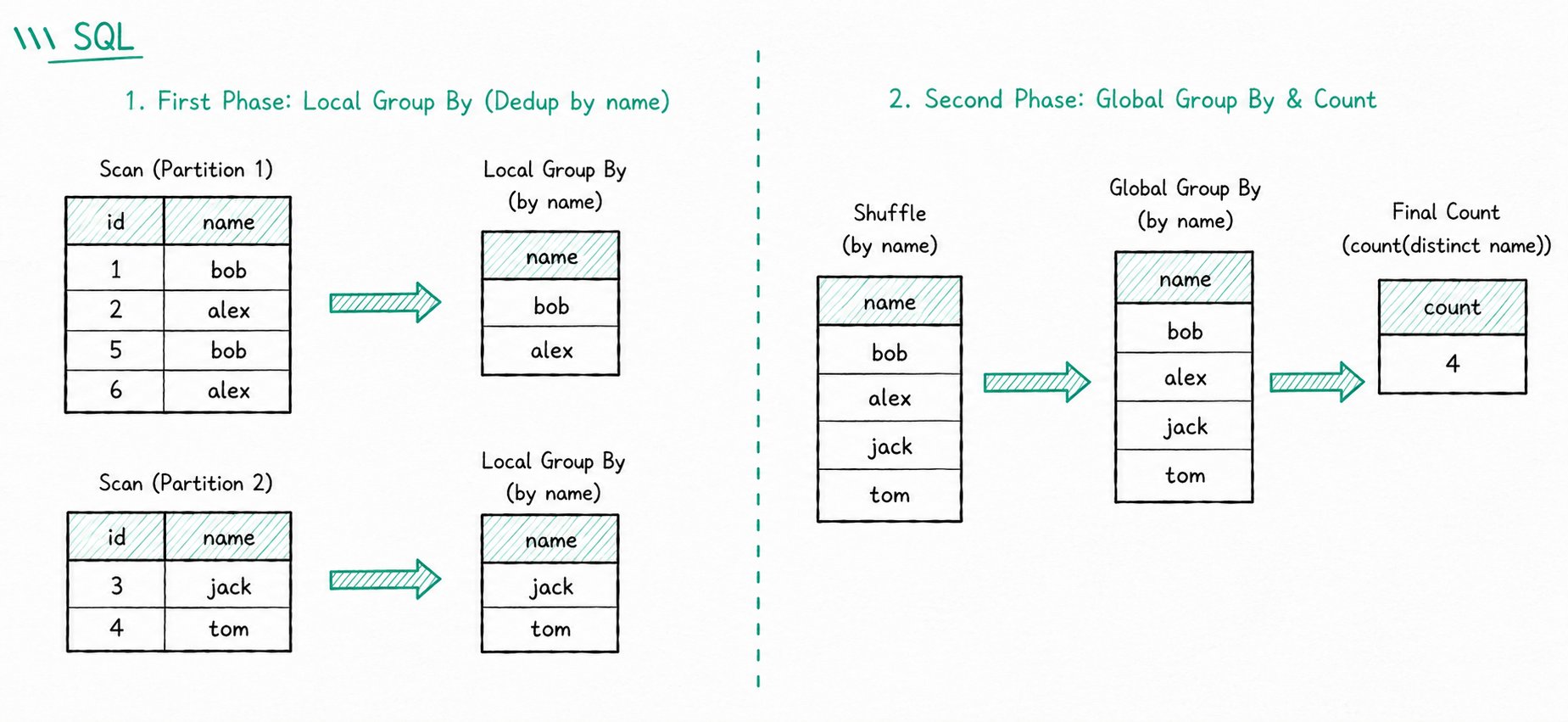
Because COUNT DISTINCT has to keep the detailed data during computation and requires shuffling, queries become slower as the data volume grows. Bitmap precise deduplication is designed to solve the performance problems of COUNT DISTINCT on large data volumes.
Use Cases
Bitmap maps detailed data to bit positions, trading the flexibility of detailed data for greatly improved computational efficiency. Consider using Bitmap for precise deduplication in the following scenarios:
| Scenario | Description |
|---|---|
| Query acceleration | Bitmap uses bit operations for query computation, delivering strong performance |
| Compressed storage | Each detail record is compressed into a single bit, so disk and memory usage are far lower than with detailed data |
Limitations:
- Bitmap only supports precise deduplication for
TINYINT,SMALLINT,INT, andBIGINTdata types - For precise deduplication on other data types, you must build an additional global dictionary
- Columns of type Bitmap cannot be used as Key columns
Doris implements Bitmap precise deduplication based on RoaringBitmap. For the underlying principles and details, see RoaringBitmap.
Performing Precise Deduplication with BITMAP
The overall workflow consists of three steps: create the table -> load data -> query the data.
Step 1: Create the Table
Goal: Declare the target column as Bitmap type and configure the aggregate function BITMAP_UNION.
Notes:
- When using Bitmap for deduplication, set the target column type to
Bitmapand the aggregate function toBITMAP_UNIONin theCREATE TABLEstatement - Columns of type Bitmap cannot be used as Key columns
Example: Create an aggregate table test_bitmap, where the id column represents the visiting user ID and the uv column has type BITMAP and uses the aggregate function BITMAP_UNION to aggregate data.
create table test_bitmap(
        dt date,
        id int,
        name char(10),
        province char(10),
        os char(10),
        uv bitmap bitmap_union
)
Aggregate KEY (dt,id,name,province,os)
distributed by hash(id) buckets 10;
Step 2: Load Data
Goal: Load the raw detailed data via Stream Load, and convert it to Bitmap type during loading using to_bitmap(id).
Sample data (test_bitmap.csv):
2022-05-05,10001,test 01,Beijing,windows
2022-05-05,10002,test 01,Beijing,linux
2022-05-05,10003,test 01,Beijing,macos
2022-05-05,10004,test 01,Hebei,windows
2022-05-06,10001,test 01,Shanghai,windows
2022-05-06,10002,test 01,Shanghai,linux
2022-05-06,10003,test 01,Jiangsu,macos
2022-05-06,10004,test 01,Shaanxi,windows
Stream Load command:
curl --location-trusted -u root: -H "label:label_test_bitmap_load" \
    -H "column_separator:," \
    -H "columns:dt,id,name,province,os, uv=to_bitmap(id)" -T test_bitmap.csv http://fe_IP:8030/api/demo/test_bitmap/_stream_load
Step 3: Query the Data
Goal: Read the deduplicated result of the Bitmap column using the bitmap_union_count aggregate function.
Bitmap columns do not allow direct querying of the raw values; you can only query them through the
bitmap_union_countaggregate function.
Scenario 1: Total UV
mysql> select bitmap_union_count(uv) from test_bitmap;
+---------------------+
| bitmap_union_count(`uv`) |
+---------------------+
|                   4 |
+---------------------+
1 row in set (0.00 sec)
This is equivalent to:
mysql> SELECT COUNT(DISTINCT id) FROM test_bitmap;
+----------------------+
| count(DISTINCT `id`) |
+----------------------+
|                    4 |
+----------------------+
1 row in set (0.01 sec)
Scenario 2: UV per day
mysql> select bitmap_union_count(uv) from test_bitmap group by dt;
+---------------------+
| bitmap_union_count(`uv`) |
+---------------------+
|                   4 |
|                   4 |
+---------------------+
2 rows in set (0.01 sec)
FAQ
Q1: Which data types does Bitmap support for precise deduplication?
Only TINYINT, SMALLINT, INT, and BIGINT. To deduplicate strings or other types, you need to build an additional global dictionary.
Q2: Can a Bitmap column be used as a Key column?
No. Bitmap-type columns can only be used as Value columns and must be paired with the aggregate function BITMAP_UNION.
Q3: Why can the raw values in a Bitmap column not be queried directly?
Bitmap is a bitmap structure and does not store detailed data. You need to read the deduplicated result through aggregate functions such as bitmap_union_count.
Q4: What advantages does Bitmap have over COUNT DISTINCT?
| Comparison | COUNT DISTINCT | BITMAP precise deduplication |
|---|---|---|
| Computation method | Keep detailed data + shuffle for deduplication | Bit operations |
| Query speed | Slows down on large data volumes | Significantly faster |
| Resource usage | Detailed data uses a lot of resources | Low disk and memory usage |
| Data types | Any type | Integer types only; other types require a global dictionary |
