Incremental View Maintenance (IVM)
Incremental View Maintenance (IVM) maintains an asynchronous materialized view based on row-level changes in its base tables. A regular asynchronous materialized view recomputes all of its data or every affected partition; IVM computes only the rows inserted, updated and deleted in the base tables between two refreshes and applies those changes to the materialized view.
IVM is available since Doris 5.0.0. It is experimental and disabled by default. Before using it, enable changelog and Table Stream in the FE configuration. See Prerequisites.
When to use IVM
Compare the number of changed rows per refresh, the size of the affected partitions and your consistency requirements before choosing a refresh method.
| Scenario | Recommendation | Reason |
|---|---|---|
| Base tables receive frequent inserts, updates and deletes, and the changed rows are a small share of the table or partition | Use IVM | Only the row-level changes between two refreshes are computed, so whole partitions are not recomputed |
| Changes are concentrated in a few partitions and recomputing those partitions is affordable | Use PARTITIONS | Simpler to configure; recomputes the affected partitions |
| Building the first baseline, small data volume, or recovering the IVM baseline | Use COMPLETE | Recomputes all data of the materialized view |
| Results must be transactionally consistent with the base tables in real time | Do not use an asynchronous materialized view | IVM still refreshes through asynchronous tasks and does not provide real-time consistency |
Differences from partition-level incremental refresh
Doris supports four refresh methods for asynchronous materialized views. IVM corresponds to INCREMENTAL. Do not confuse it with the partition-level incremental refresh provided by PARTITIONS.
| Refresh method | Computation granularity | Suitable scenario | Behavior when the conditions are not met |
|---|---|---|---|
INCREMENTAL | Row-level changes | The number of changed rows is far smaller than the whole table or the affected partitions | Fails by default; can fall back when FALLBACK is specified |
PARTITIONS | Every affected materialized view partition | Changes are concentrated in a few partitions and recomputing them is affordable | Fails by default; falls back to COMPLETE when FALLBACK is specified |
COMPLETE | All data | Small data volume, first baseline, or recovering the IVM baseline | Always recomputes everything |
AUTO | Chosen automatically by Doris | You want Doris to pick an available strategy | Tries IVM, partition refresh and complete refresh in turn, whichever is available |
INCREMENTAL FALLBACK only changes how failures are handled at refresh time. When the materialized view is created, its definition SQL must still satisfy the IVM requirements; FALLBACK does not let an unsupported definition pass the creation check.
How it works
IVM reuses the changelog and Table Stream capabilities of Doris:
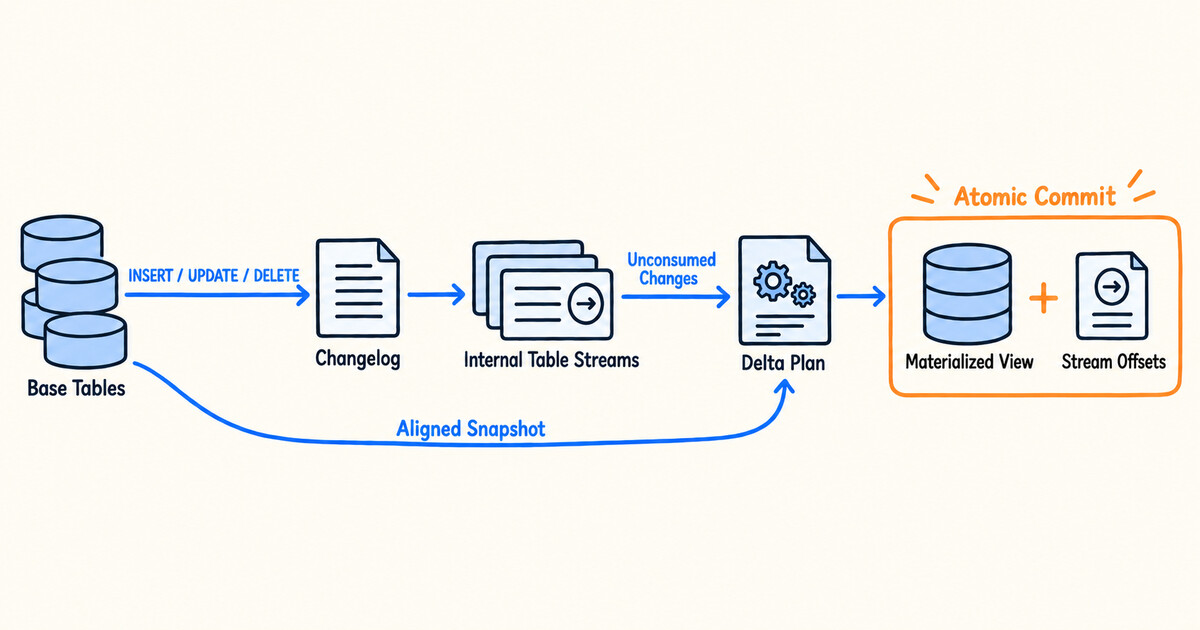
When a materialized view that supports IVM is created, Doris creates an internal Table Stream for every base table that participates in incremental maintenance. The names of internal Streams start with __doris_ivm_stream_. You do not need to create, consume or drop these Streams.
At refresh time, Doris generates a delta plan from the unconsumed changes of each base table. For join queries, it also reads a snapshot of the base tables aligned with the consumption offsets, so that multi-table computation uses a consistent data boundary. The materialized view data and the consumption offsets are committed in the same transaction; if the transaction fails, neither is committed.
Prerequisites
Version and FE configuration
-
Use Doris 5.0.0 or later.
-
Set the following options in
fe.confon every FE and restart the FEs:enable_feature_changelog = true
enable_table_stream = true
Both options are static (non-dynamic) configurations. enable_feature_changelog turns on changelog and the global commit timestamp; enable_table_stream turns on Table Stream DDL and internal Stream management.
Base table requirements
Base tables that participate in incremental maintenance must be Doris OLAP internal tables in the Internal Catalog and meet the following requirements:
| Base table model | Supported | Requirements and behavior |
|---|---|---|
| Unique Key Merge-on-Write | Yes | Changelog and the before image must be enabled; inserts, updates and deletes are all handled |
| Duplicate Key | Yes | Changelog must be enabled; only appended changes are provided, and deletes executed through delete predicates are not recorded |
| Unique Key Merge-on-Read | No | Use Merge-on-Write instead |
| Aggregate Key | Not for incremental maintenance | Can only be used as a table listed in excluded_trigger_tables that does not trigger incremental refresh |
| External tables | No | The incremental base tables of an IVM must be Doris internal tables |
For workloads that need to handle updates and deletes, use a Unique Key Merge-on-Write table and set the following properties when creating it:
PROPERTIES (
    "enable_unique_key_merge_on_write" = "true",
    "changelog.enable" = "true",
    "changelog.need_historical_value" = "true"
);
Changelog can only be enabled when the table is created and cannot be disabled afterwards. For the full list of table model, column type, write method and DDL restrictions, see Changelog.
Quick start
The following example creates an IVM that aggregates orders by status. The first refresh uses COMPLETE to build a full baseline; later refreshes use INCREMENTAL FALLBACK to process row-level changes.
The steps are:
- Create a Unique Key Merge-on-Write base table with changelog enabled.
- Create the IVM with
REFRESH INCREMENTAL FALLBACK. - Run a
COMPLETErefresh to build the full baseline. - Change the base table data and run an incremental refresh.
- Query the refresh task to confirm the result and the fallback reason.
Step 1: Create the base table and load initial data
Create a base table that supports updates and deletes, with changelog and the before image enabled:
CREATE DATABASE IF NOT EXISTS ivm_demo;
USE ivm_demo;

CREATE TABLE orders (
    order_id BIGINT,
    order_status VARCHAR(16),
    amount DECIMAL(10, 2)
)
UNIQUE KEY(order_id)
DISTRIBUTED BY HASH(order_id) BUCKETS 1
PROPERTIES (
    "replication_num" = "1",
    "enable_unique_key_merge_on_write" = "true",
    "changelog.enable" = "true",
    "changelog.need_historical_value" = "true"
);

INSERT INTO orders VALUES
    (1, 'created', 100.00),
    (2, 'created', 200.00),
    (3, 'paid',    300.00);
Step 2: Create the IVM
Specify REFRESH INCREMENTAL in CREATE MATERIALIZED VIEW. This example also specifies FALLBACK, so that Doris can fall back to a partition refresh or a complete refresh when a change cannot be computed incrementally in a safe way. The trigger is ON MANUAL so that each refresh can be observed step by step; production views usually switch to a scheduled or on-commit trigger, see Setting the automatic refresh interval.
CREATE MATERIALIZED VIEW orders_by_status
BUILD DEFERRED
REFRESH INCREMENTAL FALLBACK ON MANUAL
DISTRIBUTED BY RANDOM BUCKETS 1
PROPERTIES (
    "replication_num" = "1"
)
AS
SELECT
    order_status,
    COUNT(*) AS order_count,
    SUM(amount) AS total_amount
FROM orders
GROUP BY order_status;
After the view is created, Doris automatically creates the corresponding internal Table Stream. You can check the mapping with mv_infos:
SELECT Name, RefreshInfo, IvmBaseTableStreams
FROM mv_infos("database" = "ivm_demo")
WHERE Name = "orders_by_status";
Step 3: Build the full baseline
Use COMPLETE for the first refresh to build the baseline for later incremental maintenance:
REFRESH MATERIALIZED VIEW orders_by_status COMPLETE;
The refresh task runs asynchronously. After the task succeeds, query the materialized view:
SELECT order_status, order_count, total_amount
FROM orders_by_status
ORDER BY order_status;
+--------------+-------------+--------------+
| order_status | order_count | total_amount |
+--------------+-------------+--------------+
| created      |           2 |       300.00 |
| paid         |           1 |       300.00 |
+--------------+-------------+--------------+
Step 4: Write changes and run an incremental refresh
The following statements update order 1, delete order 2 and insert order 4:
INSERT INTO orders VALUES (1, 'paid', 100.00);
DELETE FROM orders WHERE order_id = 2;
INSERT INTO orders VALUES (4, 'created', 400.00);

REFRESH MATERIALIZED VIEW orders_by_status INCREMENTAL FALLBACK;
After the refresh task succeeds, IVM has processed only the row-level changes above. The materialized view now contains:
SELECT order_status, order_count, total_amount
FROM orders_by_status
ORDER BY order_status;
+--------------+-------------+--------------+
| order_status | order_count | total_amount |
+--------------+-------------+--------------+
| created      |           1 |       400.00 |
| paid         |           2 |       400.00 |
+--------------+-------------+--------------+
Step 5: Confirm the refresh method and fallback reason
Query the latest refresh task to confirm the requested method, the actual refresh scope and the fallback reason:
SELECT Status, TaskContext, RefreshMode, IvmFallbackReason, ErrorMsg
FROM tasks("type" = "mv")
WHERE MvDatabaseName = "ivm_demo"
  AND MvName = "orders_by_status"
ORDER BY CreateTime DESC, TaskId DESC
LIMIT 1;
TaskContextrecords the refresh method requested by this task, for exampleINCREMENTAL.RefreshModerecords the partition scope the task actually refreshed:COMPLETE,PARTIALorNOT_REFRESH.IvmFallbackReasonis empty when no IVM fallback happened; otherwise it records a stable fallback reason.ErrorMsgrecords the details of a failed strict incremental refresh.
Supported queries
IVM checks the definition SQL when the materialized view is created. With an explicit REFRESH INCREMENTAL, an unsupported definition makes the creation fail. This section lists the supported relational operations and aggregate functions with a runnable example for each, followed by the query forms that are not supported.
Example tables
The examples in this section use three base tables: the customer table customers, the sales table sales and the refund table refunds. All three are Unique Key Merge-on-Write tables with changelog and the before image enabled. You can run them in the ivm_demo database created in Quick start:
CREATE TABLE customers (
    customer_id BIGINT,
    name VARCHAR(32),
    city VARCHAR(16)
)
UNIQUE KEY(customer_id)
DISTRIBUTED BY HASH(customer_id) BUCKETS 1
PROPERTIES (
    "replication_num" = "1",
    "enable_unique_key_merge_on_write" = "true",
    "changelog.enable" = "true",
    "changelog.need_historical_value" = "true"
);

CREATE TABLE sales (
    sale_id BIGINT,
    customer_id BIGINT,
    channel VARCHAR(16),
    amount DECIMAL(10, 2)
)
UNIQUE KEY(sale_id)
DISTRIBUTED BY HASH(sale_id) BUCKETS 1
PROPERTIES (
    "replication_num" = "1",
    "enable_unique_key_merge_on_write" = "true",
    "changelog.enable" = "true",
    "changelog.need_historical_value" = "true"
);

CREATE TABLE refunds (
    refund_id BIGINT,
    sale_id BIGINT,
    amount DECIMAL(10, 2)
)
UNIQUE KEY(refund_id)
DISTRIBUTED BY HASH(refund_id) BUCKETS 1
PROPERTIES (
    "replication_num" = "1",
    "enable_unique_key_merge_on_write" = "true",
    "changelog.enable" = "true",
    "changelog.need_historical_value" = "true"
);

INSERT INTO customers VALUES
    (1, 'Alice', 'Beijing'),
    (2, 'Bob',   'Shanghai'),
    (3, 'Carol', 'Beijing');

INSERT INTO sales VALUES
    (101, 1,    'web',   120.00),
    (102, 1,    'app',    80.00),
    (103, 2,    'web',   200.00),
    (104, NULL, 'store',  50.00);

INSERT INTO refunds VALUES
    (9001, 102, 80.00),
    (9002, 103, 50.00);
The data deliberately contains two special cases that the join and aggregation examples rely on: store order 104 has no customer, so its customer_id is NULL, and customer Carol has no orders yet.
Every example follows the same steps: run its CREATE MATERIALIZED VIEW, then run REFRESH MATERIALIZED VIEW <mv_name> COMPLETE to build the baseline, and after the refresh task succeeds, run SELECT * FROM <mv_name> to see the result. The results shown here are sorted by the leading columns.
Supported relational operations
| Operation | Description |
|---|---|
| Columns and expressions | Select some of the columns, or compute new columns with deterministic expressions |
WHERE filters | Filter the rows of the base tables by a condition |
FROM subqueries | Aliased subqueries in the FROM clause; they can be nested and must not contain aggregations |
| Constant rows | A SELECT without FROM that always returns one row of constants, for example SELECT -1, 'unknown'. It can be a UNION ALL branch, one side of a join, or the whole definition |
GROUP BY aggregation | The aggregation must be the outermost operation of the query with only projections above it; deterministic expressions on group-by columns and aggregate results are supported |
GROUPING SETS, ROLLUP, CUBE | Can be used with GROUPING() and GROUPING_ID(); the same restrictions as GROUP BY apply |
SELECT DISTINCT | Handled as a GROUP BY without aggregate functions; the same restrictions as GROUP BY apply |
INNER JOIN, CROSS JOIN | Multi-table joins and self-joins are supported |
LEFT OUTER JOIN, RIGHT OUTER JOIN, FULL OUTER JOIN | The side that keeps all its rows (the left side of a LEFT JOIN, the right side of a RIGHT JOIN, both sides of a FULL JOIN) must not be a Duplicate Key table without changelog listed in excluded_trigger_tables, because the rows of such a table have no fixed row identity |
| Nested outer joins | The side of an outer join that can be padded with NULL is itself a join. The more complex that side, the larger the incremental refresh plan |
UNION ALL | Branches can come from different tables, the same table, or constant rows |
| Chained IVM | Another IVM is used as a base table. The IVM used as a base table must enable changelog and the before image |
The examples below are grouped by category.
Single-table queries
- Columns & expressions
- WHERE filter
- FROM subquery
- Constant row
Select the columns you need, or compute new columns with expressions. Expressions must be deterministic, that is, the same input always produces the same result; for example, NOW() and RAND() cannot be used.
CREATE MATERIALIZED VIEW mv_sales_projection
BUILD DEFERRED REFRESH INCREMENTAL ON MANUAL
DISTRIBUTED BY RANDOM BUCKETS 1
PROPERTIES ("replication_num" = "1")
AS
SELECT sale_id, channel, amount, amount * 0.9 AS discounted_amount
FROM sales;
Result:
+---------+---------+--------+-------------------+
| sale_id | channel | amount | discounted_amount |
+---------+---------+--------+-------------------+
|     101 | web     | 120.00 |           108.000 |
|     102 | app     |  80.00 |            72.000 |
|     103 | web     | 200.00 |           180.000 |
|     104 | store   |  50.00 |            45.000 |
+---------+---------+--------+-------------------+
Keeps only the rows that satisfy the condition. When a base table row is updated, Doris evaluates the condition again on the new values: a row that no longer matches is removed from the materialized view, and a row that starts to match is added to it.
CREATE MATERIALIZED VIEW mv_large_sales
BUILD DEFERRED REFRESH INCREMENTAL ON MANUAL
DISTRIBUTED BY RANDOM BUCKETS 1
PROPERTIES ("replication_num" = "1")
AS
SELECT sale_id, customer_id, amount
FROM sales
WHERE amount >= 100;
Result:
+---------+-------------+--------+
| sale_id | customer_id | amount |
+---------+-------------+--------+
|     101 |           1 | 120.00 |
|     103 |           2 | 200.00 |
+---------+-------------+--------+
Use an aliased subquery in the FROM clause, for example to select the web orders first and then join them with the customer table. Subqueries can be nested; inside them, too, only the operations listed in this section can be used, and they must not contain aggregations.
CREATE MATERIALIZED VIEW mv_web_sales
BUILD DEFERRED REFRESH INCREMENTAL ON MANUAL
DISTRIBUTED BY RANDOM BUCKETS 1
PROPERTIES ("replication_num" = "1")
AS
SELECT w.sale_id, c.name, w.amount
FROM (
    SELECT sale_id, customer_id, amount
    FROM sales
    WHERE channel = 'web'
) AS w
INNER JOIN customers AS c ON w.customer_id = c.customer_id;
Result:
+---------+-------+--------+
| sale_id | name  | amount |
+---------+-------+--------+
|     101 | Alice | 120.00 |
|     103 | Bob   | 200.00 |
+---------+-------+--------+
A constant row is a SELECT without FROM that always returns one row of constants. A common use is to add an "unknown" member to a dimension table for the rows that cannot be matched to it:
CREATE MATERIALIZED VIEW mv_customers_with_unknown
BUILD DEFERRED REFRESH INCREMENTAL ON MANUAL
DISTRIBUTED BY RANDOM BUCKETS 1
PROPERTIES ("replication_num" = "1")
AS
SELECT customer_id, name, city
FROM customers
UNION ALL
SELECT -1, 'unknown', 'unknown';
Result:
+-------------+---------+----------+
| customer_id | name    | city     |
+-------------+---------+----------+
|          -1 | unknown | unknown  |
|           1 | Alice   | Beijing  |
|           2 | Bob     | Shanghai |
|           3 | Carol   | Beijing  |
+-------------+---------+----------+
A constant row can also be one side of a join, for example CROSS JOIN (SELECT 0.14 AS usd_rate) r to attach a parameter to every row, or the whole definition of a materialized view, for example SELECT 1 AS id, 'x' AS name.
A constant row produces no changes. The first refresh of a materialized view that contains a constant row always runs COMPLETE, even when INCREMENTAL is requested; later incremental refreshes only process the changes of the base tables.
Aggregation
- GROUP BY
- GROUPING SETS / ROLLUP / CUBE
- SELECT DISTINCT
Computes aggregation results per group. The input of the aggregation can be a single table, a join, a UNION ALL or a FROM subquery, but the aggregation itself must be the outermost operation of the query. The following example joins sales with customers and then aggregates by city; order 104 has no customer and is not counted.
CREATE MATERIALIZED VIEW mv_city_sales
BUILD DEFERRED REFRESH INCREMENTAL ON MANUAL
DISTRIBUTED BY RANDOM BUCKETS 1
PROPERTIES ("replication_num" = "1")
AS
SELECT c.city, COUNT(*) AS sale_cnt, SUM(s.amount) AS total_amount
FROM sales s
INNER JOIN customers c ON s.customer_id = c.customer_id
GROUP BY c.city;
Result:
+----------+----------+--------------+
| city     | sale_cnt | total_amount |
+----------+----------+--------------+
| Beijing  |        2 |       200.00 |
| Shanghai |        1 |       200.00 |
+----------+----------+--------------+
The projection above the aggregation can rename columns, reorder them, or use deterministic expressions to compute on group-by columns and aggregate results. For example, SUM(amount) * 100, MAX(amount) + 1 and SUM(amount) / COUNT(*) support incremental refresh, subject to the restrictions of the aggregate functions used. HAVING and aggregations inside a subquery or a join input are not supported. See Unsupported query forms.
Computes several combinations of dimensions in one aggregation. The following example uses ROLLUP(c.city, s.channel) to produce the city and channel details, a subtotal per city and a grand total; in the subtotal and total rows, the rolled-up columns are NULL. GROUPING SETS, CUBE, and the GROUPING() and GROUPING_ID() functions that identify subtotal rows are supported as well.
CREATE MATERIALIZED VIEW mv_city_channel_rollup
BUILD DEFERRED REFRESH INCREMENTAL ON MANUAL
DISTRIBUTED BY RANDOM BUCKETS 1
PROPERTIES ("replication_num" = "1")
AS
SELECT c.city, s.channel, SUM(s.amount) AS total_amount
FROM sales s
INNER JOIN customers c ON s.customer_id = c.customer_id
GROUP BY ROLLUP(c.city, s.channel);
Result:
+----------+---------+--------------+
| city     | channel | total_amount |
+----------+---------+--------------+
| NULL     | NULL    |       400.00 |
| Beijing  | NULL    |       200.00 |
| Beijing  | app     |        80.00 |
| Beijing  | web     |       120.00 |
| Shanghai | NULL    |       200.00 |
| Shanghai | web     |       200.00 |
+----------+---------+--------------+
SELECT DISTINCT is handled as a GROUP BY without aggregate functions, and the same restrictions as GROUP BY apply. Note that UNION (that is, UNION DISTINCT) is still not supported.
CREATE MATERIALIZED VIEW mv_channels
BUILD DEFERRED REFRESH INCREMENTAL ON MANUAL
DISTRIBUTED BY RANDOM BUCKETS 1
PROPERTIES ("replication_num" = "1")
AS
SELECT DISTINCT channel
FROM sales;
Result:
+---------+
| channel |
+---------+
| app     |
| store   |
| web     |
+---------+
Joins
- INNER JOIN
- CROSS JOIN
- Outer joins
- Nested outer joins
Keeps only the rows that match on both sides. Order 104 has no customer, so it is not in the result.
CREATE MATERIALIZED VIEW mv_sales_customer
BUILD DEFERRED REFRESH INCREMENTAL ON MANUAL
DISTRIBUTED BY RANDOM BUCKETS 1
PROPERTIES ("replication_num" = "1")
AS
SELECT s.sale_id, c.name, c.city, s.amount
FROM sales s
INNER JOIN customers c ON s.customer_id = c.customer_id;
Result:
+---------+-------+----------+--------+
| sale_id | name  | city     | amount |
+---------+-------+----------+--------+
|     101 | Alice | Beijing  | 120.00 |
|     102 | Alice | Beijing  |  80.00 |
|     103 | Bob   | Shanghai | 200.00 |
+---------+-------+----------+--------+
Returns every combination of the rows on both sides (the Cartesian product). The following example self-joins customers to list every pair of customers.
CREATE MATERIALIZED VIEW mv_customer_pairs
BUILD DEFERRED REFRESH INCREMENTAL ON MANUAL
DISTRIBUTED BY RANDOM BUCKETS 1
PROPERTIES ("replication_num" = "1")
AS
SELECT a.name AS customer_a, b.name AS customer_b
FROM customers a
CROSS JOIN customers b
WHERE a.customer_id < b.customer_id;
Result:
+------------+------------+
| customer_a | customer_b |
+------------+------------+
| Alice      | Bob        |
| Alice      | Carol      |
| Bob        | Carol      |
+------------+------------+
An outer join keeps all rows of one side and pads the other side with NULL when there is no match. LEFT OUTER JOIN keeps the left side, RIGHT OUTER JOIN keeps the right side, and FULL OUTER JOIN keeps both sides.
LEFT OUTER JOIN: keeps every order. Order 104 has no matching customer, so name is NULL.
CREATE MATERIALIZED VIEW mv_sales_left
BUILD DEFERRED REFRESH INCREMENTAL ON MANUAL
DISTRIBUTED BY RANDOM BUCKETS 1
PROPERTIES ("replication_num" = "1")
AS
SELECT s.sale_id, s.amount, c.name
FROM sales s
LEFT OUTER JOIN customers c ON s.customer_id = c.customer_id;
Result:
+---------+--------+-------+
| sale_id | amount | name  |
+---------+--------+-------+
|     101 | 120.00 | Alice |
|     102 |  80.00 | Alice |
|     103 | 200.00 | Bob   |
|     104 |  50.00 | NULL  |
+---------+--------+-------+
RIGHT OUTER JOIN: keeps every customer. Carol, who has no orders yet, is in the result as well.
CREATE MATERIALIZED VIEW mv_sales_right
BUILD DEFERRED REFRESH INCREMENTAL ON MANUAL
DISTRIBUTED BY RANDOM BUCKETS 1
PROPERTIES ("replication_num" = "1")
AS
SELECT c.name, s.sale_id, s.amount
FROM sales s
RIGHT OUTER JOIN customers c ON s.customer_id = c.customer_id;
Result:
+-------+---------+--------+
| name  | sale_id | amount |
+-------+---------+--------+
| Alice |     101 | 120.00 |
| Alice |     102 |  80.00 |
| Bob   |     103 | 200.00 |
| Carol |    NULL |   NULL |
+-------+---------+--------+
FULL OUTER JOIN: keeps both order 104, which has no customer, and Carol, who has no orders.
CREATE MATERIALIZED VIEW mv_sales_full
BUILD DEFERRED REFRESH INCREMENTAL ON MANUAL
DISTRIBUTED BY RANDOM BUCKETS 1
PROPERTIES ("replication_num" = "1")
AS
SELECT c.name, s.sale_id, s.amount
FROM customers c
FULL OUTER JOIN sales s ON c.customer_id = s.customer_id;
Result:
+-------+---------+--------+
| name  | sale_id | amount |
+-------+---------+--------+
| NULL  |     104 |  50.00 |
| Alice |     101 | 120.00 |
| Alice |     102 |  80.00 |
| Bob   |     103 | 200.00 |
| Carol |    NULL |   NULL |
+-------+---------+--------+
The side of an outer join that can be padded with NULL is called the null-producing side, for example the right side of a LEFT JOIN. A nested outer join is one whose null-producing side is itself a join. The following example first uses sales LEFT JOIN refunds to attach refunds, and then uses that whole join as the right side of customers LEFT JOIN.
CREATE MATERIALIZED VIEW mv_customer_refunds
BUILD DEFERRED REFRESH INCREMENTAL ON MANUAL
DISTRIBUTED BY RANDOM BUCKETS 1
PROPERTIES ("replication_num" = "1")
AS
SELECT c.name, s.sale_id, r.refund_id, r.amount AS refund_amount
FROM customers c
LEFT OUTER JOIN (
    sales s
    LEFT OUTER JOIN refunds r ON s.sale_id = r.sale_id
) ON c.customer_id = s.customer_id;
Result:
+-------+---------+-----------+---------------+
| name  | sale_id | refund_id | refund_amount |
+-------+---------+-----------+---------------+
| Alice |     101 |      NULL |          NULL |
| Alice |     102 |      9001 |         80.00 |
| Bob   |     103 |      9002 |         50.00 |
| Carol |    NULL |      NULL |          NULL |
+-------+---------+-----------+---------------+
An incremental refresh has to compute the null-producing side both before and after the change, so the more complex that side, the larger the refresh plan. If planning or refreshing becomes too expensive, create that side as a lower-level IVM first and build the current materialized view on top of it. See the chained IVM example in UNION ALL and chained IVM.
UNION ALL and chained IVM
- UNION ALL
- Chained IVM
Combines the results of several queries without removing duplicates. Branches can come from different tables, the same table, or constant rows. The following example combines sales and refunds into one ledger, with refund amounts recorded as negative numbers.
CREATE MATERIALIZED VIEW mv_ledger
BUILD DEFERRED REFRESH INCREMENTAL ON MANUAL
DISTRIBUTED BY RANDOM BUCKETS 1
PROPERTIES ("replication_num" = "1")
AS
SELECT sale_id AS doc_id, 'sale' AS doc_type, amount
FROM sales
UNION ALL
SELECT refund_id, 'refund', -amount
FROM refunds;
Result:
+--------+----------+--------+
| doc_id | doc_type | amount |
+--------+----------+--------+
|    101 | sale     | 120.00 |
|    102 | sale     |  80.00 |
|    103 | sale     | 200.00 |
|    104 | sale     |  50.00 |
|   9001 | refund   | -80.00 |
|   9002 | refund   | -50.00 |
+--------+----------+--------+
Uses one IVM as a base table of another to split a complex computation into layers, for example a lower-level IVM that performs the join and an upper-level IVM that aggregates. An IVM used as a base table is itself a Unique Key Merge-on-Write table, so like other Merge-on-Write base tables it must enable changelog and the before image. Otherwise the upper-level IVM cannot be created; for example, creation fails with changelog is not enabled for table when changelog is not enabled.
CREATE MATERIALIZED VIEW mv_sales_city_detail
BUILD DEFERRED REFRESH INCREMENTAL ON MANUAL
DISTRIBUTED BY RANDOM BUCKETS 1
PROPERTIES (
    "replication_num" = "1",
    "changelog.enable" = "true",
    "changelog.need_historical_value" = "true"
)
AS
SELECT s.sale_id, c.city, s.amount
FROM sales s
INNER JOIN customers c ON s.customer_id = c.customer_id;

CREATE MATERIALIZED VIEW mv_city_total
BUILD DEFERRED REFRESH INCREMENTAL ON MANUAL
DISTRIBUTED BY RANDOM BUCKETS 1
PROPERTIES ("replication_num" = "1")
AS
SELECT city, COUNT(*) AS sale_cnt, SUM(amount) AS total_amount
FROM mv_sales_city_detail
GROUP BY city;
The upper-level IVM can only read the results that the lower-level IVM has already refreshed, so refresh the lower level first and then the upper level. After both refreshes, querying mv_city_total returns:
+----------+----------+--------------+
| city     | sale_cnt | total_amount |
+----------+----------+--------------+
| Beijing  |        2 |       200.00 |
| Shanghai |        1 |       200.00 |
+----------+----------+--------------+
A regular asynchronous materialized view (not an IVM) cannot be used as a base table of an IVM.
Supported aggregate functions
IVM supports the following aggregate functions. Their arguments can be columns or deterministic expressions:
COUNT(*),COUNT(expr)SUMAVGMINMAXBITMAP_UNIONBITMAP_UNION_COUNTARRAY_AGGCOLLECT_LIST(single-argument form only)
The following examples all group the sales table by channel:
- COUNT
- SUM
- AVG
- MIN / MAX
- Bitmap aggregation
- Array aggregation
COUNT(*) counts rows; COUNT(expr) counts only the rows where expr is not NULL. The customer_id of store order 104 is NULL, so member_sale_cnt of the store channel is 0.
CREATE MATERIALIZED VIEW mv_agg_count
BUILD DEFERRED REFRESH INCREMENTAL ON MANUAL
DISTRIBUTED BY RANDOM BUCKETS 1
PROPERTIES ("replication_num" = "1")
AS
SELECT channel,
       COUNT(*) AS sale_cnt,
       COUNT(customer_id) AS member_sale_cnt
FROM sales
GROUP BY channel;
Result:
+---------+----------+-----------------+
| channel | sale_cnt | member_sale_cnt |
+---------+----------+-----------------+
| app     |        1 |               1 |
| store   |        1 |               0 |
| web     |        2 |               2 |
+---------+----------+-----------------+
Computes a sum. The argument can be a column or a deterministic expression, for example to add up only the orders of 100 or more.
CREATE MATERIALIZED VIEW mv_agg_sum
BUILD DEFERRED REFRESH INCREMENTAL ON MANUAL
DISTRIBUTED BY RANDOM BUCKETS 1
PROPERTIES ("replication_num" = "1")
AS
SELECT channel,
       SUM(amount) AS total_amount,
       SUM(IF(amount >= 100, amount, 0)) AS large_amount
FROM sales
GROUP BY channel;
Result:
+---------+--------------+--------------+
| channel | total_amount | large_amount |
+---------+--------------+--------------+
| app     |        80.00 |         0.00 |
| store   |        50.00 |         0.00 |
| web     |       320.00 |       320.00 |
+---------+--------------+--------------+
Computes an average. Doris additionally keeps a hidden sum and count in the materialized view and uses them to recompute the average during incremental refreshes.
CREATE MATERIALIZED VIEW mv_agg_avg
BUILD DEFERRED REFRESH INCREMENTAL ON MANUAL
DISTRIBUTED BY RANDOM BUCKETS 1
PROPERTIES ("replication_num" = "1")
AS
SELECT channel, AVG(amount) AS avg_amount
FROM sales
GROUP BY channel;
Result:
+---------+------------+
| channel | avg_amount |
+---------+------------+
| app     |    80.0000 |
| store   |    50.0000 |
| web     |   160.0000 |
+---------+------------+
Computes the minimum and the maximum.
CREATE MATERIALIZED VIEW mv_agg_minmax
BUILD DEFERRED REFRESH INCREMENTAL ON MANUAL
DISTRIBUTED BY RANDOM BUCKETS 1
PROPERTIES ("replication_num" = "1")
AS
SELECT channel, MIN(amount) AS min_amount, MAX(amount) AS max_amount
FROM sales
GROUP BY channel;
Result:
+---------+------------+------------+
| channel | min_amount | max_amount |
+---------+------------+------------+
| app     |      80.00 |      80.00 |
| store   |      50.00 |      50.00 |
| web     |     120.00 |     200.00 |
+---------+------------+------------+
A newly written value can be compared with the current minimum and maximum directly. But if a deleted or updated row holds the current minimum or maximum, the new result cannot be derived from the existing result, and the full data must be read again. For example, if order 101 (120.00, the current minimum of the web channel) is deleted after the baseline is built, a strict INCREMENTAL refresh fails with IvmFallbackReason MIN_MAX_BOUNDARY_HIT, and an INCREMENTAL FALLBACK refresh falls back to COMPLETE.
BITMAP_UNION merges the Bitmaps of a group, and BITMAP_UNION_COUNT returns the number of distinct values in the merged result; they are commonly used for exact distinct counting. The following example counts the distinct customers of each channel: customer_bitmap holds the set of customer IDs, and customer_cnt is the number of distinct customers. Order 104, whose customer_id is NULL, is not counted.
CREATE MATERIALIZED VIEW mv_agg_bitmap
BUILD DEFERRED REFRESH INCREMENTAL ON MANUAL
DISTRIBUTED BY RANDOM BUCKETS 1
PROPERTIES ("replication_num" = "1")
AS
SELECT channel,
       BITMAP_UNION(TO_BITMAP(customer_id)) AS customer_bitmap,
       BITMAP_UNION_COUNT(TO_BITMAP(customer_id)) AS customer_cnt
FROM sales
GROUP BY channel;
Bitmap columns must be converted with BITMAP_TO_STRING before they can be viewed:
SELECT channel, BITMAP_TO_STRING(customer_bitmap) AS customers, customer_cnt
FROM mv_agg_bitmap
ORDER BY channel;
+---------+-----------+--------------+
| channel | customers | customer_cnt |
+---------+-----------+--------------+
| app     | 1         |            1 |
| store   |           |            0 |
| web     | 1,2       |            2 |
+---------+-----------+--------------+
A Bitmap stores only the merged result, so the values contributed by one row cannot be subtracted from it. When a row that takes part in the aggregation is deleted or updated and its group still has other rows, the full Bitmap must be recomputed: a strict INCREMENTAL refresh fails with IvmFallbackReason BITMAP_AGG_DELETE, and INCREMENTAL FALLBACK falls back to COMPLETE.
ARRAY_AGG and COLLECT_LIST collect the values of a group into an array. They handle NULL differently: ARRAY_AGG keeps NULL elements, and COLLECT_LIST skips NULL.
CREATE MATERIALIZED VIEW mv_agg_array
BUILD DEFERRED REFRESH INCREMENTAL ON MANUAL
DISTRIBUTED BY RANDOM BUCKETS 1
PROPERTIES ("replication_num" = "1")
AS
SELECT channel,
       ARRAY_AGG(customer_id) AS customer_ids,
       COLLECT_LIST(customer_id) AS member_ids
FROM sales
GROUP BY channel;
Result:
+---------+--------------+------------+
| channel | customer_ids | member_ids |
+---------+--------------+------------+
| app     | [1]          | [1]        |
| store   | [null]       | []         |
| web     | [1, 2]       | [1, 2]     |
+---------+--------------+------------+
Incremental refreshes maintain the array as an unordered multiset, so the order of its elements is not fixed. COLLECT_LIST supports only the single-argument form; COLLECT_LIST(expr, max_size) with a maximum length is not supported. ARRAY_AGG does not support JSONB or VARIANT elements.
Aggregate functions with DISTINCT, such as COUNT(DISTINCT customer_id), are not supported. For an exact distinct count of a non-negative integer column, use BITMAP_UNION_COUNT(TO_BITMAP(customer_id)) instead, but deletes and updates then require the full Bitmap to be recomputed, as described below.
Some aggregate functions cannot safely derive the new result from the current delta alone when rows are deleted. An update on a Unique Key table deletes the old row and then writes the new one, so updates can trigger the following cases as well:
- When a deleted value may be the current
MINorMAX, the full data must be read again. - When a delete affects a Bitmap aggregation result, the full Bitmap must be recomputed.
Strict INCREMENTAL fails in these cases; INCREMENTAL FALLBACK falls back to COMPLETE.
Unsupported query forms
The following forms are not supported, and creation fails with an explicit REFRESH INCREMENTAL:
UNION(that is,UNION DISTINCT),INTERSECTandEXCEPT.ORDER BY,LIMITand window functions.HAVING, and aggregations written inside aFROMsubquery or a join input. Aggregations can only be the outermost operation of the query; to filter aggregation results, filter them when querying the materialized view.- Subqueries in
WHEREor in theSELECTlist, such asIN (SELECT ...),EXISTS (SELECT ...)and scalar subqueries.INsubqueries and scalar subqueries may fail withMultiple columns returned by subquery are not yet supported; the cause is also that IVM does not support these subqueries. WITHclauses (CTEs). Rewrite them asFROMsubqueries.LATERAL VIEW.- Using a regular asynchronous materialized view as a base table. Chained maintenance requires the lower-level materialized view to be an IVM as well.
- Any other operation not listed in the table above.
Refresh and fallback
Choosing the refresh strategy at creation time
| Definition | Behavior at creation | Default behavior of later refreshes |
|---|---|---|
REFRESH INCREMENTAL | Strictly checks the IVM support scope; creation fails if unsupported | Only tries IVM; the task fails if IVM fails |
REFRESH INCREMENTAL FALLBACK | Same as strict mode; the IVM check must still pass | Tries IVM first, then falls back according to the reason |
REFRESH AUTO | Probes whether the definition supports IVM; if not, creates a regular asynchronous materialized view | For views that support IVM, tries IVM, partition refresh and complete refresh in turn |
REFRESH PARTITIONS [FALLBACK] | Requires the materialized view to define PARTITION BY | Recomputes the changed partitions; with FALLBACK, can fall back to a complete refresh |
REFRESH COMPLETE | Does not create IVM metadata | Always refreshes completely |
Setting the automatic refresh interval
IVM reuses the trigger methods of asynchronous materialized views and has no trigger syntax of its own. Specify the trigger in the ON clause after REFRESH INCREMENTAL [FALLBACK]:
| Trigger | Syntax | Description |
|---|---|---|
| Manual | ON MANUAL | Default. Refreshes only when REFRESH MATERIALIZED VIEW is executed |
| Scheduled | ON SCHEDULE EVERY <interval> <unit> [STARTS '<start_time>'] | Runs an incremental refresh automatically at a fixed interval |
| On commit | ON COMMIT | Runs an incremental refresh automatically after a load transaction commits on a base table |
The rules for the scheduled interval are:
<interval>must be a positive integer, and<unit>can beMINUTE,HOUR,DAYorWEEK.- The minimum refresh interval is
EVERY 1 MINUTE. SpecifyingSECONDfails withinterval time unit can not be second. The FE optionenable_job_schedule_second_for_testallows second-level intervals, but it is for testing only and must not be enabled in production. STARTSsets the first scheduling time in the format'yyyy-MM-dd HH:mm:ss'and must be later than the current time. Without it, the first refresh runs one interval after the materialized view is created. Later runs are fixed at the first scheduling time plus whole multiples of the interval, regardless of when the previous task finished.
The following example runs an incremental refresh every 5 minutes and allows fallback when a change cannot be computed incrementally:
CREATE MATERIALIZED VIEW orders_by_status
BUILD IMMEDIATE
REFRESH INCREMENTAL FALLBACK ON SCHEDULE EVERY 5 MINUTE
DISTRIBUTED BY RANDOM BUCKETS 1
PROPERTIES (
    "replication_num" = "1"
)
AS
SELECT
    order_status,
    COUNT(*) AS order_count,
    SUM(amount) AS total_amount
FROM orders
GROUP BY order_status;
Scheduled and on-commit tasks run with the refresh strategy defined when the materialized view was created: INCREMENTAL only tries IVM, INCREMENTAL FALLBACK tries IVM first and then falls back according to the reason, and AUTO tries IVM, partition refresh and complete refresh in turn. Automatically triggered tasks also behave as follows:
- The first automatic refresh builds the baseline by itself. If the materialized view has never been refreshed successfully (for example, it was created with
BUILD DEFERREDand not refreshed yet), the first scheduled or on-commit task automatically runsCOMPLETEto build the full baseline; you do not need to runCOMPLETEby hand. Later tasks then refresh incrementally. - Refresh tasks of one materialized view run serially, and surplus triggers are skipped. At most one running and one waiting automatically triggered task are kept. When the interval is shorter than the duration of a single refresh, or base tables commit very frequently under
ON COMMIT, new triggers are skipped and the FE metricasync_materialized_view_task_skip_numincreases. The waiting task consumes all accumulated changes in one run, so no change is lost, but the actual refresh latency is longer than the configured interval. Choose an interval that lets a single incremental refresh finish within one interval under normal load. ON COMMITis triggered only by base tables that participate in incremental maintenance. Commits on tables listed inexcluded_trigger_tablesdo not trigger a refresh, see excluded_trigger_tables.
When changing the trigger, specify only the ON clause and do not repeat INCREMENTAL. The refresh method of an IVM cannot be changed with ALTER, so ALTER MATERIALIZED VIEW ... REFRESH INCREMENTAL ... is rejected; changing only the trigger is allowed, and Doris recreates the scheduling job with the new trigger:
ALTER MATERIALIZED VIEW orders_by_status REFRESH ON SCHEDULE EVERY 1 MINUTE;
ALTER MATERIALIZED VIEW orders_by_status REFRESH ON COMMIT;
ALTER MATERIALIZED VIEW orders_by_status REFRESH ON MANUAL;
Overriding the refresh method manually
After an IVM is created, you can run any of the following as needed:
REFRESH MATERIALIZED VIEW <mv_name> INCREMENTAL;
REFRESH MATERIALIZED VIEW <mv_name> INCREMENTAL FALLBACK;
REFRESH MATERIALIZED VIEW <mv_name> PARTITIONS;
REFRESH MATERIALIZED VIEW <mv_name> PARTITIONS FALLBACK;
REFRESH MATERIALIZED VIEW <mv_name> COMPLETE;
An IVM does not allow the legacy PARTITION (<partition_name>) or PARTITIONS (<partition_name>, ...) syntax for naming the partitions to refresh. Use the PARTITIONS keyword to let Doris compute the partitions that need refreshing, or use COMPLETE to refresh all data.
Fallback order
When the request allows fallback, Doris tries the following order by default:
IVM -> PARTITIONS -> COMPLETE
Some failures mean that the existing IVM baseline can no longer be used safely. In those cases Doris skips the partition refresh and runs COMPLETE directly. Common reasons include:
IvmFallbackReason | Meaning | Recovery |
|---|---|---|
STREAM_UNSUPPORTED | An internal Stream is missing or can no longer be used | Complete refresh, which also rebuilds the internal Streams and realigns the consumption offsets |
MIN_MAX_BOUNDARY_HIT | A delete may change the current MIN or MAX | Recompute the aggregation result completely |
BITMAP_AGG_DELETE | A delete affects a Bitmap aggregation | Recompute the Bitmap completely |
PLAN_SIGNATURE_MISMATCH | The current query plan does not match the persisted IVM layout | Complete refresh and build a new baseline |
INCOMPLETE_REFRESH_SNAPSHOT | No complete refresh snapshot is available for the fallback chain yet | Complete refresh to build the baseline |
Strict INCREMENTAL never falls back. When the task fails, the materialized view keeps the data it had before the refresh, and the consumption offsets of the internal Streams do not advance. After fixing the error, you can run the incremental refresh again, or run COMPLETE to rebuild the baseline.
First refresh and baseline rebuild
An incremental refresh can only process the changes made after the baseline. The baseline is the result of the latest complete computation of the materialized view, together with the internal Stream consumption offsets aligned with it. Doris tracks whether the baseline is valid per materialized view partition: partitions whose baseline is invalid are rebuilt in full, and the other partitions keep being refreshed incrementally.
First refresh
Before a materialized view has been refreshed successfully, none of its partitions has a baseline. Whatever refresh method is requested, the first refresh computes all data in full:
| Refresh request | Behavior of the first refresh |
|---|---|
COMPLETE | Refreshes all data completely |
INCREMENTAL | Rebuilds all partitions first, then processes the delta |
INCREMENTAL FALLBACK, AUTO | Runs COMPLETE directly |
| Scheduled or on-commit trigger | Runs COMPLETE, see Setting the automatic refresh interval |
The RefreshMode of all these tasks is COMPLETE, and IvmFallbackReason is empty. You therefore do not need to run COMPLETE separately after creating an IVM; Quick start runs COMPLETE explicitly only to make the baseline step clearer.
Baseline invalidation of some partitions
The following base table operations change only metadata and write no change records to the changelog, so an incremental refresh cannot tell from the changes which rows were deleted or replaced. The materialized view partitions that read these base table partitions must be rebuilt:
TRUNCATE TABLE, including truncating only some partitionsALTER TABLE ... DROP PARTITIONRECOVER PARTITIONALTER TABLE ... REPLACE PARTITIONwith the default strict range matching
When the materialized view is partitioned by the partition column of the base table, Doris marks only the affected materialized view partitions. The next refresh, including a strict INCREMENTAL, rebuilds these partitions first and then refreshes the other partitions incrementally. The IvmRebuiltPartitions column of tasks("type"="mv") records how many extra partitions the refresh rebuilt. When a base table partition is dropped, the corresponding materialized view partition is dropped during partition synchronization and does not need to be rebuilt.
If the materialized view is not partitioned, or Doris cannot determine the affected materialized view partitions, the baseline of the whole materialized view becomes invalid, as described below. These operations on base tables listed in excluded_trigger_tables do not invalidate the baseline.
Baseline invalidation of the whole materialized view
The following situations invalidate the baseline of the whole materialized view and put it in the SCHEMA_CHANGE state, which you can check in the State and SchemaChangeDetail columns of mv_infos:
- A base table runs
DROP COLUMN,MODIFY COLUMN,RENAME COLUMN,RENAME(renaming the table) orREPLACE WITH TABLE.ADD COLUMNdoes not invalidate the baseline. Tables with changelog do not allowMODIFY COLUMNandRENAME COLUMN, see changelog DDL restrictions. - A base table runs
REPLACE PARTITIONwithout strict range matching, or a partition operation from the previous list cannot be placed on specific materialized view partitions. - A property change widens what the materialized view maintains: removing a base table from
excluded_trigger_tables, widening or removingivm_partition_window_limit, or widening the range ofpartition_sync_limit.
While the materialized view is in the SCHEMA_CHANGE state, the next INCREMENTAL, INCREMENTAL FALLBACK, AUTO, COMPLETE or PARTITIONS FALLBACK refresh rebuilds the whole materialized view, and the state returns to NORMAL after it succeeds. A PARTITIONS refresh without FALLBACK fails and asks you to use COMPLETE, AUTO or PARTITIONS FALLBACK instead.
If the definition SQL can no longer be analyzed after a base table change, for example because a column used by the materialized view was dropped, every refresh fails, and the materialized view must be dropped and created again.
Internal Stream unavailable
When an internal Stream is missing or can no longer be used, INCREMENTAL FALLBACK and AUTO run COMPLETE directly with IvmFallbackReason STREAM_UNSUPPORTED; a COMPLETE refresh rebuilds the internal Streams and realigns the consumption offsets. A strict INCREMENTAL refresh fails, and you need to run COMPLETE or AUTO once.
Previewing and explaining the delta plan
Viewing the refresh plan with EXPLAIN
The following command only generates the plan. It does not modify the materialized view data, the internal Stream offsets or the IVM metadata:
EXPLAIN REFRESH MATERIALIZED VIEW <mv_name> INCREMENTAL;
By default the plan only includes the Streams that currently have unconsumed data. To inspect the full structure of the delta plan, use:
EXPLAIN REFRESH MATERIALIZED VIEW <mv_name> INCREMENTAL WITH ALL STREAMS;
WITH ALL STREAMS also puts the Streams that have already been fully consumed into the plan, which is useful for inspecting the complete incremental shape of a multi-table join. It does not change any persisted state.
You can also explain the complete refresh plan:
EXPLAIN REFRESH MATERIALIZED VIEW <mv_name> COMPLETE;
Viewing the rows to be written with DRY RUN
WITH DRY RUN executes the delta query of the next incremental refresh and returns the result to the client, without writing to the materialized view or advancing the Stream offsets:
REFRESH MATERIALIZED VIEW <mv_name> INCREMENTAL WITH DRY RUN;
REFRESH MATERIALIZED VIEW <mv_name> INCREMENTAL WITH DRY RUN LIMIT 100;
REFRESH MATERIALIZED VIEW <mv_name> INCREMENTAL WITH DRY RUN LIMIT 100 OFFSET 200;
The result contains the rows the refresh would actually write, so besides the business columns it also includes internal columns such as the IVM, Sequence and Delete Sign columns. As long as the base table data does not change, repeated executions return the same result.
DRY RUN only supports the INCREMENTAL refresh of an IVM. It cannot be combined with COMPLETE, EXPLAIN or partition refresh.
Internal Table Streams
IVM manages the full lifecycle of its internal Table Streams automatically:
- When an IVM is created, an internal Stream is created for every base table that participates in incremental maintenance.
- When
excluded_trigger_tablesis modified, internal Streams are added or removed according to the new set of base tables. - When an IVM is dropped, the internal Streams owned by that materialized view are cleaned up.
- During a refresh, consumption offsets are recorded and advanced per base table partition.
You can view the mapping between base tables and internal Streams directly with mv_infos:
SELECT Name, IvmBaseTableStreams
FROM mv_infos("database" = "<database_name>")
WHERE Name = "<mv_name>";
You can also check Stream status and partition backlog in information_schema.table_streams and information_schema.table_stream_consumption.
Internal Streams start with __doris_ivm_stream_ and are reserved for IVM. Do not consume them with INSERT INTO ... SELECT, and do not drop or recreate them manually. Doris rejects regular INSERT INTO consumption of internal Streams.
For the offset, snapshot and concurrency semantics of Table Streams, see Table Stream Basics and Table Stream Advanced.
IVM properties
Choose properties based on row identity, partition window and trigger relationships first, then evaluate the detailed impact with the sections below.
| Property | Default | Modifiable | Effect |
|---|---|---|---|
ivm_use_full_keys | false | No | Adds the row identity keys of the source rows to the Unique Key of the materialized view, reducing the risk of hash collisions |
ivm_partition_window_limit | Unlimited | Yes | Maintains only the last N partitions of the specified base tables, ordered by partition value |
excluded_trigger_tables | None | Yes | Base tables that get no internal Stream and do not trigger incremental refresh on their own |
ivm_use_full_keys
ivm_use_full_keys controls whether the Unique Key of the materialized view also includes the identity keys of the source rows:
| Item | Description |
|---|---|
| Type | Boolean |
| Default | false |
| Modifiable | No; can only be set when the IVM is created |
| Effect | Reduces the risk of hash collisions when a composite row identity is hashed |
| Cost | Increases the key width and storage overhead of the materialized view |
PROPERTIES (
    "ivm_use_full_keys" = "true"
)
Enable this property when the query contains multi-table joins, UNION ALL or chained IVMs, and avoiding row identity hash collisions matters more to your workload. Before enabling it, confirm that the types and total length of the source keys satisfy the Doris Unique Key limits.
ivm_partition_window_limit
ivm_partition_window_limit restricts each IVM refresh to the last N partitions of the specified base tables, ordered by partition value. The format is <table_name>:<partition_count>, with multiple tables separated by commas:
PROPERTIES (
    "ivm_partition_window_limit" = "orders:7,users:1"
)
This property only limits the partitions read by IVM incremental refresh. It is not a partition retention policy for the materialized view. COMPLETE still reads the full base tables and builds the full result. Changes in old partitions excluded by the window never enter later IVM results, so this is a lossy setting that only suits workloads that explicitly care about recent partitions only.
You can modify this property with ALTER MATERIALIZED VIEW ... SET. After the window is widened or the limit is removed, previously ignored changes cannot be recovered from the existing offsets, so the baseline of the materialized view becomes invalid and the next refresh rebuilds the whole materialized view. See First refresh and baseline rebuild.
excluded_trigger_tables
Base tables listed in excluded_trigger_tables get no internal Stream and do not trigger incremental refresh on their own. When a refresh is triggered by changes in other base tables, Doris still reads the current data of these tables during the computation.
Only exclude dimension tables that rarely change, or tables whose changes may wait until a refresh is triggered by another base table. Excluding a frequently changing table leaves the materialized view with stale results after that table changes on its own.
Resource and partition properties
workload_group: the Workload Group used by refresh tasks, for limiting CPU and memory resources.partition_sync_limit,partition_sync_time_unit: control the range of partitions the materialized view retains and synchronizes. This differs from the incremental read window ofivm_partition_window_limit.refresh_partition_num: controls how many partitions a singleINSERTprocesses during partition refresh and fallback. It does not control the number of rows in an IVM delta.
For all materialized view properties, see CREATE ASYNC MATERIALIZED VIEW.
Limitations and notes
- IVM can only be enabled when the materialized view is created. You cannot turn a regular materialized view into an IVM with
ALTER MATERIALIZED VIEW, nor change an IVM to another default refresh method. To switch, recreate the materialized view. - Enabling changelog adds write and storage overhead. Unique Key MoW tables also need to read and store the values before each update. Enable it only for base tables that really need IVM, and evaluate load throughput with realistic workloads before going to production.
- IVM still refreshes through asynchronous tasks and does not provide real-time consistency with base table transactions. Refresh latency depends on the trigger method, queueing time and the execution time of the delta plan. The minimum scheduled interval is 1 minute, see Setting the automatic refresh interval.
- Complex nested outer joins enlarge the delta plan, especially complex subtrees on the null-producing side. When planning or refresh becomes too expensive, simplify the joins or materialize the complex subtree as a lower-level IVM first.
MIN,MAXand Bitmap aggregations require a complete recomputation in some delete scenarios. In production, useINCREMENTAL FALLBACKorAUTOand monitorIvmFallbackReason.- The table model, column type, schema change and delete restrictions of the changelog apply directly to IVM. See Supported scope and limitations of the changelog.
FAQ
When creation fails, a refresh falls back, or the data is not updated, use the table below to locate the cause.
| Problem | Diagnosis and handling |
|---|---|
CREATE MATERIALIZED VIEW ... REFRESH INCREMENTAL fails | Check that enable_feature_changelog and enable_table_stream are enabled on the FEs, that the base tables meet the table model and changelog requirements, and that the definition SQL is within the IVM support scope |
A strict incremental refresh task shows RefreshMode COMPLETE, or IvmRebuiltPartitions is greater than 0 | This is the automatic rebuild of a first refresh or of an invalidated baseline, not an error. See First refresh and baseline rebuild for when it happens |
A PARTITIONS refresh without FALLBACK fails with The refresh baseline of MV ... was invalidated | The baseline of the whole materialized view is invalid. Refresh with COMPLETE, AUTO or PARTITIONS FALLBACK instead |
ON SCHEDULE EVERY 30 SECOND fails with interval time unit can not be second | The minimum scheduled interval is EVERY 1 MINUTE, and the unit can only be MINUTE, HOUR, DAY or WEEK. Use ON COMMIT when lower latency is needed, see Setting the automatic refresh interval |
| The actual latency of scheduled refreshes is longer than the interval | Tasks of one materialized view run serially, and surplus triggers are skipped when a single refresh takes longer than the interval. Check task durations in tasks("type"="mv") and the FE metric async_materialized_view_task_skip_num, then lengthen the interval, simplify the definition, or give the refresh more resources through workload_group |
The refresh task falls back to COMPLETE | Query IvmFallbackReason in tasks("type"="mv") and handle it according to the reasons in Fallback order |
| The view is not updated after an excluded base table changes on its own | Tables in excluded_trigger_tables do not trigger refreshes on their own. Wait for a refresh triggered by other base tables, or run a COMPLETE refresh. After the table is removed from excluded_trigger_tables, the next refresh rebuilds the whole materialized view |
| Can internal Streams be consumed or reset manually | No. Internal Streams are reserved for IVM; Doris manages their lifecycle and consumption offsets |
Best practices
- Compare the number of changed rows with the partition size first. Prefer IVM when changes are a small share of a partition; when changes cover most of a partition,
PARTITIONSmay be simpler. - Enable safe fallback in production. Use
INCREMENTAL FALLBACKorAUTOso that deletes or baseline problems do not leave refreshes failing for a long time. - Choose the trigger and interval from the refresh duration. The minimum scheduled interval is 1 minute, and the interval should exceed the duration of a single incremental refresh under normal load; use
ON COMMITwhen lower latency is needed and base tables do not commit too frequently. - Check the baseline first. The first refresh computes all data in full; verify its result before relying on incremental refreshes to maintain it.
- Use Unique Key MoW for update and delete workloads. Duplicate Key tables only suit append-only data.
- Isolate resources for refresh tasks. Use
workload_groupto keep complex delta plans from competing with online queries. - Monitor tasks and Stream backlog. Watch
tasks("type"="mv"),mv_infosandinformation_schema.table_stream_consumptiontogether. - Review fallback reasons regularly. Occasional fallbacks protect correctness; continuous fallbacks indicate that the query shape, changelog continuity or the baseline needs attention.
Cleaning up the example
DROP MATERIALIZED VIEW orders_by_status;
DROP TABLE orders;
DROP DATABASE ivm_demo;
When an IVM is dropped, Doris also cleans up its internal Table Streams. No separate DROP STREAM is needed.
See also
- Overall capabilities and use cases of asynchronous materialized views: Async Materialized View Overview
- Creating, querying and maintaining asynchronous materialized views: Manage and Query Async Materialized Views
- Refresh strategy selection and resource planning: Async Materialized View Best Practices
- How to enable changelog and its limitations: Changelog
- Consumption, offset and snapshot semantics of Table Streams: Table Stream Basics
- Manual refresh syntax: REFRESH MATERIALIZED VIEW
- Viewing the mapping between an IVM and its internal Streams: MV_INFOS
- Viewing the refresh scope and fallback reason: TASKS