Query Cache
Query Cache is a mechanism in the Apache Doris pipeline execution engine that caches intermediate aggregation results at tablet granularity, used to accelerate repeated aggregation queries.
Pre-reading Checklist
Before using the Query Cache, confirm that:
- The query targets an internal OLAP table (not an external table such as Hive/JDBC/Iceberg/Hudi/Paimon)
- The query is an aggregation query (containing
GROUP BYor aggregation functions) - The query plan matches the
AggregationNode → OlapScanNodepattern - The query does not contain
JOIN,SORT,UNION, orWINDOWnodes - The query does not depend on non-deterministic functions such as
now(),rand(), oruuid() -
enable_query_cache = truehas been set
One-sentence Definition
The Query Cache caches aggregation results at tablet granularity in the pipeline execution engine. When the execution context of a subsequent query is the same, it returns the cached data directly, avoiding repeated scans and repeated computation.
Why Query Cache Is Needed
In analytical scenarios, the same aggregation query is often executed repeatedly while the underlying data does not change. For example:
SELECT region, SUM(revenue) FROM orders WHERE dt = '2024-01-01' GROUP BY region;
SELECT region, SUM(revenue) FROM orders WHERE dt = '2024-01-01' GROUP BY region;
Each execution rescans the same tablets and recomputes the result, wasting CPU and I/O. The Query Cache caches intermediate aggregation results and returns them directly on a hit, significantly reducing latency.
- This feature applies only to aggregation queries on internal OLAP tables. Plain scans, JOINs, sorts, and similar operations do not use the Query Cache.
- External tables are not supported (Hive, JDBC, Iceberg, Hudi, Paimon, and so on).
How It Works
Supported Query Patterns
Only fragments whose execution plan tree matches one of the following patterns are eligible to use the cache:
AggregationNode → OlapScanNode: a single-stage aggregation directly on top of the scan.AggregationNode → AggregationNode → OlapScanNode: a two-stage aggregation on top of the scan.
Intermediate nodes such as FilterNode and ProjectNode are allowed between the aggregation node and the scan node. However, the cached subtree must not contain a JoinNode, SortNode, UnionNode, WindowNode, or ExchangeNode.
The Three Components of the Cache Key
| Component | Description |
|---|---|
| SQL digest | A SHA-256 hash computed from the normalized execution plan tree (aggregation functions, grouping expressions, non-partition filter predicates, projected columns, and session variables that affect the result). Semantically equivalent queries produce the same digest. |
| Tablet ID list | The sorted list of tablet IDs assigned to the current pipeline instance. |
| Tablet range | The valid scan range for each tablet, derived from partition predicates (see Partition and Filter Behavior). |
Cache Invalidation Conditions
| Trigger Condition | Description |
|---|---|
| Data change | INSERT, DELETE, UPDATE, or compaction increments the tablet version number; subsequent queries compare versions, and a mismatch is a miss. With incremental merge enabled, an entry with an older version may instead be reused by scanning only the delta. |
| Schema change | ALTER TABLE changes the table structure, which changes the execution plan and the digest. |
| LRU eviction | When cache memory exceeds the limit, entries are evicted according to LRU-K (K=2); a new entry must be accessed at least twice to be admitted. |
| Expiration cleanup | Entries older than 24 hours are automatically removed by a periodic cleanup task. |
| Forced refresh | When query_cache_force_refresh = true is set, the cache is ignored and the query is re-executed. |
Execution Flow
First execution (cache miss):
- The scan operator reads data from tablets normally.
- The aggregation operator computes the result.
- The result is sent to downstream consumers and accumulated in preparation for writing to the cache.
- After execution completes, if the accumulated result does not exceed the per-entry size or row limits, the result is written to the cache.
Subsequent execution (cache hit):
- The scan operator detects a cache hit and skips the scan range. No tablet data is read.
- The aggregation operator has no input and produces no output.
- The cache source operator provides the cached data blocks directly.
- If the column order differs from the cached entry (for example,
SELECT a, bandSELECT b, aproduce the same digest), the columns are automatically rearranged.
Partition and Filter Behavior
Understanding how partition predicates and filter expressions interact with the Query Cache is critical for achieving a high hit rate.
Single-column RANGE Partition Predicates
For tables with single-column RANGE partitioning, partition predicates are handled specially:
- Partition predicates are extracted from the digest. The system computes the intersection of the predicate range with the actual range boundary of each partition and appends it to the cache key as a tablet range string.
- Two queries that differ only in their partition filter range can share the cache for tablets they have in common.
Example: Table orders is partitioned daily by the dt column.
-- Query A
SELECT region, SUM(revenue) FROM orders
WHERE dt >= '2024-01-01' AND dt < '2024-01-03' GROUP BY region;

-- Query B
SELECT region, SUM(revenue) FROM orders
WHERE dt >= '2024-01-02' AND dt < '2024-01-04' GROUP BY region;
- Query A scans partitions
2024-01-01and2024-01-02. - Query B scans partitions
2024-01-02and2024-01-03. - The tablet digest and range for partition
2024-01-02are identical, so Query B reuses Query A's cache for2024-01-02and only needs to recompute the2024-01-03partition.
Multi-column RANGE / LIST / Unpartitioned Tables
For tables with multi-column RANGE partitioning, LIST partitioning, or no partitioning, partition predicates cannot be extracted and are included directly in the digest. Even small differences in partition predicates produce different digests and result in cache misses.
Non-partition Filter Expressions
Non-partition filter expressions (such as WHERE status = 'active') are included in the normalized execution plan digest. Two queries can share the cache only when their normalized filter expressions are semantically identical.
| Query 1 | Query 2 | Shares Cache |
|---|---|---|
WHERE status = 'active' | WHERE status = 'active' | Yes (same digest) |
WHERE status = 'active' | WHERE status = 'inactive' | No (different digests) |
WHERE status = 'active' AND region = 'ASIA' | WHERE region = 'ASIA' AND status = 'active' | Yes (order-independent after normalization) |
Session Variables
Session variables that affect query results (such as time_zone, sql_mode, and sql_select_limit) are included in the digest. Changing any of these variables between two queries produces a different cache key and results in a miss.
Conditions That Disable the Query Cache
| Condition | Reason |
|---|---|
| The fragment is the target of a runtime filter | Runtime filter values are unknown at planning time, so caching would produce incorrect results. |
Contains non-deterministic expressions (rand(), now(), uuid(), UDFs, and so on) | Even with the same input, results vary across executions. |
| The cached subtree contains a JOIN, SORT, UNION, or WINDOW node | Only the "aggregation-scan" pattern is supported. |
The scan node is not an OlapScanNode (for example, an external table scan) | The cache relies on tablet IDs and versions, which do not exist for external tables. |
Why Query Cache Does Not Support External Tables
The Query Cache relies on three properties unique to internal OLAP tables:
- Tablet-based data organization: The cache key contains tablet IDs and the scan range for each tablet. External tables are stored in external systems such as HDFS, S3, or JDBC and have no tablet concept.
- Version-based invalidation: Each internal tablet has a monotonically increasing version number that the cache uses to detect staleness. External tables do not expose this version mechanism to Doris.
- OlapScanNode requirement: The execution plan normalization logic only recognizes
OlapScanNodeas a valid scan node beneath an aggregation cache point.
For caching needs on external tables, use SQL Cache instead.
Incremental Merge (Experimental)
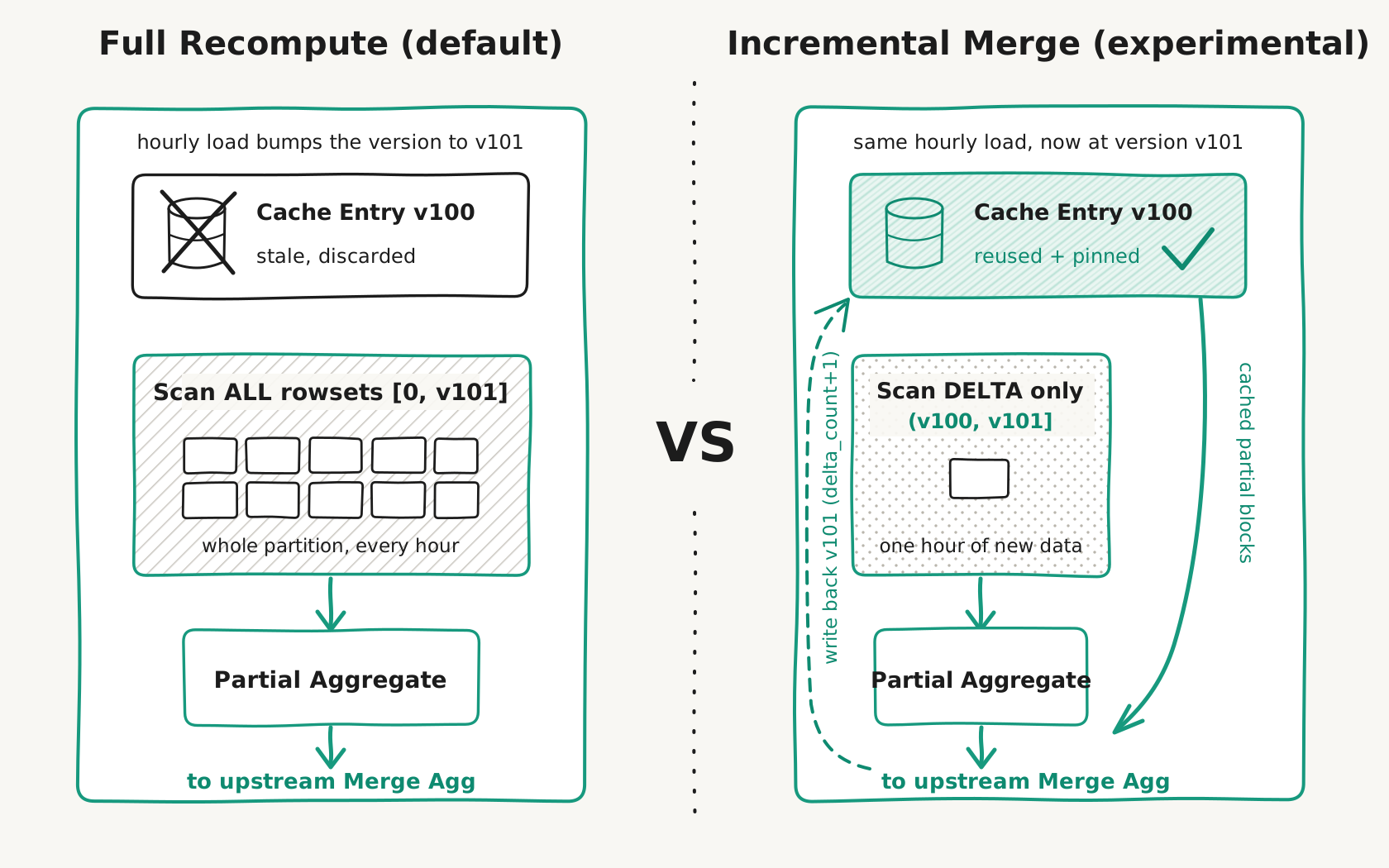
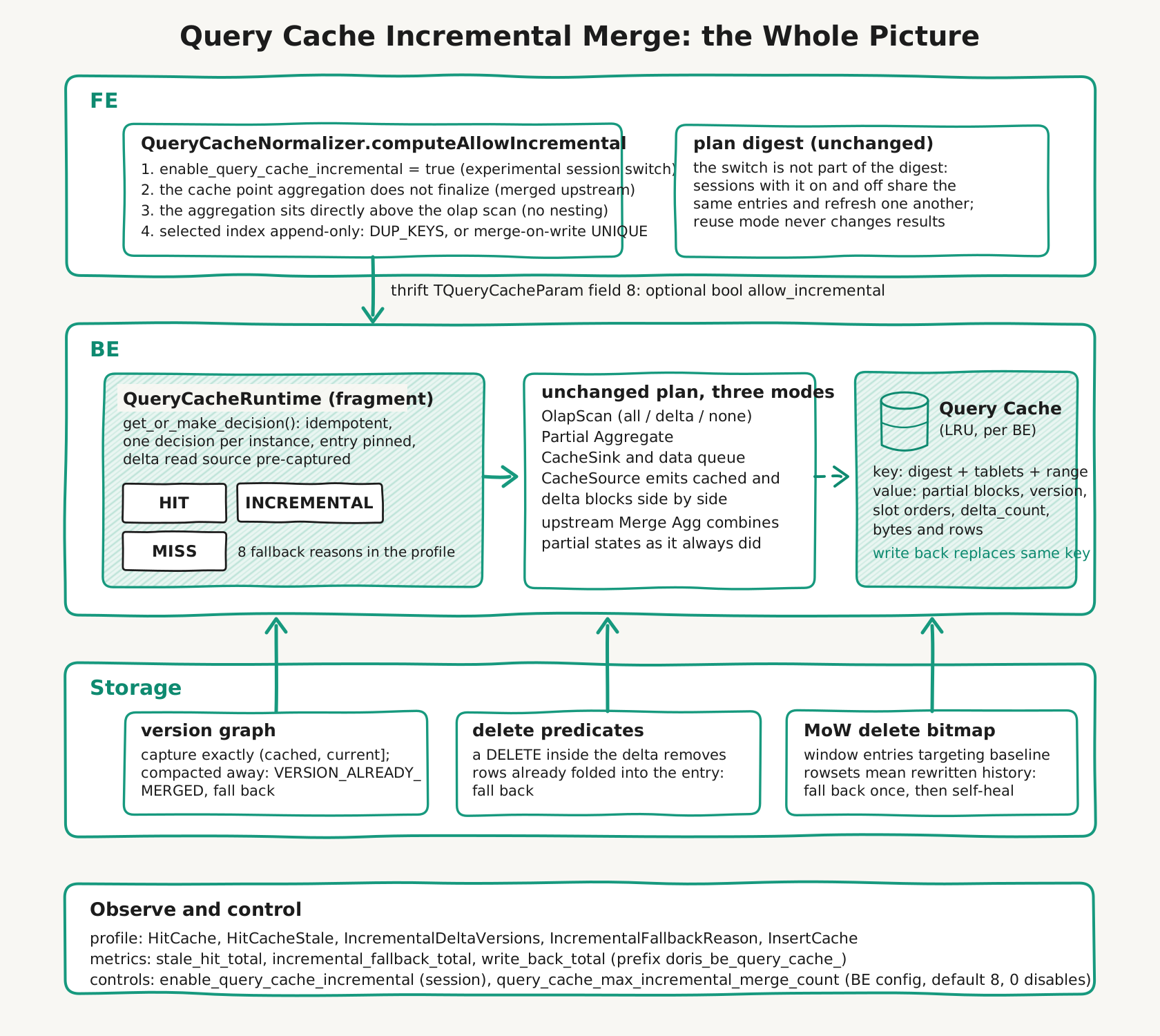
By default, a cache entry whose version falls behind (for example, the current partition of a table that receives hourly loads) is discarded, and the whole instance is recomputed from a full scan. With incremental merge enabled, BE reuses the stale entry instead: it scans only the delta rowsets in (cached_version, current_version], emits their partial aggregation state together with the cached partial blocks (the upstream merge aggregation combines both), and writes the merged entry back under the new version. For an hourly-load pattern this reduces the hot partition's scan cost from "the whole partition, every hour" to "one hour of new data".
SET enable_query_cache = true;
SET enable_query_cache_incremental = true;  -- shown as experimental_enable_query_cache_incremental in SHOW VARIABLES
Prerequisites
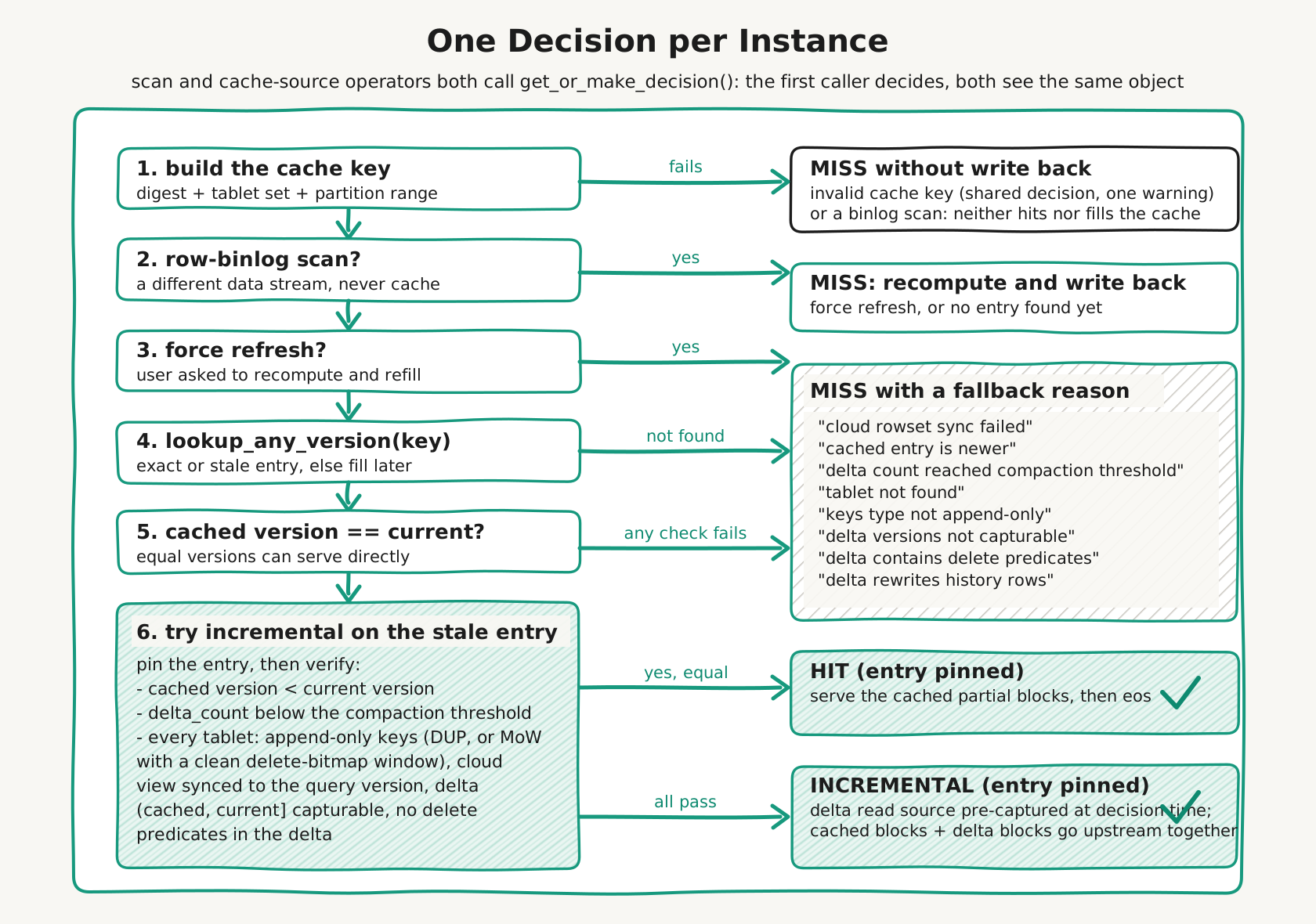
Incremental merge only takes effect when all of the following hold; in every other case the query silently falls back to a full recompute, so results are always correct:
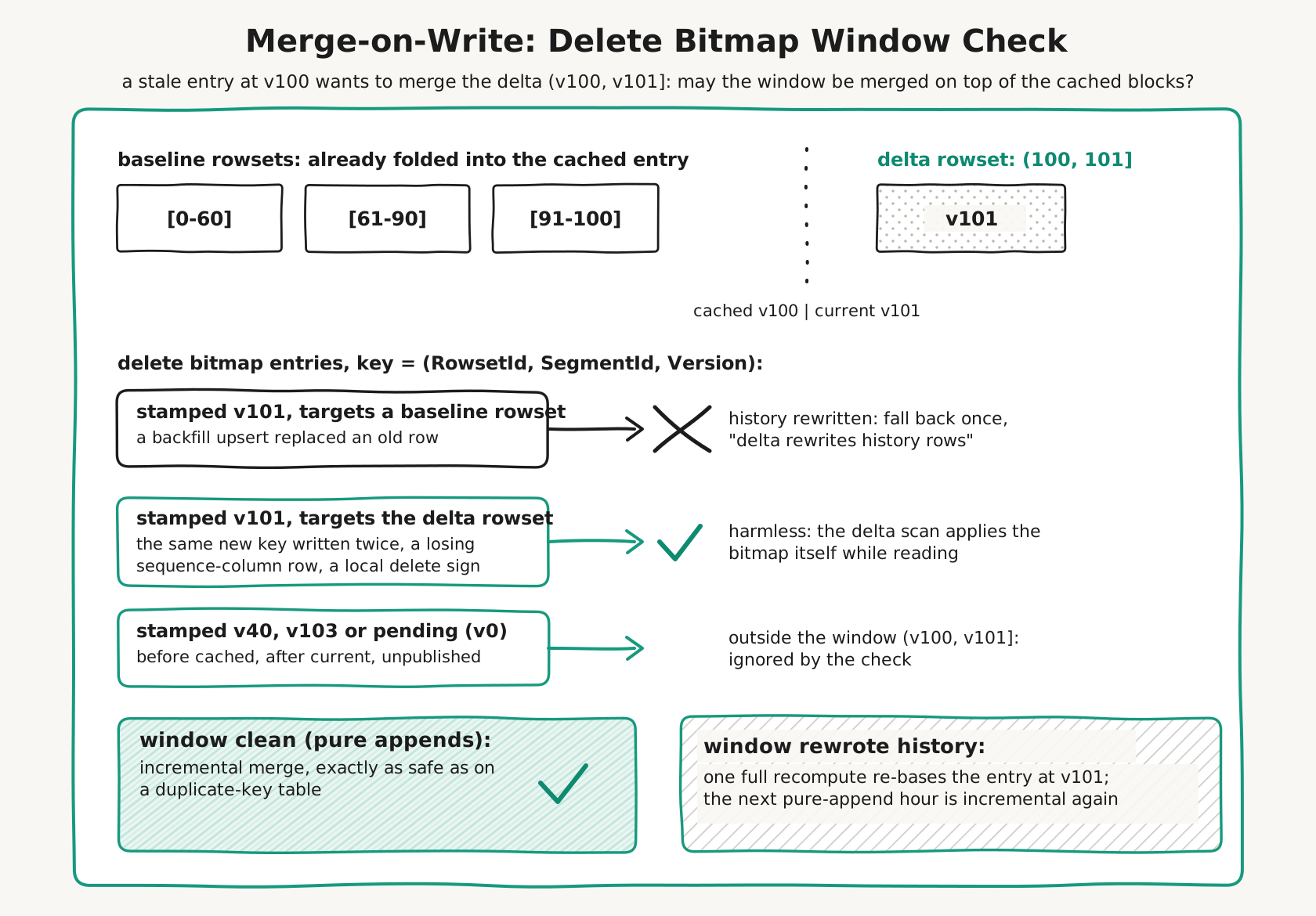
- The scanned index (base table or the selected rollup) is append-only: either the DUP_KEYS model, or a merge-on-write UNIQUE_KEYS table whose delta window did not rewrite any pre-existing key. For merge-on-write tables BE checks the delete bitmap of
(cached_version, current_version]per tablet: a window that only appended brand-new keys (the common "hourly load" pattern on a primary-key table) is merged incrementally, while an upsert, a partial update or a delete sign that hit an older key falls back to one full recompute, which re-bases the entry so the next pure-append load is incremental again. Merge-on-read UNIQUE tables resolve duplicates while reading and AGG tables merge rows inside the storage layer, so "cached snapshot + delta = new snapshot" would not hold there. Aggregated materialized views are rejected for the same reason. - The cache point is a non-finalize aggregation directly above the scan (the common two-phase aggregation shape, e.g.
GROUP BYon a non-distribution column). One-phase aggregations and nested aggregation cache points are rejected. - The tablet view can be synced to the queried version. This holds trivially in the compute-storage coupled mode; in the compute-storage decoupled (cloud) mode the per-tablet decision first brings the local view (rowsets, and for merge-on-write tables the delete bitmap) up to the queried version, which is usually free (a no-op when the view is already fresh, otherwise it merely front-loads the sync the scan would perform anyway); a sync that fails, or that stalls past a short fast-fail budget (
query_cache_decision_sync_timeout_ms, a BE config, so a slow meta service cannot hold the decision's admission thread), falls back to one full recompute. - The delta version path is still capturable (not merged away by compaction) and contains no DELETE predicate, because a delete inside the delta logically removes rows that are already folded into the cached blocks, which cannot be undone by merging.
For merge-on-write tables, the delete bitmap window check works as follows:
On compute-storage decoupled (cloud) clusters, two session variables trade version exactness for speed: query_freshness_tolerance_ms lets the scan stop at a warmed-up version below the queried one, and enable_prefer_cached_rowset lets it follow the warmed-up rowset layout; under either knob the walk may also reach beyond the queried version (a warmed compaction rowset spanning it drags the path past). A query running with either knob may therefore read a version-inexact view, so it does not use incremental merge: the delta capture always targets the exact queried version, which would defeat the knob. Independent of incremental merge, BE also skips the query cache write-back of such a query on cloud, so no entry whose content mismatches its version stamp is ever created; the query can still consume an exact HIT filled by a plain run. The incremental-merge exclusion itself is applied in every deployment mode (a deliberately mode-agnostic gate); on local storage the knobs are inert, so it merely forgoes the incremental optimization for a query that opted into a cloud-only trade-off, and results stay correct either way.
Compaction of Merged Entries
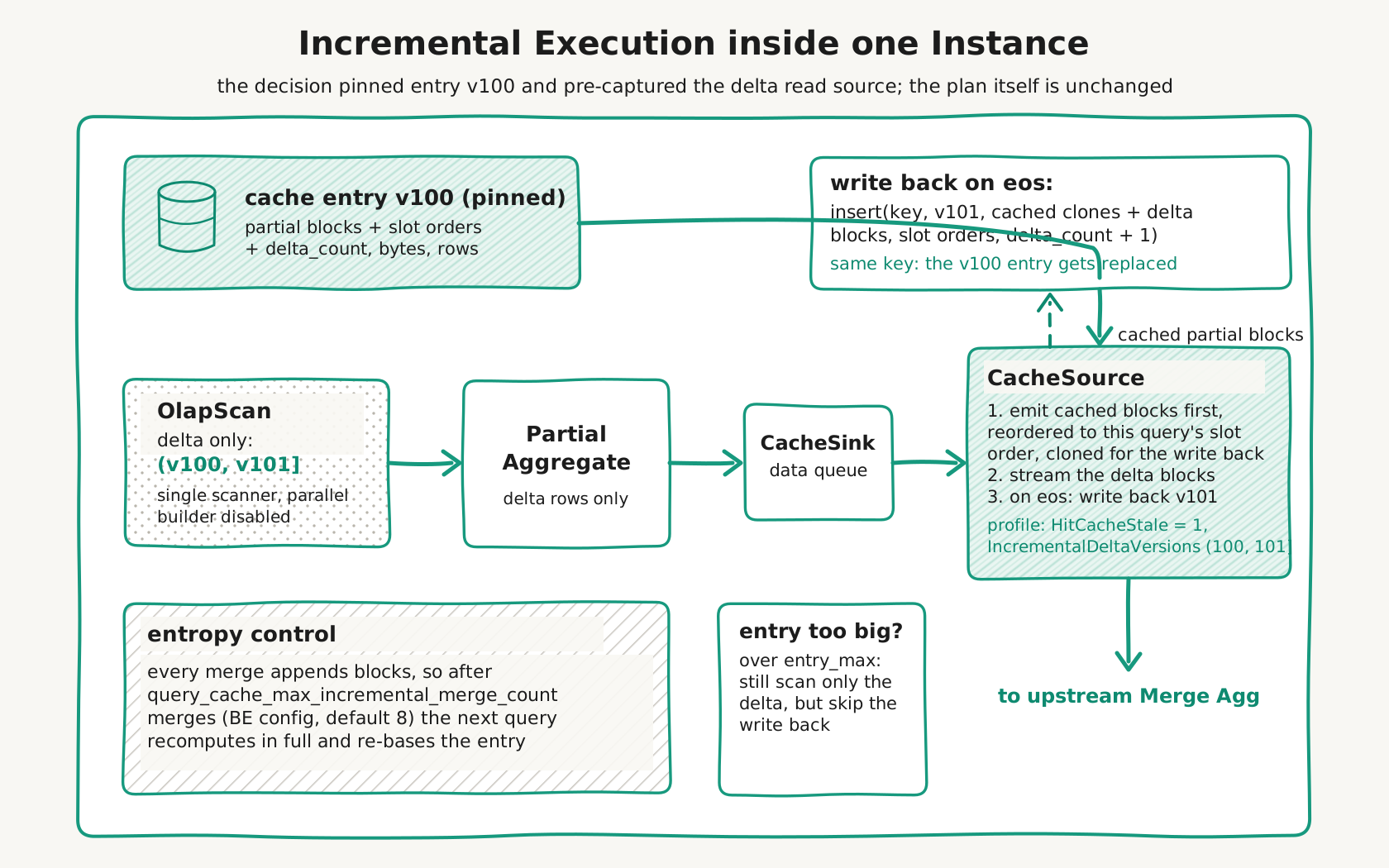
Every incremental merge appends the delta blocks to the entry, so the entry gets more fragmented over time. When an entry has accumulated query_cache_max_incremental_merge_count merges (BE configuration, default 8, changeable at runtime), the next query recomputes it from a full scan, which naturally compacts the entry.
The dataflow inside one instance, including the write-back and both entropy controls:
Observability
- In the query profile of the CACHE_SOURCE operator:
HitCacheStale = 1indicates an incremental merge;IncrementalDeltaVersionsshows the delta range (for example(100, 114514]); when a stale entry could not be reused,IncrementalFallbackReasonexplains why (delta versions not capturable,delta contains delete predicates,delta rewrites history rows,keys type not append-only,cloud rowset sync failed,cloud rowset sync timed out, and so on). - BE metrics:
doris_be_query_cache_stale_hit_total,doris_be_query_cache_incremental_fallback_total,doris_be_query_cache_write_back_total, anddoris_be_query_cache_decision_sync_time_ms(only advances in the compute-storage decoupled mode: cumulative wall time the incremental decision spent syncing tablet views to the queried version before capturing the delta).
How BE decides between HIT, INCREMENTAL and MISS, and where each fallback reason comes from:
Putting it all together, from the FE authorization to the storage-level guards:
Configuration Parameters
Session Variables (FE)
| Parameter | Description | Default |
|---|---|---|
enable_query_cache | The master switch that enables or disables the Query Cache. | false |
query_cache_force_refresh | When set to true, the cached result is ignored and the query is re-executed; the new result is still written to the cache. | false |
query_cache_entry_max_bytes | The maximum size in bytes of a single cache entry; fragment results that exceed this limit are not cached. | 5242880 (5 MB) |
query_cache_entry_max_rows | The maximum number of rows of a single cache entry; fragment results that exceed this limit are not cached. | 500000 |
enable_query_cache_incremental | (Experimental) Allows BE to reuse a stale cache entry by scanning only the delta rowsets since the cached version and merging them with the cached partial aggregation blocks. See Incremental Merge. | false |
BE Configuration (be.conf)
| Parameter | Description | Default |
|---|---|---|
query_cache_size | The total memory capacity of the Query Cache on each BE (MB). | 512 |
query_cache_max_incremental_merge_count | The maximum number of incremental merges accumulated on one cache entry before a full recompute is forced to compact it. 0 disables incremental merge at runtime. | 8 |
query_cache_decision_sync_timeout_ms | (Cloud mode only) Fast-fail budget in milliseconds for the incremental-merge decision to sync each tablet view up to the queried version before capturing the delta; if a sync does not finish within it the query falls back to one full recompute. <= 0 disables cloud incremental merge (any pending sync falls back). Runtime-changeable. | 2000 |
The query_cache_max_size_mb and query_cache_elasticity_size_mb settings in be.conf control the legacy SQL Result Cache. They are not the pipeline-level Query Cache described in this article. Do not confuse them.
Usage Examples
Step 1: Enable the Query Cache
Goal: Turn on the Query Cache master switch.
SET enable_query_cache = true;
Description: This variable is session-scoped and must be enabled in each connection. You can also set its default value as a global FE variable.
Step 2: Run a Typical Aggregation Query
Goal: Trigger cache writes and reads.
-- First execution: cache miss, compute the result and write it to the cache
SELECT region, SUM(revenue), COUNT(*)
FROM orders
WHERE dt = '2024-01-15' AND status = 'completed'
GROUP BY region;

-- Second execution: cache hit, return the result directly from the cache
SELECT region, SUM(revenue), COUNT(*)
FROM orders
WHERE dt = '2024-01-15' AND status = 'completed'
GROUP BY region;
Description: The SQL digest, tablet ID list, and tablet range of the second execution are identical to those of the first, so the cache is hit.
Step 3: Verify the Hit Through the Profile
Goal: Confirm whether the query actually uses the cache.
After running the query, check the profile and locate the CacheSourceOperator section:
| Profile Field | Meaning |
|---|---|
HitCache: true | The query retrieved its result from the cache. |
HitCache: false, InsertCache: true | A miss, but the result was successfully written to the cache. |
HitCache: false, InsertCache: false | A miss, and the result was too large to be cached. |
CacheTabletId | The tablet ID that the cache entry covers. |
Step 4: Force a Cache Refresh
Goal: Ignore the existing cache and recompute the result (for example, when you suspect cached data is incorrect).
-- Force the next query to skip the cache and recompute the result
SET query_cache_force_refresh = true;

SELECT region, SUM(revenue) FROM orders WHERE dt = '2024-01-15' GROUP BY region;

-- Reset
SET query_cache_force_refresh = false;
Description: After a forced refresh, the new result is still written to the cache.
Use-case Comparison
| Scenario | Applicable | Reason |
|---|---|---|
| Dashboards or BI tools that repeatedly run the same aggregation SQL | Yes | Digest and tablets match exactly, producing a high hit rate. |
| T+1 reports (data loaded once per day) | Yes | Same-day subsequent queries can hit the cache. |
| Aggregation queries with overlapping date ranges | Yes | Single-column RANGE partitioning lets entries be shared at the tablet level. |
| Plain SELECT scans, JOINs, sorts, and window functions | No | Only the "aggregation-scan" pattern is supported. |
| External tables (Hive, JDBC, Iceberg, Hudi, Paimon) | No | No tablet or version mechanism. Use SQL Cache instead. |
| Frequently updated tables | No | Tablet versions change rapidly, leading to a low hit rate. |
Queries containing now(), rand(), uuid(), or UDFs | No | Non-deterministic results disable the cache. |
| Queries that depend on runtime filters | No | Runtime filter values are unknown at planning time. |
Notes
- Cache is not persistent: The Query Cache resides in BE memory and is cleared when the BE restarts.
- Memory consumption: Cached data blocks consume BE memory. Monitor memory usage and adjust
query_cache_sizeas needed. - LRU-K admission: When the cache is full, a new entry must be accessed at least twice (K=2) before it is admitted, which prevents low-frequency queries from polluting the cache.
Troubleshooting
| Symptom | Possible Cause | Solution |
|---|---|---|
HitCache: false keeps appearing | enable_query_cache is not enabled. | Run SET enable_query_cache = true. |
HitCache: false, InsertCache: false | A single-entry result is too large, exceeding query_cache_entry_max_bytes or _max_rows. | Increase the corresponding threshold or add filters to reduce the result size. |
CacheSourceOperator is missing from the plan | The plan contains JOIN/SORT/UNION/WINDOW, or it is the target of a runtime filter. | Rewrite the SQL to match the "aggregation-scan" pattern. |
| The table is an external table | The Query Cache does not support external tables. | Use SQL Cache. |
| Data has not changed but the cache still misses | A schema change, a session variable change, or query_cache_force_refresh = true. | Review ALTER history, compare session variables, and reset query_cache_force_refresh. |
| The cache hit rate is very low | The tablet is updated or compacted frequently. | Reduce write frequency, or enable the cache only for low-update tables. |
| BE memory pressure increases | query_cache_size is set too high. | Lower query_cache_size and restart the BE. |
FAQ
Q1: How does the Query Cache differ from the SQL Cache?
| Dimension | Query Cache | SQL Cache |
|---|---|---|
| Cache granularity | Intermediate aggregation results at tablet granularity. | The final result of an entire SQL statement. |
| Applicable queries | Aggregation queries on internal OLAP tables only. | Any query, including queries on external tables. |
| Sharing capability | Different SQL statements can share cache entries at the tablet level. | Only an exact SQL text match can hit. |
| Invalidation | Invalidates as soon as a tablet version changes. | Based on partition versions or time. |
Q2: Will the cache be hit immediately after enabling it?
No. The first execution is a "cache miss with cache write"; only the second and later executions can hit. In addition, LRU-K (K=2) requires a new entry to be accessed at least twice before it is actually admitted.
Q3: Can aggregations that involve a JOIN be cached?
It depends on where the aggregation sits relative to the JOIN. If the aggregation is directly above the JOIN (a JoinNode appears in the cached subtree), that fragment is not cached, independent of runtime filters. But if you rewrite the query to aggregate first and then JOIN (pushing the aggregation down onto each table's scan), the per-tablet aggregation of each table can be cached on its own. One independent constraint still applies here: the JOIN pushes a runtime filter onto the probe-side scan, which makes that side's fragment non-cacheable, so with runtime filters on, only the build side is cached; to let every table in the JOIN be cached, also set runtime_filter_mode=OFF. Alternatively, use a materialized view.
Q4: Does the cache need warm-up after a BE restart?
Yes. The Query Cache is an in-memory cache that is cleared on restart. You can run the core aggregation SQL during off-peak hours to warm it up.
Q5: How can you confirm whether the cache is actually hit?
After running the SQL, check the HitCache field of the CacheSourceOperator in the profile.
Summary
The Query Cache is a pipeline-level optimization mechanism in Doris that caches intermediate aggregation results at tablet granularity. Its core characteristics are:
- Applies only to aggregation queries on internal OLAP tables.
- Performs cache invalidation automatically based on tablet versions.
- Intelligently separates partition predicates from the digest, allowing queries with overlapping partition ranges to share the cache.
- Provides per-entry size and row limits to prevent oversized results from consuming cache memory.
- Uses an LRU-K (K=2) eviction policy to maintain a high-quality cache.
