Aggregate Model
The Doris Aggregate Key Model is designed to efficiently handle aggregate operations on large-scale data queries. By performing pre-aggregation during data ingestion and the background merge stage, it reduces redundant computation and stores only the aggregated results, saving storage space and accelerating queries.
Applicable Scenarios
The Aggregate Model fits the following two types of business scenarios:
- Detail data summarization: multidimensional summary analysis such as monthly sales performance on e-commerce platforms, total customer transaction amounts in financial risk control, and ad click counts.
- Queries that do not depend on raw details: such as cockpit reports and user transaction behavior analysis. Raw detail data is kept in the data lake, and the warehouse only needs to store the summarized results.
How It Works
Each data ingestion creates a new version in the Aggregate Model. Versions are merged during the background Compaction stage, and the data is aggregated again by the primary key at query time. The overall flow is divided into three stages:
- Data ingestion stage: Data is ingested in batches. Each batch generates a version, and rows with the same aggregate key are pre-aggregated (for example, sum or count).
- Background merge stage (Compaction): Multiple version files are merged periodically to reduce redundancy and optimize storage.
- Query stage: The system performs a final aggregation on the data by the aggregate key to ensure accurate query results.
Table Creation Syntax
Use the AGGREGATE KEY keyword to specify the Aggregate Model, and declare Key columns used to aggregate Value columns.
CREATE TABLE IF NOT EXISTS example_tbl_agg
(
    user_id             LARGEINT    NOT NULL,
    load_date           DATE        NOT NULL,
    city                VARCHAR(20),
    last_visit_dt       DATETIME    REPLACE DEFAULT "1970-01-01 00:00:00",
    cost                BIGINT      SUM     DEFAULT "0",
    max_dwell           INT         MAX     DEFAULT "0"
)
AGGREGATE KEY(user_id, load_date, city)
DISTRIBUTED BY HASH(user_id) BUCKETS 10;
The example above defines a table of user information and visit behavior, using user_id, load_date, and city as Key columns for aggregation. During data ingestion, rows with the same Key column values are aggregated into a single row, and Value columns are aggregated by dimension according to the declared aggregate type.
Supported Aggregation Methods
Value columns in an aggregate table support the following aggregation methods:
| Aggregation Method | Description |
|---|---|
| SUM | Sums values; accumulates Values across multiple rows. |
| REPLACE | Replaces; the Value in the next batch replaces the Value from previous rows. |
| MAX | Keeps the maximum value. |
| MIN | Keeps the minimum value. |
| REPLACE_IF_NOT_NULL | Replaces with non-null values. Differs from REPLACE in that it does not replace null values. |
| HLL_UNION | Used for HLL-type columns; aggregates with the HyperLogLog algorithm. |
| BITMAP_UNION | Used for BITMAP-type columns; performs a bitmap union aggregation. |
If the aggregation methods above do not meet your business needs, you can use the AGG_STATE type.
Data Write and Aggregation Example
Data in the aggregate table is aggregated based on Key columns, and the aggregation is completed once the write finishes.
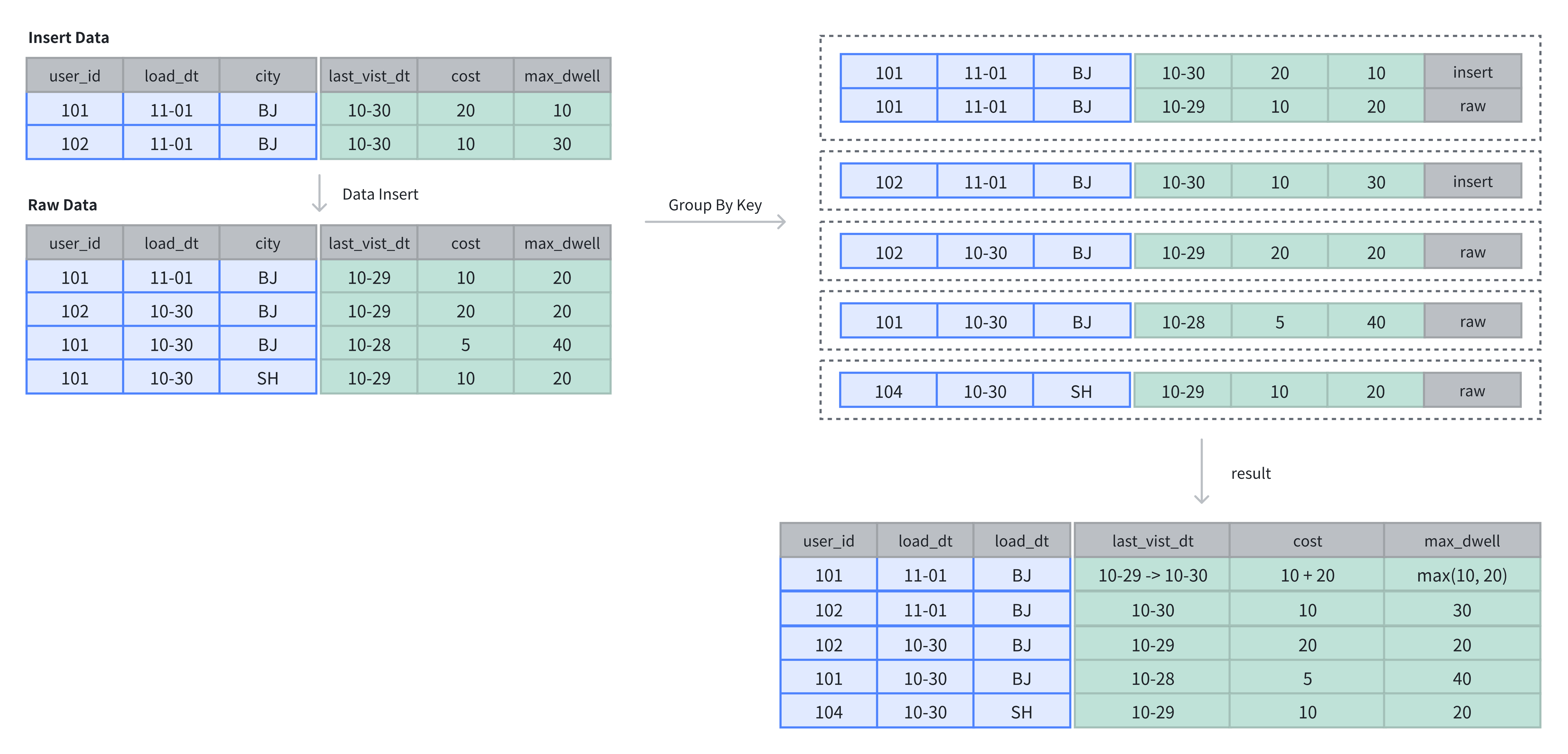
In the following example, the table originally contains 4 rows. After inserting 2 more rows, the Value columns are aggregated based on the Key columns.
-- 4 rows raw data
INSERT INTO example_tbl_agg VALUES
(101, '2024-11-01', 'BJ', '2024-10-29', 10, 20),
(102, '2024-10-30', 'BJ', '2024-10-29', 20, 20),
(101, '2024-10-30', 'BJ', '2024-10-28',  5, 40),
(101, '2024-10-30', 'SH', '2024-10-29', 10, 20);

-- insert into 2 rows
INSERT INTO example_tbl_agg VALUES
(101, '2024-11-01', 'BJ', '2024-10-30', 20, 10),
(102, '2024-11-01', 'BJ', '2024-10-30', 10, 30);

-- check the rows of table
SELECT * FROM example_tbl_agg;
+---------+------------+------+---------------------+------+----------------+
| user_id | load_date  | city | last_visit_dt       | cost | max_dwell       |
+---------+------------+------+---------------------+------+----------------+
| 102     | 2024-10-30 | BJ   | 2024-10-29 00:00:00 |   20 |             20 |
| 102     | 2024-11-01 | BJ   | 2024-10-30 00:00:00 |   10 |             30 |
| 101     | 2024-10-30 | BJ   | 2024-10-28 00:00:00 |    5 |             40 |
| 101     | 2024-10-30 | SH   | 2024-10-29 00:00:00 |   10 |             20 |
| 101     | 2024-11-01 | BJ   | 2024-10-30 00:00:00 |   30 |             20 |
+---------+------------+------+---------------------+------+----------------+
AGG_STATE
AGG_STATE is an experimental feature. It is recommended for use in development and test environments.
AGG_STATE fits scenarios where the built-in aggregation methods cannot meet your needs. Note the following constraints when using it:
- It cannot be used as a Key column.
- The aggregate function signature must be declared at table creation.
- No length or default value needs to be specified; the actual storage size depends on the function implementation.
Table Creation Example
set enable_agg_state = true;

CREATE TABLE aggstate
(
    k1   INT  NULL,
    v1   INT  SUM,
    v2   agg_state<group_concat(string)> generic
)
AGGREGATE KEY(k1)
DISTRIBUTED BY HASH(k1) BUCKETS 3;
In the example above, agg_state is used to declare the data type, and sum / group_concat are aggregate function signatures. agg_state is a data type (similar to int, array, or string) and can only be used together with the three function combinators state, merge, and union. It represents the intermediate result of an aggregate function (for example, the intermediate state of group_concat), not the final result.
Write: Use state to Generate Intermediate Results
Data of the agg_state type must be generated using the state function. For this table, use group_concat_state:
INSERT INTO aggstate VALUES (1, 1, group_concat_state('a'));
INSERT INTO aggstate VALUES (1, 2, group_concat_state('b'));
INSERT INTO aggstate VALUES (1, 3, group_concat_state('c'));
INSERT INTO aggstate VALUES (2, 4, group_concat_state('d'));
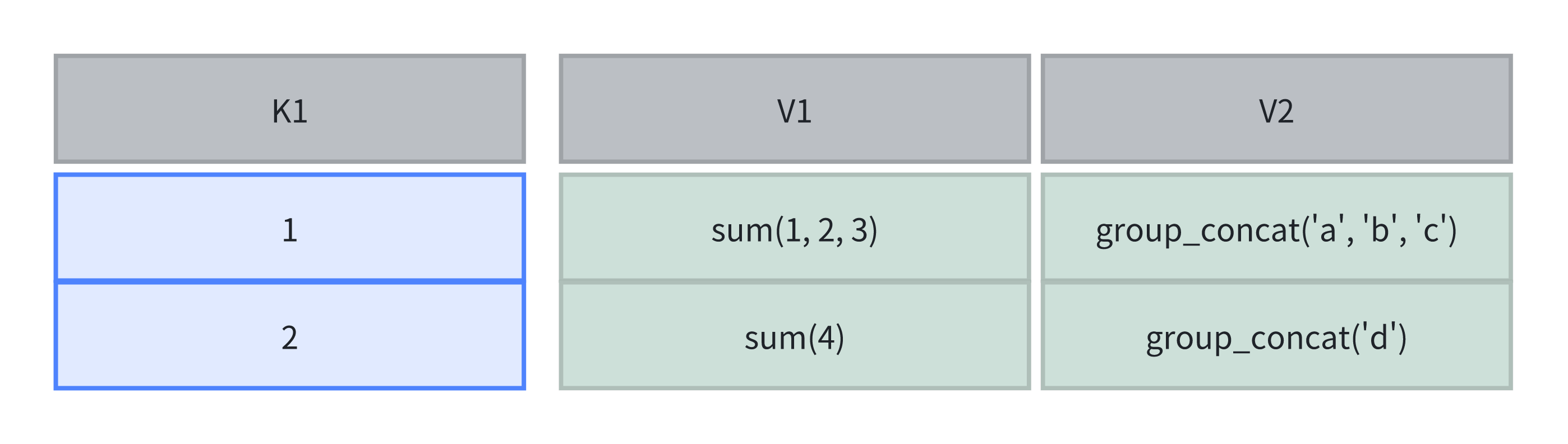
The computation in the table at this point is shown in the following figure:
Query: Use merge to Return the Final Result
At query time, you can use the merge operation to combine multiple states and return the final aggregated result. Because group_concat is order-sensitive, the result is unstable:
SELECT group_concat_merge(v2) FROM aggstate;
+------------------------+
| group_concat_merge(v2) |
+------------------------+
| d,c,b,a                |
+------------------------+
Retain Intermediate Results: Use the union Operation
If you do not need the final aggregated result and instead want to retain the intermediate result, use the union operation:
INSERT INTO aggstate
SELECT 3, sum(v1), group_concat_union(v2) FROM aggstate;
The computation in the table at this point is shown in the following figure:
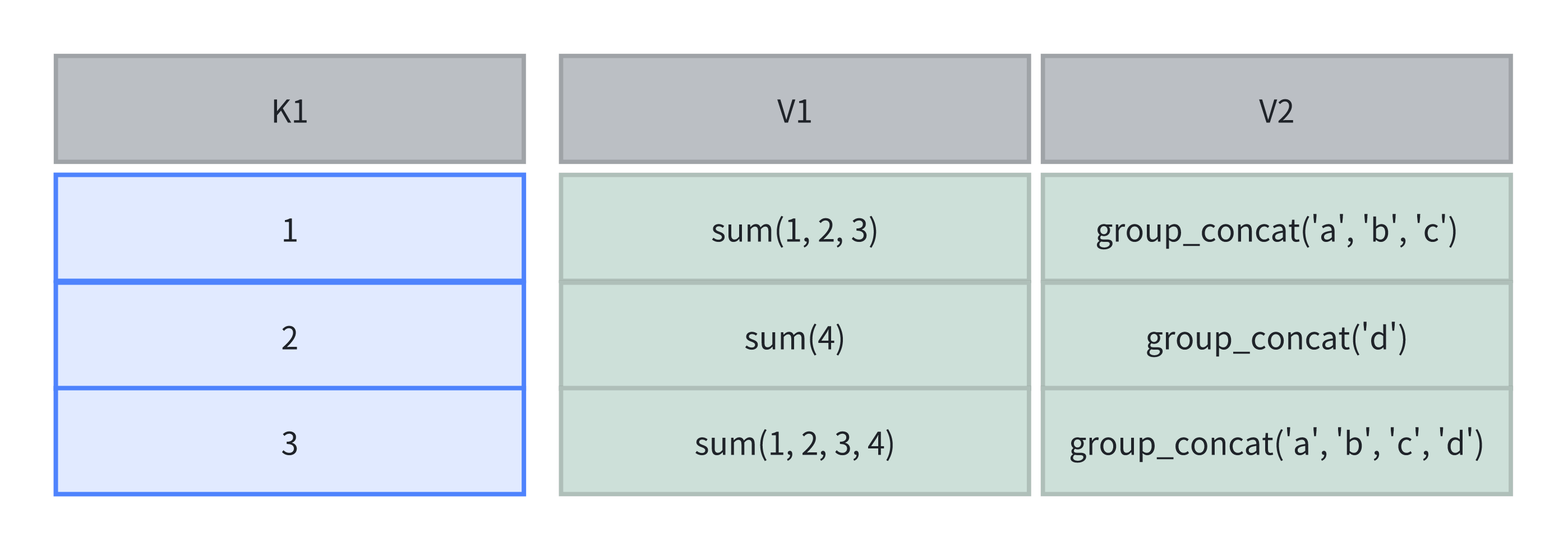
Because group_concat is order-sensitive, the result is unstable. The query results are as follows:
mysql> SELECT sum(v1), group_concat_merge(v2) FROM aggstate;
+---------+------------------------+
| sum(v1) | group_concat_merge(v2) |
+---------+------------------------+
|      20 | c,b,a,d,c,b,a,d        |
+---------+------------------------+

mysql> SELECT sum(v1), group_concat_merge(v2) FROM aggstate WHERE k1 != 2;
+---------+------------------------+
| sum(v1) | group_concat_merge(v2) |
+---------+------------------------+
|      16 | c,b,a,d,c,b,a          |
+---------+------------------------+
