Data Bucketing
A partition can be further divided into multiple data buckets according to business requirements. Each bucket is stored as a physical data shard (Tablet). A reasonable bucketing strategy can effectively reduce the amount of data scanned at query time, improve query performance, and increase concurrent processing capability.
This document is organized along the decision path used during table creation: first choose the bucketing method, then select the bucket key, and finally determine the number of buckets and the subsequent maintenance approach.
Quick Decision
When creating a table, you can complete the bucketing design in the following order:
| Step | Decision Item | Key Considerations |
|---|---|---|
| 1 | Choose the bucketing method | Whether there are high-frequency filter columns, whether the data is evenly distributed, and the table model |
| 2 | Select the bucket key (Hash bucketing only) | Query filter conditions, column cardinality, query concurrency and throughput characteristics |
| 3 | Determine the number of buckets | Data size per Tablet, number of BEs, number of disks |
| 4 | Plan the bucket maintenance strategy | Data growth trend, whether dynamic partitioning is used |
1. Choose the Bucketing Method
Doris supports two bucketing methods: Hash bucketing and Random bucketing. Their core differences are as follows:
| Comparison Item | Hash Bucketing | Random Bucketing |
|---|---|---|
| Data distribution method | Divided by the Hash value of the bucket key | Randomly and evenly distributed |
| Whether a bucket key is required | Required | Not required |
| Whether bucket pruning is supported | Supported | Not supported |
| Applicable table models | DUPLICATE / UNIQUE / AGGREGATE | DUPLICATE only |
| Risk of data skew | Depends on the choice of bucket key | Lower |
| Applicable scenarios | Point queries that frequently filter by a specific column | Analysis on arbitrary dimensions, data prone to skew |
1. Hash Bucketing
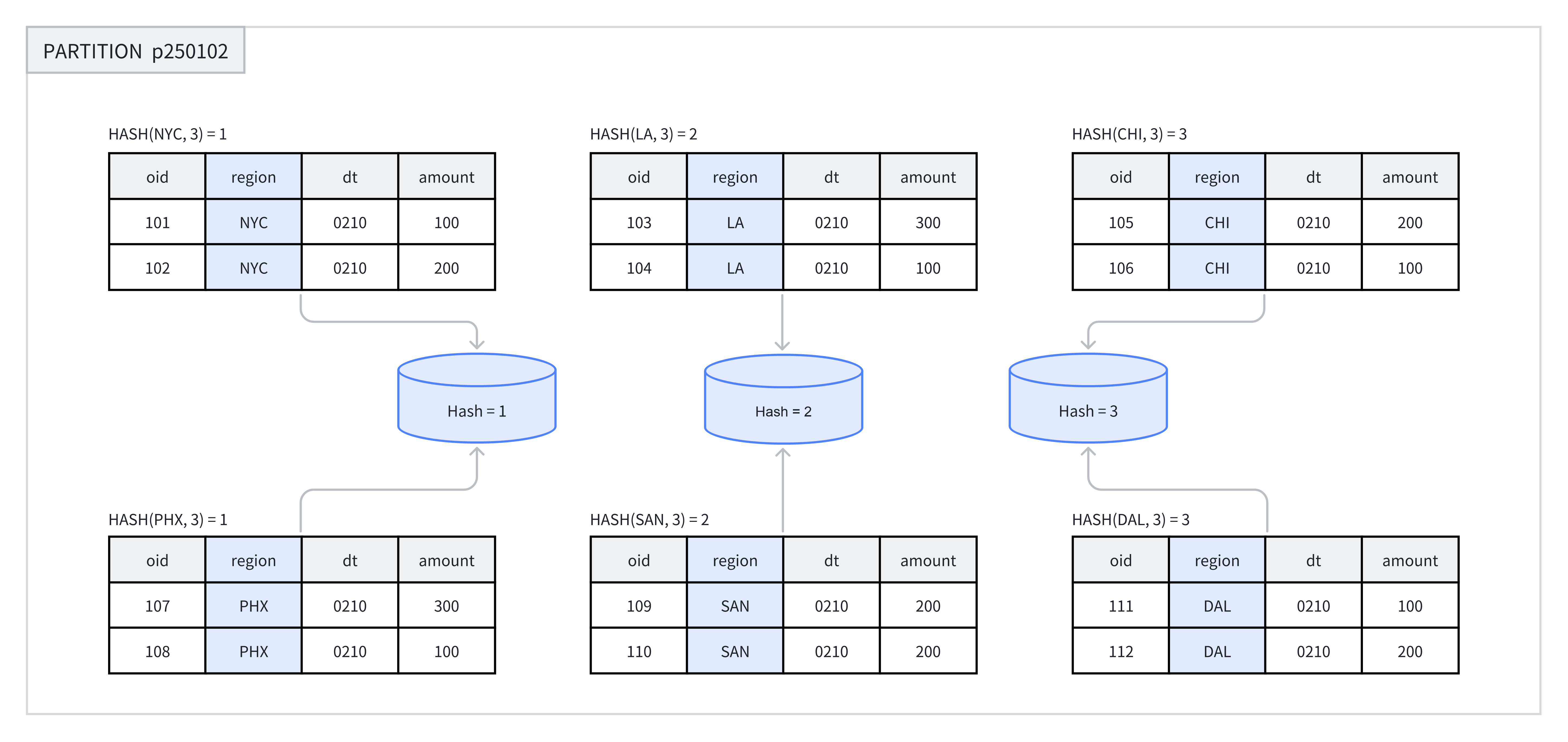
When creating a table or adding a new partition, you need to choose one or more columns as the bucket key and explicitly specify the number of buckets. Within the same partition, the system performs a Hash calculation based on the bucket key and the number of buckets, and rows with the same Hash value are assigned to the same bucket.
For example, in the figure below, the p250102 partition is divided into 3 buckets by the region column, and rows with the same Hash value are placed in the same bucket.
Recommended scenarios:
- When the business frequently filters on a specific field, you can use that field as the bucket key and leverage bucket pruning to improve query efficiency.
- The data in the table is relatively evenly distributed and unlikely to be skewed.
Example: Create a table with Hash bucketing. For detailed syntax, see CREATE TABLE.
The examples below qualify table names with the demo database; create it first if it doesn't exist on your cluster:
CREATE DATABASE IF NOT EXISTS demo;
CREATE TABLE demo.hash_bucket_tbl(
    oid         BIGINT,
    dt          DATE,
    region      VARCHAR(10),
    amount      INT
)
DUPLICATE KEY(oid)
PARTITION BY RANGE(dt) (
    PARTITION p250101 VALUES LESS THAN("2025-01-01"),
    PARTITION p250102 VALUES LESS THAN("2025-01-02")
)
DISTRIBUTED BY HASH(region) BUCKETS 8;
In the example, DISTRIBUTED BY HASH(region) specifies the use of Hash bucketing and selects the region column as the bucket key. BUCKETS 8 specifies the creation of 8 buckets.
2. Random Bucketing
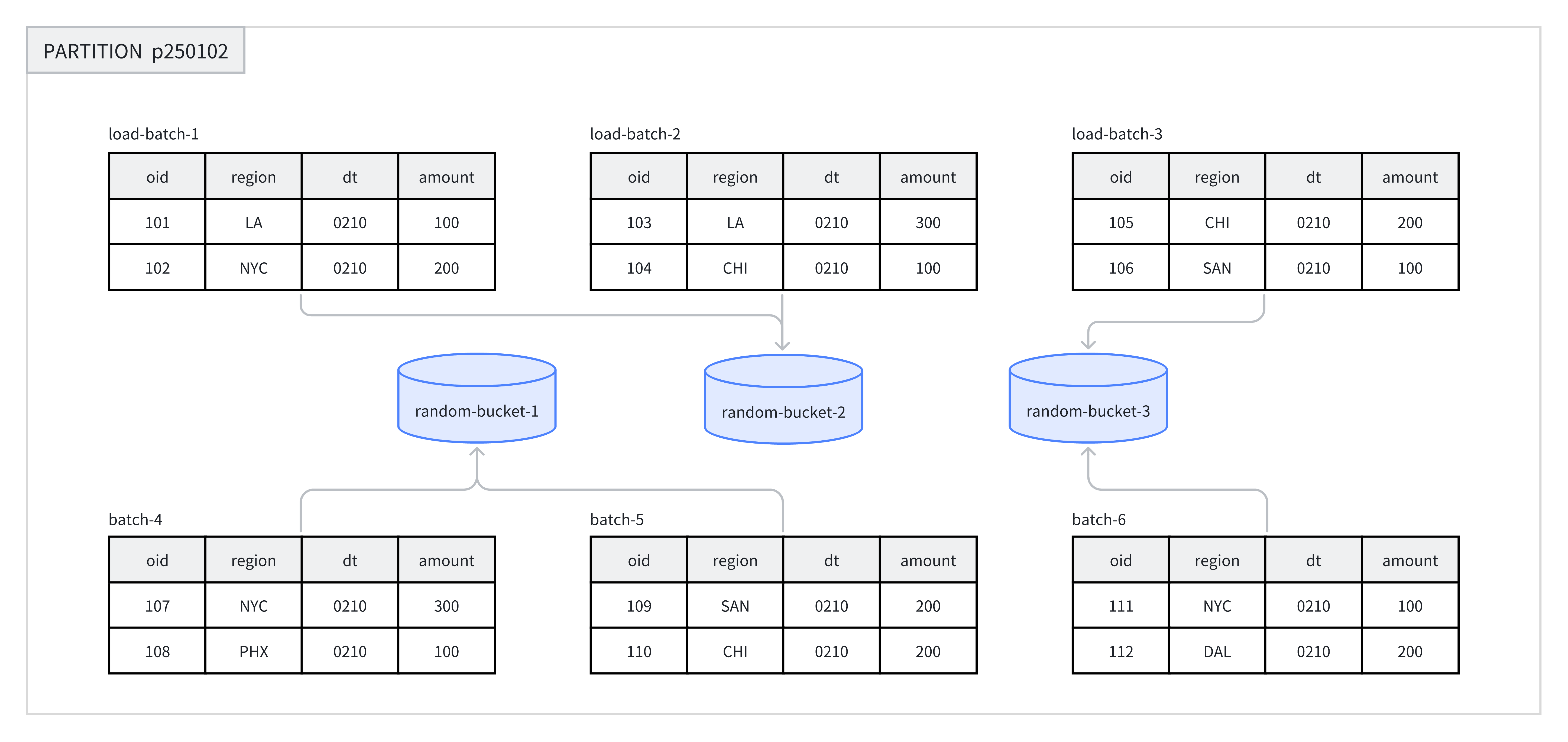
Random bucketing randomly distributes data across the buckets within each partition, without relying on the Hash value of any field. This approach ensures that data is evenly spread out and avoids data skew caused by an inappropriate choice of bucket key.
When data is loaded, each batch in a single load job is randomly written to a Tablet, which guarantees an even data distribution. For example, in the figure below, 8 batches of data are randomly assigned to 3 buckets under the p250102 partition.
When using Random bucketing, you can enable single-tablet load mode (set load_to_single_tablet to true), so that the data of a single batch is written to only one data shard. This can:
- Improve the concurrency and throughput of large-scale data loads.
- Reduce write amplification caused by data loading and Compaction operations.
- Improve cluster stability.
Recommended scenarios:
- Analysis on arbitrary dimensions, where the business has no fixed filter or join columns.
- The data distribution of frequently queried columns or column combinations is highly uneven, and data skew must be avoided.
Unsuitable scenarios:
- Point query scenarios: Random bucketing cannot perform pruning based on the bucket key, so it scans all data in the matched partitions.
- UNIQUE and AGGREGATE tables: only DUPLICATE tables support Random bucketing.
Example: Create a table with Random bucketing. For detailed syntax, see CREATE TABLE.
CREATE TABLE demo.random_bucket_tbl(
    oid         BIGINT,
    dt          DATE,
    region      VARCHAR(10),
    amount      INT
)
DUPLICATE KEY(oid)
PARTITION BY RANGE(dt) (
    PARTITION p250101 VALUES LESS THAN("2025-01-01"),
    PARTITION p250102 VALUES LESS THAN("2025-01-02")
)
DISTRIBUTED BY RANDOM BUCKETS 8;
In the example, DISTRIBUTED BY RANDOM specifies the use of Random bucketing and does not require selecting a bucket key. BUCKETS 8 specifies the creation of 8 buckets.
2. Select the Bucket Key
Only Hash bucketing requires selecting a bucket key. Random bucketing does not.
The bucket key can consist of one or more columns. Different table models impose the following restrictions on the bucket key:
| Table Model | Eligible Bucket Keys |
|---|---|
| DUPLICATE | Any Key column or Value column |
| AGGREGATE / UNIQUE | Must be Key columns (to ensure correct data aggregation) |
Selection Principles
Based on business query characteristics, you can refer to the following principles when selecting a bucket key:
| Principle | Description | Benefit |
|---|---|---|
| Leverage query filter conditions | Choose columns that frequently appear as filters in queries as the bucket key | Supports bucket pruning and reduces the amount of data scanned |
| Leverage high-cardinality columns | Choose columns with many distinct values as the bucket key | Data is evenly distributed and skew is avoided |
| High-concurrency point query scenarios | Choose a single column or a small number of columns as the bucket key | A single query triggers a scan of only one bucket, reducing IO interference between queries |
| High-throughput query scenarios | Choose multiple columns as the bucket key | Data is more evenly distributed; when the query conditions cannot fully match the equality conditions, overall throughput is improved |
3. Determine the Number of Buckets
In Doris, each Bucket is stored as a physical file (Tablet). The total number of Tablets in a table equals:
Total Tablets = partition_num × bucket_num
Once the number of buckets for a Partition is specified, it cannot be changed. When determining the number of buckets, plan ahead for future machine scaling.
Starting from version 2.0, Doris supports automatically setting the number of buckets in a partition based on machine resources and cluster information. You can choose between manual and automatic methods according to how precise the business requires the estimation to be.
1. Manually Set the Number of Buckets
Specify the number of buckets through the DISTRIBUTED clause:
-- Set hash bucket num to 8
DISTRIBUTED BY HASH(region) BUCKETS 8

-- Set random bucket num to 8
DISTRIBUTED BY RANDOM BUCKETS 8
Decision Principles
When determining the number of buckets, follow the two principles below. When they conflict, prioritize the size principle:
-
Size principle: The compressed data size of each Tablet (excluding indexes) is recommended to stay between 1 GB and 20 GB, and no more than 10 GB for Unique Key tables.
- Tablets that are too small: aggregation is less effective, and metadata management overhead increases.
- Tablets that are too large: replica migration and recovery become difficult, and the cost of retrying a failed Schema Change increases.
- You can use
SHOW TABLETS FROM your_tableto check the actual Tablet sizes.
-
Quantity principle: Without considering scaling, the number of Tablets in a table is recommended to be slightly larger than the total number of disks in the cluster.
In addition, note the following:
- The number of buckets should be an integer multiple of the number of BEs to ensure even data distribution.
- The number of buckets in a single partition should generally not exceed 128. If you need more, partition the table first.
Recommended Configuration Examples
Suppose the cluster has 10 BE machines, each with one disk. You can refer to the table below to set the number of buckets:
| Compressed Partition Data Size | Recommended Number of Buckets |
|---|---|
| < 1 GB | 1 bucket |
| 1 - 10 GB | 10 buckets |
| 10 - 200 GB | 10 - 20 buckets |
| > 200 GB | Partition the table first |
You can check the data size of a table with the SHOW DATA command. The result must be divided by the number of replicas to obtain the actual data size of the table.
2. Automatically Set the Number of Buckets
The automatic bucket inference feature predicts future partition sizes based on the partition sizes over a recent period and determines the number of buckets accordingly.
-- Set hash bucket auto
DISTRIBUTED BY HASH(region) BUCKETS AUTO
properties("estimate_partition_size" = "20G")

-- Set random bucket auto
DISTRIBUTED BY RANDOM BUCKETS AUTO
properties("estimate_partition_size" = "20G")
The estimate_partition_size property is used to adjust the initial estimate of the partition size:
- This parameter is optional. If not specified, the default value is
10GB. - This parameter only affects the initial estimate and is independent of the future partition size that the system later infers from historical partition data.
The computed bucket number is clamped between the FE configurations autobucket_min_buckets and autobucket_max_buckets:
| FE configuration | Default | Description |
|---|---|---|
autobucket_min_buckets | 3 | Lower bound of the auto bucketing result. The default changed from 1 to 3 in 4.0.8 for the 4.0 series and in 4.1.4 for the 4.1 series |
autobucket_max_buckets | 128 | Upper bound of the auto bucketing result |
The default of autobucket_min_buckets changed from 1 to 3 in 4.0.8 (the 4.0 series) and in 4.1.4 (the 4.1 series). Previously a small partition could be computed down to a single bucket, giving insufficient parallelism and data distribution. After the change, auto bucketing never produces fewer than 3 buckets.
The change only affects partitions created after the upgrade; the bucket number of existing partitions is unchanged. Set autobucket_min_buckets back to 1 explicitly to keep the old behavior.
4. Maintain Data Bucketing
Currently, Doris only supports modifying the number of buckets for newly added partitions. The following operations are not supported:
- Modifying the bucketing type is not supported.
- Modifying the bucket key is not supported.
- Modifying the number of buckets for already-created buckets is not supported.
When creating a table, the number of buckets for each partition is uniformly specified through the DISTRIBUTED clause. To handle data growth or shrinkage, you can specify the number of buckets for a new partition individually when dynamically adding partitions.
The following examples show how to modify the number of buckets for newly added partitions through the ALTER TABLE command:
-- Modify hash bucket table
ALTER TABLE demo.hash_bucket_tbl
ADD PARTITION p250103 VALUES LESS THAN("2025-01-03")
DISTRIBUTED BY HASH(region) BUCKETS 16;

-- Modify random bucket table
ALTER TABLE demo.random_bucket_tbl
ADD PARTITION p250103 VALUES LESS THAN("2025-01-03")
DISTRIBUTED BY RANDOM BUCKETS 16;

-- Modify dynamic partition table
ALTER TABLE demo.dynamic_partition_tbl
SET ("dynamic_partition.buckets"="16");
After modifying the number of buckets, you can check the result with the SHOW PARTITION command.
