One Engine for Search and Analytical Queries: How HubSpot Runs Apache Doris Across 33 Clusters
Queries on HubSpot's CRM data have to filter on any property and match text like a search engine, then join across many-to-many associations and aggregate like an analytical database. HubSpot needed one engine for both search and analytical queries, and chose Apache Doris, a real-time analytical and search database. Analytical queries on CRM objects now run on 33 Doris clusters worldwide, and P50 backend latency has dropped from about 1.8 seconds to about 500 milliseconds.
This article is based on Evolving Semi-Structured Search & Analytical Queries at HubSpot, an Apache Doris Summit 2026 talk by HubSpot Staff Software Engineer Alvaro Tuso. A big thank-you to Alvaro for generously sharing his experience and insights with the Apache Doris community! The full recording is available on demand.
Imagine a HubSpot user who wants to know which industries employ the contacts whose text property contains the word "acme", how many of those contacts each industry has, and what one of their numeric properties adds up to. The question needs both search and analytics: it matches text on contacts, joins them to companies through an association table, and then groups and aggregates by industry. Writing it in SQL is straightforward. The hard part is the data itself. Customers define most of these properties themselves, so every customer's properties are different, some customers have thousands of properties on a single object type, and the data changes constantly.
HubSpot moved this workload to Apache Doris. After analytical queries on CRM objects switched to Doris, P50 backend latency dropped from about 1.8 seconds to about 500 milliseconds, and the end-to-end time users experience fell from about 2 seconds to about 1 second. These queries now run on 33 Doris clusters worldwide. Search, built on the same data model, is under way.
This article covers what makes HubSpot's data hard, why HubSpot chose Doris, the designs it built on top of Doris, and how it scaled from one cluster to a global deployment. It closes with the next steps for search and events.
The Problem: Every Customer Has Its Own Schema
HubSpot's CRM can be viewed as a schema that each tenant defines for itself (Figure 1). Internally, HubSpot calls a tenant a portal. Objects are the main entities. An object type works like a table, such as contacts, companies, or deals, and customers can create their own object types. Properties work like columns: each has a type, and customers can define their own. Associations are many-to-many relationship tables between objects. They link a contact to the company where the contact works, for example, and customers use them to model the relationships in their business. A list is a set of objects that match certain conditions. Events are the largest dataset, orders of magnitude larger than objects. An event is also a set of custom properties, carries a timestamp, and can be associated with an object. The queries in this article mainly serve HubSpot's Smart CRM and Data Hub.
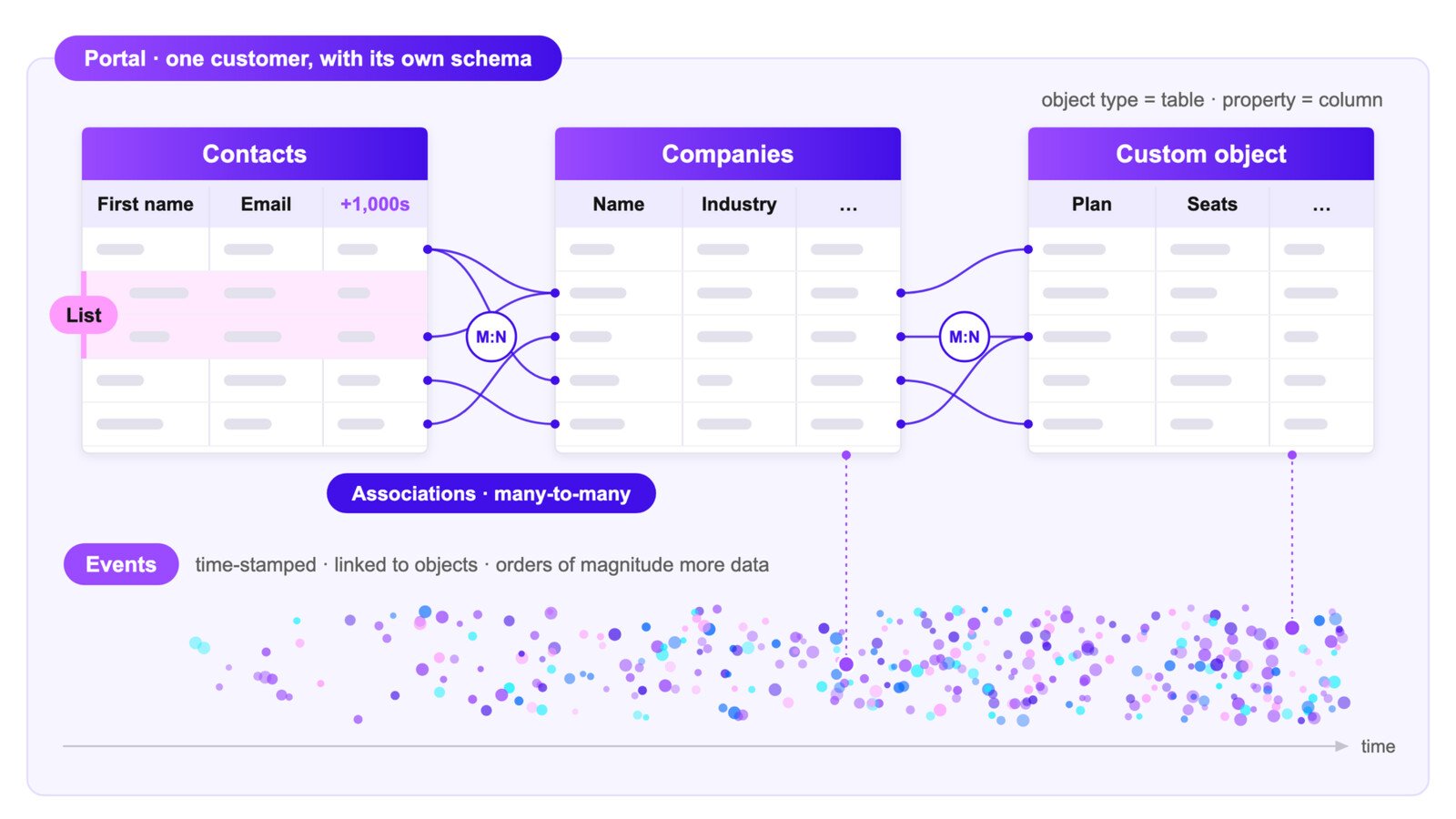
Figure 1: How HubSpot's CRM data is organized.
The scale is substantial. Object data is less than 1 PB, and event data is larger still. Ingestion runs at about 120,000 requests per second, and about 90% of those requests update existing records. Search runs at about 20,000 QPS. The traffic comes from users querying in the product UI, agents calling the API, HubSpot's AI assistant Breeze, and other HubSpot systems that need to look up objects.
Two kinds of queries run on this data. Search filters on arbitrary properties and adds text matching, sorting, and limits. Each search query is simple, but QPS is high and latency targets are strict. Analytical queries run at much lower QPS and filter in a similar way, but they also join up to five object types and then aggregate. Every additional object type adds another hop through a many-to-many relationship table, so real queries often contain around 10 joins and are expensive in both compute and I/O.
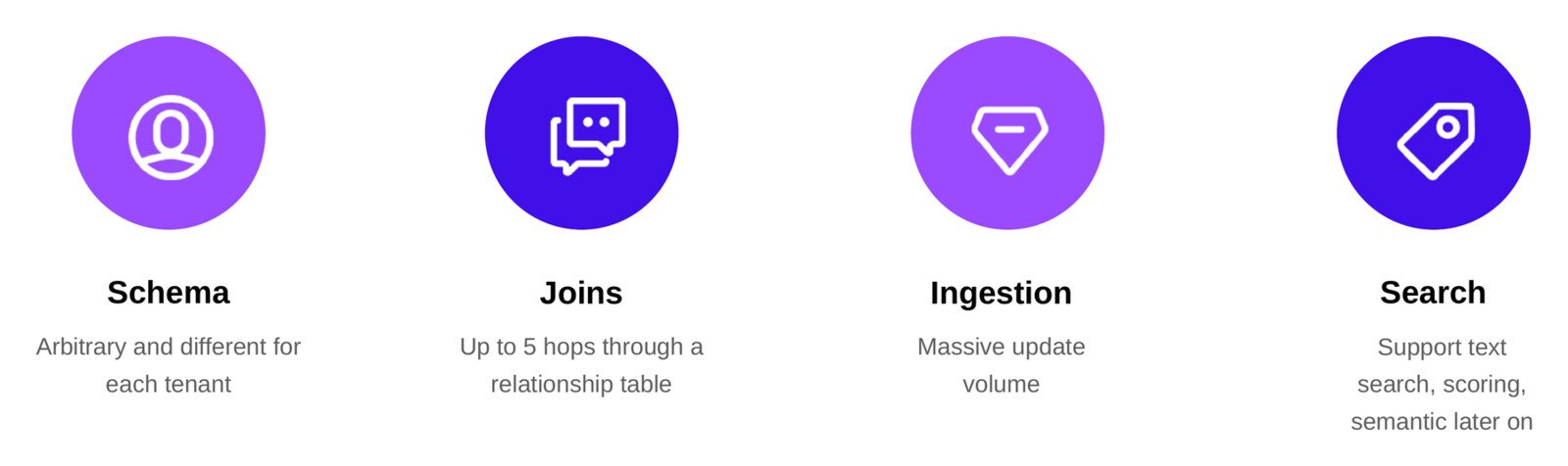
Figure 2: The four challenges HubSpot faced.
The challenges come down to four (Figure 2):
- The schema differs by tenant. Some customers have thousands of properties on a single object type. A system with a fixed schema can materialize only some of them and has to put the rest into a JSON map.
- Joins. Analytical databases handle joins well, and search engines usually do not. Few systems do both.
- Ingestion is dominated by updates. The faster data is written, the more files a query has to read and the harder it becomes to keep query latency low, so data freshness and query latency pull against each other.
- Search. HubSpot needs text search today, and scoring and semantic search later.
HubSpot was looking for a database that could put search and analytical queries in the same engine.
Why Apache Doris
That is exactly how Apache Doris is positioned: as a real-time analytical and search database. Alongside the joins and aggregations of an analytical database, Doris has built-in inverted indexes and full-text search. During its evaluation, HubSpot contacted VeloDB and ran a set of analytical and search queries on a small sample of its data in VeloDB Cloud, VeloDB's managed service. The results were strong. The two companies then formed a formal partnership and have worked closely together ever since, doing joint R&D to bring the project into production.
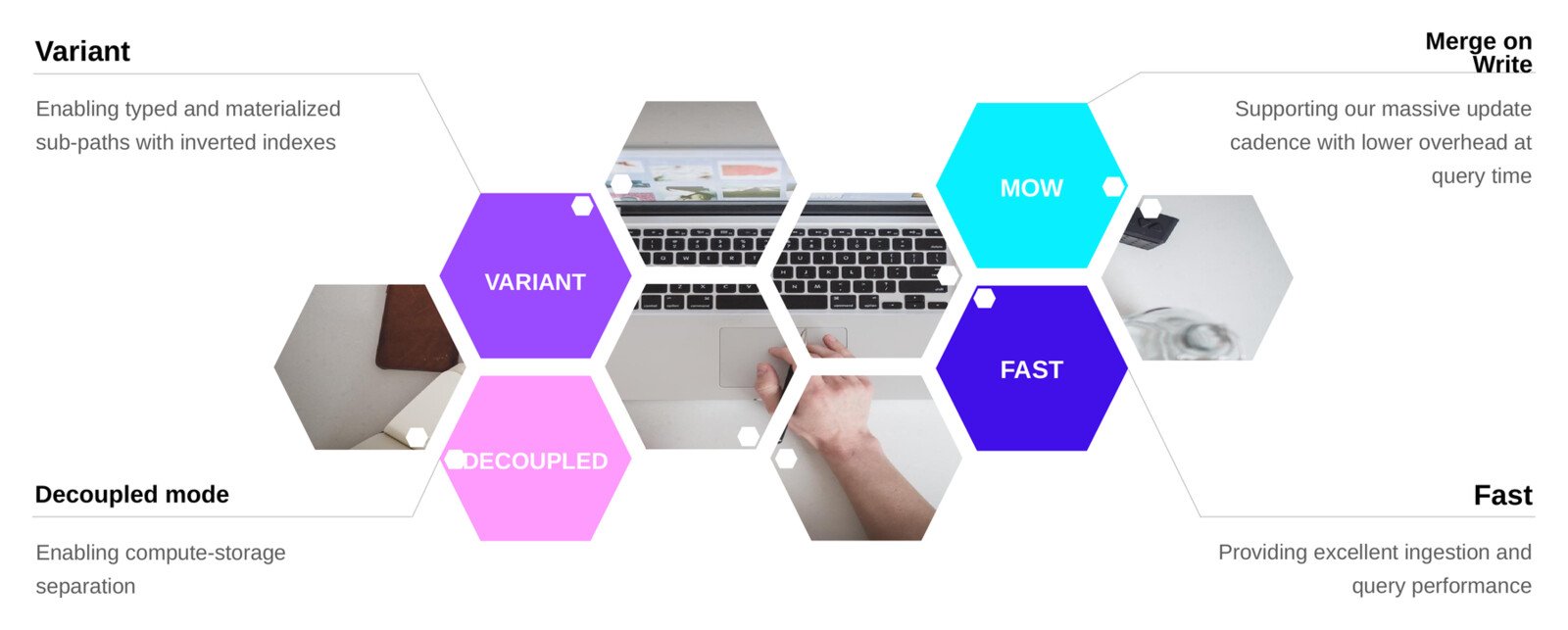
Figure 3: The four Doris capabilities behind the choice.
Four Doris capabilities drove the decision (Figure 3):
- VARIANT: This was the most important capability. VARIANT can match column names by pattern, assign types to the matched sub-paths, and materialize those sub-paths in the backend as regular columns, which can also carry inverted indexes. As a result, HubSpot can model every customer-defined object type and property as a real column, without having to choose between materializing only some properties and pushing the rest into JSON.
- Unique Key model: HubSpot's objects, associations, and events all have idempotent IDs, which map naturally onto the Unique Key model. When a write commits, Doris marks the old row as deleted and skips it at query time, which removes most of the merge work at read time.
- Compute-storage decoupling: HubSpot's customers vary widely in size. Decoupling compute from storage makes it easier to isolate customers from one another and to limit the impact of any failure.
- Performance: Ingestion and query latency both stay low, even while data is written continuously.
These capabilities made the approach possible. The final results depended on the designs HubSpot built on top of Doris.
A Deep Dive into Doris at HubSpot
Each of the four designs below builds on a Doris capability and adds a layer of HubSpot's own engineering.
Turning Arbitrary Properties into Typed Columns
Customers' raw property names cannot serve directly as column names. Contacts have a first name, companies may only have a name, and every custom object names things its own way. Across all customers, there are millions of distinct property names or more, and no database can materialize all of them.
HubSpot reused an approach it originally designed for Elasticsearch: it groups properties by type and numbers them within each object type. A contact's first name might map to string_1, and a company's name can also be string_1. This sharply reduces the number of distinct sub-path names in the VARIANT column, to a few hundred in one table and a few thousand in the other. HubSpot also split the object table in two by column count, one table with few columns and one with many, so that the two do not interfere with each other.
On top of these slots, HubSpot uses VARIANT type patterns (MATCH_NAME_GLOB) to assign a type by prefix. The patterns cover Booleans, datetimes, enums, numbers, number arrays, text, and phone numbers. Phone numbers get their own prefix because they are searched differently from regular text. HubSpot sets variant_max_subcolumns_count to 50,000. This deliberately high limit is never reached in practice; its purpose is to ensure that every sub-path is materialized as a column (Figure 4).
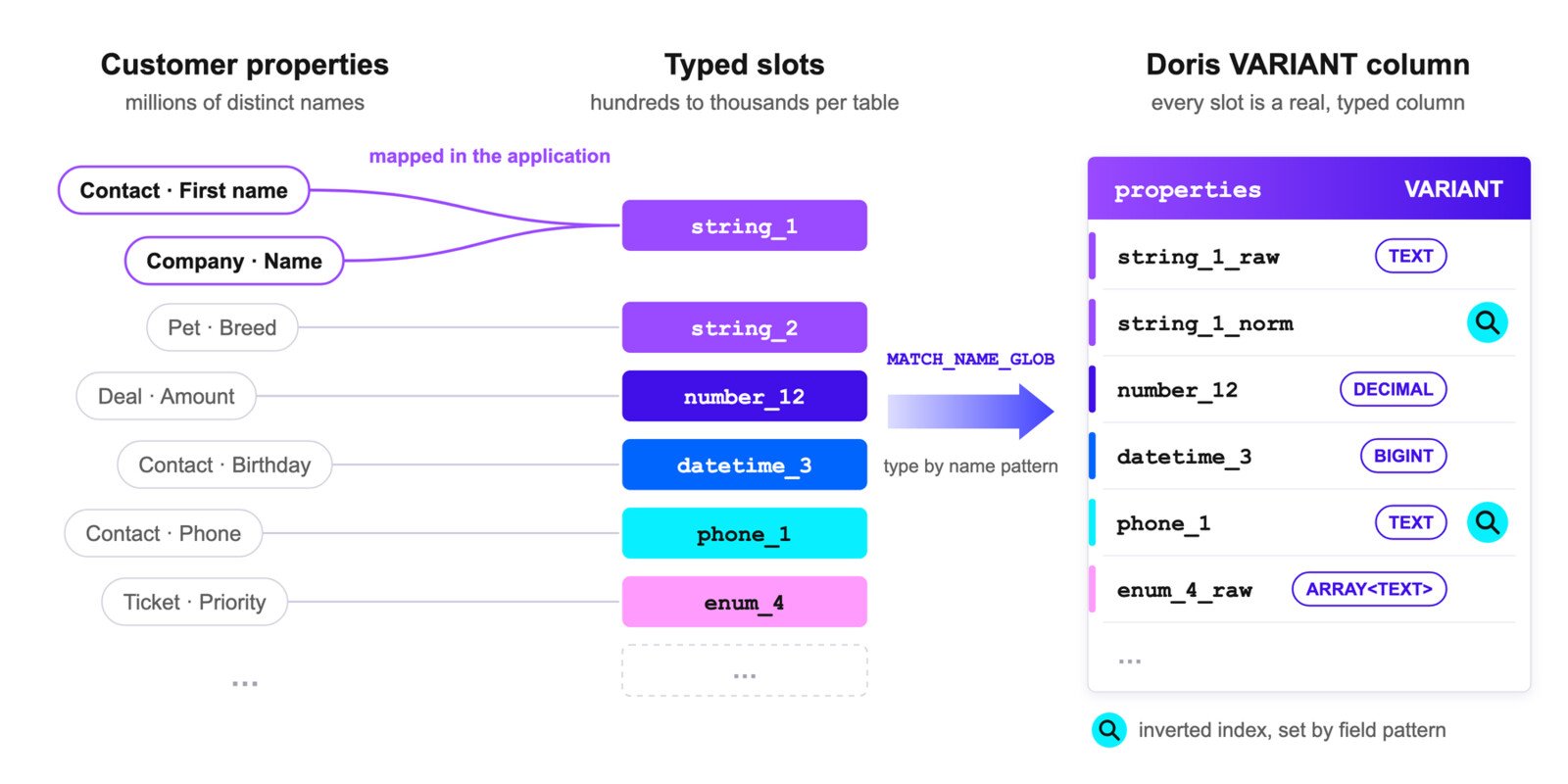
Figure 4: From customer property names to typed sub-columns in VARIANT.
HubSpot also defines inverted indexes by field pattern (field_pattern). Normalized strings, phone numbers, and number arrays each get their own kind of index, paired with HubSpot's custom analyzers, such as standard_normalized and normalized_edge_ngram_phone_number below. The approach resembles dynamic templates in Elasticsearch. Some HubSpot products use Elasticsearch, so HubSpot worked with VeloDB to make text matching in Doris behave the same way as in those products.
-- VARIANT column in the object table
`properties` variant<
  MATCH_NAME_GLOB 'boolean_*':boolean,
  MATCH_NAME_GLOB 'datetime_*':bigint,
  MATCH_NAME_GLOB 'enum_*_raw':array<text>,
  MATCH_NAME_GLOB 'number_*':decimal(38,10),
  MATCH_NAME_GLOB 'numberArray_*':array<decimal(38,10)>,
  MATCH_NAME_GLOB 'string_*_raw':text,
  MATCH_NAME_GLOB 'phone_*':text,
  PROPERTIES(
    'variant_max_subcolumns_count' = '50000',
    'variant_enable_typed_paths_to_sparse' = 'false'
  )
>

-- Inverted indexes defined by field pattern
INDEX idx_string_norm_standard (`properties`) USING INVERTED PROPERTIES(
  "support_phrase" = "true",
  "field_pattern" = "string_*_norm",
  "analyzer" = "standard_normalized"
),
INDEX idx_phone_ngram (`properties`) USING INVERTED PROPERTIES(
  "support_phrase" = "true",
  "field_pattern" = "phone_*",
  "analyzer" = "normalized_edge_ngram_phone_number"
),
INDEX idx_numberArray (`properties`) USING INVERTED PROPERTIES(
  "field_pattern" = "numberArray_*"
)
To learn how VARIANT works internally, see the VARIANT deep dive on the Apache Doris website.
Lesson: normalize property names into a bounded set of typed slots in the application layer, then let VARIANT materialize them.
Controlling Query Fan-Out
The object table defines its key and data distribution as follows. portalId is the tenant ID, objectTypeId identifies the object type (that is, a table in the CRM), and objectId is the ID of the object itself.
UNIQUE KEY(`portalId`, `objectTypeId`, `objectIdHash`, `objectId`)
DISTRIBUTED BY HASH(`portalId`, `objectTypeId`, `objectIdHash`) BUCKETS 256
The important part is the extra objectIdHash column. Within a single customer, object types can differ enormously in size: a customer might have a million contacts but only ten companies. If Doris distributed data only by tenant and object type, all one million contacts would land in a single tablet (a Doris data shard) on a single BE (backend node). If Doris spread the data across every BE instead, even a query for ten rows would have to touch every BE.
objectIdHash is a hash computed from the object ID. Because it appears in both the key and the distribution key, HubSpot can control from the application side how many tablets each object type is split into. HubSpot knows each customer's write rate and the data volume of each object type, and decides the split accordingly: a single tablet for a small object type, for example, and ten for a medium one. This takes a fair amount of application-side work. At query time, the application passes the assigned hash values as a filter, and Doris sends execution fragments only to the BEs that hold the relevant tablets. The other BEs do not participate (Figure 5). This matters most for search: search runs at about 20,000 QPS, so the CPU, RPC, and memory saved on each query add up to a substantial amount.
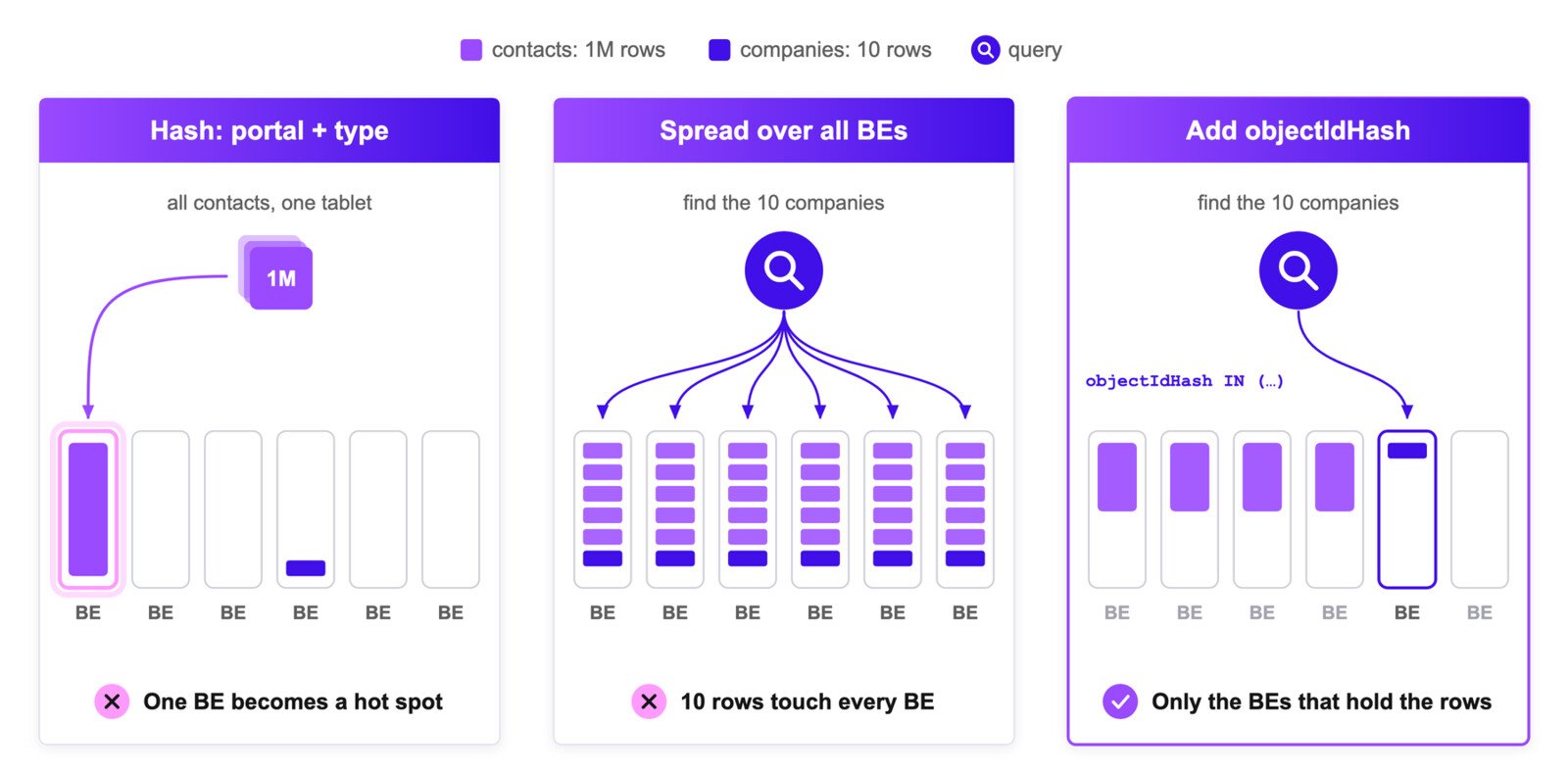
Figure 5: Tablet placement and query fan-out under three distribution schemes.
Putting these designs together gives the example analytical query below, which answers the question at the beginning of this article. It filters contacts on a text property, joins them to companies through the association table, groups by company industry, and then counts contacts and sums a numeric property. The query first casts VARIANT sub-paths to concrete types, because the FE (frontend node) does not know the type of a sub-path; once the type is declared, the query can use the indexes and the matching functions. objectidhash IN (0) limits the contacts to a single tablet, and MATCH_PHRASE uses the inverted index for phrase matching. This version is heavily simplified; real queries usually contain around 10 joins.
SELECT
  CAST(co.properties['string_4_raw'] AS TEXT) AS industry,
  COUNT(DISTINCT c.objectid) AS contacts,
  SUM(CAST(c.properties['number_12'] AS DECIMAL(38, 10))) AS total_value
FROM objects c
JOIN associations a
  ON a.portalid = c.portalid
  AND a.fromobjectid = c.objectid
JOIN objects co
  ON co.portalid = a.portalid
  AND co.objectid = a.toobjectid
WHERE c.portalid = 1
  AND c.objecttypeid = '0-1'
  AND c.objectidhash IN (0)
  AND CAST(c.properties['string_8_norm'] AS TEXT) MATCH_PHRASE 'acme'
GROUP BY industry
ORDER BY contacts DESC
LIMIT 100;
Lesson: use a power of two for the bucket count. HubSpot studied and tested the hash function that Doris uses and found that powers of two produce fewer collisions and spread data more evenly across buckets.
Many Small Clusters Instead of One Big One
HubSpot runs as many services as possible on Kubernetes, with a single Kubernetes cluster per data center, and Doris is no exception. Doris runs in Kubernetes on AWS EC2, in compute-storage decoupled mode with FoundationDB, entirely on ARM64 Graviton instances. HubSpot also tried mixing in AMD instances and found that Doris performs much better on ARM64.
The pods use the Kubernetes Burstable QoS class. CPU requests match the steady load of ingestion and queries, while CPU limits leave generous headroom. As a result, pods from several Doris clusters can share a node, and a query can briefly use extra CPU when it needs to. These bursts are infrequent and barely visible in node metrics, yet they noticeably cut tail latency, which helps analytical queries in particular. To make this work, HubSpot tuned Doris and proposed a change to how cgroup memory is accounted.
The bigger question was how to divide the clusters. From the start, HubSpot did not aim for one giant cluster per data center that held every customer's data. Growing a small experiment straight to that scale would have wasted significant resources and caused repeated rework. The cell-based architecture that HubSpot is adopting also calls for small clusters with a small blast radius.
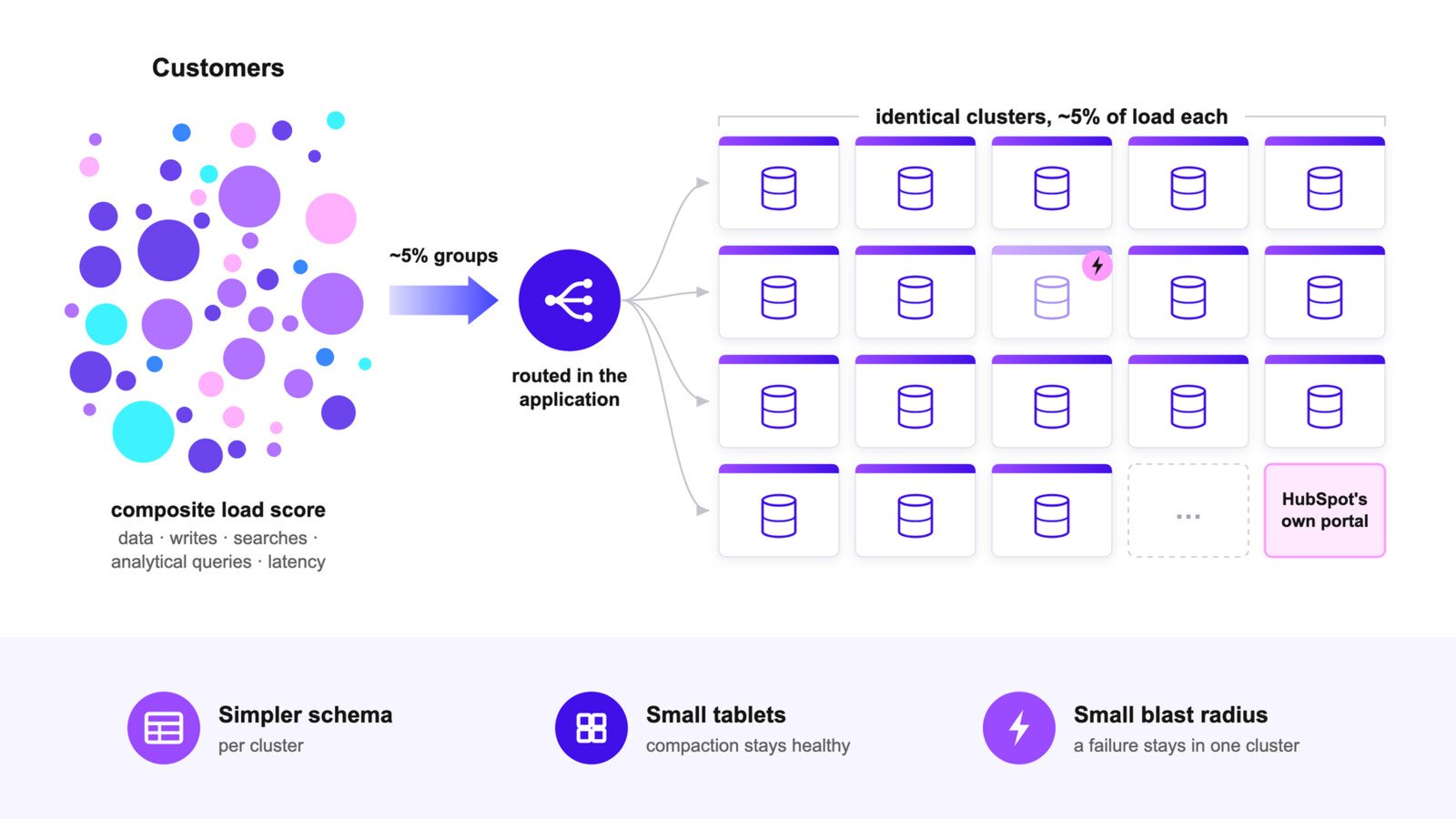
Figure 6: Customers grouped by load, with one identically configured small cluster per group.
In practice, HubSpot computes a composite load score for each customer from data volume, write volume, search volume, analytical query volume, and latency. It then splits all customers into groups that each account for about 5% of the total load. Each group gets its own identically configured small cluster, and the application layer handles routing. HubSpot's own account carries a particularly heavy load, so it runs in a separate cluster. As Figure 6 shows, small clusters bring three benefits. Each cluster has a simpler schema. Tablets stay small enough that compaction does not become a problem, which is the first thing to watch when running heavy ingestion on Doris. And a failure in one cluster affects only a small share of customers.
HubSpot has strict security requirements for its data stores. Doris provides audit logging by default. To trace which system each query comes from, HubSpot created a separate database user for each infrastructure component. HubSpot also worked with VeloDB to implement mTLS for all traffic within a cluster in VeloDB Enterprise, along with database user authentication based on certificate SANs (Subject Alternative Names): only a system that holds the matching certificate can connect as that user.
Lesson: when every cluster is configured the same way, results on a 5% sample predict the full rollout. After analytical queries went live on the first cluster, HubSpot was confident that it could scale to 100% quickly. Its method for measuring customer load was reliable, and the results were consistently reproducible. The rollout described in the next section bore this out.
Fresh Data Without Slower Queries
Most of the work during the scale-up went into ingestion.
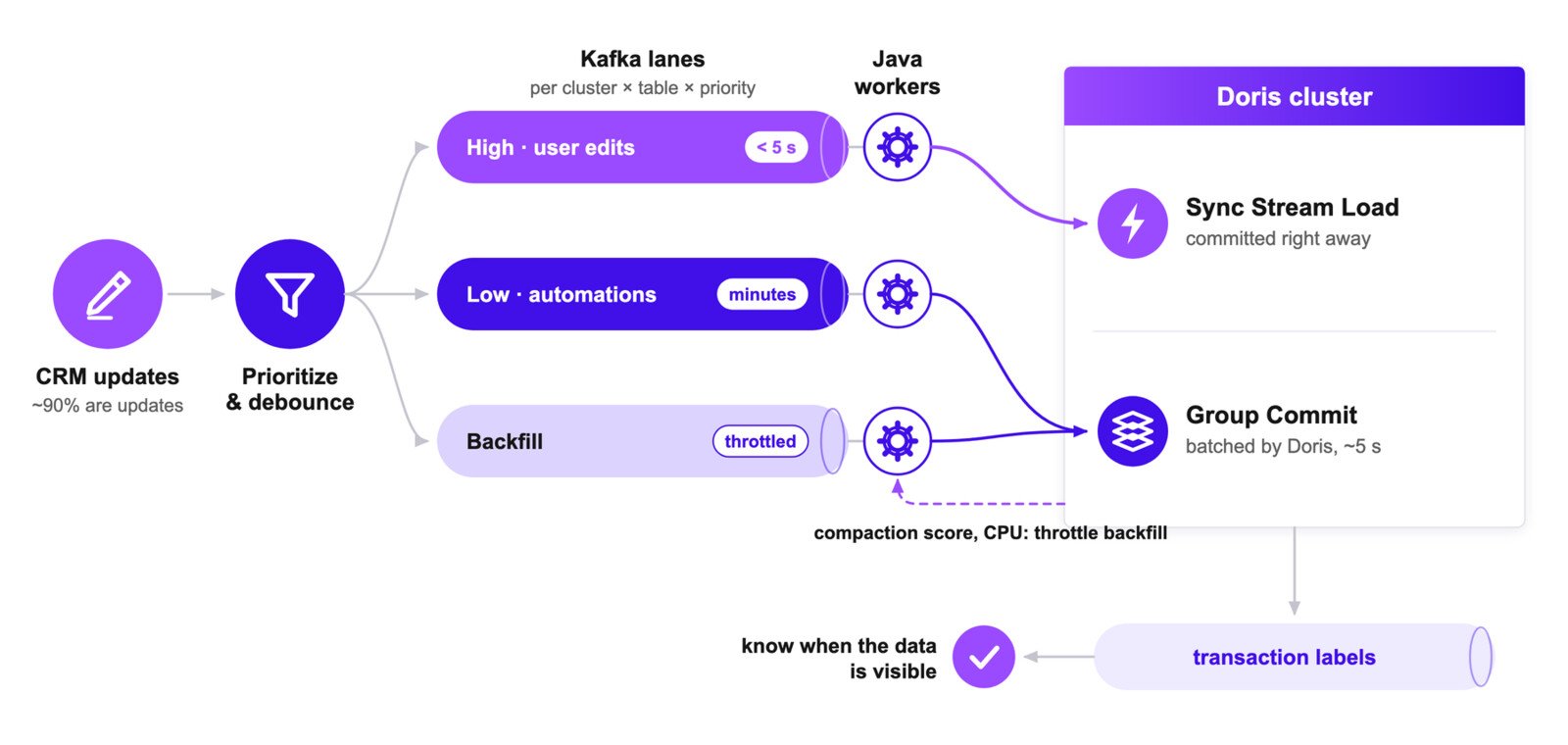
Figure 7: The ingestion pipeline, with lanes separated by priority.
HubSpot first prioritizes ingestion traffic by its source (Figure 7). A user who edits a record by hand expects to see the change immediately, while an automation can usually take effect a few minutes later. High-priority writes target visibility within 5 seconds; lower priorities can take a few minutes.
Upstream CRM updates go through prioritization and debouncing, then into Kafka topics partitioned by cluster × table × priority. Each topic acts as a lane. HubSpot's own Java workers consume the lanes and write to the corresponding cluster through Stream Load. The highest priority uses synchronous Stream Load and commits immediately. All other traffic uses Group Commit, which Doris batches on the server side about every 5 seconds. Writes that users are waiting for become visible right away, and the workers do not need to build large batches to protect the database, so HubSpot gets the best of both. The workers also check each cluster's compaction score and CPU usage and throttle backfill lanes when necessary. Each write returns a transaction label, which the workers publish to another topic; HubSpot uses that topic to determine when data becomes visible.
Together with the Unique Key model described earlier, this design keeps frequent updates from turning into merge costs at query time.
Lesson: reserve synchronous Stream Load for the writes users are waiting on, and let Group Commit batch everything else.
Rollout and Results
With customers grouped into identically configured small clusters, HubSpot rolled out analytical queries in four steps (Figure 8). It started with one cluster in the NA1 data center, serving a sample of about 5% of customers. It then expanded to three clusters and about 15% of customers, then to all 21 clusters in NA1, and finally to the global deployment of 33 clusters.
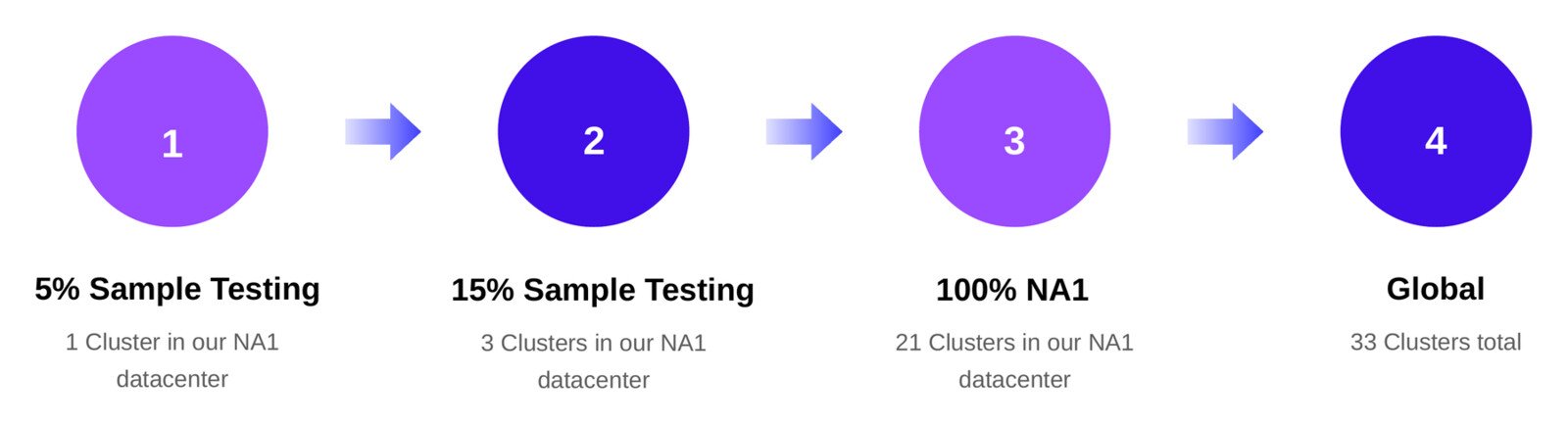
Figure 8: Analytical queries scaled from a 5% sample to 33 clusters worldwide.
Going from the validated three-cluster stage to the global deployment took only about three weeks. Two things made the rollout smooth: the way HubSpot grouped customers into clusters, and Doris itself.
Figure 9 shows about two hours of monitoring around the switch. The yellow line is the backend execution time of analytical queries. It drops sharply at the switch to Doris and keeps falling over the following hour or so, with P50 going from about 1.8 seconds to about 500 milliseconds. The green line is the end-to-end time that users experience, which falls from about 2 seconds to about 1 second. The lower latency has also led to higher customer satisfaction.
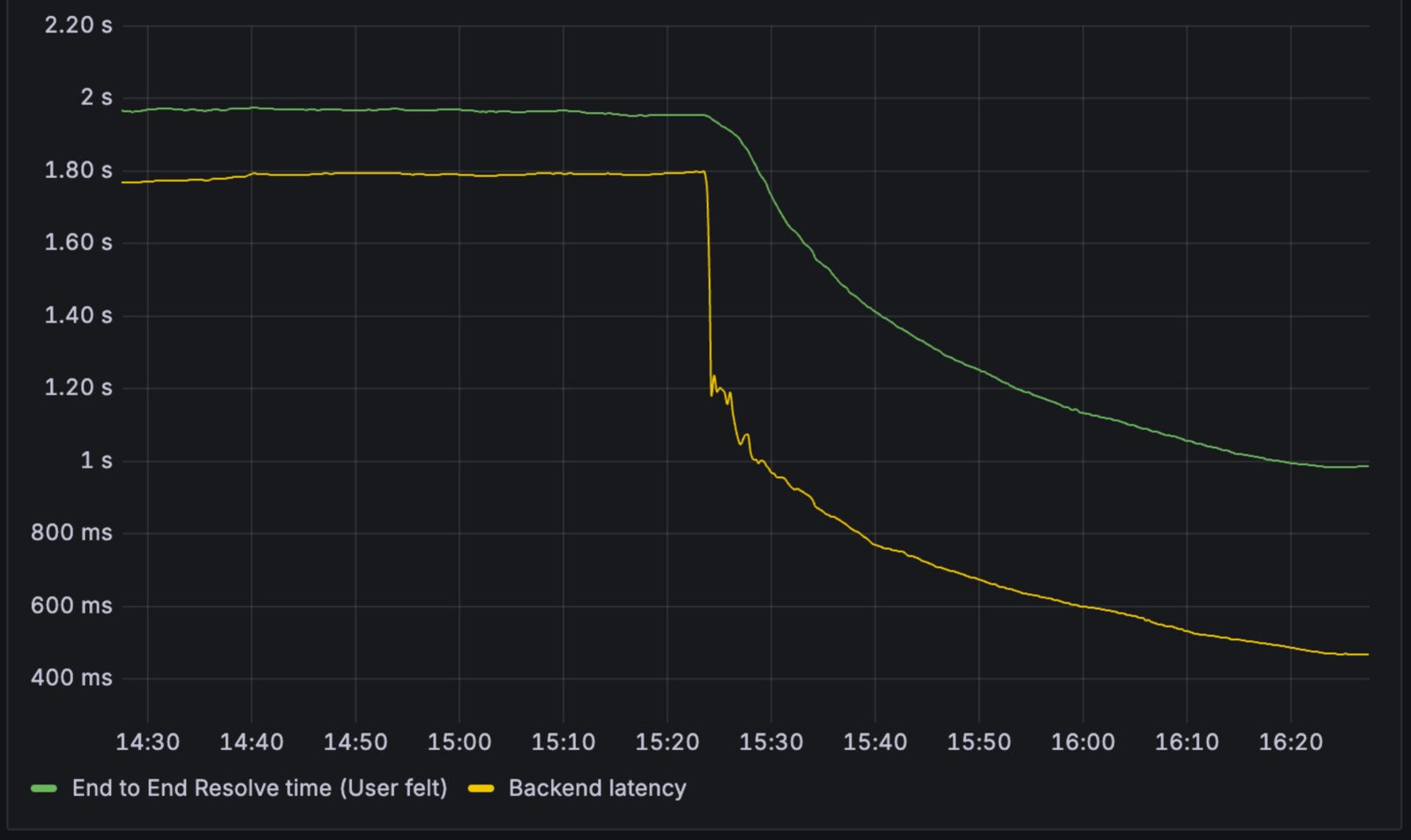
Figure 9: P50 query latency over about two hours around the switch. Yellow is backend latency; green is the end-to-end time that users experience.
What's Next: Search and Events
HubSpot's next step is to run search on Doris as well. Search and analytical queries share the same data model. Through the partnership, HubSpot and VeloDB have already made several improvements for search: a query function used much like the Elasticsearch query string, inverted index predicate pushdown in certain joins, better concurrency, and smooth rolling restarts. The two teams have also delivered fixes for cgroup memory accounting, concurrent cumulative compaction, and other areas, along with many smaller improvements.
The main challenges now are high concurrency and cache availability. The cache holds only one copy of the data, so losing a single node noticeably hurts workloads with strict latency requirements. Newer Doris releases already address this with Peer Read. High QPS is a challenge for most databases, but the results so far are very good. Next, HubSpot plans to upgrade to a newer release and start testing scoring and semantic search.
Events are another direction. Today, only object queries run on Doris, and HubSpot wants to run analytical queries on events next. Event data is orders of magnitude larger than object data and already lives entirely in Iceberg, so HubSpot plans to start by querying Iceberg directly through Doris. Because event data does not fit in the cache, object data will need to be pinned in the cache. If performance falls short, HubSpot will consider a hybrid architecture.
Further out, HubSpot plans to consolidate more datasets into Doris and evaluate capabilities such as federated queries, which would give other teams more flexible options.
This article is based on Evolving Semi-Structured Search & Analytical Queries at HubSpot, a Doris Summit 2026 talk by HubSpot Staff Software Engineer Alvaro Tuso. The full recording is available on demand. Figures 2, 3, 8, and 9 come from the talk's slides; the other figures were created for this article based on the talk. This article is part of the Doris Summit 2026 series. The Doris Summit 2026 Recap covers the main themes of the conference, and the next article covers Apache Fluss.
Get involved with the community:
- Website: https://doris.apache.org
- Contribute: https://doris.apache.org/community/how-to-contribute/contribute-to-doris
- GitHub: github.com/apache/doris
- Slack: doris.apache.org/slack