DorisとHudiの使用
新しいオープンデータ管理アーキテクチャとして、Data レイクハウスはデータウェアハウスの高性能とリアルタイム機能を、データレイクの低コストと柔軟性と統合し、ユーザーがより便利に様々なデータ処理と分析ニーズを満たすことを支援します。企業のビッグデータシステムにおいて、ますます適用されています。
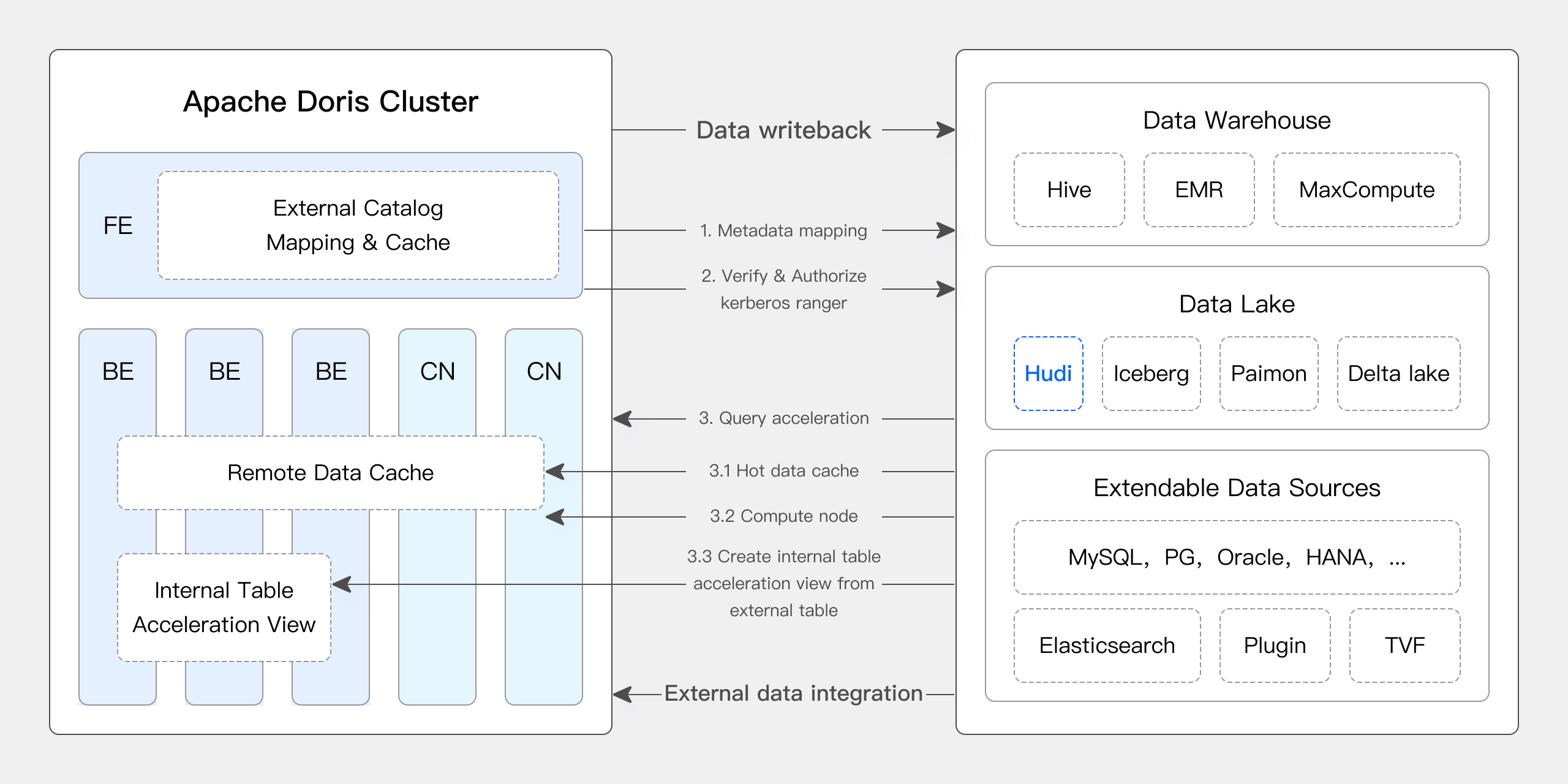
最近のバージョンにおいて、Apache Dorisはデータレイクとの統合を深め、成熟したData レイクハウスソリューションに進化しました。
- バージョン0.15以降、Apache DorisはHiveとIceberg外部テーブルを導入し、データレイクにおけるApache Icebergとの結合機能を探求しました。
- バージョン1.2以降、Apache Dorisは正式にMulti-カタログ機能を導入し、様々なデータソースに対する自動メタデータマッピングとデータアクセスを可能にし、外部データ読み取りとクエリ実行に関する多数のパフォーマンス最適化を行いました。現在、高速でユーザーフレンドリーなレイクハウスアーキテクチャを構築する能力を完全に備えています。
- バージョン2.1では、Apache DorisのData レイクハウスアーキテクチャが大幅に強化され、主流のデータレイクフォーマット(Hudi、Iceberg、Paimonなど)の読み取り・書き込み機能を改善し、複数のSQL方言との互換性を導入し、既存システムからApache Dorisへのシームレスな移行を実現しました。データサイエンスと大規模データ読み取りシナリオにおいて、DorisはArrow Flight高速読み取りインターフェースを統合し、データ転送効率を100倍向上させました。
Apache Doris & Hudi
Apache Hudiは現在最も人気のあるオープンデータレイクフォーマットの一つであり、Apache Dorisを含む様々な主流クエリエンジンをサポートするトランザクショナルデータレイク管理プラットフォームです。
Apache DorisはApache Hudiデータテーブルを読み取る能力も強化しました:
- Copy on Write tableをサポート:Snapshot Query
- Merge on Read tableをサポート:Snapshot Queries、Read Optimized Queries
- Time Travelをサポート
- Incremental Readをサポート
Apache Dorisの高性能クエリ実行とApache Hudiのリアルタイムデータ管理機能により、効率的で柔軟性があり、コスト効率の高いデータクエリと分析を実現できます。また、堅牢なデータリネージ、監査、および増分処理機能も提供します。Apache DorisとApache Hudiの組み合わせは、複数のコミュニティユーザーによって実際のビジネスシナリオで検証・推進されています:
- リアルタイムデータ分析と処理:金融、広告、Eコマースなどの業界におけるリアルタイムデータ更新とクエリ分析などの一般的なシナリオでは、リアルタイムデータ処理が必要です。Hudiはデータの一貫性と信頼性を確保しながら、リアルタイムデータ更新と管理を可能にします。Dorisはリアルタイムで大規模データクエリリクエストを効率的に処理し、組み合わせることでリアルタイムデータ分析と処理の要求を効果的に満たします。
- データリネージと監査:金融や医療などデータセキュリティと正確性の要求が高い業界では、データリネージと監査は重要な機能です。HudiはTime Travel機能を提供して履歴データ状態を表示し、Apache Dorisの効率的なクエリ機能と組み合わせることで、任意の時点でのデータの迅速な分析を可能にし、正確なリネージと監査を実現します。
- 増分データ読み取りと分析:大規模データ分析では、大きなデータボリュームと頻繁な更新の課題に直面することがよくあります。Hudiは増分データ読み取りをサポートし、ユーザーは完全なデータ更新を行うことなく、変更されたデータのみを処理できます。さらに、Apache DorisのIncremental Read機能がこのプロセスを強化し、データ処理と分析効率を大幅に改善します。
- クロスデータソース連合クエリ:多くの企業は異なるデータベースに保存される複雑なデータソースを持っています。DorisのMulti-カタログ機能は様々なデータソースの自動マッピングと同期をサポートし、データソース間の連合クエリを可能にします。これにより、複数のソースからデータを取得し統合して分析する必要がある企業にとって、データフローパスが大幅に短縮され、作業効率が向上します。
この記事では、Docker環境でApache Doris + Apache Hudiのテストとデモンストレーション環境を迅速に構築する方法を読者に紹介し、様々な操作を実演して読者が迅速に開始できるよう支援します。
詳細については、Hudi カタログを参照してください
ユーザーガイド
この記事で言及されるすべてのスクリプトとコードは、このアドレスから取得できます:https://github.com/apache/doris/tree/master/samples/datalake/hudi
01 環境準備
この記事では、以下のコンポーネントとバージョンでDocker Composeを使用してデプロイします:
| Component | Version |
|---|---|
| Apache Doris | デフォルト2.1.4、変更可能 |
| Apache Hudi | 0.14 |
| Apache Spark | 3.4.2 |
| Apache Hive | 2.1.3 |
| MinIO | 2022-05-26T05-48-41Z |
02 環境デプロイメント
-
Dockerネットワークを作成する
sudo docker network create -d bridge hudi-net -
すべてのコンポーネントを開始する
sudo ./start-hudi-compose.sh注意:開始前に、
start-hudi-compose.shのDORIS_PACKAGEとDORIS_DOWNLOAD_URLを希望するDorisバージョンに変更できます。バージョン2.1.4以上の使用を推奨します。 -
開始後、以下のスクリプトを使用してSparkコマンドラインまたはDorisコマンドラインにログインできます:
-- Doris
sudo ./login-spark.sh

-- Spark
sudo ./login-doris.sh
03 データ準備
次に、Sparkを通じてHudiデータを生成します。以下のコードに示すように、クラスタには既にcustomerという名前のHiveテーブルがあります。このHiveテーブルを使用してHudiテーブルを作成できます:
-- ./login-spark.sh
spark-sql> use default;

-- create a COW table
spark-sql> CREATE TABLE customer_cow
USING hudi
TBLPROPERTIES (
  type = 'cow',
  primaryKey = 'c_custkey',
  preCombineField = 'c_name'
)
PARTITIONED BY (c_nationkey)
AS SELECT * FROM customer;

-- create a MOR table
spark-sql> CREATE TABLE customer_mor
USING hudi
TBLPROPERTIES (
  type = 'mor',
  primaryKey = 'c_custkey',
  preCombineField = 'c_name'
)
PARTITIONED BY (c_nationkey)
AS SELECT * FROM customer;
04 データクエリ
以下に示すように、Dorisクラスターにhudiという名前のCatalogが作成されました(SHOW CATALOGSを使用して確認できます)。以下がこのCatalogの作成文です:
-- Already created, no need to execute again
CREATE CATALOG `hudi` PROPERTIES (
    "type"="hms",
    'hive.metastore.uris' = 'thrift://hive-metastore:9083',
    "s3.access_key" = "minio",
    "s3.secret_key" = "minio123",
    "s3.endpoint" = "http://minio:9000",
    "s3.region" = "us-east-1",
    "use_path_style" = "true"
);
-
作成されたHudiテーブルを同期するために、このCatalogを手動で更新してください:
-- ./login-doris.sh
doris> REFRESH CATALOG hudi; -
SparkでHudiのデータに対する操作は、Catalogをリフレッシュする必要なくDorisで即座に表示されます。Sparkを使用してCOWとMORの両方のテーブルにデータ行を挿入します:
spark-sql> insert into customer_cow values (100, "Customer#000000100", "jD2xZzi", "25-430-914-2194", 3471.59, "BUILDING", "cial ideas. final, furious requests", 25);
spark-sql> insert into customer_mor values (100, "Customer#000000100", "jD2xZzi", "25-430-914-2194", 3471.59, "BUILDING", "cial ideas. final, furious requests", 25); -
Dorisを通じて、最新の挿入されたデータを直接クエリできます:
doris> use hudi.default;
doris> select * from customer_cow where c_custkey = 100;
doris> select * from customer_mor where c_custkey = 100; -
Sparkを使用してすでに存在するc_custkey=32のデータを挿入し、既存のデータを上書きします:
spark-sql> insert into customer_cow values (32, "Customer#000000032_update", "jD2xZzi", "25-430-914-2194", 3471.59, "BUILDING", "cial ideas. final, furious requests", 15);
spark-sql> insert into customer_mor values (32, "Customer#000000032_update", "jD2xZzi", "25-430-914-2194", 3471.59, "BUILDING", "cial ideas. final, furious requests", 15); -
Dorisを使用して、更新されたデータをクエリできます:
doris> select * from customer_cow where c_custkey = 32;
+-----------+---------------------------+-----------+-----------------+-----------+--------------+-------------------------------------+-------------+
| c_custkey | c_name                    | c_address | c_phone         | c_acctbal | c_mktsegment | c_comment                           | c_nationkey |
+-----------+---------------------------+-----------+-----------------+-----------+--------------+-------------------------------------+-------------+
|        32 | Customer#000000032_update | jD2xZzi   | 25-430-914-2194 |   3471.59 | BUILDING     | cial ideas. final, furious requests |          15 |
+-----------+---------------------------+-----------+-----------------+-----------+--------------+-------------------------------------+-------------+
doris> select * from customer_mor where c_custkey = 32;
+-----------+---------------------------+-----------+-----------------+-----------+--------------+-------------------------------------+-------------+
| c_custkey | c_name                    | c_address | c_phone         | c_acctbal | c_mktsegment | c_comment                           | c_nationkey |
+-----------+---------------------------+-----------+-----------------+-----------+--------------+-------------------------------------+-------------+
|        32 | Customer#000000032_update | jD2xZzi   | 25-430-914-2194 |   3471.59 | BUILDING     | cial ideas. final, furious requests |          15 |
+-----------+---------------------------+-----------+-----------------+-----------+--------------+-------------------------------------+-------------+
05 Incremental Read
Incremental ReadはHudiが提供する機能の1つです。Incremental Readを使用することで、ユーザーは指定された時間範囲内の増分データを取得でき、データの増分処理が可能になります。この点において、Dorisはc_custkey=100を挿入した後の変更されたデータをクエリできます。以下に示すように、c_custkey=32のデータを挿入しました:
doris> select * from customer_cow@incr('beginTime'='20240603015018572');
+-----------+---------------------------+-----------+-----------------+-----------+--------------+-------------------------------------+-------------+
| c_custkey | c_name                    | c_address | c_phone         | c_acctbal | c_mktsegment | c_comment                           | c_nationkey |
+-----------+---------------------------+-----------+-----------------+-----------+--------------+-------------------------------------+-------------+
|        32 | Customer#000000032_update | jD2xZzi   | 25-430-914-2194 |   3471.59 | BUILDING     | cial ideas. final, furious requests |          15 |
+-----------+---------------------------+-----------+-----------------+-----------+--------------+-------------------------------------+-------------+
spark-sql> select * from hudi_table_changes('customer_cow', 'latest_state', '20240603015018572');

doris> select * from customer_mor@incr('beginTime'='20240603015058442');
+-----------+---------------------------+-----------+-----------------+-----------+--------------+-------------------------------------+-------------+
| c_custkey | c_name                    | c_address | c_phone         | c_acctbal | c_mktsegment | c_comment                           | c_nationkey |
+-----------+---------------------------+-----------+-----------------+-----------+--------------+-------------------------------------+-------------+
|        32 | Customer#000000032_update | jD2xZzi   | 25-430-914-2194 |   3471.59 | BUILDING     | cial ideas. final, furious requests |          15 |
+-----------+---------------------------+-----------+-----------------+-----------+--------------+-------------------------------------+-------------+
spark-sql> select * from hudi_table_changes('customer_mor', 'latest_state', '20240603015058442');
06 TimeTravel
DorisはHudiデータの特定のスナップショットバージョンのクエリをサポートし、それによりデータのTime Travel機能を実現します。まず、Sparkを使用して2つのHudiテーブルのコミット履歴をクエリできます:
spark-sql> call show_commits(table => 'customer_cow', limit => 10);
20240603033556094        20240603033558249        commit        448833        0        1        1        183        0        0
20240603015444737        20240603015446588        commit        450238        0        1        1        202        1        0
20240603015018572        20240603015020503        commit        436692        1        0        1        1        0        0
20240603013858098        20240603013907467        commit        44902033        100        0        25        18751        0        0

spark-sql> call show_commits(table => 'customer_mor', limit => 10);
20240603033745977        20240603033748021        deltacommit        1240        0        1        1        0        0        0
20240603015451860        20240603015453539        deltacommit        1434        0        1        1        1        1        0
20240603015058442        20240603015100120        deltacommit        436691        1        0        1        1        0        0
20240603013918515        20240603013922961        deltacommit        44904040        100        0        25        18751        0        0
次に、Dorisを使用して、c_custkey=32を実行し、データ挿入前のデータスナップショットをクエリできます。以下に示すように、c_custkey=32のデータはまだ更新されていません:
注意:Time Travel構文は現在、新しいオプティマイザではサポートされていません。まず
set enable_nereids_planner=false;を実行して新しいオプティマイザを無効にする必要があります。この問題は将来のバージョンで修正される予定です。
doris> select * from customer_cow for time as of '20240603015018572' where c_custkey = 32 or c_custkey = 100;
+-----------+--------------------+---------------------------------------+-----------------+-----------+--------------+--------------------------------------------------+-------------+
| c_custkey | c_name             | c_address                             | c_phone         | c_acctbal | c_mktsegment | c_comment                                        | c_nationkey |
+-----------+--------------------+---------------------------------------+-----------------+-----------+--------------+--------------------------------------------------+-------------+
|        32 | Customer#000000032 | jD2xZzi UmId,DCtNBLXKj9q0Tlp2iQ6ZcO3J | 25-430-914-2194 |   3471.53 | BUILDING     | cial ideas. final, furious requests across the e |          15 |
|       100 | Customer#000000100 | jD2xZzi                               | 25-430-914-2194 |   3471.59 | BUILDING     | cial ideas. final, furious requests              |          25 |
+-----------+--------------------+---------------------------------------+-----------------+-----------+--------------+--------------------------------------------------+-------------+
-- compare with spark-sql
spark-sql> select * from customer_mor timestamp as of '20240603015018572' where c_custkey = 32 or c_custkey = 100;

doris> select * from customer_mor for time as of '20240603015058442' where c_custkey = 32 or c_custkey = 100;
+-----------+--------------------+---------------------------------------+-----------------+-----------+--------------+--------------------------------------------------+-------------+
| c_custkey | c_name             | c_address                             | c_phone         | c_acctbal | c_mktsegment | c_comment                                        | c_nationkey |
+-----------+--------------------+---------------------------------------+-----------------+-----------+--------------+--------------------------------------------------+-------------+
|       100 | Customer#000000100 | jD2xZzi                               | 25-430-914-2194 |   3471.59 | BUILDING     | cial ideas. final, furious requests              |          25 |
|        32 | Customer#000000032 | jD2xZzi UmId,DCtNBLXKj9q0Tlp2iQ6ZcO3J | 25-430-914-2194 |   3471.53 | BUILDING     | cial ideas. final, furious requests across the e |          15 |
+-----------+--------------------+---------------------------------------+-----------------+-----------+--------------+--------------------------------------------------+-------------+
spark-sql> select * from customer_mor timestamp as of '20240603015058442' where c_custkey = 32 or c_custkey = 100;
クエリ最適化
Apache Hudiのデータは大まかに2つのカテゴリに分けることができます - ベースラインデータと増分データです。ベースラインデータは通常マージされたParquetファイルであり、増分データはINSERT、UPDATE、またはDELETE操作によって生成されるデータ増分を指します。ベースラインデータは直接読み取ることができますが、増分データはMerge on Readを通じて読み取る必要があります。
Hudi COWテーブルまたはMORテーブルのRead Optimizedクエリをクエリする場合、データはベースラインデータに属し、DorisのネイティブParquet Readerを使用して直接読み取ることができ、高速なクエリ応答を提供します。増分データの場合、DorisはJNI呼び出しを通じてHudiのJava SDKにアクセスする必要があります。最適なクエリパフォーマンスを実現するため、Apache Dorisはクエリ内のデータをベースラインデータ部分と増分データ部分に分割し、前述の方法を使用してそれらを読み取ります。
この最適化アプローチを検証するために、EXPLAIN文を使用して以下のクエリ例でベースラインデータと増分データがどれだけ存在するかを確認できます。COWテーブルの場合、すべての101個のデータシャードがベースラインデータ(hudiNativeReadSplits=101/101)であるため、COWテーブルはDorisのParquet Readerを使用して完全に直接読み取ることができ、最高のクエリパフォーマンスが得られます。ROWテーブルの場合、ほとんどのデータシャードがベースラインデータ(hudiNativeReadSplits=100/101)であり、1つのシャードが増分データであるため、これも良好なクエリパフォーマンスを提供します。
-- COW table is read natively
doris> explain select * from customer_cow where c_custkey = 32;
|   0:VHUDI_SCAN_NODE(68)                                        |
|      table: customer_cow                                       |
|      predicates: (c_custkey[#5] = 32)                          |
|      inputSplitNum=101, totalFileSize=45338886, scanRanges=101 |
|      partition=26/26                                           |
|      cardinality=1, numNodes=1                                 |
|      pushdown agg=NONE                                         |
|      hudiNativeReadSplits=101/101                              |

-- MOR table: because only the base file contains `c_custkey = 32` that is updated, 100 splits are read natively, while the split with log file is read by JNI.
doris> explain select * from customer_mor where c_custkey = 32;
|   0:VHUDI_SCAN_NODE(68)                                        |
|      table: customer_mor                                       |
|      predicates: (c_custkey[#5] = 32)                          |
|      inputSplitNum=101, totalFileSize=45340731, scanRanges=101 |
|      partition=26/26                                           |
|      cardinality=1, numNodes=1                                 |
|      pushdown agg=NONE                                         |
|      hudiNativeReadSplits=100/101                              |
Sparkを使用していくつかの削除操作を実行することで、Hudiベースラインデータと増分データの変化をさらに観察できます:
-- Use delete statement to see more differences
spark-sql> delete from customer_cow where c_custkey = 64;
doris> explain select * from customer_cow where c_custkey = 64;

spark-sql> delete from customer_mor where c_custkey = 64;
doris> explain select * from customer_mor where c_custkey = 64;
さらに、パーティション条件を使用してパーティションプルーニングを行うことで、データ量をさらに削減し、クエリ速度を向上させることができます。以下の例では、パーティション条件c_nationkey=15を使用してパーティションプルーニングを行い、クエリリクエストが1つのパーティション(partition=1/26)のデータのみにアクセスできるようにしています。
-- customer_xxx is partitioned by c_nationkey, we can use the partition column to prune data
doris> explain select * from customer_mor where c_custkey = 64 and c_nationkey = 15;
|   0:VHUDI_SCAN_NODE(68)                                        |
|      table: customer_mor                                       |
|      predicates: (c_custkey[#5] = 64), (c_nationkey[#12] = 15) |
|      inputSplitNum=4, totalFileSize=1798186, scanRanges=4      |
|      partition=1/26                                            |
|      cardinality=1, numNodes=1                                 |
|      pushdown agg=NONE                                         |
|      hudiNativeReadSplits=3/4                                  |