From Real-Time Ingestion to Fresh Results: Incremental Computing in Apache Doris 5.0
Real-time analytics depends on more than ingesting new data quickly. Downstream metrics and denormalized tables also need to reflect the latest business state.
Consider an online order. A customer pays, a support agent changes the address, or an operations team corrects the amount. Dashboards and joined business tables need to reflect each change. Scheduled full recomputation becomes expensive as the dataset grows: infrequent runs leave results stale, while frequent runs repeatedly scan large tables to process a handful of updates.
Apache Doris 5.0 introduces an incremental computing framework built on Changelog and Table Stream. These components capture and consume row-level changes. Incremental view maintenance uses those changes to update stored query results.
This article introduces the framework through four order-processing scenarios and explains when to use each approach. These capabilities are experimental and require explicit configuration. The original article previewed Doris 5.0; trying the features before release requires builds that include the relevant changes.
Changelog and Table Stream: the foundation
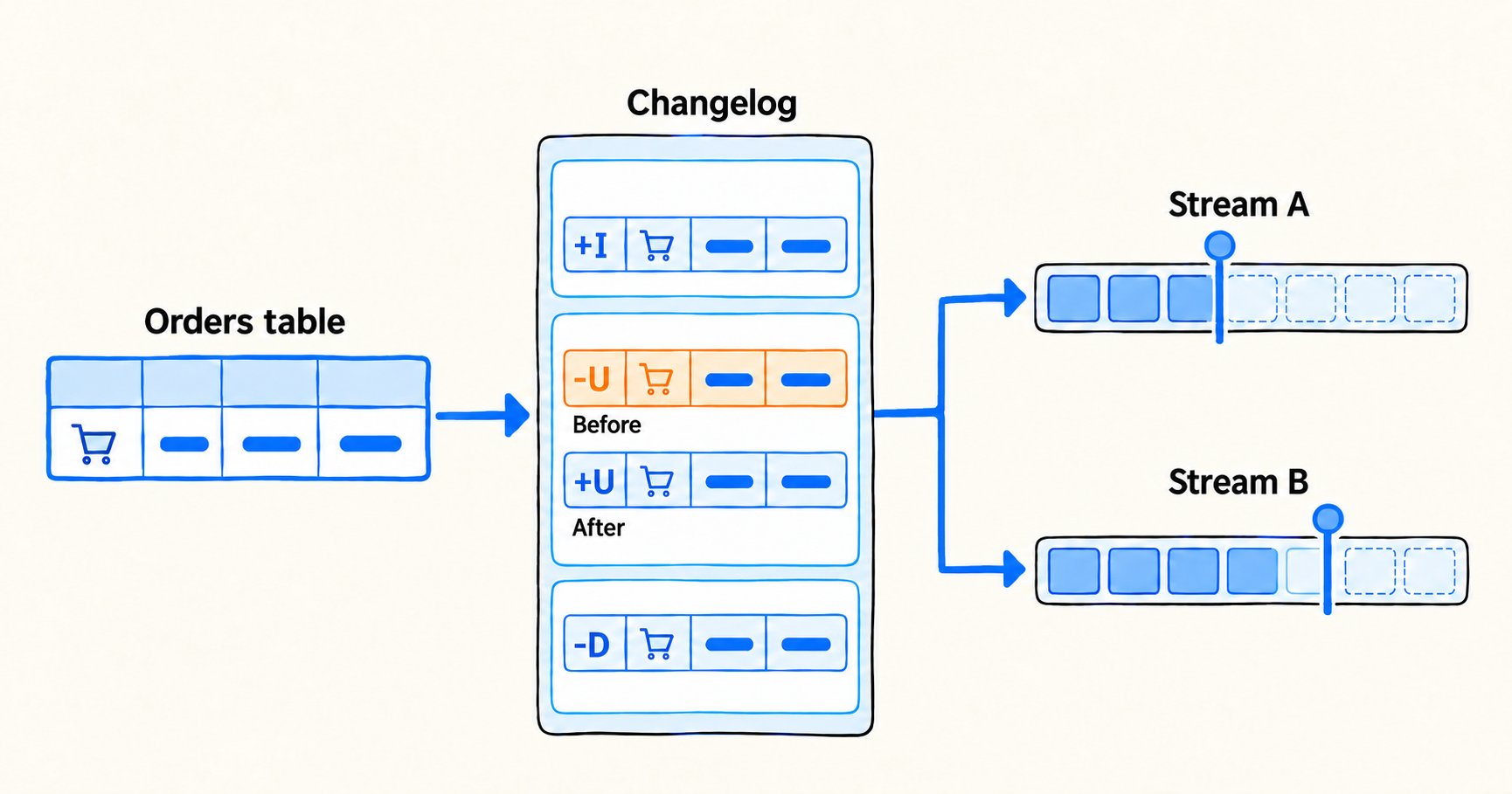
To update metrics and joined tables after an order changes, the system must know what changed and how far each downstream consumer has progressed. Changelog and Table Stream handle those two responsibilities.
Changelog records row-level changes
An orders table stores current state. Changelog records inserts, updates, and deletes. Querying the table shows what an order looks like now; reading Changelog shows how it got there.
Suppose order 1 changes from created with an amount of 100 to paid with an amount of 120. The table keeps the new state, but an aggregate by status also needs to subtract the old 100 from the created group. Changelog can retain both the old and new row. The old row is the before image. A delete likewise needs the old values to determine what to remove from an aggregate.
For supported internal tables, Doris persists row changes with commit timestamps and record sequence numbers so downstream consumers can read them in order. The examples here handle updates and deletes, so they use Unique Key tables with Changelog and historical values enabled at table creation.
Table Stream tracks consumption
A Table Stream references a base table with Changelog enabled and exposes changes that the stream has not consumed. A customer-support pipeline and an audit task can create separate streams over the orders table. Advancing one stream does not affect the other.
Each stream tracks its own consumption position per partition. An ordinary SELECT inspects pending changes without advancing that position. With INSERT INTO ... SELECT ... FROM <stream>, the target write and position advance commit in the same transaction; both roll back if it fails.
Consumers choose a stream type:
append_onlyreads appended records.min_deltacollapses repeated changes to the same key into a net delta.detailpreserves individual changes.
Changelog records what changed; Table Stream tracks what has been consumed. Incremental view maintenance builds on both.
Incremental view maintenance
What IVM does
A materialized view stores the result of a SQL query. When its base tables change, the stored result needs to change too. Incremental view maintenance (IVM) computes how inserts, updates, and deletes affect that result, then applies the corresponding changes.
You still define the view in SQL. For supported aggregates and joins, Doris reads the changes through Changelog and Table Stream, generates an incremental plan, and maintains the result. You do not need to hand-code every change-handling rule or recompute the entire dataset on every refresh.
How IVM updates a result
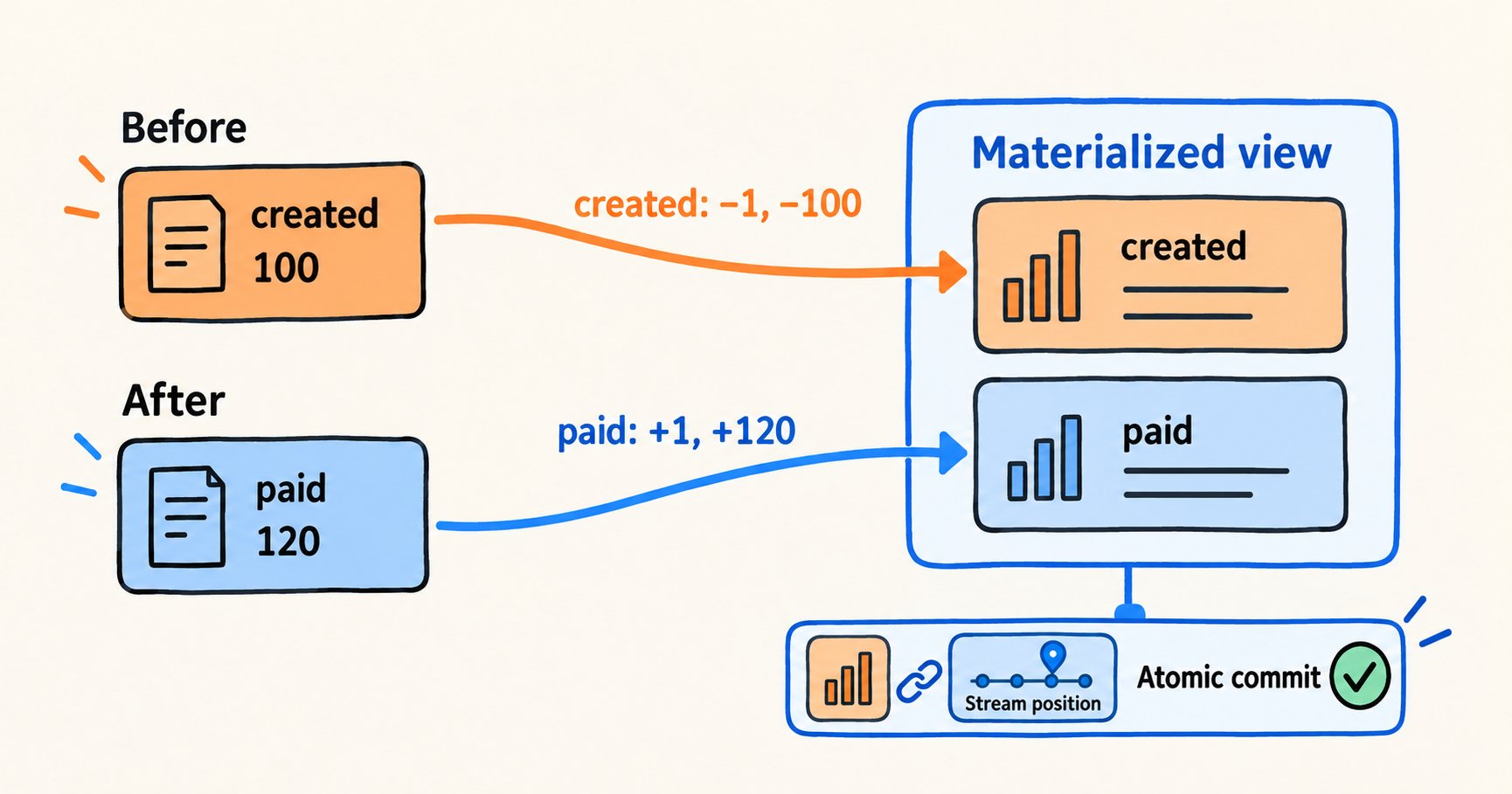
For order 1, changing from created, 100 to paid, 120 requires removing one order and 100 from the created group, then adding one order and 120 to the paid group.
IVM performs three steps:
- Read base-table changes. Doris creates internal Table Streams for participating base tables. The refresh task reads pending changes, including before and after images.
- Compute result changes. Doris derives an incremental plan from the view definition. Here, that plan retracts the old row's contribution and adds the new row's contribution.
- Commit results and progress. The materialized view update and stream positions commit in one transaction. A failure rolls both back, keeping the result consistent with consumption progress.
The first refresh must establish a baseline before incremental changes can be applied. Refreshes are asynchronous, so a view can lag behind its base tables until a refresh finishes. For custom processing inside Doris, you can create and consume Table Streams directly.
Four practical scenarios
1. Keep order metrics current
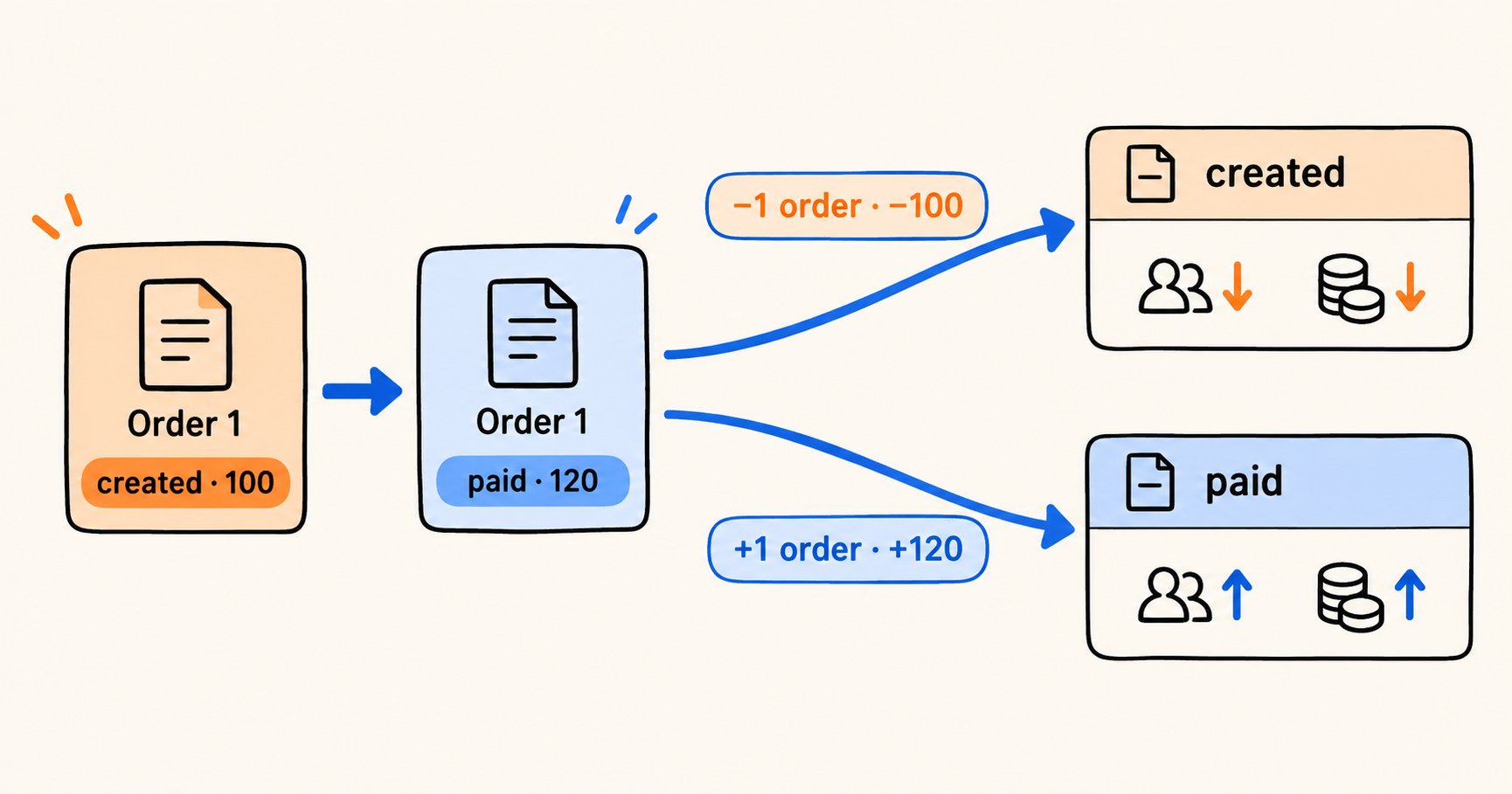
An operations dashboard shows order counts, total amounts, and average amounts by status. Payments move orders between groups; amount corrections and deletes must also update the existing metrics. Counting only new orders would produce incorrect results.
For supported aggregates, IVM uses old and new Changelog values to maintain the affected groups. Teams define metrics in SQL and can reduce repeated scans of historical data.
First, set enable_feature_changelog = true and enable_table_stream = true in fe.conf on every FE. Set enable_feature_changelog = true in be.conf on the BEs for Changelog cleanup, then restart the affected nodes. See the IVM prerequisites. Create a Unique Key orders table with Changelog and before images enabled:
CREATE DATABASE incr_article_demo;
USE incr_article_demo;

CREATE TABLE orders (
    order_id BIGINT,
    customer_id BIGINT,
    order_status VARCHAR(16),
    amount DECIMAL(12, 2)
)
UNIQUE KEY(order_id)
DISTRIBUTED BY HASH(order_id) BUCKETS 1
PROPERTIES (
    "replication_num" = "1",
    "enable_unique_key_merge_on_write" = "true",
    "changelog.enable" = "true",
    "changelog.need_historical_value" = "true"
);

INSERT INTO orders VALUES
    (1, 10, 'created', 100.00),
    (2, 20, 'paid',    200.00),
    (3, 10, 'paid',    300.00);
Create the aggregate view and run a complete refresh. Wait for that refresh to succeed before modifying the orders. Then apply the changes and request an incremental refresh:
CREATE MATERIALIZED VIEW orders_by_status
BUILD DEFERRED
REFRESH INCREMENTAL FALLBACK ON MANUAL
DISTRIBUTED BY RANDOM BUCKETS 1
PROPERTIES ("replication_num" = "1")
AS
SELECT order_status,
       COUNT(*) AS order_count,
       SUM(amount) AS total_amount,
       AVG(amount) AS avg_amount
FROM orders
GROUP BY order_status;

REFRESH MATERIALIZED VIEW orders_by_status COMPLETE;

-- Wait for the complete refresh to succeed before continuing.

INSERT INTO orders VALUES
    (1, 10, 'paid', 120.00),
    (2, 20, 'paid', 180.00);
DELETE FROM orders WHERE order_id = 3;
INSERT INTO orders VALUES (4, 30, 'created', 400.00);

REFRESH MATERIALIZED VIEW orders_by_status INCREMENTAL FALLBACK;
FALLBACK allows a refresh to use partition or complete recomputation when a change cannot be maintained incrementally. It does not make unsupported view definitions eligible for IVM.
After the refresh finishes, the paid group contains orders 1 and 2, totaling 300, and the created group contains only order 4. The expected values are:
| order_status | order_count | total_amount | avg_amount |
|---|---|---|---|
| created | 1 | 400.00 | 400.00 |
| paid | 2 | 300.00 | 150.00 |
These metrics summarize the example's order amounts. Define gross sales, refunds, and other production metrics according to your business rules; a refund is not simply an order deletion.
2. Maintain a denormalized customer-order table
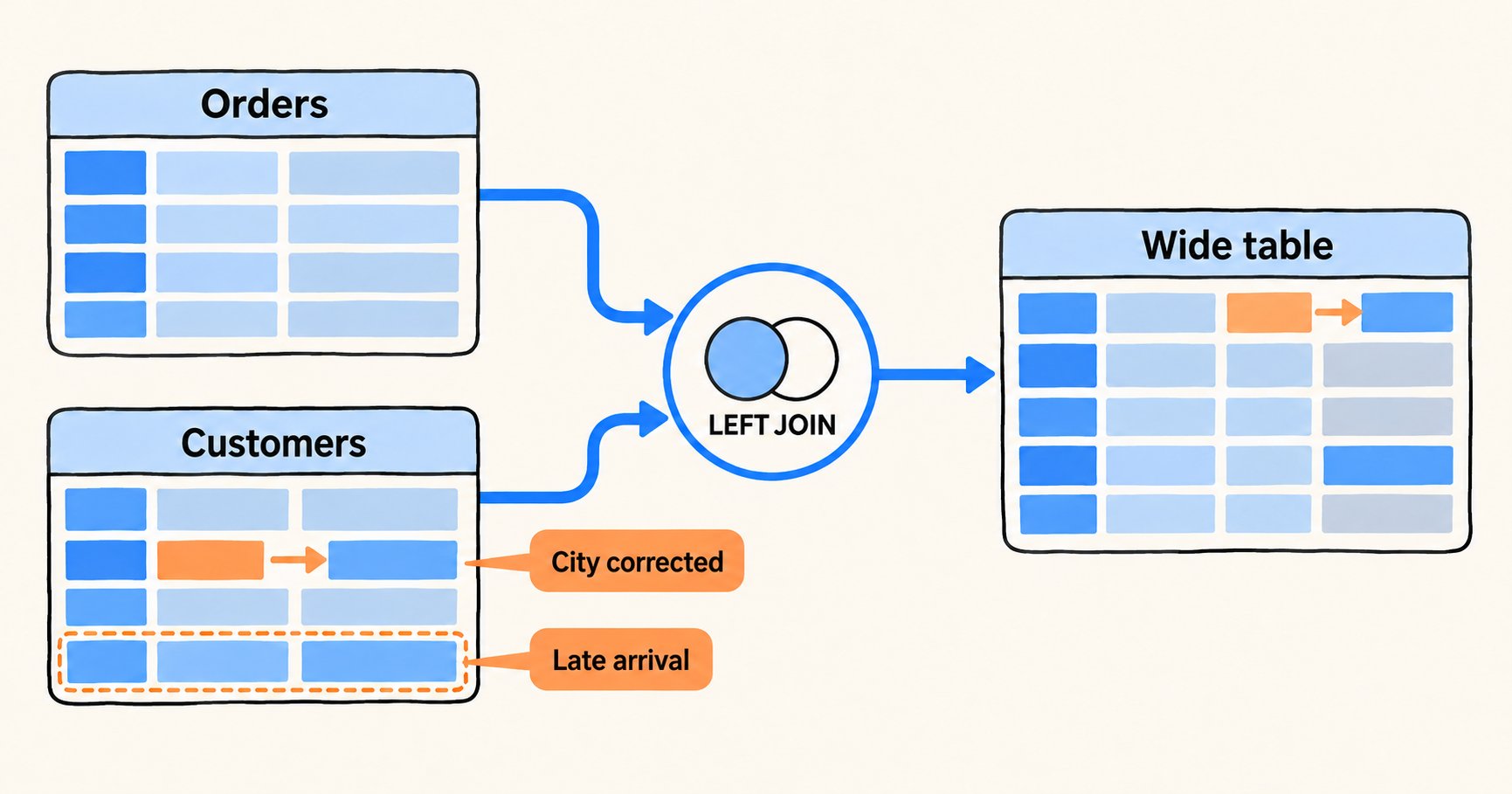
Operations and support teams often need orders joined with customer details. Processing only order-table deltas misses changes when a customer moves or when customer information arrives after an order. IVM join maintenance handles changes on both sides.
Continue with the orders table from the previous scenario. Create a customer table and joined view, establish the baseline, then change customer 10's city and add customer 30:
CREATE TABLE customers (
    customer_id BIGINT,
    customer_name VARCHAR(32),
    city VARCHAR(32)
)
UNIQUE KEY(customer_id)
DISTRIBUTED BY HASH(customer_id) BUCKETS 1
PROPERTIES (
    "replication_num" = "1",
    "enable_unique_key_merge_on_write" = "true",
    "changelog.enable" = "true",
    "changelog.need_historical_value" = "true"
);

INSERT INTO customers VALUES
    (10, 'Alice', 'Beijing'),
    (20, 'Bob',   'Shanghai');

CREATE MATERIALIZED VIEW orders_with_customer
BUILD DEFERRED
REFRESH INCREMENTAL FALLBACK ON MANUAL
DISTRIBUTED BY RANDOM BUCKETS 1
PROPERTIES ("replication_num" = "1")
AS
SELECT o.order_id, o.order_status, o.amount,
       c.customer_name, c.city
FROM orders o
LEFT JOIN customers c ON o.customer_id = c.customer_id;

REFRESH MATERIALIZED VIEW orders_with_customer COMPLETE;

-- Wait for the complete refresh to succeed before continuing.

INSERT INTO customers VALUES
    (10, 'Alice', 'Hangzhou'),
    (30, 'Carol', 'Shenzhen');

REFRESH MATERIALIZED VIEW orders_with_customer INCREMENTAL FALLBACK;
After refresh, order 1 shows the new city, Hangzhou, and order 4 gains the previously missing customer information. This view uses current customer attributes. A report that needs the city at order time must preserve that historical attribute in its data model.
3. Process changes between warehouse layers
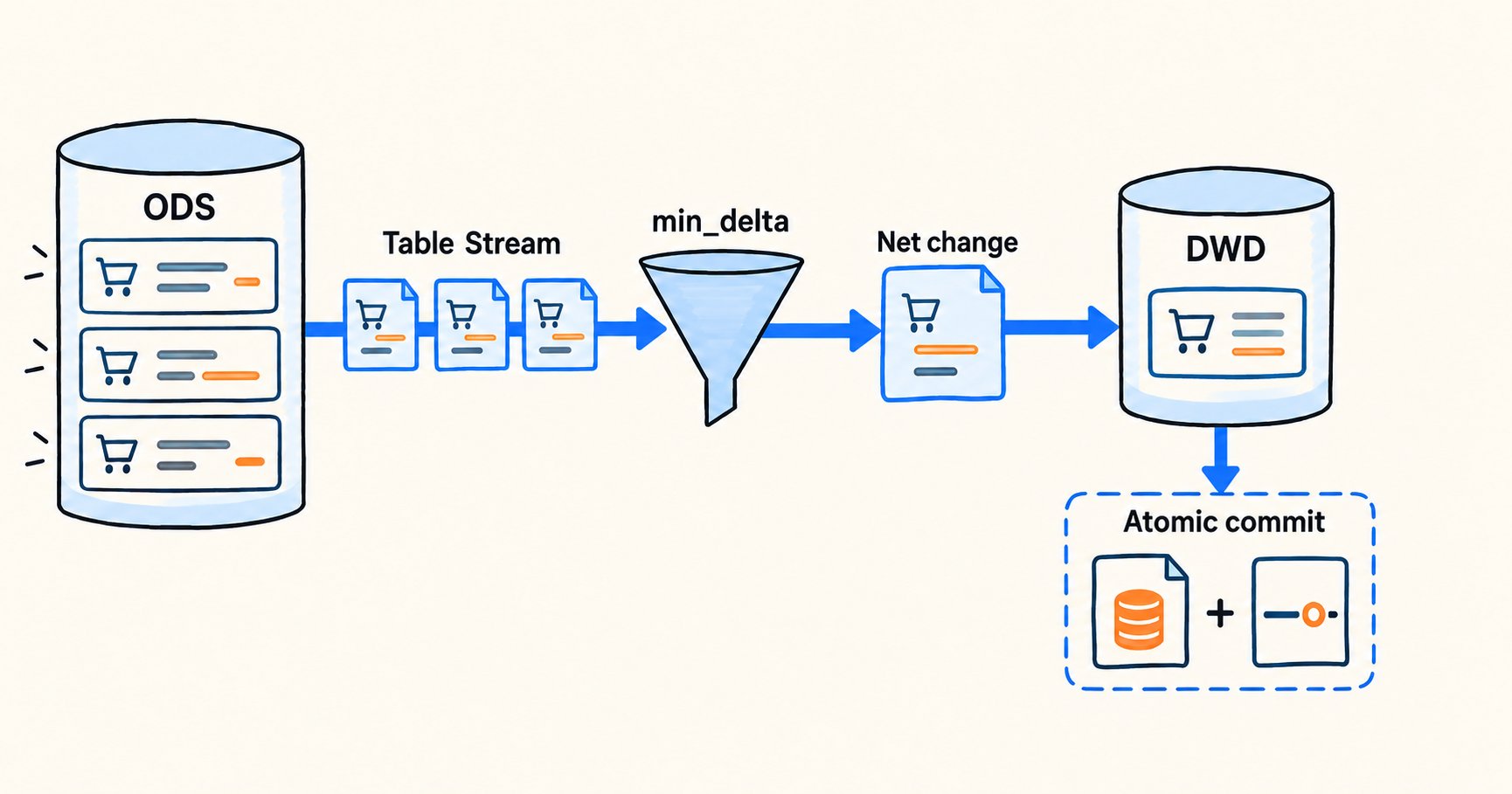
IVM automates view maintenance for supported SQL. More customized warehouse pipelines, such as ODS-to-DWD processing, may need explicit cleansing logic, consolidation of repeated updates, and retry control. Table Stream provides a basis for those pipelines inside Doris.
Create a stream that includes the initial order state, then write current rows and subsequent changes into a downstream Unique Key table:
CREATE STREAM orders_dwd_stream ON TABLE orders
PROPERTIES (
    "type" = "min_delta",
    "show_initial_rows" = "true"
);

CREATE TABLE dwd_orders (
    order_id BIGINT,
    order_status VARCHAR(16),
    amount DECIMAL(12, 2)
)
UNIQUE KEY(order_id)
DISTRIBUTED BY HASH(order_id) BUCKETS 1
PROPERTIES (
    "replication_num" = "1",
    "enable_unique_key_merge_on_write" = "true"
);

INSERT INTO dwd_orders (order_id, order_status, amount, __DORIS_DELETE_SIGN__)
SELECT order_id, order_status, amount,
       CASE WHEN __DORIS_STREAM_CHANGE_TYPE_COL__ = 'DELETE' THEN 1 ELSE 0 END
FROM orders_dwd_stream
WHERE __DORIS_STREAM_CHANGE_TYPE_COL__ IN ('APPEND', 'UPDATE_AFTER', 'DELETE');
The first execution loads current orders. Repeat the INSERT to process later net changes. UPDATE_AFTER replaces the old state, while DELETE uses the delete marker to remove a downstream row. This state-synchronization pipeline does not write UPDATE_BEFORE into the target. To audit every individual change, create a separate detail stream and store its output in an audit table.
4. Send Doris changes to other systems with Flink
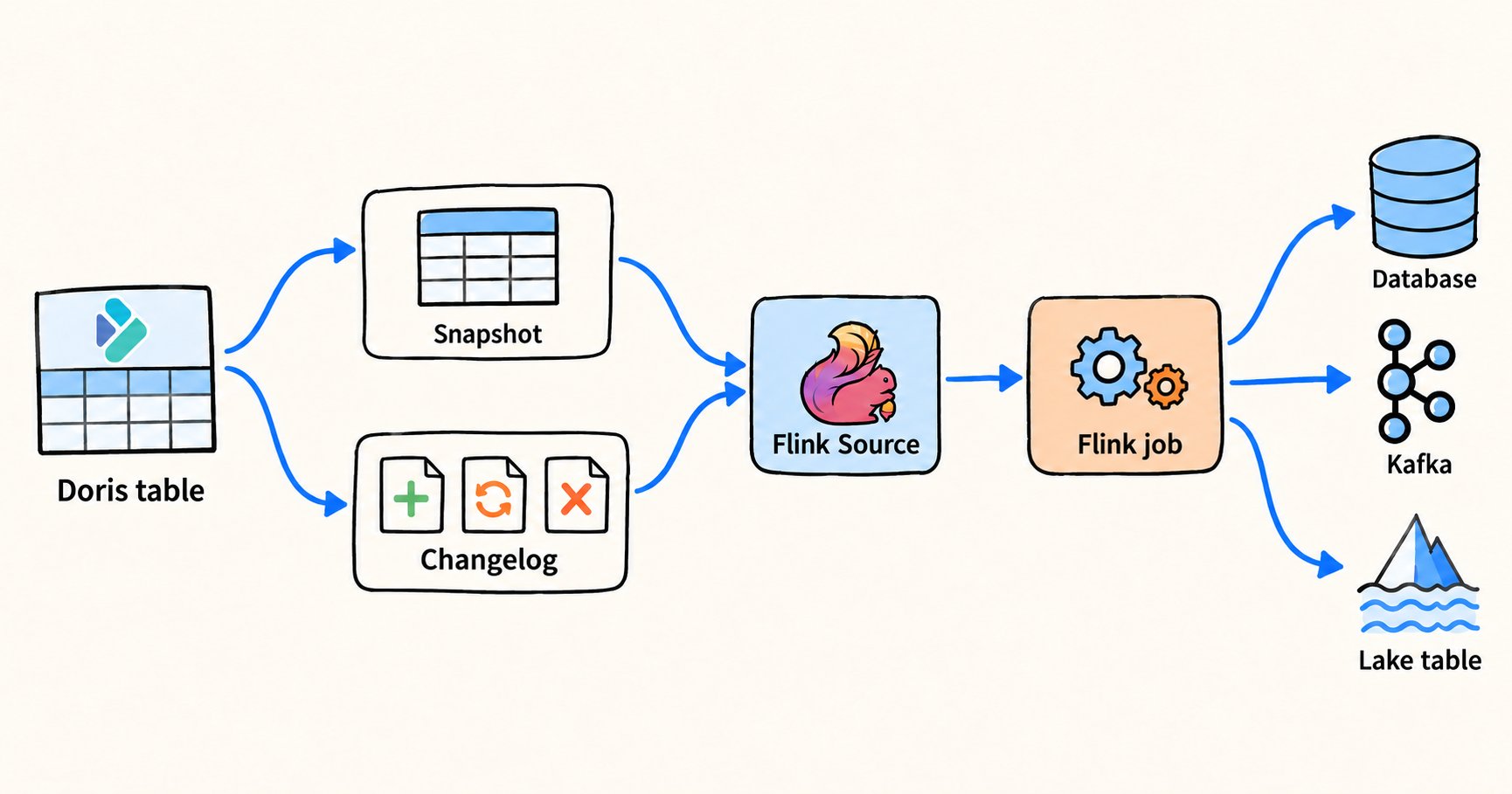
Some order changes also need to reach Kafka, a data lake, or another business system. Flink Doris Connector can use a Doris table as an incremental source.
In the Flink SQL Client, configure the orders table as a source:
SET 'execution.checkpointing.interval' = '10s';
SET 'table.exec.source.cdc-events-duplicate' = 'true';

CREATE TABLE orders_from_doris (
    order_id BIGINT,
    customer_id BIGINT,
    order_status STRING,
    amount DECIMAL(12, 2),
    PRIMARY KEY (order_id) NOT ENFORCED
) WITH (
    'connector' = 'doris',
    'fenodes' = '<fe-host>:8030',
    'table.identifier' = 'incr_article_demo.orders',
    'username' = '<doris-user>',
    'password' = '<doris-password>',
    'source.scan.mode' = 'initial',
    'source.changelog.increment-type' = 'detail'
);

-- Start the source, then run the following changes in a separate Doris SQL session.
SELECT * FROM orders_from_doris;
After the snapshot completes, run these changes in Doris:
INSERT INTO orders VALUES (5, 30, 'created', 50.00);
INSERT INTO orders VALUES (5, 30, 'paid',    50.00);
DELETE FROM orders WHERE order_id = 5;
The insert, payment update, and delete then flow into the Flink job. initial reads an existing snapshot before consuming later changes.
This example targets Doris 5.0.0+ and Flink Doris Connector 26.4.0+. Preview use requires Doris and connector builds with the Changelog interface changes. The destination sink must support updates and deletes. Recovery and delivery semantics also depend on checkpointing, log retention, deduplication, and sink behavior; source configuration alone does not establish an end-to-end guarantee.
Choosing an approach
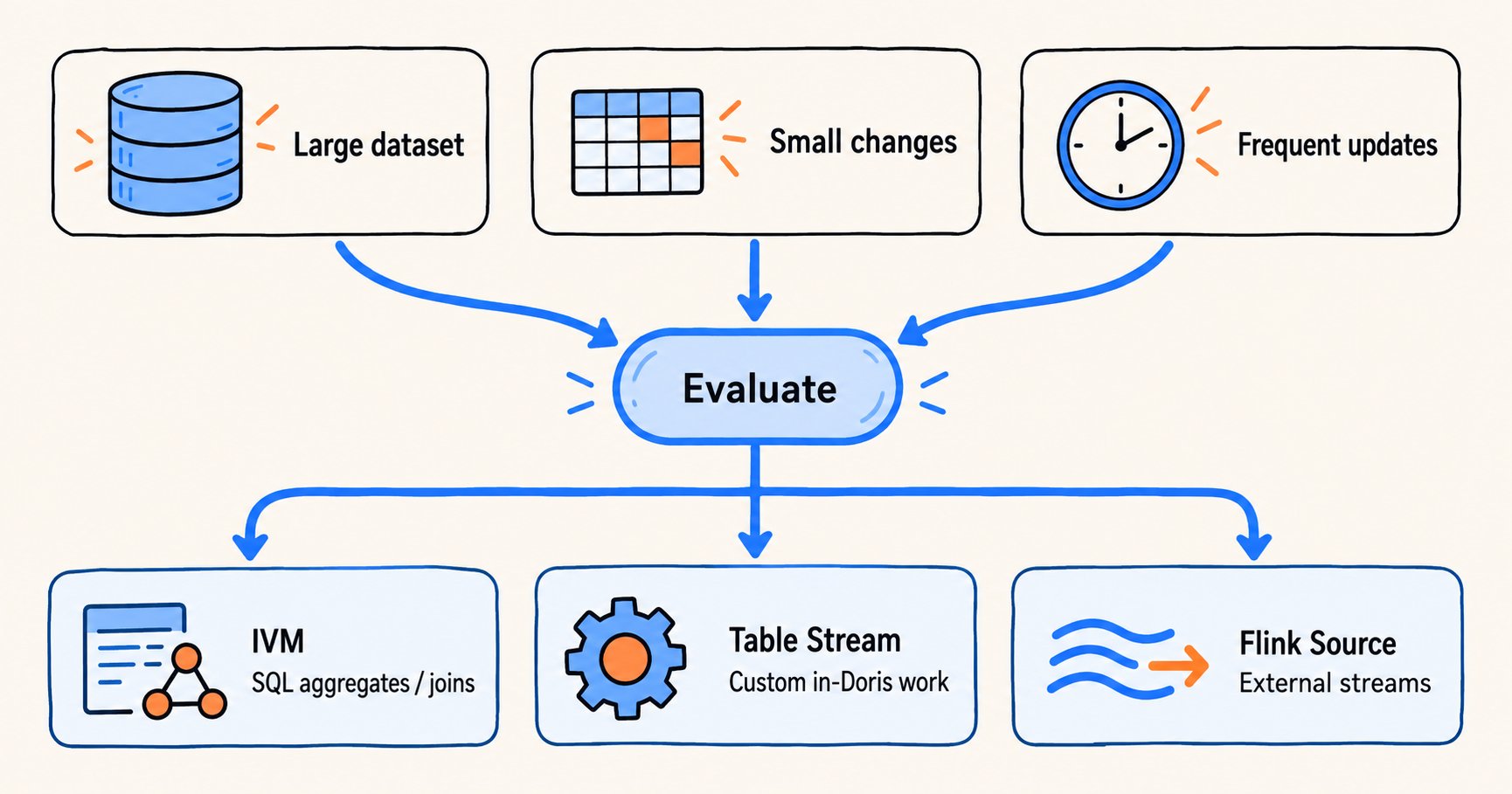
Incremental computation is most useful when a large stored dataset receives frequent changes. It complements full recomputation rather than eliminating the need for it.
| Approach | Best fit | What you control |
|---|---|---|
| Table Stream | Custom in-database ETL and warehouse layers | Change consumption, transformations, and scheduling; min_delta can collapse intermediate updates, and tracked positions support retries |
| IVM | Supported SQL aggregates and multi-table joins | The SQL view definition; Doris manages incremental plans and internal streams, and the materialized view can also support transparent query acceleration |
| Flink Doris Connector | Sending changes to Kafka, lake tables, or other systems | The Flink pipeline and sinks consuming Changelog directly |
Changelog retention defaults to one day. Size changelog.ttl_seconds to cover the longest expected consumer delay; a delayed consumer cannot rely on change records that have already expired. See Changelog and Table Stream for supported operations and recovery guidance.
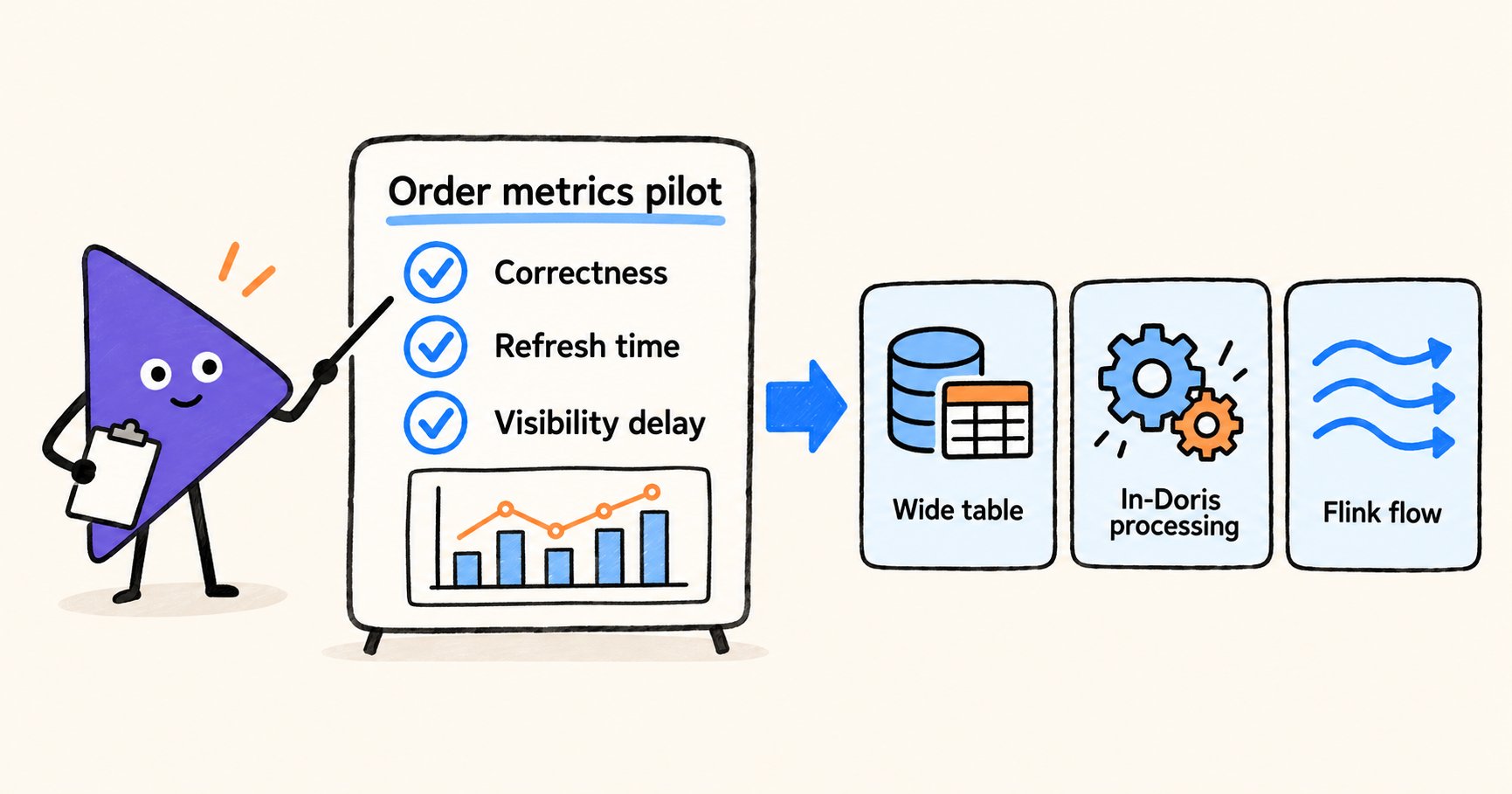
Start with a well-defined single-table aggregate, such as order counts by status. Verify correctness, refresh time, end-to-end visibility delay, and compute consumption before expanding to more complex pipelines. A follow-up technical article will examine Changelog storage and incremental plan generation.
Doris 5.0's incremental framework extends real-time ingestion to downstream results. Changelog captures changes, Table Stream manages consumption, and IVM maintains supported query results. Together, they can reduce repeated work and shorten the delay between a business update and the results that depend on it. These capabilities were announced ahead of the Doris 5.0 release; consult the project documentation and release announcements for availability.