Azure PostgreSQL
Doris continuous load is experimental and supported starting with Doris 4.1.5.
This guide prepares Azure Database for PostgreSQL Flexible Server as a source for Doris continuous load.
Pre-check Checklist
| Check | Requirement |
|---|---|
| Azure permissions | Permission to edit server parameters and restart the instance |
| Database permissions | Permission to create roles, grant replication, and publish the required source tables |
| Maintenance window | Changing wal_level requires a server restart |
| Network and TLS | The Doris FE and the CDC Client on the BE can reach the source on port 5432 over TLS. For public access, allow their outbound IP addresses in the Azure firewall. For private access, verify routing and DNS. |
Step 1: Check the Current Configuration
Connect to the source instance and check the WAL level and the capacity for replication slots and WAL senders.
SHOW wal_level;
SHOW max_replication_slots;
SHOW max_wal_senders;
If wal_level is already logical and the instance has enough replication slots and WAL senders, proceed to create the sync user.
Step 2: Configure Server Parameters
-
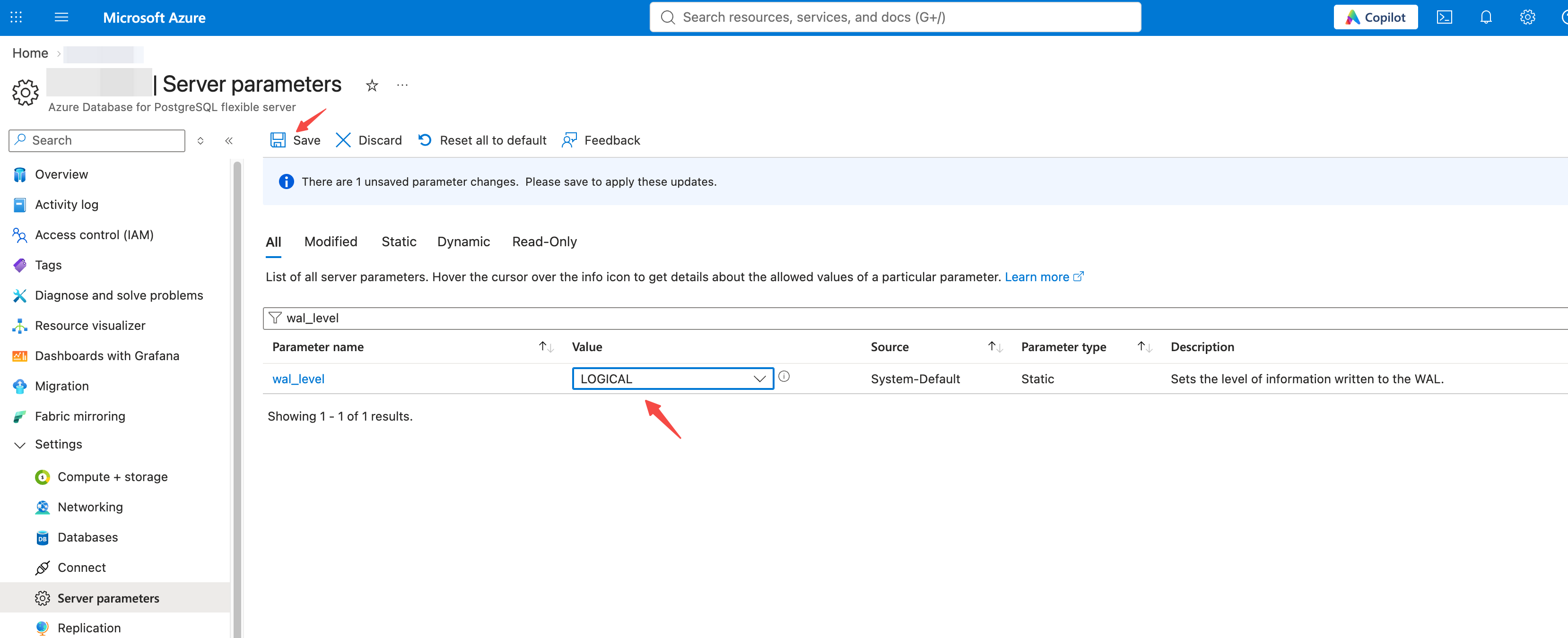
In the Azure portal, open the PostgreSQL Flexible Server and go to Settings → Server parameters.
-
Set
wal_leveltological. -
Increase
max_replication_slotsandmax_wal_sendersas needed for the existing replication workloads and the new Doris jobs. -
Save the changes. Azure PostgreSQL logical replication
Step 3: Restart the Instance and Verify the Configuration
Restart the instance during a maintenance window. After restart, connect to the source database and run SHOW wal_level;. Expect logical.
Step 4: Create the Sync User
Connect to the source database as the Azure PostgreSQL server administrator. Replace source_db and public with the database and schema to sync, and grant access to the source tables.
1. Create the User
CREATE ROLE doris_sync WITH LOGIN PASSWORD '<password>';
2. Grant Database and Schema Access
GRANT CONNECT ON DATABASE source_db TO doris_sync;
GRANT USAGE ON SCHEMA public TO doris_sync;
GRANT SELECT ON ALL TABLES IN SCHEMA public TO doris_sync;
3. Grant Replication Privileges
ALTER ROLE doris_sync WITH REPLICATION;
The REPLICATION attribute is granted through PostgreSQL SQL. Check that rolreplication is true for the sync user.
SELECT rolname, rolreplication FROM pg_roles WHERE rolname = 'doris_sync';
Step 5: Configure the Publication
Doris uses pgoutput for logical replication. By default, Doris creates a publication and a logical replication slot for the job. To let Doris create the publication, the sync user needs CREATE on the source database and must own the tables it publishes. PostgreSQL publication permissions
For a sync user with read and replication privileges, have a role with the required permissions create the publication in the source database and include all tables the job will sync. Use tables with primary keys for Auto Table Creation Sync.
CREATE PUBLICATION doris_pub_custom FOR TABLE public.orders, public.customers;
Set "publication_name" = "doris_pub_custom" when creating the job. Doris manages the replication slot if you omit slot_name. You manage the pre-created publication.
After completing the prerequisites, follow PostgreSQL CDC with Auto Table Creation to create the job and configure TLS.
FAQ
Q1: Why does an Azure administrator still need REPLICATION?
Azure administrator role membership and the PostgreSQL REPLICATION attribute are independent. Query pg_roles.rolreplication to check the role's current replication privilege.
Q2: How do I check which tables an existing publication contains?
Query pg_publication_tables in the source database and check the schemaname and tablename values for the selected pubname.
Troubleshooting
| Symptom | Check |
|---|---|
| The replication connection is denied | Verify that the sync role has rolreplication = true and that wal_level is logical. |
| The job cannot create a publication | Check database CREATE privilege and source table ownership, or create a publication separately and specify publication_name. |
Azure rejects CREATE EXTENSION hstore | If the source schema uses hstore, add it to azure.extensions in Server parameters, then run CREATE EXTENSION IF NOT EXISTS hstore; in the source database. Azure extension allowlist |