Azure MySQL
Doris continuous load is experimental and supported starting with Doris 4.1.5.
This guide prepares Azure Database for MySQL Flexible Server as a source for Doris continuous load.
Prerequisite Checklist
| Check | Expected value |
|---|---|
log_bin | ON |
binlog_format | ROW |
binlog_row_image | FULL |
| Sync user | SELECT on the source database and global REPLICATION SLAVE and REPLICATION CLIENT privileges |
| Binlog retention | Covers the longest expected interruption and replication lag |
| Network and TLS | The Doris FE and the CDC Client on the BE can reach the source on port 3306 over TLS. For public access, allow their outbound IP addresses in the Azure firewall. For private access, verify routing and DNS. |
Step 1: Check the Current Binlog Configuration
Open a new MySQL connection and check the effective values.
SHOW GLOBAL VARIABLES WHERE Variable_name IN ('log_bin', 'binlog_format', 'binlog_row_image', 'binlog_expire_logs_seconds');
SHOW SESSION VARIABLES LIKE 'binlog_row_image';
Expect log_bin = ON and binlog_format = ROW. The global and session binlog_row_image values should both be FULL.
Step 2: Configure Server Parameters
-
In the Azure portal, open the MySQL Flexible Server and go to Settings → Server parameters.
-
Set
binlog_row_imagetoFULLand save. Azure enables binary logging and uses row-based logging.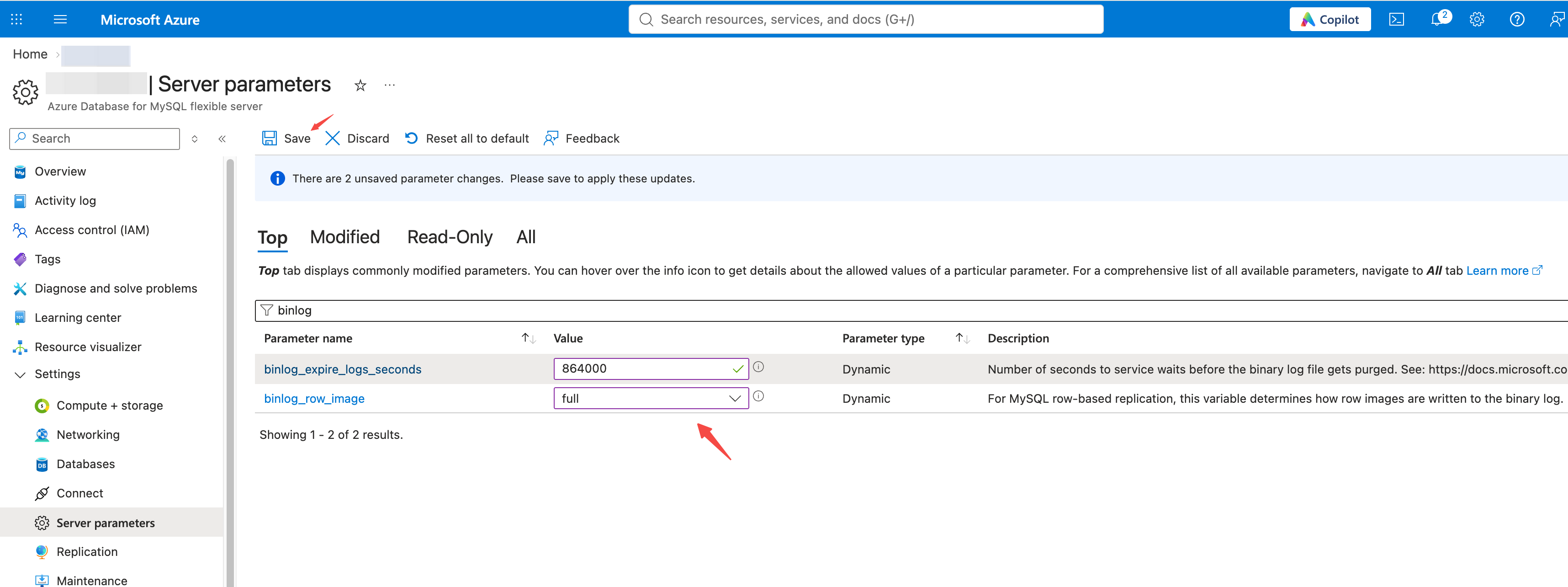
-
Open a new MySQL connection and check the global and session values for
binlog_row_imageagain.
For details, see Configure server parameters.
Step 3: Create a Sync User
Connect as the server administrator. Replace source_db with your source database name and set a password for the sync user.
CREATE USER 'doris_sync'@'%' IDENTIFIED BY '<password>' REQUIRE SSL;
GRANT SELECT ON source_db.* TO 'doris_sync'@'%';
GRANT REPLICATION SLAVE, REPLICATION CLIENT ON *.* TO 'doris_sync'@'%';
SELECT lets Doris read snapshot data. REPLICATION SLAVE lets it read binary log events, and REPLICATION CLIENT lets it query binary log status.
On MySQL 8.4, connect as the sync user and run SHOW BINARY LOG STATUS;. The result should include a binary log file and position. On earlier MySQL versions, use SHOW MASTER STATUS;. MySQL 8.4 binary log status reference
Step 4: Configure Binlog Retention
In the Azure portal, set binlog_expire_logs_seconds under Server parameters. Azure uses seconds for this parameter. The screenshot in Step 2 uses 864000 seconds (10 days) as an example. Choose a value that covers the longest expected interruption and replication lag so Doris can resume from its saved position. Azure MySQL binlog retention
After completing the prerequisites, follow MySQL CDC with Auto Table Creation to create the job and configure TLS.
Frequently Asked Questions (FAQ)
Q1: Does changing binlog_row_image require a server restart?
binlog_row_image is dynamic. After saving the change, open a new connection to check the effective value. Restart if the Azure portal prompts you to do so.
Q2: Why does binlog_row_image need to be FULL?
Doris continuous load needs complete row images to process updates and deletes. MINIMAL can omit unchanged columns.
Troubleshooting
| Symptom | Check |
|---|---|
The connector rejects MINIMAL or NOBLOB | Confirm that the global value and a new session both report binlog_row_image = FULL. |
| Binary log status is denied | Verify that the sync user has REPLICATION CLIENT. MySQL 8.4 uses SHOW BINARY LOG STATUS. |
| Doris cannot resume from the stored position | Check whether Azure has purged the required binary log and review the configured retention period. |