代码提交指南
GitHub 提供了便捷的 Pull Request (PR) 协作机制。本文介绍向 Apache Doris 项目提交 PR 的完整流程。
整体流程包括:
- Fork
apache/doris仓库到自己账号。 - 配置本地 git 并提交修改。
- 在 GitHub 创建 PR。
- 如有冲突,通过 rebase 解决。
1. Fork 仓库
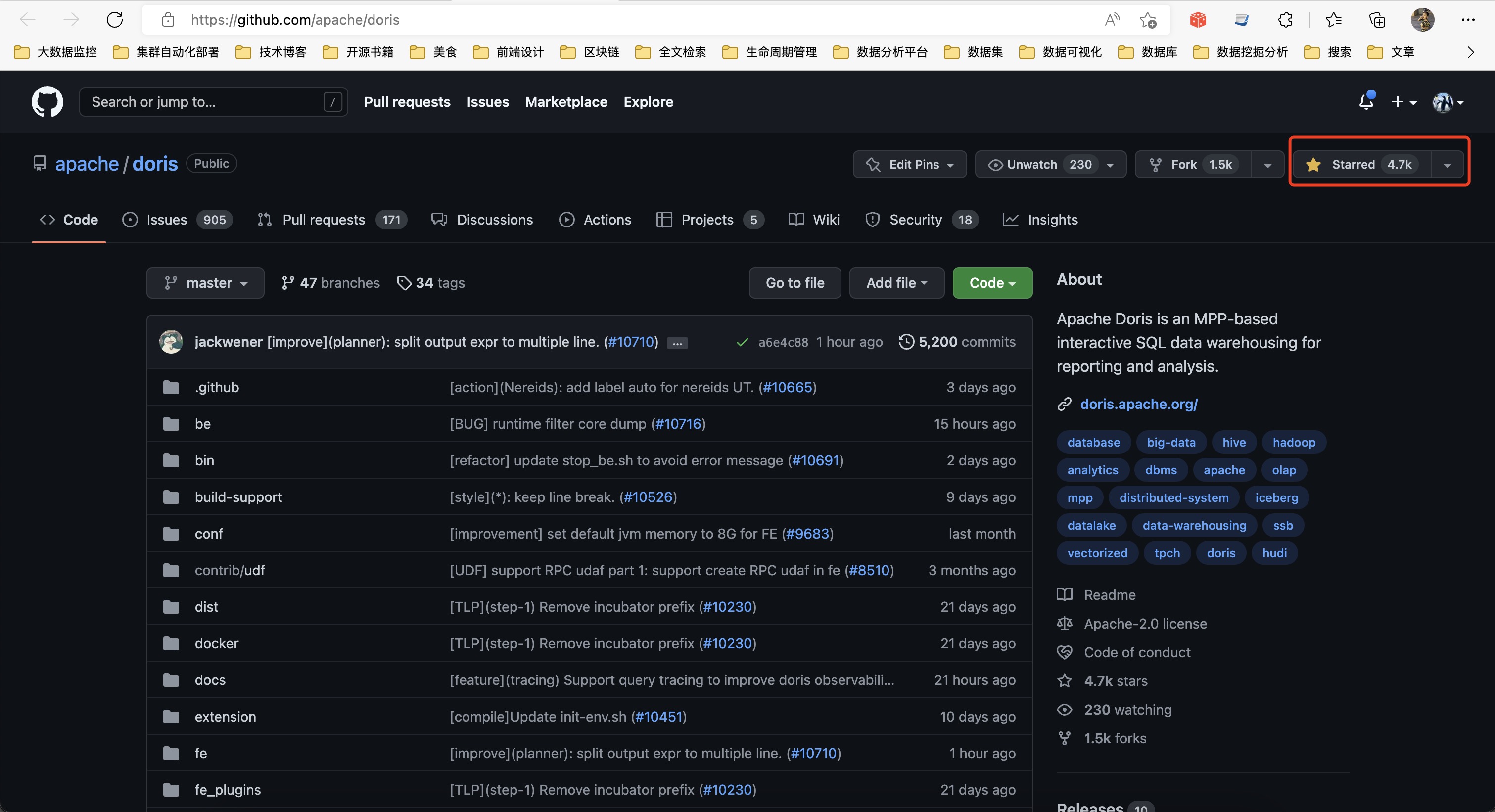
进入 apache/doris 的 GitHub 页面,点击右上角 Fork 按钮完成 Fork。
2. 配置 git 并提交修改
(1)克隆代码到本地
git clone https://github.com/<your_github_name>/doris.git
cd doris
git submodule update --init --recursive
注意:请将 <your_github_name> 替换为您的 GitHub 用户名。
clone 完成后,origin 会默认指向 GitHub 上的远程 Fork 地址。
(2)将 apache/doris 添加为远程仓库 upstream
cd doris
git remote add upstream https://github.com/apache/doris.git
(3)检查远程仓库设置
git remote -v
origin    https://github.com/<your_github_name>/doris.git (fetch)
origin    https://github.com/<your_github_name>/doris.git (push)
upstream  https://github.com/apache/doris.git (fetch)
upstream  https://github.com/apache/doris.git (push)
(4)新建分支以便在分支上做修改
git checkout -b <your_branch_name>
注意:<your_branch_name> 为您自定义的分支名字。
创建完成后即可在该分支上进行代码修改。
(5)提交代码到远程分支
git commit -a -m "<your_commit_message>"
git push origin <your_branch_name>
更多 git 使用方法请参考 GitHub 官方文档:git 使用。
3. 创建 PR
(1)新建 PR
在浏览器切换到自己的 GitHub 页面,将分支切换至提交的分支 <your_branch_name>,点击 Compare & pull request 按钮进行创建。
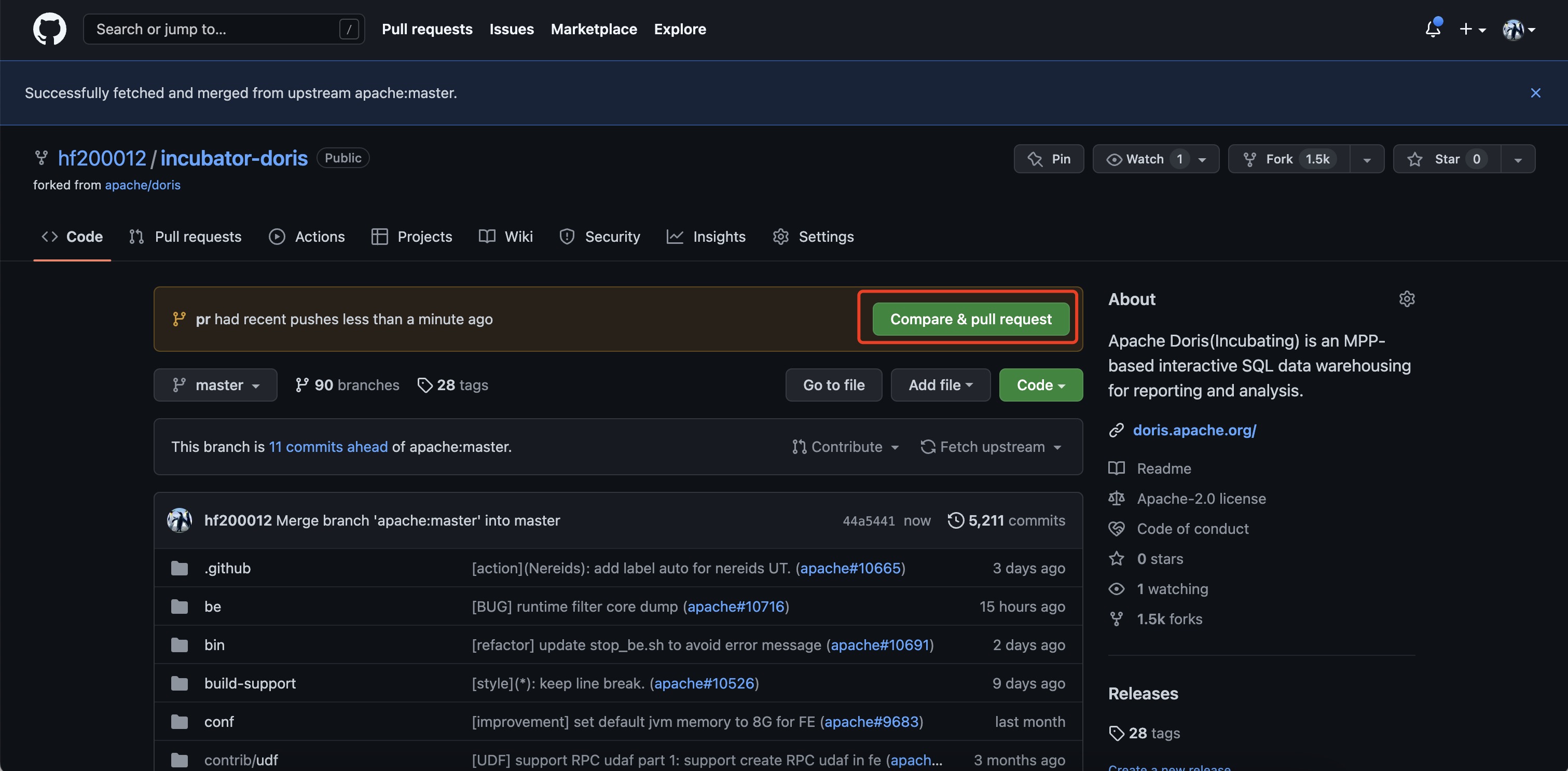
(2)准备分支
此时会出现 Create pull request 按钮。如果没有出现,请检查是否正确选择了分支,也可以点击 compare across forks 重新选择 repo 和分支。
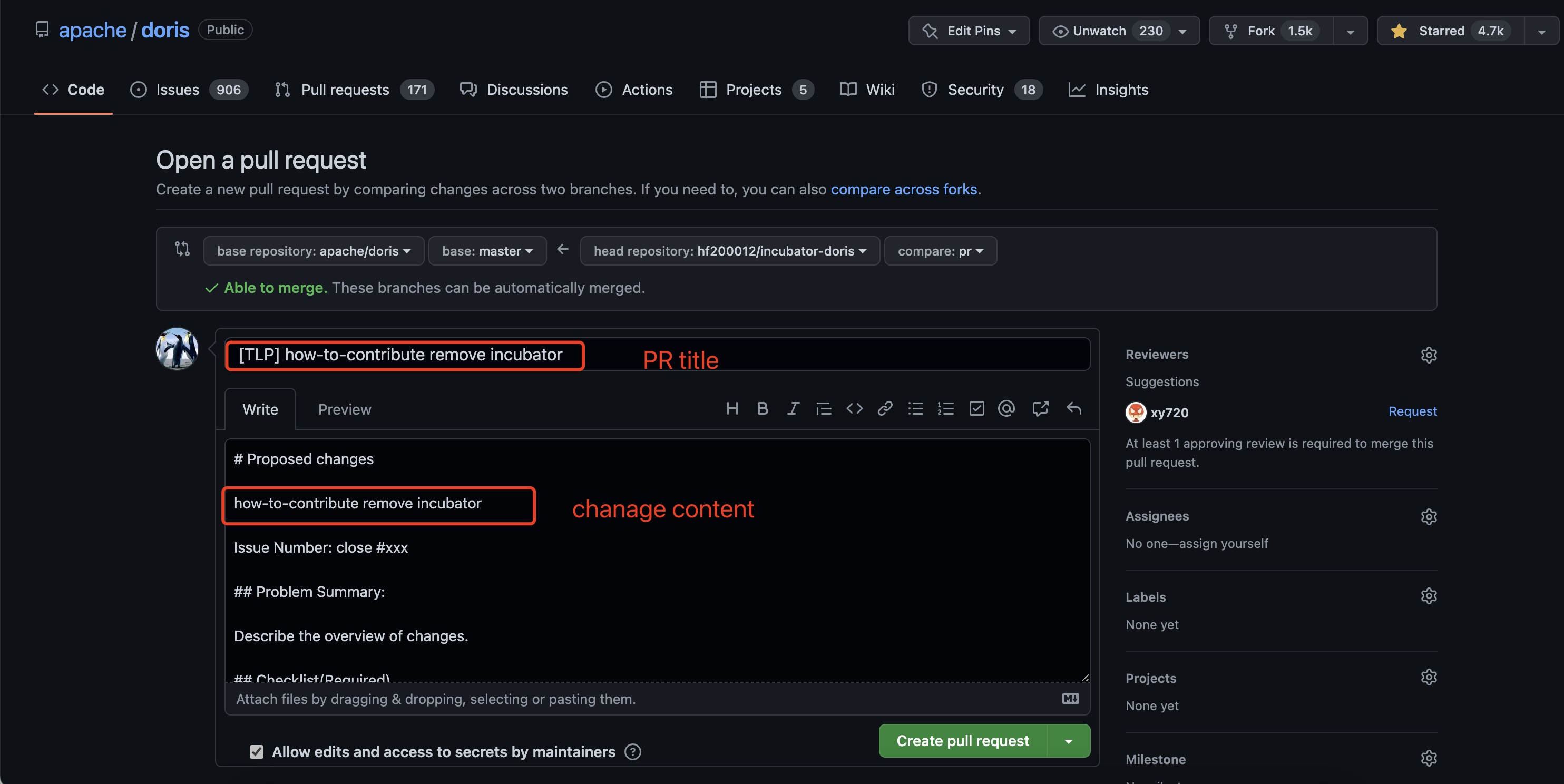
(3)填写 Commit Message
填写 commit 的总结和详细内容,然后点击 Create pull request 完成创建。
Commit Message 书写要点如下:
| 要点 | 要求 |
|---|---|
| 语态 | 英文「动词 + 宾语」形式,使用祈使句 |
| 时态 | 动词不用过去式 |
| 主题与正文 | 都要写,且二者之间用空行分隔(GitHub PR 界面上分别填写即可) |
| 主题长度 | 不超过 50 个字符 |
| 正文行宽 | 每行不超过 72 个字符,超过需手动换行 |
| 正文内容 | 解释「做了什么、为什么做、怎么做的」 |
| 主题首字母 | 大写 |
| 主题句尾 | 不要有句号 |
| 关联 Issue | 在正文中写明关联 Issue(如 #233) |
更详细的内容请参考 https://chris.beams.io/posts/git-commit。
(4)完成创建
创建成功后,您可以看到 PR 等待 Doris 项目维护者 Review。可以等待 Review 与合入,也可以直接联系社区跟进。
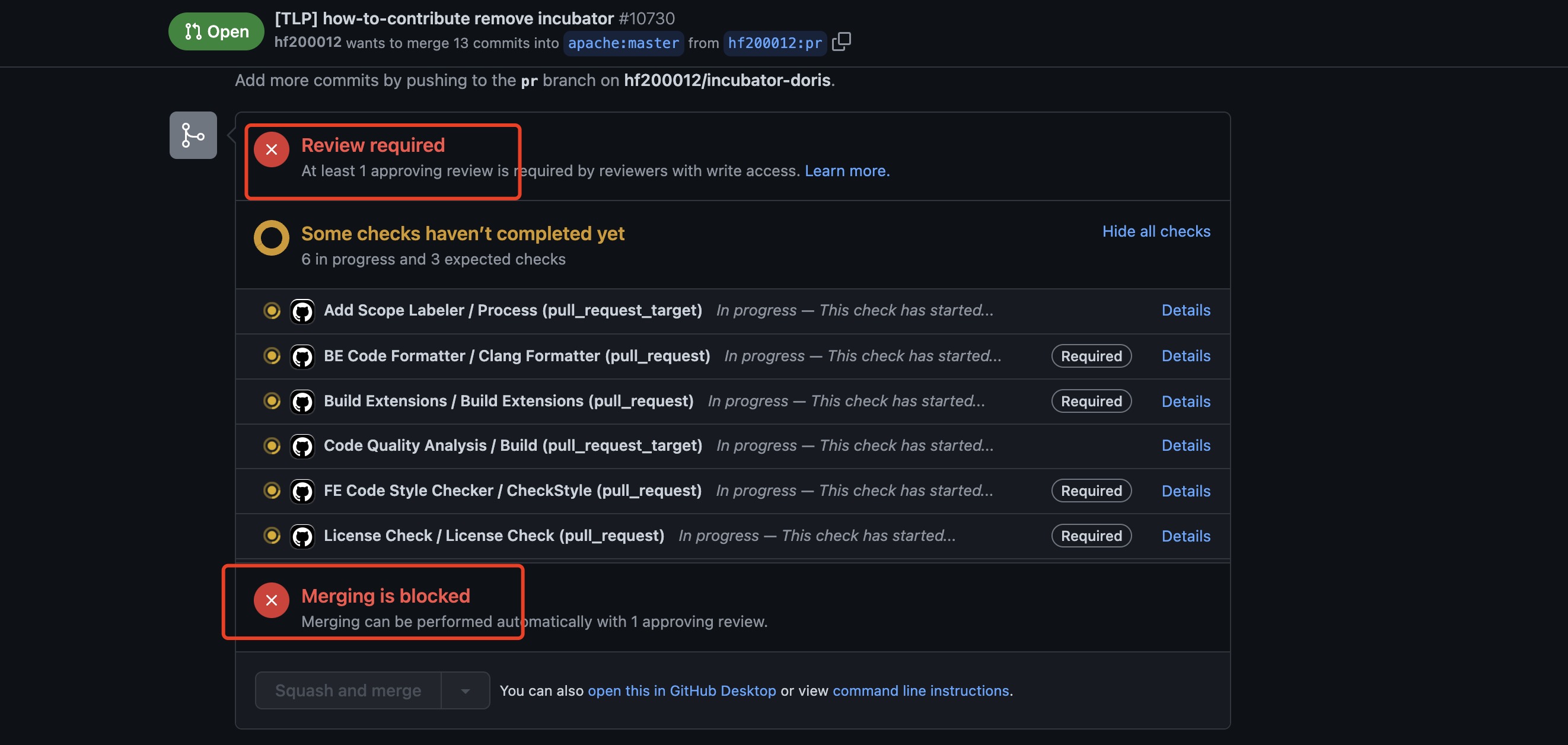
至此 PR 创建完成。更多关于 PR 的内容请参考 collaborating-with-issues-and-pull-requests。
(5)等待 CI 检查通过
PR 创建后会自动触发 CI 流水线。在 PR 页面底部的检查列表中:
- 标记为 Required 的检查项必须全部通过(变绿),PR 才允许合入。
- 其余非 Required 的检查项可作为参考,但不阻塞合入。
具体哪些检查项是 Required 以 PR 页面实时显示为准。如果检查失败,请点击该 Check 进入 GitHub Actions 日志定位错误,修复后 git push 重新触发即可。
4. 冲突解决
PR 提交时的代码冲突一般是由于多人编辑同一个文件引起的,按以下步骤解决:
(1)切换至主分支
git checkout master
(2)同步远端主分支至本地
git pull upstream master
(3)切换回开发分支(假设分支名为 fix)
git checkout fix
(4)进行 rebase
git rebase -i master
此时会弹出修改记录的文件,一般直接保存即可。随后会提示哪些文件出现了冲突,打开冲突文件修改冲突部分。所有冲突文件处理完毕后,执行:
git add .
git rebase --continue
依此往复,直至屏幕出现类似 rebase successful 字样。此时可向 PR 分支强制推送更新:
git push -f origin fix
5. 完整示例
下面给出一个从同步代码到推送分支的完整示例。
(1)已配置 upstream 的本地分支 fetch 最新代码
$ git branch
* master

$ git fetch upstream
remote: Counting objects: 195, done.
remote: Compressing objects: 100% (68/68), done.
remote: Total 141 (delta 75), reused 108 (delta 48)
Receiving objects: 100% (141/141), 58.28 KiB, done.
Resolving deltas: 100% (75/75), completed with 43 local objects.
From https://github.com/apache/doris
   9c36200..0c4edc2  master     -> upstream/master
(2)进行 rebase
$ git rebase upstream/master
First, rewinding head to replay your work on top of it...
Fast-forwarded master to upstream/master.
(3)检查是否有别人提交未同步到自己 repo
$ git status
# On branch master
# Your branch is ahead of 'origin/master' by 8 commits.
#
# Untracked files:
#   (use "git add <file>..." to include in what will be committed)
#
#       custom_env.sh
nothing added to commit but untracked files present (use "git add" to track)
(4)将其他人提交的代码同步到自己的 repo
$ git push origin master
Counting objects: 195, done.
Delta compression using up to 32 threads.
Compressing objects: 100% (41/41), done.
Writing objects: 100% (141/141), 56.66 KiB, done.
Total 141 (delta 76), reused 140 (delta 75)
remote: Resolving deltas: 100% (76/76), completed with 44 local objects.
To https://lide-reed:xxxx@github.com/lide-reed/doris.git
   9c36200..0c4edc2  master -> master
(5)新建分支并准备开发
$ git checkout -b my_branch
Switched to a new branch 'my_branch'

$ git branch
  master
* my_branch
(6)代码修改完成后,暂存改动
$ git add -u
(7)填写 message 并提交到本地分支
$ git commit -m "Fix a typo"
[my_branch 55e0ba2] Fix a typo
 1 files changed, 2 insertions(+), 2 deletions(-)
(8)将分支推送到 GitHub 自己的 repo
$ git push origin my_branch
Counting objects: 11, done.
Delta compression using up to 32 threads.
Compressing objects: 100% (6/6), done.
Writing objects: 100% (6/6), 534 bytes, done.
Total 6 (delta 4), reused 0 (delta 0)
remote: Resolving deltas: 100% (4/4), completed with 4 local objects.
remote:
remote: Create a pull request for 'my_branch' on GitHub by visiting:
remote:      https://github.com/lide-reed/doris/pull/new/my_branch
remote:
To https://lide-reed:xxxx@github.com/lide-reed/doris.git
 * [new branch]      my_branch -> my_branch
至此即可按照前述流程创建 PR。