Compute Group
TL;DR Apache Doris Compute Group is the storage-compute decoupled equivalent of Resource Group. You split BE nodes into named groups, grant users access, and bind each session to a group; only those BEs serve the query. Because storage is shared (S3, OSS, COS, HDFS), adding a group costs you compute, not a replica. A BE failure inside one group does not affect the others, and decommissioning a whole group leaves the data untouched.
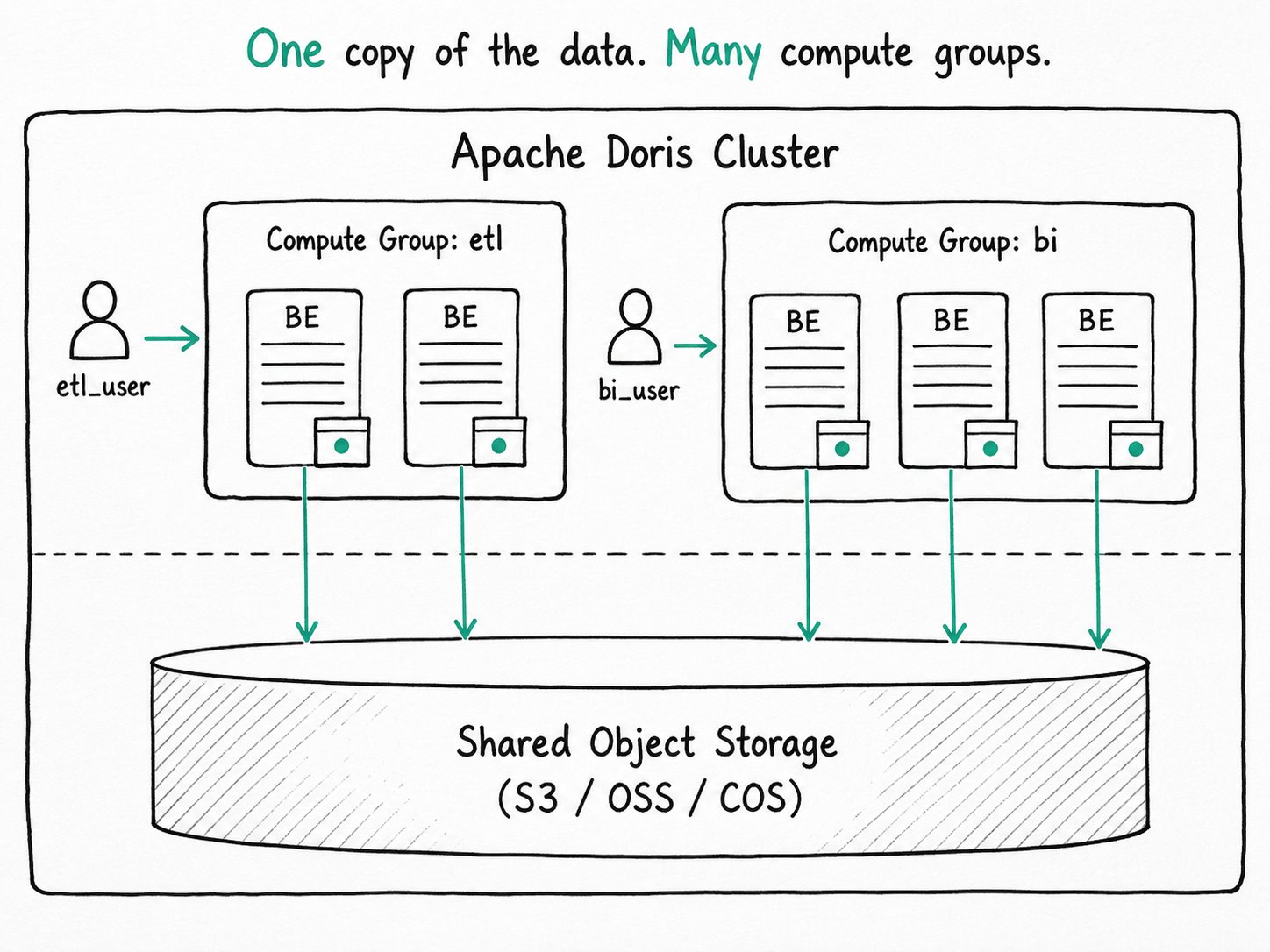
Why use Apache Doris compute groups?
Apache Doris compute groups give you BE-level workload isolation without multiplying storage, because every group reads from the same shared object store. Resource Group buys you BE-level isolation in compute-storage integrated mode, but the bill arrives as storage. Five groups that all need to read the same table means five replicas of that table. Two new tenants means rebuilding replica allocation. Spinning up a temporary pool for tomorrow's batch run means moving data around first.
In a storage-compute decoupled deployment, the BE is stateless. It caches hot tablets locally for speed, but the source of truth lives in shared object storage. So adding another set of BEs costs you compute and a cold cache, nothing else. There is one logical copy of the data, regardless of how many compute groups read from it.
Compute Group is the feature that turns that into workload isolation. You divide BEs into groups the way you would with Resource Group, but the storage budget stops scaling with the number of groups. Spin up an ETL pool for a load window, run BI on a different pool that never feels the load, decommission a group at midnight. The data does not move.
What is an Apache Doris compute group?
An Apache Doris compute group is a node-level isolation primitive in storage-compute decoupled (cloud) mode. Each BE belongs to exactly one compute group, identified by a name. The same object-storage manifest backs every group, so adding a group means adding compute and a cache that needs warming, not adding a replica. Workload Group then sits inside a compute group, partitioning CPU and memory across the queries running there.
Key terms
tag.compute_group_name: the BE-side property set when adding a backend. Defaults todefault_compute_groupwhen omitted.default_compute_group: a per-user property that picks the compute group for new sessions. Set withSET PROPERTY FOR '<user>' 'default_compute_group' = '<name>'.USE @<group>: a per-session switch that flips the active group for the current connection, optionally combined with a database name (USE my_db@<group>).USAGE_PRIV ON COMPUTE GROUP: the access privilege. Granted withGRANT USAGE_PRIV ON COMPUTE GROUP <name> TO <user>. Without it, the user cannot select the group.- File cache: the local on-BE cache of hot tablet blocks. A new group starts cold and pays an object-storage round-trip on every miss until it warms up.
How does an Apache Doris compute group work?
An Apache Doris compute group tags each BE at registration, grants USAGE_PRIV to specific users, binds sessions to a group either by default property or by USE @<group>, and restricts query fragment placement to that group's BEs while shared object storage backs every group.
- Tag BEs at registration.
ALTER SYSTEM ADD BACKEND 'host:9050' PROPERTIES ("tag.compute_group_name" = "etl")adds a backend into theetlgroup. Omitting the property lands the BE indefault_compute_group. The MetaService persists the assignment, andSHOW COMPUTE GROUPSreports the membership. - Grant access. A regular user has no compute groups by default.
GRANT USAGE_PRIV ON COMPUTE GROUP etl TO 'etl_user'is what lets them target the group at all. Admin users see every group. - Bind a default.
SET PROPERTY FOR 'etl_user' 'default_compute_group' = 'etl'makes new sessions land in the right group automatically. The user has to reconnect for the change to take effect. - Switch on demand.
USE @biflips the active compute group for the current session. Useful for DBAs who carry access to several groups, and for ad-hoc queries that need a different pool than the user's default. - Plan and execute. The query planner restricts fragment placement to BEs in the chosen group. Each BE reads from shared storage; the local file cache absorbs repeats. Misses are a network call, not a query failure.
- Scale freely.
ALTER SYSTEM ADD BACKEND ...grows a group;ALTER SYSTEM DECOMMISSION BACKEND ...shrinks it. There is no tablet rebalance to wait for, because there is no replica to move.
Quick start
-- Add stateless BEs into two compute groups
ALTER SYSTEM ADD BACKEND 'be1:9050' PROPERTIES ("tag.compute_group_name" = "etl");
ALTER SYSTEM ADD BACKEND 'be2:9050' PROPERTIES ("tag.compute_group_name" = "bi");
ALTER SYSTEM ADD BACKEND 'be3:9050' PROPERTIES ("tag.compute_group_name" = "bi");

-- Grant access
GRANT USAGE_PRIV ON COMPUTE GROUP etl TO 'etl_user';
GRANT USAGE_PRIV ON COMPUTE GROUP bi  TO 'bi_user';

-- Set defaults (the user has to reconnect for new defaults to apply)
SET PROPERTY FOR 'etl_user' 'default_compute_group' = 'etl';
SET PROPERTY FOR 'bi_user'  'default_compute_group' = 'bi';

-- One-off switch for the current session
USE my_db@bi;
SELECT region, SUM(amount) FROM orders WHERE dt = CURRENT_DATE() GROUP BY region;
Expected result
+------+-----------+-------+----------+
| Name | IsCurrent | Users | Backends |
+------+-----------+-------+----------+
| etl  | false     | 1     | 1        |
| bi   | true      | 1     | 2        |
+------+-----------+-------+----------+
SHOW COMPUTE GROUPS confirms the layout. The aggregation runs only on be2 and be3. ETL and BI share the same orders data on object storage, but they share no BEs and no local cache. Decommission be1 and the etl group is empty; the data is untouched.
When should you use an Apache Doris compute group?
Apache Doris compute groups fit storage-compute decoupled clusters that need workload isolation, read/write separation, or elastic peak/off-peak compute, but not integrated deployments or cross-group queries.
Good fit
- Storage-compute decoupled clusters that need workload isolation without paying for extra replicas.
- Read/write separation: load data through a writer group and query from a reader group, with one shared object-storage copy. See file cache best practices for warm-up tactics that keep readers fast.
- Elastic peak/off-peak compute: add a group during business hours, decommission overnight, no data movement either way.
- Multi-tenant clusters where each tenant gets its own compute pool but the storage bill stays flat.
- Subdivide CPU and memory inside each compute group with Workload Group; see Workload Group binding for the create-time scoping.
Not a good fit
- Compute-storage integrated deployments. There is no shared object storage, so the equivalent feature is Resource Group.
- Cross-group queries. Like Resource Group, a query cannot stitch BEs from two compute groups together; pick the right group per session.
- Workloads that cannot tolerate a cold-cache penalty. A brand-new group has nothing in the file cache and pulls every read from object storage on the first query. Use
WARM UP COMPUTE GROUP <target> WITH COMPUTE GROUP <source>to pre-populate before traffic arrives. - Re-binding workload groups across compute groups after the fact. A workload group is created inside one compute group and cannot be moved; drop and recreate to change the binding.
- Anyone hoping data writes are isolated as a side effect. Reads are pinned to BEs in the chosen group, but the write path ultimately persists to the shared storage layer, so a runaway load can still tax storage bandwidth.
Further reading
- Compute Group reference: the full SQL surface, privilege model, and
USE @groupswitching rules. - Managing compute groups: operational walkthrough for read-read, read-write, and write-write isolation patterns, plus the legacy "compute cluster" naming note.
- Workload Group binding: how a workload group is scoped to one compute group, and the rules around the auto-created
normalgroup. - Resource Group: the integrated-mode counterpart, with its replica-multiplication tradeoff.
- Workload Group: the in-process layer you usually combine with Compute Group.
- File cache best practices for read-write separation: warm-up strategies that keep query groups fast even when writes happen elsewhere.
- MPP Architecture: the shared-nothing execution model — every BE you add brings another fragment-instance slot.