Data Cache & Page Cache
TL;DR Apache Doris caches lakehouse storage at two layers. The Data Cache keeps bytes from S3 or HDFS on a BE's local disk (1 MB blocks) so repeat scans skip the network. The Page Cache keeps decompressed column pages in memory so repeat scans also skip decompression and decoding.
WARM UPpre-populates both, turning a cold deploy into a local-disk-fast second run and a RAM-fast third run.
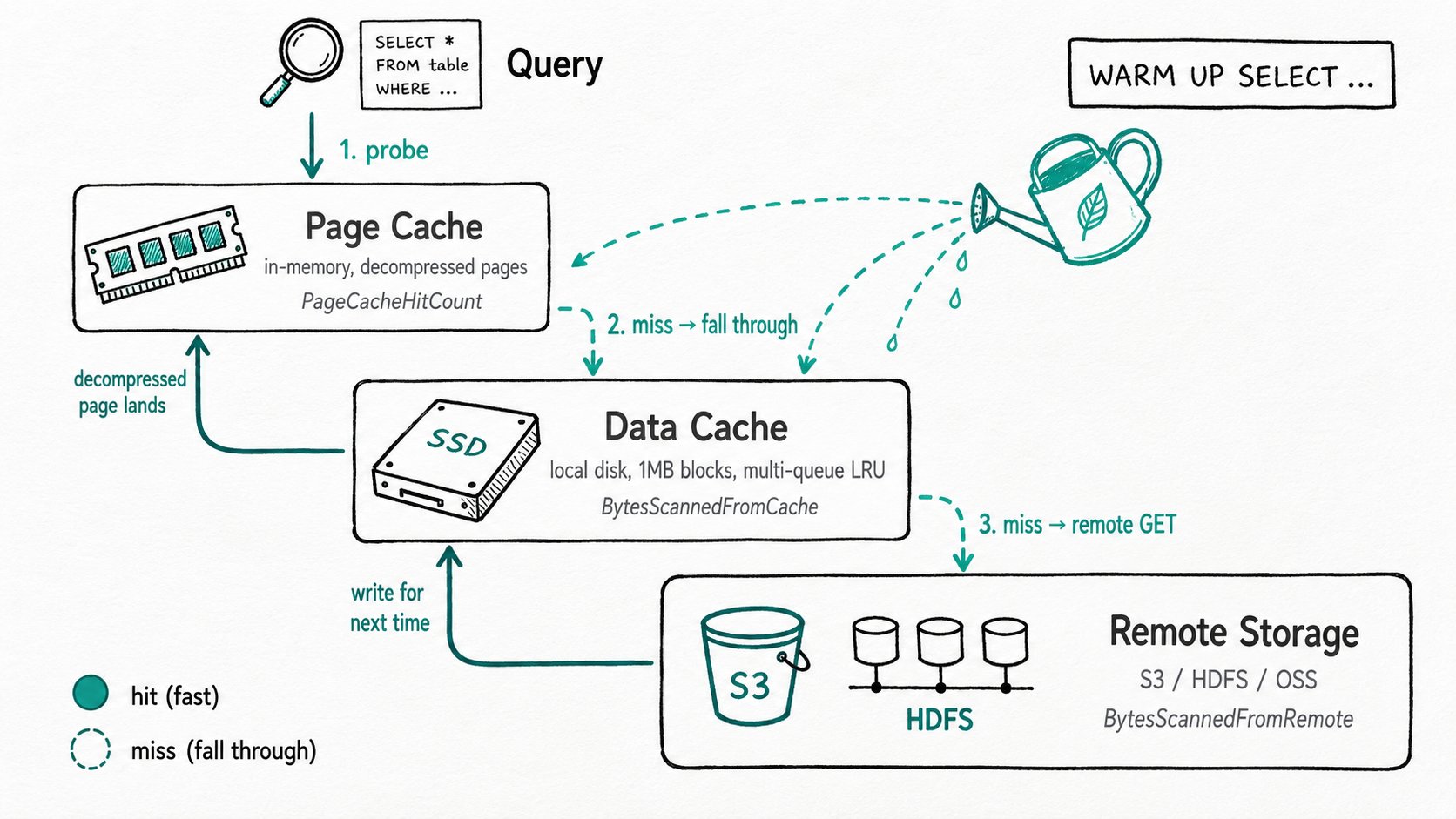
Why use the data cache and page cache in Apache Doris?
The Apache Doris Data Cache and Page Cache cut lakehouse query latency by removing repeated network fetches and repeated decompression on hot data. A query against a Hive or Iceberg table on S3 pays for every byte three times: once to fetch it (HTTP round trip per ranged GET), once to decompress it (snappy, zstd, gzip), and once to decode it (RLE, dictionary, plain). The fetch is usually the worst offender. S3 GET tail latency runs 30 ms to 500 ms; a Parquet scan that issues thousands of ranged reads can spend most of its wall clock waiting for HTTP, before any CPU work starts.
A few common patterns make this hurt:
- The same dashboard runs every five minutes, hitting the same 100 GB of recent partitions, and each run downloads them again.
- A BE was just added to the cluster (autoscale, replacement, deploy) and the first query that lands on it has to fetch every file fresh, while the rest of the cluster answers in milliseconds.
- A high-concurrency report fans out to dozens of BEs, all querying the same hot partitions, and the cluster is bottlenecked on egress from the object store rather than CPU.
The two caches sit at different layers. A Data Cache hit removes the network. A Page Cache hit removes the network and the decompression, but only after some earlier read populated it.
What are the Apache Doris Data Cache and Page Cache?
The Apache Doris Data Cache and Page Cache are two complementary storage caches: a per-BE local-disk cache for remote file bytes and an in-memory cache for column pages.
Data Cache is a per-BE local-disk cache for remote file bytes. When an Apache Doris BE reads a Parquet or ORC file from a Hive, Iceberg, Hudi, or Paimon table, the bytes are pulled in 1 MB blocks and written to a configured local directory. Subsequent reads of the same offset hit the disk instead of S3.
Page Cache is an in-memory cache for column pages. There are two flavors. The Storage Page Cache caches decompressed pages from internal Doris segments. The Parquet Page Cache (4.1+) does the same for external Parquet files, and is smart about whether to keep the page compressed or decompressed depending on its compression ratio.
Key terms
Block: the granule of the Data Cache. 1 MB by default; one block per(file, offset)pair on disk.Multi-queue LRU: the Data Cache's eviction strategy. Separate queues for normal data, TTL'd data, index data, and disposable one-shot reads, so a one-pass scan doesn't evict the dashboard's hot blocks.Page: the decoding unit inside a column chunk: typically 64 KB to 1 MB of values, RLE/dictionary/plain-encoded.WARM UP: SQL syntax that pre-populates either cache by running a synthetic scan in the background.Admission control: a policy that decides whether a given query is even allowed to write into the Data Cache, used to keep one-shot scans from polluting it.
How do the Apache Doris Data Cache and Page Cache work?
Apache Doris funnels every lakehouse scan through the Page Cache first, then the Data Cache, and only falls back to S3/HDFS on a miss. A scan flows through the caches in order, top to bottom.
- Page Cache lookup (memory). Before issuing any IO, the reader checks whether the column page it needs is already in the Page Cache, keyed by file path, file size, and offset. A hit returns ready-to-decode (or already-decoded) bytes; the reader skips both IO and decompression.
- Data Cache lookup (local disk). On a Page Cache miss, the file reader checks the Data Cache for the 1 MB block covering the requested byte range. A hit reads from local NVMe at GB/s; the reader still has to decompress and decode, but the network is bypassed.
- Remote read (S3/HDFS). On a Data Cache miss, the BE issues a ranged GET against object storage and writes the 1 MB block back to the local cache for next time. Admission control can refuse the write if the query is flagged as one-shot.
- Decode + Page Cache write. Decompressed pages go back into the Page Cache. The Parquet Page Cache compares each page's
decompressed_size / compressed_sizeagainstparquet_page_cache_decompress_threshold(default 1.5): below the threshold it stores the cheaper compressed form, above it stores the decompressed form. - Eviction. Both caches use sharded LRU. The Data Cache also runs a background eviction loop (
enable_evict_file_cache_in_advance) that frees space when the disk crosses a watermark, before a query has to wait.
WARM UP walks the same path on demand. It runs the scan, records hits and misses, and pre-fills both caches without returning rows.
Quick start
-- One-time setup on each BE: configure a cache directory.
-- be.conf (enable_file_cache is enabled by default since Doris 4.2):
--   enable_file_cache = true
--   file_cache_path = [{"path":"/data/file_cache","total_size":107374182400}]

-- Per-session toggles (defaults shown):
SET enable_file_cache = true;

-- Pre-populate the Data Cache for today's hot partition.
WARM UP SELECT l_orderkey, l_shipmode
FROM hive_catalog.tpch.lineitem
WHERE l_shipdate = '2026-05-01';

-- Now run the real query: it should hit cache on retries.
SELECT l_shipmode, count(*)
FROM hive_catalog.tpch.lineitem
WHERE l_shipdate = '2026-05-01'
GROUP BY l_shipmode;
Expected result (profile excerpt)
VFileScanNode
  BytesScannedFromCache:   2.02 GB
  BytesScannedFromRemote:  0 B
  PageCacheHitCount:       18432
  PageCacheMissCount:      0
The first run populated the Data Cache from S3. The second run answered the query without leaving the BE's local disk, and decompressed pages were served from RAM.
When should you use the Apache Doris Data Cache and Page Cache?
Use the Apache Doris Data Cache and Page Cache for repeat queries on hot lakehouse partitions, high-concurrency dashboards, and compute-group elasticity. Skip them when working sets exceed the cache, on one-shot ETL, or on mechanical disks where local IO is no faster than the remote source.
Good fit
- Repeat queries on hot partitions (rolling-window dashboards, daily reports).
- Lakehouse tables on S3 or HDFS where network or egress is the dominant cost.
- High-concurrency workloads where dozens of BEs hit the same files. The cache decouples query throughput from object-store throughput.
- Compute-group elasticity: warm a new compute group from an existing one before routing traffic to it.
- Workloads with skewed access (Pareto: 10% of partitions take 90% of queries).
Not a good fit
- Working sets larger than the cache. If every query touches new data, the cache thrashes and you pay full miss cost on every read while still spending CPU on eviction. Either grow the cache, narrow the predicate, or disable the cache for that workload.
- One-shot ETL and backfills. They evict the genuinely hot blocks for data nothing will read again. Use admission control to keep these scans out of the cache, or run them with
enable_file_cache = false. - Queries on internal Doris tables hoping for the Data Cache to help. The Data Cache only kicks in for Hive, Iceberg, Hudi, and Paimon files; internal tables already benefit from the Storage Page Cache and the OS page cache.
- Mechanical disks. The Data Cache assumes local IO is meaningfully faster than the remote source. On HDDs, the local round trip can be slower than a parallel S3 GET. Use SSD or NVMe.
- Sizing the Page Cache too aggressively. Beyond 30–40% of memory, you starve the query buffer pools and trigger spilling that costs more than the cache saves. The default
storage_page_cache_limit = 20%is sane for most workloads.
Further reading
- Data Cache reference: the full surface, including
WARM UP SELECT, per-query limits, and admission control. - File Cache (compute-storage decoupled): the same machinery applied to internal tablets in cloud mode.
- Parquet Page Cache and other lakehouse tuning: the in-memory decompressed page cache for external Parquet files.
- Parquet Reader Optimization: the reader that decides which bytes to ask for in the first place. Caches and pruning compose.
- Query Cache and Condition Cache: result-level and predicate-level caches that sit above the storage caches.
- WARM UP statement: the SQL surface for pre-populating caches across compute groups.
- Iceberg: a primary consumer of the page cache — Iceberg scans read remote Parquet over S3-style object storage.