MCP Server
TL;DR The Apache Doris MCP Server (
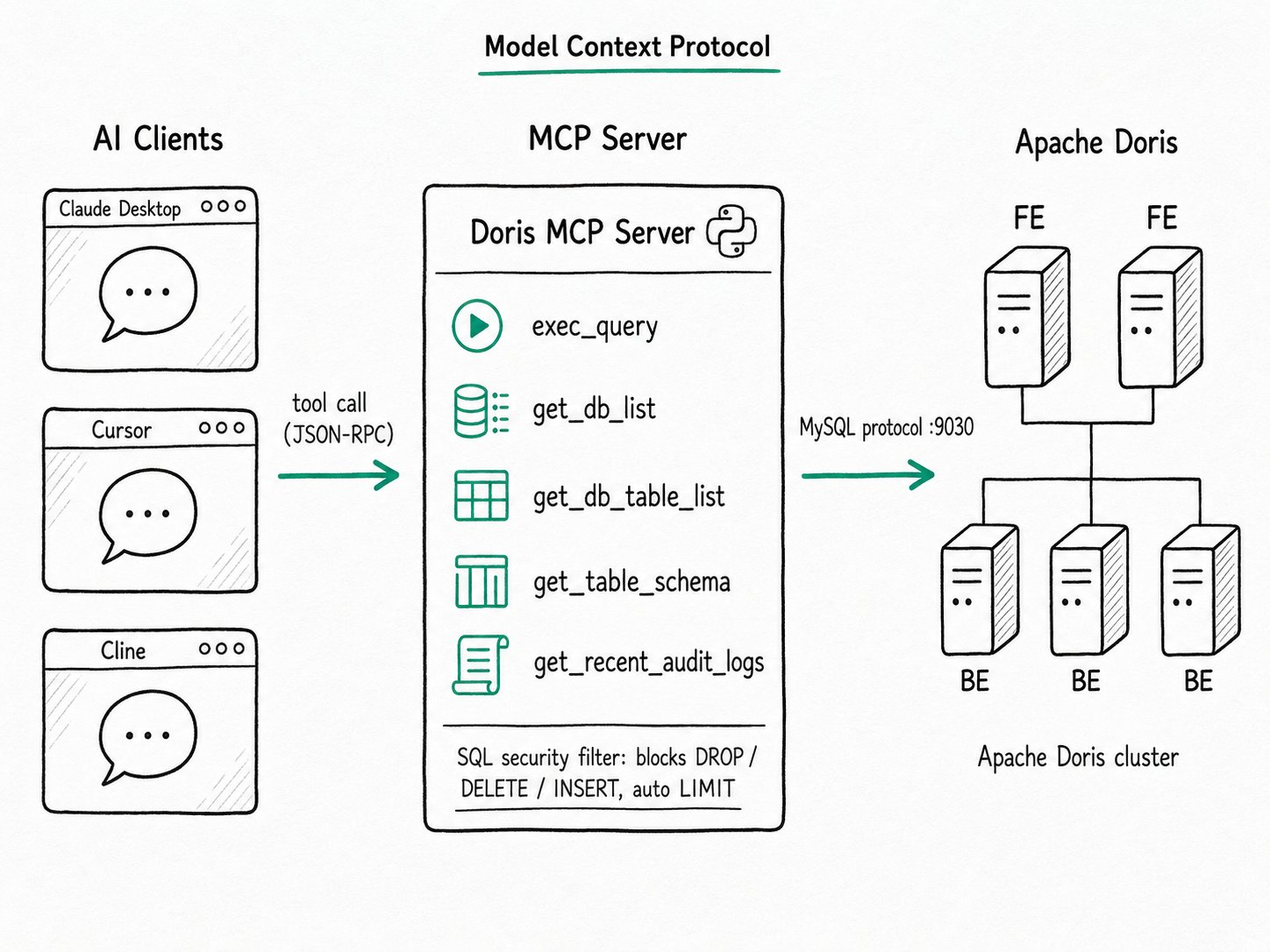
doris-mcp-server1.0) is a Python service that speaks the Model Context Protocol over stdio or Streamable HTTP. It exposes Apache Doris to AI assistants as eight read-only tool domains (catalog, query, cluster, pipeline, search, governance, lakehouse, and semantic) holding 55 capabilities that the assistant discovers when it needs them. Install it withpip, point Claude Desktop, Cursor, or any MCP client at it, and the model can explore schemas and run bounded, read-only SQL against a real cluster without a custom integration.
Why use the Apache Doris MCP Server?
The Apache Doris MCP Server replaces the same chat-assistant-to-database integration that every company would otherwise build from scratch. You would otherwise stand up a small Python service, wrap a few SQL helpers, handle credentials, timeouts, result truncation, and read-only enforcement, and then rewrite client-specific glue for Claude Desktop, Cursor, and whatever shows up next month. The work is mostly boilerplate, but the bug surface is large: an over-eager DELETE from an LLM is a real outage. The in-database AI surface, LLM SQL functions and embeddings, complements this card from the SQL side.
Anthropic released MCP in November 2024 to standardize that work. Servers expose tools with typed inputs and outputs; clients (Claude Desktop, Cursor, Cline, Continue, Zed, and others) speak the same protocol; the model decides when to call. Database vendors have followed: ClickHouse, Snowflake, MotherDuck, BigQuery, and Supabase all ship official servers.
The Apache Doris MCP Server is the equivalent for Apache Doris. It lives in a separate repository (apache/doris-mcp-server), ships on PyPI under Apache 2.0, and you launch it from any MCP client config in a few lines.
What is the Apache Doris MCP Server?
The Apache Doris MCP Server is a Python 3.12+ service that connects to Apache Doris 2.0 or later over the MySQL protocol. Version 1.0 replaces the earlier flat list of tools with eight stable domains: each domain is one MCP tool, and the operations inside it are discovered on demand, so the model starts from eight entries instead of 55. The server checks which operations the connected cluster can actually serve, runs only read-only work, and returns schema-validated JSON.
Key terms
- MCP (Model Context Protocol): an open JSON-RPC 2.0 protocol for connecting LLM clients to external tools and data. Tools are typed functions; resources are read-only data; prompts are reusable templates.
- Domain: one of the eight tools the server registers:
doris_catalog,doris_query,doris_cluster,doris_pipeline,doris_search,doris_governance,doris_lakehouse, anddoris_semantic. - Child capability: an operation inside a domain, such as
list_tablesindoris_catalog,execute_queryandexplain_queryindoris_query, orsearch_dataindoris_search. There are 55; the tool registry lists them all. - Progressive disclosure: the default
hierarchicalmode. The assistant calls a domain with an empty object to get its children, their input schemas, and whether each one is available on this cluster, then calls the same domain again withchild_toolandarguments. Clients that cannot make the two-step call can setMCP_TOOL_EXPOSURE_MODE=flat, which exposes all 55 children as tools. - Transport:
stdioruns the server as a subprocess of a local client. Streamable HTTP runs it as a long-lived service with an/mcpendpoint plus/liveand/readyhealth checks; an HTTP listener beyond loopback requires authentication (static tokens, JWT, or OAuth/OIDC). - Read-only runtime: the built-in capabilities never write. Statements that would modify data are refused, and every result is capped in rows, bytes, and time before it leaves the server. Doris privileges still decide what the connected account can see.
How does the Apache Doris MCP Server work?
The Apache Doris MCP Server runs through a five-step loop: the client connects to the server, the server connects to the cluster, the model discovers a domain, it calls a child capability, and bounded results return as JSON.
- The client connects to the server. In
stdiomode, the MCP client spawnsdoris-mcp-server --transport stdioas a subprocess and talks over stdin/stdout. In HTTP mode, you rundoris-mcp-server --transport http --host 127.0.0.1 --port 3000and the client sends requests tohttp://127.0.0.1:3000/mcp. - The server connects to Apache Doris. It reads
DORIS_HOST,DORIS_PORT,DORIS_USER,DORIS_PASSWORD, andDORIS_DATABASEfrom the environment (or the matching--doris-*flags), opens a MySQL-protocol connection to the FE on port 9030, and checks which capabilities the cluster's version and configuration support. - The model discovers what it needs. The client lists eight domain tools. For "what tables hold order data?", the model calls
doris_catalogwith{}and gets back its five children, includinglist_tablesandget_table_context, each with its status on this cluster. Capabilities that depend on optional integrations, such as MetricFlow indoris_semantic, reportmisconfigureduntil you set them up; they stay visible but fail closed when called. - The model calls a child capability. It calls
doris_catalogagain withchild_tool: "list_tables", thendoris_querywithchild_tool: "execute_query"and the SQL it wrote. The server validates the arguments against the child's schema and rejects anything that is not read-only: aDELETEcomes back asSQL operation DELETE is not read-only. - Bounded results return as JSON. By default a query returns at most 100 rows and 1 MB and runs for at most 30 seconds. A call can ask for more within the server's limits (
max_rowsup to 100,000,timeout_msup to 300,000), so a carelessSELECT *does not blow up the model's context window.
Quick start
Install the server (Python 3.12 or later), then create some data and a read-only account for it:
pip install doris-mcp-server==1.0.0
which doris-mcp-server        # note the absolute path
CREATE DATABASE demo;
CREATE TABLE demo.orders (
  order_id   INT NOT NULL,
  region     VARCHAR(16) NOT NULL,
  amount     DECIMAL(10, 2) NOT NULL,
  created_at DATETIME NOT NULL
) DUPLICATE KEY(order_id) DISTRIBUTED BY HASH(order_id) BUCKETS 1;

INSERT INTO demo.orders VALUES
  (1, 'emea', 120.00, '2026-10-01 09:00:00'),
  (2, 'apac',  80.50, '2026-10-01 10:30:00'),
  (3, 'emea',  42.25, '2026-10-02 14:10:00'),
  (4, 'amer', 310.00, '2026-10-03 08:45:00');

-- Never hand an LLM a write-capable account
CREATE USER 'mcp_reader'@'%' IDENTIFIED BY 'replace-me';
GRANT SELECT_PRIV ON internal.demo.* TO 'mcp_reader'@'%';
Register the server in your MCP client's configuration (the file and its location depend on the client). Use the absolute path from which doris-mcp-server: GUI clients do not inherit your shell's PATH or virtual environment.
{
  "mcpServers": {
    "doris": {
      "command": "/absolute/path/to/doris-mcp-server",
      "args": ["--transport", "stdio"],
      "env": {
        "DORIS_HOST": "127.0.0.1",
        "DORIS_PORT": "9030",
        "DORIS_USER": "mcp_reader",
        "DORIS_PASSWORD": "replace-me",
        "DORIS_DATABASE": "demo"
      }
    }
  }
}
Expected result
After a restart, the client lists one doris server with eight tools: doris_catalog, doris_cluster, doris_governance, doris_lakehouse, doris_pipeline, doris_query, doris_search, and doris_semantic. Ask "what is the revenue per region in demo.orders?" and the assistant calls doris_query with {} to discover execute_query, then calls it:
{
  "child_tool": "execute_query",
  "arguments": {
    "database": "demo",
    "sql": "SELECT region, SUM(amount) AS revenue FROM orders GROUP BY region ORDER BY revenue DESC"
  }
}
The rows come back together with the limits that applied:
"rows": [
  {"region": "amer", "revenue": "310.00"},
  {"region": "emea", "revenue": "162.25"},
  {"region": "apac", "revenue": "80.50"}
],
"limits": {"max_bytes": 1048576, "max_rows": 100, "timeout_seconds": 30}
Ask it to "delete the apac orders" and the same call returns the error SQL operation DELETE is not read-only.; mcp_reader has no write privilege either.
When should you use the Apache Doris MCP Server?
The Apache Doris MCP Server fits read-mostly AI assistant scenarios, especially schema discovery, ad-hoc analysis, search, and on-call investigation against a real cluster.
Good fit
- AI-assisted SQL authoring inside Cursor or Claude Code, where the assistant reads the real schema (
doris_catalog→get_table_context) and drafts a query instead of guessing column names. - Ad-hoc "ask your data" sessions in Claude Desktop, especially for engineers who would otherwise paste schemas into the chat by hand.
- On-call assistants:
doris_querylists slow queries, explains plans, and reads profiles, anddoris_clusterreports nodes, compaction, and workload groups, so the assistant can narrow down why a dashboard broke. - Search-aware assistants:
doris_searchruns text, vector, and hybrid search throughsearch_dataand inspects analyzers and indexes, so the model does not have to hand-writeMATCH_*or ANN SQL.
Not a good fit
- Production write paths. The 1.0 server is read-only by design, and an LLM in the loop is not the right place for
INSERTorUPDATE. Use a real application for writes. - Untrusted data. An attacker who can put text into a row your assistant later reads can attempt prompt injection. The community has documented real incidents on Postgres MCP servers; treat anything the model fetches as data, not instructions, and review tool calls before running them. See MCP security best practices.
- Browsing multi-million-row tables. Tool results land in the model's context window, and the per-token bill scales accordingly. Keep the default row cap, ask the model to write aggregations, and reach for a notebook for anything beyond a sample.
- Multi-tenant clusters with no row-level scoping. The server connects with the Doris account you configure; whatever that account can see, the model can see. Create a dedicated read-only user, restrict its database grants, and never reuse a power-user account.
- Workflows beyond reading. The 55 capabilities cover schema, query, operations, and search paths, but custom workflows, batch jobs, or NL2SQL with your own prompts belong in an integration that calls Apache Doris directly, or in a custom tool provider.
Further reading
- AI on Doris: how the MCP server fits alongside
AI_*SQL functions, embeddings, and vector search. - LLM SQL Functions: the in-database side of the AI story, for batch enrichment of text columns.
- Doris MCP Server repository: source, documentation, and the 1.0 release notes.
- Tool registry: the eight domains and 55 child capabilities with their schemas.
- Migrating to 1.0: how the pre-1.0 tools and settings map to the 1.0 domains.
- Configuration reference and security model: every setting, including authentication for HTTP deployments.
- Model Context Protocol specification: the protocol version the server speaks, including transport details and security guidance.
- Anthropic's MCP announcement: the original problem statement and the design choices behind tools, resources, and prompts.