Workload Group
TL;DR Apache Doris Workload Group slices a single cluster into named groups, each with its own CPU share, memory ceiling, query concurrency cap, and IO budget. Heavy ETL goes in one group, dashboards in another, ad-hoc analysts in a third. A runaway query in one group no longer takes the others down with it. Linux cgroups handle CPU isolation; the BE process handles memory, IO, and concurrency.
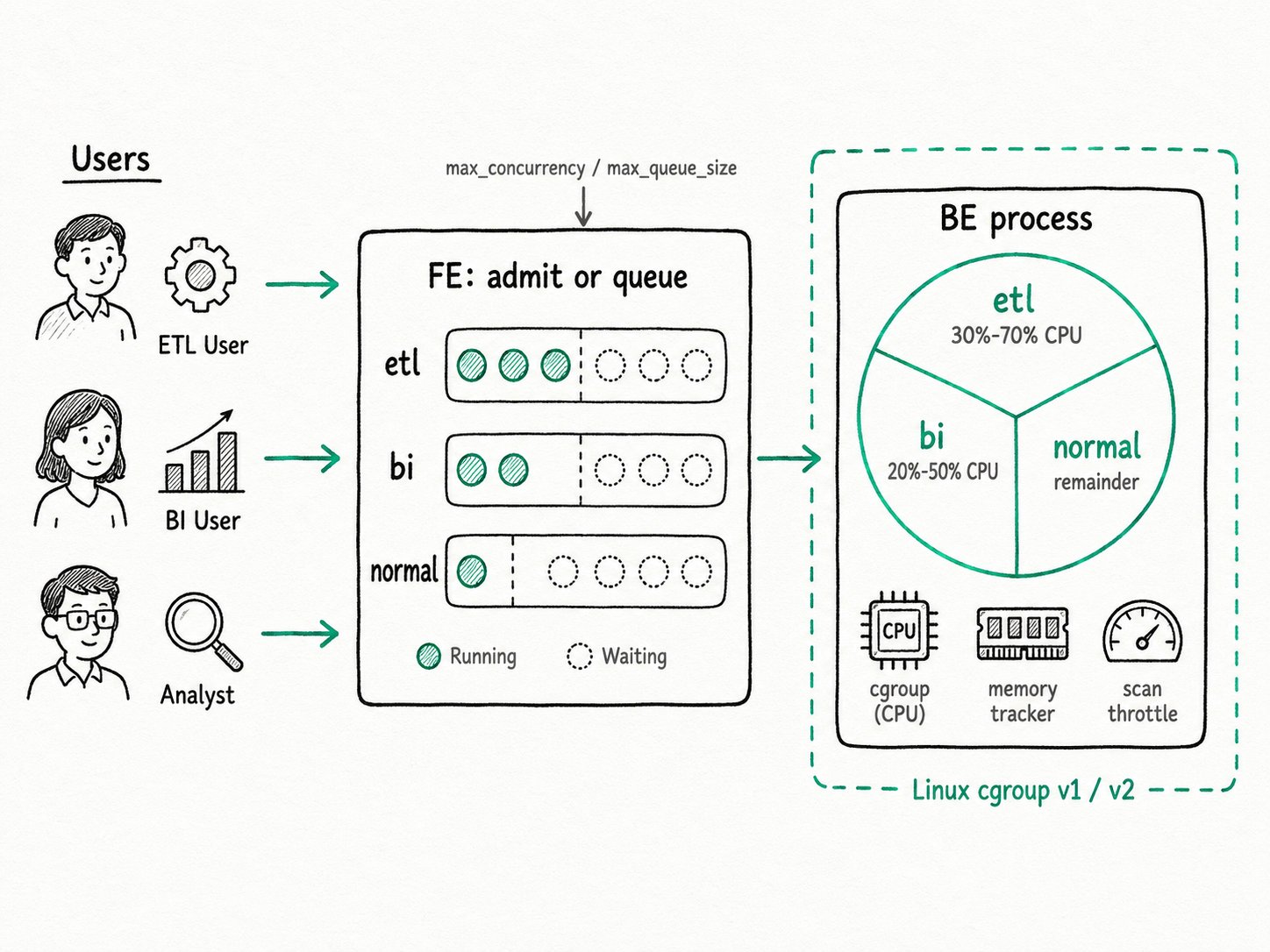
Why use workload group in Apache Doris?
Apache Doris workload group prevents mixed workloads from starving each other on a shared cluster. A production Doris cluster almost never runs one workload. A typical day looks like this: a 2 a.m. ETL pipeline rewrites yesterday's partitions, a finance team reruns their daily report at 9 a.m., an executive dashboard polls the same GROUP BY region every fifteen seconds during business hours, and an analyst kicks off a SELECT * because they forgot the WHERE clause.
Without resource controls, those four workloads share one global pool. The ETL job runs on the same threads that serve the dashboard. A bad ad-hoc query fills the BE's memory and triggers a kill on the report. Concurrency is unbounded, so a sudden spike of dashboard refreshes piles up against the ETL load and degrades everyone.
Workload Group fixes this without adding hardware. You define one group per workload class, set the limits each group is allowed, and bind users to the right group. The cluster keeps running on the same set of BEs, but the BE schedulers, memory tracker, and cgroup controllers now divide capacity along the lines you drew.
What is the Apache Doris workload group?
Apache Doris workload group is an in-process isolation feature: every BE process serves every group, but the BE knows which threads, scan slots, and memory belong to which group. CPU isolation routes BE worker threads into per-group cgroups. Memory isolation tracks per-group usage in the BE memory tracker and triggers spilling or query cancellation when a group exceeds its ceiling. Concurrency control sits at the FE: each group has a queue, and queries past the limit wait or fail fast.
Key terms
min_cpu_percent/max_cpu_percent: the CPU bandwidth a group is reserved (soft floor) and the cap it can never exceed (hard ceiling). The sum ofmin_cpu_percentacross groups must stay under 100%.min_memory_percent/max_memory_percent: the share of BE memory the group is guaranteed and the share it can grow to before queries spill or get killed.max_concurrency/max_queue_size/queue_timeout: the running-query cap, the depth of the wait queue, and how long a queued query is willing to wait. All three are per-FE, not cluster-wide.read_bytes_per_second/remote_read_bytes_per_second: per-group IO throttles, applied per data directory on local tables and per BE for external sources.normalgroup: the default group, auto-created on first start, used for any session that has not been bound elsewhere. You cannot drop it.
How does the Apache Doris workload group work?
The Apache Doris workload group resolves the target group at the FE, admits or queues the query, then enforces CPU, memory, and IO limits at the BE.
- Resolve the group (FE). The FE picks a group in this order: an explicit
/*+ SET_VAR(workload_group='...') */hint, the session variableworkload_group, the user propertydefault_workload_group, thennormal. The FE checks USAGE privilege on the chosen group. - Admit or queue (FE). The group's queue checks how many queries are already running in this group on this FE. If under
max_concurrency, the query gets a slot and proceeds. If over, it waits, capped bymax_queue_sizeand timed out byqueue_timeout. A full queue rejects fast. - Pin threads to a cgroup (BE). Each BE keeps one cgroup per group under
/sys/fs/cgroup/doris/<wg_id>(cgroup v2) or/sys/fs/cgroup/cpu/doris/<wg_id>(v1). When a fragment for the group runs, its workers join that cgroup. The kernel's CFS scheduler enforcesmin_cpu_percent(viacpu.weight) andmax_cpu_percent(viacpu.max). - Track memory per group (BE). Every allocation is tagged with the group ID. When the group's tracker crosses
memory_low_watermark, spillable operators start spilling to disk. When it crossesmemory_high_watermark, the BE pauses queries in the group and may cancel the largest one to bring usage back below the line. - Throttle scans (BE). Local and remote scan thread pools have per-group ceilings (
scan_thread_num,max_remote_scan_thread_num), andread_bytes_per_secondcaps how much disk IO each group's scans can consume. This is the knob that keeps an unindexed full-table scan from saturating the SSDs.
Quick start
-- One group for ETL, one for BI dashboards
CREATE WORKLOAD GROUP etl PROPERTIES (
  'min_cpu_percent'='30','max_cpu_percent'='70',
  'min_memory_percent'='30','max_memory_percent'='70',
  'max_concurrency'='10');

CREATE WORKLOAD GROUP bi PROPERTIES (
  'min_cpu_percent'='20','max_cpu_percent'='50',
  'min_memory_percent'='20','max_memory_percent'='50',
  'max_concurrency'='50','max_queue_size'='100','queue_timeout'='3000');

-- Bind users persistently
SET PROPERTY FOR 'etl_user' 'default_workload_group'='etl';
SET PROPERTY FOR 'bi_user'  'default_workload_group'='bi';

-- One-off override for a single query
SELECT /*+ SET_VAR(workload_group='bi') */ region, SUM(revenue)
FROM orders WHERE dt = CURRENT_DATE() GROUP BY region;
Expected result
+------+-------------------+-------------------+-----------------+
| name | running_query_num | waiting_query_num | max_concurrency |
+------+-------------------+-------------------+-----------------+
| etl  | 4                 | 0                 | 10              |
| bi   | 47                | 12                | 50              |
+------+-------------------+-------------------+-----------------+
SHOW WORKLOAD GROUPS (or SELECT ... FROM information_schema.workload_groups) reports live counts. The 12 queries waiting in bi are queued behind the 47 already running. The four ETL queries get a guaranteed 30% of CPU even when BI is busy, and they cannot push past 70%.
When should you use the Apache Doris workload group?
Use the Apache Doris workload group when a single cluster runs more than one workload class and you need predictable behavior under load without buying more hardware.
Good fit
- Mixed-workload clusters: ETL, scheduled reports, dashboards, and ad-hoc analysts on shared BEs.
- Multi-tenant deployments where cost matters more than perfect isolation: one cluster, several teams, predictable behavior under load.
- Throttling a known troublemaker. A team's
SELECT *habit, a Kafka backfill that occasionally turns into a flood, anything with a tail you want to clip. - Pair it with Compute Group in storage-compute decoupled mode. The compute group gives you a separate set of BEs; the workload group divides resources within it.
Not a good fit
- You need physical isolation: separate SLAs, separate security domains, or billable tenants. A BE crash or kernel OOM still hits every group in the same process. Use Resource Group or a dedicated Compute Group instead.
- You expect cluster-wide concurrency to be a single number. With three FEs,
max_concurrency=10allows up to 30 concurrent queries cluster-wide. Either size the per-FE cap accordingly, or front the cluster with a load balancer that pins users to one FE. - You run BEs in non-privileged Docker or Kubernetes containers. The BE process needs read and write access to the host's cgroup tree to enforce CPU limits. Without privileged mode (or the Doris Operator), CPU caps silently fail. Memory and concurrency still work, but you have lost the most useful knob.
- You set memory overcommit on and let the sum of
max_memory_percentreach 100%. There is no headroom left for the soft-limit overflow path, and the BE will cancel the largest in-group queries when it hits the global ceiling. Leave 10 to 20% room. - Your workloads are bursty and short-lived enough that a Snowflake-style auto-scaled warehouse would be cheaper than a fixed allocation. Workload Group divides a fixed pool; it does not provision new compute.
Further reading
- Workload Group reference: full property table, cgroup setup steps, and migration notes for the 4.0 property rename.
- Workload management overview: how Workload Group, Resource Group, and Compute Group fit together, and when to pick which.
- Concurrency control and queueing: how the per-FE queue behaves, the
bypass_workload_groupadmin override, and queueing pitfalls under multiple FEs. - Spill to disk: what happens when a group hits its
memory_low_watermarkand how slot-based memory policies work. information_schema.workload_groups: the system table for live group state, used by the example above.- Resource Group: physical BE-node isolation for stronger SLA boundaries.
- Compute Group: the compute-storage-decoupled equivalent that adds isolation without copying data.
- Multi-tenant workload isolation in Apache Doris: the original design blog with internal benchmarks for soft- and hard-limit CPU on a 16-core BE.
- MPP Architecture: the execution model whose fragment instances Workload Group caps per query.